
Alexandria Ocasio-Cortez dance melts down social media

The shaming attempt backfired with the power of 1,000 suns.

Alexandria Ocasio-Cortez

We were all young once. Yes, even Mitch McConnell and Steny Hoyer. In our youth, we were carefree and fun, probably because we had no idea of the fresh hell our political landscape would become in the future.

Yesterday, new senators and representatives were sworn in. Among them was New York Democrat Alexandria Ocasio-Cortez. She’s become a favorite target of the right-wing media for her outspoken beliefs. As “AOC” was being sworn in, a Twitter user shared an old video of her dancing with the following caption:

If you watched the video, you’d see it’s clearly an homage to a dance from “The Breakfast Club.” For reference, we take you back to the 1980s.

That tweet backfired.

Hard.

First of all, AOC is a really good dancer. She’s having fun. Also, who cares?

As is now customary, Twitter wasted no time obliterating the offending account.

There’s even a Twitter account dedicated to remixing the dance. Here are some of our favorites:

@AnonymousQ1776 got dunked on so hard, so repeatedly, the account is now deleted.

Today, AOC had the last laugh (and last dance).

So get out there and dance, America. Twitter has your back.

Twitter gets an update as rumors of new Tweet edit button grow

Twitter for iOS update includes a new “sections” tab for search

Twitter users on iOS devices will start to see the roll-out of an update to the Twitter search function. For a very long time the search function remained untouched with results coming in the form of a scrollable list. Now, following a tweet from Twitter last night, this is all due to change.

Twitter for iOS update includes a new “sections” tab for search

The new sections tab allows iOS users to scroll horizontally through different sections to view the top tweets and news relating to them. The new sections include For you, Sports, Fun, Entertainment, and more.

Finding the new sections tabs couldn’t be easier. All you have to do is hit the search icon at the bottom of the page and you’ll then see them at the top of the screen beneath the search bar. Clicking each tab will then open a scrollable list of top stories and Tweets relating to each section. The For you section, however, still resembles the old Twitter search page by showing trending searches and hashtags relating to your usual Twitter behavior.

In other Twitter news, CEO Jack Dorsey has been talking about the possibility of adding a much sought-after edit button. People have been calling for an edit button to be added to Twitter since forever. If you don’t believe us, check out the comments on that tweet above, which is about something completely unrelated.

The issue for users is that if they tweet something that contains a small error, grammatical or otherwise, they have to delete their tweet and then repost it. The flipside of this is that Twitter is used for breaking news and an edit button, theoretically, could provide a way of altering what has happened in the past by changing the tweets that broke the stories. This might sound like an overblown problem, but in today’s world, people distorting the truth is not something that should be taken lightly.

While speaking at an event in India, Dorsey addressed the needs of the Twitter community. He said, “A lot of people want the edit button because they want to quickly fix a mistake they made. Like a misspelling or tweeting the wrong URL. That’s a lot more achievable than allowing people to edit any tweet all the way back in time.”

Does this mean we could soon be seeing a short window of opportunity for editing our tweets? If Twitter were to implement a 10-minute window for editing Tweets that contain errors, similar to the new “Delete sent messages” feature coming to Facebook Messenger, it would give people the chance to correct any spelling mistakes without allowing the opportunity to change history.

The new sections feature for Twitter search is rolling out to users in the U.S. right now. If it still hasn’t landed on your phone, don’t worry as these things take time. If you want to keep up to date on whether an edit button is, in fact, coming to Twitter, sign up for our regular newsletter by passing us your email address in the box at the bottom of the page.

How to delete old tweets before they wreck your career

Don’t let your past destroy your future. Here’s how to clean up your old tweets.

twitter

Be careful what you post on the internet!

Recently, Disney fired the director of “Guardians of the Galaxy,” James Gunn, when inappropriate posts from his Twitter account resurfaced after almost a decade. Mayhem ensued: while detractors pointed out the dark nature of the tweets, supporters argued that he has become a completely different person, the main accuser was targeting Gunn for recent statements against Trump, and the posts came from a time when Gunn was younger and leaned toward juvenile, provocative humor. Meanwhile, many poor fans just wanted to see “Guardians of the Galaxy 3” directed well.

This example goes to show: people often change for the better, but their Twitter history doesn’t.

There’s nothing wrong with changing your story on social media to reflect the smarter, wiser person you’ve become today. We’re here to help you accomplish that task with a few easy practices.

Twitter for Windows 10 DOWNLOAD NOW
8

How to delete old tweets before they wreck your career

Smart posting

The best offense is a good defense.

If you’re new to social media sites like Twitter, start off right by watching the words, pictures, and videos you post online. If that sounds cliche… remember that dentists constantly tell their patients to floss. Why? Because It’s a good reminder, which many people forget to do anyway.

Also, even if you mean to delete a post later, there’s such a thing as Web Indexing. Companies will take moment-in-time snapshots of a website… which last forever. It would take a dedicated person to find your post, yes, but why have that embarrassing comment in the cloud at all?

Finding posts

Open your Twitter profile. There are three easy ways to look for dangerous posts:

1. The thorough search. Scroll down through every post you’ve ever created, reach each one, and make sure they line up with your current beliefs.

2. The username search. To save time, type your username into the top bar with a keyword to the right and you will find a list of your posts using that word.

3. The Find Function. Scroll back through all your tweets and use the “Find” function by clicking “Command-F” (this works for any internet page and most desktop apps). This will pull up a small bar in the right side which you can use to search through your content:

Search

4. Twitter Advanced Search. Go to the Twitter Advanced Search page and you’ll have a lot more search options. This is also a great way to dig up embarrassing, weird old tweets from other people. For example:

Deleting posts

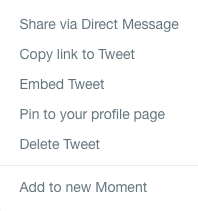
After you find the offensive, embarrassing, or distasteful tweets, simply click the downward caret at the top right of the post and select the “Delete Tweet” option.

Delete

From there, Twitter will ask if you’re sure about the decision. Hit “Confirm” and the tweet’s as good as gone!

Finish Him

Deactivating an account: The Final Stand

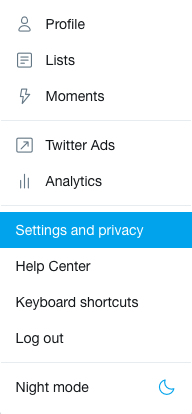
If things get really bad and you need to step away from Twitter, it’s possible to deactivate your account altogether. Click your profile picture and go to settings:

S and P

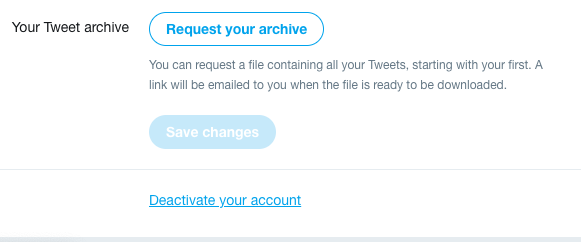
There, you’ll be taken to the “Account” section. Go to the bottom, find the “Deactivate your account” button, and follow the steps. Farewell, account!

Before You Go

We hope you never have to delete your account. And luckily, the odds are against that happening for most people.

But to ward against the possibility, watch your posts from the start: anything you put online should be either benign, or tied to a core belief you would defend in front of family, friends, and the rest of the world.

Thanks for reading, please enjoy social media responsibly!