WhatsApp puts an end to free backups: this is how it affects you

Google has decided to put an end to the free storage bar: now, the backup copies we make of our chats will occupy part of the 15 GB free that Google offers by default.

For some time now, WhatsApp has continued to add new features, such as enhanced group chats. However, not everything was going to be good news. Unexpectedly, Google has decided to put an end to the free storage party: now, the backups we make of our chats will take up part of the 15 GB of free storage that Google offers by default.

WhatsApp DOWNLOAD

It was in 2018 when Google decided that WhatsApp backups on Android would not occupy space within Google Drive. Despite that decision, the messaging platform has completely changed its plans. Its new policies regarding backups will take effect gradually starting next month.

As a warning, WhatsApp will display a message within the Settings indicating the number of days remaining before the changes take place. In fact, you may already see this notice if you have the beta version 2.23.24.21 installed, as explained by WABetainfo.

Fortunately, Google Workshop account holders are exempt from this change; for them, cloud storage remains unlimited. Google itself will provide a set of tools for you to optimize space, such as mass deletion of both old photos and files. And if you want to preserve your data, you always have the option to subscribe to a Google One plan. As of now, the basic plan offers 100 GB for 1.99 euros per month.

iPhone users, on the other hand, will not be affected by this measure. Backups on iOS are stored within Apple’s cloud, iCloud. However, the amount of free space they provide is only 5 GB.

WhatsApp DOWNLOAD

WhatsApp is going after Discord: this is how the new group voice chats will be in the app

WhatsApp isn’t just capable of drawing inspiration from apps like Telegram to implement improvements; their latest addition is clearly inspired by services like Discord or Clubhouse. Very soon, this WhatsApp feature will allow you to engage in large group audio chats without the need for making calls.

Technically, it would be a function similar to calls but with a much more user-friendly and less intrusive interface than actual calls. Thus, when there’s an active voice chat in a group, any member can effortlessly join through the simple access menu.

WhatsApp Messenger DOWNLOAD

Group voice chats, but not for everyone

Unfortunately, although this feature could be of interest to millions of people in sizable groups, the minimum requirement for activating this functionality is higher than the standard. WhatsApp will activate this group voice chat function for groups with a minimum of 33 members. Therefore, if your WhatsApp group has fewer people, you might not be able to experience this new feature for the time being.

Among other details, an interesting aspect of these group chats is that they offer a less invasive method of communication than calls. Users won’t trigger a ringing tone; instead, they’ll simply see a “voice icon” in the upper right corner of the screen, allowing them to easily access any active call or start one themselves.

WhatsApp will allow opening voice chats in larger groups

Other updates from WhatsApp

Not by any means the only recent update that has arrived on WhatsApp. In fact, many other interesting features have recently been introduced, such as the ability to search messages in your chats by date rather than by words. Additionally, among other things, WhatsApp channels can now also have polls for conducting votes.

WhatsApp tirelessly works to remain one of the leading applications in the Western instant messaging sector. While it might not be able to rival the popularity of WeChat or Line in the Eastern markets, in European and American markets, WhatsApp continues to be a preferred messaging option, even surpassing strong competitors like Telegram.

WhatsApp Messenger DOWNLOAD

WhatsApp is preparing message searches by date

WhatsApp continues to work diligently to offer all kinds of improvements designed for the benefit of users. One of the additions that is currently being tested in the WhatsApp beta version is the ability to search for messages within your chats based on the date. This has long been requested by the community, as it represents a significant quality of life improvement.

There are many changes that WhatsApp proposes and even implements, but search tools have been stagnant for a long time. Therefore, if this feature ends up reaching the final version, hundreds of millions of users will be able to benefit from it.

WhatsApp Messenger DOWNLOAD

Searching in a more efficient way

This new option to search for messages within the application is part of the WhatsApp beta for Android 2.23.24.16. In it, when you go to perform a search, a calendar icon will appear in the text bar, where you can click to set an exact date for your messages.

When you press the calendar button, a calendar will appear that allows you to directly choose the year, month, and day you want to track your messages. This way, you will reach the content you are looking for much faster if you remember when you sent or received the specific message.

The advances of WhatsApp as an application

WhatsApp has made a significant number of profound changes over the past few years, including changes to its interface, the introduction of new features, or importing elements from Telegram to make them available in its system as well. Gradually, thanks to these changes, it has maintained its position as the leading instant messaging application in the Western market.

Searching messages on WhatsApp will be easier than it has ever been

At the moment, it is unknown when this testing feature might be rolled out, and even if it could be ultimately discarded or not, as it will all depend on the feedback provided by the testers to Meta. However, one thing is entirely certain, WhatsApp will continue to receive improvements and innovations in abundance in the coming weeks and months

WhatsApp Messenger DOWNLOAD

How To Know If Someone Blocked You On WhatsApp

Do you suspect someone has blocked you on WhatsApp? With these easy tips you’ll soon find out if you’ve been deleted from their online life.

You’re talking to someone on WhatsApp, tempers flare, and suddenly they disappear and you never hear from them again. It can be your bestie, fling, former co-worker, an ex… they simply stop replying to your messages leaving you somewhat in the dark. This is when you ask yourself, “Did they block me on WhatsApp?”. We’ve all been there and know it’s not a nice feeling. Fortunately, there are a few ways to figure out if you’ve been blocked by a certain user.

Do you suspect you’ve been blocked on WhatsApp? There are some red flags that will help you find out the truth. Here are some easy ways to prove if your intuition is right.

WhatsApp DOWNLOAD

You can’t see their last seen stamps or online status in the chat window

WhatsApp includes a “last seen” function that shows if a user is active and when was he last seen online. You can easily find this ticker by opening a chat with your contact and checking under his name. Normally you’ll find there a last seen stamp with a date and time. If you can’t see any information, you might have been blocked. 

Keep in mind this isn’t a foolproof system since it is possible to disable this feature from the app’s settings. However, it’s a good start if you suspect someone has blocked you on WhatsApp.

Their profile pictures never change

If you can’t see the status of the person that you think that has blocked you, their profile photo hasn’t changed in a long while or it simply has vanished into thin air, there’s a chance they’ve blocked you.

When a person limits or blocks a contact on WhatsApp, their profile picture and status disappear from the app. Instead of it, you’ll see a blank silouette similar to the one that appears when you open an account and there’s still no profile picture uploaded.

It’s important to point out that, once again, this isn’t a foolproof method to know if you’ve blocked. It is possible that your contact isn’t very prone to update their picture often or that they decided not to share with the rest of their contacts.

Your messages can’t be delivered

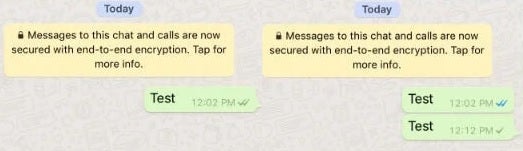
If you’re sending messages and there are no blue check marks or double check marks, you can start to worry: they may have blocked you.

There are three types of check marks:

  • ✓ Check mark- This is just a single check mark and means that the message has been delivered to the source server. For example, this is what you’ll see if it is at WhatsApp’s base of operations where everything is managed.
  • ✓✓ Double check mark- Two check marks mean that the message reached its recipient. In other words, the same way it arrived at the WhatsApp servers, it was sent on out to that other person. This all probably sounds pretty familiar to regular users of the app.
  • ✓✓Blue check marks- The check marks turn blue, which means the recipient has read your message. Although you won’t always see it. If the message recipient has turned read receipt off, you’ll never know if it’s blue or not. The most you’ll see is the double check we talked about before.

You might be surprised to know there’s quite a few reasons you might see only one check mark next to a message. The person may have turned off their phone so the second icon won’t appear, their device might be broken so it’s disabled, the SIM card may not work for that person (or you), etc. These explanations have an expiry date though. If you write to that person and it’s stuck at a single check mark for a long time, it is very likely you’ve been blocked.

Voice calls won’t go through

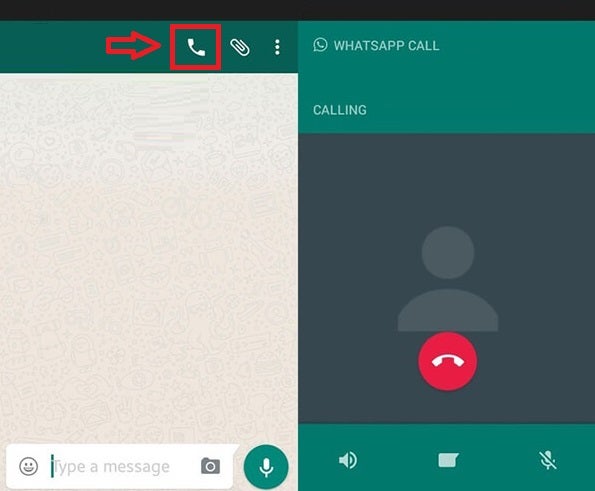
One of the easiest way to know if a contact has blocked you on WhatsApp is making a phonecall through the app. You can do this simply by pressing the phone icon you’ll find at the top right corner of your chat window. If the call goes through, even if they’re not answering, you can breathe a sigh of relief: You haven’t been blocked. It you get an error message though, sound the alarms since the odds are against you.

“Well, maybe not, maybe they don’t have reception.” That’s possible, it’s true. If the person does not have reception or Internet connection, you will also get an error when you call, just like if their device is blocked, broken, lost, etc. However, and as we said before, the chances of this happening for a long stretch of time are very low.

You can’t add them to a group

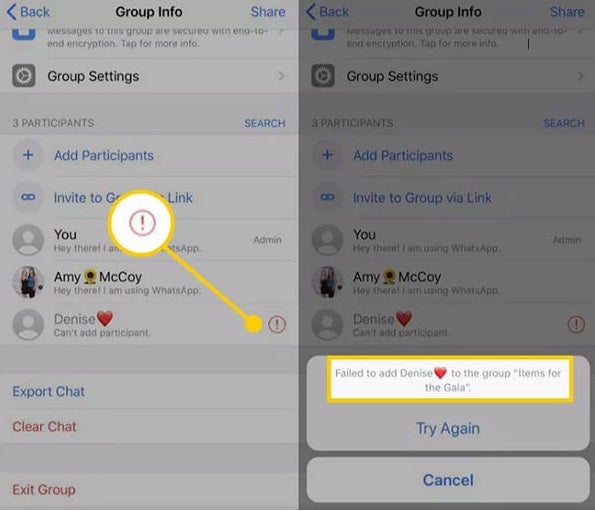
This one is one of the few foolproof methods to find out if you’ve been blocked on WhatsApp. In fact, it’s so dependable we’re surprised we didn’t find it on the app’s official website as a way to find out if someone has blocked you. And the best part is that it’s as simple as creating a group and adding that person to it.

The best way to test this out is to quickly create a dummy group and then try to add your contact. If they’ve blocked you, the system itself will tell you that you can’t that participant because you don’t have the proper permissions and that an error has occurred. You’ll also notice a red question mark next to your suspected contact’s name. If you experience any of this, we’re sorry to let you know you’ve been blocked in WhatsApp.

Ask them directly

We all like playing Sherlock Holmes from time to time but there’s an easier method to know if you’ve been blocked on WhatsApp. Simply ask the person straight away. If you’re not dealing with an online friend or someone that lives abroad, just meet this person and casually ask them about your WhatsApp conundrum. If you’ve been blocked and the person confirms it, talking it out might fix the problem. So, why not giving it a go?

As you can see, finding out if you’ve been blocked on WhatsApp can be tricky, but it’s not impossible. With these list of tips you’ll easily know who has kicked you out of their mobile life. And remember, when in doubt, just ask your friend directly!

Voice notes that self-destruct are coming to WhatsApp

WhatsApp continues to work on privacy features for the benefit of its users. Voice notes with the option to be listened to only once are currently being tested in beta versions of the messaging app, and it seems that they will soon be introduced to accompany photos and videos with self-destructing capabilities.

The application, which is part of the Meta conglomerate, is finalizing a new improvement that will allow users to send voice notes that can only be listened to once. When this feature moves from the beta phase to the final version, it will represent another advancement that many users can enjoy when using voice notes.

WhatsApp Messenger DOWNLOAD

A single tap to self-destruct

As indicated by Wabetainfo, this feature of self-destructing voice notes is already being tested in WhatsApp beta versions, and its operation is as simple as it is intuitive. To activate this function, you just have to tap on the “1” above the “send message” button. If not activated, it will be a regular audio, but if you enable it, that audio can only be listened to once.

In this way, voice notes gain an extra layer of privacy that users can freely use once it becomes available to the public. There is no confirmation on when this feature will roll out, but there is no doubt that it is a very useful option and would be well-received by users due to its service.

WhatsApp’s constant advancements in security

This isn’t the only advancement WhatsApp has made recently in terms of privacy. Just recently, the option to lock chats has been enabled, ensuring that other people don’t have unrestricted access to your chat content if they use your phone. Additionally, the self-destruction of photos and videos after being opened once has been a feature in the application for several years.

As mentioned earlier, there’s no confirmed end date for the testing of this function, which means there’s still a chance it could be discarded for any reason. However, given that it aligns with the functionalities of other multimedia files, it could undoubtedly be rolled out at any time.

WhatsApp Messenger DOWNLOAD

Here’s how you can enable chat blocking on WhatsApp

Thanks to the Blocking function, we can protect the chats we select within WhatsApp from prying eyes.

Over the years, maintaining the privacy of conversations on WhatsApp has become a priority for many users. The messaging application has improved over time, introducing features like Screen Lock. However, now we have a new alternative, Lock.

WhatsApp DOWNLOAD

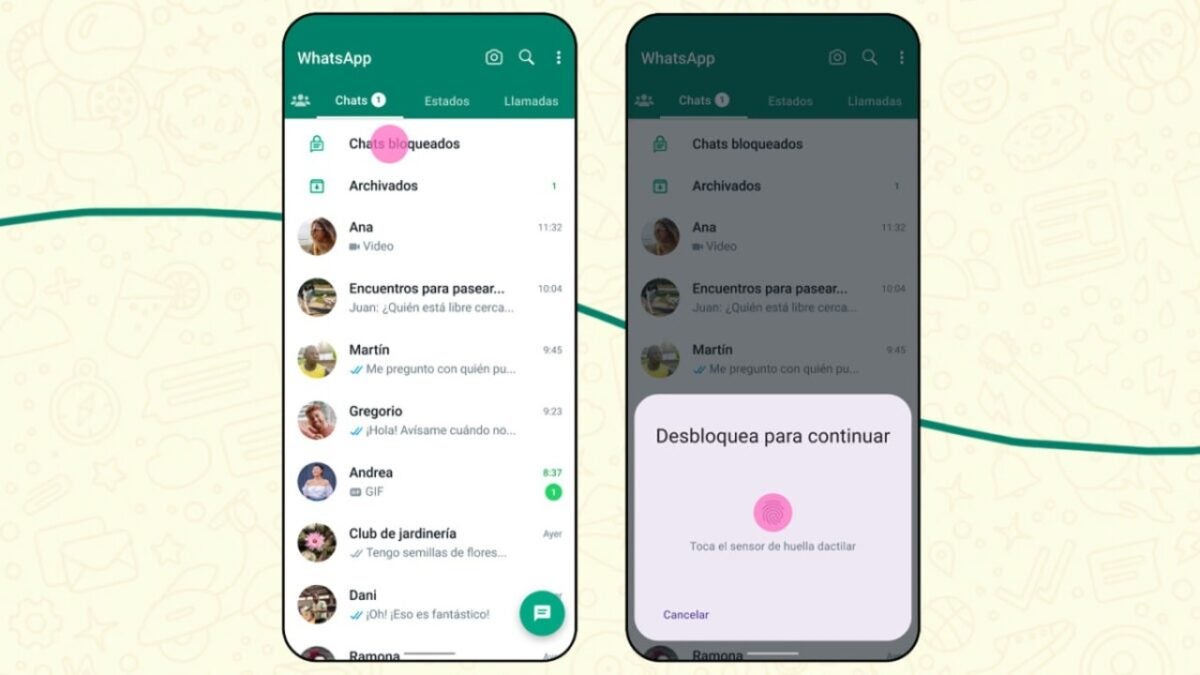
Thanks to Lock, we can protect selected chats from prying eyes. These chats will then be available in a new section called ‘Locked Chats.’ Additionally, notifications for these chats will also be hidden.

If you want to lock certain chats on your WhatsApp and hide them, just follow these steps:

  • First, locate the conversation you want to hide and enter it.
  • Tap on the name or photo of the contact. In the contact information screen, look for the option ‘Lock Chats.’
  • Choose the protection method you want to use (it can be biometric, your face, or a code).

Now, the chat will be in its own folder, accessible only with the security method you chose earlier. If you don’t see them within WhatsApp, don’t worry: just slowly swipe down the chat screen, and there you will find them under the name ‘Locked Chats.’

As mentioned in the official WhatsApp blog, in the coming months, we will see new additions and improvements related to Lock. One of the features mentioned is the ‘ability to lock them on linked devices’ and ‘create a custom password for your chats different from the one you use on your phone.’

If you can’t find this feature on your phone, make sure that WhatsApp is up to date. You can check for the latest version available on the Play Store or the App Store.

WhatsApp DOWNLOAD

WhatsApp will include advanced options to format messages

Considering that WhatsApp is a widely recognized and globally used messaging application, it’s not surprising that it receives various updates regularly. The Meta platform, like its other social networks and services from different companies, is constantly evolving. That’s why it is now gearing up to introduce new advanced options to customize our messages.

WhatsApp Beta DOWNLOAD

About this, WABetaInfo has reported and indicates that users of the WhatsApp beta for Android are already testing these new features, so they are being tested prior to a full release. While the app already has several options that allow us to edit our texts, now we will be able to modify even their structure and format.

WhatsApp continues to evolve constantly

Therefore, not only will you be able to write text in bold, italics, or monospacing, but you will also have new tools that, for example, will allow you to share lines of code, something that can be done using backticks. Additionally, you will be able to create lists in messages, and they can be made in numbered or bulleted formats, or use a block quote if you want to respond to a specific part of a text.

These innovations can be compared to the ones implemented by Google in Google Chat, for instance. Regardless, it seems evident that both platforms are very aware that offering different options to users to write their messages is crucial for their own evolution.

WhatsApp Beta DOWNLOAD

To conclude, it’s worth mentioning that these new WhatsApp features are only available to users of the beta version of WhatsApp for Android. Therefore, we will have to wait for a future update for these options to reach the full version of the Meta app, allowing us to customize our messages when sending them to our friends, family, or work groups, among others.

WhatsApp for iPad is now available in beta phase and will reach all users very soon

WhatsApp is the most popular messaging app on smart devices, and it’s important for it to provide a quality service on all types of platforms. So, WhatsApp for iPad, a request that has been around for many years, can finally be used, although it is currently in the beta phase, which prepares the app for its final version.

Anyone interested can join the beta program to test WhatsApp for iPad, although this version will have its own flaws and bugs typical of the development phase. However, considering that the application is already in this advanced phase, it’s only a matter of time before the final version is available on Apple tablets.

WhatsApp Business DOWNLOAD

Meta and its issues with iPad

It’s been a long-standing issue for Meta to provide subpar service to iOS tablets. The versions of their applications on iPads have always been a source of complaint for many users, as they show poorer work compared to their Android counterparts and are much inferior to what they offer on iPhones. However, the arrival of WhatsApp on iPads is expected to be a turning point in this trend.

As for the functionality itself, it would be identical to, for example, WhatsApp Web, connecting to the main account through a QR code and linking the service simultaneously. Inside, users would have the usual WhatsApp features connected to the iPad.

The iPad has always been seen as a reference point in the world of tablets, which they pioneered.

WhatsApp is evolving

WhatsApp, on the other hand, has implemented a significant number of updates in recent months, making 2023 one of the years with the most changes within the app. One example is the ability to send content in high definition, both in photos and videos, something many users have been requesting for years.

Furthermore, it’s worth mentioning one of its main sources of inspiration: the features of Telegram, its main competitor in the instant messaging app segment. Observing Telegram has also allowed them to borrow ideas like instant videos, for instance.

WhatsApp Business DOWNLOAD

WhatsApp is very close to supporting HD videos

It seems that WhatsApp is gradually adapting to the changing times and, above all, to the needs of its users. While it’s true that sometimes its features haven’t quite caught on, like video statuses, others respond to popular demand, such as the ability to use a single app to manage multiple WhatsApp accounts. Over the years, WhatsApp has added many other features, such as the ability to make voice and video calls, which changed the mobile phone landscape to some extent. This time, it’s the turn of HD videos, something that the WhatsApp community has been requesting for a while.

WhatsApp DOWNLOAD

It’s still behind, but it’s a big improvement

Yes, believe it or not, this is a novelty: until now, WhatsApp did not support HD videos, and the maximum resolution allowed was 848×476 pixels, with an aspect ratio of approximately 16:9. This resolution made sense when most smartphones had screens with that resolution or, at most, HD. However, with the proliferation of Full HD and even 2.5K screens, this limitation has become problematic because the video quality of compressed files sent via WhatsApp did not meet user expectations.

With the new update, users will be able to edit the video resolution in the video editing panel before sending it, similar to how images are handled. The HD resolution will not be the default setting because SD quality takes up less storage space and is easier to transmit in cases of poor connectivity.

WhatsApp DOWNLOAD

Indeed, it may not be the leap that many were hoping for, but it’s a positive step toward improving video sharing on the platform. WhatsApp was starting to lag behind its competitors in this regard. With any luck, they’ll update to Full HD resolution in the near future, which would be a welcome improvement for users.

WhatsApp’s Silent Revolution: Anonymous Group Creation Now Possible

WhatsApp is the most popular messaging tool today, and it could almost be said that it is present in every smartphone in the world. It incorporates multiple utilities ranging from pure text to sending multimedia elements, recording voice notes in real time, video notes, calls and other chat functions are complemented by the possibility of setting up broadcast channels and chat groups, the latter being one of the most used tools in the application. However, until now it had a small handicap: giving it a name was mandatory. With this new update that is now a thing of the past.

WhatsApp DOWNLOAD

Naming WhatsApp groups has always been one of the most tedious tasks that accompany the application. While we sometimes come up with ingenious names, a group of friends to organize a Saturday get-together (or any informal meeting) does not require such displays. Meta has understood this and from now on groups may not have names.

All about WhatsApp nameless groups

These WhatsApp groups have a small limitation: they cannot be formed by more than six people. It does not seem too strict a limitation, and it is not too difficult to create one, although it has some particularities that were not present in the groups as we knew them. For example, the process of creating the group is not that it is similar but, directly, it is the same: you open your WhatsApp application, press the icon of the three dots at the top right and select “create new group”. That’s where the magic begins.

Normally the application would ask you to create a group with a name, but as long as you do not select more than six participants you will see this field marked as “optional”, so you do not necessarily have to fill it in. Once created, the name of the participants will be assigned automatically, although we do not know if it is the name of each user’s profile or the one assigned by the person creating the group.

WhatsApp DOWNLOAD

No other functionality of the group has been altered, so this version remains fully functional and is perfect for a temporary group that you will end up deleting shortly after creating.