Windows 11 Embraces Evolution: Original Versions No Longer Upgradable

It’s the endless cycle. You’re born, you grow, you reproduce, and you die. Every life has a purpose, and the original version of Windows 11 has fulfilled its purpose. For that reason, Microsoft has announced that users of Windows 11 from 2021 will no longer receive security updates starting from October 10th.

Windows 11 21H2, the first version that kicked off a new generation of interfaces and usability, will no longer receive security patches this fall. Therefore, as reflected in Microsoft’s blog, the company recommends that we update to the latest operational version possible to ensure our PC is not vulnerable to new threats. Whether you are a Home user or any of the Pro variants, the update will be inevitable.

Windows 11 DOWNLOAD

The past and future of Windows 11

Windows 11 had a controversial start when it entered users’ lives. While many were not entirely satisfied, there was the option to revert back to Windows 10. But sooner or later, reluctant users will have to make the leap because we know that the 22H2 version of Windows 10 will also end support on October 14, 2025.

This still gives a few years of leeway, especially to users of older PCs that do not support Windows 11. Over these two years, both skeptical users and those in need of new hardware will have to consider abandoning Windows 10 before security patches stop being updated. This is how it happened with Windows 8, Windows 7, Windows Vista, or the legendary Windows XP.
It’s been a long time since Windows XP was the primary computer system

On the other hand, even though Windows 11 has been with us for less than two years, there are people who are already imagining what Windows 12 and its interface will be like. After all, each person is unique, and while some prefer the nostalgia of more classic operating systems, others fantasize about the revolutionary innovations that could be in store for the future.

In the meantime, the focus in the present is on continuing to improve user feedback, which has significantly improved since its launch in 2021, as reflected in details such as the number of Steam users. On the other hand, they are also working towards the release of Windows 11 23H2 in the coming months, further enhancing the operating system.
Windows 11 in 2023: what you need to know

Microsoft’s operating system enters its third year in 2023 and it is a crucial one for Microsoft.

Launched at the end of 2021, Windows 11 is now one of two operating systems still in support. The other, Windows 10, reaches end of support in 2025.

Microsoft released the first feature update for Windows 11 in October 2022. The first feature drop, called Moments update, followed a month later.

It was this feature drop, and not the feature update, that introduced the most noticeable change in 2022: tabs in File Explorer.

Microsoft released the first development builds of the next major version of Windows 11 earlier this month already. While it is unclear whether 2023 will see the release of a feature update, it is clear that new features will still be added to the operating system in one form or another.

Frequent Moments updates will introduce new features in Windows 11. The first two will land in the first half of 2023 already, and rumors suggest that Microsoft is working on more for the second half of 2023.

New Windows 11 features in 2023

Microsoft confirmed some planned features officially already and others have appeared in Insider builds. While there is still the chance of delays or even cancellations, most of the features will become a part of Windows 11 eventually.

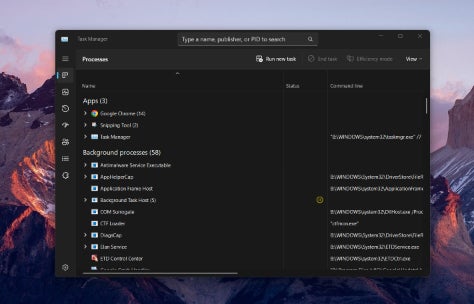
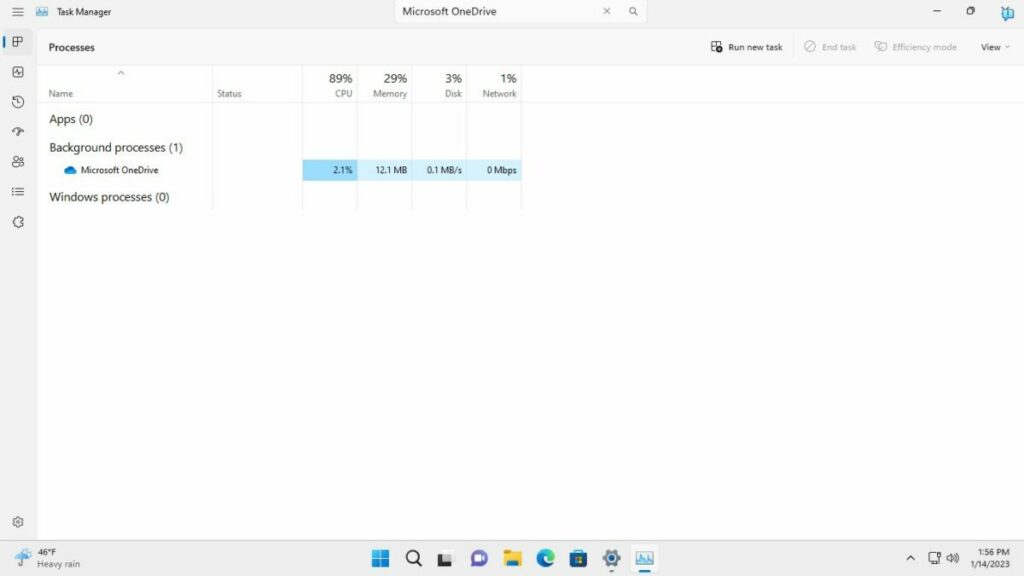
Task Manager Search

Search in Task Manager

Task Manager is an essential tool in Windows 11. The shortcut Ctrl-Shift-Esc, or a right-click on the taskbar and the selection of Task Manager opens the interface.

It lists running processes and their resource usage, provides performance data, has options to manage startup apps, and displays signed-in users.

The process listings may list hundreds of processes, which makes it difficult sometimes to find a specific one. The available sort options help, but an integrated search improves that further.

Instead of having to scroll the entire listing until the desired process is found, users may type part of its name to see it right away.

Energy Recommendations

Energy Recommendations Windows 11

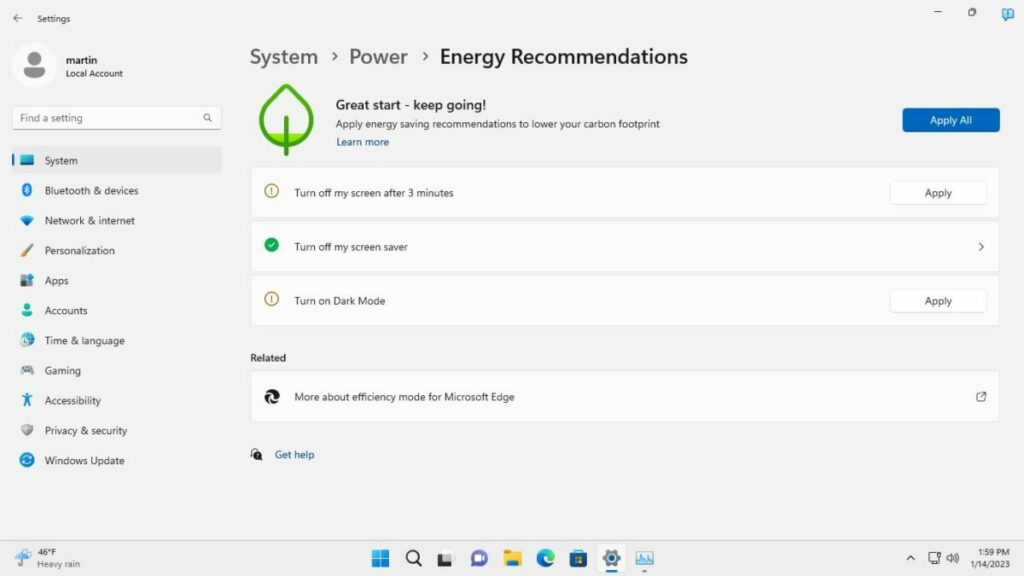
The price of energy increased in most regions of the world in 2022. Windows 11’s upcoming Energy Recommendations feature aims to help reduce the energy hunger of the Windows 11 device.

It does so through recommendations, e.g., to reduce the turn off interval of the screen or enabling dark mode.

Windows 11 users should not expect wonders from the feature, but it may help reduce power usage; this is especially useful on mobile devices on battery.

Tabs in Notepad

Notepad with Tabs

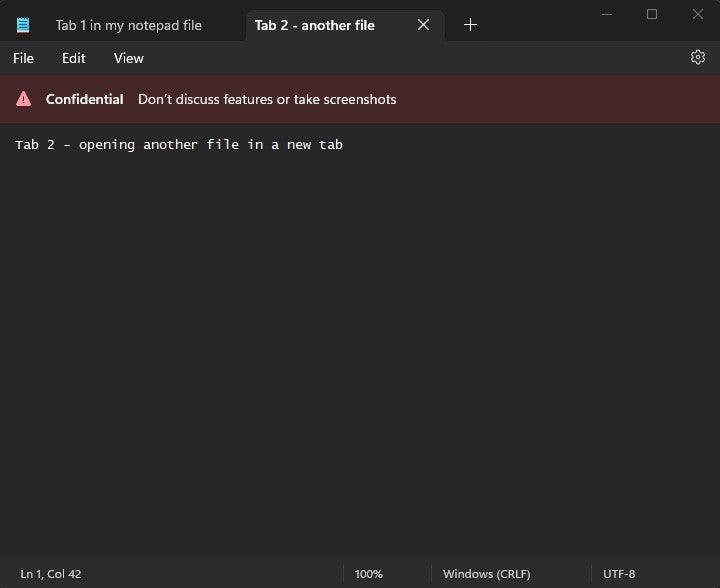
A Microsoft employee leaked the news on Twitter. A posted screenshot showed the default text editor Notepad with a tabbed interface.

Microsoft introduced tabs in File Explorer last year and it seems that the company plans to introduce tabs in more apps in 2023.

Notepad is a prime candidate for tabs. Many third-party text editors, including Notepad++, support tabs.

The feature allows users to load multiple documents in a single window. It is a comfortable feature that will improve Notepad significantly.

There is more

Here is a list of features that will launch in Windows 11 in 2023:

  • Live Search in File Explorer that returns results as the user types.
  • A taskbar optimized for tablets.
  • Changes to the search field in the taskbar.
  • App Folders on the desktop. These hold multiple links to apps and expand on selection.
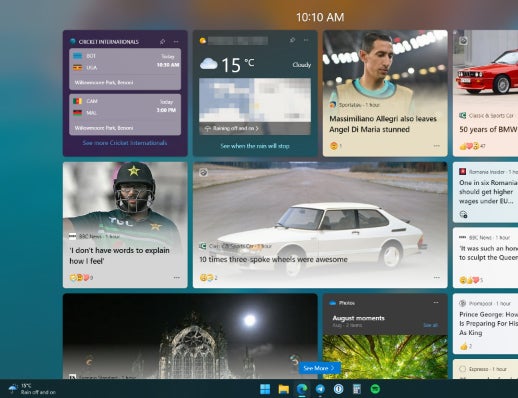
  • Full-screen widgets panel.

New features will be revealed as development progresses in 2023.

Windows 11 has an incredibly small presence on Steam, but it’s rising

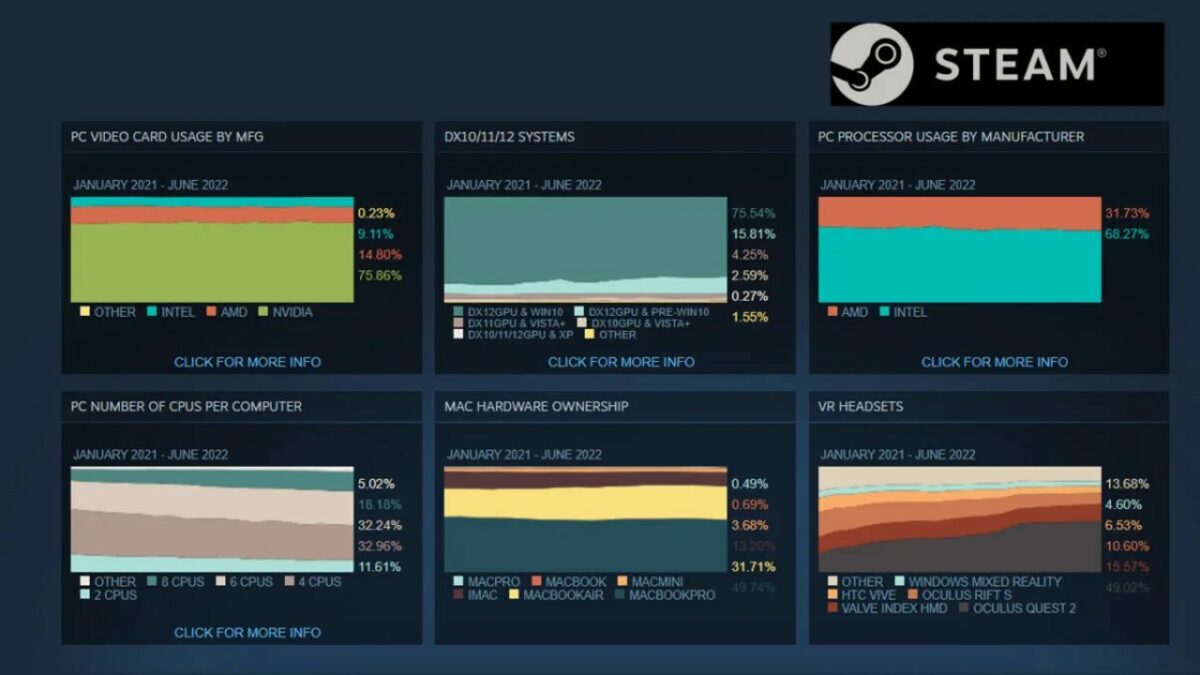
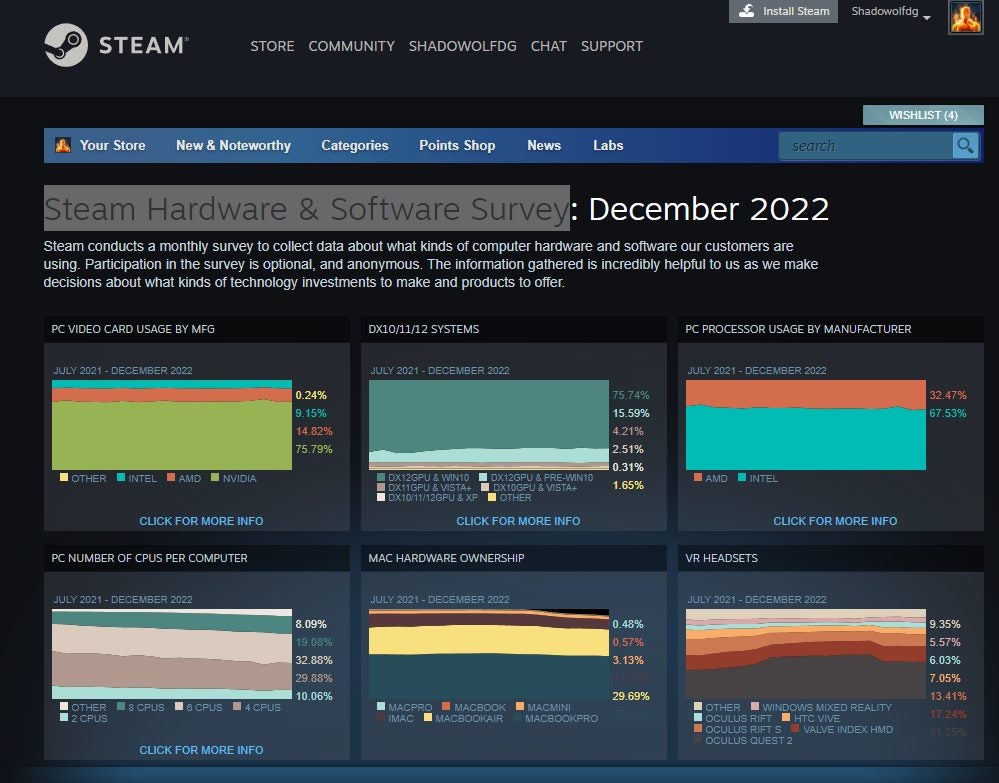
Every month, Valve releases a Steam Hardware & Software Survey that showcases which operating systems and PC configurations run the platform’s games. The latest report shows that Windows 11 doesn’t have much of a presence, but it’s increasing. At the moment, it has a monopoly of just under 29%, with Windows 10 at 65%, Linux at 1.38%, and Apple at 2.48%. Windows 7 lingers behind at 1.66%.

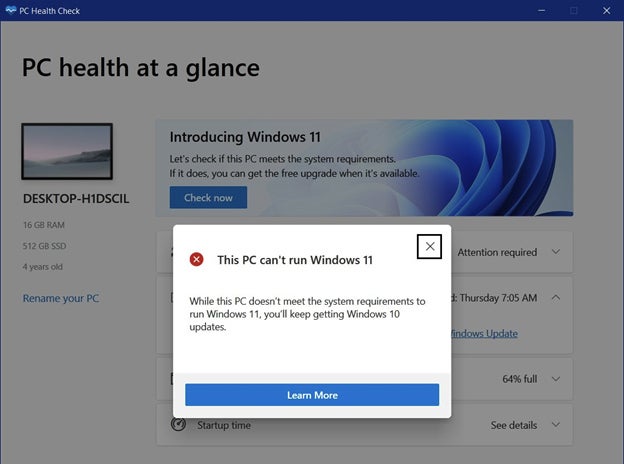
As you may have seen from our past articles, Windows 10 users have been hesitant to move over to Windows 11. Many of them aren’t sure they want to make the move, while others just don’t have the system requirements needed to upgrade. The TPM requirement is also a massive issue, but some have found a way to upgrade without meeting it.

The Steam Hardware and Software Survey has plenty of other stats, which I won’t share here since it’s incredibly boring for laymen like you and me. If any of you have a striking interest in seeing comparisons in line with memory, CPU, physical cores, and other hardware specs, please be my guest and check the complete report.

Windows 11 has an incredibly small presence on Steam

The main factor is that the report shows how many Steam members still haven’t moved over to Windows 11. You need to keep in mind that it’s optional to send your specifications to Valve whenever you play games on the platform. There’s a good chance it’s not a 100% pure reflection of all users at the moment.

It will be interesting to see what that percentage will be at the end of 2023. With all the new updates for Windows 11, we should see more people upgrading from Windows 7 and 10. Of course, it depends on if they can finance upgrading their computer systems, which isn’t getting any cheaper. While we thought technology would stop being expensive as time went on, inflation and rising economic costs have proved us wrong.

Hopefully, the anticipated games of 2023 will see more Windows 11 users on Steam. Also, we’re expecting Windows 10 support to end within the next year or more, which should certainly drive the increase in upgrades.

This free Windows 11 tool removes one of the ugliest design quirks

Windows 11 is Microsoft’s newest and most modern looking operating system. Windows users who dig a bit deeper find traces of older versions of the operating system. Some of these go back to the Windows XP era or even earlier.
Windows 11 Download Now

Windows had a clear and concise look for the most part in Windows 7 and earlier versions. The release of Windows 8 changed this significantly, mixing old elements with new ones. Windows 10 made things worse, even, with its modernization of some areas of the operating system, while keeping others unchanged.

Windows 11 is Microsoft’s attempt to launch a modern operating system. The company updated several core applications and elements of the operating system to address glaring design differences.

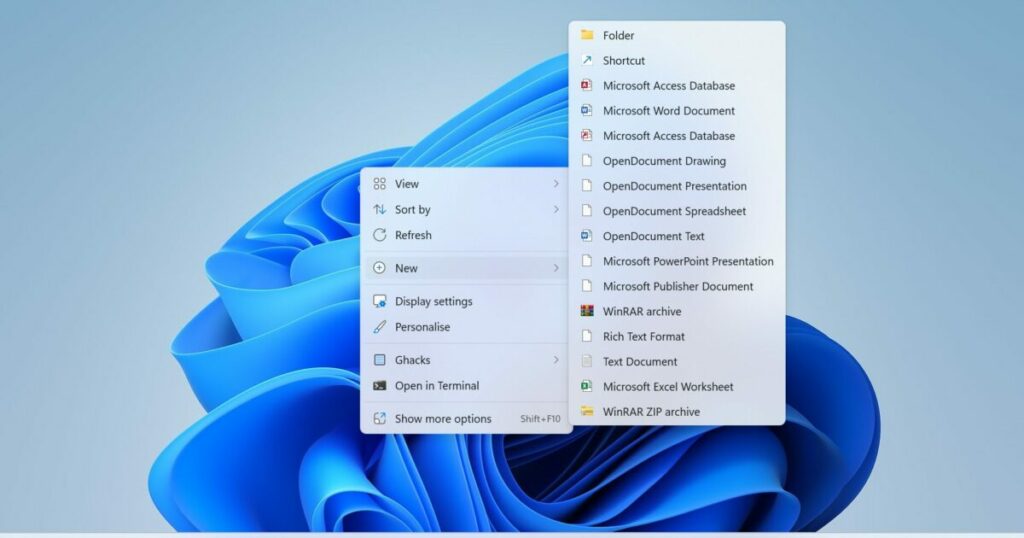
Take the File Explorer context menu as an example. Microsoft introduced a modern looking interface in Windows 11. It fits the overall design philosophy. However, Microsoft kept the classic context menu as the modern one does not hold all the entries available on the system.

Make the entire context menu pretty

The classic context menu is a necessity at the moment, as entries of older applications may only be available through it. Applications such as 7-Zip, the Nvidia Control Panel, or even Microsoft’s own PowerToys tools, are only available in the classic context menu.

Applications like WinRAR resolved this through updates, but many apps are still only accessible through the classic context menu.

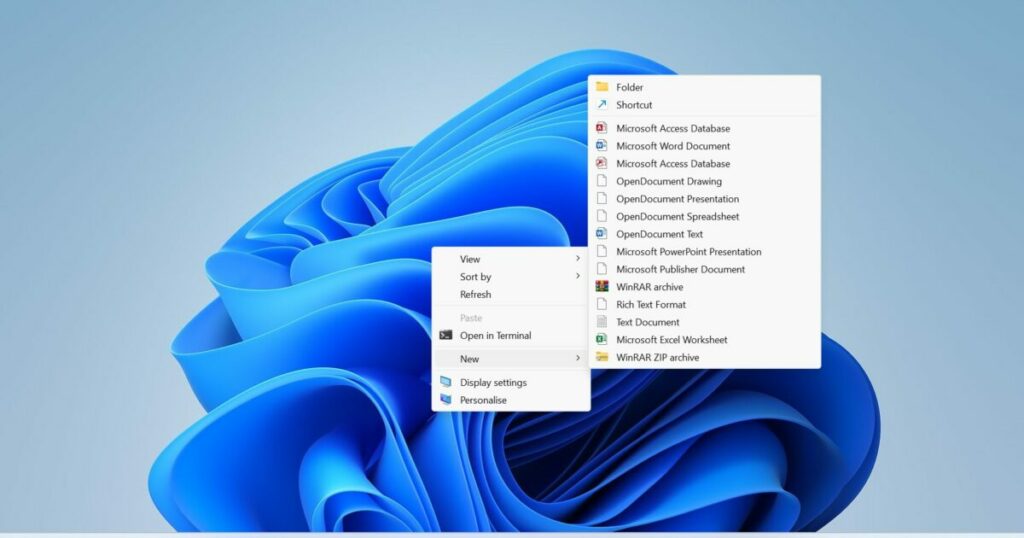
The classic version looks dated when it is compared to the modern context menu of Windows 11. Its design is old-fashioned and it lacks transparency effects on top of that.

The classic Windows 11 context menu

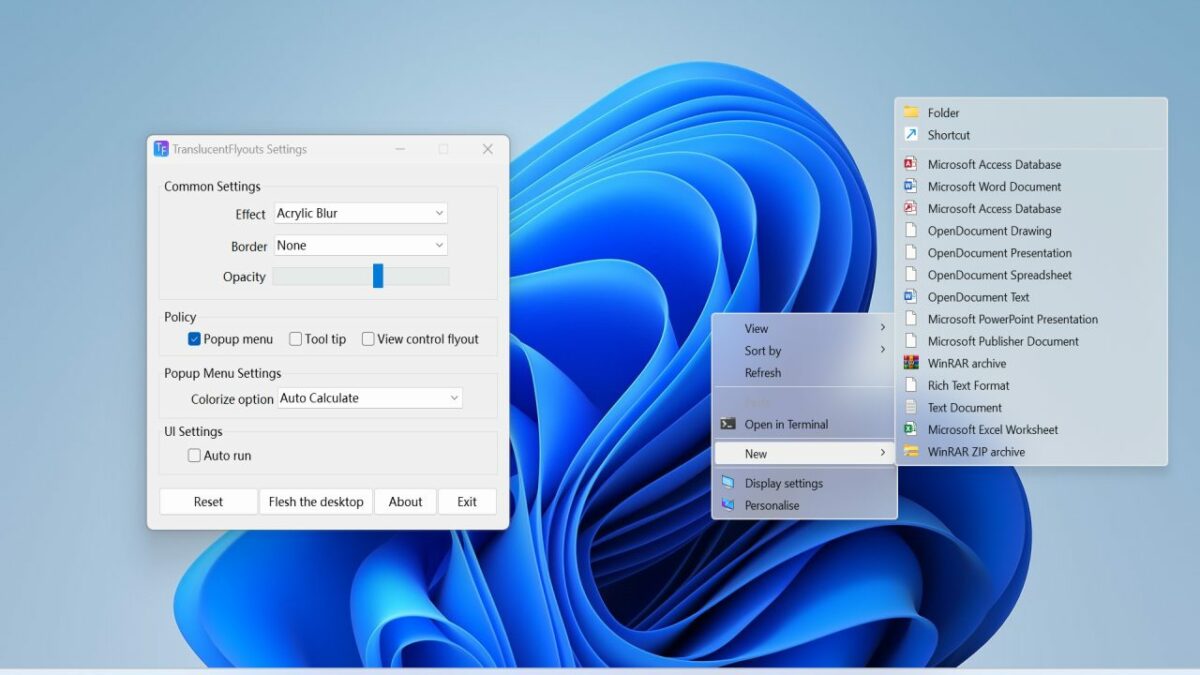
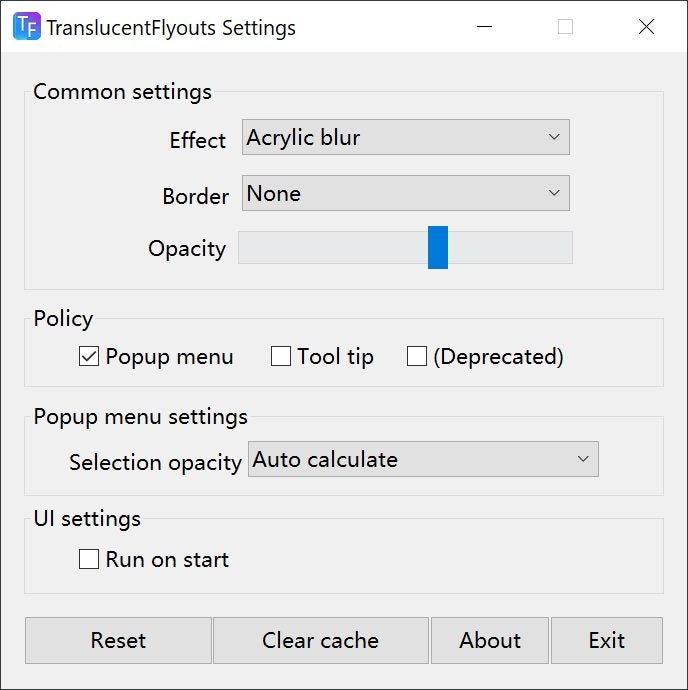
A free utility for Windows 11 comes to the rescue. Translucent Flyouts (via Gamestar) is an open source program for Windows 11 that beautifies several areas of the operating system. The application improves the look of the secondary context menu of the operating system and that of flyouts. Flyouts are used by Windows 11 to display notifications to the user.
The tool makes subtle changes to the operating system. Even better, it uses barely any resources while running. A quick check of the Windows Task Manager revealed that it uses less than 2 Megabytes of RAM while running.
The only requirement to using it is that transparency needs to be enabled in the operating system’s settings; this is the default and should therefore be enabled on most devices.

How to install the application

Installation of TranslucentFlyouts is straightforward. Download the latest version of the program from the project’s GitHub repository. We used version 1.0.5 for the test, but new versions get released regularly by the developer.

The program is provided as a ZIP archive, which you need to extract using a ZIP software. All that is left to do after the extraction is to run the executable file.

Use the provided tweaking options to change the transparency effect and related settings. Changes take effect immediately, and there is a reset option to start anew using the defaults.

There is a handy option to run the program on start. A right-click on the icon in the system tray area exits it.

New useful Media Player update for Windows 11

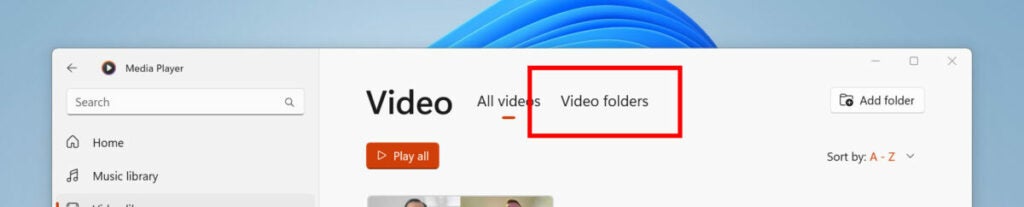
Media Player has been around for several years, bringing musical joy to those who can’t function without songs playing in the background. I, for one, can’t work or produce articles like this unless YouTube Music is running my playlist. The new Windows 11 25262 update brings with it a new solution: you can now browse your video folders.

Why is this handy? Well, you wouldn’t understand the benefit of it unless you’ve personally tried to locate a specific video among your thousands of folders or multiple hard drives. Now, you can check any volders (my made-up name for video folders) that may exist on your PC. It makes it easier when you want to make a new playlist.

Windows 11 Media Player gets updates

Another feature that’s been added is the ability to rip those beloved CDs of yours to save songs on your computer. It’s helpful in case you lose the compact discs and your beloved songs for all time. I think DJs and Karaoke hosts will enjoy this feature the most, especially if music brings in the money.

I want to bring up an interesting thought, though. Is Media Player fighting a losing battle? How many of us actually waste the precious storage we have on our devices for music? We have so many online platforms now where we can listen to music at will. Will we truely reach a situation where we won’t have internet access to hear our beloved songs, or what are we worried about?

Perhaps, it’s more for those people who don’t want platforms like YouTube and Spotify to steal their personal information or use it for advertising purposes. If, for some reason, you’re still listening to music offline to save internet data or when you don’t have access, then these updates to Media Player are for you.

What can we expect from Windows 12?

Shortly after Windows 11 was released, rumors started circulating that it was to be the final version of the software. Now, obviously, this is a little short-sighted, but it speaks to the belief that consumers had that Microsoft had finally got it right, that it had finally washed out the poor taste that Windows 8 left in users’ mouths. 

Now though, we have confirmation that Windows 12 is on its way and is expected to release around the end of 2024. However, we haven’t really received any information about features or what the interface is going to look like yet. Luckily, there’s a fan-made Windows 12 concept that could probably shed light on what the OS could look like. 

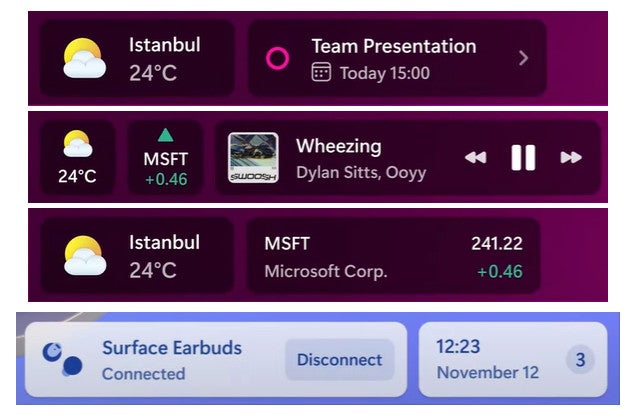
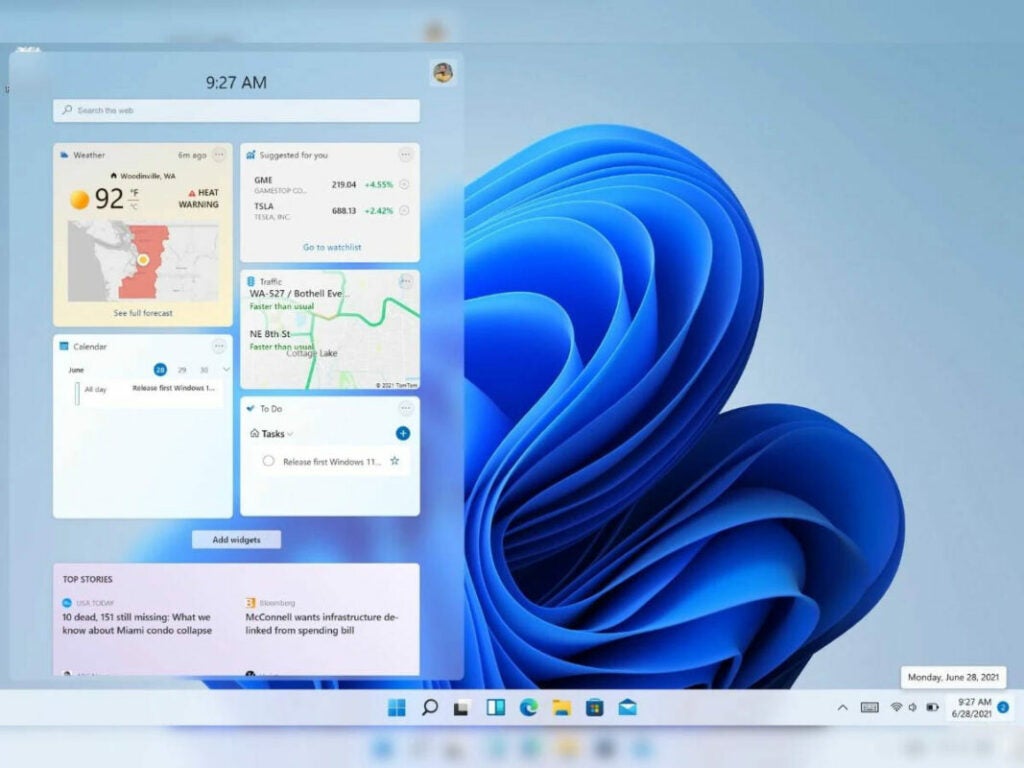
The first major feature that the concept showcases is the reworked Widgets interface. This is basically a wet dream for anyone wishing that Microsoft would give us a Widgets interface we don’t abjectly hate. Widgets are not a new feature in OS interfaces, and this concept is far more dynamic with more features we actually need and no spammy news that no one asked for. Below you can see the stunning layout of all the most essential Widgets as well as a peak at the floating taskbar. 

Is this what Windows 12 will look like

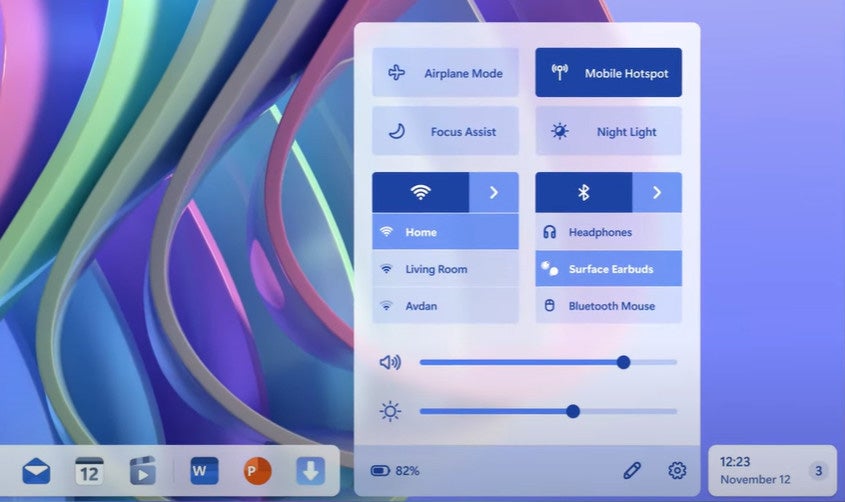
Another incredible sight to behold is the reworked dock with all your most used controls. In this concept, the control panel is expanded from a separate floating portion of the taskbar. Microsoft could seriously learn a thing or two from this concept. It perfectly uses the available space without leading to a crowded cramped home screen. The designer has managed to achieve this without altering the Windows design language any more than it likely will change in the next version. There’s a clear connection here between Windows 11 as it is and this concept. It’s an incredible feat. 

Is this what Windows 12 will look like

Windows OS concepts are common if you know where to look, but the creator of this particular exploration has gone to so much effort to combine novel functionality with a familiar aesthetic. Hopefully, the people who are creating the end-user Windows 12 experience are paying attention to concepts like this, if only for inspiration. We’re obviously not going to get a carbon copy of this exploration as the final software, not by a long shot, most likely. But it’s certainly fun to dream about. 

In any event, while Windows may not be the most adaptable or customizable OS out there, such systems do exist. With effort, someone could recreate this fictional Windows 12 for a system like Linux. Until then, all we can do is hope that when Windows 12 releases, it’s functional, intuitive, and familiar.

5 Exciting features coming to Windows 11

Microsoft has officially released the 2022 update to its Windows 11 operating system to a wider audience. This is the first of many major Windows 11 updates, adding numerous novel features while simultaneously fixing the list of shortcomings that plagued the OS upon its initial release.

However, Microsoft isn’t done with the OS, and as soon as the new update went live to more people, the company added even more improvements and features to the preview builds of Windows 11. 

Here are the 5 most exciting new features coming to future updates of Windows 11.

Functional search box

The current iteration of the Windows 11 search box is not as useful as it could be. Essentially, the current search box taunts you by letting you click on it, but before you start typing, it opens another window where you can actually type a search query. It seems in the next update to Windows 11, the company plans to do away with the dummy search box and give us one that actually works.

This is a very minor issue that likely only affects people with varying degrees of OCD, otherwise known as perfectionists. Nonetheless, this change is likely to leave the entire operating system feeling more cohesive and user-friendly, two aspects that many users would say the infant operating system still lacks in some areas. 

5 exciting features coming to Windows 11

More refined Widgets

Windows widgets are… a point of contention, in the nicest terms possible. Apart from feeling relatively spammy with all the ‘news’ articles it forces upon you, the interface is also just completely lackluster. The revised widgets interface is now full-screen, which adds a little more immersion to the feature. However, this means that instead of overlaid spam immersion, you’ll have full-screen spam immersion.

However, Microsoft has now allowed independent developers to start making custom widgets that will appear on the Microsoft Store. This will hopefully go a long way toward the widgets interface feeling less spammy and more functional.

5 exciting features coming to Windows 11

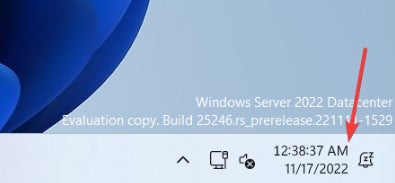
Seconds on the clock

This is another nifty feature that many have probably been hoping for. In a time where every second counts, Microsoft may soon add seconds to the clock in the notification banner. If you’re in the preview channels, you’ll already be able to enable and play with this feature, but there isn’t terribly much to say about it at this stage. It’s a seconds counter on your home screen; that’s pretty much it.

5 exciting features coming to Windows 11

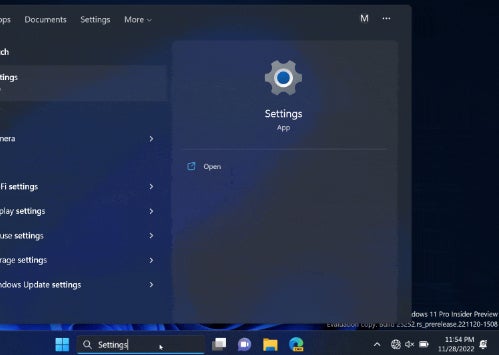
Better task manager

The built-in task manager utility is already quite the feature, now that it has a search box to field your search queries. The major updates coming to task manager in the future are mainly a more intuitive layout and a slightly more modern approach to dialog boxes. Be warned, though, you shouldn’t enable any testing features for a utility like task manager. This is a utility that always needs to be running at its peak, and enabling test features may decrease its efficiency. 

5 exciting features coming to Windows 11

Animated icons

Part of the reason that Windows 11 sometimes feels so lackluster compared to other operating systems from rival companies is that it’s relatively immobile and, for lack of a better word, dead. This new innovation brings a lot more life into the OS ecosystem through animated icons in the Settings app. This is sure to make the operating system feel even more immersive and, for lack of a better word, alive. 

So much more

We’re incredibly excited to see these new updates rolling out in the future, among many others. As soon as that happens, we’ll be here to guide you through them. If you’re still new to Windows 11, we have a whole host of guides and tutorials that you can follow, including our guide for how to fix the Unexpected Store Exception error. No more blue screen of death.

Is it time to update from Windows 10 to Windows 11?

The latest version of the Windows operating system (OS), Windows 11, was released in October 2021. Alongside the release, there was also the option for current Windows 10 users to upgrade to the newest version for free. However, it’s been a little over a year since the release, and so far, the uptake of Windows 11 is very slow.

If we look at all versions of Windows currently operating on users’ computers, Windows 11 only makes up 13.6%, barely surpassing Windows 7, which is 10.6%. Windows 7 was released in 2007 and is still used today, despite no longer receiving updates or security patches. Windows 10 is still the preferred operating system and dominates, with 71.9% of all Windows computers running this version.

There are many reasons why you should consider upgrading to Windows 11, just as there are compelling reasons to wait. However, the primary reason why the uptake has been slow is that there isn’t any pressing need to upgrade right now. Windows 10 is still receiving patches and security fixes – so why change the system now? 
A spokesperson at Windows explained that Microsoft isn’t worried, and the slow uptake isn’t unusual as they experienced similar trends with Windows 10 and even Windows XP back in the day. Windows is still dominating the market by being the most-bought device in the world, with a 76% market share globally. However, the spokesperson also noted that we might see more urgent incentivized campaigns to get users to switch to the newest OS.

Windows 11 Upgrades Still Not Taking Off

Another major reason why the uptake of the free upgrade is so slow is because of the insane system requirements needed to run the new OS. Windows 11 requires users to have a reasonably new CPU, a large amount of RAM and the security chip known as TPM 2.0. Unfortunately, many current Windows computers don’t meet these requirements. Approximately 55% of business devices used globally won’t meet these requirements.

You’d be wrong if you think the biggest issue with the system requirements is the TPM chip. Many devices purchased today come with this chip already built into the motherboard. The issue is the combination of these requirements, and if they aren’t met, you can’t proceed with the upgrade.

Many users believe that Windows 11 is nothing more than just Windows 10 with a paint job. While it is true that there are many similarities between the two OS, Windows 11 does have a few unique features. Visually it’s much more appealing with rounded edges, a centralized taskbar and pastel colors, but the features go beyond looks. The performance of Windows 11 is much better and faster. The development team spends a lot of time improving memory management to ensure that open apps get allocated more resources than those running in the background. The version also supports Android apps. Returning from a sleep state is also 25% faster due to improvement in RAM suspension.

Since Windows 11 utilizes the TPM chip, the operating system’s security is also much more powerful. This is one of the biggest differences between Windows 10 and the new version. This chip enables SHA-256 encryption, Autopilot, SecureBIO and Windows Defender System Guard. 
It also didn’t help that the first release was riddled with bugs and other issues. These issues range from minor annoyances such as slow file transfers to major issues such as the blue screen of death. While updates have been released since this debacle, users are still wary of making the change until all the issues have been addressed.

Windows 11 Upgrades Still Not Taking Off

Windows recently announced that they were returning to a single annual feature update for new operating systems instead of the bi-annual system it’s been using. Security and bug patches will still be released monthly. There are also rumors that Windows is considering returning to releasing a new OS once every three years. Taking this into account, we could see a new operating system by 2024.

If you want to stick with Windows 10, that’s entirely possible for now. However, users that currently use Version 21H1 might want to consider updating to Version 21H2. This is because 21H1 will reach its end-of-life rules on December 13th, 2022. At this point, it will receive no further security or bug patches. Windows 10 Version 21H2 is a newer version and will continue to receive updates and patches for now.

We’re wondering if we’ll see an increase in upgrades to Windows 11 and whether users are just biding their time. It’s apparent that in many cases, if users don’t have to make a change, they’ll stick to what’s familiar and works.

Will Microsoft be able to solve the mysterious Windows 11 gaming bug?

Just over two weeks ago, Microsoft released the Windows 11 22H2 update that many of us have been waiting for. Unfortunately, it didn’t run as smoothly as the company expected. PC gamers ended up with stuttering and lag in many games, killing the previous delightful performance. Now, the 22H2 is rolling out again, but only to those gamers who don’t have specific games or apps installed.

Microsoft did a deep investigation into what was causing the lag in gaming performance when 22H2 was released. What it found was that some games and apps enabled debugging features on the GPU. While this is a built-in feature for Windows, it’s not something that other apps should be able to access.

When Microsoft discovered this issue, they put a safeguard in place. That meant that all affected PCs had a block enabled, preventing the Windows upgrade from happening. So while it was advertised that the new version was available, many users didn’t see the option to upgrade.

Despite the time since the investigation, Microsoft hasn’t been able to fix the problem yet. When you head to the health dashboard, you may see this message:

“The safeguard hold with the safeguard ID of 41990091 has been updated to only safeguard Windows devices which have one of the small subset of games and apps which are still affected by this issue.”

Windows

In effect, it means that Microsoft has identified which games and apps are enabling the GPU debugging features. If your device doesn’t have any of these installed, then you’re going to see the Windows 22H2 update ready for your device. The safeguard hold will be gone. 

However, should you have programs that cause this issue, you won’t be able to upgrade. Microsoft recommends you update all your apps, games, and drivers for the best way to remove this issue. For now, it will continue trying to find a solution to this gaming bug problem.

It’s time to boost Windows 11 security

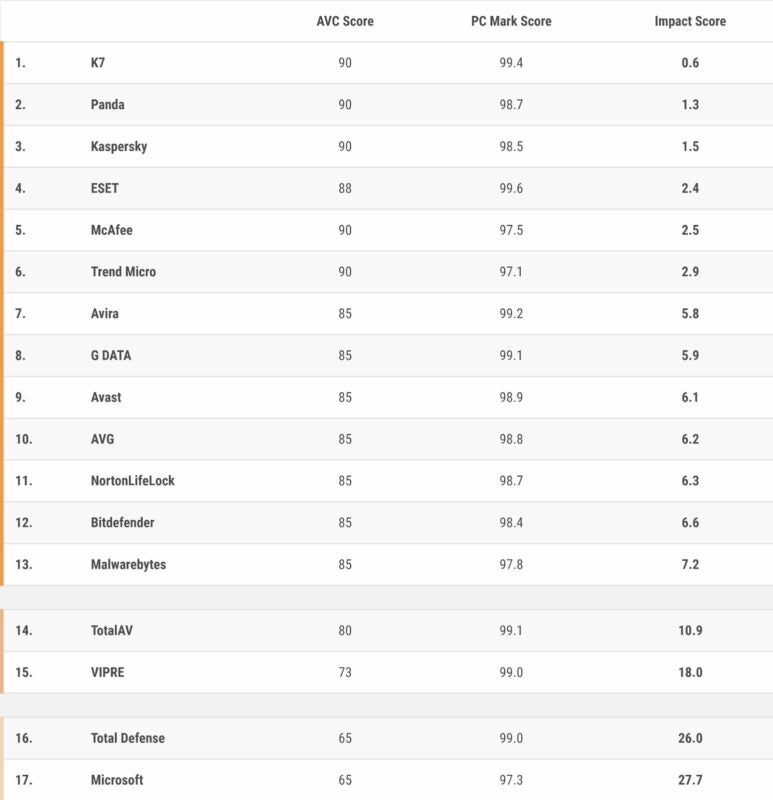
It seems that Microsoft Defender has yet again taken last place in an antivirus assessment. AV-TEST, a reputed antivirus assessment firm, recently tested numerous anti-malware products on the Windows 11 operating system. Microsoft Defender did not impress. In fact, the resident Microsoft antivirus barely scraped by and currently shares last place with Total Defense. 
Windows 11 DOWNLOAD

The fact that Microsoft Defender achieved such a dismal score would not be so alarming if not for the multi-billion dollar brand it represents. The fact that this AV software is what comes with every Windows device is what’s truly troubling. It is time to boost Windows 11 security. 

The assessment firm graded each of the 17 antivirus products with its own score, known as the AVC or AV-C score. AV-TEST also used a PCMark score. In order to achieve a perfect score according to the AVC score, the software would need to achieve a score of 90. The PCMark score was out of 100. To determine each product’s total performance impact, researchers looked at the Impact Score. This value was obtained by adding both the AVC score results and those of the PCMark score and then subtracting the result from a possible total of 190. 

It’s time to boost Windows 11 security

As you can see in the table above, K7 scored the highest, with a score of 189.6 out of a possible 190. Microsoft Defender, regrettably, scored only 162.3. 

Just in case you were curious about how the assessment firm determined the values for the AVC score, here’s how it was done: ‘For the AV-C score, we took the rounded mean values of first and subsequent runs for File Copying, whilst for Launching Applications we considered only the subsequent runs. “Very fast” gets 15 points, “fast” gets 10 points, “mediocre” gets 5 points and “slow” gets 0 points.’ 

The reasons that Microsoft Defender scored so low can be summed up by poor handling of file copying and archiving. App installations are another place that Microsoft Defender on Windows 11 was found lacking. In addition to that, it was discovered that the utility tends to slow users’ systems down considerably when these processes are performed. Luckily, Microsoft also has a PC Manager utility that should help you out if your PC is running a little slow. 

However, the test didn’t just reveal that Microsoft Defender is one of the poorest-performing mainstream antivirus utilities in the industry. It also introduces us to the best-performing alternatives. According to AV-TEST, you cannot go wrong with K7, Panda, or Kaspersky. All three of these utilities, apart from achieving the three highest scores out of the 17 services that were put to the test, were given a three-star Advanced+ Performance badge in the October 2022 AV-TEST antivirus software assessment. If you’d like to read the full report, you can find that here.

If you’d prefer to read more articles about Windows 11, why not check out our latest piece about a potential lower-priced Windows device? Is the tech giant taking notes from Netflix?