Video: Clean private data in Firefox

You may have Firefox as your regular web browser, but that doesn’t mean you make use of all of its features. A simple enough one is the ‘Clear Private Data’ function. This allows you to erase all the information stored in your browser. Using it regularly is not only safe practice, as it ensures that you clear out sensitive information like passwords or certificates regularly, it can also improve Firefox’s performance. Anyway, enough said here. Why read when you can watch? Here is a little tutorial using our new video feature. Enjoy!

insertvideo(“outtest5″,”1011″, null , null, true,”false”,url + “images/watermark_final.png”);

Today’s downloads for Windows, Mac and Mobile

Download PC Health OptimizerWindows: Is your PC too slow? Are you running out of disk space? Does Windows take a long time to start up? These are all symptoms of improper PC maintenance. Luckily you can now fix them all with PC Health Optimizer, a complete set of tools that includes pretty much everything your need to improve your system’s performance in every single aspect.

net4macMac: net4mac is a social networking application that allows you to connect with other Mac users and discuss all things Mac. You can join different groups, create events and even sell or buy Apple products via the classifieds section. You’ll have to create your own profile and make friends, with which you’ll be able to chat or send messages to. net4mac also includes special offers on the developer’s other programs.

0t_powerherothumb.pngPalm: How do you conserve the battery of a Pal device? Power Hero should help you out thanks to its power saving features. You can alter the state of your wireless resources, get the profile screen to change at a given time and activate auto-shutdown. Power Hero should help you make the most of your Palm device’s battery.

First look at WinRAR 3.80 Beta

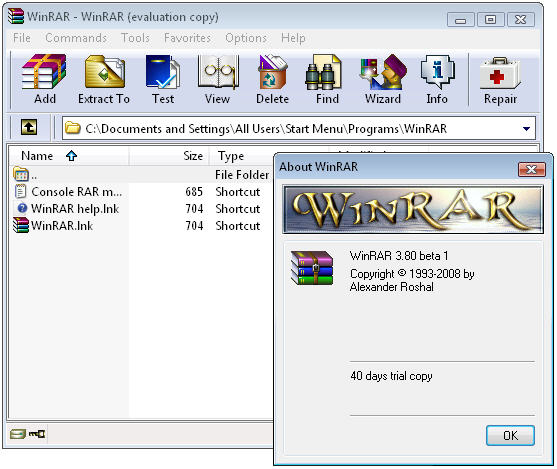
WinRAR has recently launched version 3.80, currently in Beta stage. This new version keeps exactly the same appearance as previous ones, which is always good for users because we don’t have to relearn anything from scratch. However there are quite a few new features that make WinRAR an even more handy utility.

WinRAR 3.80 Beta

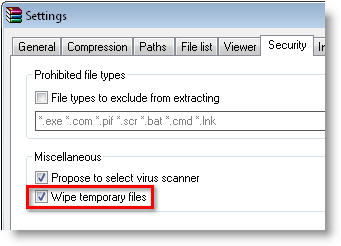
The first one is related to new supported formats: WinRAR 3.80 Beta can compress files in UTF-8 format and WinZip encrypted archives, for a higher level of security. Also regarding security, this new version allows you to delete temporary WinRAR files in a safer way by providing the “Wipe temporary files” option in the Settings > Security dialog window. Moreover, a new “Options” tab in the archiving dialog that enables you to choose between deleting, sending to the recycle bin or simply wiping those files right away once they’ve been saved to an archive.

WinRAR 3.80 BetaFocusing more on usability, the new WinRAR 3.80 Beta features now both the “Ask before overwrite” and “Skip existing files” possibilities in the archive extraction dialog window. These options were already available in previous versions, but now they’ve been made even easier to use. Another great new feature is the possibility to add archiving profiles right into Windows Explorer’s context menu, so that you can archive anything according to your own settings in just a couple of clicks.

As you can see, WinRAR 3.80 Beta may not be a major update, though it does feature some nice improvements that make it safer and easier to use. But you know, small things count! If you want to give it a try and see for yourself, head on to the WinRAR website and download the file. The Beta version works for a trial period of 40 days.

Keep your nose to the grindstone with Grindstone

Grindstone logoWhat’s the biggest obstacle to productivity for the modern office worker? Slow PC’s, poor IT support, jammed printers, pure boredom? No, if we’re a little bit honest then it’s all those fun little distractions such as YouTube, MySpace and Facebook which take valuable chunks out of our day.
Unless you’ve got an iron will, it’s very hard to resist a video clip or a set of photos from the last party you attended when you know you really should be working. Therefore, Greasemonkey has come to the rescue with a clever little script called Grindstone. As the developers say:

The internet is addictive. The web is filled with new and shiny things that can be distracting when you want to be productive. And multitasking only makes it harder to get things done. Grindstone is a Greasemonkey script to help block websites that steal your focus. You tell it which sites to block and when to block them. Think of it as a safety net for staying productive.

When you try to access sites that you’ve asked Grindstone to kindly keep you away from, you’ll receive a splash message on your screen saying such messages as “Don’t Lose The Flow”, “Keep Grinding” or “Stay Focused” gently reminding you to keep your eyes on your work. Note that this is a script rather than a Firefox add-on so the installation process is slightly more complicated but on the plus side, scripts are generally more stable and cause less add-on conflict issues.

To get it going, you’ll need to ensure you have the Greasemonkey extension installed and then simply install the Grindstone script and away you go – the boss will be proud of you!

Ask Sandra to benchmark your PC

Benchmark logoBenchmarking your system is something that most of us rarely do but it’s useful for a variety of reasons. In computing, benchmarking is usually associated with assessing performance characteristics of your hardware such as testing the limits of your CPU and RAM. This makes is much easier to understand how your PC or system will react under certain conditions. Gamers in particular often find it useful to know whether their system can handle certain games. In addition, it can help determine whether the various performance-enhancing applications you’re running on your PC actually do anything or whether a new driver you’ve installed works.

Sandra screenshot

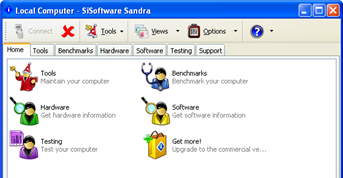
Professional benchmarking software can cost anything up to $1000 but there are many utilities out there that will do a basic job for free, pick of the bunch for my money being Sandra. It might not be the fastest benchmarking utility on the market but it’s certainly the most thorough and comprehensive I’ve used. The full name of the program is actually iSoftware Sandra (the System ANalyser, Diagnostic and Reporting Assistant) and provides all you need to know about your hardware, software and other devices whether hardware or software. The analysis takes a while because it attempts to test your system under both high and low stress situations to give you comprehensive readouts on the CPU, chipset, video adapter, ports, printers, sound card, memory, network, Windows internals, AGP, PCI, PCIe, ODBC Connections, USB2, 1394/Firewire, etc.

Note that benchmarking is not always easy and often involves several attempts under different conditions to achieve reliable results. Interpretation of benchmarking data can also be very difficult because different PC’s are configured differently, with different components from various manufacturers even if they share a similar spec. However, if you’re not happy with some of the results Sandra gives you, you can also try anyone of these free utilities.

More cheats for Icy Tower

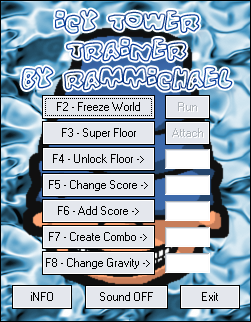
Improve your Icy Tower skillsMany people choose to spend their lunch hour taking a walk, reading the newspaper or lunching with friends. However, there are plenty of us who must stay chained to our desks at this time due to our chronic addiction to Icy Tower. I don’t know how many times I’ve tried to help Harold the Homeboy get to the top of the tower over the years, but I still can’t bear to tear myself away from the game. A while back I hit you with some tips and tricks on how to improve your score and now I’ve stumbled across some more great cheats that no serious ‘Tower-head’ should be without, courtesy of RAMMichael.

The site offers a bunch of downloadable add-ons that will inject a new lease of life into Harold, and improve your overall enjoyment of the game (if such a thing were possible). I must confess that I’m still not exactly world class at the game, so I found the Icy Tower Trainer a real godsend. This utility lets you do things like freeze the game, make all floor lengths the same, or unlock any start floor.

Those of you who are more proficient in scaling the tower might want to try and make things a little bit more challenging from the start. Icy Tower Floor Controller is a simple little editor that lets you change the size of the floors to make things a bit more interesting. Initial Speed Changer, on the other hand, will crank up the pace of the scrolling at predefined speed of your choice. Both of these tools add some welcome diversity to those boring early stages.

Lots of my Tower-playing pals have taken to posting videos of their stunning performances on YouTube. I’ve got pretty fed up with their gloating, so I installed the Icy Tower Replay Editor and Replay Info. The editor allows you to change the values in your saved replays to make it look as if you’ve done a lot better than you actually have. It takes a while to get the hang of programming these changes, but once you do you’ll probably spend more time pretending to do really well than you will actually playing the game!

Alternatives to the Mac Keychain

Keychain AccessThere’s a place in your Mac where you can safely store all your sensitive data like passwords, keys and certificates and access them when you need to. That place is Keychain Access, which can be found in your Utilities folder. You can create password-protected keychains for all the different sorts of private info you have. Now, you may be a little wary of storing all your secret data in one place and having it all protected by one password. What would happen if somebody got hold of it? Obviously you’d end up looking a little dumb, so when using Keychain it’s essential to verify that your password is as strong as possible.


Keychain Access does include some safeguards, just in case something starts to go wrong with your passwords. One is Keychain First Aid, which can verify and repair broken and corrupted keychains. Second, and last resort, is to reset your keychain. You can do this from the preferences in Keychain Access. Under the general tab you’ll find a ‘Reset My Keychain’ button. Press that and the application will revert to the factory settings.

Not everybody likes working with Keychain though and I can understand if you find it a little confusing or if you think it lacks a few features. There are some excellent alternatives out there, so why not give them a try?

  • 1Password – Both extremely simple to use and very powerful, it generates strong passwords and adds form filling. Accessible from the menu bar.
  • PasswordWallet – Multi-file synchronization, BlowFish 448-bit encryption and a format for generating random passwords.
  • Pastor – Offers a good password generator and a simple way to create new entries.
  • Wallet – Great interface, Quick Lock and a great built-in password assistant makes this a good choice on Leopard.
  • Password Repository – Very similar to Keychain yet with advanced content filtering and color categories.
  • info.xhead – Keep your sensitive data in all sorts of smart and password protected categories.

Pimp your car in Photoshop

We all dream of having a Porsche, a Lamborghini or a Ferrari at some point of our lives. But while we save money for those, why not creating the car of our dreams with Photoshop? Follow these easy steps and learn how to pimp your car in less than 20 minutes. It’s not like the real thing of course, but it’s funner and a lot cheaper.

Pimp your car in Photoshop

Continue reading “Pimp your car in Photoshop”

Software to help you win at poker

When the chips are down turn to these software programsI’m a big fan of poker but, like most games I play, I’m not very good at it. Unfortunately, unlike other pursuits, if you’re not very good at poker then you probably won’t be very good at paying the mortgage at the end of the month. Recently I’ve managed to halt my losing streak thanks to three simple computer programs.

One thing I usually have the most trouble with is working out if my hand is actually worth pursuing or if I should just fold straight away. Since installing Poker Indicator I’ve wised up a bit, however. This crafty app attaches itself to your online Texas Hold’em table, automatically looks at your cards, and calculates your odds of winning. It can even read your opponents’ playing styles before you join the game, so you have an idea of the kind of sharks you’ll be swimming with.

While I’m away from the pressure of an online game I find Draw Odds Poker Calculator to be a handy way of learning moves and honing my skills. You can simulate and memorize gaming situations, together with the associated odds, to help you make the right decisions during a real game. The program is suitable for the most used variations of draw poker – those using a 52-card deck with no wild cards, with up to five cards allowed to discard.

Those of you who are yearning for an easier ride may want to try WinHoldEm, which is an online Texas Hold’em poker bot. What this basically means is that it will play the online tables instead of you, reading the cards that have been dealt and the moves that have been made. The bot’s intelligence is really determined by you though, as it needs to be programmed by the user, so it will only be as good as you though. Mind you that’s not to stop you getting a poker expert to help you train it. Now there’s an idea.

Apple iPhone 3G confirmed!

iPhone 3GJust as expected, Apple revealed version 2 of the iPhone yesterday at the WWDC. The mobile device, which will be available in 22 countries worldwide on July 11th, offers a sleuth of new features: 3G network support, GPS, simultaneous voice and data connections, Microsoft Exchange ActiveSync, secure access via Cisco IPSec VPN, WPA2 Enterprise and 802.1X authentication, a flush headphone jack and better battery life (300 hours standby, 10 hours talk time, 5 to 6 hours high speed browsing, 7 hours video, and 24 hours of audio).

Apple also revealed the new App Store, which will give you access to all the applications created by independent developers using the iPhone SDK.

iPhone 3G now comes in two models, black and white, yet the most significant announcement could be the price itself. In an effort to reach a number of 10 million iPhones sold worldwide, Apple will now offer the device at significantly lower prices, $199 for the 8 GB model and $299 for the 16 GB one.

This was easily one of the most exciting days of WWDC in recent years with many more announcements accompanying news of the iPhone3G, and all that just on day 1.

Apple also announced the expected transformation of their .Mac service into MobileMe. It will let you store all your email, contacts and calendars on a secure server on the me.com site and sync to any one of your devices, whether Mac or PC. MobileMe will work with native applications and current .Mac users will be automatically migrated to it.

Day 1 of WWDC 08 was also the opportunity to reveal a little bit more about the next Mac OS, Snow Leopard. Expected in about a year, Snow Leopard will offer Microsoft Exchange support and introduce Quicktime X, with optimized codecs and a better playback experience. OpenCL, 64-bit technology and a Multicore architecture will also mean much improved performances.

There’s more to come at the WWDC, notably with the Design Awards expected in a few days. We’ll keep you posted!