Access your music from the cloud with MP3tunes

Spotify is really popular in Europe, offering a huge library of music to listen to on demand from computers and smart phones. I’ve said before that I’m not a huge fan, and MP3tunes addresses on of my complaints: that Spotify doesn’t have everything I want to listen to.
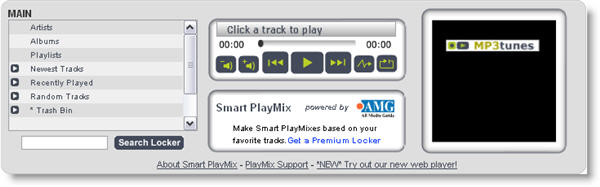
I have everything I want to listen to, though, and MP3tunes allows me to upload my music to their service, and then stream it from any browser, or my iPhone (there’s even an Android app, if you have one of those). The browser service best, but the iPhone app seems to be unstable. This may be due to iOS4, so hopefully they’ll fix it soon.

The uploading app is available for Windows and Mac, and works fine although to be honest it’s not the most polished program I’ve ever seen.

MP3tunes is an interesting service, but I’m still not a big streaming fan. I will stream things, but I don’t see it as the ultimate solution. I’ll keep storing things locally, as it saves energy and bandwidth on my phone. For me, the best things about the web and music are the sharing possibilities. Spotify’s playlists are an excellent example, and SoundCloud, which allows you to upload music and share it, is a great place to discover new music.

App Inventor: now anyone can make an Android app

Last week I told you about Nokia’s new Ovi App Wizard, which allows anyone to create their own Symbian applications. Today, Google has launched something similar in the shape of App Inventor, which allows budding developers to make Android apps without any technical knowledge.

App Inventor features a graphical user interface that lets you design and build applications by dragging and dropping elements onto the screen. Google has literally gone back to school with App Inventor, working with junior and high school kids to help ensure the editor is as easy to use as possible. In fact, it promises that making programs with App Inventor won’t require a single line of coding.

I’m still waiting on my invite for App Inventor and will be curious to see what the scope of this development tool is. On the face of it, App Inventor certainly looks more advanced than the Ovi App Wizard, which essentially just serves web feeds. My fear though, after watching the promotional video, is that the Android Market is about to become the biggest repository of crap apps on the planet.

[youtube]http://www.youtube.com/watch?v=8ADwPLSFeY8[/youtube]

How to: delete your profile from web services

Creating an account for an online service is usually very easy. Too easy I’d say. In fact, it’s so easy you may end up with user profiles in online communities you don’t even remember signing up for. However, turns out that deleting accounts and user profiles sometimes isn’t so easy. Social networks and other online services feed on users and they like to make it difficult for you to abandon them. Here’s a short tutorial on how to delete user accounts from Gmail, Windows Live Messenger, Yahoo!, Twitter and Facebook.

separator21.jpg

Deleting your Gmail account

I can’t think of any reason why you would want to give up Gmail (or many other Google’s services, for that matter) but hey, I won’t judge you if you want to. In order to remove your Gmail account, you need to visit this website and click the appropriate link.

delete your profile from web services

You can remove individual accounts or close your entire Google account permanently. Continue reading “How to: delete your profile from web services”

Today’s downloads for Windows, Mac and Mobile

Sid Meirs CivilizationBlackBerry: Sid Meier’s Civilization is an all-time classic strategy game in which you must build an empire by battling it out with rival armies. The fourth incarnation in the series now hits the BlackBerry, in the shape of Sid Meier’s Civilization IV: War of Two Cities. The aim of the game is to take command of rival cities by wiping out their soldiers, destroying their buildings and pillaging their resources

Download Glary Registry RepairWindows: The Windows Registry is a core component of your system, so you better keep it in perfect shape! With Glary Registry Repair you can easily scan more than a dozen areas in the Registry and repair any problems you may find right on the spot. It’s easy to use, really fast and saves a backup copy of the Registry before changing anything.

wiretap.jpgMac: WireTap Studio is a serious solution to record anything from your Mac. What used to be called WireTap Pro is still as reliable as ever, all in a small interface that lets you record, edit and save your audio in any format. WireTap Studio can capture both software and hardware sounds so long as you select the input source. There are two available in the interface. Just press the recording button to get started.

fring adds two-way video calling for iPhone

Fring logofring has released an update of its popular iPhone chat service, allowing iOS 4 users to make two-way video calls. The new version also adds multitasking, meaning you can keep the app open in the background and get notifications of when your buddies come online.

Other enhancements include a new Social Stream, which lets you view Twitter feeds and status updates from Facebook in a neat chronological list view. You can even use fring to post an update to Facebook and Twitter simultaneously. Version 3.2.0.5 of fring makes improvements to the address book too, allowing you to manage your buddy list more effectively, including the ability to merge contacts.

If you haven’t tried fring yet, I recommend you check it out as it offers a neat way to assimilate your contacts from Skype, Facebook, MSN, Google Talk, and the like. You can instantly who is online regardless of which social network you’re friends with them on, then chat via IM, make free calls, or perform video calls.

Read my full review of the latest version of fring here.

How to find iTunes TV show artwork

itunes coverflow.pngWhen iTunes was updated to display TV show artwork per season, it left many people with a problem. Sure, iTunes retrieved and displayed artwork for the TV show as a whole, but often it couldn’t for the individual covers of different seasons. Sometimes this is because TV shows that have been ripped to your hard drive don’t have the correct metatags to allow iTunes to recognize the exact season. Other times it’s simply because the artwork isn’t available for one reason or another.

In such cases, to avoid having gaps in your pristine iTunes TV show artwork, there are two main solutions to this:

1. Use an application to add metatags to your iTunes TV shows collection

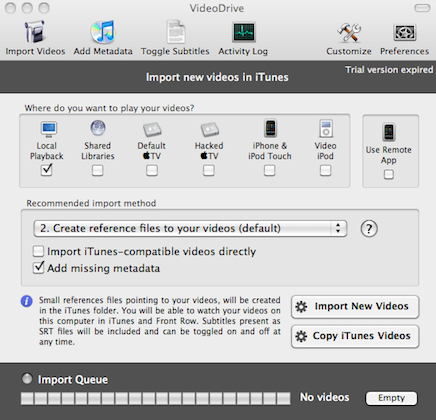
There are several applications you can use to do this. One of the best on Mac is VideoDrive which allows you to search online for metadata and cover art and automatically number season and episodes of TV Shows so that iTunes retrieves the correct cover art for each show. It’s very easy to use, has a slick interface and has tons of customization and preference options:

videodrive.png Continue reading “How to find iTunes TV show artwork”

YouTube launches Leanback – couch potatoes rejoice!

Leanback

YouTube’s new Leanback service is set to take channel-hopping to a whole new level. The new free service, launched yesterday, allows users to cycle through YouTube videos as easy as flicking up and down the channels on your TV.

Movies load at full-screen and play through non-stop until you interact with them. The selection of clips that come up is determined by your user history, subscriptions, and videos that friends have liked. Controlling Leanback is done entirely using the keyboard cursor keys and the Enter key – a control system that lends itself perfectly for watching YouTube on your television.

At first I was a bit skeptical about Leanback. The feed generated for me based on my personal profile was loaded with crap. It included terrible stop-motion movies made with Transformers toys, a drunk cat, Family Feud bloopers and loads of dull mobile phone demonstrations. It was no better than all the other dross on late-night cable, and nearly put me off Leanback entirely.

Browse away from the ‘Your Stream’ section and you start to appreciate the real beauty of Leanback. Hit the ‘down’ arrow on your keyboard and you can flip through YouTube video categories and view the most popular clips. Better still, hit ‘Up” and you’ll be able to search the YouTube catalog, loading a feed of videos based around this keyword.

The longer you play around with Leanback the more sense it makes as a platform for watching videos. It’s even turning me on to the idea of Google TV, which I was dead against at first. I’m now keeping my fingers crossed that Leanback will soon replace the dreadful YouTube XL for PlayStation 3. Then my couch will be seeing a lot more action.

Moonbase Alpha: In Space, noone can hear you yawn

Who didn’t want to be an astronaut once upon a time? Rockets, weightlessness and walking on the moon looked really cool. NASA are trying to bring our dreams crashing into harsh reality, with their free educational game Moonbase Alpha.

It could be fantastic – multiplayer missions on the Moon to save the base after a destructive meteor shower. It features a moon-buggy and robots! Unfortunately, Moonbase Alpha doesn’t feature Bruce Willis, and is designed with team-building and realism in mind.

In my first half an hour, I walked and jumped gracefully, but really slowly around the moonbase. I picked up a welder, drifted towards electrical units that were broken, and fixed them slowly. I then drifted back to the toolshed, to grab a wrench. Did you know astronauts can’t carry more than one object at a time? Using the moon-buggy speeds things up, as you can load items onto it, one by one, and move a lot faster. But it’s still hardly exciting.

You can play multiplayer online, which would be much more interesting, but it’s currently very difficult to find servers and active games. Moonbase Alpha is available for Windows via Steam, and it’s totally free, so you can easily find out if you have what it takes to live on the Moon – do you have that much patience? The Moon would be much more fun if it was being invaded my aliens, in my opinion…

How to: Backup your Twitter account

When I created my Twitter account three years ago, I did it only because I wanted to see what it was like and test Twitter-related software. Nowadays Twitter has become an important source of news and interesting links, and also a way to make friends – some of which I’ve met “in real life” afterwards.

Being such an increasingly valuable tool, needing a backup tool for it was only a question of time. There are lots of stuff on my Twitter account I’d like to save in a safe place, such as favorite tweets, direct messages and interesting links shared by your contacts. But how do you backup Twitter? Actually, there are a few ways to do it:

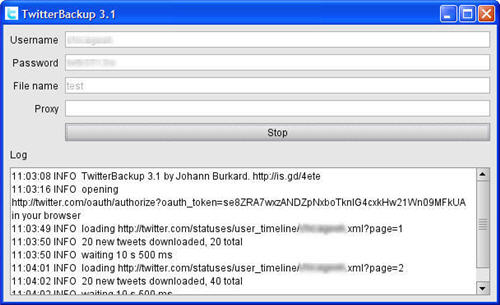
TwitterBackup

backup your Twitter account

TwitterBackup is a simple, Java-based tool that saves a copy of your tweets in an XML file. It’s very easy to use, though the backup process can take a long time – depending on the number of tweets to backup – and it doesn’t include direct messages. Continue reading “How to: Backup your Twitter account”

Android – my first week

android_final.pngReaders, I’m in love. After years in a safe but boring relationship with a Nokia so old that people used to ask me if it had a color screen, I am head over heels for a sleek HTC Legend. I knew that once I made the jump from cellphone prehistory to the modern world, there were only two options – a HTC with Android or an iPhone. In the end, I decided on a HTC. Why? Put simply, the HTC is just cooler! iPhones have their charm and, as Jon has evangelized before, they may even beat the Android on certain technical levels, but I had fallen for the HTC, and fallen hard. Who’s going to argue with true love?!

The initial set up was easy as pie – in fact, my biggest problem was waiting to charge the phone before I could use it! Before actually getting an Android, I didn’t have much experience. I had played around with other people’s iPhones and investigated a HTC or two, but I was no expert. Even so, my first few hours with the new phone couldn’t have been easier. Android is very user-friendly. Obviously, if you make the jump, you’ll have your own opinions about which Android apps are the most important, but here’s how I’ve played it so far: Continue reading “Android – my first week”