Ask anything: Formspring makes it possible

/* Style Definitions */ table.MsoNormalTable {mso-style-name:”Table Normal”; mso-tstyle-rowband-size:0; mso-tstyle-colband-size:0; mso-style-noshow:yes; mso-style-priority:99; mso-style-qformat:yes; mso-style-parent:””; mso-padding-alt:0cm 5.4pt 0cm 5.4pt; mso-para-margin:0cm; mso-para-margin-bottom:.0001pt; mso-pagination:widow-orphan; font-size:11.0pt; font-family:”Calibri”,”sans-serif”; mso-ascii-font-family:Calibri; mso-ascii-theme-font:minor-latin; mso-fareast-font-family:”Times New Roman”; mso-fareast-theme-font:minor-fareast; mso-hansi-font-family:Calibri; mso-hansi-theme-font:minor-latin; mso-bidi-font-family:”Times New Roman”; mso-bidi-theme-font:minor-bidi;}

formspringlogo11.jpgLet’s face it. Most people who frequent social media and blogging sites fall into two categories: those who like to read and those who like to be read. For those who fall into the latter category, it’s nice to know people are actually reading what you write. Many bloggers covet online interaction in their blog post comments and via feedback forms.  Formspring.me offers another means by with to connect to your readers.

Formspring’s simplicity is likely what makes it so popular. Sign up for an account, find your friends, and ask them questions. Ideally, they’ll return the favor and ask you something in return. With the option to integrate the questions you receive and your subsequent answers into your accounts on Facebook, Twitter, MySpace, Blogger, Tumblr, and WordPress, very little work is actually involved in increasing the interactivity between you and your readers. 

formspringblogpost1.jpg

You can also opt to allow people to ask you questions anonymously, but blogger beware: This can open you up to any number of random – and sometimes even inappropriate – inquiries. 

Not a blogger but still interested in the concept? Formspring allows you to answer questions through your profile and publish them solely on their website. Even if you don’t subscribe to any of the major social media and networking sites, Formspring allows you to create an account and connect with friends who do. And, with claims of 1 billion questions already answered, it’s unlikely that you’ll be sitting around waiting for someone to ask you something for very long.

uTorrent Apps Studio brought out of beta

uTorrent version 2.2 for Windows has just been released bringing out of beta an Apps Studio which allows users to instantly customize features such as adding protection to uTorrent from BitDefender, social networking functions (such as Twitter) and even games. It also allows users to find legal entertainment content via add-on Apps such as Vodo and ZuluMusic.

appsgallery.png

There have also been other improvement relating to connectivity, security and skins. These include a new skinning format, the ability to use a password-protected boss key, new proxy privacy features and an improved set download location/relocate feature which now moves files for you. Finally, there’s also now an option to pause torrents when user activity is detected on the computer so that it doesn’t slow you down while surfing the net.

Mac OS X 10.6.5 update released

mac-software-update1.pngAfter a slight delay by Apple, they’ve finally rolled out the long awaited OS X 10.6.5 update for Snow Leopard. You can update either via Software Update (click the Apple logo in the top left of your screen), or download the update here. Be warned that it’s quite a hefty update (644.48MB to be exact) so allow yourself plenty of hard drive space and time.

This is the first big update to Snow Leopard since June and should iron-out a lot of minor bugs that weren’t addressed in previous updates.

Note that it’s recommended that you backup your system either using Time Machine or a backup tool such as Carbon Copy Cloner before updating.

The full list of issues that this update addresses are:

  • Improves reliability with Microsoft Exchange servers.
  • Addresses performance of some image-processing operations in iPhoto and Aperture.
  • Addresses stability and performance of graphics applications and games.
  • Resolves a delay between print jobs.
  • Addresses a printing issue for some HP printers connected to an AirPort Extreme.
  • Resolves an issue when dragging contacts from Address Book to iCal.
  • Addresses an issue in which dragging an item from a stack causes the Dock to not automatically hide.
  • Resolves an issue in which Wikipedia information may not display correctly in Dictionary.
  • Improves performance of MainStage on certain Macs.
  • Resolves spacing issues with OpenType fonts.
  • Improves reliability with some Bluetooth braille displays.
  • Resolves a VoiceOver issue when browsing some websites with Safari 5.
  • Improves Bluetooth pairing with Magic Trackpad.
  • Resolves performance issues with third-party displays that use InstaPort technology.
  • Add SSL support for transferring files with iDisk.
  • Resolves an issue when opening 4-up Photo Booth pictures in Preview.
  • Addresses keyboard responsiveness issues in the Dock when Spaces is turned on.
  • Resolves an issue syncing Address Book with Google.
  • Fixes an issue when replying to a Mail message sent by a person whose name contains certain characters such as é or ü.
  • Improves performance for users bound to an Active Directory domain.
  • Improves reliability of Ethernet connections.
  • Systems with a Mac Pro RAID Card (Early 2009) installed can now be put to sleep. For more information, see Mac Pro RAID Card (Early 2009): Enabling system sleep.
  •  Improves reliability of fibre channel connections, resolving a potential Xsan volume availability issue.
  • Adds RAW image compatibility for additional digital cameras.
  • Security improvements.

Make GIMP look like Photoshop with GimPhoto

gimphoto.pngThe closest free image editor to Photoshop is GIMP. However, using GIMP can be awkward for those used to Photoshop’s interface and menus and so there have been a few attempts to adapt GIMP to make it closer to Photoshop. One of them is GIMPshop (which I looked at here) and the other is GimPhoto.

GimPhoto may well be the solution for you if you don’t like GIMPshop. Like the latter, GimPhoto is a modification of GIMP which makes it feel much closer to Photoshop. It does this because by default, it includes 20 plugins which are available with GIMP.

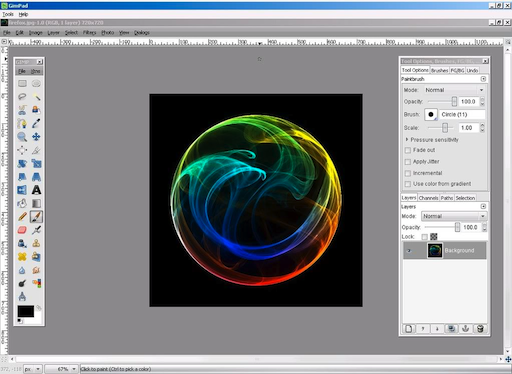
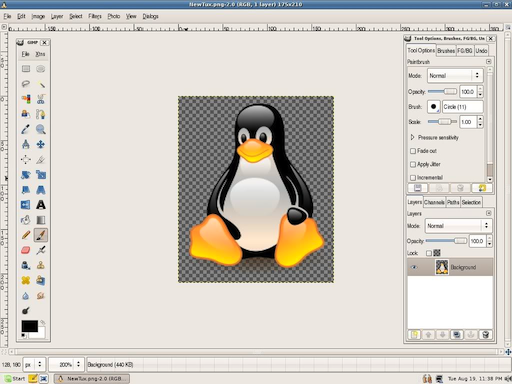
One of the frequently cited problems with GIMP is that the interface and menu labels are a bit confusing and awkward compared to Photoshop and this is certainly something that GimPhoto has improved upon. GimPhoto looks and feels much closer to Photoshop:

gimphoto1.png

GimPhoto incorporates many of the features of GIMP but with an improved interface, batch processing, online backups, custom brushes and advanced editing options. The menu layouts are much closer to Photoshop meaning Photoshop users will adapt to it much quicker than GIMP or GIMPshop:

gimphoto2.png

However, GimPhoto is still a quite complex package for beginners although there’s a very detailed user guide to help you get to grips with it. Obviously, it also lacks some of the most powerful editing features of Photoshop.

GimPhoto is an impressive attempt at making a free version of Photoshop and if you never really adapted to GIMP or GIMPshop, it may well be the image editing package for you. Note that GimShop is only available on Windows (including a portable USB version) and Linux. If you’d like to see it on Mac, or have any comments about the Windows and Linux versions, you can leave suggestions for the developer here.

Google launches Instant Previews

Google never stops working on improving its search engine. After launching Google Instant a couple of months ago, they’ve now taken a leap to image-based search results with the Google Instant Previews – a snapshot of each website listed in the results of your query.

Google Instant Previews

Instant Previews has been implemented in a way that it doesn’t disturb the standard Google search procedure. Just use Google as you normally would, and if you want to see previews for your search results, click the magnifying glass icon next to any of them. Google will display a graphic preview for the selected result, highlighting relevant content – such as your search keywords – if they appear on the website.

From that moment on, hovering your mouse over any other result will also display a snapshot of the website, so that you can scroll down the page and browse search results as if you were flipping through a magazine. Instant Previews are also keyboard navigable: just press the right key to activate them and the down key to check previews for all your results.

Try Spotify Premium for 7 days for free

Swedish online streaming music service Spotify is now offering 7-day free trials to give free users a chance to test Spotify Premium. To obtain your trial code, all you need to do is logging into your Spotify account and visit the trial website.

Free Spotify Premium

As you may already know, Spotify is currently available in four flavors: Open, Free, Unlimited and Premium. With these 7-day trials, free users will be able to test the Premium service at no cost, as long as they provide valid payment details on the payment form. The payment method you choose will be automatically charged for one month’s access to Spotify Premium once the free 7-day trial period is over. You can cancel at any time during the trial period by logging into your account and disabling the payment.

Among the excellent features included in Spotify Premium you’ll find better audio quality, no ads, offline mode for playlists and mobile apps for iPhone, Android, Symbian and Windows devices that let you enjoy Spotify on the move.

Opera Mobile for Android released

Opera Mobile for Android releasedPopular pocket web browser, Opera Mobile has finally been released for Android phones. The app allows you to easily traverse the web through a stylish user interface. Opera Mobile supports helpful navigation aids such as multiple tabs, a start page to put up to nine shortcuts, and a comfortable pinch-to-zoom tool.

If you’ve used Opera Mini before on your Android then you’ll already be familiar with the features and functionality of Opera Mobile, because it is virtually the same application. The key difference between the two is that Mini uses page compression to load sites more quickly, whereas Mobile renders HTML fully as nature intended. This means that load times are slower in Opera Mobile, but the graphics look much crisper. Opera Mobile does come with Opera Turbo, however, which allows you to turn page compression on if you want.

Opera Mobile matches up pretty well against other Android web browsers. Personally, though, I reckon Dolphin Browser HD is still the best of the bunch, given its vast feature set and support for add-ons. Go check out my review of Opera Mobile for Android and give the program a try for yourself.

Free Browser Game: Avoidal

In Avoidal, you use your mouse to move a flying robot around the screen. Your task is to destroy stars, but you have no weapons – instead you must use your enemies to blow them up for you. There are trackers, which follow you when you approach them, and missiles that are set off when you pass in front of them.

With quick reactions, you can use these to your advantage and draw them into the path of stars to get points. Avoid getting hit by anything, and as you blow up stars you’ll build combos to multiply your score.

Avoidal is a very one-dimensional game, but it’s still pretty hard to put down once you’ve got the hang of it. Play it over at Kongregate. Requires Flash.

Why do some developers treat OSX as an afterthought?

At last month’s ‘Back to the Mac‘ event, Steve Jobs highlighted the impressive statistic that one in five computers sold in the US are Macs. OSX is growing in popularity all the time, and yet some big developers treat it like a second class operating system.

Last week’s release of Skype 5 Beta for Mac highlighted this – a late release. Skype 5 for Windows is already out of beta, and that came out months ago! When it comes to small developers, not creating Mac versions is understandable. But Skype is a huge service, with over 500 million users – don’t they have resources for simultaneous development?

Meanwhile, Google has never released a Mac version of its hugely popular Google Chat client. While you can of course chat in your browser with Gmail, it’s surprising that such a big company would fail to support OSX.

Gaming is improving, with this year’s release of the Steam platform for Mac, but progress has been remarkably slow. Big releases like this week’s Call of Duty: Black Ops are still usually released on every platform except Mac. Perhaps games haven’t always been a big part of Apple’s image but it’s not only hipsters and designers who buy Macs anymore, so surely developers are missing out.

Then of course there’s that program that’s constantly in our Mac top ten downloads despite being dormant for five years: Internet Explorer. Sure, Microsoft and Apple aren’t always best of friends, but IE is the only major browser that’s not cross platform, and that’s pretty incredible. Lack of IE for Mac support makes life difficult for Mac using web designers, although I think you’d struggle to find many other Mac owners who really miss it!

With OSX gaining market share, can developers continue to leave their Mac development as an afterthought?

Scrivener gets discount and Windows release

/* Style Definitions */ table.MsoNormalTable {mso-style-name:”Table Normal”; mso-tstyle-rowband-size:0; mso-tstyle-colband-size:0; mso-style-noshow:yes; mso-style-priority:99; mso-style-qformat:yes; mso-style-parent:””; mso-padding-alt:0cm 5.4pt 0cm 5.4pt; mso-para-margin-top:0cm; mso-para-margin-right:0cm; mso-para-margin-bottom:10.0pt; mso-para-margin-left:0cm; line-height:115%; mso-pagination:widow-orphan; font-size:11.0pt; font-family:”Calibri”,”sans-serif”; mso-ascii-font-family:Calibri; mso-ascii-theme-font:minor-latin; mso-fareast-font-family:”Times New Roman”; mso-fareast-theme-font:minor-fareast; mso-hansi-font-family:Calibri; mso-hansi-theme-font:minor-latin;}

Those of us who treat National Novel Writing Month like a highly anticipated holiday and participate in it with unbridled enthusiasm year after year have something else to celebrate, should we reach our 50,000 word count goal by November 30. 

Literature and Latte, the makers of Scrivener, the prolific project management and editing program for Macs, are at it again and continuing to improve their popular writing tool. In honor of NaNoWriMo, as it is more colloquially called, Scrivener got a face-lift in its 2.0 version for Mac. In addition, Literature and Latte released the first-ever trial version for Windows users, currently in beta form.

Windows users who haven’t experienced the wonders of Scrivener’s many organizational features can see a basic introduction here:

[youtube]http://www.youtube.com/watch?v=AdwnHo23Ub8[/youtube] 

Since NaNo has been in full swing now for over a week, this may not be big news to many. What has been getting little attention, however, is the reward the makers of Scrivener are offering to those who manage to successfully complete their 50,000 word novellas in the allotted 30 day time frame.

Literature and Latte are offering a 50% discount off the regular license price of Scrivener for this year’s NaNoWriMo winners. And, while the Windows 1.0 version isn’t yet available for purchase, the offer applies to Windows WriMos who win as well.  Set to be released in early 2011, Scrivener 1.0 for Windows is set at $40. Details will be posted on your writing profile on the official NaNoWriMo site around December 2, and Windows users are advised to save the coupon code for use upon Scrivener’s official release next year. It’s a win-win situation for everyone involved – assuming you win NaNo, that is.

So, even though NaNoWriMo is already well underway, this Scrivener discount is worth keeping in mind for December, when your massive novel editing effort inevitably gets underway!