Parallels Access lets you control your PC or Mac from your iPad over Wifi or 3G. You can use all your desktop apps like Microsoft Office, and the app has specially adapted gesture control to make using them easier on the touchscreen.
Parallels Access requires a client to be installed on your PC or Mac, and the app on your iPad. Setup is painless – you only need to make an account, and sign in on both devices, then you will see your computer appear on Parallels Access.
The app adapts your desktop to fit the iPad better – you don’t just see your entire desktop. with Parallels you view one window at a time, and can access others from a small menu on the side of the screen. Apps work more or less as you would imagine, and when I tried it, I found it was pretty responsive.
This is version 1.0, and there are still some problems to iron out. The first time I disconnected, my Windows taskbar disappeared completely, and it took some time for my desktop to return to normal. Despite the adaptation of touch controls for the desktop environment, they are not perfect, and you do have to touch with care sometimes. Nevertheless, it’s impressive being able to do so much, so easily from your iPad.
Parallels Access gives you a 90 day trial, after which is costs $79.99 to continue using it.
Setting up the Chromecast is easy, but performance depends greatly on the strength of the network it’s connected to. Casting quality also depends on the device used. This doesn’t matter as much for Android devices, but casting from the Chrome browser can cause a big performance dip as it tries to stream and buffer what’s being transmitted. The dongle won’t function without the associated Chromecast app and Google Cast extension.
Set up the Chromecast through Android or iOS
Setting up the Chromecast without the accompanying app or extension is much more time consuming. An iOS version of the Chromecast app has just been released, and Google has released a how to here.
Plug the dongle into the HDMI port on your television. You will probably need to use the included mini-USB power cable unless you have a new television that can power the Chromecast. Make sure you’re on the right HDMI channel – when you see the opening menu on the Chromecast, you’re at the right one.
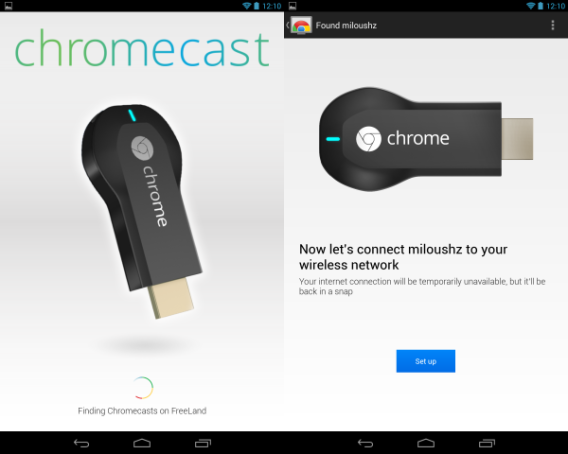
Open the Chromecast app to start.
The app will search for the dongle to access its settings. If you ever take the Chromecast to another location, you will have to set up the device again through the app to connect to that network.
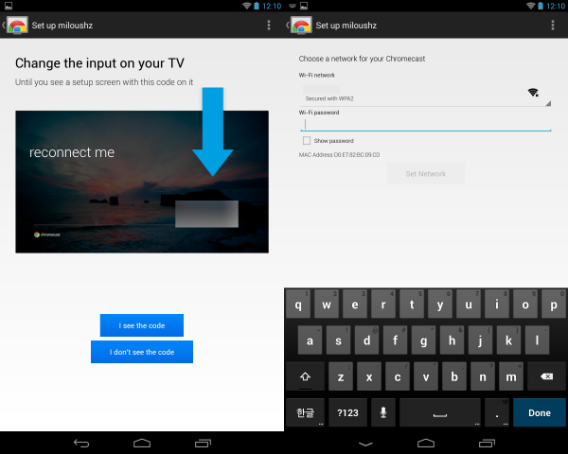
The app will access the dongle and display an access code that should be mirrored on the television screen. This will give you access to settings in the Chromecast so you can add it to your wireless network. It’s it’s correct, tap “I see the code.” Make sure your Chromecast is on the correct wireless network and enter your password.
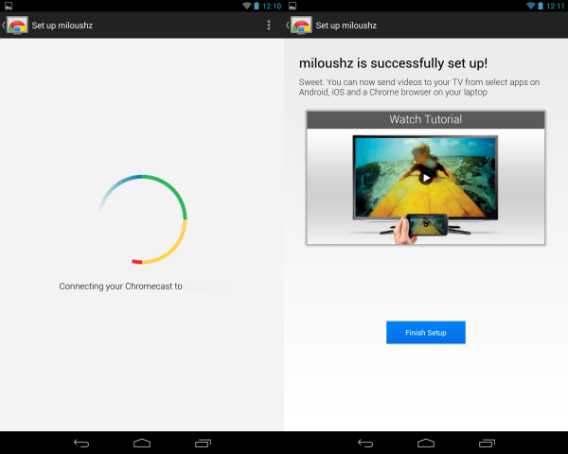
Once the Chromecast is authorized to access your wireless network, you can stream content from supported apps like Google Play Music, Netflix, and Google Play Movies & TV. You can also mirror Chrome tabs to the Chromecast if you want to use it as a pseudo second screen.
The minimum requirements mean most people won’t have trouble running the game, but gamers with more powerful machines might be disappointed to see there is no support for Direct X 10 or 11.
It seems that this year’s soccer games on PC aren’t going to look very next-gen, as EA’s FIFA 14 is also geared towards lower end PCs. EA have stated that until there is a bigger user base of players with powerful PCs, they will not use their next-gen graphics engine, and it looks like Konami has come to a similar conclusion.
Here are the full minimum and recommended PC requirements for PES 2014:
Minimum system requirements:
Operating System: Win Xp 32, Vista, Windows 7
Graphics Card: GeForce 510, Radeon HD 5450 512MB
CPU: Pentium D 820 2.8GHz, Athlon LE-1640
RAM: 1 GB
HDD: 10 GB
DirectX: 9.0c
Recommended system requirements:
Operating System: Win Xp 32, Vista, Windows 7, Windows 8
Graphics Card: GeForce GT 440, Radeon HD 5550 1024MB
The Chromecast revealed at the Android event in July is likely the response to the failed Nexus Q that debuted – but never launched – at Google I/O 2012. Emphasizing the streaming feature and shrinking the physical device from a sphere to a small dongle makes a lot more sense.
Finally receiving the Chromecast a month after its release, I tried it at two locations. Ultimately, I found the device and its software to be really interesting, as long as you’ve got a good network connection.
The great thing about the Chromecast is that setup is simple and quick. As long as you have the Chromecast app or extension, authorizing on a wireless network takes about five minutes.
But does it work well?
Casting
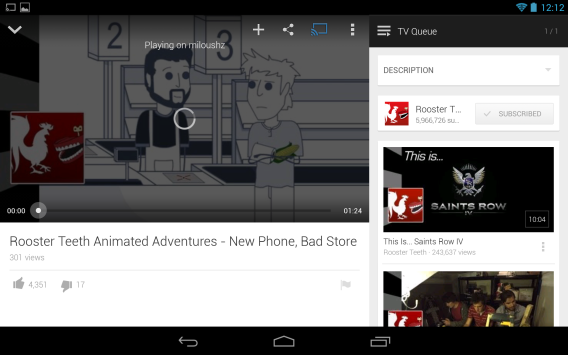
Streaming content to the Chromecast is easy. On Android devices, supported apps have a small Chromecast icon that allows you to push to the device for streaming over the television. The images on screen looked great and playback of Prometheus from Google Play Movies & TV rendered perfectly on a 720p HDTV at home.
Google Play Music also had no issues, though the cast image is pretty bare with only the album cover and track information displayed.
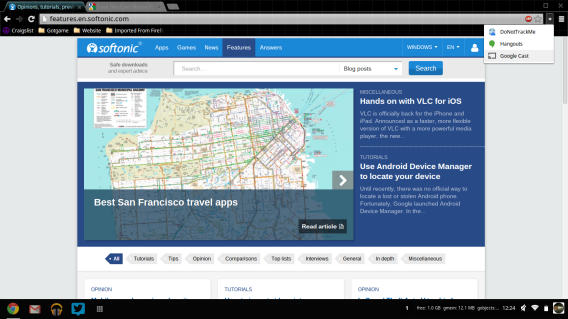
The Google Cast extension lets you mirror tabs in the Chrome browser on the screen. I came across one small issue with different screen resolutions – casting a tab from Chrome in the Chrome OS to a 1080p HDTV resulted in a pixelated image. It was still readable, but the crispness of the HDTV showed a magnified lower resolution.
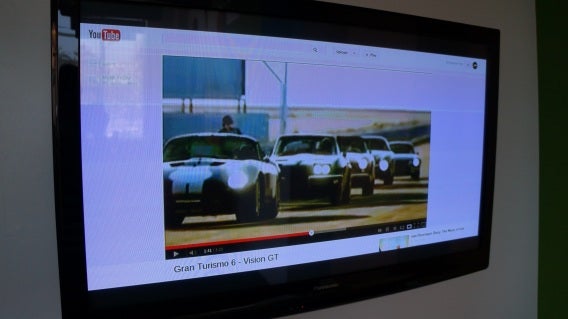
Playing a video from YouTube works, but an unstable network caused lag between commands in Chrome to the mirrored tab on the TV.
Official supported uses
Chromecast also supports Google Play Music, Google Play Movies & TV, and Netflix.
Google Play Music will stream music from your Google Play Music account with little effort. Google Play Movies & TV can quickly load content and you can control options like captions via the Android device. Netflix performed similarly to Movies & TV with little lag on my home network.
Casting from the Chrome browser is always going to be limited by your network. Testing a small 15 second video played through Google Drive‘s web interface never fully loaded on the wireless network in work. If you have a congested wireless network, don’t expect good performance.
Unofficial supported uses
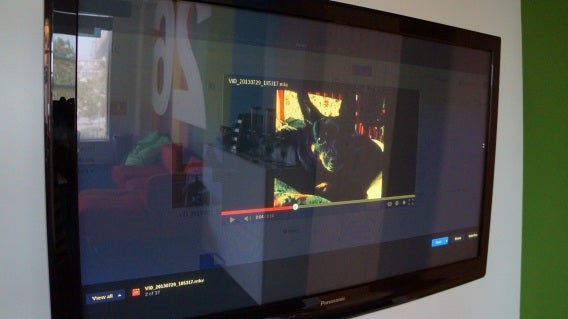
Lots of additional, unofficial Chromecast features have been discovered. One of these is pushing local files from the Chrome browser through Google Cast to the TV.
If you are casting from Chrome, you can drag and drop video files into the browser to stream them. Again, your wireless network will affect quality, but it’s possible to play different video formats from Chrome to Chromecast. The best-known format that won’t play is native Apple video.
But consider the file that you’re going to play. A rip of a Blu-ray is probably not going to stream well with all the data the file holds. Most file formats should have no problem, though there may be a sync issue in the beginning that should resolve itself. The main issue will probably revolve around buffering large video files from the laptop.
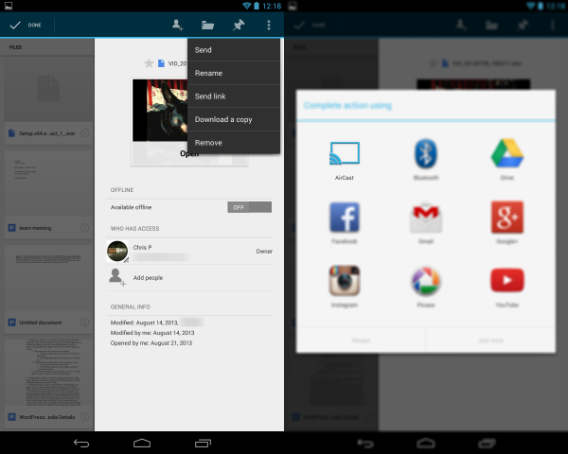
Koushik Dutta released an Android APK called AirCast that lets you stream content from the local Gallery, Dropbox, and Google Drive. He reverse-engineered the Chromecast protocols so other content could be accessed.
I tried using the apk on a Nexus 7, but could never get the app to push video stored on Google Drive to play through Chromecast. The app is still in development and the current APK is designed to self-destruct after two days. Google updated the Chromecast to disable local file casting with its latest update, but there are signs that casting local content will happen in the future.
A lot of Android developers are exploring the potential of the Chromecast for streaming media and I’m sure that, as well as improving support, Google will expand the device’s uses in the future.
Final thoughts
The Chromecast is an interesting device and paired service. The low cost of entry makes giving it a try really easy, if you’re patient enough to get one. Even with limited support for apps right now, the fact that Netflix is supported makes it easier to play video than using another standalone device connected to the TV.
The inclusion of Google Play Movies & TV is appreciated, but its ecosystem isn’t that strong. Google Play Music’s streaming option is nice, but the user interface through the Chromecast is very minimal and needs options like visualizations to make it more attractive.
As the replacement for the Nexus Q, Chromecast is the superior option and if Google continues to update the device with more supported apps, like casting games, it could eventually replace Google TV.
The unofficial uses of Chromecast display the potential of the device and it’s likely that even more creative uses will be discovered by the development community. We can’t wait to see them.
The original release of Final Fantasy XIV in 2010 was met with harsh criticism from both players and press. Square Enix themselves conceded that the MMO was a failure and the producer formally made an apology for the state of the game. Over the next three years version 1.0 of Final Fantasy XIV was retooled with new gameplay mechanics, updated graphics engine, improved servers, and a fleshed out story. In the end the game was released as version 2.0, Final Fantasy XIV: A Realm Reborn.
Default player
brightcove.createExperiences();
I played Final Fantasy XI for several years, and eagerly picked up Final Fantasy XIV when it first launched. While I didn’t despise the game like so many others, it was rather lukewarm and I only played for about five months. Due to my subscription of 1.0, there was no need to purchase 2.0 as it automatically rolled into my account. I was also granted early access to the game three days before the official launch. I’ve chronicled my impressions as a returning player coming into a very different world.
Warrior of Light
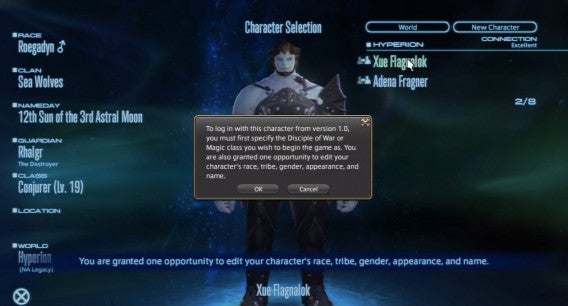
A Realm Reborn (2.0) takes place five years after the end of the original Final Fantasy XIV (1.0). Story-wise, the world was under siege from the primal Bahamut and the empire of Garlean. In a last ditch effort to save the heroes from utter destruction, they were transported five years into the future, though with their memories fragmented. New 2.0 players take the role of novice adventures who will hear stories of the “Warriors of Light” that fought five years ago. 1.0 players are instead the actual Warriors of Light, who have certain small advantages and slightly altered stories.
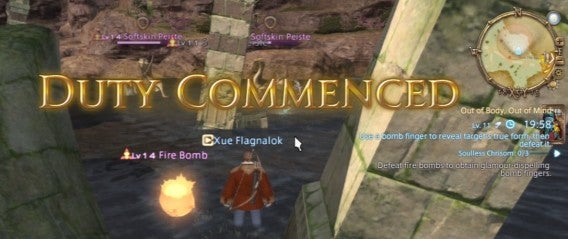
As a Warrior of Light I retained my class levels, abilities, gear, money, mount, and ability to change classes. I however didn’t keep access to various quests, transportation (airship), retainers, or other companions. Despite my higher level I found myself at the same story progression as any other player. I started 2.0 in the higher level 20’s as a Pugilist and soon found myself blitzing through quests without much thought of difficulty or goals. The focus was to get my airship pass as soon as possible and travel to other cities. This required going through a large amount of quests designed from levels 1 through 15.
Eventually I decided to drop my Pugilist gauntlets and take up lower level classes such as Lancer and Archer. If I was going to be doing lower level content, it made sense to be lower level and gain appropriate rewards. Even if you are higher level, 2.0 makes full use of ‘level syncing’ to reduce your current level and bring it closer to one applicable to the story or dungeon you’re undergoing. This meant that I was typically on my toes, even if I went in with higher levels and overpowered gear. What also made things nice was that most quest rewards let you opt out of getting lower level gear in exchange for more money (gil).
Duty Finder and roles
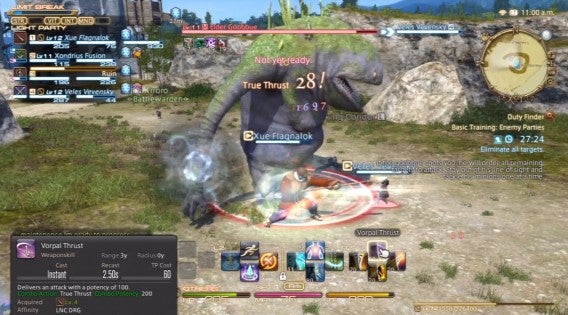
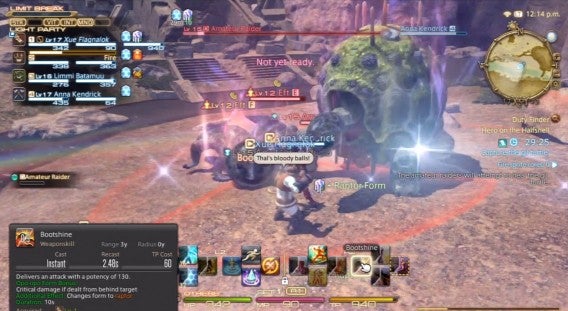
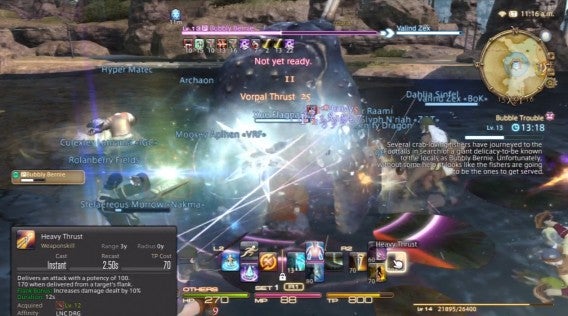
One of the biggest improvements is the implementation of the Duty Finder, Final Fantasy XIV version of a Dungeon Finder. Not only does it include finding full dungeons, but shorter “Guildhest” group quests, hunts, and eventually will allow PvP. The first few of these objectives are available at level 10, but as mentioned before you can enter at higher levels and by synced down. One thing to keep in mind that each class can only queue as a single role, even if they have been gearing themselves as something else. Marauders and Gladiators are assigned tanks; Conjurer as healer; and Lancer, Archer, Pugilist, Arcanist, and Thaumaturge as damagers (DPS or Damage per second). Basic dungeons require one tank, one healer, and two damagers.
As you can imagine this can mean long wait times for damage dealers, while tanks and healers get first dibs. My classes above 10 and ready to use Duty Finder were Pugilist, Lancer, Archer, and Conjurer; three DPS, a healer, and no tanks. Though you only actually need these roles to queue, you can still run around as other classes in the meantime and actively switch classes during a dungeon or guildhest. In some cases many players were switching to melee DPS (Lancer, Pugilist) to tank simpler encounters.
Roles expand slightly at level 30, where each class can upgrade to a job once achieving level 15 with a designated secondary class. For example a 30 Pugilist/15 Lancer can become a Monk, which is a more specialized and less customizable Pugilist. Most of the classes advance to only a single job, which shares its original role. The exception is Arcanist (DPS), which has two jobs in the form of Summoner (DPS) and Scholar (Healer). In the end players will have to wait until level 30 to see more healer options.
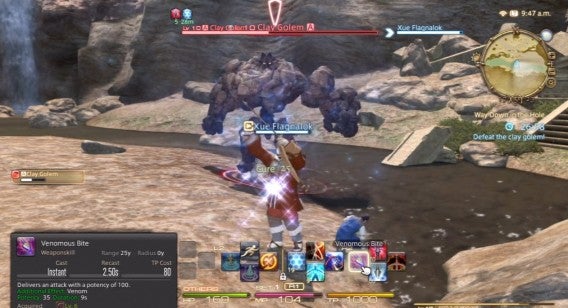
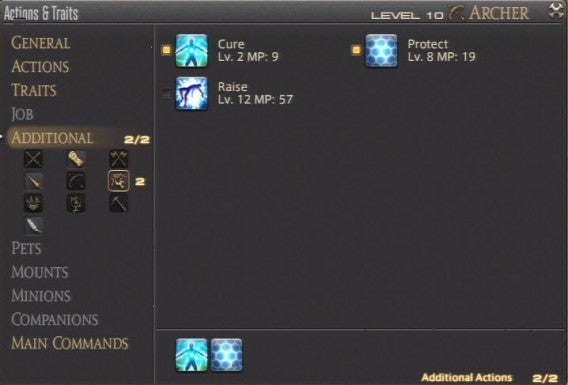
Most classes can already heal and defend themselves by assigning additional abilities from other classes. For example my levels of Conjurer allowed me to assign magic such as Cure, Protect, and Raise to my DPS classes. Though the amount of healing was much lower and couldn’t be used as area of effect, it was still very useful in a pinch. Most jobs lack the option of adding in a variety of cross-class abilities, and are restricted to only a select few. The question for players is if it’s better to have the specialized strength of jobs, or the diversity of classes. It’s speculated that classes will be better for soloing, while jobs will shine in groups.
Fate and Levequests
It seems that with so many classes that you’ll be spending a lot of time grinding. Besides the Duty Finder, there are many activities to relieve the monotony of leveling. The first is Fate, timed world quests that sprout out around and allow anyone to take part in. This isn’t really new to MMOs, as games such as Guild Wars 2 and Warhammer Online: Age of Reckoning implemented them all the time. Fates are very common and quick allowing easy experience and gil without much hassle.
Levequests return in A Realm Reborn. Levequests are short quests designed to be completed solo and can include fights in the field, gathering materials, or crafting in town. An improvement to Levequests is that you can hold up to 100 at once, and are rewarded an extra allowance every few hours. One drawback is that you will fail a Levequest if you happen to disconnect or are transported to an instance, such as using Duty Finder. This can make it risky to initiate a leve when you are queued for something else.
Additionally, the item rewards and assignments are typically geared towards the guilds that are located in the nearby cities. For example in the city of Ul’dah and the surrounding region you’ll likely be given gear for Gladiators, Pugilists, and Thaumaturge; crafting and gathering is typically for Weavers, Alchemists, Goldsmiths, and Miners. This isn’t much of a problem for 2.0 players who might already be those classes. However, as a returning 1.0 user most of those proved worthless and motivated me to continue my hasty pursuit of an airship pass, and guilds in other cities.
World problems
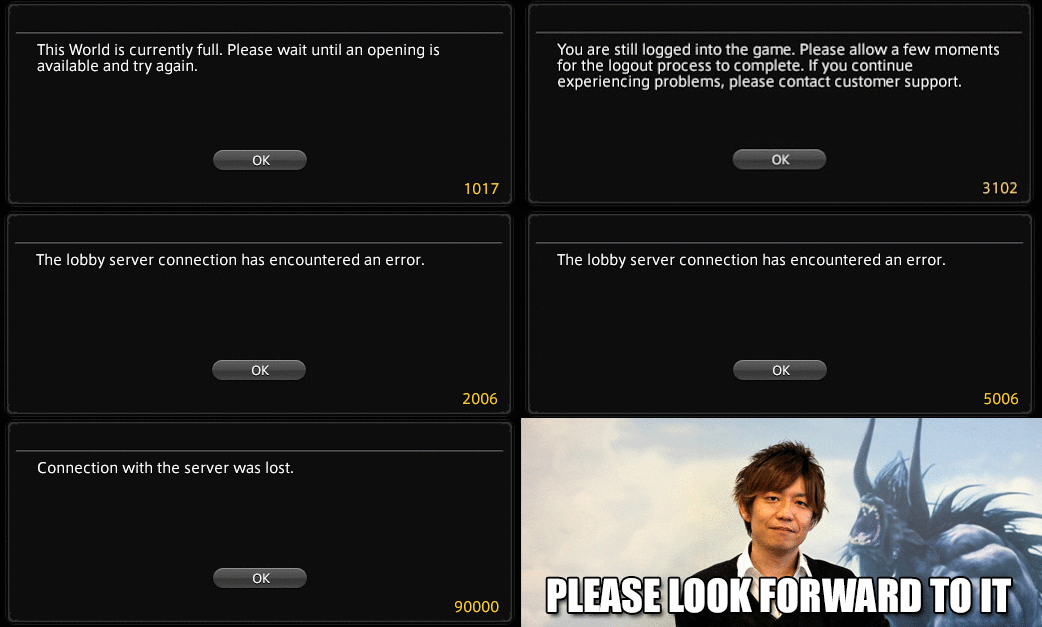
The biggest issues during early access were the technical server problems. Even though it was planned to gain a three day head start to older players and those that pre-ordered, it became difficult to even play. During the second day of early access, August 25th, Square Enix decided to limit the amount of players allowed on the NA/EU servers and disable the player queue. Instead of being placed in a waiting list, unfortunate players were given a “1017 error” telling them to log in when space was free. This led many to spam the login screen and attempt to brute force their way in. I was guilty of this and spent more than two hours trying to get in.
Even once inside the game there were still plenty of server errors, including crashes, time outs, and a broken Duty Finder. Many players were cautious, often staying in the same zone to avoid being disconnected and having to repeat the login fiasco again. Others went completely AFK, taking up player space with no form of auto kick to remove the idle. The problem was eventually resolved in the early morning of August 26th, allowing many players to easily get into the NA/EU servers. The JP servers never suffered these problems.
Ready for launch?
Final Fantasy XIV: A Realm Reborn officially releases on August 27th and the question remains is if Square Enix is ready. The amount of early access players represent only a fraction of the populace, and things could get worse once the floodgates open. It’s good that they’ve managed to work out some kinks now, even if felt like early access players were in a beta stress test.
A Realm Reborn is incredibly fun, compelling, and a great reboot to the lackluster original. Returning players will have certain advantages with gear and levels, but the playing field is rather balanced for with those that are coming in for the first time. If I spent hours just trying to get into the game, there is something alluring or addictive that many others will feel as they explore the new Eorzea. I’ll continue playing Final Fantasy XIV to explore all the nooks that I’ve yet to discover in the short amount of time so far.
Attachments in Gmail now appear as large thumbnails, and open up into full-screen when you tap them. The bigger change is the Google app integration. If you have Google Drive and Google+ installed, links to them will now open in the apps instead of through your browser, which is a much neater solution. This can be turned on and off in settings.
The fairly recent trend for better integration between apps is good news for users, but only integrating the Google eco-system means there are plenty of links that still open a browser when you really want an app. Only the native iOS Mail app will open directly into the Facebook or Twitter apps, for example, although it won’t directly open Google apps.
This lack of cooperation between Apple and Google may be due to competition between the two companies, but it’s annoying for users.
The Syrian Electronic Army has claimed its latest victims: Twitter and the New York Times. We previously reported that the SEA hacked Viber because it believed the service to be a massive spying program. Recently, the SEA’s attacks have become more and more aggressive, taking down the sites of major media outlets like CBS, NPR, The Washington Post, Huffington Post, and Associated Press.
The attack on the New York Times site briefly displayed a message from the SEA before it was quickly taken down. Twitter is suffering from a major outage but is still loading. Images on Twitter, however, are not loading and many third-party apps like Hootsuite are suffering from the effects of the attack. The attacks focus on exploiting Melbourne IT, the domain registrar of both Twitter and the New York Times, allowing the SEA to reroute traffic from its intended destination, meaning links on Twitter may take users to a completely different page.
At the time of this writing, the official Syrian Electronic Army site has also been taken down.
Rockstar has sent out a press release today for an upcoming Grand Theft Auto V trailer that will debut on Thursday, August 29th. Though there have been plenty of GTA V trailers, the one debuting on Thursday will the “The Official Trailer.”
The company recently revealed the in-game perks for the Special and Collector’s Editions of the game like exclusive vehicles, wardrobe, and abilities. This came after a leak where in-game assets, like all the spoken audio, were downloaded from the European Sony store from a digital pre-order file. The file was quickly pulled down, but not before fans were able to dissect the game’s plot and soundtrack.
Hype is building to an all time high as Grand Theft Auto V nears its September 17th release date. We’ll update you when “The Official Trailer” is revealed but you can check out the rest of our GTA V coverage here.
Back in June, Rovio teased a new Angry Birds game with a mysterious teaser site. The site showed a countdown from 3, the word “GO!” and a red angry bird taking off in a cloud of dust. While the company has not released a release date for the game, they have released a new teaser trailer that clears up a little about what the game actually is, putting to rest some of the rumors.
In the teaser video, a member of the Rovio team talks about how the company experimented with creating an endless runner type game like Temple Run or Minion Rush but decided to make a kart game instead. The energy drink company Red Bull apparently helped in this decision. The teaser video shows no gameplay video, though, so we’ll still have to wait for that.
Knowing the Angry Bird franchise, destructible karts and fighting are almost guaranteed. The teaser shows people dressed as angry birds crashing their soapbox derby karts. It’ll be exciting to see what Rovio comes up with in Angry Birds Go!.
Yesterday we reported that Windows 8.1 was completed and had been shipped to manufacturers to bundle with new PCs. In the past, when a new version of Windows gets released to manufacturing (RTM), developers in the Microsoft Developer Network (MSDN) and IT professions part of TechNet would get an advanced copy of the update. This has changed for Windows 8.1 as Microsoft has stated in a blog post that everyone would be getting the update at the same time.
October 18th is about two months away so users, developers and IT professionals will all have to wait for Windows 8.1 to be released via the Windows Store. “This is the date when Windows 8.1 will be broadly available for commercial customers with or without volume licensing agreements, our broad partner ecosystem, subscribers to MSDN and TechNet, as well as consumers,” says Microsoft.
Traditionally, MSDN and TechNet users are given early access as they have to prepare apps or machines for the update. There’s speculation that Microsoft has held off on giving early access to MSDN and TechNet users because they’re still working on some last minue bug fixes and features before the Windows 8.1 is truly ready.