Chromecast app comes to iOS

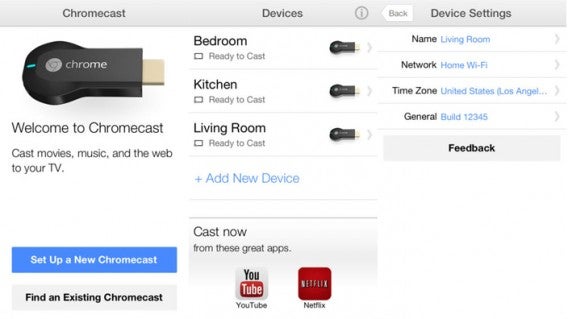
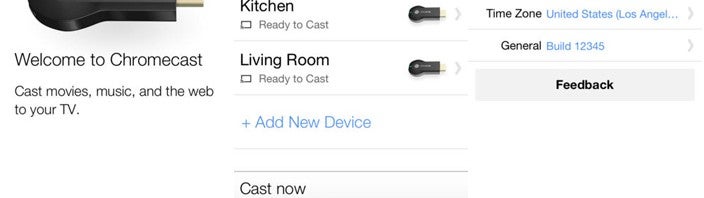
iPhone and iPad users can finally set up their Chromecast streaming device without the need for going on the web or using an Android device. The app works exactly the same as the Android version, allowing you to set up your Chromecast for the first time.

Both Android and iOS devices already have the ability to stream content to the Chromecast so the app isn’t adding any new functionality. The iOS app will show all of your different Chromecasts and allow you to add more. You can check your device settings, look at your Wi-Fi network, as well as specifying the timezone.

chromecast ios combined

It’s odd that Google didn’t debut both apps at the same time, but now those who purchase the Chromecast (if they can find one) will have a way to set it up using only their iOS device.

Download Chromecast for iOS

Source: iTunes

BitTorrent Sync available on iOS this week

Last month BitTorrent Sync, the app that lets you sync files securely using the BitTorrent’s distributed technology, launched in beta and on Android. BitTorrent wanted to release on Android first but told Softonic that an iOS version was in the works. Today, BitTorrent has announced that an iOS version of BitTorrent Sync is coming later this week so you can sync files across all your mobile devices.

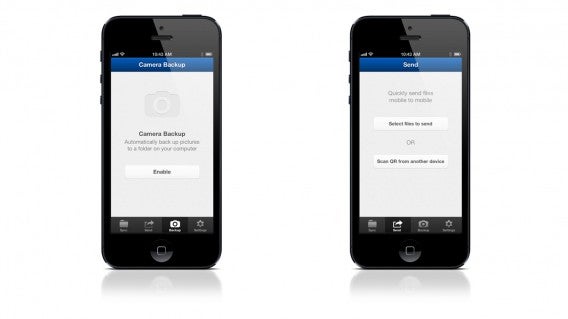
The beauty behind BitTorrent Sync is the ability to build your own personal and secure cloud. While apps like Facebook and Dropbox offer automatic photo backup, you have to trust those sites and services to keep your data safe from prying eyes. BitTorrent Sync allows you to back up your photos directly to a computer without using a middleman app. There’s also no file size limit and your storage space depends on how much space you have on your computer or device.

In addition to launching on iOS, BitTorrent Sync will have the app localized in ten languages, giving the app a more global reach. German, Spanish, French, Italian, Japanese, Russian, Chinese, and Portuguese speakers can now have an app in their language.

BitTorrent Sync will be available later this week in the Apple App Store.

Download: iOS (coming soon), Android

Source: BitTorrent Blog

10 essential games for your Android device

So, you’ve bought a shiny new Android and can’t wait to download the coolest games from Softonic. We understand the overwhelming number of choices out there, so we’ve prepared a list of the 10 coolest games for Android that will keep you glued to your device for hours on end. They’re part of our awesome Basic Tips for Android series – check them out below!

Angry Birds – An unqualified success

Angry Birds is a fun action game for Android. The mission is simple: Shoot pigs with a slingshot full of birds. Some games have an inexplicable hold on us – you play once, and you’re hooked. Angry Birds for Android is a great example.

Real Racing 3 – Our favorite when it comes to mobile racing games

Real Racing 3 is one of the best racing games for Android. Incredible graphics, realistic cars and several different types of races. All this and it’s free! There are several different race modes, including a new one, Time Trial, which lets you race against competitors from all over the world – the fastest time wins in a single elimination round. You can buy new cars, and repair or buy upgrades for your racing machine with money you earn while competing.

Asphalt 7: Heat – Burn rubber and win the race

Asphalt 7: Heat for Android brings all the magic of mobile car races to Google’s operating system. Undoubtedly one of the best racing games. Asphalt 7: Heat for Android has all the elements for a runaway success. There are six game modes, 15 tracks and 60 different cars. It’s impossible not to have fun.

Pou – Join the craze

Pou is a virtual pet for Android. Do you remember Tamagotchi? Pou is similar. You need to feed it, clean it and play with it for it to grow strong and healthy. Pou first appears on your phone’s display looking like a delicate little ball. By swiping your finger on the screen, it follows your movement with its eyes. And it’s full of minigames!

Talking Tom Cat – The most charming cat on Android

Talking Tom Cat is a super fun game for Android. Tom is a virtual cat who repeats everything you say and can even be quite rude. Talking Tom Cat is a first and foremost a game, it’s fun and good for a few laughs. But Tom is practically a real cat – you feed it, cuddle it and scratch its head when needed.

Candy Crush Saga – Logic and quick thinking

Candy Crush Saga is a strategy game for Android in the style of Bejeweled and Tetris. Perfect for people who like dynamic and fun puzzles, you connect vertical or horizontal lines of at least three of the same candy. Align four or more candies and you get special items that help end the level faster.

Real Football 2013 – Show who’s boss on the pitch

Real Football 2013 is the new version of the best free soccer game for mobile devices. Manage your team and compete with the best European teams on Android. The biggest new feature of Real Football 2013 is that, in addition to competing on the field, you have to train and manage your team and score wins for the franchise.

Temple Run 2 – Run, Lola, Run

Temple Run 2 is the exciting sequel to one of the most downloaded Android games from Softonic. The graphics and effects in this version are the best ever. Do you like ancient temples, monsters, and amazing Indiana Jones-style races? Then make room on your Android for Temple Run 2. This new version is even better than the first Temple Run.

Subway Surfers – World tour

Subway Surfers is a great action game for Android. The goal of the game is to avoid the Vandal Squad and a pitbull chasing you through the yards. The reason? You were caught painting graffiti in stations and on trains. Avoid obstacles, collect coins and dodge oncoming trains.

Grand Theft Auto: Vice City – Mafia hitmen, drug deals and criminal empires

Grand Theft Auto: Vice City is a great game for Android. Join the underworld mafia and show that you too can be a Godfather. It’s a simple idea that makes an excellent game for Android. In Grand Theft Auto: Vice City, you live in a replica of 1980s Miami and need to seek out the mobsters responsible for crimes.

Is there a great game missing from our list? Comment and let us know what your favorite game for Android is!

While you’re here, check out our Basic Tips for Android series!

Original article written by Felipe Pessoa for Softonic BR.

What is encryption?

Want to know why you should, how you can and how to do it right? Then read on!

What is encryption?

To encrypt is to transform information to protect it from prying eyes. By applying encryption, a message is altered beyond recognition or appears incomprehensible, but the information isn’t lost and can later be retrieved.

Scrambling the alphabet and exchanging one letter for another is a classic example of encryption (source).

The method used to create and retrieve (decrypt) an encrypted message is a shared secret between the message sender and the recipient. The discipline of studying these mathematical methods is called cryptography.

When someone other than the recipient tries to decipher the message without knowledge of the technique used or the key required to decrypt, it’s known as a cryptographic or cryptanalytic attack. Its aim is to “break” the message encryption. If you think of an encrypted file like a trunk, the cryptanalyst is like a thief who forces the lock rather than using the key.

Encrypt doesn’t mean to hide

Don’t confuse encryption, which is the alteration of a message, with concealment. Steganography is the discipline of concealing information through a variety of methods that are often used in conjunction with cryptographic techniques.
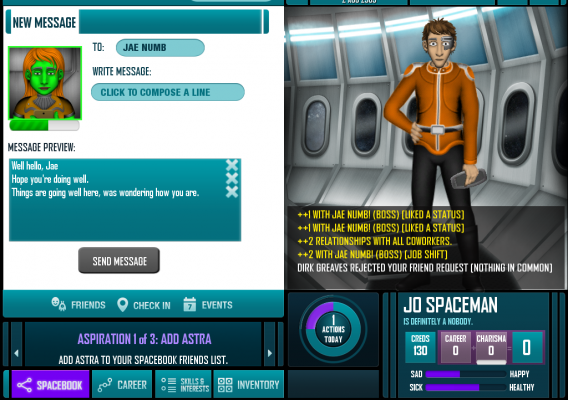
Steganography is hiding information within other pieces of information (source)

While the purpose of cryptographic techniques is to prevent the content of the message from being interpreted, the goal of steganography is to make the existence of the message unknown. An example is hiding a message within an image.
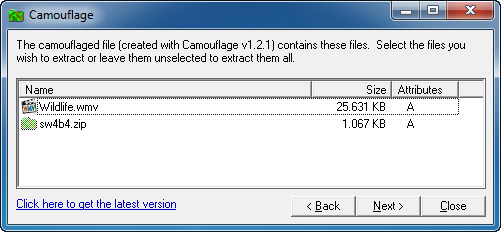
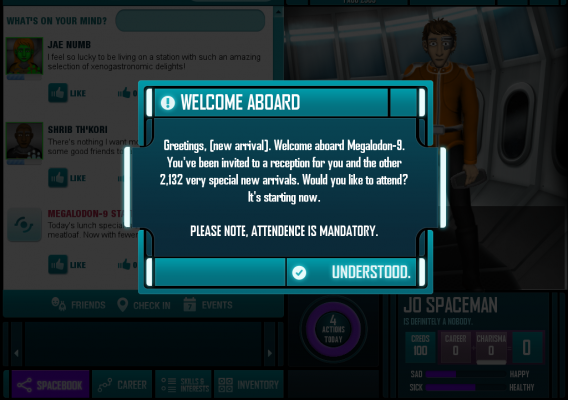
Since an encrypted message may attract unwanted attention, cryptographic techniques can be used in combination to hide a message.

Encryption and computing: a good marriage

Cryptographic techniques have been used since ancient times to transmit information of strategic importance. Initially, these techniques were as simple as rotating letters using a scroll wrapped around a stick.

Reproduction of Roman scrolls, used in ancient times to encrypt messages

Later on, complex mechanical devices were used, such as the famous Enigma machine, which the Germans used successfully for years to transmit orders during World War II.

Closeup of Enigma machine rotor

During World War II, the ongoing need for better decryption techniques led to the development of the first computers, machines more powerful than the mechanical calculators previously used by cryptanalysts.

Encryption software

Today, encryption is used in many different situations where it’s essential to keep secrets. In many such cases, encryption is present without you even knowing.

Cryptographic techniques are used in many scenarios:

  • For web site authentication
  • When voting in online elections
  • To pay online with a credit card
  • When receiving and sending emails
  • When saving confidential documents
  • To check the integrity of a file

In most cases, these techniques are automatically used by applications, and the only thing you have to worry about is remembering a password. In other cases, encryption is voluntary and depends on the security level you want to achieve.

Encryption types

There are many encryption techniques available. Most of them can be classified into three main categories:

  • Classic encryption
  • Symmetric encryption or secret key
  • Asymmetric encryption or public key

Classic encryption uses more or less complex alphabetic substitution methods. It’s very economical, but also vulnerable to attacks such as frequency analysis.

The secret message that appears in the story “The Gold-Bug

Symmetric encryption is the use of the same key to encrypt and decrypt an encrypted message. Until 1976, this was the only kind of encryption available for data protection in computing environments.

Steganography is hiding information within other pieces of information (source)

The fact that there is a shared secret between the transmitter and receiver is a vulnerability that has been resolved only for asymmetric encryption. Still, symmetric encryption is widely used and respected.

With asymmetric encryption, the shared secret problem is solved: Messages are encrypted with a public key, but only the designated recipient can decrypt them with your private key, which (in theory) no one else has.
Asymmetric encryption ensures confidentiality (top) and authenticity (below) – (source)

By not needing an initial key exchange, asymmetric encryption greatly reduces the chances of a successful cryptanalysis. Asymmetric encryption can also be used to sign documents and verify authorship.
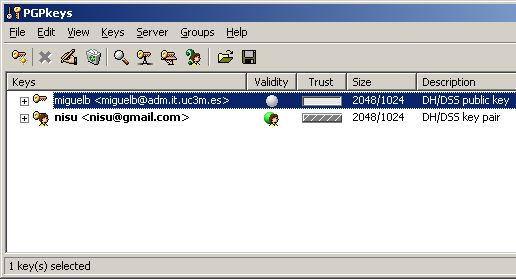
PGP is a well-known example of an asymmetric encryption program.

In both types of encryption, the strength of a key is indicated by the bits or key length. A 3072-bit key is much more complex and difficult to break than a 128-bit key, but also requires more computing power.


What is a cryptographic attack?

Cryptanalysis is investigating the weaknesses of encryption techniques. It’s a fascinating discipline, a combination of linguistics, mathematics, reverse engineering and espionage.

The techniques used for a cryptographic attack vary depending on the amount of information available about the encryption used and the protected data. Knowledge about the technology used and the content is helpful to the attacker.

Whatever attack is used, there are three resources that any attacker needs: time, prior information and computing resources. The complexity of current encryption systems sometimes requires very powerful computers.

Steganography is hiding information within other pieces of information (source).

A widely used type of attack is the brute force method, which uses all the power of a computer to guess a password. The longer the key, the longer it takes for the attacker to guess it… if they guess it at all.

The downside to encryption

The advantages of encrypting data are clear: protecting privacy, identity, data integrity and security when sending information via open networks. But encryption also has its disadvantages.

The most obvious drawback is that once the key that’s used to encrypt the data is lost, you forever lose access to that data. It’s inconvenient, not to mention embarrassing, and happens often unless you choose easy to remember passwords – which in turn presents its own security risk.

Another drawback of encryption is that it’s slow, costly and inconvenient to use strong encryption techniques. These drawbacks have been minimized over the years, as computing power has increased, but it’s still a problem.

Relationship between length (strength) of an RSA key and decryption time (source)

Finally, the false sense of security that encryption creates can be a double-edged sword, especially if the techniques are applied lightly. Attacks via social engineering and phone-hacking can bypass even the most robust keys.

What applications can be used to encrypt your data?

Encryption used to be only for governments and corporations. Now anyone can use the strongest encryption techniques on a personal computer or mobile phone.

The two protection scenarios in which you can apply encryption are as follows:encryption while in transit and local encryption. The former ensures the privacy of your data as it is transmitted over the network. The latter ensures the privacy of your local data.

Encryption of information in transit

  • HotSpot Shield, a tunnel VPNconnection that protects your privacy
  • BoxCryptor, which encrypts Dropbox files and other cloud content
  • PGP, the most frequently used email encryption method (or GnuPG)
  • TigerChat and other secure messaging apps
  • Encryption of local information

  • TrueCrypt, a utility that creates virtual encrypted drives
  • FreeOTFE, an excellent alternative to TrueCrypt
  • AxCrypt, an encryption suite for Windows
  • SSE, a cipher suite for Android devices
  • Learn more…

    Original article written by Fabrizio Ferri-Benedetti for Softonic ES.
    More details about Grand Theft Auto V Special and Collector’s Editions

    We already knew about some of the items that would be bundled with the Collector’s and Special editions of Grand Theft Auto V but now Rockstar has revealed what in-game bonuses players will receive.

    First off, both Special and Collector’s Editions will include a pair of special firearms: the .50 Caliber Pistol and the Bullpup Shotgun. These weapons will be available at any Ammunition in Los Santos. Players will also get a new melee weapon in the form of the Hammer, which is pretty self-explanatory.

    Players will also receive a 20% discount off of personalization items like clothing, tattoos, and more. This discount applies across all three protagonists in the game at any of the retail shops in the game.

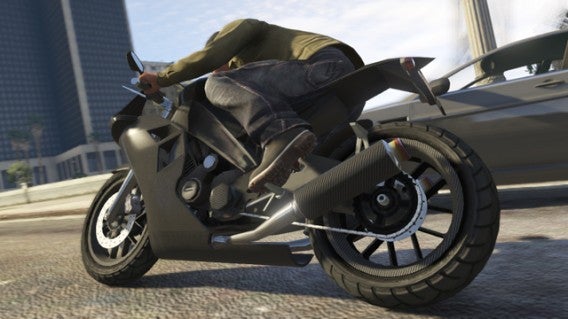
    It’s not just looks though, as the Collector’s and Special editions will include exclusive vehicles in the game. There’s a carbon fiber sports bike, the CarbonRS and the Hotknife, which is a 1930s styled hotrod. When players log on to Grand Theft Auto Online, they will have access to the Khamelion electric car, which won’t be available in the single player campaign.

    Players can look forward to creating custom characters in GTA Online as well as character models for Niko Bellic of Grand Theft Auto 4 and Claud and Misty from Grand Theft Auto 3.

    Last but not least, players with the Collector’s and Special editions will get a Special Ability Bar which refills 25% quicker than in the standard game. Each of the three characters in GTA V has his own special ability; Michael can slow down time in a gunfight, Franklin can slow down time while driving, and Trevor can activate his rage mode to do more damage to enemies.

    For more information about the special editions of Grand Theft Auto V, check out the source link below.

    Source: Rockstar

    Yahoo! starts handing out abandoned IDs, will cost $1.99 to request name

    Back in July, Yahoo! released a site where users could sign up for a user ID wishlist. The company noticed that many IDs had been abandoned and decided to give them out to active users instead. The “My Wishlist” site allowed users to select up to five of their ideal user IDs.

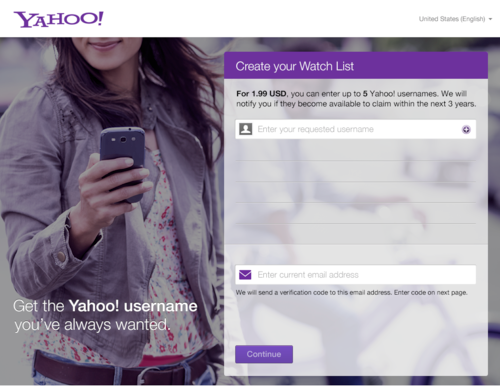
    For those who didn’t sign up for Wishlist by the August 7th deadline, Yahoo! will still help you try and secure the user name of your dreams but for a price. $1.99 will give users access to the Watchlist, which lets you select up to five user names and will alert you when they become available. The service lasts for 3 years so $1.99 isn’t too much in the long run if you really want a better user ID.

    yahoo watchlist

    Yahoo! also listed the most requested names for guys and girls. Here’s what they are:

    Top 3 name requests for guys:

    • David
    • Michael
    • Alex

    Top 3 name requests for girls:

    • Maria
    • Jennifer
    • Jessica

    If you want to sign up for the Yahoo! Watchlist, you can do so here.

    Source: Yahoo!

    Facebook begins testing shared photo albums

    Collaborative photo albums are coming to Facebook soon. The social network began rolling out the new feature to a limited number of English users but plans to roll the feature out internationally in the future.

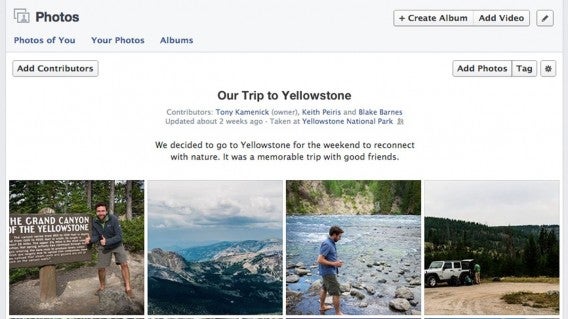
    Shared photo albums will allow users to create a collaborative album with full privacy controls. You can choose between sharing publicly, friends of contributors, and contributors only, making sure you’re sharing to who you want.

    Since the feature is still being experimented with, there are a few limitations. There’s a limit of 50 contributors and each can only share up to 200 photos. Facebook developers have stated that they plan to increase this limit if needed in the future. The shared photo album feature also only works with the web. There are plans to bring the feature to mobile devices in the future.

    Shared-Album-Screen

    The idea for shared photo albums came from one of Facebook’s “hackathon” sessions where employees gather outside of work to create experimental features. “Right now, if you were at a party and there were three different albums created, you might not be able to see all the photos [based on privacy settings], which is kind of confusing and frustrating,” says Bob Baldwin, the Facebook engineer who lead the shared albums project.

    Facebook isn’t the only company to see the value behind collaborative photo albums. Google released an update to its Google+ social network during the company’s 2012 Google I/O developers conference. Google’s shared albums, dubbed “Party Mode”, allows guests to participate in sharing photos at an event, which get broadcasted live on Google+.

    Source: Mashable | Header image credit: Facebook

    Windows 8.1 finalized, released to manufacturers

    Microsoft has finished hammering out all of the bugs in Windows 8.1 and has released it to manufacturers to be bundled with new PCs. The company has hit is goal of rolling out a RTM (release to manufacturing) release by August and it barely made it with six days left in the month.

    The Windows 8.1 upgrade will be free to all existing Windows 8 users and will be available to download from the Windows Store on October 17th. The updates to the operating system are pretty minor but will help make Windows 8 feel like a more polished product. Microsoft is bringing back the Start button, offering more personalization with Live Tiles, and the ability to snap multiple windows for multitasking.

    Read more about Windows 8.1

    Source: CNET

    Grand Theft Auto V soundtrack, digital pre-order leaked then pulled

    Over the weekend, the alleged soundtrack for Grand Theft Auto V was leaked on the site GTAForums.com. The soundtrack was then posted on Reddit and fans quickly pieced together links to the songs so excited fans could get a taste of the music before the game launches on September 17th. The folks over at The Verge even created a Spotify playlist for you to enjoy.

    In addition to the leaked soundtrack, the digital pre-order file was leaked in the European PlayStation store. While it was quickly pulled down, Rockstar Games was not happy. “As you can imagine, we are deeply disappointed by leaks and spoilers being spread in advance of the game’s launch,” writes Rockstar in a blog post.

    This leak allowed people to pull assets from the game, which contain some spoilers. While no major spoilers were revealed in the leaks, fans shouldn’t have to avoid spoilers for long as the game is just 3 weeks away.

    Source: PlayStation | Rockstar

    AdBlock – using ads to get rid of ads?

    AdBlock is a Chrome extension that blocks internet advertising from sites you are viewing. Now, in an unusual turn of events the company is crowd sourcing for donations so it can run its own advertising campaign to raise awareness of the tool. As it says on the campaign site, ‘We’re going to use ads to get rid of ads.’

    AdBlock is founded on the idea that advertisements are annoying, and the Chrome extension apparently has 15 million users. While some users do find ads annoying, it is those ads that keep most sites running, and available for free. There has yet to be a viable alternative to this model for websites, and if everyone used AdBlock, most sites would probably cease to exist.

    AdBlock’s competitor, AdBlock Plus (they are not related), takes a slightly more subtle approach, with its ‘acceptable ads’ feature. AdBlock Plus sees that there are annoying, intrusive ads, and acceptable ones. They have a ‘whitelist’ of sites that meet their criteria of acceptable ads.

    AdBlock’s advertising goals include a Times Square billboard if they reach $50,000, a New York Times full page ad at $150,000 and right at the top, the unlikely goal of $4.2 million for a Superbowl 2014 ad.

    Download AdBlock for Chrome

    [Source: TheNextWeb]