The Softonic Minute: Street View, Vine, World of Warplanes and Talking Tom

Google Street View takes you through the canals of Venice, Vine arrives on Windows Phone, World of Warplanes is available for PC download, and Talking Tom turns into a Tamagotchi. Check out this week’s hottest software news in The Softonic Minute.

Default player

brightcove.createExperiences();

Google Street View takes you to Venice

Google has added the canals of the Italian city to Google Maps. You can travel more than 380 miles around Venice on foot, gondola or vaporetto thanks to Google’s Trekker Camera. Thanks to this new addition, you can explore some of the most famous landmarks the city has to offer, without leaving the comfort of your own home!

Vine comes to Windows Phone

Twitter’s microvideo service Vine has landed on the mobile operating system from Microsoft, offering all the same options as on the iPhone and Android versions. The only thing Windows Phone is missing now is Instagram! Download Vine for Windows Phone.

World of Warplanes, a war in the clouds

World of Warplanes is now available for download on PC. It’s a free-to-play game in which you fly warplanes while encountering other players in the sky. If the visual style seems a bit familiar, it’s because World of Warplanes belongs to the same series as the popular World of Tanks. Download World of Warplanes.

My Talking Tom: your favorite pet returns!

The developers of Talking Tom Cat have released a new mobile game, My Talking Tom, which is a Tamagochi style ‘virtual pet’ game. In My Talking Tom, you have to look after your cat and raise him from kitten to adult, making sure he is well fed, gets enough sleep, and is entertained! Download My Talking Tom for iPhone, Android and Windows Phone.

Check out all of our past Softonic Minutes here!

How many people get their news from Facebook?

How many people get news from the social networks they use? The Pew Research Center has analyzed 11 social media sources, like Facebook and Reddit, and discovered what percentage of users on each gets news from that source.

There are lots of interesting facts in the research. Less than one percent of Vine users get news from the social video service, for example, and 14% of users of MySpace get news from MySpace. Also, people still use MySpace, which is news to lots of us.

Reddit has the highest percentage as a news source, with 62% of redditors using it for news. This isn’t surprising, as Reddit is mainly for sharing and talking about stories. Twitter and Facebook are next, followed by Google+. Right at the bottom is Pinterest, which isn’t a big source of news stories at all.

It’s a different story when looking at what percentage of the population get news from each source. Reddit is only used by 3% of Americans, so it’s right near the bottom of the table. Facebook is the winner, with 64% of the population using the site, and 30% of those users getting news from it.

Perhaps worryingly, 10% of YouTube viewers get news from the video site. Pew defines news as “information about events and issues that involve more than just your friends or family”, which might arguably include videos about Justin Bieber, but we can’t be sure.

Which social media sites do you use for news?

Read the full report here.

RELATED STORIES

iOS 7.0.4 released with FaceTime and security fixes

Apple has released a small update for iOS 7, version 7.0.4. It includes bug fixes and improvements, and should correct the problem some users had with FaceTime calls failing.

iOS 7.0.4 is on 17 MB, but you’ll need at least 765 MB of space to perform the update. You also need to be connected to a WiFi network. A small security issue with App and in-App purchases has also been fixed in this update. Previously, a signed-in user was able to complete a purchase without providing their password. Apple says this has been fixed by adding ‘additional enforcement of purchase authorization.’

The update is for iPhone 4 and later, iPod touch (5th generation) and later, iPad 2 and later. You can apply it by going to Settings, then tapping General and Software Update. It will then be downloaded and applied automatically once you’ve aggreed to the terms of service.

RELATED STORIES

Flipboard for Windows 8.1 released

Flipboard, the news magazine app, finally debuts on Windows 8.1. After months of promising to bring the app to Windows, Flipboard has made good on its promise. The app will be familiar to users who have the Android or iOS versions. A version for Windows Phone is in the works and will be coming soon.

Users can navigate throughout the app with swiping gestures to flip between pages or bouncing out of a story. There are even more gestures in this version of Flipboard for Windows 8.1 as it works with Windows’ native gestures as well. Swiping up displays buttons for subscribing, refreshing, and editing while swiping down from the top will reveal additional information about the content you’re viewing.

Flipboard for Windows 8.1 also works with the operating system’s snap feature, letting you multitask with the app.

The Windows Store link still isn’t live yet but we will update this post when the link appears. In the meantime, check out the video walkthrough below.

UPDATE: It took a while but the link is now live. Download Flipboard for Windows 8.1 at the link below.

Download Flipboard: Windows 8.1 | Android | iOS

RELATED STORIES

iBooks gets iOS 7 redesign

Two months after releasing iOS 7, Apple has finally updated its iBooks app to match the rest of its apps and operating system. iOS 7 features a dramatic redesign of the operating system, getting rid of all the fake wood and metal textures that iOS was known for. However, iBooks featured a wooden bookshelf up until today.

The update also redesigns the iBook store, which now resembles the App Store and Newsstand apps. The entire interface is bright and minimal, no avoids using real world textures in its interface.

iBooks store

iTunes U, Apple’s education portal, has also been redesigned to fit the iOS 7 design standards.

iWork and iLife apps for iOS 7 have also been redesigned and are available for free with the purchase of a new iOS device.

Download iBooks for iOS

RELATED STORIES

BBM updated for Android and iOS

BlackBerry Messenger has been updated for Android and iOS today, bringing performance improvements, bug fixes, and new features. The update also brings support for the iPod Touch and iPad.

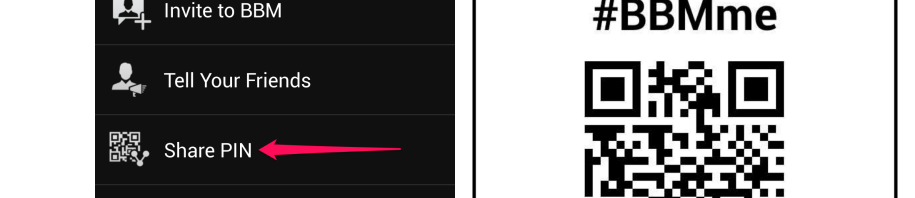
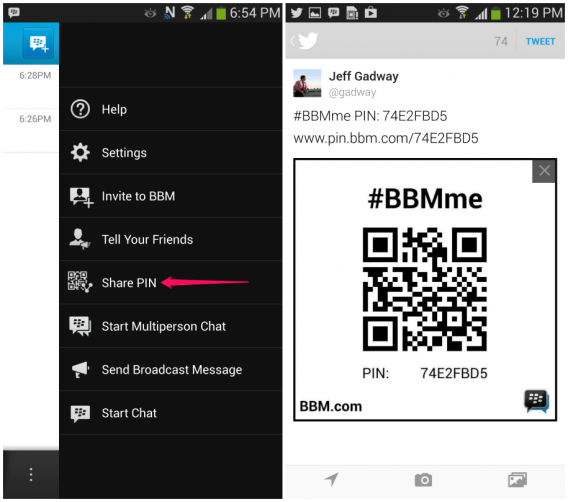
New to BBM is the ability to invite a contact to join a BBM group via email, which is handy if you don’t know your friend’s BBM PIN. Sharing BBM PINs have also been made easier with the addition of QR barcode you can scan.

BBM PIN barcode

Both Android and iOS versions will receive the updated features but Android users will get the ability to create categories in their contacts lists. Android users will also have the ability to filter BBM groups.

Here are the full changelogs for each version:

BBM for Android

  • Support for BBM Contact Categories
  • BBM Group List sorting and filtering improvements
  • More options for sharing your BBM PIN Barcode
  • Find your friends on other social networks who are also using BBM
  • Addresses an issue where some users may have experienced higher battery use

BBM for iOS

  • Support for iPod and iPad devices running iOS6 and iOS7
  • Improvements to right-to-left language support
  • More options for sharing your BBM PIN Barcode
  • Find your friends on other social networks who are also using BBM
  • Fixes an issue where some users would be missing BBM contact names

Download BlackBerry Messenger for: Android | iOS

Source: Inside BlackBerry

RELATED STORIES

Google Experience Launcher available for Android 4.1+ devices

Google is bringing its Google Experience Launcher (GEL) to phones with Android 4.1 and up. GEL debuted with Android 4.4 KitKat on the Nexus 5 but is now available to other Android devices. The launcher features Google Now integrated into the home screen, bigger icons, and a bunch of other interface tweaks.

The new launcher is bundled with the Google Search app for Android, which means it acts like a third-party launcher. You can run this on devices with custom skins like the Galaxy S4 or HTC One. When you update the Search app, you will be prompted to choose a default launcher where you can select GEL to take over your home screen.

GEL has been optimized to work on both Android tablets and phones running Android 4.1 and up. The launcher is able to display transparency, but only on devices running KitKat. This means older versions of Android will still feature the blacked out navigation and notification bars.

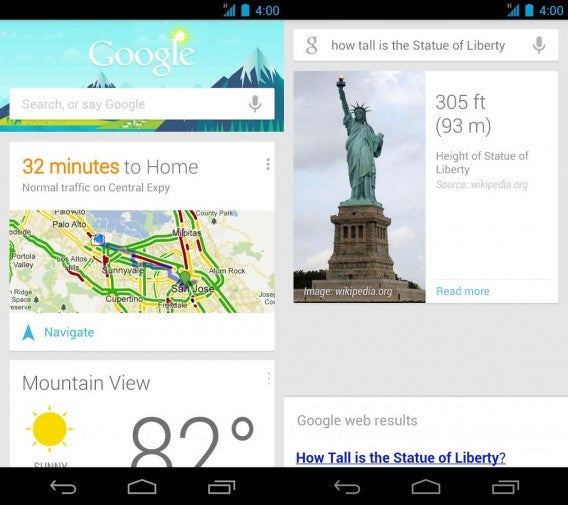
Google Now has also been updated with new cards for website updates, news topics, and what to watch. Additionally, Google Now now supports recurring reminders.

Google Now combined

Voice commands have also been improved, asking users for elaboration if there’s not enough information to execute a command. For example, if you tell Google to send a message, Google will ask who you want to send the message to and what you want to say. This makes the user experience much better if you haven’t memorized all the voice commands.

Download the latest Google Search for Android

Via: Android Police

RELATED STORIES

Google adds the canals of Venice to Street View

Google has brought the canals of Venice to street view, taking their Street View Trekker on gondolas to capture the city from the water.

As we reported last month, Google has started to add waterways to street view, beginning with the River Thames of London. Adding Venice means you can now explore many of the city’s canals as if you were floating along them. Google covered 265 miles on foot, and 114 by boat. You can see such sights as the Synagogue of the first Jewish Ghetto, and the Devil’s Bridge in Torcello island.

Google added a video to YouTube that shows you how the city was brought to Street View, which you can see below.

Google Maps is available on the web, as well as for Android, iOS and Windows Phone.

My Talking Tom, the new game from the makers of Talking Tom Cat

The developers of Talking Tom Cat have released a new mobile game called My Talking Tom, which is a Tamagochi style ‘virtual pet’ game, where you have to look after your cat and raise him from kitten to adult.

In My Talking Tom, you’ll have to feed you cat, as well as play with it, make sure it sleeps well and take it to the bathroom (just like a real cat…). You can give him gifts, like glasses or hats, as well as change his fur color and customize his house.

Playing with your cat gets you experience points, and level up, giving you new options. If you want more coins to spend on outfits or food, you can buy them through Google Play. Some of the in-game purchase options are pretty big, so parents should make sure their device settings do not allow kids to buy anything without authorization.

Download My Talking Tom for iOS and Android.

Find and remove duplicate files with these 6 tools

It may be hard to notice, but your PC could be clogged up with duplicate files taking up space on your hard drive! Although there are many multipurpose cleaning and optimization tools for your PC, like the popular CCleaner, there’s also specific software that can help you clean duplicate files, MP3s, and images from your hard drive and free up some space.

There are plenty of software apps that will help you remove duplicate files, and they all perform basically the same function: find and remove duplicate files, regardless of what type of file they are or which extension they have. You can search duplicates by name, size, file type, or byte-by-byte, for example, making it easy to filter exactly what type of files you are looking for. What are some of the best options? Below are some software apps that’ll make the task of finding and removing duplicates a lot less tedious.

Duplicate Cleaner

A popular file cleaning software that’s easy to use and has many options for removal and selection, Duplicate Cleaner will help you find and remove files, MP3s and photos. Its probably one of the best file cleaners out there because its easy to use, has a great interface, and it not only lets you remove duplicate files, but also helps you manage the original file too.

Fast Duplicate File Finder

Fast Duplicate File Finder is another good option for managing duplicate files. It lets you scan selected folders and locations on your hard drive, and has a built in image viewer that lets you preview images and multimedia files before you decide whether you want to permanently delete them or not.

Easy Duplicate Finder

Easy Duplicate Finder has very flexible scanning options and supports multiple drivers and file types, which is especially useful for audio and video files. It’s really fast and warns you about suspicious file types after scanning, in a window at the bottom of the screen. The downside? It’s lacking a user-friendly interface.

Auslogics Duplicate File Finder

Auslogics Duplicate File Finder is the quick but simple option for removing duplicate files. It has few advanced features, but is quick and gets the job done!

Duplicate Music Files Finder

Specifically for helping you sort through your music library, a common source of duplicate files, Duplicate Music Files Finder can help you find and sort duplicate music files scattered throughout your PC. It also looks for redundant files, or files that no longer work properly, to further help you clean and organize your hard drive. It supports many different audio formats, including  MP3, WMA, OGG, APE, MPC and VQF.

SimilarImages

Like the above mentioned program, SimilarImages is software specifically meant for removing one type of file: images. It not only helps remove duplicates of the exact same image, it also finds similar images, meaning images that may look the same but are in a different size or format. The scan is quick and convenient, so if you’re looking for a quick way to sort through all your photos without viewing them one by one, this piece of software will help do the trick.

Have any of these programs helped you manage your duplicate files?

[Original article published on January 20, 2009]