App of the Week: Marco Polo

Softonic’s App of the Week highlights some of the coolest, most unique, and most interesting mobile apps for iOS and Android. This week, everyone’s favorite childhood game lands on iOS to help you recover a misplaced iPhone. The name of the game? Marco Polo.

How does it work? Simple. Just turn on the app and let it run in the background. If you misplace your phone, yell out “Marco”. Your phone responds with “Polo”, and voilà, you’ve found it. Hopefully, at least.

Default player


brightcove.createExperiences();

Of course, the app isn’t perfect, but the concept is fun. Yelling “Marco” doesn’t always illicit a response from the phone, and you have to be careful with pronunciation in order to get a reaction. You can, however, change the voice of the app to 30 different “Polo” responses, and you can even customize the keyword so that you can yell out anything from “Columbus” to “Magellan” to find your phone. Running the app in the background will also take up a lot of battery life.

It’s not a replacement for your iPhone’s Find My Phone feature, but it’s a fun concept with $0.99 price tag that could just help you find that lost phone between couch cushions.

Make sure to check out some of our past App of the Week features.

Goat Simulator 1.1 update out in June, brings more goats

Coffee Stain Studios has announced update 1.1 for Goat Simulator, a tongue-in-cheek goat simulation game for PC, will finally be released on June 3rd. Having previously slotted a released date in May, the developers have finally set a concrete date for the anticipated update. It’ll be a big update that brings many improvements, changes, and content, including new goats, a new map, and split-screen multiplayer mode.

The free update will include:

  • A new map as big as the old map
  • Split-screen local multiplayer for up to four goats
  • The ability to run up walls or hold your front hooves
  • The ability to ride bikes and skateboards
  • New playable goats including “Tornado Goat”, “Shopping Goat”, “Classy Goat” and “Repulsive Goat”
  • Several optimizations, achievements and “that kind of thing”

While Goat Simulator may have been called the “the dumbest game in the world” by it’s own creators, that hasn’t stopped it being a huge success among gamers.

Read our full review of Goat Simluator and download the game here.

Follow me on Twitter @suzieblaszQwicz

RELATED NEWS:

Google Forms and Drawings are tools you probably don’t know about

The Google Docs suite of web apps are great alternatives to the standard productivity suites we’re familiar with, but there are two, lesser known tools that Google’s also released. Forms is an easy survey app that can load results into Google Sheets, while Drawings is an online artist tool.

I’ve used Forms a lot to get feedback for different projects, and the support with Sheets makes looking at the results very easy. Drawings is an app that I’ve seen a lot, but never had to use. It’s likely you may have never needed it as well. Here, I’ll go through the features of Forms and Drawings to help you make use of these Google Docs tools.

Forms

Form is an app for making surveys, and like other Google Docs apps, there are different themes you can use. For Forms, it seems easier to use the default theme because they look a bit cluttered.

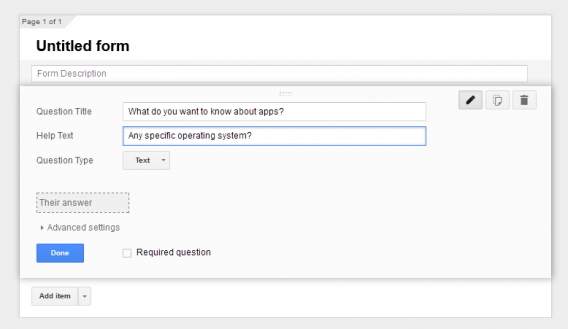
The purpose of Forms is for feedback. In its most basic layout, you are given space to enter a Question Title and Help Text, where the Help Text is extra space to explain in more detail what you’re asking.

The next section is Question Type. This is how people will respond.

Google Form text

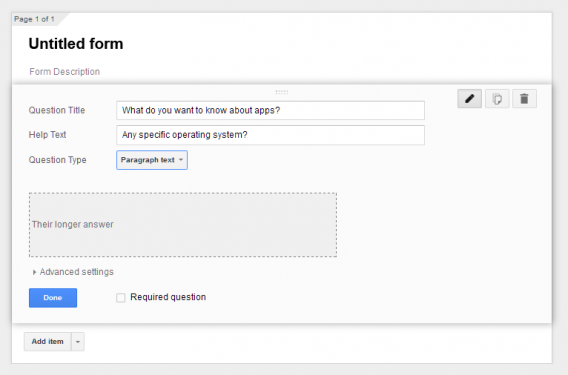
Text: short answer

Google Forms paragraph
Paragraph Text: long answer

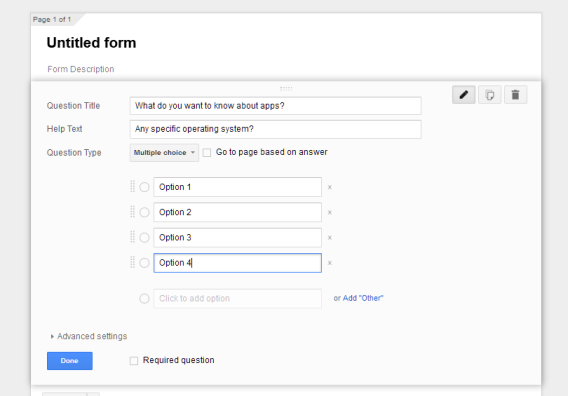
Google Forms multiple=
Multiple Choice: one choice between a number of options

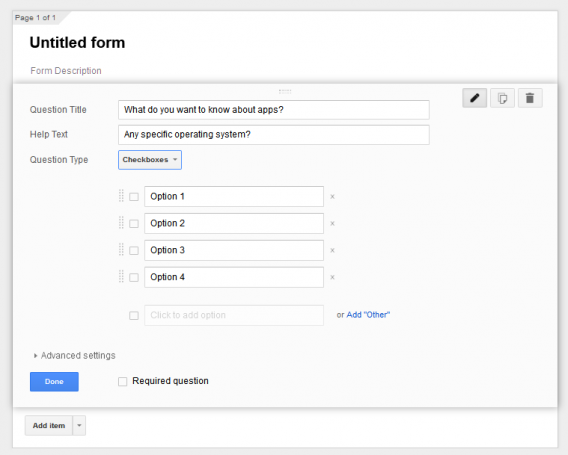
Google Forms checkboxes
Checkboxes: multiple choices between options

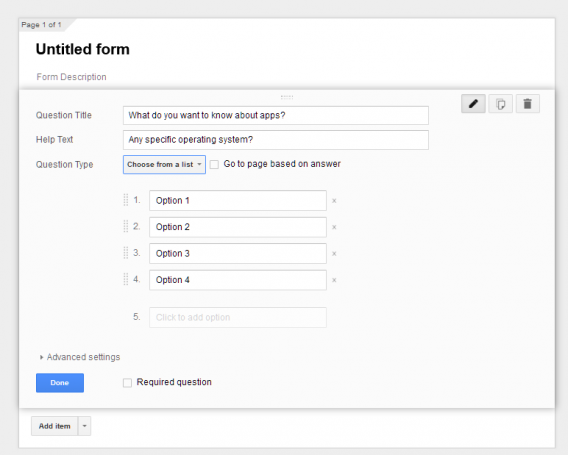
Google Forms choose from a list
Choose from a list: one choice in a drop-down menu

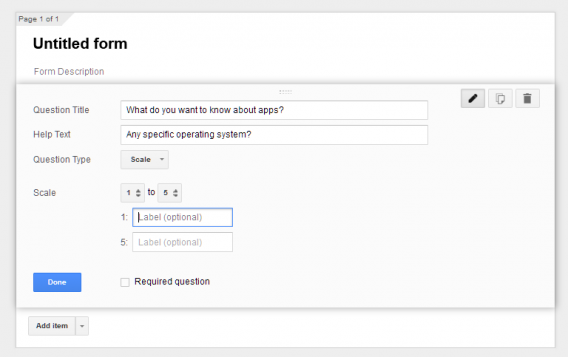
Google Forms scale
Scale: number choice between two options

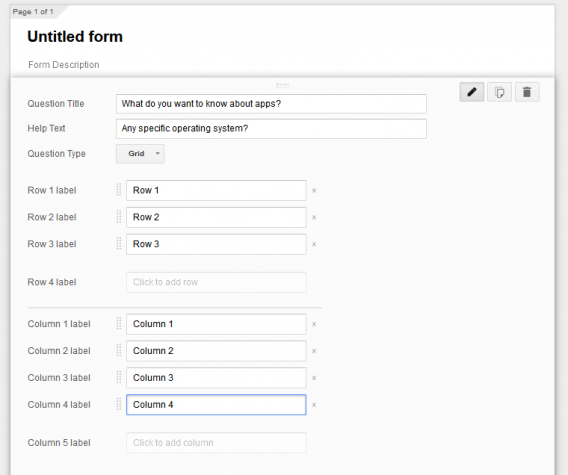
Google Forms grid
Grid: select one choice between different options in a grid system

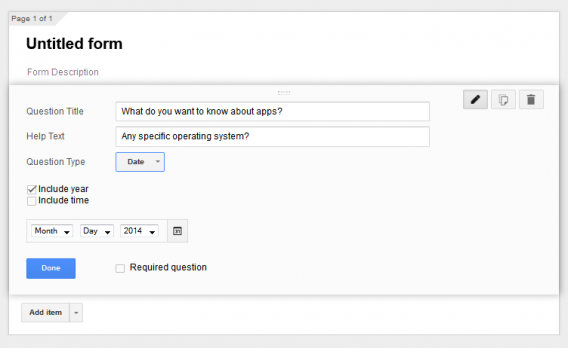
Google Forms date
Date: poll for dates

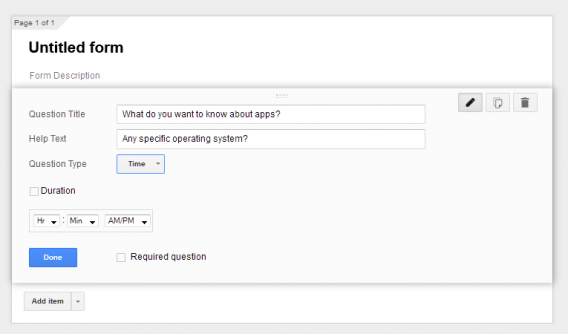
Google Forms time
Time: poll for time and duration

After you’ve decided which type of question format to use, the Confirmation Page will show you options for analyzing the data after respondents have finished the survey. These options aren’t necessary unless you want to give people the option to see results or edit responses.

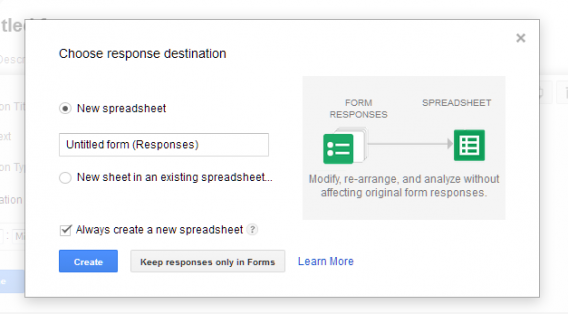
Google Forms responses in Google Sheets

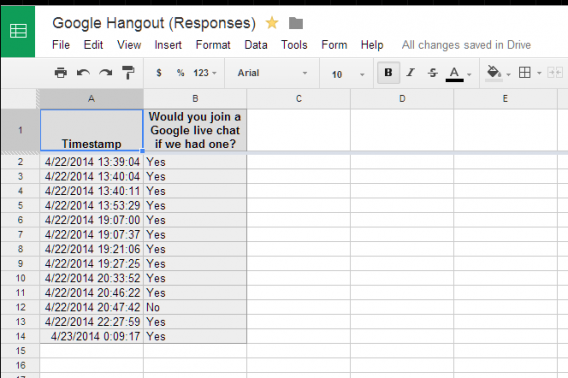
Results from Google Forms can be collected in Google Sheets. All responses can be aggregated into a spreadsheet so that you can easily see the results. You can also keep responses only in Google Forms, but depending on the amount of responses you’re expecting, Sheets is easier to edit and gives a much easier visual flow to the data.

Google Sheets responses

Since Google Forms and Sheets are both part of Google Drive, there’s less need to worry about your data getting lost, and the integration is really useful.

Drawings

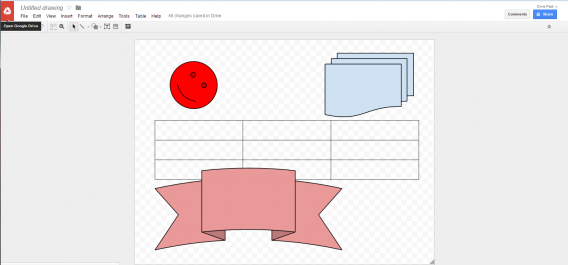
Honestly, I don’t know the purpose of Google Drawings. According to the Chrome Store, it’s purpose is to create charts and diagrams for other Google Docs apps. The workable area for Drawings is a bit small by default, but you can manipulate the area by using the small selector in the bottom right of the area.

Google Drawings

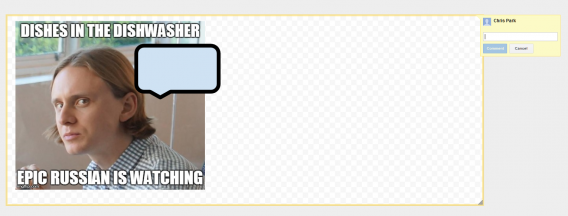
Like other Google Docs apps, you can add and use photos stored in Google Drive. Google Drawings also has guides to adjust the position of your photos. It’s not as comprehensive as a standalone photo editor, but it works for quick photos.

Google Drawings

Like other Google Docs apps, you can also collaborate and comment on work being completed by invited collaborators. Google Drawings has a lot of the same options as other Google Docs apps, but the usability of the app may be better suited for collaborative concepts rather than a photo editor replacement.

Good utilities when you need them

Both Forms and Drawings are good tools when you need them, but that’s probably not often. Forms is a little more useful because of the variety of options for responses, and the integration of results with Google Sheets is great. I’ve used it multiple times, and having results in a spreadsheet is useful.

Drawings feels like an app to create drafts rather than more comprehensive image drafting. It’s an alright tool, but I’ve never needed to use it before. If you create a document entirely inside Google Docs, then you might be more likely to use Drawings. As of now, however, it doesn’t seem to have a place.

The Google Docs suite has all the productivity apps that you need. While some apps may be missing more advanced features, the ones excluded would probably only be useful for professionals. For a normal user, the tools provided are fine.

Related Articles

Call of Duty: Modern Warfare 2 and 3 finally arrive on Mac

Gaming has never been great on Mac with a limited number of games coming out for the operating system. Today is no different as Call of Duty: Modern Warfare 2 and 3 are finally out on Mac.

Modern Warfare 2, a five year old game, will be available for download from Steam and various other online Mac game retailers. It will cost $19.99 and an additional $14.99 if you want the two DLC packs for the game.

Modern Warfare 3 is available for $39.99. You can pick up the game’s four DLC packs priced for $14.99.

Even though the games are a bit old, you’ll still need a pretty decent Mac to run them. Here are the system requirements for the two games:

  • Operating System: 10.9.2 (Mavericks)
  • CPU Processor: Intel i3 (Dual-Core)
  • CPU Speed: 2.2GHz
  • Memory: 4 GB RAM
  • Hard Disk Space: 13 GB
  • Video Card (ATI): Radeon HD 4850
  • Video Card (NVidia): Geforce 640M
  • Video Card (Intel): Iris
  • Video Memory (VRam): 512 MB
  • Peripherals: Macintosh mouse and keyboard
  • Both games do not support ANY gamepad

Download Call of Duty: Modern Warfare 2 for Mac (Steam)

Download Call of Duty: Modern Warfare 3 for Mac (Steam)

Source: Aspyr

Via: Polygon

Follow Lewis on Twitter @lewisleong

RELATED STORIES

Steam in-home streaming available to all

The latest Steam update includes the much anticipated in-home streaming feature. Game streaming has been part of the experimental beta version of Steam for a while, but is now stable enough for everyone to enjoy.

Steam in-home streaming allows you to stream certain games over your home network to play on another computer. This means your powerful gaming PC can stream games to a less powerful computer. The feature supports Windows, OS X, and even Linux. Valve’s SteamOS is also supported, of course.

Steam isn’t the first to provide game streaming. NVIDIA GameStream technology allows PC users to stream games to their NVIDIA SHIELD consoles. GameStream is actually more powerful than Steam as it allows players to stream games from any internet connection.

I had a chance to try out Steam in-home streaming at this year’s Game Developer Conference and was surprised how fluid everything was. DiRT 3 ran smoothly and control input never lagged. Low latency for controls is especially important for racing games.

You can try out Steam in-home streaming for yourself by having the latest version of Steam installed on two computers on your home network.

Download Steam: Windows | Mac

Source: Steam

Follow Lewis on Twitter @lewisleong

RELATED STORIES

Facebook will automatically ID what you’re watching or listening

Facebook is making it easier to share what music you’re listening to and what TV show you’re watching. The next update to Facebook for Android and iOS will use your phone’s mic to ID a song or show.

Facebook isn’t the first company to do this. Shazam’s iOS app first debuted in 2008, letting users ID playing music. The company then added TV and movie support.

Instead of typing out which song you’re listening to, Facebook automatically listens to what’s playing in the room. The app will show what it thinks you’re listening to at the top of the status update page. Tap on it, compose your status, and share. Check out the video below to see how it works.

Default player


brightcove.createExperiences();


Music shared on Facebook will show a player with a 30 second clip. The app is smart, using an embedded player from the music service you used last like Spotify or Rdio. Shared TV shows give info about which episode and season you’re currently watching.

Facebook music sharing

Privacy is an important issue and Facebook never stores what it records.

The feature will be rolling out to Android and iOS users in the US in coming weeks.

Download Facebook: Android | iOS

Source: Facebook

Follow Lewis on Twitter @lewisleong

RELATED STORIES

5 alternatives to Snapchat for sending messages that self destruct

Apps for sending self destructing messages are slowly but surely setting up camp in app stores, and it’s rumored that Facebook is next in line with Slingshot.

Snapchat, the app for sending self-destructing pictures, videos, and now messages, paved the way. Following the PRISM scandal, many developers have followed suit in various forms. Why? If millions of people already share images that self-destruct, why not offer a destructable e-mail or chat application?

Among a myriad of encrypted services, I have compiled a list of the five most successful multi-platform apps, including Confide, TigerText, or Privatext. Either way, there should be something for everyone.

Confide, the best compromise between security and ease of use

Confide

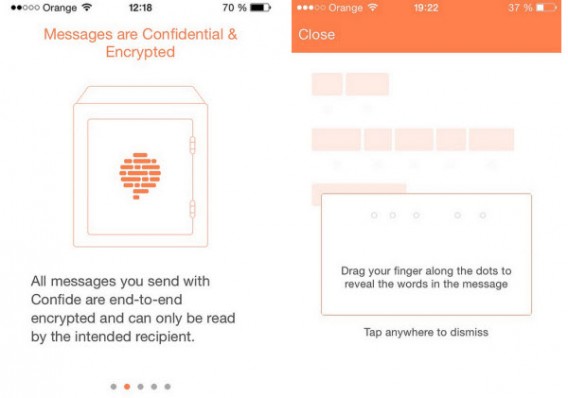
Available for Android and iOS, Confide succeeded in combining maximum security with exemplary ease of use.

The core of the system? To read incoming messages, you must slide your finger over the hidden message to make the message appear. In use, Confide protects you against any attempt at a screenshot. If the correspondent tries, you’ll be notified immediately and the image will not be saved.

In other words, if you’re looking for a serious application that’s easy to use, you can’t go wrong with Confide.
Confide

Privatext: the serious service

Privatext

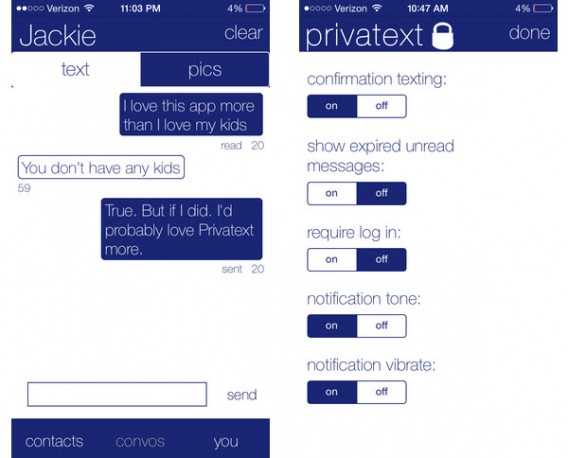
When you’re on Privatext, it’s all about mimimalism.

To create an account, simply fill in your email address. As the name suggests, Privatext is used for nothing more than to send secure text messages. When you open the app for the first time, you can see that the emphasis is clearly placed on security.

The biggest issue, however, is the interface: it could definitely use some improvement. During my test, I could see some bugs in the display, and if you choose to use Privatext daily, it could get annoying.
Privatext

Frankly Chat: colorful, simple and safe

Frankly

To create a Frankly Chat account, you have to provide your phone number, which the app uses to find potential contacts who are already registered with the service.

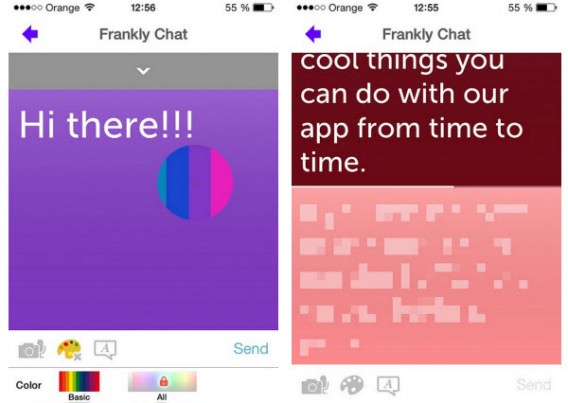
Fortunately, Frankly Chat has many good features to attract users: like Confide, it’s impossible to take screenshots of the program.

The data disclosure system is similar: content appears only when you touch the screen. Special mention must also be given to the editing options, which are comprehensive and fun to use.
Frankly Chat

TigerText Secure Messenger App: designed for companies

TigerText

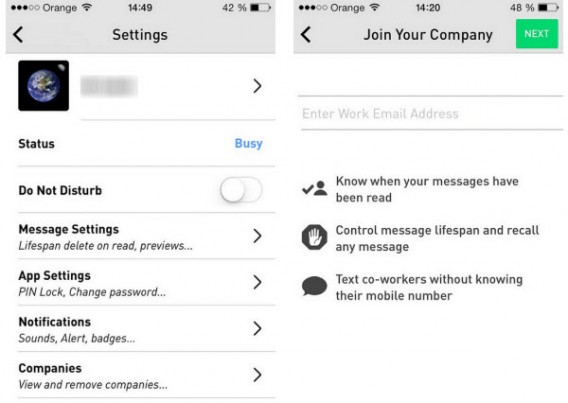
TigerText Secure Messenger App is more than an alternative to Snapchat. Recognized by industry professionals, TigerText is designed primarily for businesses.

Many medical professionals have already turned to TigerText. This multiplatform service allows all employees of a company to connect without having to exchange phone numbers.

Finally, and perhaps the best evidence of the seriousness and efficiency of this service, TigerText offers a $1 million guarantee if data sent using the service is intercepted.
TigerText

Wickr: as convenient as it is effective

Wickr

Wickr provides a good compromise between an interface that’s a pleasure to use, and enhanced security. It allows you to share any type of data, from video and audio messages, to photos.

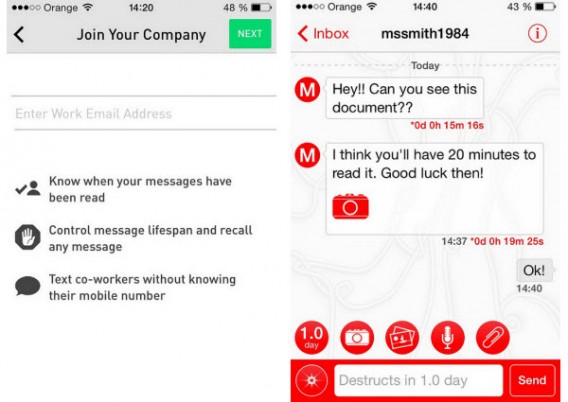
Changing meeting times, adding colleagues without having their number, an ID system that performs well: these options allow you to use Wickr in a ton of different ways. In short, it’s an excellent choice for those wishing to make their communications secure.
Wickr

Many options to suit your needs

Out of all the options, I think both Wickr and Confide offer the best options and most interesting apps.

Regardless, all these apps offer a great disposable service. After all, why should all of our conversations be stored forever on another company’s servers? Now that you know a little more, you can choose the service that suits you best.

If you want to use a more popular messaging app, check out our article comparing the privacy of some of our favorite messaging apps.

Follow me on Twitter @bbrassart
eBay hacked but PayPal OK, change your passwords now

Online retailer and auction house eBay has been compromised. Attackers gained access to the company’s database containing encrypted passwords and other non-financial data. While your credit card numbers and PayPal account are safe, your name, email, and address have been accessed.

PayPal released a separate statement this morning stating it has found no evidence of a breach on its own servers.

“Extensive forensic research has shown no evidence of unauthorized access or compromise to personal or financial information for PayPal customers. PayPal customer and financial data is encrypted and stored separately, and PayPal never shares financial information with merchants, including eBay.”

The attackers gained access to eBay’s servers by targeting its employees. After taking over an employee’s account, the attackers then accessed customer data.

eBay says the breach happened between late February and early March, but didn’t detect it until two weeks ago. Although the hackers have had your information for a few months, eBay has not detected any “increased fraudulent account activity.”

The hackers may have your information but they haven’t tried using it on eBay yet. If you use your eBay password for any other accounts, it’s a good idea to change those passwords as well.

As always, we recommend using a password manager to generate and manage your passwords. Always use a different password for every site.

eBay will begin notifying its users of the breach today, urging them to change their passwords. You can change your password now by navigating to your eBay account settings and “Personal Information” section.

Source: Business Wire

Via: BBC

Follow Lewis on Twitter @lewisleong

RELATED STORIES

Twitter: how to activate (and deactivate) the Mute function

Twitter started rolling out the Mute function to let you mute tweets from users so that they don’t appear on your timeline.

Instead of having to unfollow someone, you can mute them without the awkwardness of them knowing you don’t want their tweets flooding your timeline. The Mute function, however, doesn’t cancel everything: replies and @mentions will continue to appear in your notifications, the user will still be able to send you private messages, and your tweets will appear in their timeline.

Below, I’ll show you how to mute a user on Twitter for Android and the web version, as well as how to unmute an account you silenced. Please note, this function is still rolling out on the web version so it won’t be available to everyone yet. Similarly, an iOS version is expected, but still not available.

Mute users in the web version of Twitter

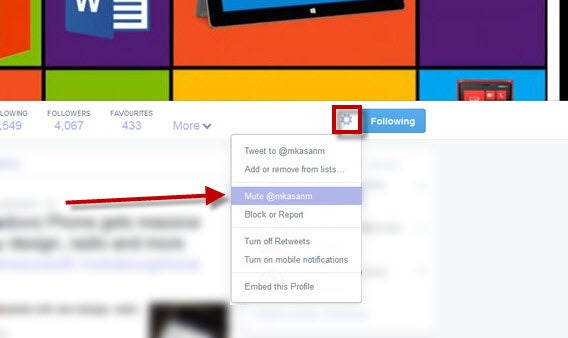
In the desktop version of the web app, you can mute a user from the timeline on their profile.

The quickest way is to hide a user’s tweets from your timeline. To do this, click on the More button (the one with three dots) at the bottom right of the tweet, and then click Mute @username.

Mute Twitter on web

Hide a user from your timeline on the web version

You can also do it directly from the profile you want to hide. Go to their user page and click on the gear wheel on the right. After that, select Mute @username.

Mute Twitter on profile

Mute users in Twitter for Android

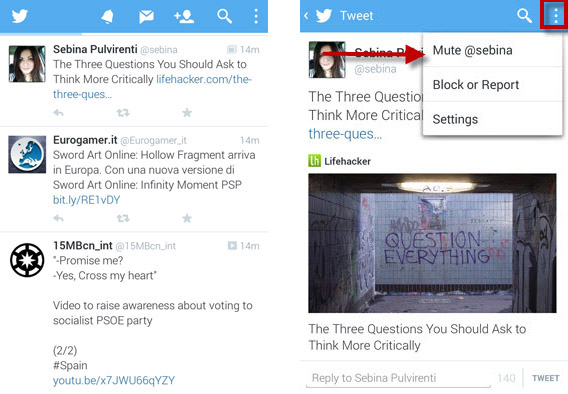
You can mute a user from your timeline or their profile page. In your timeline, click on the person’s profile picture, and then on the button with three vertical dots in the top right of the screen. In the menu that pops up, click on Mute.

Mute on Twitter for AndroidSelect the tweet, press the three dots and then Mute

On the next screen, there’ll be an explanation of what the Mute function does. To accept and mute the person, click on Yes, I’m sure.

Confirm mute

To mute from their profile, press the gear wheel on the left. In the pop up that opens, select the fourth option, Mute @username.

Mute on profile

Go to their profile, press the gear, and then Mute

How to reactivate an account’s tweets

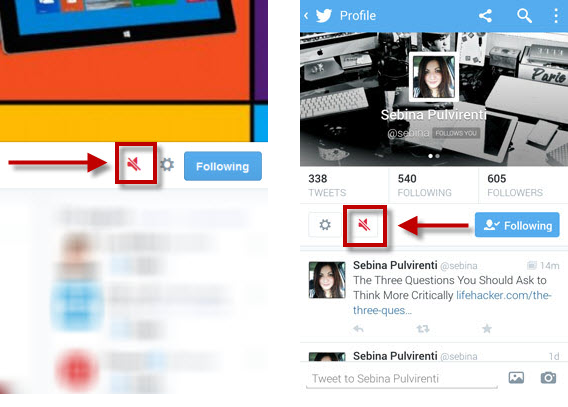
Don’t worry, muting or removing an account isn’t forever. To reverse the mute, go to their profile page. If you muted them, you’ll see the red speaker with a line through it, just like in the image. Click on the speaker to unmute the user.

twitter unmute

Unmuting an account on the web version (left) and the Android version (right)

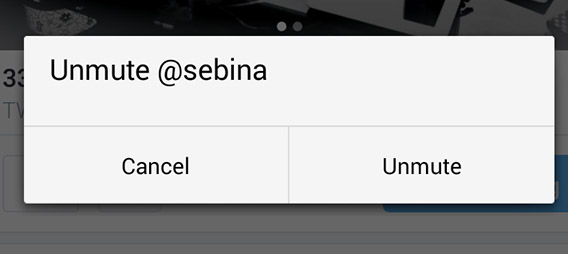
In the version for smartphones, you’ll be asked if you want to unmute the selected user.

unmute confirmation

Click Unmute to make the user’s tweets visible on your timeline again. Now, you’ll be able to see their messages on your timeline.

With the introduction of this new feature, Twitter hopes to fix the overwhelming influx of messages that invade many users’ timelines, avoiding the need for the fateful Unfollow button.

However, many people may criticize this move because Twitter, unlike Facebook, is not based on friendships, meaning that you’re free to follow whoever we want, with no obligations.

According to Phil Pearlman, an editor at Yahoo! Finance, this new feature could create confusion on the social network. As a result, the follower becomes much less important given that virtually anyone could start reading your tweets.

From the redesign of the profile and the mute feature, it seems that Twitter is getting closer and closer to Facebook.

Follow me on Twitter @ zoltan__v

FIFA 14 mobile updated with World Cup content

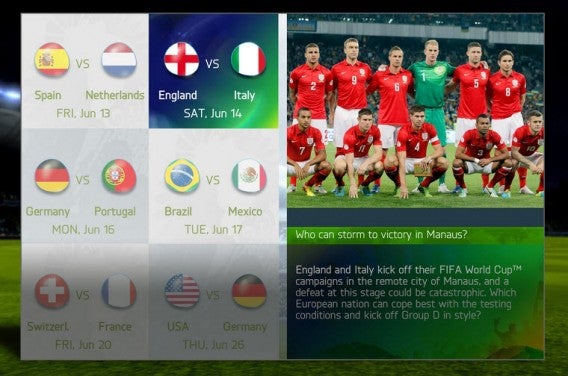
FIFA 14 for mobile has been updated with content for the 2014 World Cup 2014 in Brazil. The update for the free mobile soccer game from EA Sports is now available on iOS, Android, and Windows Phone.

The update includes official national teams and jerseys, the ability to play with the Adidas Brazuca, the official soccer ball of the tournament, and Matches of the Week from some of the most memorable qualifiers of the last two years. Once the tournament kicks off on June 12, new games will be added to the Match of the Week as the tournament progresses.

FIFA 14 Mobile(Source)

As a reminder, the the 2014 World Cup in Brazil will take place between June 12th and July 13th.

Follow Zuzanna on Twitter @suzieblaszQwicz

RELATED ARTICLES: