To compete with Google+ Hangouts and other VOIP services, Skype has removed its Premium subscription model and now offers group video calls for free. Available for both Windows and Mac, as well as Xbox One, the newly free feature lets you include up to 10 people on a single call.
Here, we’ll show you how to make a group video call, giving you all the tips and tricks for taking advantage of VoIP from the comfort of your couch.
Initiate a group video call on Skype
To set up a call and (virtually) meet your friends, go to the Discussions tab, then drag contacts to the top right of the window. You can add up to 9 participants (it’s 10 including you). Once you’ve grouped together the people you want to call, simply click the Video Call button to start a video conference, or choose the Call the group option to open a chat without activating your webcam. Note that it’s possible to save a group in your Contacts . You can rename the group using the pen icon at the top left, as seen below. Enter the name of the group and click OK to save it. This option can be especially useful if you regularly video conference with the same people.
Add a participant during an ongoing conversation
Did you forget to add a friend to the group conversation? Don’t worry– there’s a way to add another person to a video call that’s already in progress, although only the person who initiated the call can do this. This person will have to click the + button, then choose Add people to the call. Select the contacts you want, then click OK. Once the added person has accepted, you can continue with your free video call.
The little extras during calls
Sending files, much like screen sharing, is now an integrated function for any self-respecting chat system. Skype is no exception to the rule and provides the following possibilities: screen grab, sending files and contacts, and screen sharing. Below is a short video published by Microsoft to help you better understand all the features of group video calls.
Default player
brightcove.createExperiences();
Our opinion
With this Skype feature available for both PC and Mac, Microsoft is taking on Google Hangouts, ooVoo, and other similar services, head-on. It’s certainly taken a while, but Skype can always count on its existent (and substantial) user base to be happy about this change.
Microsoft announced today that it will be launching a new edition of Windows called Windows 8.1 with Bing. The operating system gives device manufacturers a low cost version of Windows for its cheaper devices.
One of the big problems with putting Windows on a low price device is the high licensing prices. Low cost devices have very little profit margin and Microsoft recognizes this problem. Many manufacturers resort to putting free operating systems like Android on their low end devices.
So what’s different about Windows 8.1 with Bing? The operating system will come with Bing as the default search engine, but users can choose another search engine in the settings. Some Windows 8.1 with Bing devices will also ship with Office or a one year subscription to Office 365.
Windows 8.1 with Bing will be available exclusively to hardware manufacturers, which is a bummer those wanting a cheaper version of Windows.
Microsoft knows its losing to Android in the low end of the market. Only time will tell if Windows 8.1 with Bing will be successful.
Productivity app Springpad will be shutting down its service on June 25th. The company has not stated why its closing its doors but it is likely due to tough competition from apps like Evernote and Google Docs.
Springpad’s app featured a Pinterest-like board where you can create reminders, lists, and notes. The app worked well and received positive reviews. Still, it was no match for Evernote’s marketing and app integration.
Springpad users will have until June 25th to export their data, after which all information will be erased. The company will also be releasing an export tool in the coming days to make saving your data easy.
“We are very sorry to let you know that Springpad will be shutting down on June 25th. At that point Springpad.com will no longer be available, all online and sync features of the mobile apps will stop working, and your personal data will no longer be stored on our servers.”
With an expected preview of The Sims 4 Create A Sim mode at this year’s E3 2014, the new feature has added even more anticipation to the latest version of The Sims franchise. As we learned a few months ago, The Sims 4 will focus on characters, making sure that each Sim living in your neighborhood is a unique and unpredictable person.
From what little we’ve already seen in the preview trailer from EA, we get some detail about Create A Sim mode, but if we dig a little deeper, we can get a lot more detail that, although may not be directly mentioned in the video, is very much implied.
Default player
<!–
By use of this code snippet, I agree to the Brightcove Publisher T and C
found at https://accounts.brightcove.com/en/terms-and-conditions/.
–>
<!–
This script tag will cause the Brightcove Players defined above it to be created as soon
as the line is read by the browser. If you wish to have the player instantiated only after
the rest of the HTML is processed and the page load is complete, remove the line.
–>
brightcove.createExperiences();
Say goodbye to your neighbor clone
If there’s one thing I didn’t like about The Sims 3, it was that, in the end, all Sims were way too similar, especially those that the game randomly generates to be your neighbors.
This will mostly likely end in The Sims 4, as the new (and easy to use) Sims editor will let you modify every inch of your Sim’s face and body. Just like in real life, Sims can have prominent hips but narrow shoulders, or be a bit chubby with thin legs. Different ethnic groups are also much more visible, each with their own traits, creating realism and countless combinations that are rarely seen in a game.
At last, the Sims will look like real people.
Their physical traits could influence their character
The attention to detail in Create a Sim goes as far as changing the way they smile or walk. This, together with their new physique, might even influence their personality. For example, a Sim that walks with vigor and its head held high is likely to be more confident, while those with a nice smile will be more attractive to the rest.
Now, let’s take it one step further. Isn’t it true that in real life, our body has an impact on our level of physical activity? A Sim with a slim but strong frame is more likely to be good at sports and can, perhaps, eat whatever he/she wants without gaining weight. On the other hand, one that is chubbier won’t be very good at running, even if he/she is a sports enthusiast, and could gain weight the minute he/she stops dieting and exercising.
How much will the Sims’ physique influence their character?
Fewer features, but more accurate
It makes sense that the physical traits of the Sims influence how they behave, especially if you take into account that, from what I can see in the video, you’ll only be able to choose three traits per character (instead of five like in previous versions).
Everything seems to point to the fact that the personality traits we’re able choose have more to do with intellectual interests and tastes, not the same as those things influenced by physical appearance. So, it doesn’t matter what you look like: this won’t have an impact on whether you’re a bookworm, whether you’re passionate about science, or whether you’re a hopeless romantic.
Similar to The Sims 3, your traits will have an impact on your life’s desire, that elusive goal that gives you a great reward. In The Sims 3, the reward was happiness points, but this time, the game will give you something better: a great skill for your daily life. From the examples I can see in the video, it looks like once you fulfill your life’s desire, the Sims will get a special skills like, being quick learners, or being good at relating to other characters.
Only three features per Sim? I’m sure this hides a few surprises
The importance of fashion
In The Sims 3, the Sims editor already had a lot of options to customize your character’s style. You could choose tops, pants and skirts, coordinate outfits, and accessorize. I don’t suspect any really big changes in The Sims 4, but I hope there are.
In the past, it’s been complicated to change the predefined colors and prints of clothes and save them for later. This meant that every time you wanted to customize a Sim, you basically had to start from scratch. The Sims 4 will feature the new Style Book function, which seems to be an option with previously set and saved outfits, available not only for that particular Sim, but for all of your characters. This will save you a lot of time changing and choosing the perfect outfit for you Sim.
If EA wants us to spend less time with boring actions, it wouldn’t surprise me to see a similar function for the Buy and Build modes, allowing us to save furniture combinations beyond the current collections or the already set rooms we’ve seen in The Sims 3.
Fashion lovers will enjoy the new StyleBook
The Build mode has been simplified, at last
Speaking of Build mode, the trailer ends with a small preview of it, and although it’s hard to see much, I’ve seen enough to notice that it’ll be easier to edit your home. It looks like a new option lets you drag entire rooms, and there’s no need to delete individual walls or move objects one by one, which is especially convenient if you want to extend a house that’s already furnished.
If we add to this an easier customization of objects, we’ll have a breakthrough in The Sims. We’re looking forward to seeing more of this in the next trailer.
Building will be much easier than in The Sims 3
What to expect at E3 2014
At Gamescom 2013, I was able to get my hands on a first demo of The Sims 4, where we briefly saw the Create a Sim mode that we know a lot more about now. Maybe at E3 2014, we’ll be taken one step further and see what the Build and Live modes are like.
Facebook gets a bit more personal with questions, Batman: Arkham Knight releases a new trailer, Google celebrates the anniversary of the Rubik’s Cube, and eBay suffers a major attack. Check out this week’s hottest software news in the Softonic Minute.
Default player
<!–
By use of this code snippet, I agree to the Brightcove Publisher T and C
found at https://accounts.brightcove.com/en/terms-and-conditions/.
–>
<!–
This script tag will cause the Brightcove Players defined above it to be created as soon
as the line is read by the browser. If you wish to have the player instantiated only after
the rest of the HTML is processed and the page load is complete, remove the line.
–>
brightcove.createExperiences();
Facebook is testing a new feature where you can ask your friends about their relationship status. This isn’t surprising, since Facebook already allows you to ask for personal information like phone numbers, but it may be the most intrusive. Continue reading…
We can finally see what to expect from the graphics in Batman: Arkham Knight. The new video also shows the Batmobile in action, one of the staples of the series, as well as some of the villains Batman will be taking on. Read our review of Batman Arkham Knight, and watch the trailer here.
To celebrate the 20th anniversary of the legendary Rubik’s Cube, Google has launched Cube Lab, a page where you can create your own cube or play with ones created by others. Create and solve your own Rubik’s Cube at Chrome Cube Lab.
145 million eBay accounts are in danger in what could be the second largest attack ever, right behind Adobe’s hack in 2003. eBay recommends changing your password immediately. Luckily, PayPal, whose owned by eBay, has not been affected. Continue reading…
The World Cup causes unparalleled excitement every 4 years for soccer fans around the world. For those lucky enough to go to Brazil for the 2014 World Cup, there’s more to see than just soccer over the course of the 4 week tournament.
Rio de Janeiro, Sao Paulo, Brasilia, Porto Alegre, Salvador, Cuiabá, Fortaleza, Manaus, Recife, Natal, Belo Horizonte and Curitiba are all host cities of the 2014 World Cup in Brazil.
Lucky for us, we have plenty of in-house Brazilian editors who’ve helped us compile a non-exhaustive list of 11 mobile apps that’ll help you make the most of your trip to Brazil for World Cup 2014.
Accomodation : Where do you stay?
Airbnb
Hotels and hostels in Brazil are probably overloaded for this year’s World Cup tournament, so why not go the alternative route and take a look on Airbnb? This service, where homeowners rent out their properties to vacationers, is used in many countries and has become really popular (and useful) in the past year.
If you want to go the more traditional route, the Booking.com app is a must for online booking. Just like the website, the mobile app lets you filter options by price, area, and type of room, among other filters.
Do you want to find hotels that aren’t necessarily shown in tourist guides or general apps? Try Hotel ASAP. Highly recommended by our Brazilian colleagues, this app includes the most interesting and unique hotels in the country.
Restaurants: Discover the best restaurants in the country
Nativoo guides
More than just a directory of places, the Nativoo app (Android and iPhone) is a comprehensive tourist guide. Restaurants, hotels, transport, and landmarks are all included in the app, making it the perfect ally for your trip to Brazil. The app is available in several versions for most major Brazilian cities.
You can download Nativoo guides for the following cities:
The geo-location app has just undergone a complete overhaul. With the division of Foursquare’s social aspect to a new app, Swarm (on both Android and iOS), the developers leave Foursquare as an app to recommend restaurants, hotels, and other places around the city, all based on your tastes.
Travelling to Porto Alegre, the largest city in southern Brazil? In this case, you can not miss Comer na Boa. This app lists the best restaurants in the city, as well as ratings and comments posted by other customers. Southern Brazil will welcome you with open arms.
Download Comer na boa – Porto Alegre for Android and iPhone
Tourism: discover Brazil’s many attractions
Concierge Brazil
Concierge Brazil apps are all published by Guia 4 Rodas, one of the most respected travel guides in Brazil. To celebrate Brazil’s choice as World Cup host, the publishers released an app for each host city of the competition. The guides are highly recommended for anyone interested–directly or indirectly– in Brazil.
You can download Concierge Brazil for the following cities:
Available for iPhone and iPad, the Brazil Mobile app aggregates and classifies all of Brazil’s attractions by category. Despite its somewhat outdated interface, Brazil Mobile gives you all the info you need to know about Copacabana, Iguazu Falls, or the Maracana stadium.
You can download Brazil Mobile for iPhone and iPad for the following cities:
For all those lucky enough to go to Brazil, it looks like there have been many more before you: TripAdvisor is very popular and a great resource in the World Cup host country. This tourist guide has info about the best restaurants and hotels in the country, as well as offering helpful tips and travel information of every kind.
For those who still don’t know about Waze, it’s a free GPS for smartphones. The idea? Connecting all drivers for better traffic warnings, including traffic jams, construction, and accidents. Traffic in Brazil is not particularly fluid, so it might be a good idea to download the app so that you don’t miss any World Cup games.
Need a taxi to get safely back to your hotel? Try Easy Taxi. This booking service works in all World Cup host cities. Just like Uber, you press a button and the taxi nearest you will come and pick you up.
To make sure you don’t miss anything during your stay in Brazil, we recommend that you install all of these apps. Some are standard, but useful, while others will help you make the most out of your trip to Brazil.
Apple has acknowledged the existence of an iMessage bug that makes text messages disappear for users moving to another phone.
iMessage is Apple’s universal messaging app that sends messages over the internet, saving on expensive texting plans. The app only works with other iMessage users and will default to texting if the recipient doesn’t have iMessage.
The problem arises when a user switches from using an iPhone to another phone with the same number. iMessage recognizes that number as still being tied to an iPhone, forcing the app to send an iMessage instead of a text.
This creates a huge problem for people who transition to another phone. Messages are intercepted and lost in Apple’s iMessage cloud.
Apple recommends users turn off the iMessage feature on their iPhones before switching to a non-Apple device. This is still a major problem as most users will not think about this until it’s too late.
Apple responded about the bug saying, “We recently fixed a server-side iMessage bug which was causing an issue for some users, and we have an additional bug fix in a future software update.”
There’s no word when the next bug fix will be released.
Four months after launching on iOS, Secret is now available on Android. The app allows users to post anonymous secrets, which are then shared with people nearby.
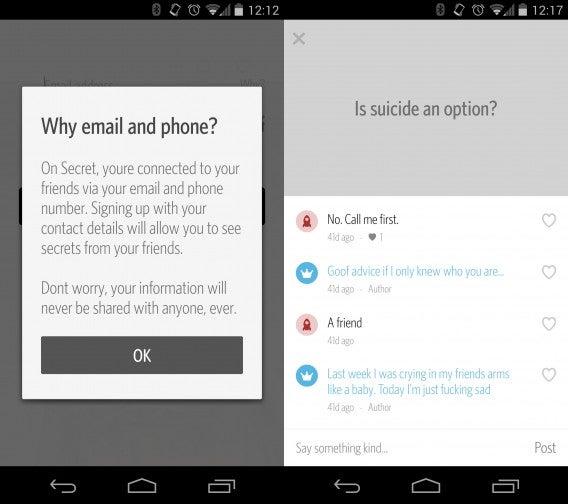
While the app doesn’t reveal your precise location, it does collect your location data. You’ll also need to sign up using your phone number and email address so the app knows who to share your secrets with.
Launching the app, you’ll see a stream of secrets. You can tap on the chat bubble to add a comment or tap the heart to like the secret. Liking a secret will share it with your friends, which allows some secrets to go viral.
Content on secret is a mix of silly poop stories to more serious topics like thoughts about suicide. Trolls often use Secret to spread false rumors like the one below.
Exclusive to the Android app is the Friends-only feed, giving you the most relevant secrets. The feature will come to iOS eventually but there’s no solid date yet, according to The Verge.
Hit up the download links below to give Secret a try.
The penultimate episode of The Wolf Among Us will be released May 27th for Mac and PC. Xbox 360 users will get the episode May 28th and iOS users one day after.
Telltale Games released a spoiler filled trailer, which you can watch below. If you haven’t caught up with episodes one to three, don’t watch the trailer!
Default player
brightcove.createExperiences();
If you’re not familiar with the Wolf Among Us, it’s a game that takes place in Bill Willingham’s Fables comic series. It’s a prequel to the comics that follows sheriff Bigby Wolf as he tries to solve murders in Fabletown.
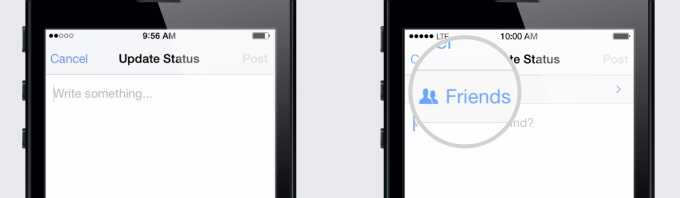
Facebook has a bad reputation for making its service more and more public. That’s about to change as Facebook will stop making public sharing the default. The new default will be to “Friends” only, but users will still have the option to share publicly.
To make sure you understand your privacy settings, Facebook will also be rolling out its Privacy Checkup tool. The cute cartoon dinosaur will walk you through your privacy settings to make sure everything is up to date.
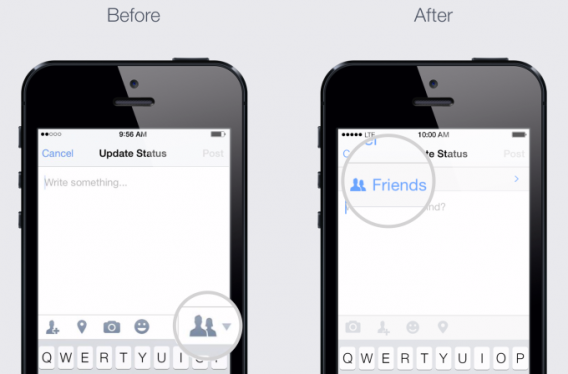
Facebook is taking privacy more seriously with service-wide changes. Last month, the social network announced that it will update its mobile apps with more obvious sharing settings. You will be able to see exactly who you’re sharing to from the status composition window instead of having to tap on a button.
For more information, check out TechCrunch’sexcellent coverage of all the Facebook privacy changes.
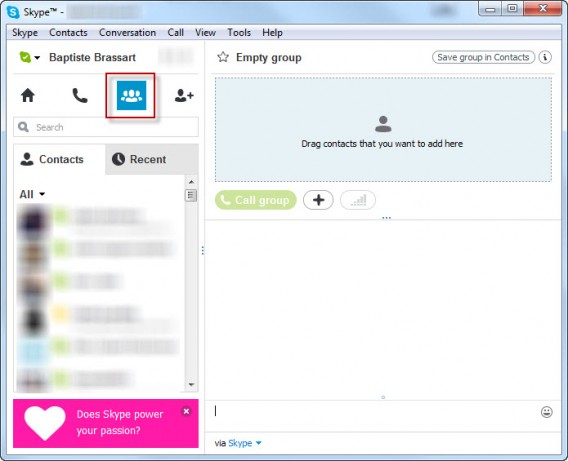 Once you’ve grouped together the people you want to call, simply click the Video Call button to start a video conference, or choose the Call the group option to open a chat without activating your webcam.
 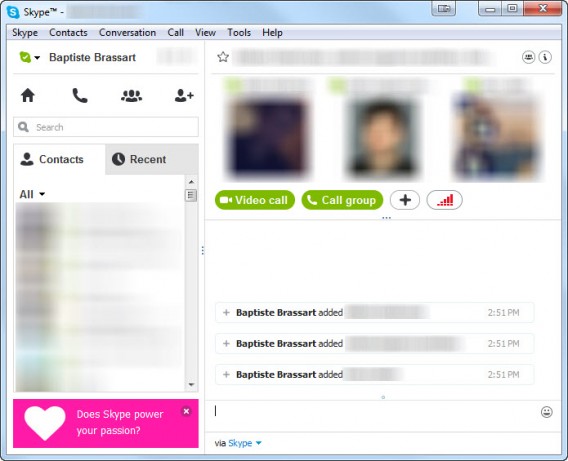 Note that it’s possible to save a group in your Contacts . You can rename the group using the pen icon at the top left, as seen below. Enter the name of the group and click OK to save it. This option can be especially useful if you regularly video conference with the same people.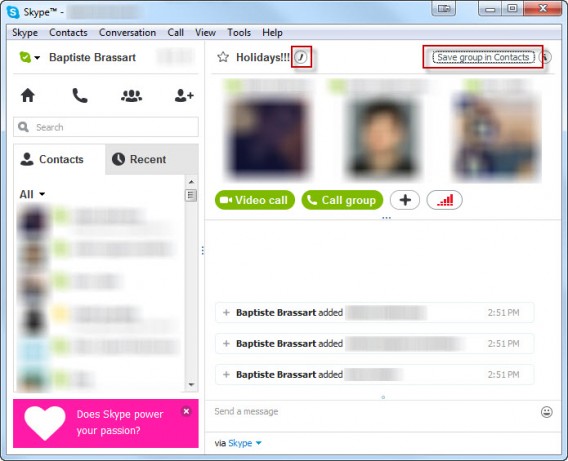

 Select the contacts you want, then click OK.
  Once the added person has accepted, you can continue with your free video call.
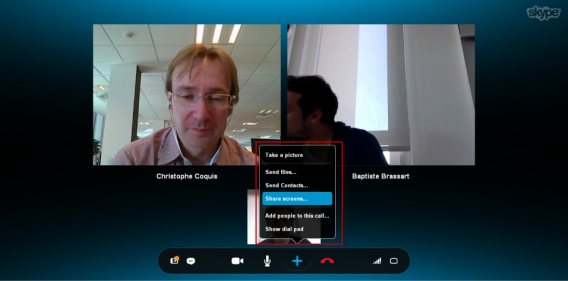 Below is a short video published by Microsoft to help you better understand all the features of group video calls.

 At last, the Sims will look like real people.
 Only three features per Sim? I’m sure this hides a few surprises
 Fashion lovers will enjoy the new StyleBook