Death Stranding Director’s Cut is coming soon

Remember how long we waited for Death Stranding to appear on PC and PS4, which then carried over to the PS5? Well, it’s been two years since the glorified walking simulator finally launched and the Director’s Cut for PC is almost ready. Indications are that we’ll see the upgraded game as soon as March 30th, 2022.

PS5 players have already had a taste of some of the new content. They’ve seen new missions, weapons, boss battles, and more in the science fiction exploration game. Death Stranding Director’s Cut will have all of these and more, with improved graphics appearing thanks to Intel’s Xe Super Sampling.

There’s still no sign of Death Stranding coming to Xbox or Xbox players being able to stream it from the GeForce Now app on console. If you recall, there seemed to be some agreement in place that 505 Games could port the game to Windows, but it needed to stay away from competitor consoles. 

The new Death Stranding Director’s Cut will be a great way for gamers who haven’t tried the game to step in and try it. In the meantime, we’re waiting to see what else Kojima Productions is working on. Last year, Hideo Kojima hinted at two new games while remaining mysterious about them. The one was labeled as ‘big’ and the other ‘challenging’. 

While we wait for further news, we can enjoy the expanded Director’s cut on the 30th of March. If we manage to get a review copy of the title, we’ll certainly share our impressions of the update.

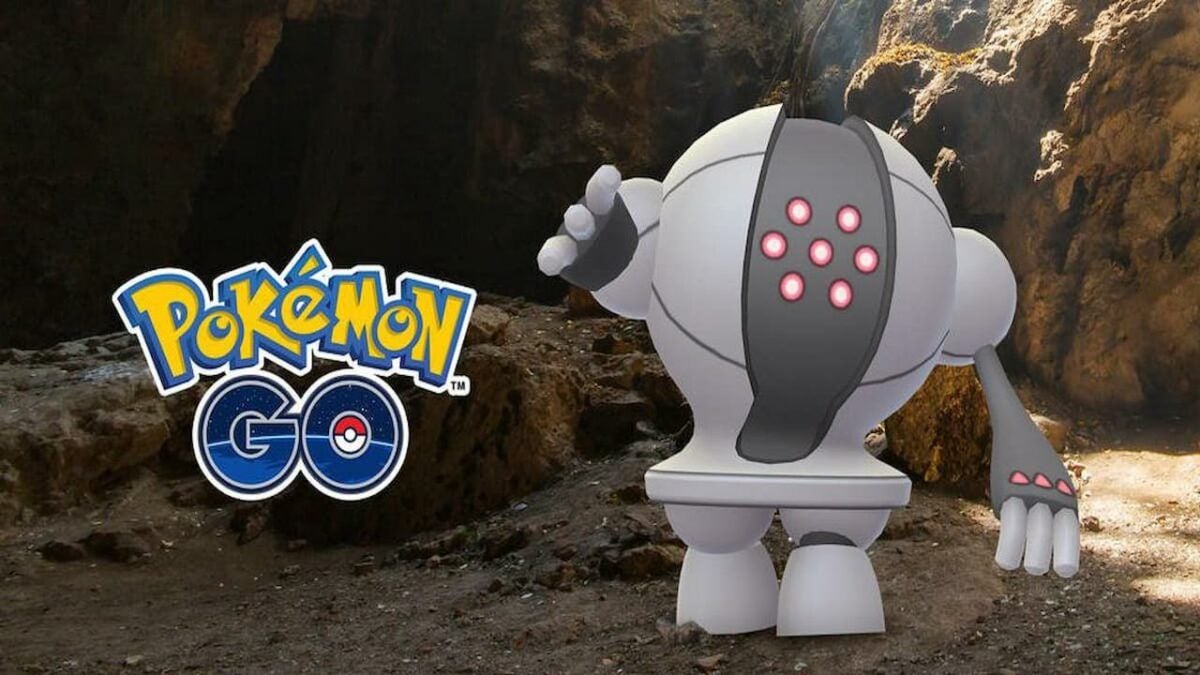
The 9 Best Pokemon to Get in Pokemon GO

I wanna be the very best, the best there ever was – doesn’t the song bring back memories? Sounds familiar, right? There’s a reason that this song became the epic soundtrack of the popular Pokemon series. These same words apply to the newest mobile game in the franchise Pokemon GO. It offers players a chance to experience what it’s like to be a Pokemon trainer. You can go out into the world, collect all these different creatures, and then train them to become stronger and participate in battles.

Today, we’ll be looking at the nine best Pokemon that every trainer should try to collect. We’ll also be looking at strategies you can take to ensure that you can beat the gym leaders and rise up to become the strongest Pokemon trainer out there.

Top 9 Pokemon in Pokemon GO

Here are the top nine Pokemon that can give you the edge in battles:

  • Tyranitar
  • Dragonite
  • Rydon
  • Onix
  • Slaking
  • Gyrados
  • Alakazam
  • Tentacruel
  • Lapras

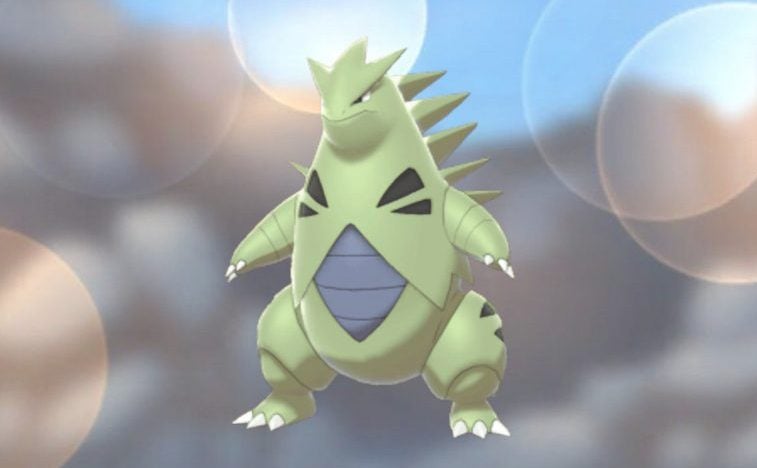
Tyranitar

Tyranitar is a rock/dark type Pokemon, which makes him strong against flying, bug, fire, and ice-type Pokemon. This is also a well-rounded pokemon for attacking strength, defense, and stamina. Tyranitar is one of the best rock types against powerful psychic Pokemon like Mew Two. The dark type also means Tyranitar will take less damage from psychic attacks. This makes Tyranitar a great asset to your team.

The 9 Best Pokemon to Get in Pokemon GO

Dragonite

Dragonite is a dragon/flying type Pokemon, making him a great asset against bugs, fighting, and grass types. Dragonite has a very strong defense, as well as having great counter moves. Although he isn’t the strongest of the dragon types, he is very useful in a balanced team. 

The 9 Best Pokemon to Get in Pokemon GO

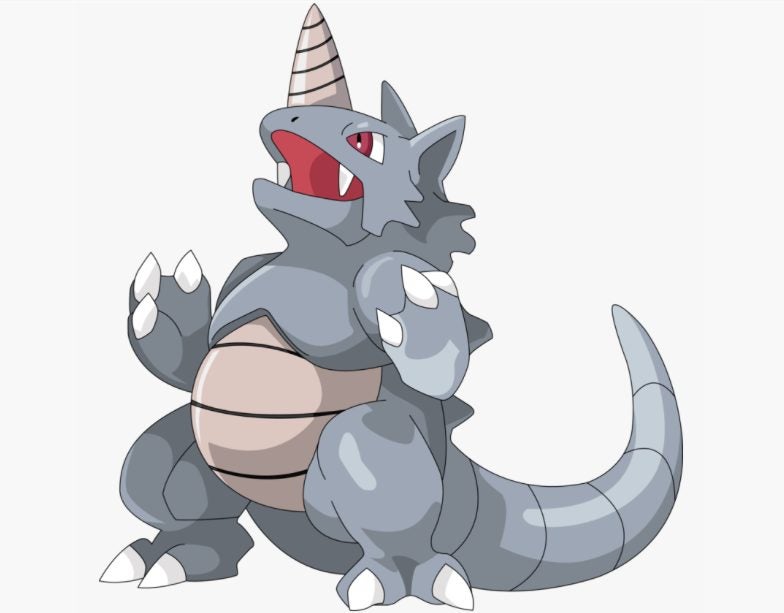
Rydon

Rydon is a ground/rock type pokemon which makes him a formidable force against poison, steel, fire, electric, ice, and bug types. As well as being one of the strongest Pokemon, he is also well-rounded with a very decent defense and stamina. However, fighting and water types may provide a bit of a challenge for Rhydon.

The 9 Best Pokemon to Get in Pokemon GO

Mantine

Mantine is a water/flying type pokemon that is very effective against ground, rock, fire, and bug types. Mantine is also one of the Pokemon with the best defense stats, making it the ideal member for a well-balanced combat team. Mantine can be weak to electric and rock-type attacks.

The 9 Best Pokemon to Get in Pokemon GO

Slaking

Slaking is a normal type Pokemon, but don’t let that fool you. Slaking could very well be the strongest Pokemon in all of Pokemon GO, with a maximum combat power (CP) of 5010. Not only does this Pokemon have a very strong attack, but it also has a great defensive capability which makes him a nice well-rounded member to have on your team.

Normal types are traditionally weaker against rock, ghost, and steel types, but with enough care, candies, and stardust, your Slaking should be able to beat almost any attacker.

The 9 Best Pokemon to Get in Pokemon GO

Gyarados

Gyarados is a water/flying type pokemon that evolves from the, often useless, Magikarp. Despite being weaker against electric and rock-type attacks, Gyarados is one of the strongest and best overall Pokemon that you can add to your team. 

The 9 Best Pokemon to Get in Pokemon GO

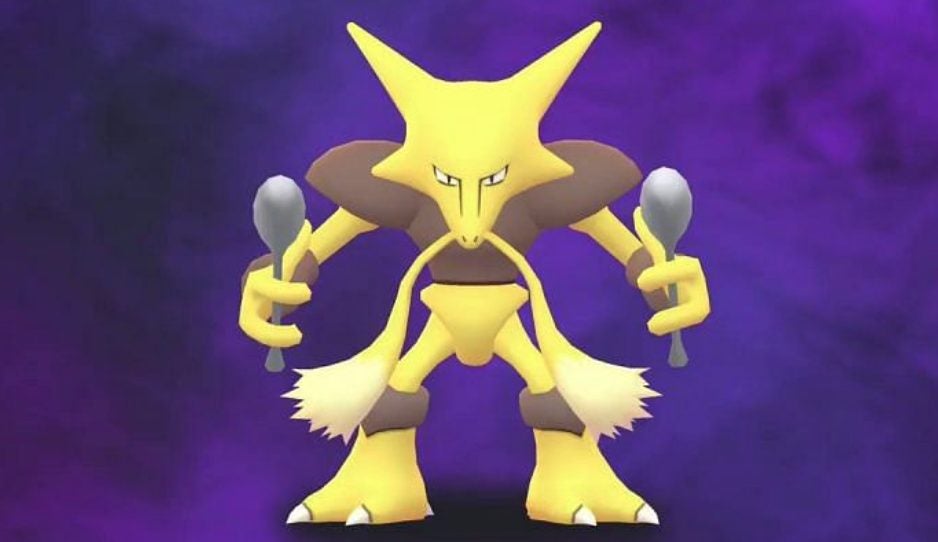
Alakazam

Alakazam is a powerful psychic type that is strong against fighting and poison types. Although it does have a weakness against bug, dark, and ghost-type attacks, Alakazam is one of the Pokemon with the highest attacks in Pokemon GO. Some of Alakazam’s best moves are Psycho Cut and Psychic. This member can be a great attacking force when part of a strong team.

The 9 Best Pokemon to Get in Pokemon GO

Tentacruel

Tentacruel is a water/poison type that has great defensive stats. Tentacruel is strong against ground, rock, and fire Pokemon. This makes it a great addition to your team as ground and rock pokemon are known to be strong. While Tentacruel is vulnerable against electric and psychic attacks, with the good defensive stats, a strong Tentacruel can make a big difference in your team.

The 9 Best Pokemon to Get in Pokemon GO

Lapras

Lapras is a unique water/ice type pokemon. Although it is weak against fighting, rock, electric, and grass-type moves, it does have a rare legacy move set which can make this an extremely strong attacking pokemon with decent stamina and defensive stats. Lapras is also a very rare pokemon, and it may be quite difficult to find, but once you do, Lapras can make a great asset to your battling team.

The 9 Best Pokemon to Get in Pokemon GO

Best Techniques to Beat Any Gym Leader

When it comes to winning battles against gym leaders, there are a few things to consider. The first is that it’s important to assemble a diverse team for the battle. This means including your strongest Pokemon but also having Pokemon with good defensive stats and stamina. It doesn’t matter how strong your Pokemon is if it can’t take a beating from an opponent and survive. 

Another factor to consider is your pokemon types. Try to collect a wide range of pokemon types. Pokemon types can have a big impact on your battle. For example, if you have two pokemon battling against each other with the exact same CP, but one is a grass type, and the other is a water type, chances are the grass type will come out victorious.

Therefore it’s a good idea to look at the types of your strongest Pokemon and try to collect a wide range of types so that when you face a gym leader, you can use your best Pokemon (type and strength) against whatever the gym leader throws at you.

Final Thoughts

Pokemon GO is a fun and addictive game that gives players the chance to experience the thrill of collecting these amazing creatures and then training them and winning battles. If you collect the strongest Pokemon from this list while making sure to follow our tips for beating gyms, you’re well on your way to becoming a great Pokemon trainer.

Pokemon Go Beginner's guide MORE TIPS
9

Your guide to Adobe Creative Cloud Express (formerly Adobe Spark)

Creative entrepreneurs need fast yet effective ways to share their work with the world. Thankfully, Adobe kept the needs of the Creator Economy in mind when it introduced Creative Cloud Express in 2021. Formerly known as Adobe Spark, this free online design platform simplifies the process of creating professional-quality graphics, videos, logos, web pages, and more.   

Social media influencers, bloggers, vloggers, writers, photographers, and content-creating freelancers can all get a lot out of Adobe Creative Cloud Express. The app is designed for creatives of every experience and skill level. To get the most out of Creative Cloud Express, however, you’ll need to understand its tools and features.

Adobe Creative Cloud Express START FOR FREE
9

Using Adobe Creative Cloud Express’ best features

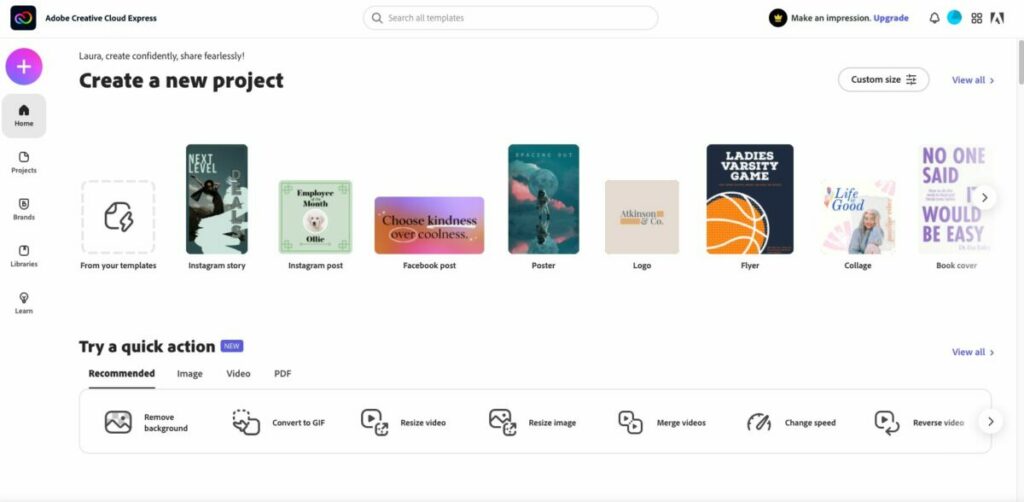
After you download and install Creative Cloud Express, sign in (or create a new) Adobe account. It’s best to explore the sidebar and get familiar with the different pages within the platform. If you’ve ever used Spark, it will look very familiar. Clicking the plus sign in the upper right corner will display all the best Creative cloud features, separated by columns for Create new and Quick actions.

Graphics and design

One of the benefits of Adobe Creative Cloud Express is its wealth of graphic design features. And with easy-to-use tools for adjusting colors, adding filters, and manipulating images–even novice graphic designers can create stunning visuals. The key to getting the most out of Creative Cloud Express is to take advantage of the templates. 

The platform has a massive library with thousands of templates. These professionally designed selections come preloaded with optimal colors, fonts, and more. Whether you’re creating a social media post, flyer, or logo, you’ll find a good starting point in the various library categories. Using the easily customizable templates is preferable to starting fresh with a blank canvas.

Web page design

Adobe Creative Cloud Express also offers a wide range of features that simplify the web page design process. With customizable templates, drag-and-drop elements, and integrated social media sharing tools, it’s easy to create beautiful web pages that represent your brand or personal blog. If you’re new to making a web page, start by selecting one of the provided themes. You’ll see different options like Crisp, Whimsy, and Vintage to match the tone you’re looking for. 

If you already have photos and video to add to your page, Creative Cloud Express has upload options that integrate with pre-set formatting and sizing features. The platform also makes it easy to find and add royalty-free content. The free photos option will search the databases of Flickr and Pixabay. There are also video embed features that make it easy to add YouTube videos to your page.

Adobe Sensei

Adobe Sensei is the artificial intelligence and machine learning technology used by Adobe. It powers a number of features in Adobe Creative Cloud Express, including quick actions. With quick actions, you can easily create a design or video in just a few clicks. All you need to do is select one of the many templates offered on the platform, make some simple edits, and your creation will be ready to share with the world. 

Extra features

There are additional noteworthy features to consider. First is full ContentCal integration. ContentCal is a content calendar built specifically for creatives to help plan, publish, and measure the success of content marketing initiatives. With ContentCal’s integration with Adobe Creative Cloud Express, you can add designs and videos to your content calendar and publish them directly to social media or other channels.

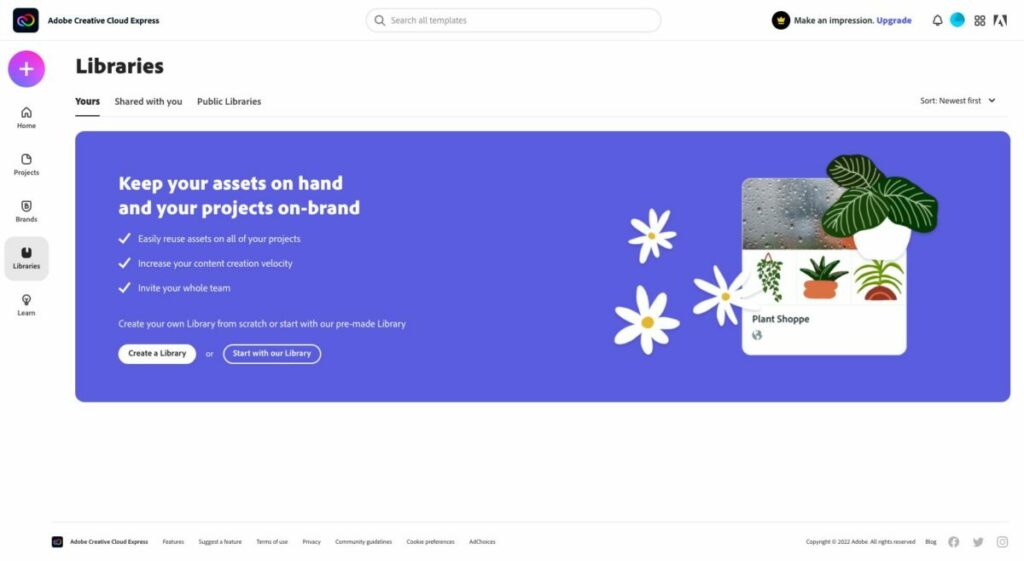
There’s also seamless integration with Creative Cloud Library, a desktop application that lets you access and share your creative assets — such as brushes, fonts, color themes, images, and videos — across Adobe Creative Suite applications. You can also use it to create libraries of projects for easy reuse. 

While the intuitive interface is easy to use, there’s help if you get stuck and don’t know how to proceed. The Adobe Creative Cloud Express User Guide is packed with resources, knowledge, and links. Here you can search by topic, interact with experienced creatives within the community, and live chat directly with someone from Adobe’s customer support team. 

Note: A paid subscription is technically required to chat with a live agent, and although they remind you of that during the connection process, you will still be connected to a live agent whether you have a paid plan or not. The User Guide is accessible at any time from within the platform.

Adobe Creative Cloud Express cost: is it free?

There is no cost for the Creative Cloud Express base app. However, there are upgrade options to unlock more features. If you want to stick with the free version, you’ll get the following for both web and mobile devices: 

  • 1,000+ templates, graphic design assets, and fonts by Adobe
  • Limited access to the Adobe Stock royalty-free image library
  • Base-level editing and photo effect features, which include removing background and animate
  • Up to 2GB of storage

The $9.99 per month premium plan (note: Canva is $12.95) gets you all of that plus:

  • Extra premium-level templates and design features
  • The full collection of royalty-free Adobe Stock photos (more than 160 million)
  • More than 20,000 Adobe Fonts
  • Additional features such as refine cutout, resize, and graphic groups
  • One-tap feature for adding your brand content, fonts, colors, and logo
  • The ability to convert and export to and from PDFs and other file types
  • Users can manage all templates and assets via the Creative Cloud Libraries
  • Up to 100GB of storage

The Creative Cloud Express membership also gives you access to the premium features within Adobe Premiere Rush, Adobe Photoshop Express, Adobe Spark Video, and Adobe Spark Page.

Creativity all around

So there you have it: an overview of what Adobe Creative Cloud Express can do for creatives of all experience levels. Whether you’re looking to start a blog, create graphics for social media, or make professional-quality videos, Adobe Creative Cloud Express has you covered.

EA plans to deliver 3 new Star Wars games

Electronic Arts has made a major announcement with regards to one of its top gaming brands. It seems as if their development teams are working hard on the next three Star Wars games. Attached to them are some mighty names, and one of the titles will be a sequel to Star Wars Jedi: Fallen Order.

The second Star Wars game will be a first-person shooter, with director Peter Hirschmann from the Medal of Honor franchise taking the lead. Since we were massive fans of the MoH games, we can’t wait to see what he does with an SW title. The third game will focus on strategy elements, with director Stig Asmussen from previous God of War games ready to show us what he can do.\

The head of production and development for all three Star Wars games is Respawn Entertainment. You may recall them from titles like Titanfall, Apex Legends, and the first Star Wars Jedi: Fallen Order. They must have done a stellar job for EA to ask them to return for so many SW games.

It’s clear from EA’s press release that Respawn Entertainment has a passion for working with Lucasfilm and its intellectual property. The Force is clearly with them as the development teams work incredibly hard to bring us the best in video gaming entertainment. There’s no clear indication as yet when the games are set for release and on what platforms, but we’ll be watching E3 closely this year to see if there are any announcements. 

With the EA desktop app and titles connected to Xbox Games Pass, it will be interesting to see if any of these Star Wars games will be available for free on the subscription platform for Windows gamers.

Windows 11 update will add support for Android apps

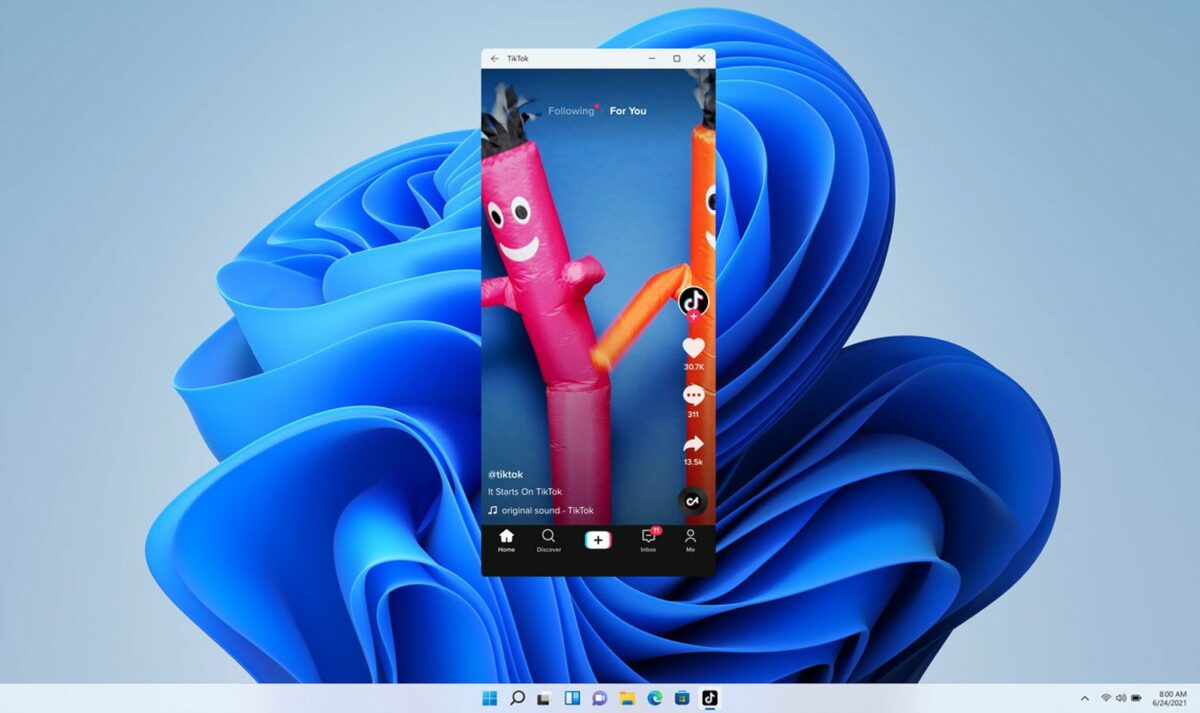
Last year, we indicated that Microsoft was working to make Android games compatible with Windows 11. We only expected the update to appear in the middle of 2022, but it appears that development is running ahead of schedule. It seems that the next Windows 11 update that adds support for Android apps may be available much sooner.
It’s no real surprise that Microsoft is pushing to have an Android emulator within the Windows 11 environment. With Bluestacks as one of the go-to applications for that purpose on the Windows OS, macOS and ChromeOS already have the functionality. Panos Panay, who’s the Windows Chief Product Officer, states they’re doing all they can to have the integration available as soon as possible.

With Android and Windows games already releasing like wildfire in the first month of 2022, we hope we’ll see plenty of titles in the Windows 11 update. Of course, there will also be other features appearing, such as sharing your screen with a button from the taskbar. The weather widget will be making a comeback.

One fascinating piece of information from Panay’s press release is how he feels that online learning is the future, and Microsoft is clearly making that one of the key focus points of future upgrades. With Microsoft Teams integrated into Windows 11, it’s easier for teachers and students to discuss assignments. 

With a Windows 11 update soon to bring Android games to the operating system, it may cause havoc with productivity and studies, though. Here’s hoping students have the discipline needed to steer clear of the emulators and focus on their assignments. 

Speaking of which, you may want to check out our guide of the best apps for students to increase focus and productivity.

Blizzard Entertainment is set to release a new survival game

Blizzard Entertainment is known for bringing us some stellar games like Warcraft, Starcraft, Diablo, and Overwatch. While the gaming company has been facing some very negative allegations regarding their workplace culture, Blizzard has just announced the release of an exciting new survival game for fans.

With the gaming company facing allegations of sexual harassment, assault, and inappropriate behavior, there have been some major setbacks in game releases. The highly anticipated Overwatch 2 and Diablo 4 were scheduled to be released in the year, although with the delays, it’s likely we’ll only see these games in 2023.

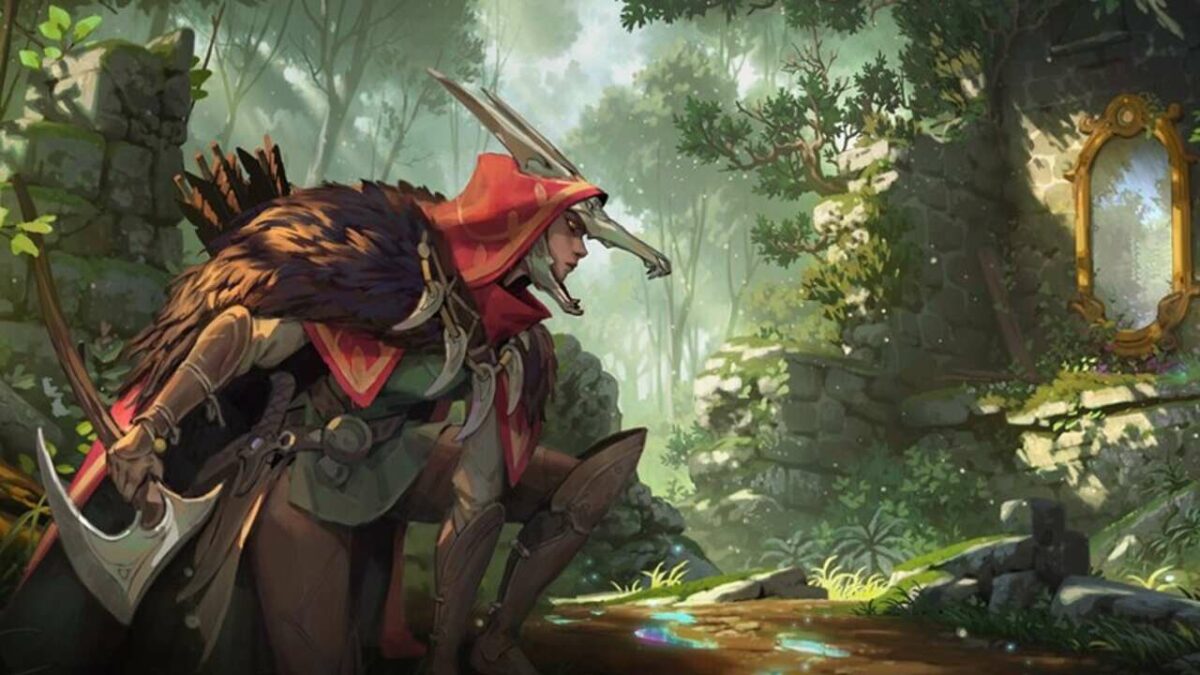
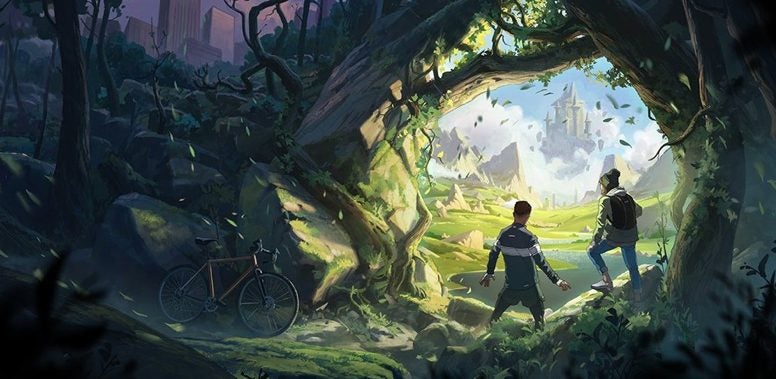
Earlier in the week, Blizzard announced that they are working on a brand new survival game. This will be the first time that Blizzard attempts a survival game. This game will be set in an original world that we haven’t seen before, with all-new heroes and characters. The company has not released much more than this statement and two of the game’s art pieces. This is probably because the statement was meant as more than just a teaser for a new game.

Blizzard Entertainment is set to release a new survival game
Blizzard Entertainment’s new survival game is set to be in a new and original universe.

Along with the announcement of the new development, Blizzard is also focused on attracting new talent to work on the game. These positions are from Art, Design, and Engineering departments across the board. This does bring some release as the company promised changes in the near future to combat the serious allegation of a toxic work environment. It is nice to see them acting on these promises.

Despite having very little information about the new game, there are rumors that it may resemble other popular survival games like Rust, DayZ, and Don’t Starve. We look forward to finding out more about the new Blizzard survival game in the near future, especially under the guidance of Microsoft who recently acquired Activision Blizzard for a phenomenal $69BN.

If you have some extra time on your hands, check out the list of Activision Blizzard games we suspect may be coming to Xbox Games Pass.

Rainbow Six Extraction exceeds 3 million players

@R6Extraction took to Twitter in the early hours of the morning to announce a major win; Rainbow Six Extraction has surpassed 3 million players worldwide in its first week on the market. This comes only a few days after Rainbow Six Extraction was released on Microsoft’s Xbox Game Pass service making the game more readily available to a greater number of players. Ubisoft plans to celebrate this win with a special Buddy Pass launch, letting players invite up to two friends to play with them for free. 

Players across all platforms, including those who play the game via Xbox Game Pass, will receive two tokens to give to their friends so that they can try the game out. The tokens will function as a free trial and are valid for two weeks. Cross-play integration also means that players can squad up with their friends, no matter what platform they prefer. Should these trial players choose to purchase the game, any progress they made during the trial period will be transferred to their new gaming profiles. 

More exciting Rainbow Six Extraction news comes in the form of planned free post-release content. If you needed more incentive to keep playing R6E and leveling up your Operators, here it is. Rumour has it you’ll be needing all the REACT tech you can get your hands on for the upcoming free content in this jaw-dropping loot ‘n shoot. So keep making the Archaeans lives’ a living misery and gaining PvE and tactical co-op experience; you’ll thank us later. 

Rainbow Six Extraction is available now on Xbox One, Xbox Series X|S, PS4, PS5, Google Stadia, Amazon Luna, and Ubisoft+. You can also play it with Xbox Game Pass and Windows 10/11 PCs with PC Game Pass. 

If you haven’t already, why not check out how you can redeem free limited edition loot with Amazon Prime and Rainbow Six Extraction.  

Leaks hint at upcoming content for Yu-Gi-Oh Master Duel

Since Yu-Gi-Oh Master Duel’s arrival on Jan 19, avid duelists have had a free-to-play platform for epic card battles. The game surprised fans by arriving on gaming marketplaces without much pre-launch publicity. One week after the game’s surprise arrival, hardcore duelists and data miners have uncovered proof of possible future content deep in the game’s core files. 

OzoneTCG, a prominent YouTube channel in the Yu-Gi-Oh-verse, gathered leaks using an Asset Studio GUI. The leaks show unreleased concept art and details of new upcoming solo mode archetypes and pictures of powerful cards that aren’t the game’s current build. One of Ozone TCG’s most controversial leaks is the powerful Synchro monster, Baronne de Fleur. Here is a list of the upcoming archetypes uncovered in the leak:

  • Mecha Phantom Beasts
  • The Weather
  • Lightsworn
  • Herald

A Reddit user named ‘Kr0Meister’ publicized the leaks by OzoneTCG and added to the leak list with their own discoveries. Among these new leaks are new sleeves, unused field parts, duel fields, profile icons and frames, and mate bases. It’s pertinent to mention that one of the duel fields seems to depict a Colosseum, and another seems like a strong reference to the Grand Spellbook Tower. 

Another Reddit user named ‘Nintendax’ added further leaks that hint at what might be the first event and tournaments coming to Yu-Gi-Oh Master Duel. The data mine put specific emphasis on ‘A special pack that can only be bought with tickets from tournaments.’ The leaked background images and logos suggest packs for Xyz, Fusion, and Synchro tournaments are coming soon to Yu-Gi-Oh Master Duel. 

Leaks are unsurprising as data miners delve into new games’ core files as soon as games are released. But these should also be taken with a grain of salt as until new packs and features are released, any concept art or architecture for planned features are simply that: planned features. Leaks do, however, serve an important role within the gaming community as they intensify interest in titles like Yu-Gi-Oh Master duel and the possibilities of a very exciting and hopefully tournament-driven future for the franchise. 

Top games released for Windows this week

It’s a busy week for gamers, with plenty of launches on several platforms. While we’re mostly focusing on Windows titles in this article, notable mentions are Gran Turismo 7 for PlayStation and Triangle Strategy for Nintendo Switch towards the end of the week. There are also a handful of indie titles on the cards.

For now, let’s look at the top games released for Windows this week and what you can expect for Xbox Games Pass.

Best games released this week for Windows

We haven’t seen a striking shift from Windows 10 to Windows 11 as yet, so you can play any of the games below on both operating systems. As the latter prepares for the new Android emulation upgrade it will be fascinating to see which mobile games we’ll be able to play on PC.

Here are our top picks for Windows game releases this week.

Guild Wars 2: End of Dragons | Feb 28, 2022

Guild Wars 2 has released the third expansion for the series, titled End of Dragons. It appears as if the Dragon Cycle is collapsing, which is having disastrous effects on the world. There are new heroes and skills that will be tested in this epic fantasy adventure.

We remember playing Guild Wars 1 back in the day, and we’re really proud to see that the MMORPG series has come this far. You’ll have new trait lines and combat mounts in Guild Wars 2: End of Dragons, making you more mobile and powerful. There are also new sea activities you can enjoy, such as new fishing spots.

Top games released for Windows this week

Pets at Work | Feb 28, 2022

From a detailed fantasy adventure to a casual indie game, Pets at Work presents a puzzle title with adorable creatures. These furry animals are lost at work with their owners nowhere to be seen. Using objects they find in the environment, they need to shift them around and make their way around the building.

Top games released for Windows this week

Shadow Warrior 3 | Mar 1, 2022

Shadow Warrior 3 presents a first-person shooter that mixes combat abilities with fantasy folklore. Lo Wang and his employer have accidentally unleashed a mythical dragon from its supernatural prison. With swords and bullets at hand, it’s your job to work through the vast array of enemies to face the ultimate boss.

There are some movements you may recognize from games like Prince of Persia and Assassin’s Creed. You can run along walls, perform air dashes, double jump, and use a grappling hook for advanced moves. With hilarious banter along the way, it’s a game set in Feudal Japan you may just love.

Top games released for Windows this week

ELEX II | Mar 1, 2022

As an anticipated sequel to the first ELEX RPG, ELEX II asks you to save Magalan again. This time, the danger is from new invaders called Skyands. Your task is to unite the factions in an impossible attempt against an almighty foe.

The game features an open world within a steampunk environment. There are plenty of NPCs and objects you can interact with, helping you on your journey and quests. After you create a group, you can also leave them at any time, creating more flexibility. In the end, you’ll have a lengthy story that should keep you busy for days. 

Top games released for Windows this week

Puzzle Quest 3 | Mar 1, 2022

With Puzzle Quest 3 coming to PC, you’ll have an interesting combination of RPG, fantasy, and puzzles. You can pick a class when you start, each of which has specific attributes. You even pick up gear to add to your inventory that will aid you across the more challenging levels.

How it works is that you’ll match gems to power up your abilities. You can then unleash them when they’re fully charged, destroying your opponents quickly. However, you’ll need to plan it strategically so you don’t do it too early. The best part is that it’s free to play.

Top games released for Windows this week

FAR: Changing Tides | Mar 2, 2022

You are Toe that finds himself waking up stranded in a world that’s flooded with water. With the resources you have, you build a ship that takes you across this side-scrolling adventure. FAR: Changing Tides is a casual game that lets you explore more than fight any opponents.

As a sequel to FAR: Lone Sails, the game shows new scenery, characters, and creatures. It’s more a meditative approach to gaming, which takes out all the violence of modern titles. It also has a stunning soundtrack that plays various sounds from the ocean.

Top games released for Windows this week

BABYLON’S FALL | Mar 3, 2022

You may recognize this PlatinumGames title published on a different platform before. The entire story is coming to Steam, presenting the action RPG in all its glory. Up to three players can join forces and take on opponents together to complete objectives. There are various playstyles and weapons you can use towards victory in Babylon’s Fall.

Top games released for Windows this week

The latest Xbox Games Pass games

At the moment, there are few games joining the Xbox Games Pass this week. Instead of buying FAR: Changing Tides on Steam, you can try it free this week on XGP first if you have a subscription and are in the right region. There are other titles appearing later in March, which we’ll cover in future articles.

Some other titles we’ve seen appear on Xbox Games Pass with the “New” label that you may have missed since our last update include:

Which Windows games will you be playing?

As you can see from our list of the top Windows games this week, there’s a decent line-up. We’re expecting a few more to appear this month, so we’ll keep our eyes open for those. Let us know which of these titles you’ll be enjoying this week.

How to Force Quit frozen apps on your Mac, iPhone, and iPad

Apple devices are less exposed to threats, which is one reason why their apps tend to behave well most of the time. Nevertheless, iOS apps occasionally become unresponsive, leaving users unable to access functions or regular quit options. In times like these, the best option is to use Force Quit.

Years ago, the only way to deal with a non-responsive app was to initiate a hard shutdown, potentially compromising the system. This was especially true of older computers. Force quitting, however, provides a convenient workaround on all Apple devices. The function is effectively a shortcut that helps you combat buggy apps without putting your valuable hardware at risk. 

How to Force Quit on your Mac laptop

If your mouse cursor has turned into an everlasting spinning wheel of death, you’re likely dealing with a crashed application on your laptop. The best solution is to initiate a Mac Force Quit through one of these methods:

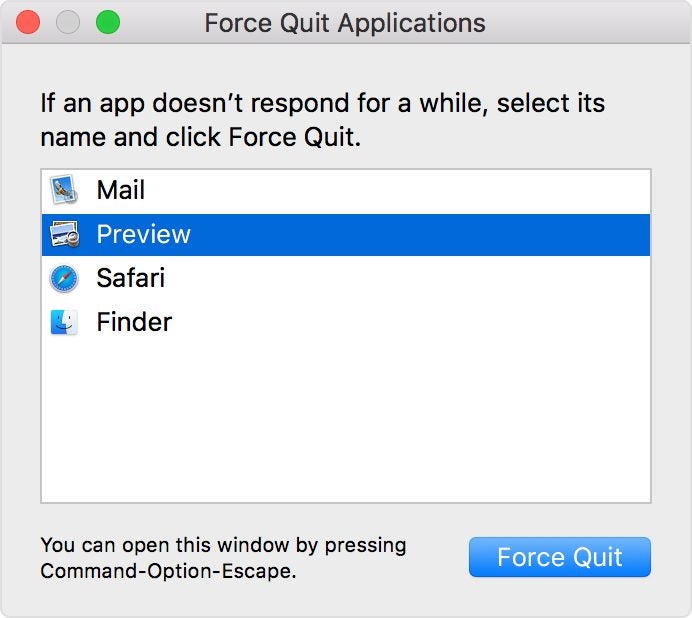
  • Press the Option, Command, and Esc (Escape) keys at the same time.
  • In the upper-left corner of your screen, click the Apple icon and then select Force Quit.
  • Hold down Option and right-click the icon of the unresponsive app in your Dock. You’ll then see a Force Quit action in the pop-up menu.

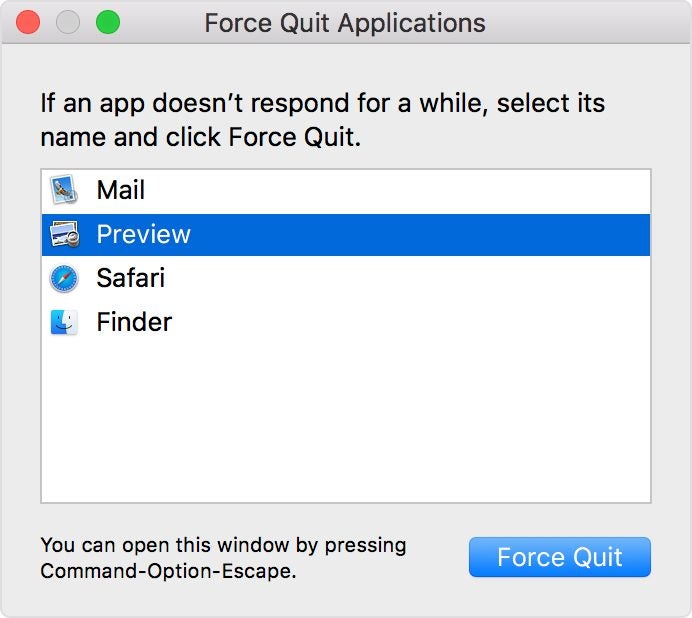
Methods one and two will reveal the Force Quit applications window. You’ll then select the unresponsive app and select Force Quit.

How to Force Quit frozen apps on iPhones

You’ll start the process of force-quitting a stuck app via the App Switcher on your iPhone. Accessing this feature varies depending on which iPhone you have and the version of iOS it uses. 

For iPhone models X and above, you will observe a notch selector at the top of the screen. These mobile devices lack the traditional home buttons found in earlier models. Here are 3 steps to Force Quit on an iPhone X and above models:

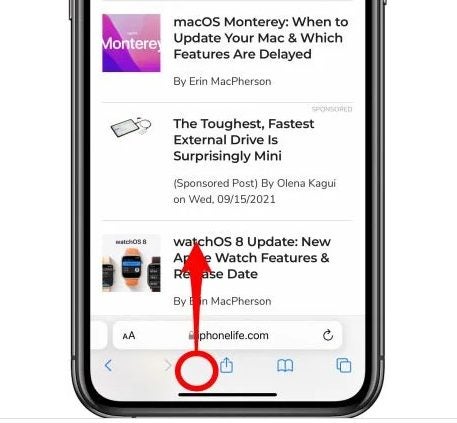
  • As you are in the unresponsive app, swipe up from the home bar at the bottom of the iPhone screen.
Swipe up from the home bar
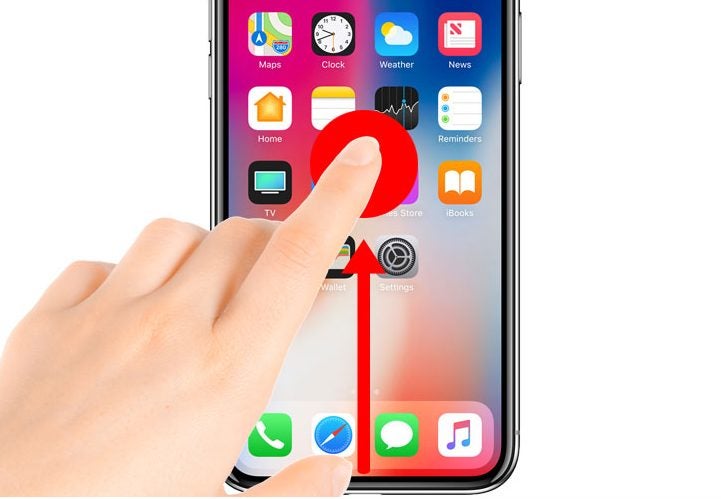
  • Hold your finger over the display until you see the preview of the app, moving it to the middle of the screen. Then lift your finger to open the App Switcher.
Hold your finger over the display
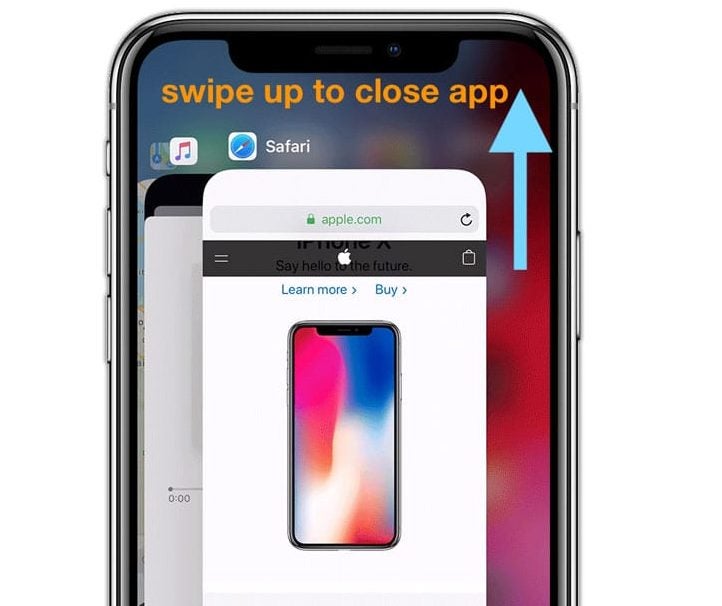
  • Scrolling horizontally in the App Switcher, you can find all the apps you’ve previously accessed. Swipe on the stuck app’s preview to quit the application. The app will disappear, effectively halting the program.
Swipe up to close app

How to Force Quit frozen apps on iPads

The approach to force quitting an iPad is similar to the process on iPhone. However, the interfaces differ slightly.

Here is the process for iPad Pros running iOS 12, iPadOS13 or higher:

  • Swipe up from the bottom section of the screen toward the middle and hold for a brief second.
  • Upon letting go of the screen, you will encounter the App Switcher.
  • Select the app you want to Force Quit from the App Switcher grid to dismiss it, and complete the process.

How does Force Quit work?

When an app closes on an iPhone or iPad, it continues to run in the background. Many users are unaware that they are essentially pausing the app so that it demands less CPU. This ensures the optimal function of the device. 

Poor performing applications freeze and become stuck before rendering themselves unusable. In this case, the Force Quit command is the only option aside from initiating a hard shutdown procedure. 

Is force quitting safe for my device?

Force quitting a stuck application is the safest way to resolve an unresponsive application and prevent the issue from happening again. Frozen applications in Apple devices are predominantly attributable to insufficient RAM. 

Devices short on memory (RAM) can support a limited number of applications, including those that remain open in various tabs or windows. The system will become unresponsive anytime its available memory resources are close to maximum capacity. 

RAM is like your workbench in the sense that it outlines how much space that is available for work. If you have too many projects crowding up your bench, you won’t be able to work on anything at all.

Once you’ve Force Quit the app, you can access it again from the home screen or your applications folder. If it’s a trusted app, it should reload and work like new.