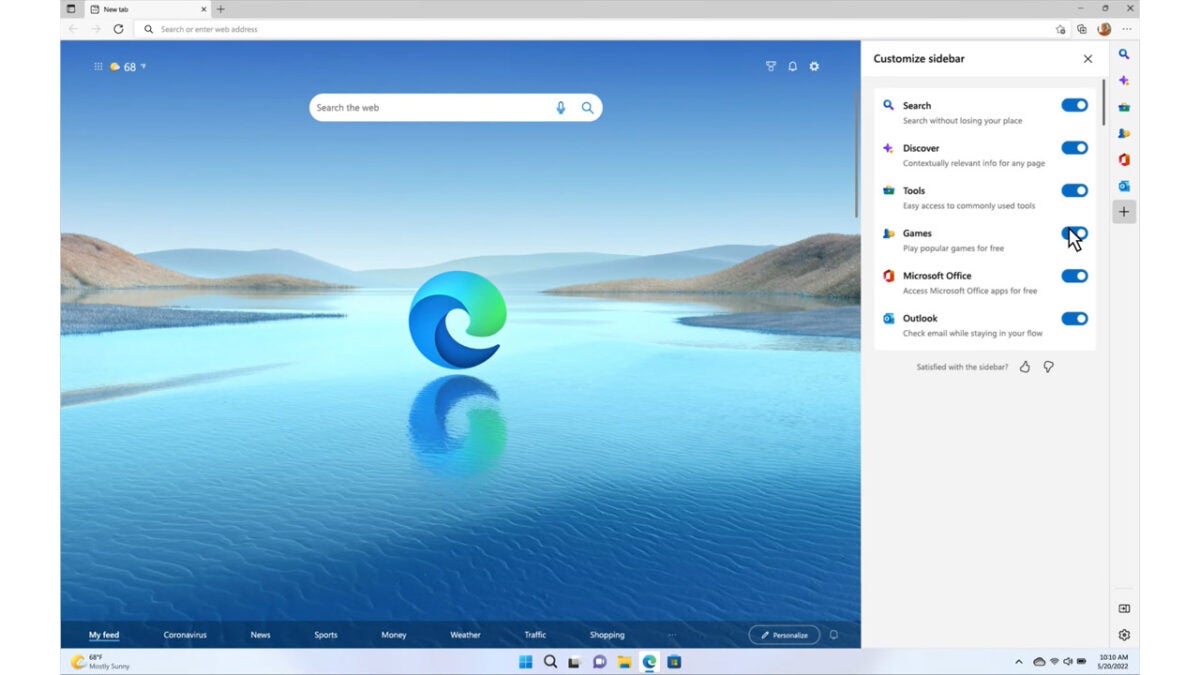
Microsoft Edge’s new sidebar is now live

Microsoft Edge is a very capable web browser that offers users added and innovative forms of utility over other web browsers. In fact, Microsoft is constantly trying to build new features in attempts to steal away users from Google Chrome. Today, a new feature, which we covered a few weeks ago has gone live, and you can now access the Microsoft Edge sidebar when using the browser. Here is what you need to know.

Microsoft Edge Download Now

We first brought you news of the Microsoft Edge Sidebar, which gives users the chance to use other Windows tools from within the browser, back in June. Microsoft has now released a blog post including official details about the launch of the sidebar.

The sidebar plays well on integrating some key Windows features into the Microsoft browser. Microsoft describes the feature as such:

“The new sidebar in Microsoft Edge lets you access tools and features side-by-side within your browser, even as you navigate between tabs. From being able to search specifically within the page you’re viewing, to using tools to do quick math without opening another tab, we’ve found a way to help you be more productive without losing your place as you browse.”

The tools that will sit inside the sidebar include search, Discover, Outlook, Office, and even tools like the clock, dictionary, calculator, converter, and even an internet speed test. These will all sit in a super slim sidebar on the right-hand side of the browser, which will open up when one of them is selected.

As to whether this added utility will help Edge steal away some Google Chrome users remains to be seen. There is certainly enough here, however, to help carve out a bit of a unique offering for the browser that could see it gain some ground. We will have to wait and see.

In other Microsoft Edge news, a recent security update has patched over 15 security issues.

Netflix ads look to be coming this Fall

As Netflix has been slowly but surely losing subscribers over recent months, the ailing streaming platform has been looking for ways to attract more users to the platform. As well as plans to stamp out account sharing, another big part of Netflix’s current strategy is to introduce a new cheaper tier of subscription that will be supported by showing ads during shows and movies. After months of speculation and leaks of information, it now looks like we can tell you when the new subscription tier will launch.

Netflix Download Now

According to a report from Variety, the decision has been taken at Netflix to push out the new tier to users in most countries where Netflix has an established user base, which includes the likes of the US, the UK, Canada, and more on November 1.

Interestingly, according to the Variety report, Netflix is pushing for this date to beat the launch of the new lower-priced Disney+ subscription tier, which will also be supported by ads.

This would mark a considerable acceleration of the original plans Netflix executives had, to launch in 2023, but follows on from a report we released in May, which detailed plans to launch the new ad-supported tier by the end of the year.

This latest leak follows on from a series of reports over the last few weeks covering the emerging details of the new lower-priced Netflix membership tier. We broke the news last week that the tier will likely cost between $7 and $9 a month. Just a couple of weeks before that story we also reported on the fact that the new tier will not support downloads meaning subscribers will only be able to watch Netflix shows when they have active connections to the internet. We also know that subscribers will have to sit through about 4 minutes of ads for every hour of programming they watch.

Netflix still hasn’t officially confirmed this new release date, but there is very little to suggest that it isn’t true. In other recent Netflix news, the streaming platform is planning to further expand into gaming.

Diablo Immortal gamers are in debt for third-party Eternal Orb purchases

The drama continues to unfold with Diablo Immortal, an epic fantasy game so many of us were waiting for. Sadly, Activision Blizzard’s decision to include microtransactions has been nothing short of a nightmare. The latest issue revolves around players trying to obtain Eternal Orbs at a cheaper price through third parties, and then being banned or landing in debt.

Diablo Immortal DOWNLOAD

For those of you who don’t play Diablo Immortal, let me enlighten you on why Eternal Orbs are so valuable. They unlock items you can’t buy with the in-game currency, such as unique cosmetics, crests, bundles, and more. To obtain these precious items, you need to buy them with real money.

To give you some more perspective, a pack of 60 orbs will cost you around $1, while 7,200 orbs are $100. With players already annoyed at having to pay for anything in Diablo Immortal, they looked for third parties selling them cheaper. Some sold 7,200 orbs for $10. You can see why Blizzard was disgruntled.

According to some Reddit comments, Blizzard has a system in place to prevent this from happening. For those who used this method to obtain Eternal Orbs at cheaper prices, the company banned their accounts. Others have their in-game currency in the minus, some owing 600k in orbs.

Diablo Immortal gamers are in debt for third-party Eternal Orb purchases

There are two sides to this story, of course. On the one side, we have the players who are still unhappy about Diablo Immortal microtransactions. I’m still wondering if this would have been the case had Activision not bought Blizzard. The company is fond of adding microtransactions, as we see in all the latest Call of Duty games. 

On the other hand, players are still paying for those microtransactions, with Diablo Immortal raking in $24 million in two weeks. It doesn’t look like this payment system is going anywhere anytime soon.

Microsoft Edge 105 fixes 15 security issues

Microsoft released a new stable version of the company’s Edge web browser. Edge 105 is a security and feature update that is already available.

Microsoft Edge, which uses the same core as the Google Chrome web browser, shares some of the vulnerabilities with Google’s Chrome browser. The core, called Chromium, is open source, and available to all developers and organizations.

Microsoft Edge Download

For example, browsers such as Vivaldi, Brave or Opera use Chromium as the source.

Both Google and Microsoft modify the Chromium core to introduce custom features and services. It is common that vulnerabilities are exclusive to one of the browsers, but many vulnerabilities are shared.

In the case of Microsoft Edge 105, only one of the security issues is Edge-specific. The remaining 14 vulnerabilities are shared among all Chromium-based browsers, including Chrome.

To put this into perspective, Google patched 24 different security issues in Chrome 105 when it released it on August 30, 2022.

The 14 core security issues fixed in Edge include a critically rated vulnerability, filed under CVE-2022-3038, and several security issues rated as high.

The sole Edge-specific vulnerability is a remote code execution vulnerability, and rated low.

How to download Edge 105

Microsoft Edge installations update to a new version of the web browser automatically after release; this may take hours or even days, depending on the rollout.

Edge users who want to speed up the process may do the following to expedite the installation:

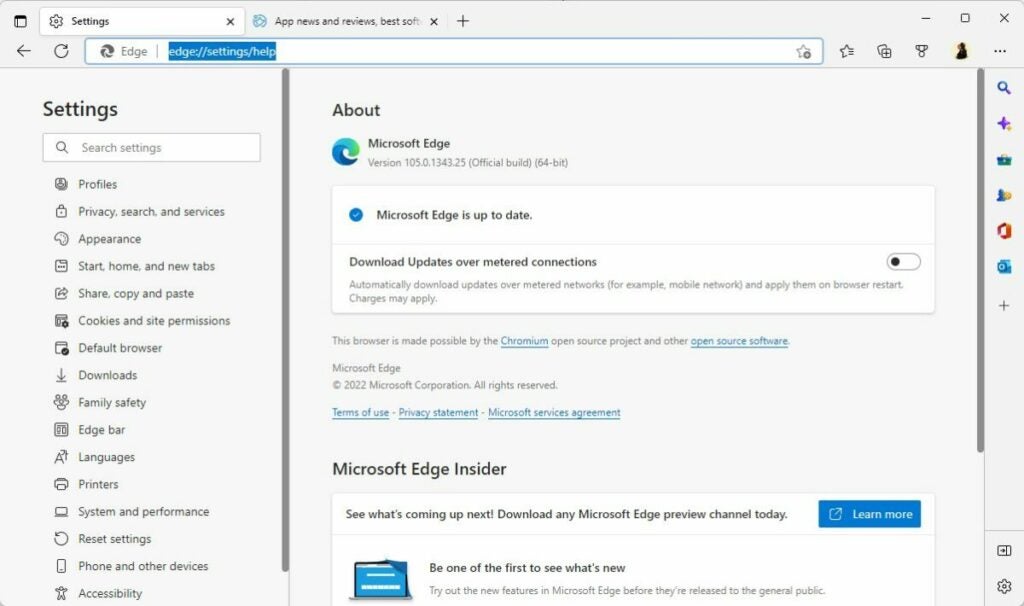
  1. Load edge://settings/help in the browser’s address bar. You may also select Menu > Help > About Microsoft Edge.
  2. The page that opens displays the current version. Edge runs a check for updates and will install any update that it finds.
  3. A restart is required to complete the process.

New and existing users may download the latest version of Microsoft from the official Edge website or a trusted source, such as Softonic, as well.

Edge may be installed over existing installations, or installed for the first time on a compatible system.

Microsoft Edge 105: the changes

Microsoft Edge is a security update first and foremost. Although that is the case, Edge 105 includes other changes that are important.

The browser’s enhanced security mode supports WebAssembly for 64-bit Windows operating systems now. Microsoft plans to roll out the feature to other systems Edge is available in the future. For now, it is a feature exclusive to Edge running on 64-bit Windows devices.

Enhanced Security Mode is not enabled by default, but it can be enabled with just a few clicks.

Edge applies additional security protections to websites visited in the browser, if the mode is active. The protections limit certain attack vectors to improve user security while using Edge.

Here is how you configure Enhanced Security mode in Edge:

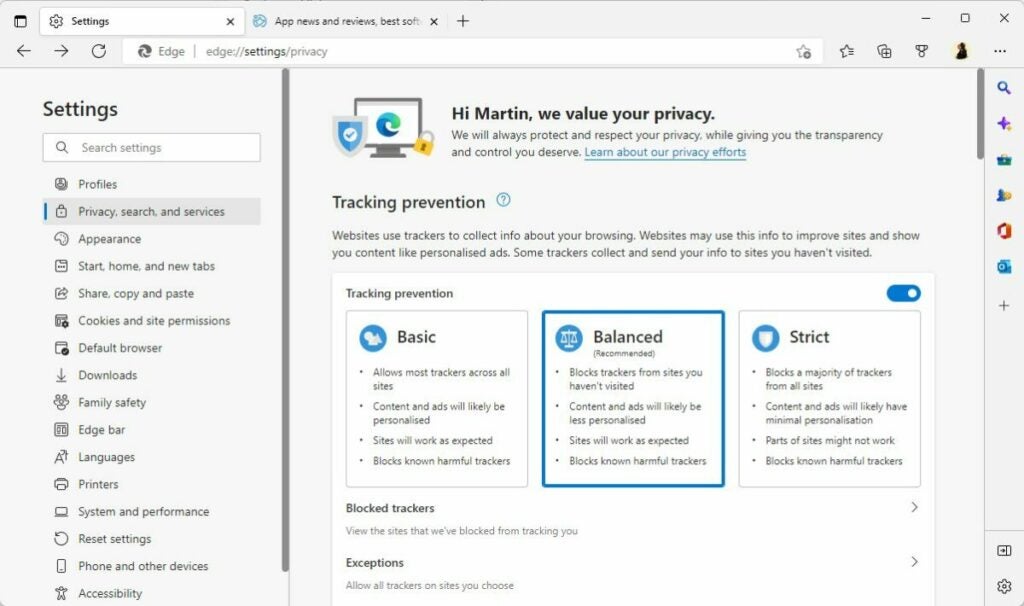
  • Select Menu > Settings > Privacy, search, and services, or load edge://settings/privacy directly in the browser’s address bar.
  • Scroll down to the Security section on the page that opens.
  • Locate the “Enhance your security on the web section”.
  • Toggle the feature to On, and select one of the three available options:
    • Basic — adds security mitigations to sites that are not visited often.
    • Balanced — adds security mitigations to sites that are not visited frequently.
    • Strict — adds security mitigations to all sites.

Some sites may not work correctly anymore after enabling the security mode. There are options to add sites to a blocklist to disable the mode for these specifically.

In short, it is a good idea to start with basic or balanced, to avoid site breakage.

The remaining changes, for the most part, are of interest to organizations only.

Microsoft improved the cloud site list management experience for Edge’s Internet Explorer Mode. Generally speaking, it is giving administrators more control over lists used in IE Mode.

Edge 105 Stable includes new policies, which are mostly useful to administrators as well. These policies add options to Edge to disable certain features in company networks and on company devices.

Closing Words

Microsoft Edge 105 Stable is an important security update, which users of the browser should install as soon as possible. In general, it is a good idea to install security updates right after release to protect devices and applications against potential attacks targeting these vulnerabilities.

Vulnerability in TikTok’s Android app was allowing attackers to secretly access user accounts

TikTok is a hot topic these days with politicians all over the Western World frothing at the mouth at the possibility of the Chinese app getting its hands on their citizens’ data. There are other security concerns that need to be taken seriously, however, such as the more traditional cybersecurity issues we regularly report on here at Softonic. Today we have news of a vulnerability in the TikTok app for Android that has been allowing attackers to secretly access users’ data. Let’s go through the details now:

TikTok Download Now

It is a popular method for cybersecurity and antivirus specialists to raise the profile of their products by reporting on security vulnerabilities they have uncovered. This is even the same for security researchers at software giants like Microsoft. The Microsoft Defender 365 Research Team has released a report exposing a security vulnerability in the TikTok Android app that “could lead to one-click account hijacking”.

Fortunately, although the vulnerability was active for a period of time, it was quite complex and required a chain of multiple issues to occur at once, in order for the exploit to be taken advantage of. This means that the vulnerability has now been closed before any seeming exploits have been actioned.

This is great news because although it would have been difficult to exploit, the vulnerability was quite serious, with the Defender 365 team reporting:

“The vulnerability allowed the app’s deeplink verification to be bypassed. Attackers could force the app to load an arbitrary URL to the app’s WebView, allowing the URL to then access the WebView’s attached JavaScript bridges and grant functionality to attackers.”

Once again, a security issue is highlighting the need for vigilance when you are online. It is more important than ever to take care whenever you are clicking links or downloading files. As always in these cases, we recommend you refer to our phishing scam and fake link infographic every time you come across something suspicious.

Image via: Flickr

Twitter is officially testing an Edit Tweet button!

It really seems like Twitter fans have been requesting an Edit Tweet button for years with the requests constantly falling on deaf ears. The main concerns from Twitter HQ have related to users changing the information in Tweets that have been cited for news and informational purposes, which could lead to increased levels of fake news and misinformation spreading across the internet. Now, however, it looks like a solution has been reached as it looks like we are finally about to see an Edit Tweet button. Let’s check it out:

Twitter Download Now

Twitter has published a blog post announcing that it is officially testing an Edit Tweet button and explaining how it is going to work. The test is giving select users a 30-minute window after they have posted to edit their Tweets. If they do decide to edit the Tweets, they will then be marked with a “Last edited” label so that anybody reading the Tweet will know that it has been altered.

Another key aspect of the feature is that users will be able to click on the Last edited label to open up a version history of the Tweet, which will show all edits made across the different versions of the Tweet.

As a part of the test, Twitter is seeking feedback on the length of the window available to users to edit their tweets. Depending on feedback, the 30-minute window could be extended, or it could be shortened.

At the moment the test is only rolling out to a very select group of Twitter users, but there are plans to expand the test to Twitter Blue subscribers in the coming weeks. That means there are still no exact details of when the feature will roll out to everybody. Twitter HQ say that they will be monitoring how this affects people’s interactions with Tweets so theoretically there could still be a lot of tinkering to do on this one. Either way, if it comes tomorrow or next year, the fact that we know it is coming is big news.

In other Twitter news, a security flaw has seen certain verified accounts exposed to attack.

Meta is thinking of charging you to use Facebook, Instagram, and WhatsApp

Ever since Facebook rebranded to Meta, the big blue social network has been quietly working away in the background to halt its decline. Instagram hasn’t been without its own problems either having recently been forced into an embarrassing U-turn about how the Instagram feed works. Well now, Meta might be able to score another own goal as reports are coming out that the company is searching for ways to make you pay to use both social networks and WhatsApp. Here is what you need to know.

Facebook Download Now

Reporters at The Verge have broken a story about a leaked memo at Meta, which discusses the formation of a new team at the company, which is called “New Monetization Experiences”. It seems that the team will have the mission to seek opportunities to insert new paid experiences into both Facebook, Instagram, and WhatsApp.

Interestingly, the introduction of new premium features into social networks and communication apps seems to be on trend at the moment with Telegram and Snapchat both rolling out premium subscription options for their services. There is no doubt, however, that Meta will have to tread carefully with this one as users of both Facebook and Instagram are feeling jaded at the moment and may simply jump ship.

The thing here is that there is nothing exciting enough going on at either network that would qualify as a premium experience meaning they are going to have to come up with new features and experiences if they are to start charging for them. We could see, for example, a premium experience offered to influencers on Instagram who are using the platform to earn a living. On Facebook, however, it is more difficult to identify potential premium features unless Meta decides to finally start policing the network for fake news and malicious misinformation but decides to charge users to turn on the feature. Unfortunately, the same could go for WhatsApp too!

There could be nothing in this story, but the timing of it breaking out is unfortunate for Meta. We will have to keep an eye on this story to see how it develops. In other Meta news, the company has released an impressive new AI translation model.

Easily use Twitch Studio in 5 simple steps

Twitch Studio is a broadcasting platform being developed by Twitch itself to make live streaming easier and more accessible to all users. One of the main goals is to make it simple enough that even beginners can start streaming on Twitch within minutes, but how does it work?

Twitch Studio DOWNLOAD

Twitch Studio Beta is available for anyone to try out, and with this handy guide, we’ll show you how to use Twitch Studio in five simple steps. Continue reading to discover just how easy it is to get started on this broadcasting platform without needing a bunch of other third-party programs.

The advantages of using Twitch Studio

Although Twitch is an extremely popular live streaming platform, it can be intimidating to start streaming. This is because after Twitch originally launched, it didn’t come with its own native broadcasting platform. As such, users had to rely on providers like OBS Studio and StreamLabs, making it difficult for beginners or anyone unfamiliar with the Twitch platform to get started.

However, Twitch Studio aims to change this and make it easy for anyone, even beginners, to start live streaming in a few simple steps. Using this platform has many advantages for users. The main is the easy-to-use interface that can guide you through the setup of your streams. 

Another benefit of using Twitch Studio is that it allows you to completely personalize your streams directly from within the platform. You will automatically be given access to starter layouts and overlays to use to customize your streams. If you already use a Twitch Stream Package, those will also be available within Twitch Studio.

One of the most important benefits is the easy integration between the broadcasting platform and Twitch itself. Since this is a platform of Twitch, all your alerts, activity feeds, and chats are also onboard. Having everything in one place makes it very convenient.

How to use Twitch Studio

  1. Download Twitch Studio

    How to use Twitch Studio

    Your first step in getting started would be downloading the free Twitch Studio Beta app on your PC. The app is still in beta and is only available on Windows now. You can use the above link in the intro to download the app or download it directly from the Twitch website.

  2. Log in

    How to use Twitch Studio

    Once you’ve installed the app, you can log in using your Twitch account details to sync everything between the two. Alternatively, you can create a new account by clicking on ‘Sign Up’ and filling in the required fields to create an account.

  3. Set up the basics

    How to use Twitch Studio

    The first time you sign in to Twitch Studio, you’ll be taken through the setup process to get the basics sorted. Click on ‘Get Started’ to begin the process. You’ll start by setting up the audio for your streams. Connect your mic, and select it as your default one.

    Also, test it out by clicking on ‘Test Hardware’ in the upper corner before continuing. You can customize individual settings by clicking on ‘Personalize’; however, the app will automatically choose the best settings, so you don’t have to unless you have specific requirements. Click on ‘Continue to Webcam’ to go to the next step.

    On the next screen, select the webcam you want to use. If it doesn’t show up immediately, click on the ‘Refresh’ button. Click on ‘Continue to Layouts’ to move to the next step.

  4. Add layouts and scenes

    How to use Twitch Studio

    The app automatically provides you with a few layouts and scenes to choose from. There will be three default scenes available, one for your ‘Main’ screen, one for your ‘Be right back’ screen, and one for your ‘Chatting’ screen. You can click on each one to customize them. Through customization, you can add extra images such as logos, banners, and more to make your streams your own.

    Click on ‘Continue to Settings’ to adjust your stream settings. Once again, the app chooses the best settings for you, so you don’t have to change anything unless you have specific requirements.

  5. Start streaming live

    How to use Twitch Studio

    Once you’ve completed all these steps, you can click on ‘Return to App,’ From here, you can decide to go live immediately by simply clicking on ‘Start Stream’ and giving your stream a title. Once ready, click on ‘Start Stream’ to begin broadcasting.

Five best initial abilities in Midnight Fight Express

While Midnight Fight Express may look like a fairly simplistic game, there’s actually a whole lot more intricacy going on just under the surface of what you see at first glance. Behind the low-poly environment and simplistic art style, there’s an incredible combat system and an extensive skill tree. Midnight Fight Express is essentially a top-down 3-dimensional brawler, but the presence of this skill tree makes it feel like the game is whispering to you that it’s actually an RPG. 

Midnight Fight Express DOWNLOAD

While the skill tree in Midnight Fight Express is not as extensive as those in other RPG titles, it can still be a little dissuading to try and figure out where to place the most emphasis – especially early on in the game. Therefore, we’ve decided to give you a quick guide on the best initial abilities to focus your early game point collection on in Midnight Fight Express. 

Parry Weapons

Anyone familiar with this particular portion of the larger skills and abilities tree will know that this is one of the most crucial places to sink your points. This is essentially the key to turning the tables on your opponent. At the beginning of the game, you’re most likely going to be on the offensive more often than actually throwing hands when not provoked. Investing in Parry Weapons lets you take on a more offensive role, which is crucial to early success. 

Although, it’s pertinent to note that you’re not only going to use this in situations where you’re the primary aggressor. This ability is also perfect for a defense that you can turn into an offense. So, here’s how you do it: An opponent will come at you, fists and weapons blazing. This will usually be some kind of melee weapon.

You’ll now be able to block their attacks more effectively, as well as issue a few of your own hits. This new ability ensures that you deal more damage to your opponent, but it also essentially results in them dropping their weapon at your feet, like some kind of sacrifice. Now, not only do you have your enemy subdued, you also have a new weapon!

Five best initial abilities in Midnight Fight Express

Long Range Attacks

One of the first things you’ll notice is that your character’s punches are laughably short-range attacks. This is okay if your attacker is close enough to clip through you, but in a slightly more reasonable and believable hand-to-hand combat scenario, it’s not the best.

Luckily, Midnight Fight Express has a Long Range Attacks ability that lets you increase the distance that your punches will travel. This is perfect for the situation mentioned above, as well as if facing a large group of combatants and you need to be able to close gaps between yourself and said combatants without actually moving too far.  

With sufficient attention paid to upgrading your Long Range Attacks ability, you’ll be able to close gaps and knock teeth out by simply using the light attack button. 

Five best initial abilities in Midnight Fight Express

Kick Big Items

Throwing hands is almost as fun as picking up items to throw at your enemies. But, do you know what trumps both those choices, hands down? Kicking stuff at your opponents. You see, when you’re throwing things, you’re not just performing one action. Especially seeing as the movements in the game are based and built on actual movements gleaned from a motion capture system, every moment is as realistic and quintessentially human as possible.

This means the simple act of throwing an item at an enemy is a major time thief. You have to account for the time it takes for your character to bend down, extend its arm, open its hand, grasp an object, and then lift the object up while simultaneously returning to a standing position. Then, the character has to stabilize itself, build up momentum to throw the object, and actually perform the various movements associated with throwing the object at a target. 

If you kick an object, you simply have to build up momentum in your dominant leg, aim, and kick. It’s that simple. Of course, you need to dedicate resources to the ability to kick big objects on the skill tree first, but once you do, you’ll have far faster responses than if you were to pick items up to launch at your adversaries. 

Five best initial abilities in Midnight Fight Express

Power Wave Bullet

This isn’t as immediate a possibility as the rest of the items on this list, but it’s still a crucial one. As you play through the missions and objectives of the game, you’ll get to a pivotal point where you unlock a sidearm. This sidearm is known as the Secondary Gun and it opens up a whole new world of attack mechanics. For one thing, you’ll be able to shoot your adversaries now –  no more waiting for them to be close enough to smack you in the face. But second, and possibly most importantly of all, you’ll be able to dedicate resources to an ability called Power Wave Bullet. 

Essentially, this is one of the most fun and useful abilities to unlock, as it lets you power through numerous enemies simultaneously. This is particularly useful if you’re facing off against a sizeable crowd of miscreants. The trick, however, is to use this in conjunction with a melee weapon. You’ll be unstoppable – for a time. 

Five best initial abilities in Midnight Fight Express

Environmental Finisher

‘Finish Him’ – your brain must be screaming now. I know mine is. But this is not Mortal Kombat. However, you do have access to a similar set of mechanics in this game. While you won’t see the breaking of bones and graphic splatters of miscellaneous bits of viscera, you will be able to use various features of the environment to finish off your opponents. This will be particularly useful if you want to clear each stage. 

Now, I cannot speak to the sheer scope of environmental finishers yet – I haven’t quite finished the game yet. I can, however, say that the environmental finishers are certainly entertaining to watch, and they deal extensive damage, which gets you out of harm’s way a lot faster. Therefore, this particular branch of the skills and abilities tree is a crucial one to which to dedicate resources. 
Five best initial abilities in Midnight Fight Express

Steam Deck plans for next-gen hardware are underway

With so many countries waiting for the Steam Deck handheld console to become available, Asia is in celebrations that many games can now reserve it. Valve is also happy to be able to meet the demand, but it’s already discussing plans for a next-gen upgrade. There’s so much more it can do with the Steam platform, especially with streaming and game availability.

Steam DOWNLOAD

Weekly Famitsu recently had an interview with Valve members and developers about Steam Deck. One of the questions asked was if gamers can expect more from the gaming console. One of the designers, Greg Coomer, indicated that the next generation of Steam products will see vast improvements.

The focus isn’t only on Steam Deck, but also on other platforms that use the Valve software, such as televisions and computers. Speaking specifically about the handheld console, Pierre-Loup Griffais mentioned that gamers usually have an issue with its battery life. As one of the developers of the device, he’s hoping the company can find a solution.

With Valve pushing the Steam Deck to 40 Hz refresh rates, it’s no wonder the battery doesn’t last that long. If they want to extend to 60 Hz, they’re going to have to come up with an almighty solution for powering the device when it’s not on charge. Can you imagine starting a game just to have it die within an hour? 

Steam Deck plans for next-gen hardware are underway

Another issue games have had is that about 30% of Steam games are unsupported on Steam Deck. Still, having about 5,000 titles available to play is impressive. We hope to see the gaming console available in more countries to come. Specifically, I hope they iron out these issues before it arrives here by me when I finally get to buy it.