ByteDance may have bitten off more than it can chew, and this realization is now impacting hundreds of employees in China. The TikTok parent company started investing in mobile game development a few months ago. However, it’s had to reduce employees in two studios while doing some internal shuffling.
South China Morning Post was one of the first to notice the ByteDance issue. With the TikTok parent company based in China, Wushuang Studio in Shanghai and Jianang Studio in Hangzhou both saw game development come to a halt as jobs were cut. While the Shanghai headquarters remains largely unaffected, the focus will be on games already released to the general public.
TikTok had already presented some in-app gamers to members after ByteDance invested in gaming. The initial audience was Vietnam with mini-games available for streaming. Nuverse appeared as a standalone company under the ByteDance umbrella, designed to solely manage the gaming component.
Why is ByteDance now shifting its attention away from game development? According to the South China Morning Post article, it has to do with China cracking down on game developers. The government has actively been limiting licenses for game development so it can ensure no one putting the country in a bad light.
Perhaps the obvious solution is that social network and chat apps like TikTok should concentrate on what they were built to do. Instead of trying to harvest the rewards of other industries, just add new features that are connected to the app. Hopefully, Netflix learns this lesson soon, despite it increasing its games with hardly anyone playing them.
How determined are you to play World of Warcraft at the moment? It seems like the servers are showing long queues, with players finding inventive ways to get in on the action. Apparently, the best strategy is to enter the game in the morning, move around every now and again, and start playing when the server lets you in by evening time.
This delay is causing issues with Classic World of Warcraft on two major servers. The first one hails back to 2019, which is the original one that’s more or less unchanged since it launched. The second WoW server is a more recent one with fresh data, which is better for newcomers.
So, how are World of Warcraft gamers dealing with this queue issue? With some days showing a queue of more than 14,000 players, it’s a challenge that boggles the mind. The solution: start the game in the morning and wait until the evening to begin playing.
Of course, this strategy only works if you’re unemployed or working from home. The trouble is that you need to keep moving your character to prevent being kicked from the server. These gamers have much more patience than me, who logged out ten minutes after waiting for Elder Scrolls Online servers to let me in.
At least gamers are having fun joking about it on the Classic WoW Reddit thread.
In other recent news, Blizzard laid off about 100 employees when they canceled World of Warcraft mobile. However, I don’t believe this is the reason for the massive queues, as it’s a different project.
I think it has more to do with the new balancing system where you only connect to servers where there’s enough member distribution in factions. To ensure equity across factions, you’ll have to wait until the server has enough members. For now, Blizzard hasn’t indicated if they have a solution for the long queue time.
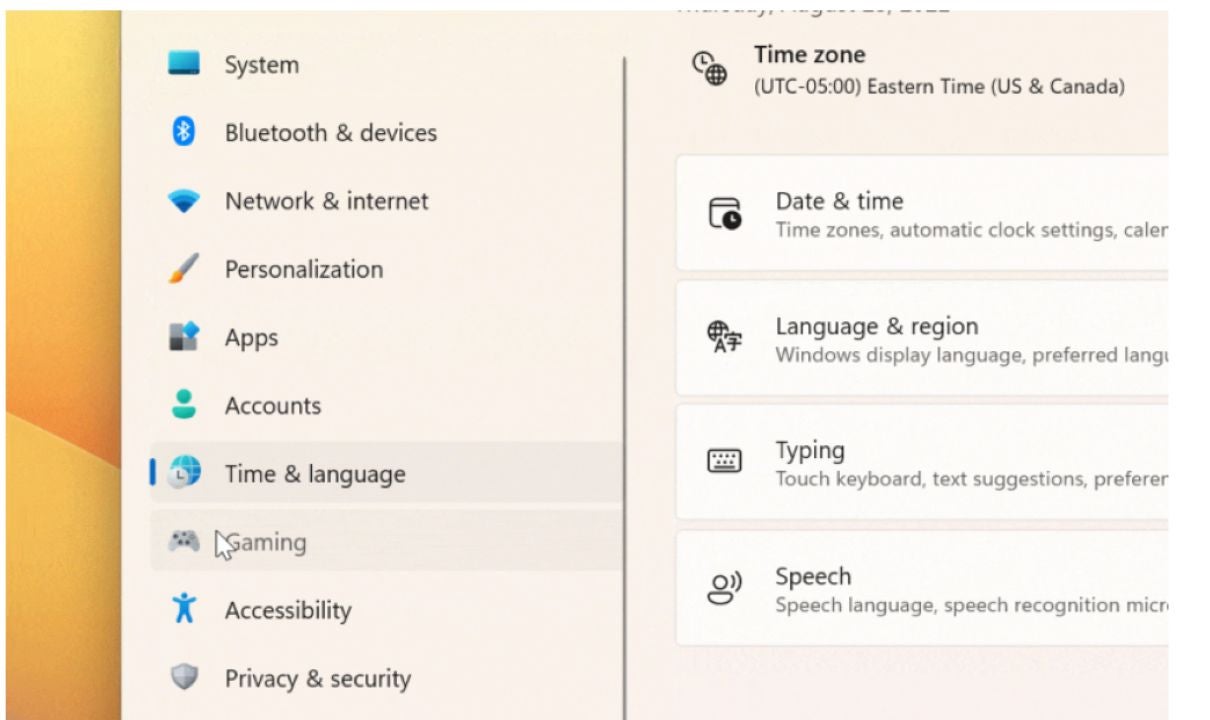
Microsoft is going out of its way to add subtle yet fancy features to its free operating system Windows 11 to offer even more dynamic aesthetics. The latest in this regard is the animated icons in the Settings app on Windows 11. With this feature enabled, the icons show specific animations as you click on them and move from one option to the next.
Interestingly, Microsoft hasn’t publicly announced this feature yet. It was introduced with the Windows 11 build 25188, along with some other changes and improvements. If you haven’t updated Microsoft’s latest operating system, now is the time. Download and install Windows 11.
This feature is not available to the public yet and has been rolled out for those enrolled in the Dev Channel with the Windows Insider Program. If you don’t have Windows 11 build 25188, you won’t see the changes even if you follow the steps correctly.
If you want to enroll your Windows device in the program, you can join theWindows Insider Program from the Windows Update section in Settings. Once your device is enrolled in the program, you can download build 25188 from Windows Update. Check for updates, and follow the steps to install the new build.
Here’s how you can activate the animation icon feature for the Settings app.
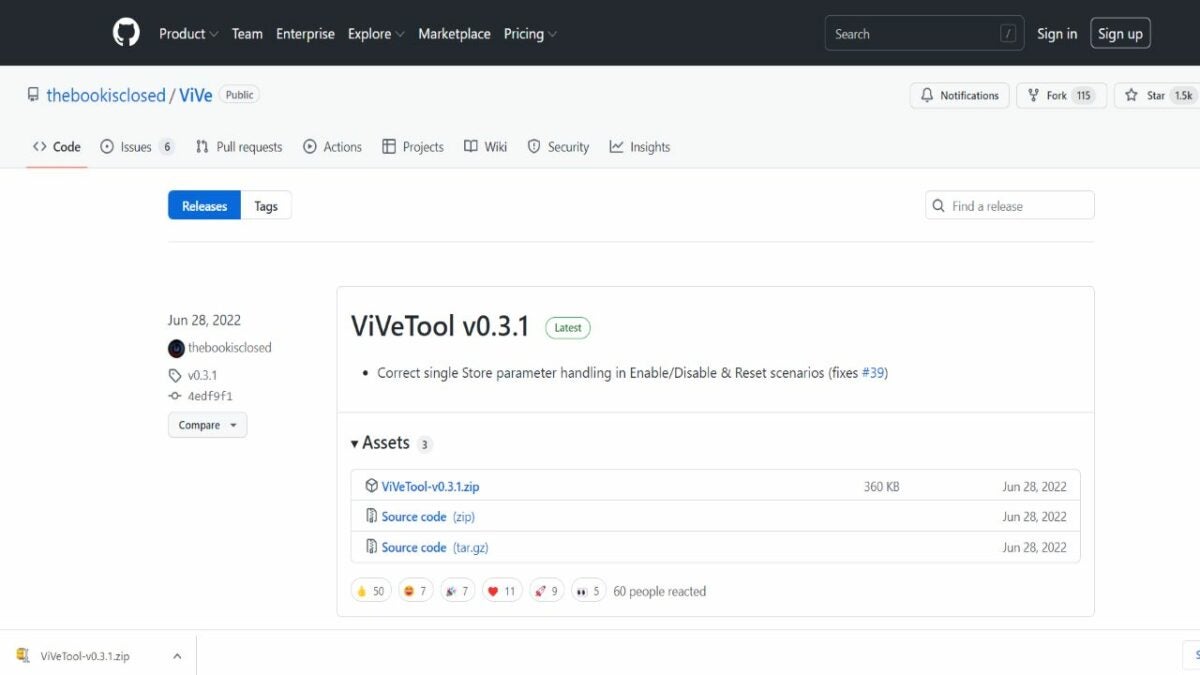
Launch GitHub website and download ViveTool-vx.x.x.zip
This Windows 11 feature is not yet available to apply or activate through Windows Settings. You’ll need to download a file from GitHub. The file’s name is ViveTool-vx.x.x.zip. Simply right-click on the file name of the file under Assets and select Save link as, and download it to the desktop. You’ll see different versions of the ViVeTool releases. Download the most recent one, which is ViVeTool v0.3.1.
Extract the folder
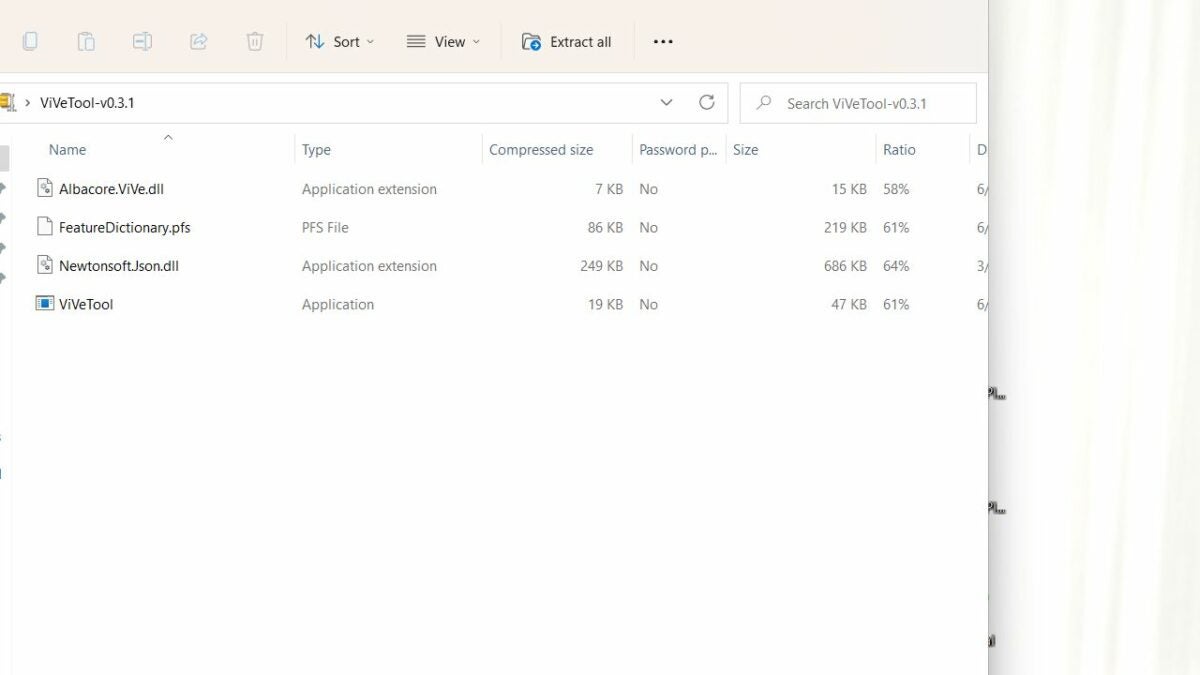
Once downloaded, right-click on the folder and select Open With. Then, click on Windows Explorer. A new dialog will open; select Open. The folder will open in the Windows Explorer window. In the menu bar on top, click on the option Extract All.
A new window will open with the path to the folder. First, copy the path, and then, click on Extract.
Launch command prompt to enable
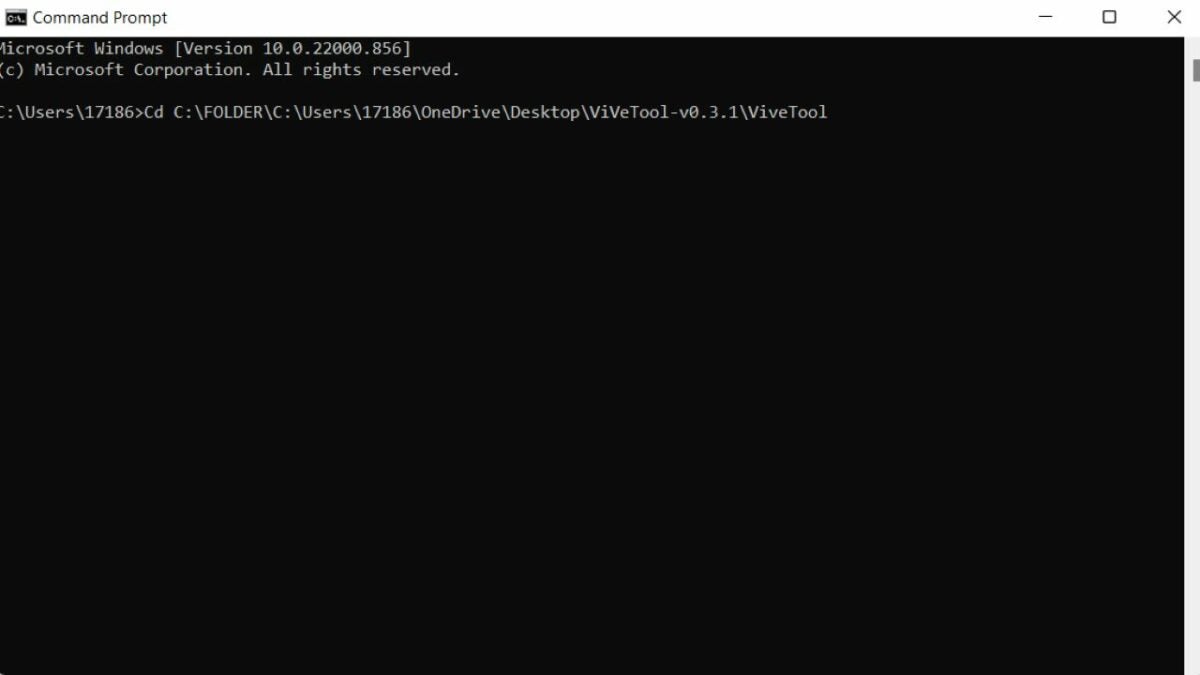
Go to the Start menu by clicking on the Windows icon from the taskbar. In the search bar on top, type Command Prompt. Right-click on Command Prompt and select Run as administrator. In the Command Prompt window, type the following command. Cd C:\FOLDER\PATH\ViveTool Here, PATH is the path to the folder that you copied earlier. So paste Ctrl + V or manually type it here. Press Enter.
Now, type the following command to enable the feature. ViveTool /enable /id:34878152. Press Enter and restart Windows Windows icon > Power button > Restart.
Check the settings app
Once the PC has restarted, go to the Settings app. Click on the Windows icon from the taskbar and select Settings from the pinned icons. You can also search for it if you don’t see it pinned. As the Settings app opens, navigate the icons on the left-hand side and see if the icons are animated. Once you click on the icon, it will show a subtle animated movie once you click on it. For example, the Time & Language icon from the menu will feature the clock moving. Other animations are simpler. For instance, the Accounts icon simply zooms in and out when you click on it. The System icon also just moves on clicking.
What if you want to disable this feature of animated icons? The process is pretty much the same. Follow the same steps as above, but in the third step, type in this command ViveTool /disable /id:34878152 instead of this ViveTool /enable /id:34878152. This will disable the feature, and the icons in the settings app will remain static.
Getting the most out of Windows 11
Microsoft may or may not introduce this feature officially to Windows 11 as it’s only available with build 25188, which is available to subscribers of the Windows Insider Program. It’s just one of the many motions and animation features Microsoft has introduced with Windows 11, making it more fun than its predecessor Windows 10.
You can only apply it now with the ViVeTool folder from GitHub. However, it’s safe to use and may also implement other fixes to Windows 11. If you’ve followed the instructions and applied the animated Settings icon feature, tell us in the comments how you like it or if Windows should make it a permanent feature of the Settings menu.
Windows 10 settings for better performanceREAD MORE
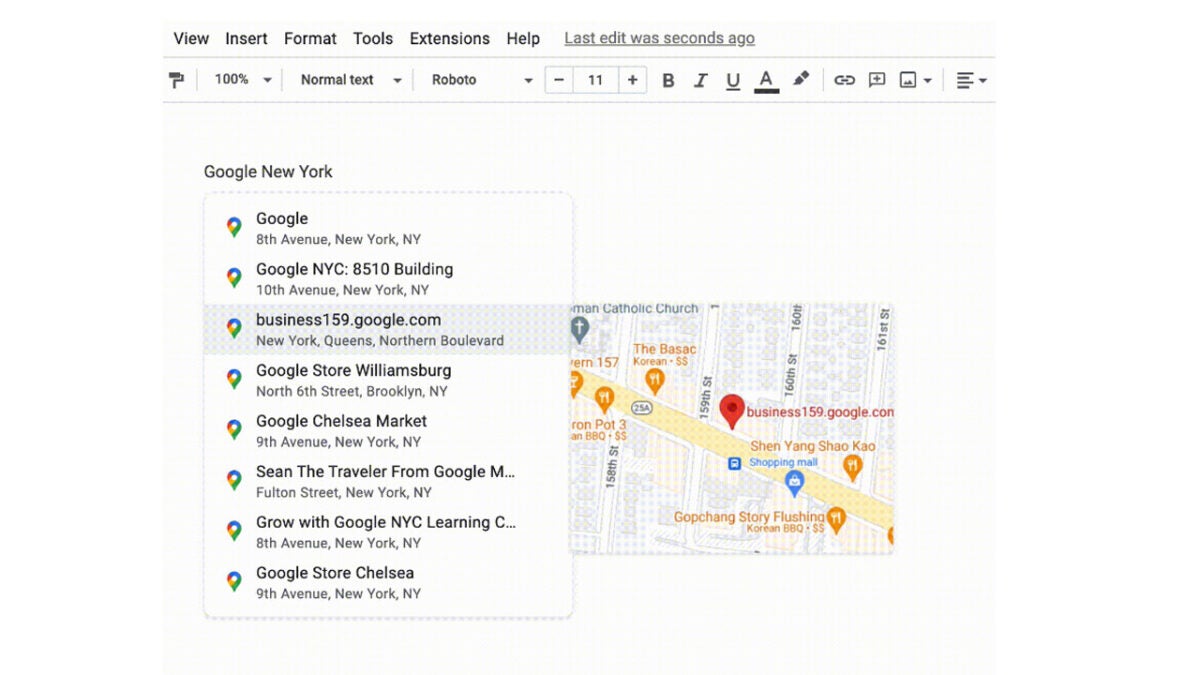
Google has recently added a useful tool to Google Docs that allows users to insert emojis into their documents. All users have to do is type the @ symbol into their documents and then spell out the name of the emoji they are looking for. Now, Google is building more functionality into the @ symbol as the company is rolling out an update that will allow users to include Google Maps chips into Google Docs. Here is what you need to know.
Last year Google rolled out an update that allowed users to add Google Maps chips into documents by pasting a Maps link into the document. Now, however, Google is making it even easier by incorporating the feature into the increasingly useful @ functionality. This means all users will have to do to add the chips to their documents is type @ and then write in the location or addressof the place they want to include in the document.
Google has put together a help page explaining more about the Google Map chips and also including full instructions on how to use them and why they might be useful, which you can find here.
The Google Maps chips update has already started rolling out to all Google Docs users on both a Rapid Release and a Scheduled Release, with the Rapid Release rollout almost coming to an end. Those users receiving the Scheduled Release rollout should have access to the updated feature by the end of the month.
TikTok has been at the eye of a storm recently as politicians have been criticizing its ties to the Chinese government. Privacy is at the heart of this matter, which means this latest story will cause headaches for those at TikTok headquarters as a hacker group called “AgainstTheWest” has claimed that it has stolen user data from TikTok’s servers. TikTok has denied that a breach of sensitive data has taken place, so we are going to examine the story in a little more detail to help you understand what is going on.
Bleeping Computer reports that the hacker group has shared images of a database it claims to have hacked, claiming that the database holds over 2 billion records and almost 800GB worth of user data.
TikTok denies that this breach has taken place, however, with a spokesperson telling The Verge:
“We have confirmed that the data samples in question are all publicly accessible and are not due to any compromise of TikTok systems, networks, or databases. We have confirmed that the data samples in question are all publicly accessible and are not due to any compromise of TikTok systems, networks, or databases.”
According to the Bleeping Computer report, it is highly likely that the database being showcased by the hackers has created a third-party data scraper and merely contains publicly available information that has been pulled together on an industrial scale. The AgainstTheWest group has then accessed it and is trying to leverage it to hurt TikTok.
Interestingly, according to cybersecurity researcher CyberKnow, the name AgainstTheWest is easily misunderstood. Rather than being a group that is against the west, the title actually refers to who the group targets. They target entities that they believe to be against the west, hence this action against the ties between TikTok and the Chinese government, which Western politicians have been railing against.
It appears then that the information being shared by the hacker group does not represent data that isn’t already publicly available on the internet and, for now at least, it looks like TikTok hasn’t been hacked. However, the move does indicate that there has been some sort of internal system breakdown, which has caused certain aspects of user data to leak onto the internet. This means it is highly likely that TikTok will have to take action to plug the leak.
User privacy is a big issue these days and online platforms and websites have to take huge steps to protect their users’ data from falling into the wrong hands. On top of protecting against external threats to privacy, these web companies must also ensure that their own practices do not breach the privacy rights of their users. In this regard, Instagram has seemingly been failing as a country in the EU has just handed out a massive €405 million fine to the social network because of how it has been handling teens’ data. Let’s dig a little deeper.
Meta, Instagram’s parent company, has received a fine of €405 million by Ireland’s Data Protection Commission (DPC) following a two-year investigation into how the social network has been handling the data of teenage users.
The investigation into Instagram’s data-handling practices has focused on two ways in which the social network is supposed to have been breaching GDPR rules. The Verge reports that these are:
“[1] Instagram allowing young users, ages 13-17, to set up business accounts on the platform, which made those users’ contact information publicly available. (Users sometimes switch to business accounts because doing so comes with access to more engagement analytics.) [2] Instagram also allegedly made the accounts of some young users public by default.”
Ireland’s DPC has form for handing out massive fines to Meta and previously fined the company €225 million when it found that WhatsApp was not sufficiently informing EU citizens about how it collected and used their data. This new fine, however, marks the toughest punitive action taken so far, almost doubling the previously recorded largest fine.
The tough action follows years of scrutiny regarding how these social networks are handling the data of their youngest users, particularly in a context and awareness of the potential damage Instagram can do to the mental health of teenage users of the app. The DPC will release full details of the decision next week, but Instagram has already said that it plans to appeal the decision.
It’s been two years since Snapchat announced that it wanted to become one of the biggest gaming destinations in the business. While the global partnership lead, John Imah, was pretty confident with the eight games that appeared in 2019, it looks like things have changed. The company is stepping back and moving away from this venture.
In one of it’s latest financial reports, Snapchat outlined the issues the company has been facing this year. Besides a drop in the market share, it seems like revenue is also falling. It’s had to make a decision to cut some projects, one of these being future game development.
The report also has a letter at the end sent out to Snapchat staff. About 20% of the employees will lose their jobs, which is around 1,300 people. The focus is now shifting to augmented reality, revenue growth, and community development. If any projects aren’t connected to these three elements, they need to go.
I haven’t been on Snapchat in years, as I find the app rather pointless. Little did I know there’s been so much development in the background since then, adding more features. Not that it piques my interest to reinstall it, but the games portion may have made me reconsider.
While this new move towards no game development and employee lay-offs are sad, Snapchat believes it will save about $500 million in light of the latest drop in market shares. Perhaps the company, like so many others, was too ambitious and bit off more than it could chew. We’ll have to see if users feel any loss at the decision for no more games.
Other features are still proceeding, such as the dual-camera tool on Snapchat where you can use both the front and back cameras. Also, I believe it’s continuing with the Snap Map feature development.
The world is finding innovative ways to use DALL-E, an artificial intelligence platform that quickly turns your text into images. Until now, many people used it to simply conjure up pictures with brief descriptions to use in projects. Developers are now taking it further and imagining what was outside the frames of historically famous paintings.
Let’s take The Girl with the Pearl Earring by Johannes Vermeer as an example. In one of the latest tweets, you can see how @_akhaliq used the new Outpainting feature in DALL-E to expand the borders of the painting. By using sections of the image and some descriptions, the program was able to simulate the surroundings using the same brush style.
DALL·E: Introducing Outpainting
Extend creativity and tell a bigger story with DALL-E images of any size
While many have been experimenting with famous paintings in this way, they can be used with any photos. There are even some that expand the logo for Universal Studios. The extra details don’t even need to be realistic, as even the Mona Lisa has some interesting sci-fi touches.
While many of these DALL-E Outpainting experiments are just for fun, it shows great potential for businesses. Game developers can quickly get a new take on a Rembrandt painting. I’m guessing this feature will also be used for the Metaverse where you can purchase new items made by the A.I. system as NFTs. With DALL-E 2 moving into the beta phase and 1 million invites going out to test the system, you can imagine how much of a role Outpainting will play.
You’ll be able to take your favorite Avenger scene and place them in new surroundings without having to digitally create them on Photoshop. It could save game developers so much time if they already have elf or warrior sprites and want to place them in a specific environment matching the style.
There is a good chance that the majority of Android apps that you have installed on your Android devices are collecting data and sharing it with third parties.
A recent study conducted by Incogni analyzed the top 1000 free and paid applications on Android. The company interacts with data brokers on the behalf of customers to get collected user data removed.
Of the 2000 Android applications, 55.2% share data that they collect with third parties. Free apps, those available without a price tag on Google Play, share seven times more data points with third parties than paid applications.
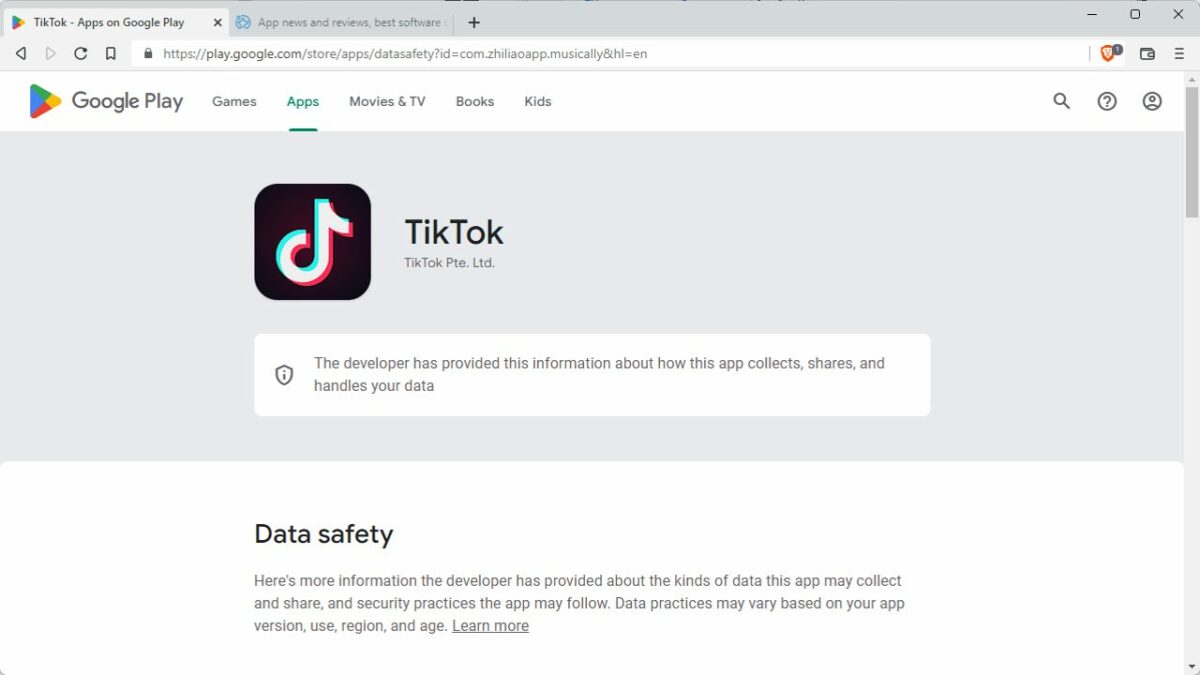
Google Play’s new Data Safety section
Google introduced a new Data Safety section on Google Play in July 2022. All Android developers, small one-person teams, and the largest international organizations needed to fill out data safety information for their applications before the deadline.
The section informs Android users about how applications collect, share and handle user data. The whole system is honor-based, which means that developers provide the data without it being verified by Google.
Here is how you check the data safety information on Google Play:
Open Google Play on the Android device or in any web browser on mobile or desktop systems.
Select the application or game that you want to verify.
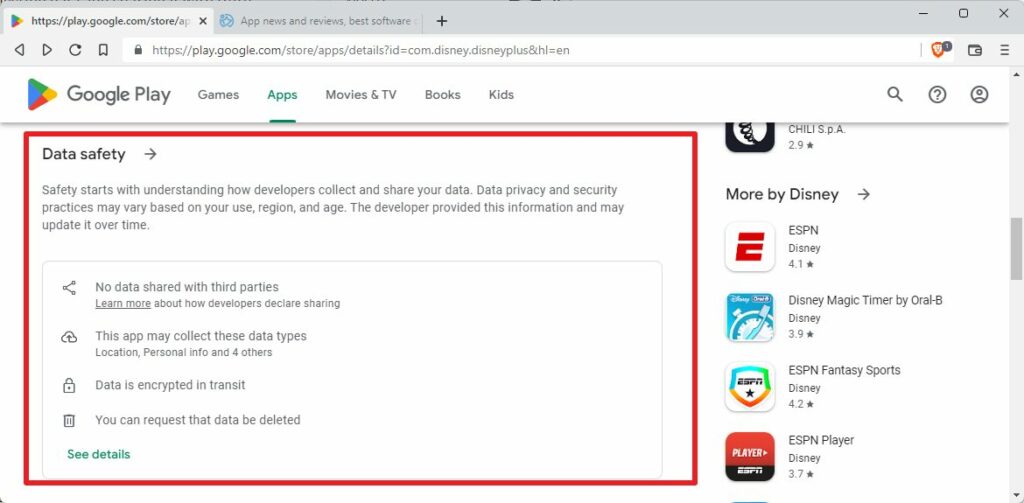
Scroll down to the Data Safety section.
There, you find a summary, which reveals major points. If you want to know more, you may activate the data safety link to open a page with additional details.
For example, opening the Disney+ app reveals that is does not share data with third-parties, that it collects six different data types, uses data encryption, and supports data deletion requests.
While that sounds good on paper, Incogni discovered that Google has a specific definition of data sharing. According to Google’s definition, data sharing refers to the “transfer of user data to any third party”.
Anonymous data, as well as transfers “made to a service provider or for legal purposes”, does not need to be revealed in the Data Safety section on Google Play.
In other words; if an app anonymizes collected data before it transfers it, it may not be revealed in the Data Safety section.
Apps collect lot of data on Android
Social applications like Facebook, Messenger or LinkedIn collect the most data points according to the study.
The top 10 apps that collect the most data points:
Facebook
Nextdoor
Microsoft Teams
Messenger
Instagram
Oculus
LinkedIn
Ebay
Snapchat
DoorDash – Dasher
The top 4 applications collected 36 out of 37 available data types. Only race and ethnicity is not collected.
While social applications collect the most data, most social apps share very little. Meta’s applications, Facebook, Facebook Lite, Messenger, Instagram, and Messenger Lite, share only 4 data types with third parties, according to the Data Safety section on Google Play.
It is important to realize, again, that certain forms of data sharing do not need to be revealed.
Social, business, and shopping applications collect the most data points on average on Android. Consequently, apps in those categories know more about their users than apps in other categories.
The Data Safety section does not reveal the purpose of the data collection, but the list of shared data points gives some clues.
Android apps share a lot of data as well
Incogni analyzed the main data points that Android applications shared.
The top 10 apps that share the most data points with third parties:
Cast for Chromecast & TV Cast
DoorDash – Dasher
Booking.com Hotels and more
The Home Depot
Fetch Rewards: Earn Gift Cards.
DoorDash – Food Delivery.
Picsart Photo & Video Editor
Dave – Banking & Cash Advance
Drum Pad Machine – beat maker
Reddit
App interactions, crash logs, diagnostics, the approximate location, and other actions top the third-party data sharing list. Diagnostic data, including crash logs and performance data, is used by developers to find and resolve errors and issues.
A significant number of apps shared user names (4.77%), email addresses (6.77%), and home addresses (3.85%). 13.4% of apps share the approximate location, 3.85% the exact location.
All in all, 55.2% of the 2000 analyzed applications share that with third parties. Almost 70% of apps that do not share data with third parties are paid applications.
As a result, free apps share an “average of 7 times more data points than paid ones” according to Incogni.
Closing Words
Incogni’s study demonstrates that Google Play’s Data Safety section lacks information that Android users may consider important.
Data Safety, on the positive side, reveals some information on an application’s data collecting, sharing and handling.
On the negative side, the filled-out information is not verified. If that was not bad enough, Google’s own definition of data sharing gives developers the go-ahead to omit some of the data sharing of their applications.
Free apps share more data points than paid Android applications; this should not come as a surprise. The saying that free is not really free seems to be confirmed by this, as users pay with their data.
To be clear, there are free Android apps out there that do not collect or share data, and paid apps that do. On average though, free apps share more data points than paid applications.
With Android 13 heading to Pixel devices and soon to be landing on other third-party manufacturer phones, we have some rather interesting news to bring you about the next iteration of Android that will likely come towards the end of 2023. It looks like Google is going to build satellite connection functionality into Android 14. Here is what you need to know.
Rumors have been circulating for a while that Apple is working hard on making it possible to for iPhone’s to be able to connect to Space X’s Starlink satellite network, which offers internet connectivity that comes from space. Now, according to XDA Developers, Google does not want to be left behind in this race and so is also looking to implement this new satellite functionality into the next version of Android too.
All this news follows hot on the heels of a recent announcement from T-Mobile and Space X, detailing a new partnership that would see the telecommunications provider offering satellite connectivity from 2023.
The news about Google looking to ensure that its own smartphones would be able to take advantage of this historic partnership seems to be official as the Senior Vice President of Android, Hiroshi Lockmeyer, tweeted about the news himself. He said:
“Wild to think about user experiences for phones that can connect to satellites. When we launched G1 in ’08 it was a stretch to get 3G + Wifi working. Now we’re designing for satellites. Cool! Excited to support our partners in enabling all of this in the next version of Android!”
This new satellite connectivity should help to remove mobile connection dead zones where users are unable to connect to their networks. It will be interesting to see if these deals with T-Mobile will also work abroad as although there are plenty of dead zones in the US, it has to be said that this technology will be much more useful in countries that don’t have access to the high level of mobile telecommunications technology available in the US.