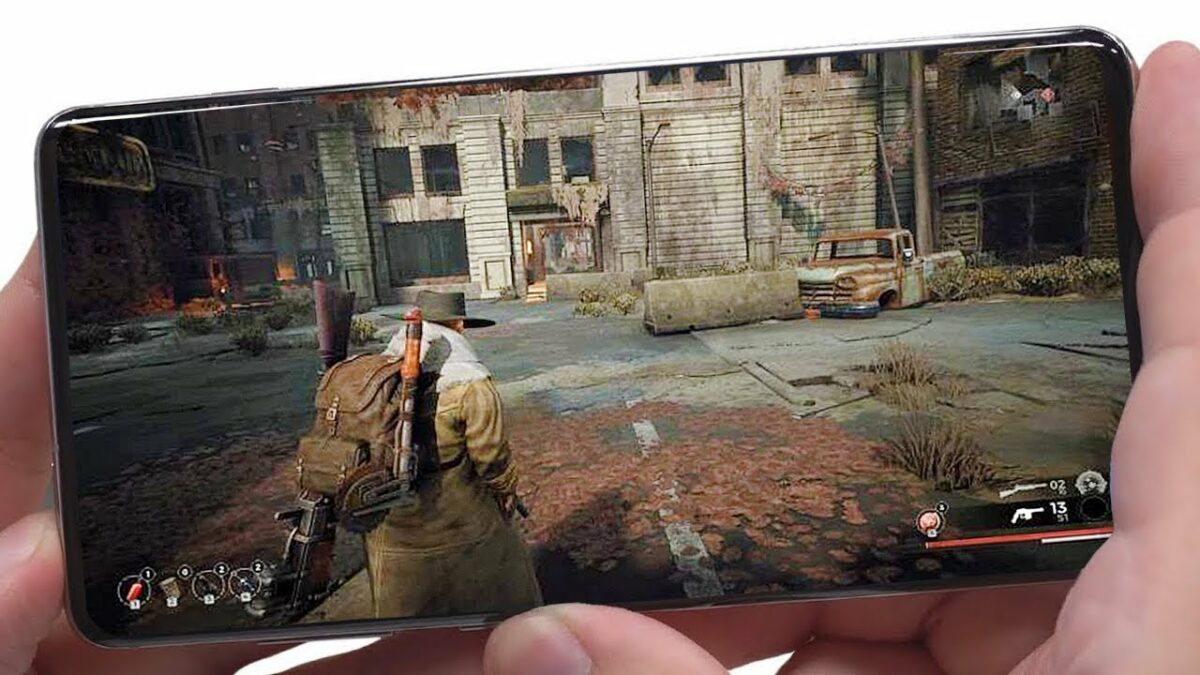
Top Android games to enjoy

Welcome to Softonic’s breakdown of the top ten Android games. There are so many mobile games today, it can be challenging to select one that you may actually like. As such, it may be a good idea to look at what other gamers are downloading and playing.

This list is based on the number of downloads from the Softonic site, revealing how popular they are. So, without further ado, here’s our top ten list of popular Android games. Be sure to watch this video to see the gameplay footage and hear my commentary.

Minecraft

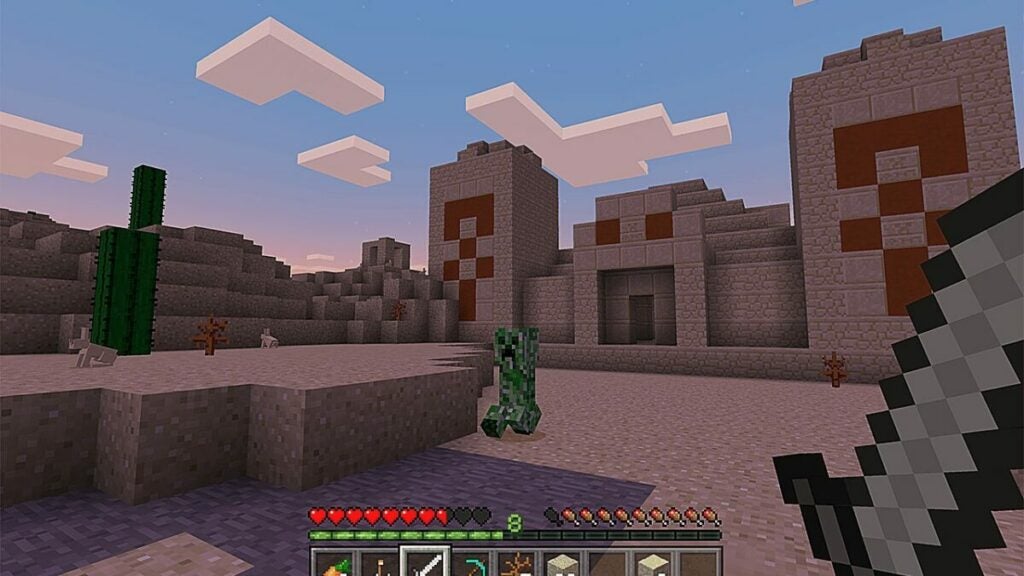
Welcome to our number 1 downloaded Android game! When it comes to the mobile version, the game mechanics remain the same. You’ll explore vast lands while surviving against mobs in the evening. Destroying objects gives you blocks to build with, and there’s food to sate your hunger.

Minecraft DOWNLOAD

You’ll have to pay for the Android version of Minecraft, but we managed to get some footage for you to see what it looks like. The controllers are pads and buttons on the screen, and you can quickly tap your inventory.
Top Android games

Garena FreeFire

As with most battle royale shooters, you jump from a plane in Garena Free Fire and land on the battlefield. In your quest to win, you’ll find weapons and ammo to take out your opponents. When you kill them, you simply need to stand over their corpses to obtain more powerful firearms, ammo, and armor.

As you’ll see from my recording, it was pretty easy winning my first match. Yes, that was my first Garena Free fire game ever, and I capped those players so quickly, it was almost too easy. 

Garena FreeFire DOWNLOAD
Top Android games

SubWay Surfers

Are you in the mood for a casual endless running game? It looks like Subway Surfers is near the top of our list. It features a graffiti artist that’s spraying walls on a railway line before a security guard appears on the screen. What unfolds is an endless run, jumping over objects and away from trains in an effort not to be caught.

The video shows my attempt at a first run using BlueStacks. At first, it looks pretty easy until you run into a train or jump incorrectly. You’ll probably have a laugh at how many times I failed in the recording.


Subway Surfers DOWNLOAD
Top Android games

Poppy PlayTime: Chapter 2

Are you in the mood for some psychological horror? After the success of the first chapter, Poppy PlayTime: Chapter 2 quickly came to Android after the PC release. It directly follows the events of the first chapter after you eliminated Huggy Wuggy for good….or did you?

As you can see in the video, you’ll have these mechanical hands to get through the scenes. I’ve already completed both chapters on PC, and there’s a slight difference in visuals and gameplay. Still, you’ll need to perform the same actions to find your way out.


Poppy Playtime: Chapter 2 DOWNLOAD
Top Android games

Roblox

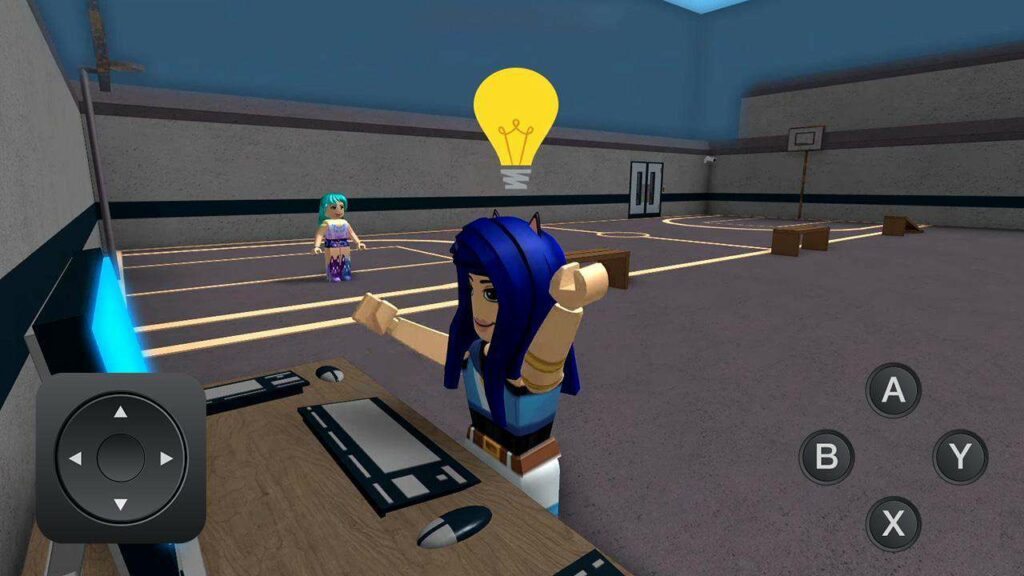
Roblox has many exciting titles for you to enjoy. Most of the games are free, but many of them have microtransactions in the form of Robux. You don’t need to buy any of the items to enjoy the games, but it does help you progress quickly.

In the video, you’ll see me playing Mall Tycoon, one of my favorite games on the platform. I’ve progressed quite far and resurrected about five times already to obtain new rewards. There are also many scary titles too.

Roblox DOWNLOAD
Top Android games

Stumble Guys

Stumble Guys features qualifying rounds to make it through to the next level. With each stage you make it through, you’ll earn higher ranks. The best part of the rewards is that you can acquire fun outfits and gear for your characters.

If you can’t outrun your opponents, push them off the ledge. That’s what makes the game so much fun. You don’t want to miss the action in the video as I played Stumble Guys on Bluestacks, struggling to get into the qualifiers.


Stumble Guys DOWNLOAD
Top Android games

Fortnite

The premise of Fortnite is that you drop from a Battle Bus onto an arena that changes every season, shooting other players and completing quests until one person or team is left standing. Every season sees new skins and characters, while there’s always some storyline to propel you into exciting adventures.

You’ll find vehicles on the battlefield to transport you to distant locations, while chests provide you with exotic weapons. Luckily, your skins and gear transfer to new seasons. But I don’t want to spoil it for you. Look at the features in the video.


Fortnite DOWNLOAD
Top Android games

eFootball

You may not recognize the name eFootball at first, as it used to be called Pro Evolution Soccer. With the dynamic name change comes a few new features, but it’s still the same game by Konami. You’ll build a dream team of players to enter football tournaments and championships.

You can choose from authentic football clubs from different countries, selecting their famous sports gear. Want to know more? I have specific commentary dealing with the game in the video. 

eFootball DOWNLOAD
Top Android games

Mobile Legends

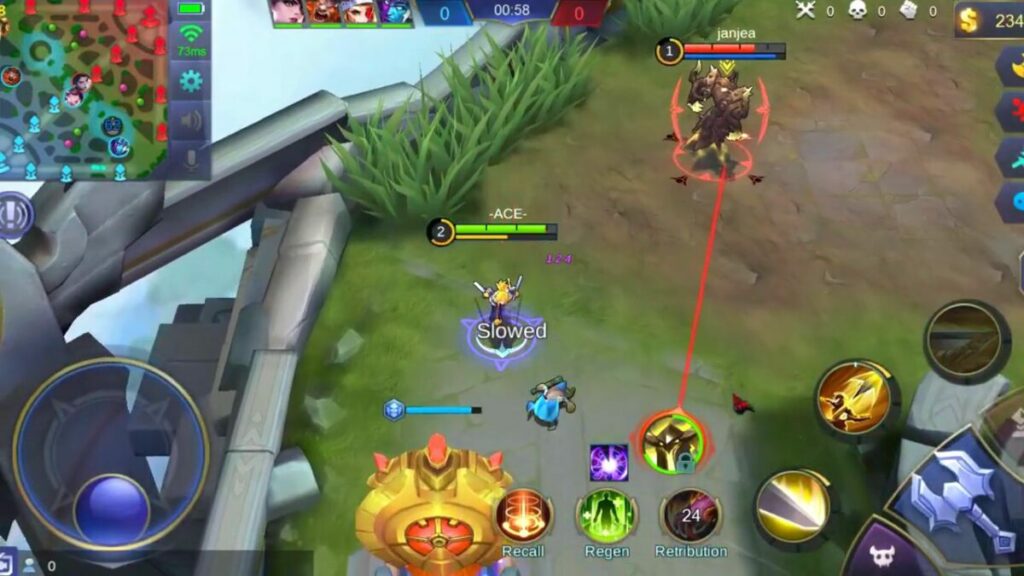
With similar gameplay to League of Legends, Mobile Legends features towers and bases on either side of the map. Once you select your hero, you need to run across one of the three lanes to battle minions and opposing heroes. You’ll confront the enemy’s towers before finding and destroying the base.

What makes Mobile Legends so popular are the ranks. As you play and win matches, you’ll climb different levels. You can check out more details and visuals in our video where I show what it looks like heading through the lanes.

Mobile Legends DOWNLOAD
Top Android games

Brawl Stars

Supercell released this Android gem worldwide in 2018. The concept involves selecting a Brawler, or hero, that you move around the screen to shoot other players or bots. While you’ll start with a basic hero, you’ll unlock more brawlers the longer you play.

There are different modes in the Android game, namely Brawl Pass, Power League, and Club League. You’ll also find seasons where you play various modes for specific rewards. Be sure to check out the video above for more details and gameplay footage.


Brawl Stars DOWNLOAD
Top Android games

And that’s it for our video and article on the top Android games. I hope you enjoyed it, and I look forward to making more of these for you.
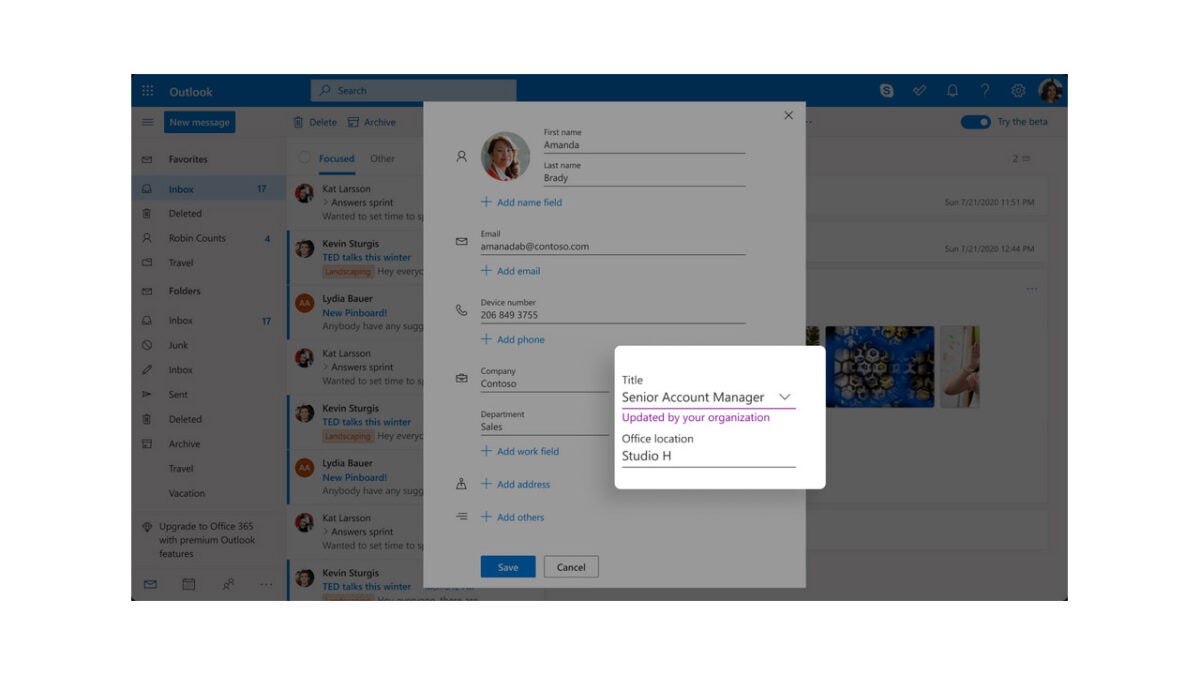

Outlook is getting a host of new contact-management features

As the default email client of the Microsoft 365 productivity suite, Outlook is one of the most popular email apps, particularly among business and enterprise users. A set of new and updated contact-management features will therefore be useful to many users. Let’s take a look at what you need to know.

Microsoft Outlook Download Now

Microsoft has announced via a Tech Community blog post that it is rolling several new features that will help us stay on top of our email contact lists.

With our contact lists constantly evolving and people changing email addresses and contact details, over time our set of contacts can become out of date and filled with useless entries.  To address this situation, Microsoft is rolling out a Self-updating contacts feature as well as several other contact-management features such as Contact categories, a New contact editor, and an Upgraded People hub.

The Self-updating contact feature will only work for Enterprise users, with Microsoft describing it like this:

“All the new contacts you add from the people card of a person belonging to your organization will be self-updating contacts. These contacts automatically stay up to date based on the organization directory. Any modifications made to contact details, such as phone number, department designation, etc., will automatically be updated in the contact.”

The new Contact categories feature will replace folders and will work in a similar way to tabs. This means that rather grouping contacts into folders you will be able add search markers to them that will make them easier to find. All existing folders will automatically be migrated to categories. The Content editor will allow you to quickly and efficiently create and edit new contacts and will also include the new features outlined here. The People hub will bring all of these features together into a new home for your Outlook contacts.

In other recent Microsoft news, the company is finally rolling out an update to Windows 10, but you shouldn’t expect any new major feature upgrades.

Amazon’s Alexa will soon help boost your Wi-Fi signal

AI smart speakers are very useful tools to have around the house as long as you don’t mind the privacy trade-offs and you take care when letting young children interact with them. Amazon, however, has just announced an incredibly new feature for some of its Alexa speakers that will give them a real advantage over other competitors from the likes of Google and Apple. The retail giant has announced that soon some Alexa smart assistant speakers will be able to boost your Wi-Fi signal around your home. Here is what you need to know.

Amazon Alexa Download Now

At the recent Amazon Launch Event, the company announced that the latest generation of Amazon Echo and Echo Dot Smart speakers (the fifth generation if you are counting), as well as the current and fourth generation speakers will be able to boost your home Wi-Fi signal as a part of the Amazon Eero mesh Wi-Fi system.

The caveat then attached to this exciting news is that for the Echo speakers to boost your home Wi-Fi you will need to have already set up the Eero mesh Wi-Fi system, which means you need to buy extra hardware to make it work. Mesh Wi-Fi systems tend to be much more effective than standard Wi-Fi extenders as they integrate with the system’s router to ensure better and more even coverage across the reach of the network.

This looks like a very clever move by Amazon as it offers households who have Echo smart speakers in their home a much cheaper way to build out a larger mesh Wi-Fi network in their home. The hardware is relatively expensive for these types of Wi-Fi extender networks so being able to augment the offering using hardware you already own will likely be attractive to users who often struggle with their Wi-Fi signal.

In other recent AI news, did you know that Meta has just handed over the governance of a major AI framework to the Linux Foundation?

Google wants to make your search experience feel more natural

There is no doubting the fact that Google is the top dog when it comes to internet search. The tech giant has ruled the roost for over 20 years and two decades worth of constant evolution and improvement is likely what sits behind that continued success. Today we bring you news of more upcoming changes to Google’s search offering that have been announced at the company’s Search On event.

Google Access Now

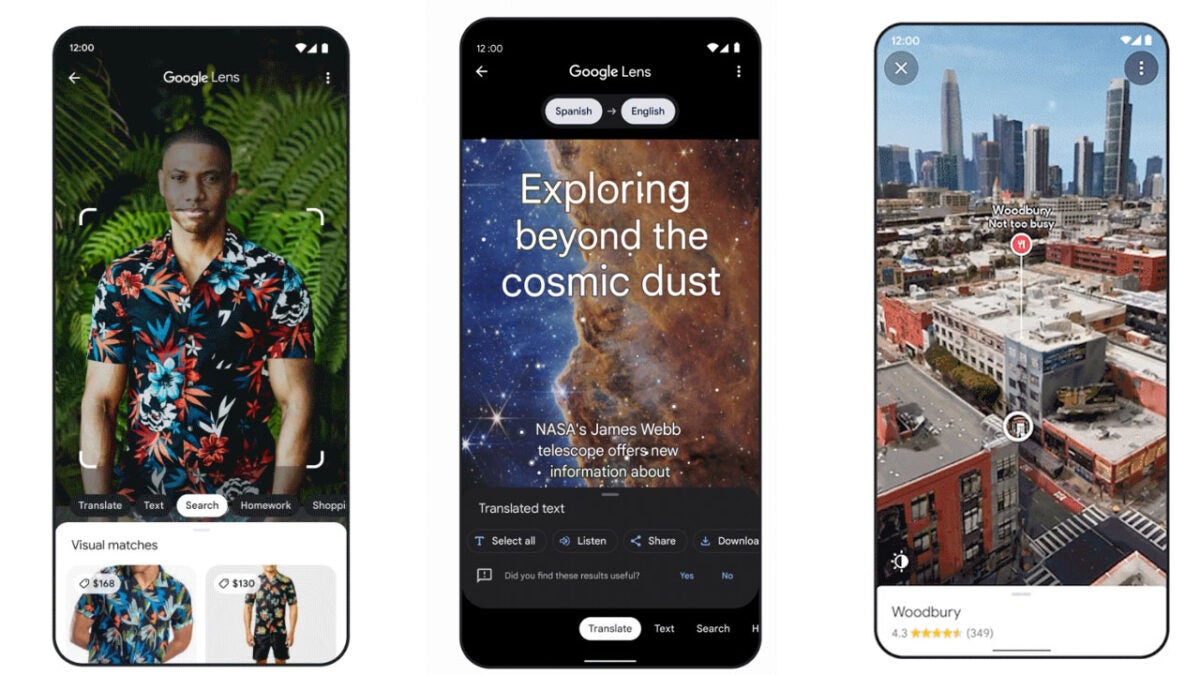
The main announcements to come from the event regarding search relate to making the search experience more natural and intuitive. The three main ways Google is implementing this mission is to improve visual searching of images, improved visual translations, and a more immersive view of locations you are searching for on Google Maps.

For a while now Google lens and Google Image search have been able to offer users an image search feature that allows them to scan and image and search for related content. Google is updating this image search offering, however, to combine both image searching and text searching in a single search query. Say, for example, you want to search for a shirt that has a particular design or style, you could search for an image of the design you’d like to see on the shirt and then include the search term shirt to see if anybody has uploaded or is selling shirts with that design.

Google is also rolling out an interesting visual translation update, which will make it easier for you to read translation Google makes when you show it an image of an item that has text you want translating. The feature will use AI to block out the old text, automatically trying to cover it with the same color present in the background and then writing the translated text over the top of it. The result should look something similar to what the original image looked like but with the translated text instead of the original text.

The Google Maps update will see the app able to offer you 3D representations of the neighborhoods your are planning to visit complete with virtual representations of the different times of day you may be thinking of heading down there. Also, the feature will also be able to offer views from inside certain locations like restaurants. This update will roll out across five major cities and seek to include aerial views of 250 locations in the coming months.

In other recent Google Maps News, did you know that you can now better plan your routes to be more eco-friendly?

Koei Tecmo’s Wild Hearts set to release in February

If you’re hoping for a new hunting game to drop into the market soon, you’re about to be overjoyed. Omega Force, the developer behind Dynasty Warriors has revealed a brand-new hunting title slated for release on February 17th 2023. The new game is called Wild Hearts, and you’ll be able to hunt monsters when it comes out. 

Wild Hearts DOWNLOAD

Leading the charge of Wild Hearts is Koei Tecmo’s executive VP Yosuke Hayashi, who has stated that the studio has been developing the game for years. He also states that Wild Hearts will be a completely new take on the hunting genre that will see the player using technology to take these larger-than-life beasts down. 

By this, he means that crafting will lie at the heart of Wild Hearts and players will have to constantly improve their crafting capabilities should they want to succeed in this game. The game is set in a fictional realm called Azuma, and if you want to dominate the bigger Kemono beasts, you’ll need to ensure that you have sufficiently advanced Karakuri gear. 

Here’s a look at the Wild Hearts reveal trailer.

‘With Wild Hearts, not only did we want to showcase the evolution, infusion, and real threat caused by Kemono, but we also wanted to create a game where crafting was at the core of the experience, redefining what can be possible in a beast hunting game.  We have placed great care in designing our Karakuri to fit within the combat, and we’re excited for players to use these powerful mechanisms to fight giant beasts and traverse the world.’

Ahead of its 2023 launch, we also know that if you don’t think you can cut it as a lone wolf, you’ll be able to play with up to two additional players in a co-op mode. Because this game is releasing on next-gen consoles, you also have access to more inclusive cross-play opportunities, meaning that you can play this game on virtually all platforms. 

Omega Force has said that the game will feature Japanese styling but that care has been taken to make sure that it will appeal to the global audience. ‘In terms of basic design, we are not overly conscious of focusing just on a Western audience, and as a Japanese developer, we try to create something we think is fun.’

Koei Tecmo’s Wild Hearts set to release in February

These words by Koei Tecmo director Kotaro Hirata emphasize a point that the developer made in an interview with IGN. Hirata explained that the game has gone through numerous phases in which different prototypes were tested. All of this was to ensure that the game doesn’t just focus on the Western audience but also contains uniquely Japanese attributes. 

While the game is being published jointly by Koei Tecmo and EA, Electronic Arts will be listed as the developer in Western territories.

Ubisoft announces another delay to the release date of Skull and Bones

Ubisoft has just announced another delay in the release date of their new upcoming action-adventure game, Skull and Bones. This is not the first delay this game has experienced, even if its reasoning is good. This latest delay has people questioning when they’ll actually be able to get their hands on a copy.

Skull and Bones DOWNLOAD

Skull and Bones is moving away from other Ubisoft-style games and provides players with a pirate-filled adventure as they traverse the seven seas. Ubisoft Singapore has been working on this multiplayer game since 2013, although Ubisoft only revealed the game in 2017. Since then, fans of the studio and pirate-lovers alike have been patiently waiting for a release date. 

The project’s launch has received quite a few pushbacks since it was first announced, and when we finally received a release date of November 8, 2022, many fans were extremely excited. This excitement was amplified when pre-orders for the game became available. However, this excitement didn’t last.

Yesterday, Ubisoft announced another delay and Skull and Bones will only be released to PC, Playstation 5, Stadia and Xbox X/S on March 9, 2023. The reason for the delay was that the developers had sufficient time to address the bugs and feedback from the recent Technical Tests and Insider Program.

Ubisoft announces another delay to the release date of Skull and Bones

This means that the development stage of the process is complete, and now it is just the polishing and finishing touches to ensure that when the game makes it to the public, it will be a great experience for all players. The developers also announced that an open beta will follow shortly (exact date not yet confirmed) for anyone wishing to give the game a test run before release.

As excited as we are for the release of this interesting game from the popular developers Ubisoft, there have already been so many delays for Skull and Bones up to this point. We hope this is the last one and that we can finally start getting excited for its release in March.

Easily clear cookies on Chrome Android

There are quite a few reasons why you’d want to clear cookies on the Chrome browser on your Android phone. From security and privacy risks to performance and device speeds, cookies can have many effects. In the past, they were essential, but as technology advances, our need for cookies is becoming much less, and often you’ll have the same experience whether you accept cookies or not. 

Chrome DOWNLOAD

In this guide, we’ll show you how to clear cookies on Chrome Android and explain why you should clear your cookies regularly.

What are cookies?

Cookies are small files created by the websites you visit and will be stored on your device. They were created to improve the users browsing experience by saving your login information, preferences, and device or browser information. While the original reason behind cookies had good intent, these files can also be used to track users. Many people are declining cookies and setting their browser to never allow these files. However, if you accidentally accept cookies, there are ways to remove them from your device.

Should you clear cookies?

You should avoid accepting cookies as much as possible, and if cookies are already stored on your device, you should clear them frequently. One of the main reasons why you should do this is to protect your privacy. Unfortunately, many third-party websites can store tracking cookies on your device and collect your browsing history, sites you visit, how long you spend on each platform and more. You have no control over what happens to this data, which can end up anywhere. This can be a serious privacy and even security issue. 

Cookies also take up storage space on your device. Even though these files are small, if you have plenty stored on your device, it will start affecting your device’s speed and performance. By routinely clearing cookies, you can keep your device performing optimally.

How to remove cookies from Chrome on an Android phone

  1. Open Chrome Browser

    How to Clear Cookies on Chrome Android

    First, you’ll need to launch the Chrome browser on your Android device by tapping on the browser icon.

  2. Open your History

    How to Clear Cookies on Chrome Android

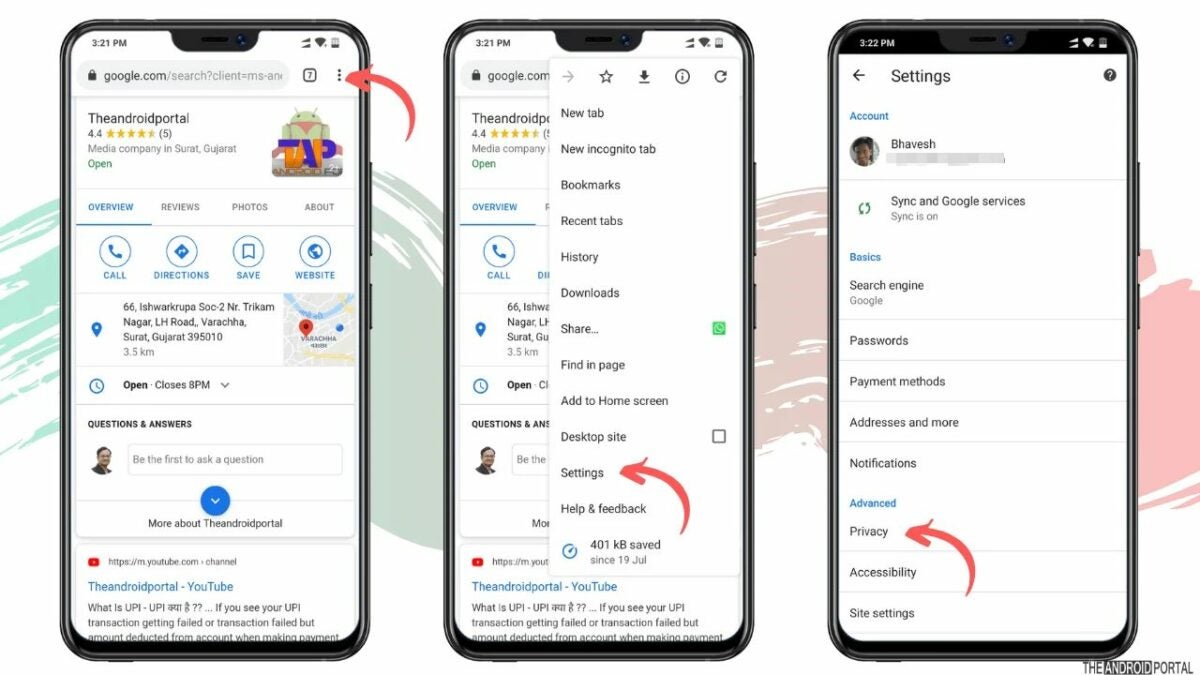
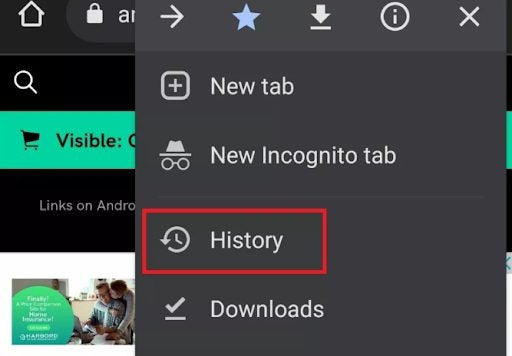
    Next, you’ll want to access your history. You do this by tapping on the ‘more’ option, represented by three vertical dots in the top right of your screen. A drop-down menu will appear. Here you can tap on ‘History’.

  3. Tap on ‘Clear Browsing Data’

    How to Clear Cookies on Chrome Android

    On the next screen, you’ll see a list of your browsing history showing all the sites you’ve visited. This list could be quite long if you haven’t cleared your history recently. Tap on the ‘Clear browsing data’ option which can be found at the top-right of your screen.

  4. Select your options

    How to Clear Cookies on Chrome Android

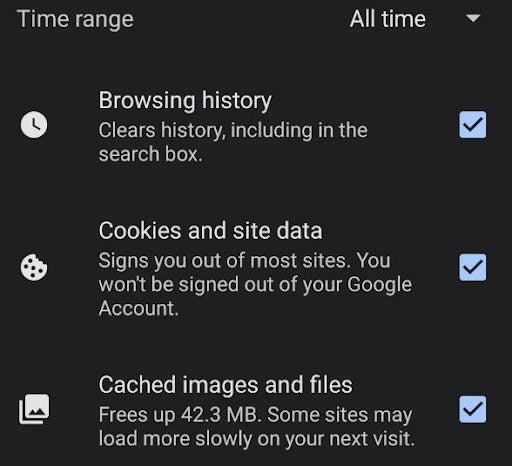
    A new window will open where you can select what you want to clear. First, you should specify the time range that you want to clear. By default, it’s set to clear everything, but if you only need to clear the last day or week, you can select that. Then you can select if you want to clear only your browsing history, cookies and site data or cached images and files. Again, all of these options will be selected by default, but you can unselect the options you want to keep.

    Tip: If you want to clear your cookies for privacy and security reasons, it would be best to clear your browsing history and cached images and files, as websites have other forms of tracking that can be used.

  5. Tap on ‘Clear Data’

    How to Clear Cookies on Chrome Android

    Once you’ve made your selections, you can tap on ‘Clear data’ to start the process of removing your cookies and any other data you’ve selected. It could take a couple of minutes to complete depending on when you last cleared this data.

    Tip: Don’t be shocked if websites you asked to remember suddenly ask you to log in again.

Enjoy track-free browsing

Whether you want to protect your online anonymity or improve your device’s performance, routinely clearing cookies can help with either of these. Most browsers will allow you to clear cookies and other collected data directly from the settings. If you’re working from your PC, be sure to check out our guide on the top Chrome extensions for productivity.

Top 5 tips for FIFA 23

We’re nearing the end of 2022, and we’re finally able to play FIFA 23. We had quite lofty expectations when the game was first announced, and we’re glad to say that Electronic Arts has delivered. Apart from performance improvements and a generally upgraded feel from FIFA 22, the new game comes with brand-new mechanics, teams, and tons of new features that have turned out to be literal game changers. 

FIFA 23 DOWNLOAD

We’re super psyched with this latest entry in the FIFA virtual football franchise, and we’re even more psyched to finally be able to give you pointers on how to play this new game. Now that it’s out, we want to give you five top tips to put into action so that you have the best FIFA 23 experience possible. 

Know your console

Before we delve into the more in-game technical tips for FIFA 23, there’s one thing that we need to clarify. There’s a significant difference between the way enjoy FIFA games on previous-gen consoles and next-gen consoles. The consoles themselves are different and therefore the gameplay you experience will be too. By previous-gen we mean the PS4 and consoles of the same era. By next-gen we mean the new PS5 and Xbox Series X|S. 

The previous-gen consoles have limitations that don’t exist in those of the next-gen. For instance, if you wanted to play with your friends, you had to be on exactly the same version. However, with the new consoles, you have access to increased cross-play capabilities that games newer games now take advantage of. Other differences exist too, though.

For instance, FIFA 23 has numerous new features that require the enhanced capabilities of next-gen consoles such as HyperMotion2 Game Technology and Composed Ball Striking. Knowing these capabilities and how to use them will make your FIFA 23 experience all the more compelling on next-gen consoles. 

tips for FIFA 23

Penalties in FIFA 23

One of the biggest changes in FIFA 23 is how penalties work. The new game introduces updated and completely overhauled set pieces and incredible reworks of the corners, free kicks, and penalties that you know and likely take full advantage of. For one thing, penalties used to include a movable reticle that you could adjust. Now, you no longer have a visual aiming reference. 

Essentially, you’ll now see an element called a composure ring. This will dilate and contract according to the composure stats of the player shooting the penalty. If your player’s composure stat is low, the ring will dilate and contract faster. If their composure stat is high, it’ll move slower. The faster movement of the composure ring essentially makes it a lot more difficult to shoot a perfect penalty. You can still aim, but you no longer need to hold the left analog stick in place as the aim is fixed. 

tips for FIFA 23

Technical dribbling

Technical dribbling is another feature that you’ll only have access to on next-gen consoles. This is essentially a brand-new system for dribbling that increases the efficacy of the Active Touch system with the inclusion of hundreds of brand-new animations. In the old days, we dribbled with the left analog stick. Now, we have technical dribbling. For players new to the franchise, this will be relatively easy to master. However, if you’ve been dribbling the old way for years, you’ll need to give yourself some time to adapt to the new way of doing things. 

The best tip we can give you to this end is to have patience with yourself. You’ll need to practice the new method a bit, and you may have to take it fairly slow in the beginning. However, once you master this new system, you’ll be boasting with all sorts of dribbling animations that you previously did not have access to. 

tips for FIFA 23

Semi-assisted shooting

This is a reworked controller setting that enables you to aim your shot manually. Essentially, this is meant to improve your accuracy by almost double. Along with this, you also have access to a new shot system that lets you hit different types of shots. For instance, a low driven shot or low shot would be achieved by limiting the power application to less than 40% while you shoot. In the old days, we had L1+R1+Shoot for PS4. Now, we have a much more convenient and intuitive system that results in far higher accuracy overall. 

tips for FIFA 23

Updated chemistry in FIFA 23

FIFA 23 marks the first time we’ve seen any significant change in chemistry in FUT since the feature first made an appearance. Thinking back, the biggest struggle has always bee trying to maintain full chemistry while fitting all the most highly-skilled players into one team. The previous way that chemistry was determined was by linking players of the same nationality or those in the same club in a formation. With FIFA 23 however, EA has put an end to direct links. This means that we can finally gain chemistry from players no matter where in the formation they are. 

tips for FIFA 23

Play ball

When working on the previous article about top new FIFA 23 features, we felt that the game was going to present us with a whole lot of new opportunities when it launched. Little did we know how many changes to the standard FIFA SOP EA had decided to make.

Even though the game has changed so much, sticking to this list will help ensure that you have the most success in FIFA 23. Keep your eye on the prize, keep your head in the game, and most importantly, keep having fun. Let’s play ball, shall we?

How to use Photoshop layer masking in 6 easy steps

Since its inception, Photoshop has always used layer masking to hide or expose elements of an image while letting you apply edits to each specific layer. Yet most Photoshop users who haven’t been formally trained on the program still use the application just like they would any other basic photo editor. So, why use layer masking when editing your images in Photoshop?

Adobe Photoshop CC Download

Layer masks allow you to nondestructively hide or disengage adjustments to an image without erasing them. Photoshop masking layers are also the most effective tools to make advanced edits to your photos, such as image composites, object removal, and background modifications for the most professional-looking results. Layering in Photoshop lets you target specific portions of your images and apply edits to those areas. In this tutorial, we’ll cover how to use layer masking in Photoshop while underscoring a few ways to make your layering workflow more efficient.

  1. Create a layer mask

    Create a new mask layer in Photoshop

    Creating a layer mask in Photoshop isn’t complicated. Start by locating the Layers panel to begin a new layer. If you’re running Photoshop on a Mac, the keyboard shortcut for this is Shift+Cmd+N. On Windows, type Shift+Ctrl+N in sequence to select a new layer. Now add the image you wish to edit.

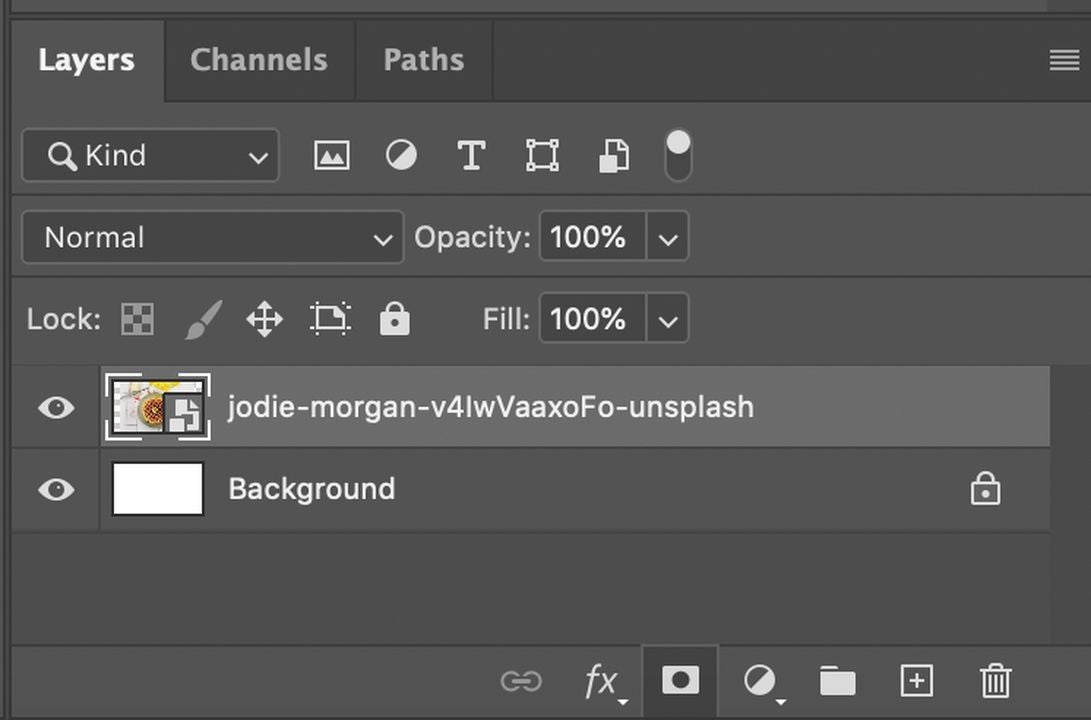
    Click the Add layer mask button next. It’s located just below the Layers panel. You’ll notice a white layer mask thumbnail appear on the selected layer. This feature shows you all the layer’s elements.

  2. Add black to conceal

    Use the toolbar or keyboard shortcut below

    In the Layers panel, choose the layer masks to set it as your active layer. Now select the brush tool, making black the preferred foreground color. The keyboard shortcut for the Brush selection tool is the letter B. You can also find the Brush picker under the Options bar, where you choose the size and hardness of your brush.

    Press the letter D on your keyboard to make white and black the default colors in your toolbar. Now type X to switch the colors and fill in your foreground with black. With the Brush tool, paint over any portions of the image you want hidden. It’s worth mentioning brush selection here matters. A sharp-edged brush helps you create a distinct line between the opaque and transparent image elements, while a broader, softer brush makes it easier to create a fade.

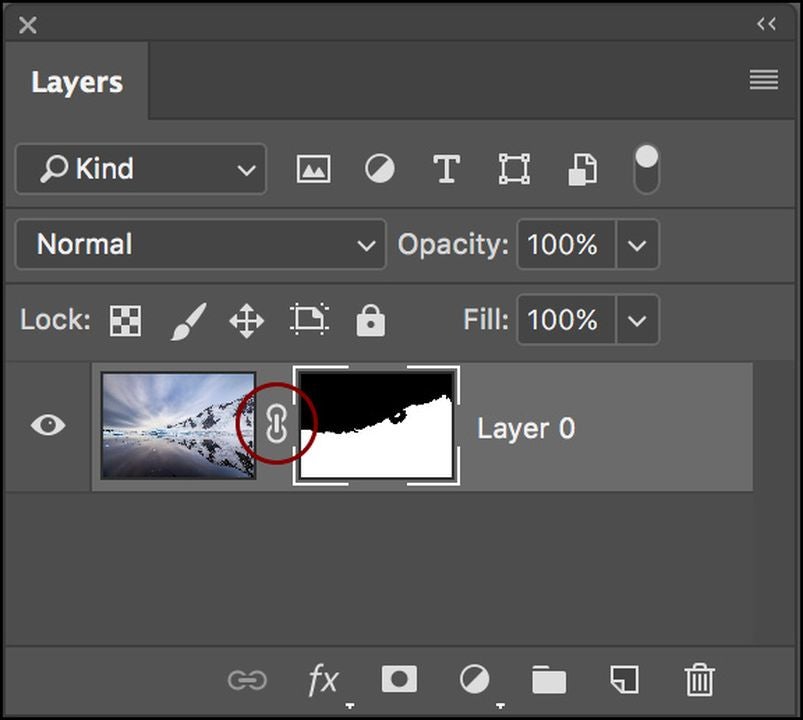
    When you paint over the image with your brush, you’re adding black to the individual layer mask you created. The black effectively conceals the layer mask so you can see the additional layer below, reflected in a checkerboard pattern that tells you it is set to Transparent mode.

  3. Add white to your layer mask to reveal

    Add a white layer

    Adding white to a layer mask exposes the layer containing the mask itself. Use the Brush tool to paint with white on a layer mask to show any elements you previously concealed with black on the layer mask.

    Use the letter X keyboard shortcut to toggle between the foreground and background colors in the Photoshop Toolbar. Now, make the foreground color white. With your Brush tool, paint over the hidden layers of your image and add white to the layer mask. This effectively brings the exposed corresponding areas of your mask back into view.

  4. Refine your layer masks

    Locate and select the subject you want to isolate

    To fine-tune your layer, locate an element you want to isolate, and ensure you’ve selected this layer in the Layers panel. Engage the Quick selection tool by typing W on a Mac or SHIFT + W on your Windows device if the W key alone doesn’t pull up your Wand and other quick selection options.

    Pick your preferred selection tool. You can use either the Wand or Quick Selection tool — whichever is most effective for your purposes and helps you make the most accurate selection. Next, in the Layers panel select the Add layer button. You’ll notice the resulting layer is black in the areas outside your selected object and that the background is now hidden. Your mask edging may not be perfect, but we’ll get to how you should address that in a moment.

  5. Use the Properties panel controls to modify and enhance your layer

    Open the Properties panel to refine your mask

    Confirm you’ve highlighted the layer mask you’re working on within the Layers panel. Now start experimenting with the available controls under the Properties panel. If this panel isn’t visible, navigate to Window at the top of your screen and select Properties from the dropdown menu options.

    Within the Properties panel, locate the Density slider and drag it slightly to the left the increase your layer’s transparency. You will notice the partially concealed portions of the masked layer. To refine your mask edging, use Feather slider just off to the right. This tool helps soften your mask layer edges, blending your subject more naturally with the underlying layer.

  6. Save your work in Photoshop

    Save your image as a TIFF or PSD

    At this point, you made several changes to your file, and you want to make sure you save your project. Saving the image file in .PSD or TIFF format retains the mask layers and lets you continue working later on. To create any new layers, follow and repeat the steps listed above.

Image layering in Photoshop is efficient and gives you more flexibility

Photoshop is a complex design application. It takes a lot of know-how to get the most out of this software. Understanding layer masking in Photoshop is important because it’s one of the most effective tools for increasing workflow efficiency. Layer masking allows you to isolate and hide parts of the image as you make changes without ever reloading the file and starting from scratch. Looking for some more Photoshop tips? Check out our guide to the latest updates in Photoshop.

Switching between multiple Facebook and Instagram accounts will soon be much easier

Meta has long been the umbrella corporation under which lies massive tech and social networks like Facebook and Instagram. As these products have grown, however, are usage of them has often spilled out from a single account and into multiple accounts often with several on each app. If this situation sounds a bit like how you use the apps, you may be interested to learn that Meta is introducing a new feature that will allow you to switch between your profiles more easily. Here is what you need to know.

Facebook Download Now

Meta has published a blog post explaining how it plans to make it easier than ever for users to switch between multiple Facebook and Instagram accounts. This will include access to notifications from across all the accounts in a single place.

The update will allow users to track multiple accounts and even create new ones from a centralized Accounts Center. As well as displaying your current Facebook and Instagram accounts, the Accounts Center will also have access to the full account sign-up process. This works for both old and new users of either Facebook or Instagram:

“People new to our products can create a Facebook or Instagram account, and then use that account to sign up for additional ones. And people who have both a Facebook and an Instagram account can now easily use login information from one app to access the other, as long as their accounts are in the same Accounts Center.”

This new feature is currently being tested around the globe on Facebook and Instagram on iOS, Android, and the web. This means that there are no concrete dates yet about when it will roll out to all users. We’ll try to keep you up to date with any updates on the feature as it advances further along the development path.

In other Meta news, the social giant has rolled out an impressive language translation AI model.