With the second beta of iOS 18.2 and its new features, Apple goes far beyond the introduction of image tools in Apple Intelligence. In this new version, sharing the location of a lost object becomes easier and more direct, as we can now send the location of our AirTag and other devices not only to friends and family but to anyone. This opens up a world of possibilities, allowing us to receive help from people outside our close circles in case of loss, especially in situations where speed is essential, such as in airports, offices, or places […]
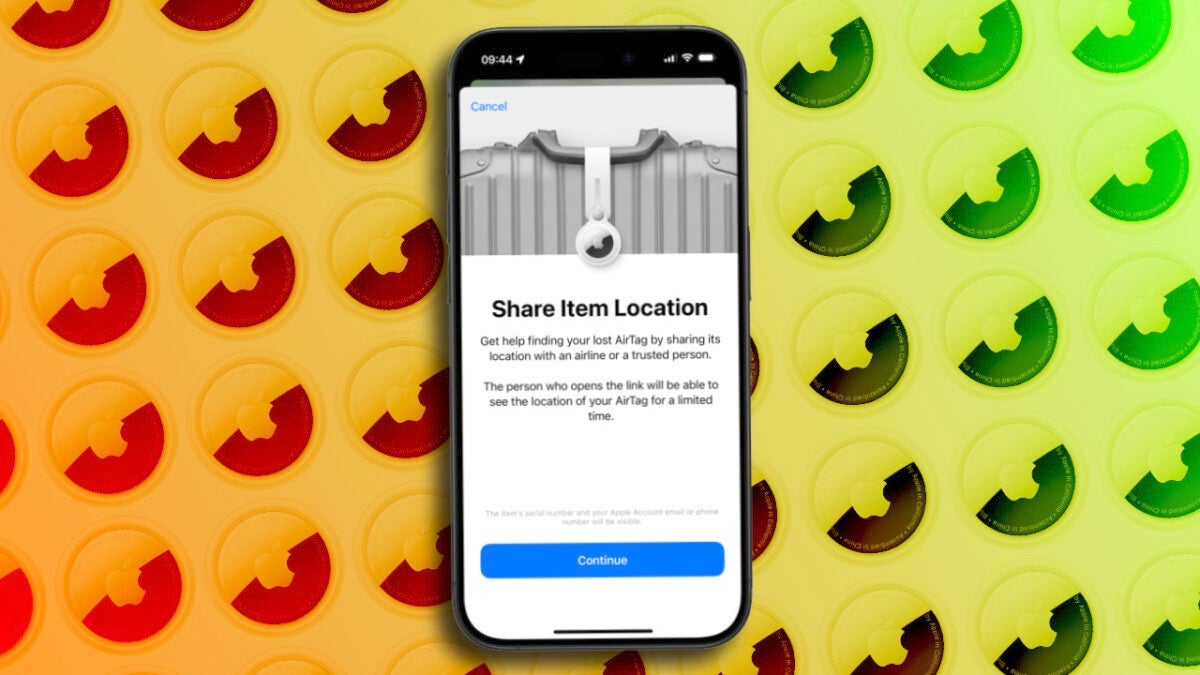
With the second beta of iOS 18.2 and its new features, Apple goes far beyond the introduction of image tools in Apple Intelligence. In this new version, sharing the location of a lost item becomes simpler and more direct, as we can now send the location of our AirTag and other devices not only to friends and family but to anyone. This opens up a world of possibilities, allowing us to receive help from people outside our close circles in case of loss, especially in situations where speed is essential, such as in airports, offices, or crowded places.
Until now, the Find My app allowed us to share the location of objects, but only with trusted people. Now, iOS 18.2 takes this feature a step further by adding the option to create a public link. This is a link that we can send, and anyone with access to it will be able to see the location of our object. How? By following these steps:
We open the Find My app on our iPhone or iPad.
We enter the Items tab.
We select the AirTag or tracking device for which we want to share the location.
At the bottom, next to “Lost AirTag,” we tap on “Share Item Location.”
We tap on Continue.
Here we will see a link that we can copy and send by any means to the appropriate person. The link, however, is temporary and will stop working after a few hours. Alternatively, by following the previous steps, we can deactivate the link in step 4 whenever we need to.
It is in this same option in step four where we find another option that further facilitates the recovery of lost objects. Now, when someone brings an AirTag close to an iPhone, the contact information we have chosen to share, such as our email or phone number, will be displayed.
As Apple itself explains within the sharing options settings, this new functionality in the Find My app is especially practical for situations where an object is lost in public places or in transit. For example, if a suitcase is lost at the airport, it is now possible to share a location link with airline staff so they can quickly track and recover the luggage. Being a temporary link, privacy remains protected, as it will become inactive after a few hours or when we decide to stop sharing the location.
The iOS 18.2 update is already in beta phase for developers, and Apple has confirmed that it will be available to the general public in December. The feature may, therefore, change before its release. Beyond the small details, however, it is clear that the AirTag is about to become much more useful.
The ability to share the location of our objects with anyone and quick access to contact information in case of loss are very important steps in keeping belongings safe.
Although Halloween has already passed, horror cinema continues to delight us with all kinds of top-notch contributions. The latest of these is an apocalyptic film that has just premiered on Amazon Prime Video. Its title is Apocalypse Z: The Beginning of the End, it comes from Spain and is already at the top of the most-watched list on the platform. This Spanish zombie movie, directed by Carles Torrens and based on the bestseller by Galician writer Manuel Loureiro, is standing out on Prime Video thanks to its originality and unique approach to zombie cinema. Set […]
Although Halloween has already passed, horror cinema continues to delight us with all kinds of top-notch contributions. The latest of these is an apocalyptic film that has just premiered on Amazon Prime Video. Its title is Apocalipsis Z: El Principio del Fin, it comes from Spain and is already at the top of the most-watched on the platform.
Subscribe to the Softonic newsletter and get the latest in tech, gaming, entertainment and deals right in your inbox.
This Spanish zombie movie, directed by Carles Torrens and based on the bestseller by Galician writer Manuel Loureiro, is standing out on Prime Video thanks to its originality and unique approach to zombie cinema. Set in Galicia, the film takes us to iconic places never before seen in the genre’s cinema that are astonishing, such as the Rande Bridge.
Genre cinema in capital letters
One of the elements that has most captivated the audience is its connection with Spanish reality, a decision that has been fundamental for the creators. The story not only takes place in Galicia, but reflects the impact of the COVID-19 pandemic. In the plot, which unfolds in a post-COVID world, humanity is more prepared for a viral threat, adding a layer of realism to the narrative. Additionally, viewers can easily recognize figures inspired by key characters during the pandemic, such as fictional versions of Pedro Sánchez and Fernando Simón.
But at the heart of this story is not only the fight against zombies or the threats of the pandemic, but also the emotional journey of Manel, a man living his own personal “apocalypse” after the death of his wife. His only companion is his cat, Lúculo, who becomes a charming and unique character in the genre. Of course, Lúculo is the best part of the movie.
The adaptation is a worthy reinterpretation of Loureiro’s novel and, although it does not aim to revolutionize the genre, it is an entertaining story full of nods to classic zombie films that will captivate fans of the genre.
The director of Godzilla Minus One, Takashi Yamazaki, might soon make the leap to Hollywood. After succeeding with this film, it was recently confirmed that he would carry out a sequel to this movie, but this might not be the only project he has in the works. As reported by Virtual Gorilla, Yamazaki has had an important meeting with Kevin Feige, the president of Marvel Studios, likely for a possible future incorporation of the filmmaker into the Marvel Cinematic Universe. This meeting took place during a talk at the Tokyo International Film Festival as part of the celebrations for […]
The director of Godzilla Minus One, Takashi Yamazaki, could soon make the leap to Hollywood. After succeeding with this movie, it was recently confirmed that he would be making a sequel to this film, but this might not be the only project he has in the works.
Subscribe to the Softonic newsletter and get the latest in tech, gaming, entertainment and deals right in your inbox.
As reported by Virtual Gorilla, Yamazaki has had an important meeting with Kevin Feige, the president of Marvel Studios, probably for a possible future incorporation of the filmmaker into the Marvel Cinematic Universe. This meeting, which took place during a talk at the Tokyo International Film Festival as part of the celebrations for the 70th anniversary of Godzilla, could be the beginning of the director’s career in Hollywood.
Will Yamazaki join the MCU?
According to the director, the president of Marvel praised his work on Godzilla Minus One, specifically mentioning the “Wadatsumi Operation,” a key aspect of the film where post-war technology is used to confront the sea monster. Feige even commented that at Marvel “we have meetings every day to see if we can develop something like that.” But, for now, everything is up in the air.
A few days ago, we shared the first image of Billy Zane —an actor you might recognize from Titanic or Back to the Future— completely unrecognizable for the movie Waltzing with Brando, in which he will portray the incredible actor Marlon Brando both in his artistic talent and his more activist side. Now, after being amazed by the incredible images of Zane as Brando in the iconic scene from The Godfather, we have a much broader look at the film thanks to the trailer they just released. In the trailer, we can see much more clearly what the movie will be about and how it has […]
A few days ago we shared the first image of Billy Zane —an actor you will recognize well from Titanic or Back to the Future— completely unrecognizable for the movie Waltzing with Brando, in which he will portray the incredible actor Marlon Brando both in his artistic talent and his more activist side.
Subscribe to the Softonic newsletter and get the latest in tech, gaming, entertainment and deals right in your inbox.
Now, after being amazed by the incredible images of Zane as Brando in the iconic scene from The Godfather, we have a much broader look at the film thanks to the trailer they just released. In the trailer, we can see much more clearly what the movie will be about and how Zane has been transformed into an exact replica of the actor:
A better world thanks to Brando
In Waltzing with Brando, we will see how Marlon Brando’s passion for sustainability merges with Judge’s architectural expertise, creating a film in a very special context that highlights the actor’s interest in a more environmentally friendly world: “Brando believed that this great ecological experiment would inspire the world to create a better and more sustainable future.” It premieres in the US on November 30th.
Managing and editing PDF documents has become essential for both professionals and users alike. However, editing PDF files has always been a challenge, as many PDF editors are either limited in functionality or complicated to use. This is where UPDF stands out as the ultimate PDF editor that we can enjoy on any platform. With an intuitive interface and advanced features presented in a simple way, UPDF allows us to edit PDFs quickly and efficiently, offering a unified and straightforward experience on Windows, Mac, iOS, and Android. Now UPDF is having a Black Friday Sale! Softonic users can get 50% off along with a free gift. Don’t miss this limited-time offer!
How to Edit a PDF on Windows or Mac with UPDF
Where UPDF excels is in its PDF editing capability on both Windows and Mac. We can edit document text, images, links, or even reorder and work directly with entire pages. And we can do it all from one place.
How to Edit Text in a PDF
UPDF allows us to edit all elements of a PDF, including text, easily and quickly. Whether we need to delete text, modify existing content, or add new content, UPDF handles everything, ensuring the original document format remains intact.
To change or delete text in a PDF, we click on the “Edit PDF” icon on the left sidebar. This activates the editing mode. Once in editing mode, we select the text we want to change or delete. Clicking on the text will bring up a purple border around the selected area. We can delete text by placing the cursor at the end and pressing the delete key, or replace it by directly typing the new word or phrase.
In addition to modifying and deleting text, UPDF allows us to adjust the text style with options in the upper toolbar, such as font type, size, color, and alignment.
We can also add text as part of a document, which we do by clicking on the “Edit PDF” icon on the sidebar and selecting the “Text” icon on the upper bar. Clicking anywhere on the document, we can begin typing. As before, we can customize the style of the added text, including font, size, color, and alignment. To exit editing mode, we click outside the text box.
If we want to add text as a comment, we simply click on the “Comment” icon on the sidebar and select “Text Comment”.
How to Edit Images in a PDF
UPDF also allows us to edit and add images in PDF documents quickly and easily. To edit an image, we enter editing mode and select the image of interest; we can rotate, extract, crop, replace, or delete it. Additionally, we can adjust its size by dragging the corners or specifying exact dimensions.
We can also add new images by clicking on “Edit PDF” and selecting the “Image” icon to insert one from our device.
How to Edit Links in a PDF
UPDF makes adding, editing, and deleting links in PDF documents extremely easy, which is ideal for connecting and expanding information interactively.
To add a link, we simply click on the “Edit PDF” tab and select “Link” on the top bar. Then, we click anywhere in the PDF to insert a link. We can choose from “Web Link” to add a URL or “Page Link” to link a page within the same PDF.
If we want to edit a link, we simply select it in the PDF and access “Properties” to modify the link type, line style, thickness, and color of the border. Finally, if we want to remove it, we right-click on it and select “Delete” to remove it from the document.
How to Manage PDF Pages: Crop, Delete, Rotate, and Split
UPDF offers a wide variety of tools to organize PDF pages, which makes presenting documents professionally easier.
To insert pages, we can do it in several ways: add a blank page, from another PDF file, or even from the clipboard. We also have the option to add images as pages directly in the document. If we need to replace a page, we select the desired page and choose the PDF file with which we want to replace it.
If we want to extract pages, we simply select them and save them in a new file; we can even delete them from the original document after extraction. If we want to split the PDF, we can do it by the number of pages, file size, top-level bookmarks, or custom elements, depending on what best suits our goal.
To adjust the layout, we select the pages and use the rotation options clockwise or counterclockwise as needed. If we find pages we no longer need, we easily delete them by selecting them and using the delete option. Additionally, in organization mode, we can zoom in on page thumbnails, which is very useful when working with documents that have small text and we need a more detailed view.
With UPDF, we can also crop pages in a PDF. To do this, we select the “Crop Pages” option, adjust the cropping area with the purple box, and apply the change with the “Crop” button. On the right panel, we can configure margins, cropped page size, and restrict proportions as needed.
If we want to apply cropping to multiple pages, we use “Apply Changes” to define a specific range, and we can even crop only odd or even pages. Additionally, UPDF allows us to split a page with horizontal or vertical division lines, also selecting the reading direction, and, when applying the “Split” option, we can delete the original page after splitting it.
How to Edit a PDF on Our iPhone or Android with UPDF
One of the biggest advantages of UPDF is its ability to edit PDF files on the go from mobile devices. An essential resource when we need quick and versatile access to documents, no matter where we are. Whether from an iPhone, iPad, or Android device, UPDF for iOS and Android allows us to make modifications to text, images, and links at any time.
In the mobile version of UPDF, editing text in a PDF is as simple as doing it on the desktop. We just need to select the text area we want to modify, and we can make changes to the content.
The mobile app also allows us to add or adjust images within the PDF. We can insert a new image (perhaps just captured with the camera), change its size, or move its position with simple gestures.
Another key function in the mobile version of UPDF is the ability to add links to web pages or other parts of the document. This makes creating interactive and navigable PDFs easy, even from a mobile device.
Where other editors are not present, on our mobile devices, UPDF stands out. With a very universal interface, yet always adapted to the nature of each device from which we work, any management is simple, quick, and efficient. Of course, edits made on a mobile device are maintained when opening the document on the computer, ensuring a smooth and efficient workflow that we can pick up and continue wherever we are.
Much More Than a PDF Editor: AI, Annotations, and OCR, Among Others
In addition to its text editing, image, and link tools, UPDF offers several options that go far beyond what we usually find in a PDF editor.
The AI function in UPDF allows us, for example, to perform complex tasks automatically, such as summarizing pages, simplifying graphics, making translations, or, chat with AI. Very importantly, UPDF AI has the capability to convert PDFs into mind maps, allowing you to quickly grasp the outline and main ideas of lengthy documents. . This technology optimizes our workflow in a unique way, making managing large amounts of data or complex information faster and more efficient than ever.
The OCR functionality of UPDF turns scanned documents or images into editable text, completely changing how we digitize printed documents. OCR recognition is essential for archiving and organizing physical documents in digital format.
Another point is that UPDF greatly facilitates the ability to add comments, underlines, highlights, and notes to the PDF document. This is ideal for text review and team collaboration. The annotation tool allows us to make precise and detailed comments that can be saved and shared easily.
UPDF also allows us to convert PDF files to various formats, such as Word, Excel, PowerPoint, and others, without losing quality or, very importantly, format. To conclude, it is worth highlighting UPDF’s digital signature and form tool, which makes filling out and signing documents quick and secure.
A PDF Editor Ahead of the Competition
In a market full of PDF editing tools, UPDF stands out for its versatility and ease of use, as well as its cost and advanced features. While editors like Adobe Acrobat or Foxit offer similar capabilities in some fields, UPDF excels as an economical solution that does not sacrifice functionality.
Unlike many competitors, UPDF combines text editing, page management, AI features, and much more in one place. With a single simple interface that makes it a complete option for both professionals and everyday users who need to work with PDF documents easily. Highlighting, among all this, its cross-platform interface, which allows for a unified workflow on Windows, Mac, iOS, and Android.
UPDF
Adobe Acrobat
Foxit
Perpetual Plan
69.99 USD
Not available
Not available
Annual Plan
39.99 USD
239.88 USD
129.99 USD
Platforms Supported
Windows, Mac, iOS, Android
Windows, Mac, iOS, Android
Windows, Mac, iOS, Android
Device Limit
4
2
1
UPDF offers several standout highlights, including a single license that enables access on four devices across all platforms, providing flexibility for users. The Enterprise Plan includes a user-friendly license management dashboard for efficient oversight in organizations, while regular product updates ensure users benefit from the latest enhancements and maintain high performance and security.
Overall, UPDF consolidates itself as the best PDF editor option on the market today thanks to its wide range of features, ease of use, and competitive pricing. From editing text, images, and links to advanced tools like OCR recognition or automatic translation, UPDF offers everything we need to work with PDF documents quickly and efficiently on any platform. UPDF is now offering an exclusive discount for Softonic users for a limited time! You can save 50% off. Don’t miss out—go and grab this amazing deal now!
PlayStation Plus Essential subscribers can now enjoy this month’s three new games until December 2nd. The titles available for download are Death Note Killer Within, Hot Wheels Unleashed 2 – Turbocharged, and Ghostwire: Tokyo. Death Note Killer Within is an online deduction game where up to 10 players can participate, divided into two teams. The teams, divided into Team Kira or Team L, must fight to control the game on equal terms while keeping their identities secret. The Death Note is hidden among the players […]
PlayStation Plus Essential subscribers can now enjoy the new three games of this month until next December 2nd.
The titles that can be downloaded are Death Note Killer Within, Hot Wheels Unleashed 2 – Turbocharged, and Ghostwire: Tokyo.
Death Note Killer Within is an online deduction game where a maximum of 10 players divided into two teams can participate. The teams, which are divided into Team Kira or Team L, must fight to control the game on equal terms while keeping their identities secret. The Death Note is hidden among the players, and they will have to work together to overcome the opposing team. Each role has its own characteristics, so you will have to devise different tactics depending on the situation.
As it is an online title, players must have a constant Internet connection. It also does not have offline modes. It is available for PS5 and PS4.
On the other hand, we have Ghostwire: Tokyo, a title developed by Tango Gameworks. In its premise, we see that a powerful occultist invades Tokyo and makes the population disappear completely. The game mixes fantasy with Japanese culture and specifically, its terrifying legends. You will find it for PS5.
In Hot Wheels Unleashed 2 – Turbocharged, we will have more than 30 vehicles at our disposal, which we can upgrade with specific abilities. It also allows us to create our own track thanks to its powerful editor, in addition to playing on tracks designed by the community. It is available for PS5 and PS4.
The games for the month of October were available until November 4 and were WWE 2K24, Dead Space, and Doki Doki Literature Club Plus!
It is more than likely that this has happened to you at some point: you started watching a series, left it for some specific reason, and when you wanted to resume it, you realized you were more lost than an octopus in a garage. Amazon knows this and is already testing a new tool to solve it. This feature, called X-Ray Recaps, creates brief summaries of series segments, episodes, or even entire seasons. All of it is personalized to the millimeter, so you can return to watching the series you want from where you left off. X-Ray Recaps generates brief text fragments where the […] are compiled.
It is more than likely that this has happened to you at some point: you started watching a series, left it for some specific reason, and when you want to resume it, you realize you are more lost than an octopus in a garage. Amazon knows this and is already testing a new tool to solve it.
This feature, called X-Ray Recaps, creates brief summaries of series segments, episodes, or even entire seasons. All of this is customized to the smallest detail, so you can resume watching the series you want from where you left off.
X-Ray Recaps generates brief text snippets where the most relevant parts of the plot, what happened with the characters, and many more details are compiled. Of course, it is a good way to avoid the Internet and the dreaded spoilers to see where we left off.
If you use Amazon Prime Video a lot, it’s likely that the name X Ray already sounds familiar to you, as it is an exclusive feature of the service. This function allows us to explore the cast of a series, find out who the actors are, and learn about their biographies, for example.
Fire TV users in the United States will now be able to use this feature, although it is still in its beta version.
Meta ha proporcionado más detalles sobre su próxima herramienta de inteligencia artificial que ayudará a identificar a los adolescentes que falsifican su edad en Instagram. Según Bloomberg, esta función, llamada “clasificador de adultos,” aplicará automáticamente configuraciones de privacidad más restrictivas a los usuarios menores de 18 años. La compañía planea lanzar esta herramienta … Continuar leyendo “”
Meta has provided more details about its upcoming artificial intelligence tool that will help identify teenagers who falsify their age on Instagram. According to Bloomberg, this feature, called the “adult classifier,” will automatically apply more restrictive privacy settings to users under 18 years old. The company plans to launch this tool early next year, with the aim of providing a safer online environment for young people.
Subscribe to the Softonic Newsletter and receive the latest news in tech, games, entertainment in your inbox
According to Allison Hartnett, director of product management for youth and social impact at the company, the software will analyze aspects such as the accounts a user follows and the type of content they interact with. If the tool suspects that a profile belongs to a minor, it will automatically be moved to a teen account, regardless of the age the user has registered.
Meta launched teen accounts in September, which limit certain features for users under 16 years old. These accounts are automatically set to private and, for example, restrict sending messages to strangers. Additionally, teenagers cannot modify these settings without parental approval, a measure aimed at preventing unwanted interactions.
Meta has not yet specified the accuracy of the tool in identifying ages, but plans to implement a system of appeal for those who are misclassified. The company will allow teenagers to verify their identity by uploading an official document or using a video selfie with Yoti, a system that estimates age based on facial features and then deletes the content.
This new Meta tool is part of a broader plan to prevent teenagers from falsifying their age. Among the planned measures are the use of device identifiers and the review of accounts created with emails already linked to previous profiles. The measures come months after Europe investigated Instagram and Facebook after considering that they are not doing enough to protect the mental and physical health of minors.
Like most of us, your computer has slowly but surely become an indispensable part of your daily routine, be it for work, keeping in touch with friends, or even just unwinding. But after some time, it just doesn’t run as smoothly anymore.
Now you are waiting ages for it to turn on, files take minutes to open, and programs lag right when you need them most. These slowdowns disrupt your workflow, delay vital tasks, and leave you with pangs of frustration. Thankfully, this common problem is preventable by just a few simple steps to keep your PC at peak performance by installing CCleaner Free.
Common PC Performance Issues (And How to Fix Them)
The more you depend on your computer, the more you will start to notice that certain problems crop up which start to affect both your work and daily life. Here’s a list of the most common issues on your PC’s performance:
Slow Startup Times
It can very easily take an eternity to wait for a computer to boot. Annoyingly slow startup times are usually the result of too many programs loading at the startup, which quite often wastes precious minutes when you just need to get things done quickly.
Lagging System Performance
Probably the most irritating thing is when junk files, caches, and programs you don’t need start to clog up your storage. And the less storage, the more impact on processing, generally affecting the speed of the computer.
Low Storage Space
A cluttered system increases the chances of crashes just at pivotal moments. Whether you’re working on a project or streaming media, continuous freezes disrupt your focus and waste time.
Frequent Software Crashes
A system cluttered with unused or older software is more prone to crash and freeze. Such crashes, whether you were working on a project or just watching a movie during your free time, disrupt everything and stop your activities.
Unnecessary Programs at Startup
A lot of different programs load by default when your PC boots up, with most being totally superfluous. They use up resources, and cause your computer to lag from the second it boots.
How a Slow PC Affects Productivity and Device Longevity
Apart from wasting time, a slow computer disrupts your day: From delays at work to wasted energy, such problems wind up taking a great toll on your productivity and the life of your device.
Lower Productivity
Have you ever just stared at a frozen screen, waiting for your files to load? Slow computers and frequent crashes turn quick tasks into time-consuming struggles. You end up falling further behind deadlines and accumulate frustration to your day. In fact, one study shows that as much as 20% of users’ time is wasted dealing with performance issues, and that drastically cuts into work and personal tasks.
Frustration Leading to Premature Device Replacement
Many users change their computers before they really need to, believing that the system has “run its course.” Meanwhile, proper maintenance could have kept its lifespan going for a longer period. Instead of hurrying off to purchase a new device once again, regular clean-ups and optimizations using CCleaner Free could keep your computer running for years… And this saves you both time and money.
Impact on Personal & Professional Life
Slow performance rears its head at the worst time, like when you’ve got an important video call coming up (… or you’re streaming your favorite show). Missed meetings, disrupted movies, and an increase in stress levels were all due to the slow performance. It greatly affects personal and professional life negatively.
Energy Inefficiency
When your device needs to work harder to process more, it consumes a lot more energy. Your computer can make simple tasks require much more processing power than reasonable; hence your increasing electricity bills. Keeping your device optimized avoids wasting both your time and energy.
Why Do PCs Slow Down Over Time and How to Prevent It
If you suspect your computer is slowing down, then you are not just imagining things. There are several common factors that conspire to drag down performance as your PC gets older. Here’s why:
Accumulation of Junk Files
Every time you browse or install any programs, your system continues to gather temporary files, browser caches, and leftovers. These continuously build up and start influencing your PC’s speed and performance. As a matter of fact, cleaning up junk files and dispensable software may recover your computer’s speed by as much as 34%.
Registry Issues
The Windows Registry is where your system goes to figure out configurations and settings for any software you’ve ever installed. When you uninstall something, it doesn’t necessarily get removed from the registry, so leftover entries accumulate and clutter this database. That may lead to errors and instability and make your PC work harder than it should.
Too Many Startup Programs
Is your computer taking forever to boot? Startup programs that run automatically when your PC turns on drain memory and CPU power from the moment your system starts, slowing down performance significantly.
Fragmented Hard Drives (For HDD Users)
If you have an HDD, then fragmented files scattered across the drive can really slow things down. Your PC is constantly taking time to piece together the fragmented data, and it just delays operations. It’s less of an issue for SSDs, but you might see it on HDDs.
Outdated, Obsolete or Unnecessary Applications
You can really slow down your system if you are running older or unused applications that are not optimized anymore. These programs use resources such as memory and processing power needlessly.
Simple Steps to Boost PC Speed and Performance Without Extra Tools
If you perform a few simple steps on a regular basis, you’ll be able to keep your system healthy with just the built-in tools:
Manual File Cleanup
Your PC gathers a lot of clutter over time—temporary files, browser caches, and unused programs can slow down your system. Regularly clearing these files will free up space and improve performance. You can easily delete them manually or clear browser caches yourself.
Managing Startup Programs
Does your PC take a long time to start? That’s likely due to too many programs launching automatically. Use Task Manager in Windows to disable unnecessary programs that start when your PC boots. Reducing startup programs can cut boot time significantly.
Disk Cleanup
You can use built-in utilities such as Disk Cleanup. The tool is straightforward to use and removes temporary files and system logs (it also clears the recycle bin too while it’s at it). Running it on a regular will clear up space and help your system to stay responsive.
Defragmentation (For HDD Users)
The use of an HDD can mean that you eventually experience slow downs as a result of file fragmentation. Defragmentation is the process in which the fragmented data is reorganized to return swift access to files, thus resulting in a performance boost.
Scanning for Malware
Your system might be housing malware. If something malicious is running, it makes sense that it would slow things down, not to mention compromising security. Run free antivirus tools to scan for malware routinely and remove damaging software that could be compromising computer speed.
The Limitations of Manual PC Maintenance vs. Automatic Tools
While manual maintenance can indeed make the computer run a bit faster, it does have several drawbacks that are not that easy to overlook.
Time-Consuming
Do you find yourself spending too much time on file cleanups or managing startup programs? Manual tasks like these can be time-consuming and require you to remember to do them regularly. In fact, studies show that users can spend hours a month just on basic maintenance tasks.
Are you spending way too much time cleaning up files or organizing startup programs? These types of tasks require that you remember to do them to begin with, and they often take time too. Users can end up wasting hours per month performing elementary maintenance activities.
Lack of Depth
A glaring issue with built-in utilities is that they often miss some things. The aforementioned Disk Cleanup, for example, simply won’t find and can miss junk files outside of the regular locations it’s programmed to explore. They also don’t address registry problems, and manually maintaining the registry is neither practical nor safe. Due to this, the result is usually slightly better but far from optimal performance improvements. You should be getting a better and deeper cleanup.
Room for Errors
There’s also a very real risk if you’re manually managing your system. Have you ever been consumed by the thought that you may have just deleted the wrong file or changed the wrong setting? It’s easy to mess with your PC’s performance, creating more problems that take even longer to fix.
Taken together, these diverse limitations explain why manual maintenance alone will eventually make your PC suboptimal and perhaps lead to more frustration with time.
Introducing a Simple Solution: CCleaner Free for Faster PC Performance
Manual maintenance of a computer’s performance is time-consuming and error-prone. Fortunately, there is an easier way that takes the hassle out of keeping your PC in great shape: CCleaner Free.
Advanced Junk File Cleanup to Boost PC Performance
Over time, junk files build up and bog down your computer’s performance. CCleaner Free makes it easy to address: click a few buttons, and in an instant, those built-up junk files are washed away. It’s quick and safe to flush the clutter from temporary system files, browser caches, residual files, and leftovers of programs that you no longer install.
Custom Cleaning Options for Tailored PC Optimization
CCleaner Free’sCustom Clean allows the user to manually select what part of the system needs cleaning. You can set up a clean your way since it is well-categorized between OS-generated files and application-generated ones. It doesn’t matter whether your preference for cleaning is focused on browser files, system caches, or temporary files because Custom Clean allows you to target the most important areas without targeting important files.
Registry Optimization to Fix Errors and Improve Stability
If left unchecked, the system registry can grow to make systems unstable, crashing at the worst moments. CCleaner Free’s registry cleaner automatically picks up obsolete or incorrect entries burdening your computer and fixes them. With an optimized registry, you experience a more stable and responsive system without having to make dangerous manual tweaks yourself.
Startup Program Management to Speed Up Boot Times
A lot of the programs launch automatically upon startup, which slows down your computer’s booting time. CCleaner Free handles this pretty painlessly. Using this feature, you can disable applications running during startup and help it start more smoothly.
A Lightweight and User-Friendly Tool for PC Optimization
Whether you are a novice or an advanced user, CCleaner Free has been built to be very easy to use. An intuitive interface allows everyone to work with it and provides your PC with better performance without technical knowledge.
From slow startups to cluttered systems,CCleaner Free improves different aspects of performance issues. The work of keeping your computer quicker, reliable, and with less hassle doesn’t need to be any more than a minimal effort.
Empowering Users with Regular PC Health Checkups for Better Performance
Regular health checkups for your PC are important, not just for it to function well but also to extend its lifespan. With CCleaner Free, you simplify cleaning junk to mere seconds while managing start-up programs and optimizing your registry, keeping your computer going for the foreseeable future.
Call of Duty: Black Ops 6 has witnessed a fantastic launch, probably the most successful installment of the franchise. And now we know why: it captured the attention of more than half of the American Xbox Series S/X players, which is a few million players. Call of Duty: Black Ops 6 has managed to leave behind all the issues we had with Activision and its partners regarding their vision of the franchise, as the new installment has managed to break all previous records and the path now seems clear. During the recent presentation […]
Call of Duty: Black Ops 6 has witnessed a fantastic launch, probably the most successful installment of the franchise. And now we know why: it captured the attention of more than half of the American Xbox Series S/X players, which is a few million players.
Call of Duty: Black Ops 6 has managed to leave behind all the issues we had with Activision and its partners regarding their vision of the franchise, as the new installment has managed to break all previous records and the path now seems clear.
During the recent Microsoft earnings presentation, Satya Nadella, the company’s CEO, confirmed that Call of Duty: Black Ops 6 has set new franchise records and has been described as the “biggest” launch in the Call of Duty series.
According to Circana's Player Engagement Tracker, on Oct 23rd, 19% of US active Xbox Series players and 18% of US active PlayStation 5 players launched Call of Duty HQ.
On October 28th, 52% of active XBS players and 34% of active PS5 players did so. Both were all-time highs for Call of Duty HQ.
Half of Xbox users have already played CoD and things are going very well on PS5
Based on an analysis by Circana’s CEO and analyst, Mat Piscatella, we now know that Call of Duty: Black Ops 6 has managed to capture the attention of “one in every two Xbox Series S/X players,” which is undoubtedly a huge achievement for the franchise, given that the inclusion of Game Pass has surely worked for Activision and its partners.
“According to Circana’s Player Engagement Tracker, on October 23, 19% of active Xbox Series players and 18% of active PlayStation 5 players in the United States launched Call of Duty HQ. On October 28, 52% of active XBS players and 34% of active PS5 players did so. Both were all-time highs for Call of Duty HQ,” reads Picatella’s message on Bluesky.
Circana US Player Engagement Tracker – Top 15 Titles by Total Weekly US Players (Not Concurrent) – W/E Oct 26, 2024
– 47% of active Xbox Series players engaged with Call of Duty HQ during the week, up from 26% the week prior.
– Call of Duty HQ ranked at #4 on Steam, after placing 27th LW.
Despite Xbox users having an advantage with Game Pass, PlayStation users did not fall behind at all, as a third of the active PS5 consumer base played the title, demonstrating that Activision is receiving love from all platforms.
Not only in the United States, also in the United Kingdom, where the title has achieved the highest traffic in history for a game and, although we haven’t seen any metrics, the indicators clearly show that the cumulative player count is going to be historic.
Undoubtedly, it is exciting to see how the Call of Duty franchise is back in full swing, and the Xbox-Activision partnership has catalyzed the increase in the number of players thanks to the ease of access to the title through Game Pass. A winning policy.