Coronavirus: Do you have to stay at home? These online resources will help you with remote working or spending time at home

Tricks, apps, and help to make this period at home more enjoyable for you, whether at work, at school or in your leisure time.

In recent weeks, COVID-19 or the novel Coronavirus has been gradually spreading throughout the world. While you shouldn’t panic, you should follow all the recommendations of official agencies, such as the WHO or your country’s government.

Even if you aren’t sick, you may have been advised to stay home for reasons of prevention. And this may mean you have to do some remote work, which, if you aren’t used to it, isn’t always easy. To help you out, we’ve put together several articles with tips for working remotely, along with some apps (mostly free) to make it easier for you to do your job effectively.

Are you a student and your classes have been canceled or you can’t physically go to school? Then go to the next section, where we have compiled resources to help ensure that these weeks when you won’t be attending classes are not wasted.

Also, at the end of this piece, you’ll find resources to help you make sure that those all those hours spent at home aren’t as boring: we’ve got free games, resources on where to watch movies for free, and even where to download ebooks for free. Countless hours of entertainment!

Resources and tips for remote working

Have you already started working remotely? Take a look at all these articles.

Resources for students

Take advantage of these class-free weeks to advance in your school work, so the return won’t be so rough.

Fun in the face of forced confinement

If you’re avoiding going out because of the Coronavirus outbreak, you may spend many hours a day bored, due to home confinement. Distract your mind with all these free resources: games, books, movies and more.

Games
Streaming

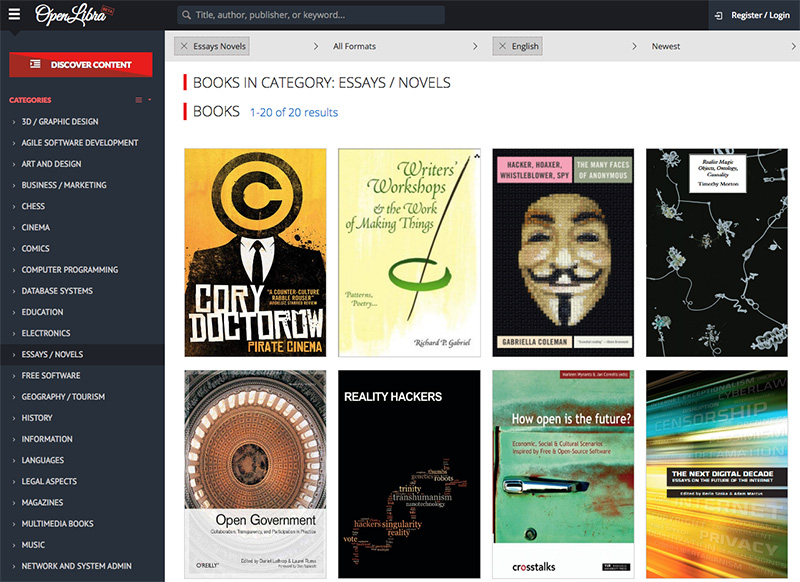
Reading


What to know about Flipgrid

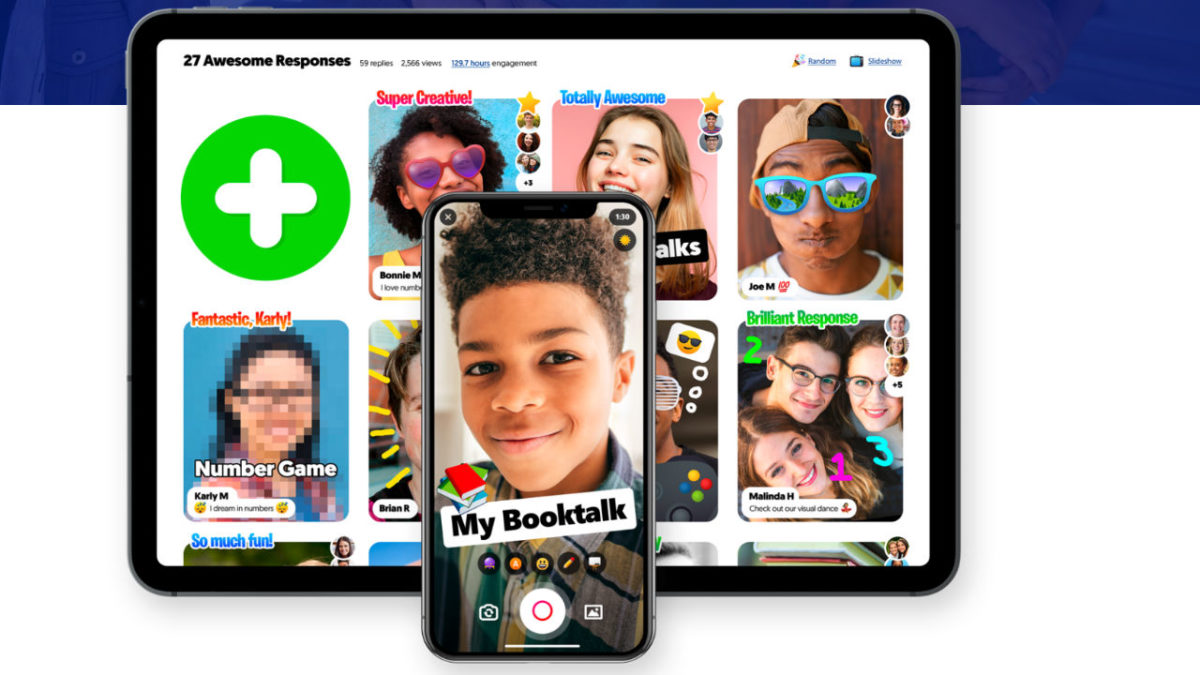
FlipGrid is an education app that allows teachers to bring tech into the classroom. Teachers can upload discussion questions to the platform and students can answer using a video response.

The platform can be used in classrooms from kindergarten through college and is quickly gaining in popularity with educators from all over the world.

Microsoft acquired the app about a year ago and has since made the platform free for educators, and has been rolling out new features like embedded videos, AR stickers, and integrations with tools like OneNote and Google Docs.

What exactly does Flipgrid do?

flipgrid view

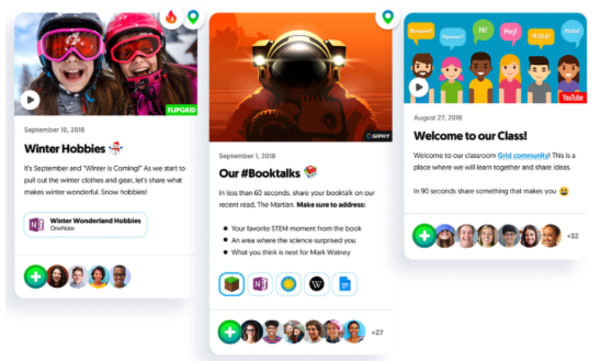
Flipgrid allows teachers to create what’s called grids to host video discussions. Each grid works like a message board where teachers can post questions—known as topics in the Flipgrid world.  Students respond to topics, which appear in a tiled display that, as you might imagine, appears in grid form.

Grids can be shared with an entire class, with smaller groups, or any configuration of users participating in a discussion. Each grid can hold unlimited topics and responses—which can be text-based or contain videos, GIFs, emojis, or an attached document.

On the student side, users can download an app or access the platform via desktop. Responses can range from 15 seconds to five minutes—though teachers can set time limits based on the assignment.

What’s more, teachers have the option to open up the discussion by allowing students to record replies to their classmates’ video responses. There are a variety of moderation features teachers can turn on or off per topic, depending on the lesson.

Student tools

flipgrid student view

Students can benefit by learning to articulate their ideas — speaking from the comfort of home rather than being put on the spot in class. They’ll also have the opportunity to see what their peers have to say—which encourages students to consider multiple viewpoints.

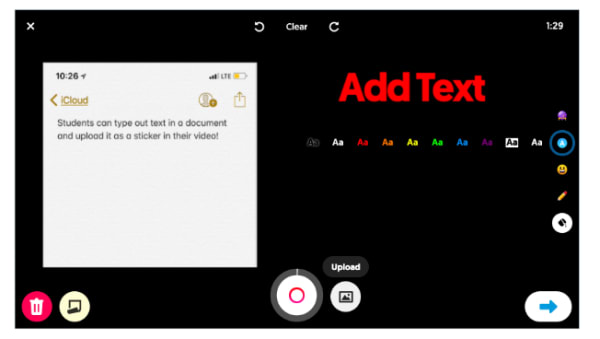
Students have access to this “sticky note” feature, which can be found on the recording screen. What it does is, it allows them to type out an outline or bullet points to include in the video, serving as a guide for the recording.

Pause, trim, and re-record buttons allow students to fine-tune their responses. Though, it’s worth pointing out, teachers need to be upfront about expectations, so students don’t waste time editing and re-recording in the pursuit of perfection.

Collaboration tools for teachers

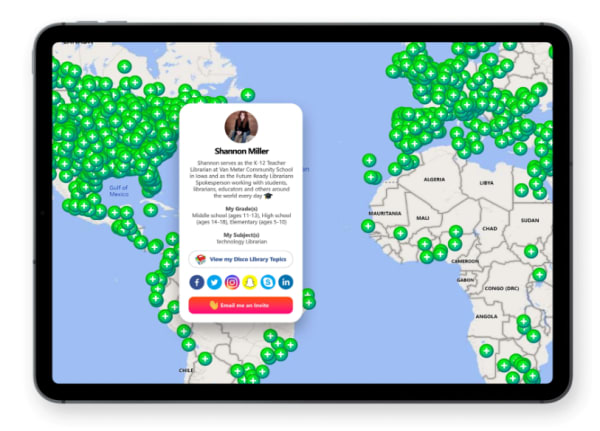
The CoPilot allows teachers to collaborate on grids and share moderator duties. There’s also the Disco Library, designed for sharing grid templates and GridPals, a social network that allows teachers to connect with other educators from across the globe.

gridpals map

Flipgrid AR

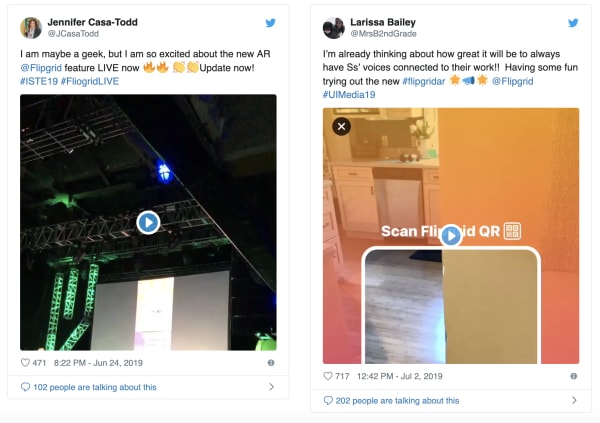
Fligrid recently added a new augmented reality feature, FlipgridAR, lets users print real-world QR code stickers that bring in-app creations into the real world.

flipgrid ar twitter shots

More content offerings

It’s not just individual teachers that can post resources to the app, either. Flipgrid now offers access to content from Code.org, Hacking STEM, NASA, Microsoft EDU, Find Your Grind, and Wonderopolis, and more.

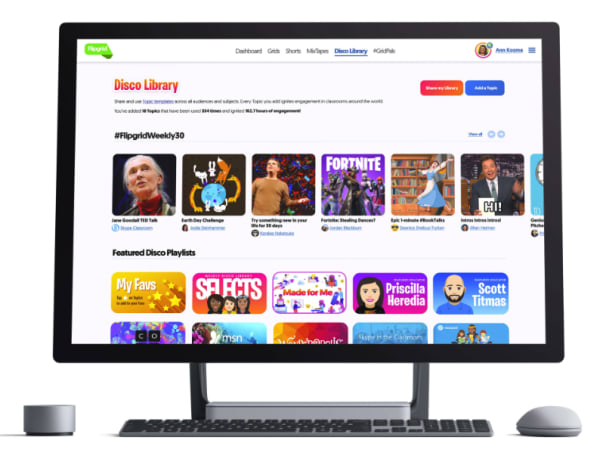
Within the Flipgrid Educator Admin panel, there’s launch-ready discussion prompts in the community-generated Disco Library.

flipgrid resources


Here, teachers can access discussion prompts and content from the community—downloading templates and other resources to bring into their own strategy.

Loop the family into the discussion

flipgrid guest mode

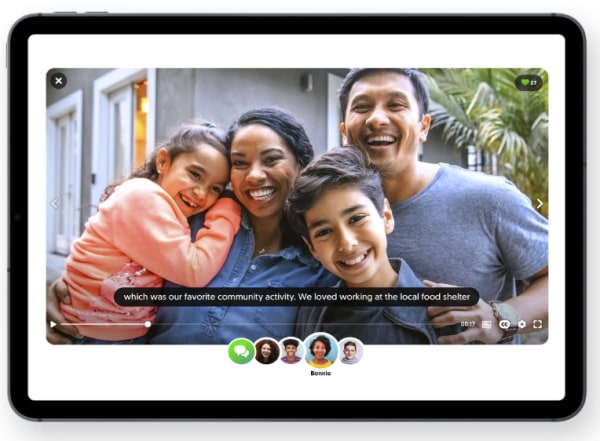
Beyond students and teachers using the platform, Flipgrid also brings family into the fold, allowing teachers to curate MixTape collections of videos so parents can see what their students are up to at school.

What’s more, there’s also the option to include Guest Mode Topics, where families can record responses from home.

Is Flipgrid an effective learning tool?

Flipgrid is an example of how educators can bring technology into the classroom in a way that helps students learn to use modern tools and get comfortable with being on camera.

The important thing to note here is, teachers need to be clear about how the platform works. Some students might assume that what’s meant to be an informal video response should be a full-blown presentation.

There’s also the issue that some kids might feel uncomfortable recording a response that their peers can review later on. As such, educators need to create a culture that emphasizes respect.

So far, Flipgrid has done a great job creating the kind of digital learning experience that takes the best parts of social media—collaboration and discussion—without resorting to the sorts of societal low points you’ll find on platforms like Facebook and Twitter.

What’s also great about this tool is, it allows educators to bring in community resources, but the teacher still leads the discussion. If you compare this experience to the disconnected MOOC environment, Flipgrid still offers that small classroom community, while pulling resources from relevant institutions that may offer more expertise.
3 great iPhone apps for learning a new skill

Turn your iPhone into a powerful learning tool with these great apps.

learning apps

Playing games on your phone can be a fun way to pass the time, but sometimes, you need something more. Why not learn a new skill in your free time? Whether you just want to challenge yourself or become the best you that you can be, the following iPhone apps will help you to do exactly that as you develop some new skills.

3 great iPhone apps for learning a new skill

Mind Tools Download Free ►
7
This app will help you develop essential career-related skills, such as management, problem solving, time management, and leadership skills. Mind Tools includes a variety of videos, articles, and other resources to help you build these crucial skills. You’ll be able to choose from a list of skills you want to develop, create a learning plan, create goals, and track your progress. It’s important to note that this is a subscription service; Mind Tools offers both standard and premium monthly subscriptions. But with more than 27 million users per year, we promise this is worth a shot.
The Great Courses Plus download free ►
8
This iPhone app allows you to have all of Great Courses’ lectures and lessons with you at all times. That way, you’ll never miss a chance to learn a new skill when you have free time. With Great Courses, you don’t have exams or a strict schedule. You’re free to access all of the info whenever you want — and however you want, through audio or video — and you can learn at your own pace. Although the app is free to download, you must purchase the courses.
Elevate Brain Training Download Free ►
8
In the digital age, this app is more important than ever. This brain-training app will help you to improve a variety of skills that may have deteriorated thanks to technology. With Elevate, you can work on improving your focus, processing speed, math skills, memory, and speaking abilities (among others) through personalized training programs. You’ll also be able to track your performance, and as you improve, the tasks and games will become harder. Elevate comes in both free and subscription versions.

Who says you have to pick just one of the above apps? Download all three to start learning a variety of new skills today.

3 great Android apps for learning a new skill

Fire up your Android and learn something new today!

Your Android can be used for more than social media and texting friends. Did you know that there are many amazing Android apps that can teach you a new skill in a fun way? Here are some of our favorite apps for learning a new skill.

3 great Android apps for learning a new skill

Android

Duolingo: Learn Languages Free download free ►
7
Do you have an international trip coming up? Wish you could learn a new language so you can speak with the locals on your vacation? Duolingo is an Android app that will teach you a new language in a fun and simple way. Duolingo has dozens of languages available so you can start learning multiple languages right away. The best thing about Duolingo is that it's completely free, so you can focus on learning a new language without breaking the bank!
LinkedIn Learning DOWNLOAD FREE
7
Everyone knows that technology is king these days. However, not many people actually know how to code. With LinkedIn Learning, you can learn to code from the comfort of your phone. LinkedIn Learning can also teach you how to design and create a website from scratch, build a mobile app, develop leadership skills, or even teach you Microsoft Office skills, among many others. The app has many amazing free courses, but you can also buy additional courses with a monthly or annual subscription plan.
With the Amazon Kindle app, the learning possibilities are endless. Amazon Kindle has thousands of how-to and self-help books. There are books to teach you how to create a budget for yourself or even how to start a garden. No matter what you want to learn, Amazon Kindle probably has a book on the subject. You can download this app for any of your Android devices, no Kindle required.

With so many amazing app choices it can be difficult to know which one you want to get started with. Why not download all three and start learning some new skills today?

This is how Netflix can help you learn new languages

Netflix really can help you learn that language you’ve always wanted to learn

netflix

Languages are the gateway to the world. When you learn a language, you unlock a path to the heart of the society and culture that helped create it. This is a two-way street, however, as consuming culture from another society is a great way to learn the language. Need proof?

Poorer countries show movies and TV shows produced in English with their original soundtrack and native language subtitles. Richer countries create a brand-new soundtrack in their native language and then dub it on top of the English language soundtrack. You’ll hear English more often in poorer countries than in wealthier countries where they can afford the re-dub.

8

Learn languages with Netflix

One way to learn a language is through passive consumption: watching movies in their native language and reading the subtitles. But you can learn faster with the Learning Languages with Netflix (LLN) Chrome extension. It uses the foreign language soundtrack of Netflix’s movies and shows to expose you to the language you’re trying to learn, and it uses the subtitle track to teach you the meanings of those words.

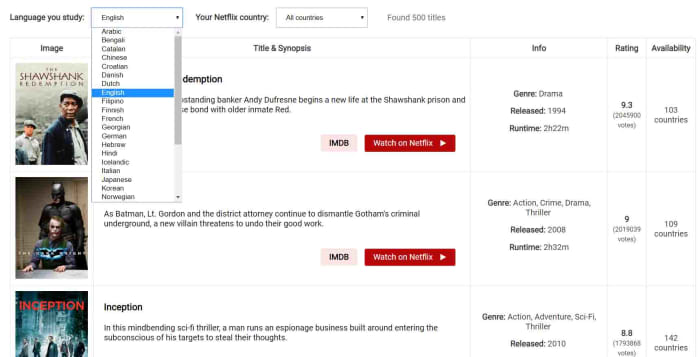
Learn languages with Netflix language catalog

The LLN extension has a catalog of all the Netflix titles that come with high-quality subtitles in the language you’re learning, and also tells you about a few issues you should consider. For example, Netflix has high-quality subtitles for the original audio track, but whenever the soundtrack has been dubbed the subtitles might not always match.

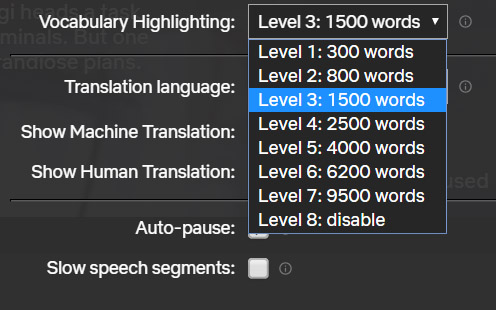
Learn languages with Netflix at the right level

The extension works by giving you the option to select your translation target language and then select a vocabulary level based around the number of words you know in that language. This will then only highlight the words suitable for your current level of learning. This allows you to tier your learning, no matter how complicated the language in the movie or show you’re watching.

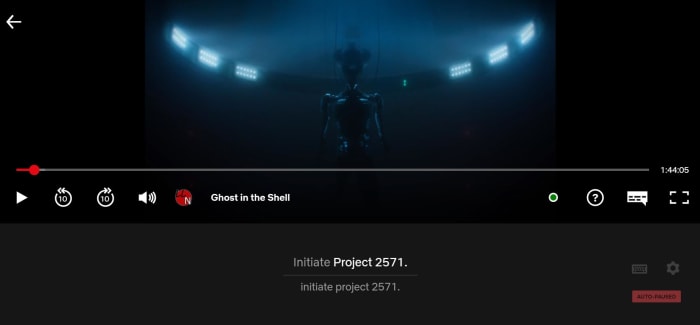
Subtitle learning with netflix

When activated, the LLN extension will show as a small icon in the Netflix control bar whenever a movie or show is playing. Then all you have to do is select the subtitle track for your target language in the normal way and hit the LLN icon. This will open up the subtitle track, which will run almost like a karaoke song with the word being spoken in the soundtrack lighting up as you hear it. This makes it very easy to match the sound of the word to the spelling.

You can use this method with subtitles showing your own language to expand your vocabulary or with subtitles in your target language to reinforce your learning. This reinforcement makes it easier to remember.

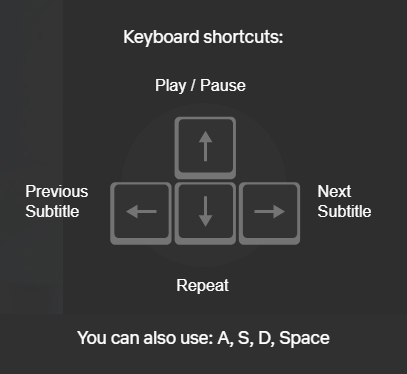
learn languages netflix keyboard shortcuts

As well as highlighting the words being spoken, the extension also offers a dictionary, so you can delve further into the meanings of the words you’re reading and hearing.

Another cool feature of the extension is keyboard shortcuts that make it easier to focus on particular words, phrases, and structures. This makes repeating phrases, skipping subtitles, and pausing on particular phrases as simple as pressing a key.

All in all, the LLN extension is a very interesting tool for anybody learning a new language. It gives you ease of control over the language you’re consuming when you watch shows and movies on Netflix. It also makes it easier to distinguish between different words being spoken in your target language, which is particularly useful for anybody just starting out with their language learning. Finally, it puts at hand in-depth explanations about the new vocabulary you’re consuming.

When it comes to language learning, practice is as important, if not more important, than the lessons themselves. The LLN extension makes it easy to practice your target language while watching Netflix, which should make a big difference for anybody trying to open that gateway to the world.

8 best apps for managing elementary classrooms

If you’re a teacher, these apps can improve your success in the classroom.

Google Classroom

Classroom management can be one of the hardest things to achieve for a teacher. With dozens of different personalities, students can struggle in a classroom setting that doesn’t fit their particular needs. Thankfully, there are some great apps out there to help readjust your classroom to fit your needs as well as your students. Each of these apps work together to create an ideal classroom for grades K-4, many of which could be used in high school education as well.

8 best apps for elementary school teachers

8. Scholastic Book Wizard Mobile

While this app may seem more useful for English teachers, it can be a great source of additional reading for any subjects outside of the classroom. It can also make it easy for novel-based classes to find books that may not be in each department’s book room yet. This can enhance your classroom’s settings to make it easier for students to feel comfortable.

7. Classtree

Getting parental consent for field trips and other activities can be a real hassle, especially for certain kids who may not interact with their parents frequently. Thankfully this app removes the paper and makes the process easy and seamless for both parents and teachers. It also allows for digital communication between administrators and parents in general, allowing for all parental questions to be answered in an easy format.

6.  BrainPOP Jr. Movie of the Week

BrainPOP Jr is a popular educational series for kids to learn about a large variety of topics. This particular app is ideal for young students, as it’s created for an audience of 10 and under. No matter what subject you’re trying to teach, however, BrainPOP Jr likely has a video on it, that can really enhance the learning experience for your students.

BrainPOP Jr Free Download ►
10

5. Kahoot!

Kahoot lets you turn your lessons into playable games, which can be an incredibly useful study activity. Sometimes it is hard to create something interactive and engaging for young students to study with, and this app takes that difficulty out for you. All you need to do is put in the information and Kahoot creates the game for you.

7

4. Socrative Teacher

It can be difficult for elementary students to focuses on quizzes, since most tend to not be particularly engaging for someone at that age. Socrative changes this dynamic to instead make quizzes fun and exciting game-like experiences for kids. This can really change your students perspective on test-taking. It can also help keep your classroom in line, as it’s easy for young students to engage in devices that they are more likely familiar with (especially if your school provides educational iPads).

3. Doceri

This app lets your iPad control your classroom computer, which means you can use it to monitor and manage the classroom from anywhere. You can also use it to control smart whiteboards, and even display videos and pictures from the iPad directly onto the whiteboard. The app may seem somewhat complicated at first, but the Doceri YouTube channel features extensive guides on how to best use their product.

2. Seesaw

Seesaw is an app dedicated to keeping parents at ease, as it allows you to post status updates and student projects to the app that parents can later look at, to get a better idea on how their student is doing. The students themselves can also post their work, which can be a great source of pride if they did something particularly well.

Seesaw: The Learning Journal Free Download ►
7

1. Common Core Standards

No matter what state you live in, Common Core can be a stressful part of lesson planning, especially searching through all of it. Thankfully this app makes it much easier to sort through the information and find what you need. It lists the Common Core standards, as well as allowing you to easily copy this information onto your own lesson plans. This can help you stay organized in order to keep your classroom together during your lessons.

While classroom management isn’t the only struggle teachers have to deal with, these apps can help tremendously. Additionally, if you’re looking for something for any age group, we’ve listed the overall best apps for educators to help you stay organized, and make your experience an easy and seamless one.

Top 7 apps for teachers

These programs can supercharge your classroom.

classroom

With hundreds of great programs available for teachers to use, it can be difficult to figure out which software is the fit best with the needs of your specific classroom. That being said, there is some software that is useful for any classroom. The right program improves the student experience and helps the teacher cut back on all that organizing. Take a look at some of the best software that any teacher can use.

Top 7 software programs for educators

7. Trello

Trello is a great organizational tool for businesses, but it also can be used to facilitate class projects. If your class is working on something as a group, or in groups, then you may find Trello to be the perfect tool to keep them on track and monitor their work.

Trello Free Download
8

6. Google Classroom

If you’ve never heard of Google Classroom, you’re missing out. This software can save you so much time and money by providing its own source of paper, writing tools, and other basic classroom functions. You can even use it as a way to manage the classroom when you’re not at work, instead of shuffling through mountains of papers and documents.

Google Classroom Free Download
7

5. YouTube (TED Talks)

No matter what subject you are teaching, someone has created a YouTube video on the topic you’re trying to convey to your students. Using these YouTube videos can be a great source of alternative teaching for students who learn better through videos. The TED Talks YouTube channel is particularly useful since the topics covered are incredibly diverse.

YouTube Free Download
7

4. Teachers Report Assistant

This program is designed to help with the management of report cards and grade keeping. You can also use it to create rubrics and use those rubrics within the program as a grading scale.

Teachers Report Assistant Free Download
7

3. QuizFaber

A great free program for making tests and quizzes. You can use it to make any type of quiz from multiple choice to true and false.

QuizFaber Free Download
7

2. Moodle

Similar to Google Classroom, Moodle is perfect for creating an online classroom environment. Teachers can use it to organize their materials, while students are able to use it to keep track of their daily schedule.

Moodle Free Download
6

1. StudyBlue

Study guides can be helpful for many students, but creating them is sometimes more trouble than they are worth. StudyBlue lets you create, distribute and save study material for students to access at any time.

StudyBlue Flashcards Download free
7

Each of these apps can improve your classroom in unique ways. You may even find yourself using all of them! Looking for more resources?  Our Softonic Solutions community has selected six programs that are perfect for teachers, so be sure to check out their list as well.