The Kowloon Walled City, an old Chinese enclave in Hong Kong, is remembered for its population density and extreme living conditions. With more than 35,000 inhabitants in just six acres, this space was known as a slum, with issues of poverty, poor sanitation, and organized crime. Despite its demolition in 1993, its legacy persists in popular culture and has inspired various representations in video games. Kowloon like we have never seen it Before, architect and content creator Sluda has recently recreated this urban maze in Minecraft, offering players the chance to explore its streets and […]
The Kowloon Walled City, an ancient Chinese enclave in Hong Kong, is remembered for its population density and extreme living conditions. With more than 35,000 inhabitants in just six acres, this space was known as a slum, with issues of poverty, poor sanitation, and organized crime. Despite its demolition in 1993, its legacy persists in popular culture and has inspired various representations in video games.
Kowloon like we have never seen it
Recently, architect and content creator Sluda has recreated this urban labyrinth in Minecraft, offering players the chance to explore its streets and historic buildings. Using a 3D model as a base, Sluda has made a meticulous architectural recreation that reflects the uniqueness of the Walled City, characterized by its chaotic buildings connected through improvised passages.
The construction process was monumental. Sluda faced the task of placing each building in its correct position, considering that each structure was unique, a consequence of the lack of regulation in its construction. The result is a detailed vision, with facades that capture the chaotic variety of the city, although the interiors of the buildings lack life and activity, increasing the sense of emptiness.
The recreation in Minecraft, available for purchase through Patreon, has received praise for its accuracy, although some players have noted the omission of the daily life that characterized the Kowloon Walled City, such as the bustle of its residents and the interactions in its narrow alleys. However, the map allows players to immerse themselves in the complexity of the space, even without the vibrant experience of its former inhabitants.
The influence of the Kowloon Walled City is not limited to this recreation, as its architectural legacy has been a reference in numerous video game titles, from Call of Duty to Cyberpunk 2077. With its recent representation in Minecraft, interest in this iconic place remains alive, showcasing the medium’s ability to explore even the darkest facets of urban history.
A new mod for Baldur’s Gate 3 has sparked interest in the community by restoring a deleted scene featuring an exchange between Withers, the undead steward, and the Tiefling girl, Arabella. This mod was created by YouTuber SlimX, who discovered the dialogue through “a simple scripting adjustment.” Available for free on his Patreon, the modification allows players to explore a more human side of Withers that is not seen in the final product. A mod that gives more personality to a rather unique character The scene in question reveals the origin of […]
A new mod for Baldur’s Gate 3 has sparked interest in the community by restoring a deleted scene featuring an exchange between Withers, the undead steward, and the Tiefling girl, Arabella. This mod was created by YouTuber SlimX, who discovered the dialogue through “a simple scripting adjustment.” Available for free on his Patreon, the modification allows players to explore a more human side of Withers that is not seen in the final product.
A mod that gives more personality to a very particular character
The scene in question reveals the origin of the nickname “Bone Man,” which Arabella gives to Withers. During the interaction, the girl jokes with him, establishing a fun relationship and a notable contrast to the tragedy that Arabella faces throughout the game. “With Withers, I can’t remember his name, so I’ll call him ‘Bone Man’!” says Arabella, highlighting her sense of humor. With a carefree tone, the little girl also compares Withers to her grandfather, adding a touch of tenderness to the dynamic.
However, the reason behind the removal of this scene is still unclear: it could have been a programming error or an intentional decision. Still, some speculate that the inclusion of humor could be disturbing before the tragic revelation that Arabella’s parents have passed away. The transition from a playful moment to a dramatic one may have been considered too abrupt for the narrative.
Regardless of the reasons behind its removal, this mod offers fans a new perspective on a character that might otherwise seem like a mere support in the story. With this restored material, players can better appreciate the emotional complexity surrounding Withers and his relationship with Arabella, providing additional context to one of the darkest aspects of the game.
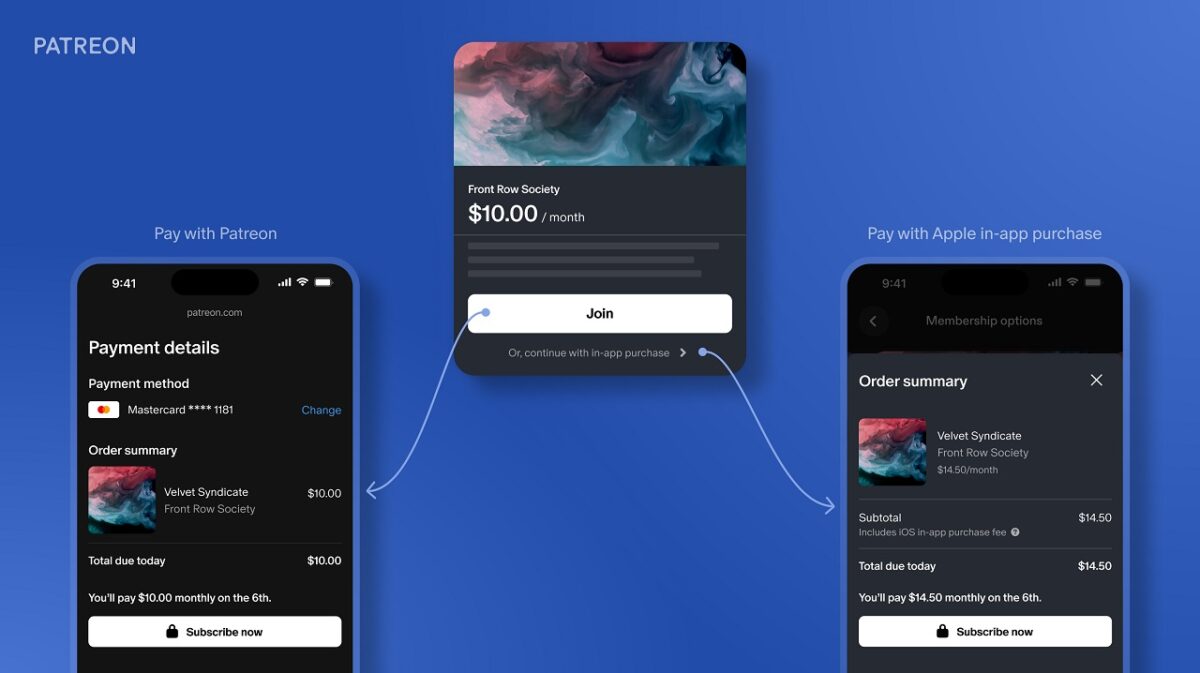
Patreon has launched an updated version of its app for iOS that allows fans in the United States to bypass Apple’s payment system when signing up for new memberships, thus avoiding the 30% commission charged by the App Store. This alternative payment option comes at a crucial time, following a court ruling that requires Apple to allow alternative payment methods without commissions. With this update, app users in the U.S. can choose a new payment method for subscriptions that does not rely on the in-app purchase system of […]
Patreon has launched an updated version of its iOS app that allows fans in the United States to bypass Apple’s payment system when signing up for new memberships, thus avoiding the 30% commission charged by the App Store.
This alternative payment option comes at a crucial time, following a court ruling that requires Apple to allow alternative payment methods without fees.
With this update, app users in the U.S. can choose a new payment method for subscriptions that does not rely on Apple’s in-app purchase system.
U.S. court rules that you no longer have to give Apple 30% of your iOS earnings.
We’re taking immediate action to make sure you and your fans benefit from this ruling as much as possible. Read more ? https://t.co/umf81TN2po
Apple appeals the court ruling while Patreon pushes to offer alternative payment methods
However, this option is currently limited to creators who use the subscription billing model, which charges fans at the time of registration instead of at the beginning of each month or per creation.
Martín, product manager at Patreon, explained that while the implementation of these payment options progresses, creators using legacy billing models still cannot accept new sign-ups through the iOS app.
This occurs in a context where the company considers that the deadline of November 2025 for all creators to switch to subscription billing is “on hold” due to the recent legal ruling.
Patreon has now adjusted their app on iOS as well – https://t.co/Q0zmMYCOfm – How much does this hurt Apple long term??
Although the total impact of the ruling is yet to be seen, Patreon emphasizes its commitment to transparency and stability as it adapts to the new regulations. The company is also working to enable alternative payment options for one-time payments in future updates.
Until then, creators who are still using legacy billing models are encouraged to consider transitioning to subscription billing to take advantage of the available growth tools.
Finally, it is worth mentioning that Apple has filed an appeal against the court ruling, which could alter the situation in the future.
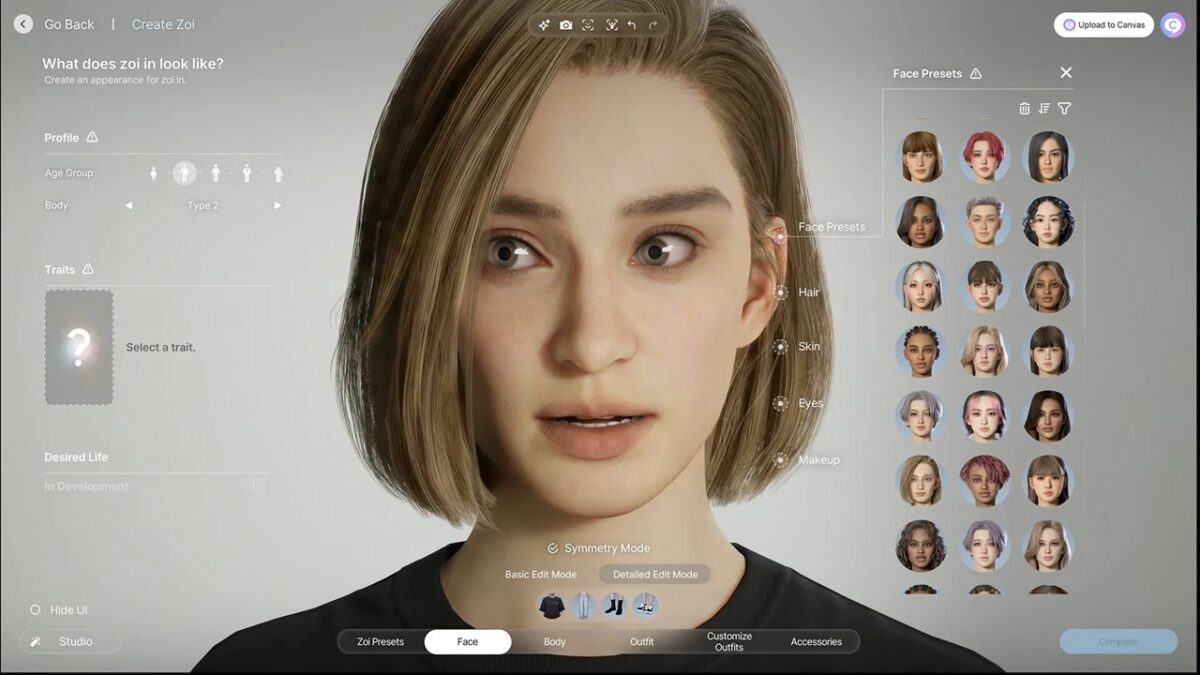
The recent early access release of Inzoi has generated notable interest in the modding community, with special attention towards sexual content mods. Among them, a nudity mod currently in beta on Patreon stands out, indicating a significant demand for this type of content among players. This phenomenon is not unexpected, considering the popularity of similar mods in other games, such as Wicked Whims for The Sims. The most popular one, of course, had to be a bit risqué One of the most popular mods so far is Remove […]
The recent early access release of Inzoi has generated notable interest in the modding community, with special attention towards sexual content mods. Among them, a nudity mod stands out, currently in beta on Patreon, indicating a significant demand for this type of content among players. This phenomenon is not unexpected, considering the popularity of similar mods in other games, such as Wicked Whims for The Sims.
The most popular one had to be a little green, of course
One of the most popular mods so far is Remove Shower Blur, which allows players to see characters wrapped in towels during showers. This mod has reached 20,000 downloads in just a few days, demonstrating how quickly modders have adapted their creations to the new title. However, it is worth noting that disabling the blur effect does not provide naked textures per se, but only removes the enveloping opacity.
Despite the rapid development of these mods, Inzoi faces several technical issues, including bugs that affect gameplay, such as the one that causes family members to disappear after several marriages, or the one that limits the sexual orientation of the characters. These bugs could disrupt the functioning of the mods as new updates are released.
In the mod ecosystem, improvements are also observed that eliminate unwanted visual effects, questionable optimizations, and options to skip the startup sequences. The community is active, creating additional content that will surely evolve with the game in its early access phase. In summary, while Inzoi continues to be developed, modders are already ready to meet the players’ requests, creating a richer and more varied gaming experience.
As of today, it’s quite challenging not to be aware of Patreon, an ideal platform for content creators of all types, who have a community willing to invest in their work to help it thrive. Speaking of Patreon, and in case you use it or plan to use it, you’ll be interested to know that the platform is undergoing a significant makeover.
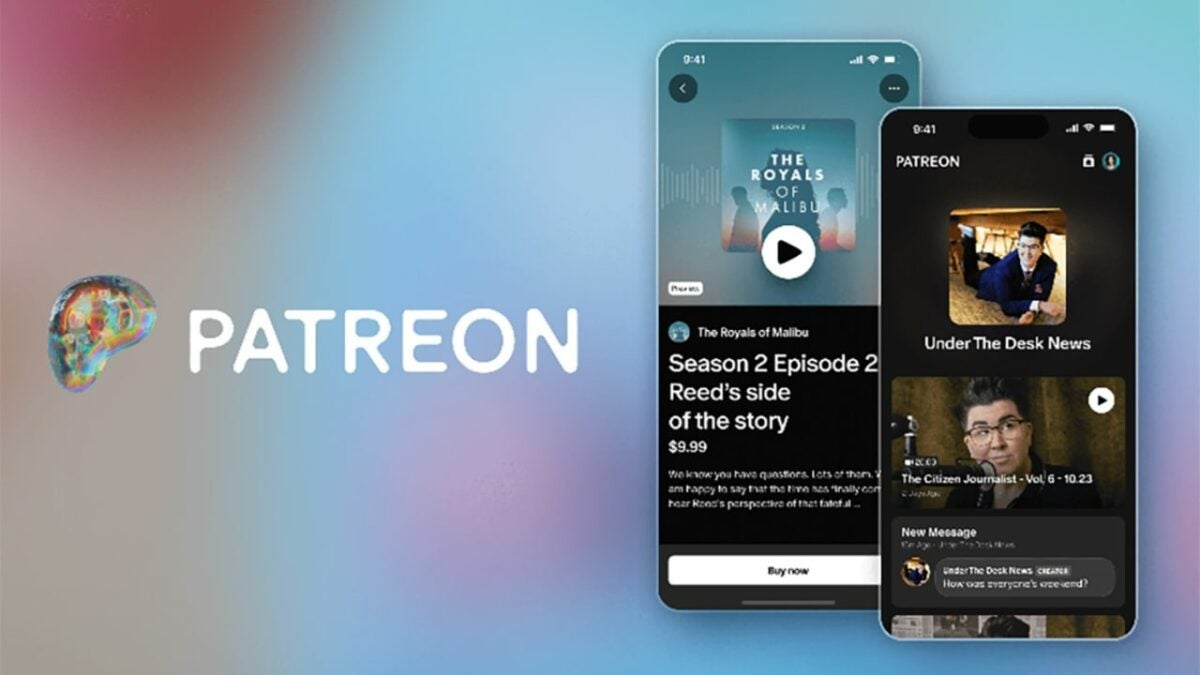
Patreon has revamped its logo and the application, but these changes are not just cosmetic; the platform has introduced new features to make the user experience as optimal as possible. With these additions, they aim to continue evolving the relationship between content creators and their followers.
Patreon continues to evolve
To start, in addition to Patreon’s rebranding, the platform now offers access to free membership levels. This means people following a specific creator can engage with their content more closely without having to pay. Content creators will still provide exclusive content for paying supporters, but now they can also sell digital products like files or videos.
It’s worth noting that content creators producing material for adults over 18 cannot sell digital products. The updates don’t stop there; Patreon has also introduced fully deployed community chats, a messaging system similar to Discord. Furthermore, user profiles can now be more comprehensive, allowing for the addition of details such as bios, profile pictures, and links to social media visible to other followers.
In fact, it’s not ruled out that in the future, Patreon might allow adding more details to member profiles, such as displaying the subscription level they are at or the products/articles they have purchased, for example. However, this would be something for the future, as what has been announced now is far from lacking.
Returning to the current user experience, Patreon’s revamped home feed now allows us to see new posts grouped individually by creators and organized chronologically in reverse order. In other words, posts from one creator won’t be interspersed with those from others, greatly enhancing the overall user experience.
Certainly, Patreon is determined to invest in its future as a platform and to make it a great place for content creators looking to finance their projects with the support of their followers and community.
Make money while making new, exclusive content for your fans with Patreon!
Patreon is a crowdfunding platform that has become the backbone for many artists, and not without reason: the developers created an excellent way for creators to earn money with the help of fans and supporters. Many YouTubers, podcasters, and content creators have already made it the hub of their business, and we can truly say from experience that Patreon makes work a pleasure.
Are you a digital artist? A cosplayer? A startup musician? A writer? Try using Patreon to build a following of subscribers who uplift and connect with your work. We’re here to give you a jump start on the crowdfunding process.
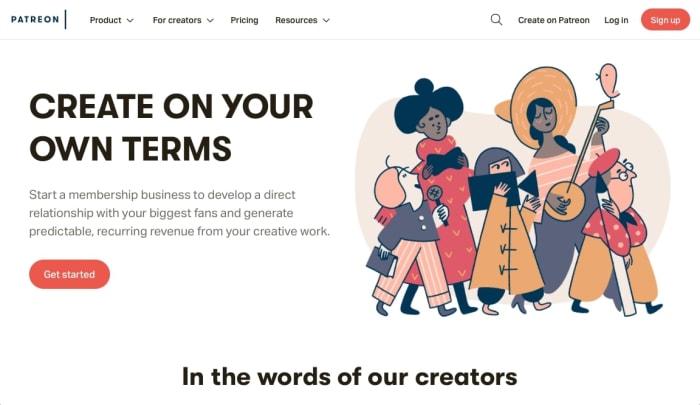
From here, you choose either the “Sign Up” or “Create on Patreon” link. They both lead to the same screen, where you’ll be asked to enter some basic information:
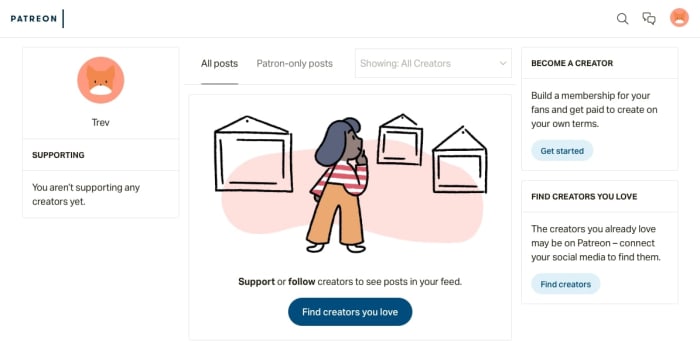
Once that’s finished, you have a basic patron access!
Here’s the thing: this account page allows you to connect with other creators and support their work, but it isn’t a creator page. If you’re looking to earn money for your projects, there are a few more steps. It begins with The Quiz, goes through profile creation, and ends when you submit your account for official review.
From your profile screen, select “Get Started” from underneath the “Become a Creator” tab.
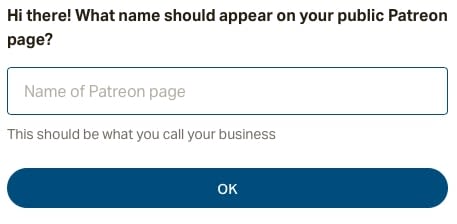
You’re going to encounter a number of questions like the one above, so be ready! These entries can be changed later, but if you want to race ahead of the game, we’ll include a cheat sheet for what’s to come:
Name: the username that patrons see on your page. If you have a stage name or Instagram account, you may want to use that title instead. It will be more recognizable to fans.
What you’re creating: This is VERY IMPORTANT. Your Patreon is part of your brand, so make it clear what visitors can expect from your work. If that’s sculptures woven from palm fronds, let people know right off the bat.
Connect Social Media Accounts: have your applicable accounts ready, with passwords and usernames at hand. This shouldn’t take too long, it’s a basic sign-in connection.
What describes your account? You must pick one or two main genres. NOTE: “Other” is an option, so don’t be worried if your specific activity isn’t included on the list.
Is your account 18+? Be honest and consider the future: if you’re planning on adding NSFW content soon, avoid false advertising! Let the supporters know what to expect.
Once the quiz is finished, you can access your full profile!
Step 3: Stylin’ the profile
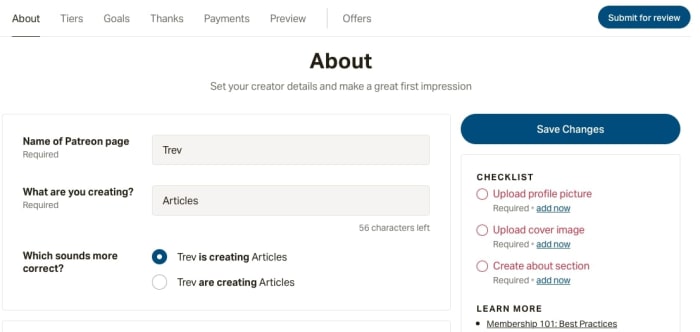
Welcome to your new profile! At least, it’s the information and settings portion. It might look bland, but DON’T PANIC:
Here, you add all the details (profile pic, tiers, color scheme) that make a Patreon page look gorgeous. Though it may sound strange, we actually enjoyed this part the most.
Wrap up the final checklist on the “About” page: your profile photos, account description, etc. After that’s finished, you’re free to send the profile in for review (see Step 7). Aside from that, it’s all icing on the cake! The cherry on top! The ninth yard!
You get it, let’s move on.
Step 4: Tiers
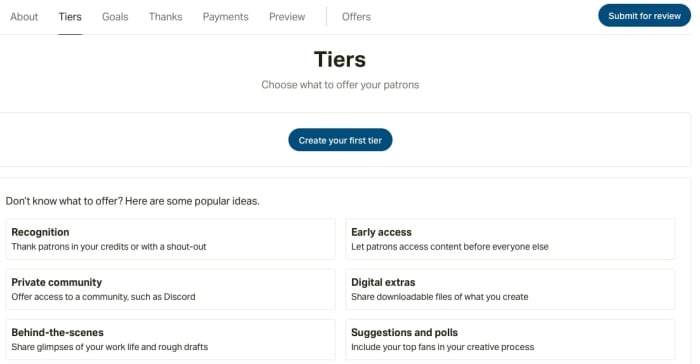
The “About” section told visitors what your Patreon is, what it does, and what services it provides. The next sections help you interact with those guests! We’ll discuss the most important segment – tiers – in detail, then mention the others.
Tiers are a staple of Patreon accounts. The basic idea goes like this: for a certain amount of donation, your supporters get a particular reward.
What type of rewards, you ask? You can choose any number of things! The most popular example is exclusive content; Patreon allows you to withhold access to posts based on what crowdfunding tier patrons have achieved.
But aside from that, there are many other options, limited only by creativity: we’ve seen startup game designers include patrons as NPC characters. Some accounts send personalized messages and thank-you notes.
Just remember: when making your tiers, consider what you’re comfortable with doing. If you offer a handmade Secret Hitler box set at just $5 and hundreds of subscribers take the deal, you may not be able to complete the order without difficulty!
Step 5: Goals, thanks, and payment tabs
Let’s quickly run through these:
Goals: help you plan ways to enhance your business when certain conditions are met. These are completely optional! However, planning to add new services may help you scale your business to new heights.
Thanks: make a small note to show your appreciation every time a new patron joins.
Payments: decide when patrons will be charged, either at the beginning of each month or monthly, upon the day they subscribed. They can contribute through PayPal or credit cards (Visa, Master Card, Discover, JCB, Diners Club, 3DS)
Goals and thanks can be set and changed at any time, payments are set to go out at the beginning of each month and can be left as the default. These are useful settings, but aren’t crucial.
Step 6: The content
So! Your profile information, settings, and design have been locked in and you’re ready to send it for review. If you want to skip Content, it’s okay to head to Step 7. Otherwise, we’d suggest making a few posts for your incoming fanbase to enjoy…
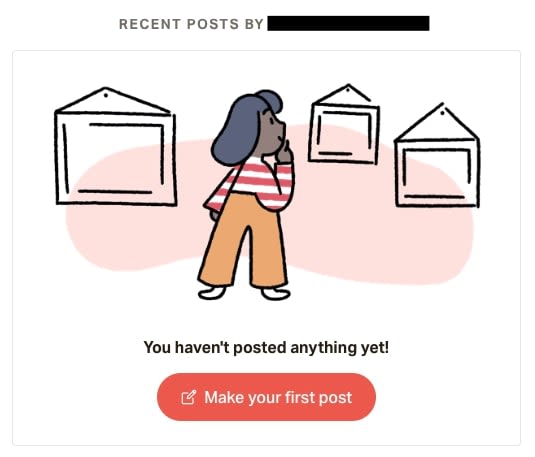
If you click your profile in “Preview,” you’ll be taken to your very own Patreon page. Unfortunately, in the blog section, you’ll find nothing yet! Hit the “Make your first post” button and start adding some content.
You may ask: what’s the goal here?
Patreon creators almost always offer content. At the beginning, if you have nothing else, we recommend re-uploading posts from other sites. For example, take a few pictures from Instagram or tweets from Twitter so your Patreon won’t be starting at zero.
After that, you should try to upload exclusive posts that aren’t available on your regular social media accounts. This ensures that tiered subscribers have some cool, fun benefits for their help.
If you don’t have anything like that quite yet, no problem! Think ahead and start generating exclusive content for the future. With practice, your tiered posts will help develop the relationship between your account and your patrons.
Step 7: Send it In
Congratulations, you’re all set! You can now hit that ever-present “Submit for Review” button:
In a few minutes or days, you’ll have your answer! If you filled out the information accurately and the content on your page reflects what you showed, the process shouldn’t take long to reach approval. Well done!
Patreon can be a huge blessing to artists that are trying to escape from their day job and invest more time in doing what they love. For the patrons, it can be a wonderful connection to a creative project they value. Whether degree you decide to pursue either of these ends, we believe Patreon has a place for you and hope this article gives you the advice needed to start!






 Welcome to the

 You’re going to encounter a number of questions like the one above, so be ready! These entries can be changed later, but if you want to race ahead of the game, we’ll include a cheat sheet for what’s to come:
 Welcome to your new profile! At least, it’s the information and settings portion. It might look bland, but DON’T PANIC:
 Tiers are a staple of Patreon accounts. The basic idea goes like this: for a certain amount of donation, your supporters get a particular reward.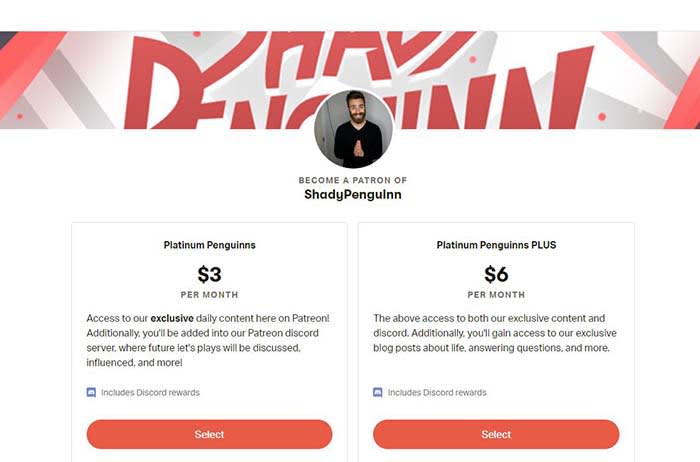
 If you click your profile in “Preview,” you’ll be taken to your very own Patreon page. Unfortunately, in the blog section, you’ll find nothing yet! Hit the “Make your first post” button and start adding some content.