Why more end users are migrating to Linux

ubuntu-1280x1024.pngA recent announcement from Dell and a BBC report, outline that sales of Linux based computer have experienced a year of constant growth. Linux is rebounding, at least for non Wal-Mart customers, among end-users for several reasons. Let’s take a look at some of these.

Both end-users and organizations are largely unhappy with the latest version of Windows OS, Windows Vista, which has been perceived more as a theme-pack for Windows XP than as a new operating system. It has been said to be slower, to require more resources and to have still lots of bugs. Bill Gates has announced in fact that a new edition of Window, version 7, will be released in one year time.

On top of this, many computer producers, Dell is an example, decided to offer the option to buy PC and notebook with Ubuntu pre-installed – a user friendly Linux distribution. This allows them to lower the final price, offering cheaper but competitive products. The reason behind a general lower price is not only because Linux is free and almost all its programs are as well. This operating system tends to require fewer resources so that the hardware used doesn’t necessarily have to be the latest, cutting edge kit.

On top of these two main factors, the security side also plays a big role in favor of Linux. The threat of virus spread via P2P and other Internet technologies is greatly reduced, as not only are there far fewer viruses and Trojans designed to attack Linux, the kernel (or core) or the operating system is inherently more stable than that of Windows.

Last but not least, the availability of software like Wine and Cedega, allows users to emulate the Windows environment in order to run games and programs they couldn’t otherwise run. Consider it just as an option for specific programs you can’t find a Linux version of or for games. To be clearer, it will be much faster to use Linux OpenOffice rather then using Windows MS Office with Wine on Linux. But for specific apps, like phone managers, 3D games etc, Wine or Cedega are better.

Web 2.0 set for huge investment

Web 2.0 Expo logoWhile the prestigious Web 2.0 Expo got underway in San Francisco yesterday, a new report claims that Web 2.0 is set for record investment as it revolutionises business over the next 5 years. Tech research group Forrester claim that around $5 billion will be spent on Web 2.0 by 2013 and it will represent a “fundamentally new way” for companies to do business.

The report claims that behind this drive will not just be developers but multinational giants such as General Motors and McDonald’s which have already embraced tools like blogs, RSS feeds, podcasting and social networking tools. The report analysed seven Web 2.0 categories: blogs, mashups, podcasting, RSS, social networking, widgets and wikis. It found that social networking tools will attract the greatest levels of investment but even that will be dwarfed by the multi million dollar revenues the software industry commands.

Report analyst Oliver Young told the BBC that this boom will quickly level out however:

Companies are now looking over their shoulder to the business market where even revenues of $50 per user per month are looking increasingly appealing. However, there will come a saturation point and investment will start to slow down as Web 2.0 applications become increasingly prevalent and absorbed into collaborative software packages.

You can follow all the latest news and exciting Web 2.0 developments in the pipeline in the Web 2.0 Expo newsroom here.

First look at Ad-Aware 2008 Beta

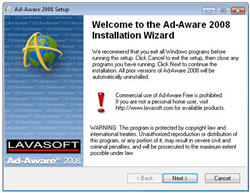
First look at Ad-Aware 2008 BetaAd-Aware is one of the most popular anti-spyware tools worldwide, with millions of downloads along its history of development. It comes in three different tastes (Plus, Pro and Enterprise, all paid-for licenses), as well as a free, slightly crippled version for home users. And now all of them are going under a beta testing stage in preparations for their next big release: Ad-Aware 2008.
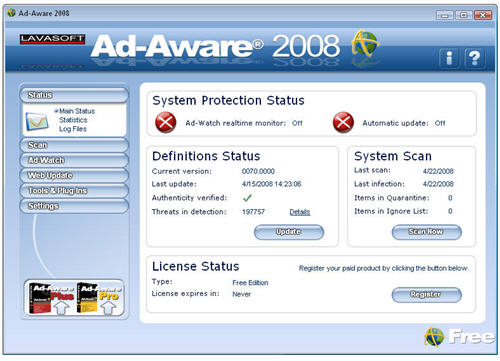

After their succeed with the previous beta program (more than 335,000 users applied to be beta testers) Lavasoft has decided to release the first public version of Ad-Aware 2008 also as a testing beta, counting on the users’ feedback to give its big shot the final shape before starting to ship it. After signing up as beta user and receiving a confirmation email, you can download the program. Your beta tester username and password also give you access to a special area in the Lavasoft website where you can submit any bugs you find, keep track of them and also suggest any idea you may have about how to improve the program’s functionality and performance.

Ad-Aware 2008 doesn’t change much in itself – at least not in appearance. The program still keeps the same interface from the previous version which, in my opinion, could improve a lot with some small tweaks (those crystal buttons and reflections are a bit out of date now).

First look at Ad-Aware 2008 Beta

According to Lavasoft, this new version has improved its performance and stability and now takes up much less resources. Though I probably didn’t test the program long enough (anti-spyware tools are fully tested when used over a long period of time) I can clearly tell the program is now faster in system scans and lighter on PC resources. Other important improvements include full support for 64-bit systems and Windows Vista, an enhanced rootkit removal system and integrated antivirus protection, though sadly this last feature will only be available for Plus and Pro versions.

So if you want to give Ad-Aware 2008 beta a go, sign up as beta tester and get your copy. Note that being a beta, the program may still be a bit buggy and you shouldn’t use it as your only security app for spyware protection.

Apple releases Aperture development kit

Apple ApertureApple have released the Aperture 2.1 SDK, which will allow independent developers to create all sorts of plugins for Aperture. One of the main improvements in the new version of Aperture was specifically to open it up to programmers, in a clear bid to compete with Adobe and the wealth of plugins for Photoshop that already exist. With the Aperture SDK you can create two sorts of plugins: for Export and for Editing. The installer comes with three examples to get started and Xcode templates for both Export and Edit plugins. You will need to sign up as an ADC Member (which is free) to download the development kit.

Although probably not such a big announcement as the release of the iPhone SDK, the Aperture development kit is still pretty big news. Apple look to tighten their relationship with independent developers in what seems like a win-win situation. They get to benefit from all the great ideas out there that can bring more features to their products, and independent developers get to showcase their skills and most importantly make use of great applications like the iPhone or Aperture.

The indie development community hasn’t wasted its time and you can already check out some creations at Aperture Plugged In. You’ll see a large list of plugins including ApertureToFtp Pro, FlickrExport Lite, Lightbox XMP or Aperture Border FX. If you are an Aperture user, it’s well worth digging in and trying out some of these. If you know a little bit about coding, go on and download the SDK and try your hand at making your own plugin. All you need is a good idea and a bit of time.

Microsoft announce XP Service Pack 3

Windows XP logoMicrosoft have announced via Microsoft Technet that they have released Service Pack 3 and users can expect updates at the end of this month.

Chris Keroack, Release Manager of Windows XP Service Pack 3 said in the announcement:

Today we are happy to announce that Windows XP Service Pack 3 (SP3) has released to manufacturing (RTM). Windows XP SP3 bits are now working their way through our manufacturing channels to be available to OEM and Enterprise customers. We are also in the final stages of preparing for release to the web (i.e. you!) on April 29th, via Windows Update and the Microsoft Download Center. Online documentation for Windows XP SP3, such as Microsoft Knowledge Base articles and the Microsoft TechNet Windows XP TechCenter, will be updated then. For customers who use Windows XP at home, Windows XP SP3 Automatic Update distribution for users at home will begin in early summer.

Service Pack 3 will include some important updates including Microsoft’s updated Management Console 3.0, which appears in Windows Server 2008 and Vista, and an update to Wifi protected access. There will also be a “health checking” component added that’s already used by Windows Server 2008 which can check to make sure that certain upgrades and security features are in place for XP-based clients before they are allowed to log onto a network.

Send free SMS messages to mobiles with Jaxtr

Jaxtr logoUsually, whenever I hear about a new free SMS texting service I tend to be very skeptical. In my experience they either never work, are not available in my country, are limited to a handful of messages or require extensive registration which later involves getting my own mobile bombarded by messages, horoscopes and other junk that I don’t want.

Jaxtr, I was pleasantly surprised to find, falls into none of the above categories and allows you to send an unlimited number of SMS messages to people in 38 countries. The setup process is really easy – just enter a name, user-name, password and e-mail address and you can start sending immediately without any verification required. Jaxtr is mainly designed as a VoIP app but it allows sending texts to mobiles via a small interface on the right of the screen. Even better, you can receive responses on your own mobile phone although this involves verifying your mobile number with the Jaxtr website.

The other good thing about Jaxtr is that it seems to work independently of mobile operators so you don’t have to worry about them intercepting your free messages or putting a stop to it all like has happened in the past to such services. It’s also an interesting alternative to Skype because Jaxtr works with any phone, both mobile and landline. When a member adds their Jaxtr link to their email signature, friends and family can call them from their regular phone from anywhere in the world without paying expensive international toll charges. Family and friends simply click on the member’s Jaxtr link to generate a local number in their own country. By saving this permanent, direct-dial number on their phone, people can call friends and family abroad at the same cost and with the same convenience as calling a friend down the street.

I’m still to meet another person who uses this service despite the developers claiming that over 10 million people in 220 countries use Jaxtr to receive calls from people visiting their social networking pages, to make calls to their friends and family worldwide and to get to know fellow Jaxtr members on café Jaxtr, the world’s largest talk network. Now that they’ve launched free mobile texting however, maybe it will give the site the profile boost it needs.

Skype offer unlimited international calls for $9.95

Skype LogoSkype have announced that from today, they are to offer unlimited international calling from the USA for just $9.95 per month. The offer only applies to U.S. users who will be able to make unlimited calls to landlines in 34 countries worldwide and even cell phones in Canada, China, Hong Kong and Singapore.

Skype have already been offering U.S. users unlimited calls in the U.S. and Canada for $3 a month and is also expanding that deal with another plan for $5.95 per month which offers free calls to Mexico City, Guadalajara and Monterrey. Although unlimited international calling is nothing new – Vonage and cable companies have been offering such deals for a while now – it is the cheapness of the Skype deals that’s really impressive. Such an aggressive marketing move surely has something to do with the economic problems the VoIP service has suffered recently. Skype’s owners eBay have seen $1.4 billion wiped off the value of the $4.3 billion price it was valued at last year due to its declining profitability. As the Financial Times reports, eBay are even considering selling Skype with eBay’s new owner John Donahue saying:

What we’re testing this year are the synergies. If the synergies are strong, we’ll keep it in our portfolio. If not, we’ll reassess it.

To purchase an unlimited calling subscription, simply go to Skype subscriptions for more details. If you purchase one of the new subscriptions for a 3-month or 12-month period before June 1st 2008, you will receive a further 33% discount.

Search the web from your address bar

If you’re constantly searching the web you must be tired of always following the same procedure: open up a website, click on the search field to activate it, enter the keywords and press enter. Well, I’m glad to tell you this tiring task can be reduced to just one step with a very simple trick that enables you to search from the address bar. Let’s see how it works with Softonic as example.

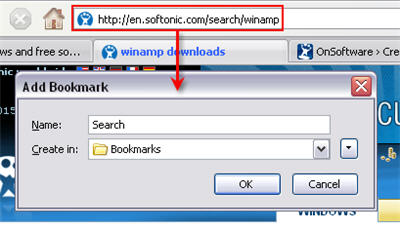
The first thing you need to do is bookmark a search page. In this case, we’ll search for anything on Softonic and bookmark the resulting URL, naming it with something like Search or similar.

Search the web from the address bar

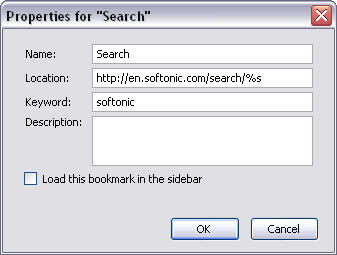
See the “winamp” bit at the end of the URL? That’s the word we used to search for this given piece of software, but we’ll need to replace it with a variable if we want to use the search function with anything. So open the bookmark’s Properties menu, replace the search term you used with %s and enter the keyword you’ll be using from now on to trigger the search tool.

Search the web from the address bar

Done! Now you can search Softonic by simply entering softonic + your search term. Continue reading “Search the web from your address bar”

NewsGator now offers RSS PostRank

NewsGatorThe makers of the excellent FeedDemon for PC and NetNewsWire for Mac also offer NewsGator, an online news reader which can also be used on your mobile phone or integrated in Microsoft Outlook. NewsGator appeals to people on the go or simply to those of you that don’t necessarily want to have a desktop RSS reader. Personally, I use Google Reader to pick up all my news but if I had to change would probably go for NewsGator.

In a move to improve their online RSS reader, NewsGator Technologies have decided to integrate RSSAide’s PostRank filtering technology to it, which should hopefully “offer more relevant news and social search features to users.”

Back in January, one of the reasons mentioned by NewsGator for making its RSS readers free was to get more attention data from users. While that statement was a little bit difficult to grasp (what do you mean exactly by attention data?), the integration of PostRank is something much more tangible for us to work with. PostRank “suggest(s) relevant articles and feeds to a person based on the social engagement, article ranking and other interactions with the RSS Reader” according to AideRSS CTO Ilya Grigorik. This sounds exciting when you think of it because it means your RSS reader will continue evolving and adapting to what you receive and read. That is one my main reasons for choosing an online reader over a desktop one. We’ll see in the coming months if more users flock from NetNewsWire and FeedDemon to NewsGator and if the integration of PostRank makes the online RSS reader more relevant than its competitors.

Today’s downloads for Windows, Mac and Mobile

Play MP3s on your Nokia phoneTired of the default media player on your Symbian phone? Then turn your handset into a portable music center with XSound. The application supports audio files in AAC and MP3 format and also ID3 tags to keep your playlists in order. An integrated search function scans your mobile for music, so that everything is ready to play.

Download Trackmania Nations ForeverJoin the most exciting online racing competition with Trackmania Nations Forever! This amazing free racing game lets you play on your own in more than 60 tracks and also compete against players from all over the world. Create your own circuits, customize your car, make friends and become the fastest driver on Earth!

JetPhoto StudioLooking for an alternative to iPhoto for organizing pictures on your Mac? JetPhoto Studio is a promising solution. You can browse your photos in calendar view, make Flash movies, screen savers and slideshows, locate them via GPS in Google Earth and and easily rate and tag them. JetPhoto Studio also works with a number of web printing and publishing services like Flickr.