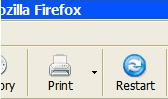
Add an instant restart option to Firefox

QuickRestart screenshotIt can be very annoying when you install extensions in Firefox, change themes or alter a configuration file and are then informed that you must restart it for the extension to take effect but are offered no option for doing so. The answer to this problem is – yes that’s right – another extension called QuickRestart.

QuickRestart allows you to instantly restart Firefox via keyboard shortcut “Ctrl+Alt+R” or an option in the file menu “Restart Firefox”. It’s a very useful little extension if you’re an add-on freak like me, although it would have been nice if they’d added a restart button to the extensions dialogue window because after all, that’s where you’ll need it most. Because of this, in the end it’s almost as quick just to close the browser and restart it again although the desktop shortcut speeds things up a little. This extension also has the advantage that there’s no annoying “Are You Sure?” prompt when you restart Firefox although the disadvantage of course is, if you press the desktop shortcut accidentally, you lose all your information.

Note that if you’d rather have a restart button on your Firefox toolbar, then you can use the Toolbar Buttons extension which includes a range of buttons including one to restart the browser.
Protect your network with Google Enterprise

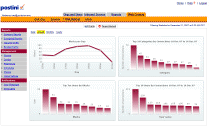
Google EnterpriseIt was only a matter of time before Google announced the launch their own security product and Google Web Security for Enterprise is their rather long winded but comprehensive security solution aimed at large networks and businesses. The suite, which scans in real-time, stops web-borne spyware and viruses before they infiltrate networks and compromise or disable computers.

However it also enables network administrators to control how employees use the Internet so they can create, enforce, and monitor a web policy to “protect you from the legal liabilities of inappropriate content, reduce bandwidth congestion, and improve employee productivity”. You’ll also notice that this is one Google product that isn’t plastered with Google branding however as the software giant has chosen to brand it under the name of developers Postini who have provided much of the infrastructure.

Google Enterprise screenshot

It even protects employees on the move whether they are working at home, in a hotel room or Wi-Fi spot. It enhances the privacy of such employees by automatically encrypting all web traffic when the user connects to a public network and eliminates the need to backhaul traffic over corporate VPN’s. Of course, as you would expect from a Google product too, it’s very easy to use even for novice network administrators.

Looks like bad news for employees surfing those prohibited sites at work then although Google’s classification system for what it considers gambling, dating and news related sites etc may allow for a few exceptions to squeeze through. And this will surely become one of the major targets for hackers and trojans if it becomes widely implemented although probably, no serious enterprise would rely on a Google product to protect their network.

Microsoft Office 2008 SP1 for Mac released

Office 2008 MacThe first big revision of Office 2008 for Mac, Service Pack 1 was released by Microsoft this Tuesday. This release carries with it major revisions and improvements, notably regarding security, stability and performance. Microsoft also fixed a weakness in Office 2008 that allowed somebody to overwrite the content of your Mac’s memory with malicious code. The bugs came from submissions in Office 2008 user forums or were collected through the Microsoft Error Report Protocol (MERP).
The biggest news that came with the release of this SP1 is probably the announcement that Microsoft will bring back Visual Basic for Applications (VBA) in the next version of Office for Mac. Contrary to the PC version of Office, where VBA is still around, Office 2008 came without Visual Basic. Obviously Microsoft has had second thoughts and decided to bring it back in future iterations on Mac. This should ensure a bit more flexibility in the office suite notably for filters, menus, toolbars, and customizing the interface.

According to Microsoft, Office 2008 for Mac has been extremely well received by users and sales are nearly three times what they were for the release of Office 2004, even though no official sales number was given by the Redmond company. I quite like Office 2008, although I believe most users will do fine with Apple’s iWork’08, which is much cheaper and much less complex. If you already have Office 2008 though, make sure to get Service Pack 1 to correct bugs from the original release.

Customize Google Maps with new tools

Customize Google Maps with new toolsI’m a big fan of Google products in general. I use Gmail and Google Reader on a daily basis, not to mention my constant queries to the search engine. But due to a natural tendency to lose my bearings anywhere, I have a special predilection for Google Maps.
This awesome world atlas can show you images of just about any location on Earth, sometimes with such a high level of detail that you can perfectly distinguish cars and people walking around. But there are many other ways to use Google Maps than just watching life as it goes on in the antipodes. Thanks to customized maps created by certain companies or by other Google Maps users, you can add new content and tools to your maps and make them even more useful.

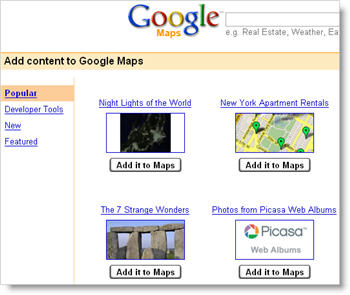
Simply load Google Maps on your browser and click on the “My Maps” tab. You’ll be presented with a selection of several map overlays, all ready to use at a single click. If you click on the “Browse the directory” button, you’ll access a larger list featuring all sorts of Google Maps add-ons: tools to calculate distance between two points, check traffic conditions in your city or search for hotels, maps for transportation networks around the world, lists of popular monuments and landmarks all over the world… even a real-time earthquake tracking tool!

Installing these extra features is a piece of cake: browse the collection until you find one that suits your needs and click on the “Add it to Maps” button. Now go back to Google Maps via the top left link and the new information will be displayed right on your map.

5 steps to upgrade your RAM

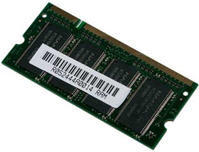
RAMUpgrading your RAM is one of the best ways to speed up an old laptop. As applications get bigger and the number of programs you install increase, the demands on your RAM also increase. Add to that graphics-heavy online applications such as Google Earth and those exciting Web 2.0 apps and you can see why having enough RAM is essential for smooth functioning of your PC.

Nowadays, if you’re running on anything less than 512MB RAM then God help you – you must be suffering some awfully slow PC usage. However, even 512MB is not really enough nowadays – you’ll need to double it to get the most out of your PC but before you do anything, you’ll need to know exactly what type of RAM your laptop or PC uses. Here is a 5 point plan for upgrading your RAM:

1. Check whether you have any RAM slots free – You should check your manual to find where your expansion slots are – in the case of laptops, they are usually on the bottom of the machine. You should find between two and eight same-sized parallel sockets on the main circuit board.

2. Check whether your RAM is parity or non-parity – Determines whether a random access memory unit stores a parity bit for error detection purposes.

3. Find out the speed of the RAM you currently have (in nanoseconds) – Buying RAM of the wrong speed will conflict with your current RAM and not work.

4. Check what type of modules your PC uses These will be either Single In-Line Memory Modules (SIMM’s) or Dual In-Line Memory Modules (DIMM’s) – There’s only a subtle variation in how they look but buying the wrong one means it simply won’t fit in the slot!

5. Check the number of pins on your motherboard – This should be 30, 72 or 168. Use this motherboard-RAM guide to see which RAM is compatible with your motherboard.

Once you’ve established all this information, it’s time to head to your local PC dealer or buy the RAM chips online. Remember that once opened, it’s very hard to return components such as RAM. If you’re unable to ascertain any of the above data, then it’s better for you to take you laptop to your dealer. However, if you purchase online, usually they will specify the exact RAM you need based on your laptop or PC model so you should have no problems.

Upgrading RAM is one of the most effective and easy ways to speed up your PC and even better, it’s not very expensive. I just checked-out an additional 512MB RAM for my Acer Aspire and it costs less than $30. So what are you waiting for – pump-up your RAM today!

Send 2GB emails for free with Filemail

FileMailAdding large attachments to e-mails is still something that most of us steer clear of if we don’t want to wait half an hour for them to upload or crash your mail server. Most web based services such as Hotmail or Gmail won’t even let you upload large files although I don’t advise even trying it unless you want to hang your e-mail client.

If you’re working on a network and want to share large files with other users, then it’s far better to place them on a shared drive. However, if that’s not an option then try Filemail which allows you to send attachments of up to 2GB in size absolutely free. When you surf into Filemail, it takes you immediately to an e-mail compose screen so there’s no annoying registration procedure to go through – just start composing and off you go. The maximum attachment size is 2GB although you can upload multiple files at once.

Filemail diagram

However, it doesn’t work quite like a conventional e-mail client. Once the files are uploaded, they are encrypted using 128bit AES algorithm and a small e-mail is delivered to the recipients, containing a short message from you and a hyperlink where the files can be downloaded. After the specified number of days or number of downloads has expired, the files are removed completely from Filemail’s servers. The only downside is that it can be a bit slow when uploading files but this is a far superior solution to trying to send bulky e-mails or sign up for registration only upload sites.

Today’s downloads for Windows, Mac and Mobile

Download Q-DirWindows: If the standard Windows Explorer is too limited for you, you need an advanced file manager like Q-Dir. Thanks to its multi-pane interface with customizable layouts and file color codes, you can move and copy files or folders in a much easier and faster way. Plus, it doesn’t require installation and can be conveniently run from a USB key.

CurbMac: The following program is also related to USB keys. Curb lets you clean the trash from your removable media. Drag and drop your key icon onto its interface and it takes care of trashing files for you. You have four different options for secure removal (including 35 pass!) of the files, making this a simple yet secure solution to trash files from USB keys.

Revamp your Windows Mobile interfaceDon’t get me wrong, I think the Pocket PC platform is awesome but, like many people, I find it a little cumbersome sometimes and the fact that I have to tap tiny icons. Pointui Home changes all that, skinning the Windows Mobile interface and allowing you to control your device’s basic features using your fingers.

Turn your mobile phone into a first aid kit

Protect yourself from situations like thisI was nearly stung by a bee yesterday, and the experience has called into question my survival skills. I’ve since realised that I wouldn’t have had a clue what to do had the critter’s attack been a success. As a result, before I venture outside into the nice weather again I’m going to make sure I’m fully prepared for any dangers that may await me by loading up my phone with a selection of essential first aid software.

I started by installing 1st Aid & Emergencies on my Pocket PC, a piece of software that offers advice on how to handle a range of emergency care situations, from a nosebleed or sunburn to a life-threatening heart attack or stroke.

This app doesn’t cover every eventually and you can never be too careful, so I also took the liberty of arming my PPC with Pandemic Flu Survival Guide in case there’s a sudden outbreak of bird flu. And, in my experience, if the birds don’t get you then the insects probably will, so I also stuck a copy of Anti-Mosquito on my mobile phone. This state-of-the art app lets off a sound frequency that repels the blood suckers. Don’t worry though, because it’s virtually inaudible to the human ear.

I also downloaded Blood Pressure Watch and Easy Pulse in order to monitor myself in case the thought of all these terrible things that could happen to me got too much for my poor old heart. What’s more, I’m now keeping a track of my general level of physical fitness using Nokia’s Wellness Diary, which monitors stuff like my weight, eating habits and exercise. Perhaps all this is a bit excessive and I’m being paranoid about suffering an illness or injury. Oh God, here comes that bee again, quick, where’s my mobile?

Yahoo! buys Inquisitor search tool

InquisitorDespite all the turmoil surrounding two rejected bids from Microsoft, Yahoo! keeps expanding and acquiring new services. In February they bought the excellent FoxyTunes Firefox extension, which gives you complete control over your music library straight from your browser.

This time they went for the very good Inquisitor search tool for Safari on Mac. No information relating to the acquisition is available on the Inquisitor page and the blog of David Watanabe, developer of the application is not available anymore, yet clicking on the feedback link in the Inquisitor page takes you to a Yahoo! account page.

When I tested and reviewed Inquisitor, I was really impressed with the speed at which it loads up results and all the little features you have to customize the search engines and displayed results. Inquisitor also has a very sleek interface which fits in very well in Safari.

The Yahoo! Search Team explains that this acquisition will give them more presence in the Mac world. They also see Inquisitor as fairly similar to their own Search Assist technology, which predicts results and can give you fairly detailed suggestions, or concepts, as Yahoo! calls them. One of the first steps taken by Yahoo! has been removing the affiliate ad links, which helped pay for the project when it was still independent. We’ll probably be seeing more changes to the search tool in the future from Yahoo!, although I hope they keep it as efficient and simple as it is now.

Top Dock customizers for Mac

DockThe new Dock featured in Mac OS X 10.5 (Leopard) became a point of debate among Mac fans. Not everybody liked the new bright active-application signal, the depth given to icons and stacks. Frequently using both Panther and Leopard, I can tell I definitely prefer the new Dock. It looks much cleaner and offers more ways to display items in folders.

What Apple was criticised for with the new Dock was the lack of customization. Developers took the matter into their own hands and started developing applications to let you tweak the aspect of the Dock. We’ve rounded up a few of those and summarized what makes them special:

  • Dockchanger – Hate the 3D look? Dockchanger brings back the 2D theme for you.
  • DockDoctor – Eight cool Dock styles and being able to switch from 3D to 2D make DockDoctor an attractive customizer.
  • Dockables – Add little actions for specific actions on your Dock. Only for Dock addicts!
  • ClearDock – Change the color of all elements in the Dock and even make it transparent.
  • SuperDocker – Not limited to the Dock, this app lets you customize the appearance of many elements in Leopard.
  • Quay – Brings hierarchical menus back to your Dock.
  • Dockdrop – Adds a little icon in your Dock to transfer files simply by drag and drop.
  • Docktop – Supercharge your Dock and tweak the appearance of everything from position to color.