How to detect malicious Android apps eating your battery

A new type of malware uses up your Android phone’s battery, letting dangerous apps fill their pockets at your expense. What are they, and how can you detect them?

Maybe you’ve installed an app that promises to download cool wallpapers, and at first, everything seems normal. But suddenly, you notice that your battery is running out very quickly, and your data usage has risen dramatically. It’s like there’s a bug sucking the resources from your phone or tablet.

Malicious apps are out there, and they’re trying to pass themselves off as normal apps. The mission? To gain access to your personal info, add viruses, or hijack your device. Android isn’t always able to identify these threats, which is why they’re both dangerous and annoying.

Luckily, there’s a tool that helps you identify these resource thieves. It’s called OS Monitor, and I’m going to show you how to use it to detect malware.

*Note: Pi, the application we use in this example, is completely harmless.

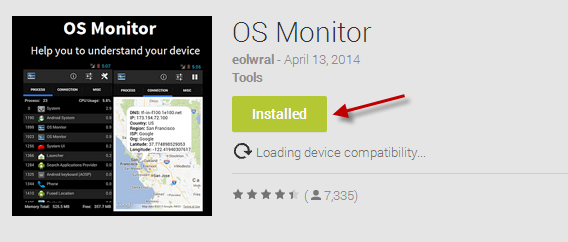
1. Install OS Monitor from Google Play

OS Monitor is the closest thing to Windows Task Manager. It shows you the CPU usage of each visible and invisible app, as well as active connections and other system statistics.

OS Monitor on Google Play

2. Enable notifications from OS Monitor

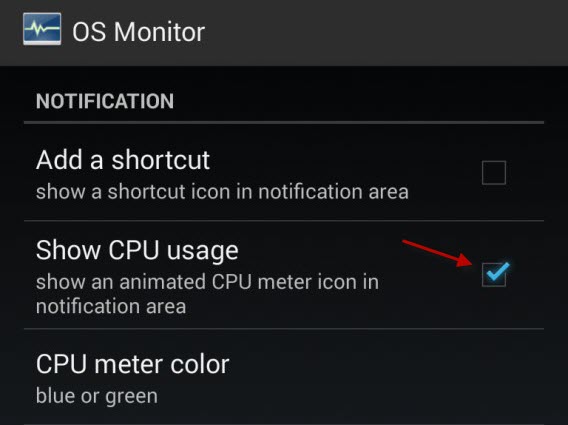
Open OS Monitor, go to Options (second icon on the right), and activate Show CPU Usage. This will make the CPU usage display in the notification area.

OS Monitor Show CPU Usage

3. Check out the CPU usage

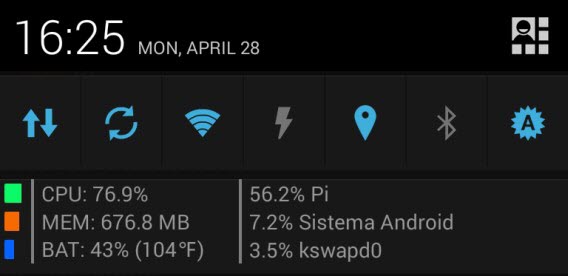
Take a look at the CPU usage. If you notice that it’s green for long periods of time without you doing anything, something weird is going on. Open notifications to confirm this.

OS Monitor CPU Usage

In this example, the CPU usage is unusually high because of an app called Pi

4. Close and uninstall the vampire apps

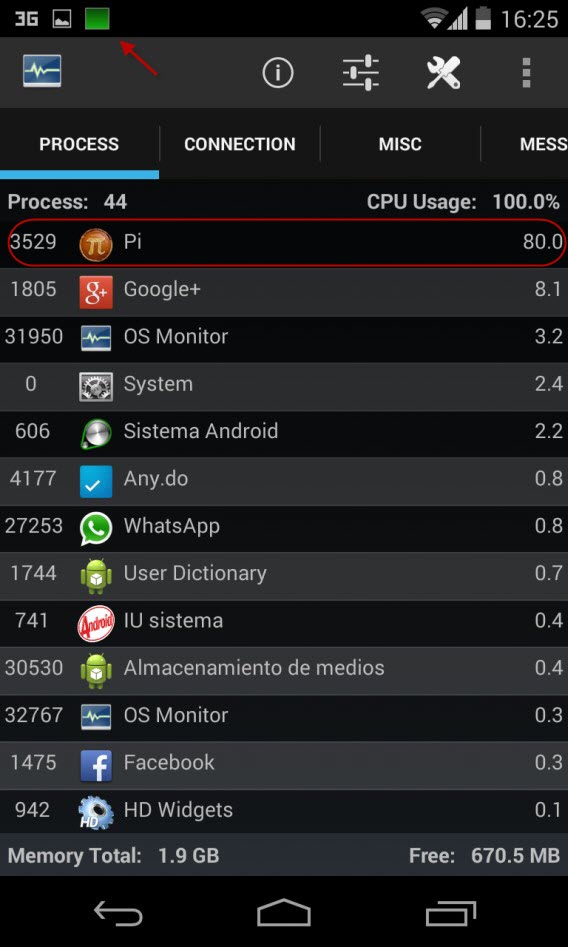
Once you’ve detected the problem– high resource consumption– open OS Monitor. You’ll see a list of applications sorted by CPU usage. In our example, you’ll see Pi. It’s using 80% of CPU.

OS Monitor

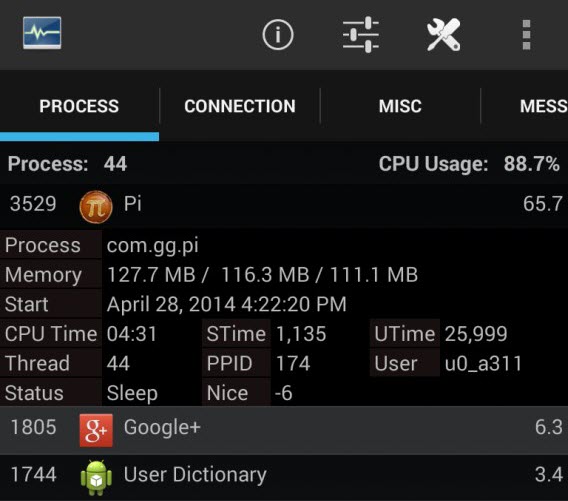
Clicking on the row with the app shows details including memory consumed, and the current status.

OS Monitor  Process

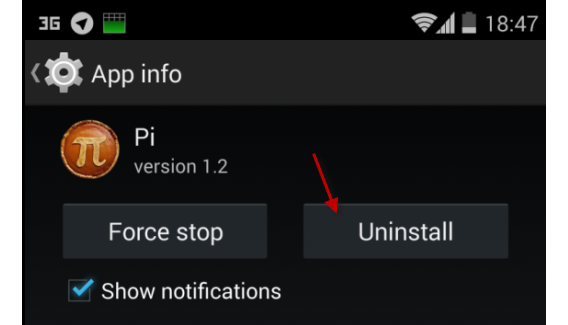
Hold it down, and the options menu will appear. Select Kill process to close the application. Then, uninstall the suspicious app using the Settings > Apps menu.

Android app uninstall

A tip for the future

Be careful of the apps you install. Apps that promise a lot for little, or nothing, in return are the first ones you should be cautious about. If you notice that your battery drains faster than it should, or that your phone is slow or unresponsive, follow the steps above to detect the fake app.

Have you ever experienced a malicious app before?

Watch Dogs launches with crashes and performance issues

Watch Dogs, the highly anticipated game from Ubisoft, launched today with many problems. Users are reporting problems logging into Uplay, Ubisoft’s digital rights management software as well as various performance issues.

Ubisoft is aware of the Uplay connection issues and is working on a fix. That doesn’t stop gamers from feeling slighted that their $60 game doesn’t work.

There are other reports of performance issues like dropped frames and the blue screen of death. Ubisoft worked closely with NVIDIA to release updated drivers for its graphics cards. PC gamers with NVIDIA cards should update to the 337.88 drivers before trying to play the game. You can get the drivers here.

AMD Radion card owners will have to wait a while longer for updated Catalyst drivers. AMD is releasing beta drivers today, which have been optimized for Watch Dogs. Since the drivers are in beta, expect some (more) bugs.

For more fixes, check out the guide on Game Debate for fixing various issues with Watch Dogs on PC.

Console gamers seem to be exempt from these issues but let us know in the comments if you’re having problems playing Watch Dogs.

Source: vg247 | Polygon

Follow Lewis on Twitter @lewisleong

RELATED STORIES

Chrome for Windows begins blocking extensions outside its web store

Google announced its plans to begin blocking Chrome extensions from outside the Chrome Web Store back in November and has now put it into action. Starting today, users will no longer be able to install Chrome extensions for Windows from outside the web store. Installed extensions from outside the web store may also be disabled.

This move is meant to protect users from malicious extensions, since they aren’t monitored by Google. The security benefit of installing extensions from the Web Store outweigh the inconvenience. Developers will have to pay a $5 fee to host their extensions in the Chrome Web Store.

Developers don’t need to worry as they can still install extensions locally for testing purposes. Enterprise users will be unaffected as well if an extension is installed company-wide.

Source: Google Chrome Blog

Via: Lifehacker

Follow Lewis on Twitter @lewisleong

RELATED STORIES

Registry hack to extend Windows XP support for 5 years too good to be true

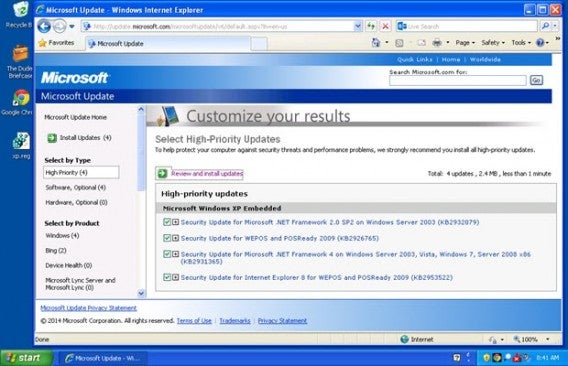
Yesterday ZDNet reported a registry hack that allowed Windows XP users to gain an additional 5 years of support. The hack tricked Windows into thinking it was Windows Embedded POSReady 2009, which will continue to receive updates until 2019.

Win XP POSReady 2009 via ZDNet

Photo credit: ZDNet/CBS Interactive

While the hack works, Microsoft says it may cause instability in Windows XP since the updates for POSReady 2009 have not been tested with XP. Here’s Microsoft’s full statement:

“We recently became aware of a hack that purportedly aims to provide security updates to Windows XP customers. The security updates that could be installed are intended for Windows Embedded and Windows Server 2003 customers and do not fully protect Windows XP customers. Windows XP customers also run a significant risk of functionality issues with their machines if they install these updates, as they are not tested against Windows XP. The best way for Windows XP customers to protect their systems is to upgrade to a more modern operating system, like Windows 7 or Windows 8.1.”

If you don’t have the means to upgrade to Windows 7 or 8.1, we have a guide about how to keep using XP even after the end of its support. But using an unsupported operating system poses many risks and upgrading to a modern OS will help you stay safe.

Source: ZDNet

Follow Lewis on Twitter @lewisleong

RELATED STORIES

Spotify hacked, users logged out as a precaution

Music streaming service Spotify has been hacked. There are few details about the attack but Spotify says only one person was affected. His or her password and payment information has not been accessed but the company is not taking any chances.

Spotify will begin logging users out, requiring them to re-enter their username and passwords. This ensures compromised accounts will be locked out since no password information has been stolen.

“Based on our findings, we are not aware of any increased risk to users as a result of this incident.”

If you use Facebook Connect to log into Spotify, all you’ll have to do is sign back in using Facebook. Users who use an email and password to log in should change their passwords just in case.

Spotify is taking an extra step to secure users by making sure Android users are running the latest version of the app. The company will be releasing a guide that shows users how to upgrade “over the next few days.”

iOS and Windows Phone users don’t have to take additional action.

Source: Spotify

Follow Lewis on Twitter @lewisleong

RELATED STORIES

Road Not Taken is a deceptively difficult puzzle game

Don’t let the cute and whimsical art fool you. Road Not Taken, the forthcoming game from developers Spry Fox, is a challenging game with nuanced gameplay. I had the chance to check out the game before its summer release, as well as talk to the developers about some of the ideas behind the game.

Default player

brightcove.createExperiences();

Gameplay

“How hard can it be?” I said to myself as I played Road Not Taken for the first time. On the surface, the game looks like a simple 2D tile-based puzzle game. Thirty seconds later, I died for the first of many times during the hour-long demo.

The goal of the game is to rescue kids that are lost in the woods by returning them to their mothers. Gamplay in Road Not Taken consists of picking up people or objects, and tossing them in the direction you’re facing. Combine different objects like rocks or trees to unlock parts of a level.

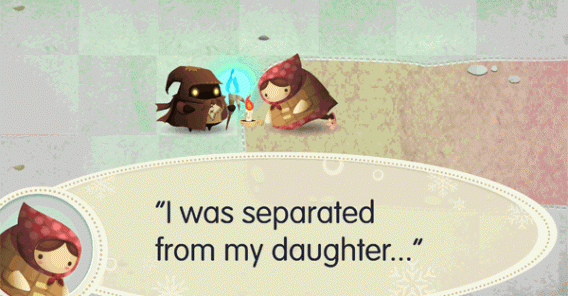
Road Not Taken mother gif

You have a finite amount of “energy” which you need to conserve to beat the game. Simple things like holding and moving an object cost energy, but tossing objects doesn’t. You’ll rely heavily on this mechanic to solve the game’s puzzles. Run out of energy, and you die.

But Road Not Taken is not quite that simple. It gets infinitely more complex, with different types of objects reacting in different ways. Take, for example, the stone that changes color every time you toss it, or the unique crafting system that lets you combine objects to create new ones.

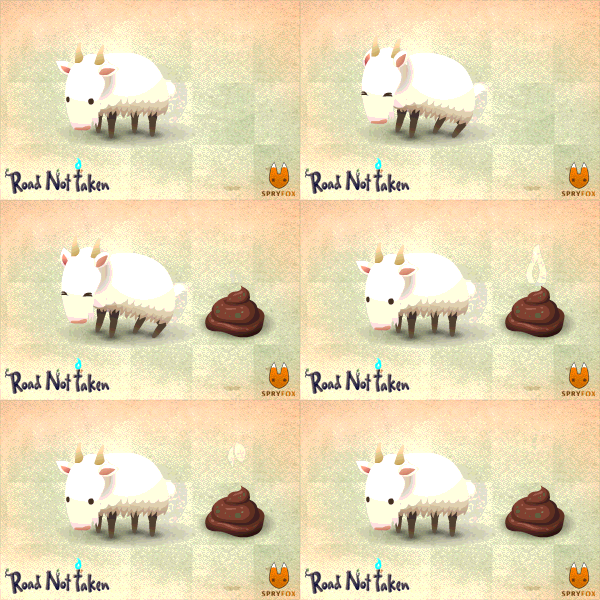
Road Not Taken pooping goat

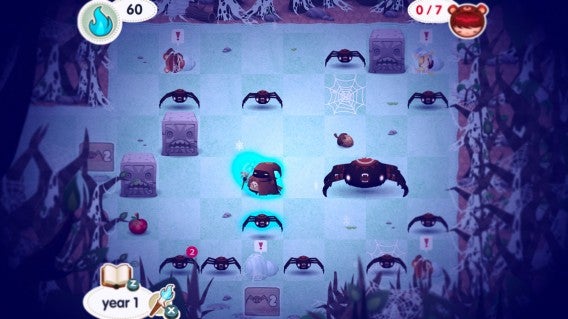
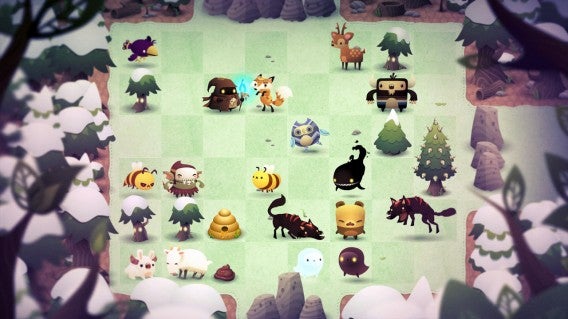
Throughout the game, I encountered various creatures, but it’s really up to the player to find out if the creatures are friends or foes. There are ravenous raccoons, giant spiders, and a even pooping goat. Each character reacts differently, and you’ll have to discover if they can help you, or if its better to get rid of them.

The combination of combat and difficult puzzles means that you’ll die often, but death doesn’t stop the game from being fun.

The big picture

The basis of the game seems simple, but the concept behind it seems to tie back to real life scenarios not traditionally experienced in games. Where exactly did the idea come from? I talked with Spry Fox’s Chief Creative Officer Daniel Cook and Chief Executive Officer David Edry to get a better idea.

“We found a cool little puzzle mechanic and I started thinking about some of the stuff that was going on in my life. ‘Wait, I’m not doing what I should be doing with my life. I’m doing this game thing but I’m supposed to be raising a family. But we don’t have kids!’ I thought, how I could apply some of those themes to this little puzzle game. And so the weird merging of those two ideas turned into Road Not Taken,” says Cook.

Given that it’s a puzzle game, the story of Road Not Taken is deeper than I expected. The world is filled with interesting characters and mysterious objects. When you bump into an object, you learn more about it. When you encounter a new enemy or object, you’ll unlock more info about it in your journal.

“I expect most people won’t end up reading the journal, but it’s there if you want to explore,” says Edery.

On top of that, there aren’t many cutscenes that take you out of the gameplay, which is how games traditionally present a story. Instead, Spry Fox chose to sprinkle bits of the story throughout the game rather than beating players over the head with it.

Road Not Taken spiders

Relationships with non-playable characters are another interesting factor that have an impact on gameplay. In the short demo I played, I chose to share my rice, coins, and blueberries with a few townspeople. In return, some gave me gifts. Unfortunately, gifts aren’t always readily accepted; if you give someone something they don’t like, they will react negatively to you.

In fact, you can even fall in love and marry someone within the game. Or it could go terribly wrong, just like in reality.

“It’s actually a horrible thing when you’re building up a relationship with somebody and they say ‘You know what? I actually fell in love with this other person and I don’t think I’m going to be with you anymore.’ So there’s all these interesting outcomes that can happen as you’re building up these relationships with the characters.”

Something else you typically don’t experience in games, Road Not Taken makes you live with your mistakes. Should you build up more relationships, or save your resources for the battles ahead? It’s up to you, but you’ll have to live with your choices.

“It’s about the experiences that you have going through life and looking back on those and saying, ‘These were good, despite being different than what other people had, but these were good,’” says Cook.

Because your character has a 15 year life-span, again, like real life, you’ll have to choose what you accomplish before you die.

Road Not Taken creatures

Much anticipation

It’s odd that Road Not Taken isn’t launching on mobile, but I can see it working perfectly on an iPad. Mobile is still a possibility, but Spry Fox wants to gauge user reaction first.

“It’s just that [the PlayStation and desktop gaming] communities seemed to be excited about it. Sony reached out to us immediately and said ‘This trailer is gorgeous, we’d love to have this on the PS4′ which, honestly, was a pleasant surprise. We had no idea they would have that reaction,” says Edery.

Road Not Taken will be released simultaneously on PlayStation 4, Vita (but may be delayed), Mac, and PC sometime this summer. The game is expected to cost around $15 but that can change as the game readies for release.

Skype’s 22 hidden emoticons

Like a good VoIP app, Skype puts you in touch with your loved ones, letting you chat via video, voice, and text while complementing your replies with fun emoticons.

Most smileys are available via the program menu, meaning all you have to to do is double click on the one you want to add it to the conversation. That being said, Skype also offers 22 hidden emoticons that you’ll only discover by typing specific commands.

This is an up-to-date list of the these secret emoticons available in Skype. Just write the text you see under “Shortcode” (if there is more than one word, just choose one), and the smiley you want will appear in your chat.

Emoticon Meaning Shortcode
Drunk (drunk)
Smoke (smoking) (smoke) (ci)
Toivo (toivo)
Rock (rock)
Headbang (headbang) (banghead)
Bug (bug)
Pool party (poolparty)
Skype (skype)  (ss)
Call me (call)
Talk (talk)
Broken heart (u)  (U)
Clock (o)  (O)  (time)
Mail (e)  (m)
Movie/Action (~)  (film)  (movie)
Smartphone (mp)  (ph)
Punch (punch)
Talk to the hand (talktothehand)
Idea (idea)
Sheep (sheep)
Dog (dog)
Cat (cat) :3
Bike (bike)

Skype also lets you add emoticons in the form of flags from 237 countries. You create them by typing the shortcode (flag:XX) where the XX is the country code of the flag you want. The country code is generally the same as the one officially used for web addresses in that country (US – United States, UK – United Kingdom, CA – Canada, etc). If you want to check, click on the image below to get a full list:

Want to find out more about Skype? Check out Everything you need to know about Skype, or catch up on the recently free feature, group calls.

Follow me on Twitter: @mariabaeta

Format a disk to use on both Mac and PC

Have you ever wanted a hard disk or a flash drive that you can use on both your Mac and your PC? With OS X, you can create one in less than a minute.

It’s not uncommon to need an external drive (hard drive or USB stick) that works on both Mac and Windows computers, especially if you need to constantly transfer files from one system to another.

Luckily, with OS X, you can create a disk that can be used by both operating systems in a snap. Here’s how.

1. Connect the disk and open Disk Utility

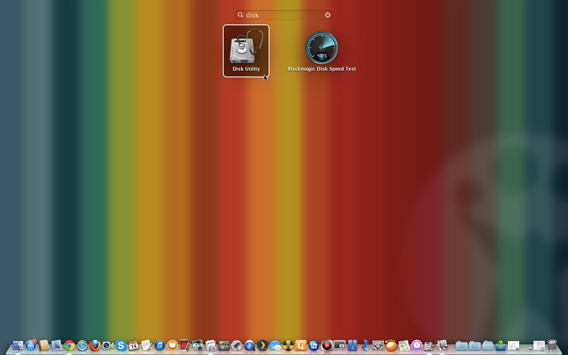
Connect the hard drive or USB drive to your Mac and then open the Disk Utility app, which is located in Applications> Utilities> Disk Utility. You can also open the app from Launchpad.

Open Disk Utility

2. Select a disk to format

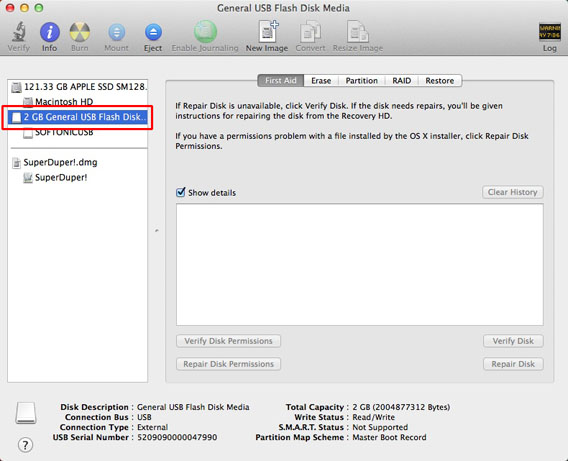
Choose the disk that you want to format for both Mac and PC from the column on the left.

Select Disk

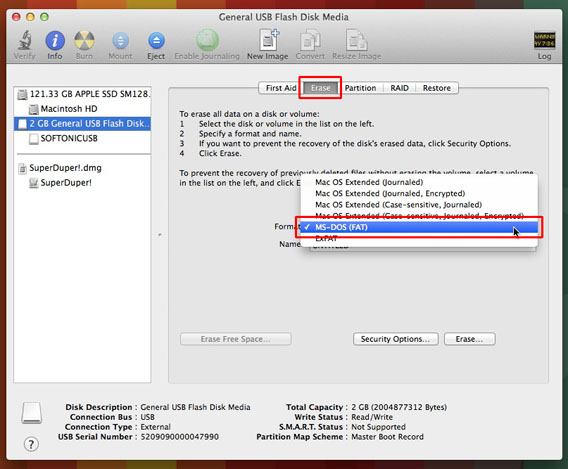
3. Choose the format

Open the Erase tab. From the Format drop-down menu, choose MS-DOS (FAT), better known as FAT32.

Choose Format

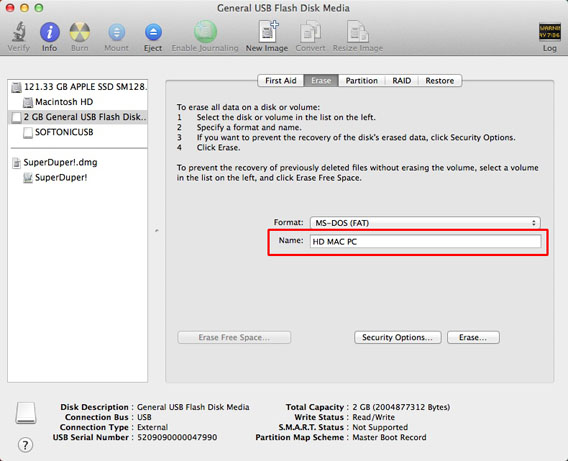
4. Choose a name for the disc

After you choose the format, you’ll see a box to enter the name of the disk. Choose any name with a maximum of 11 characters (don’t worry, it can be changed later).

Choose Name

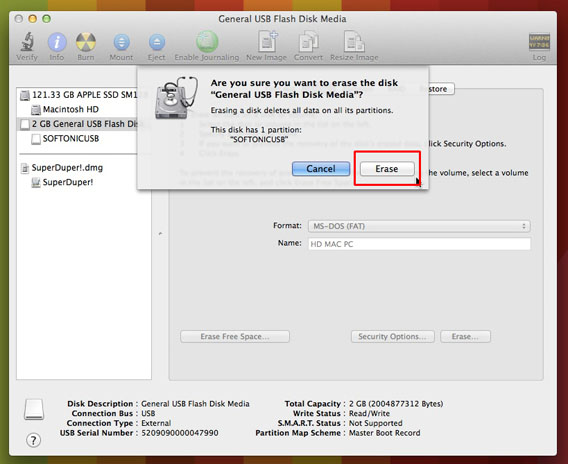
5. Erase and format

Click on Erase and confirm the operation in the next pop-up window.

*Warning: this will delete all data on the disk. If there are documents on there that you want to keep, make a copy of the files on your Mac or on another external drive first.*

Erase

And you’re done! Now, the disk can be read and written using both Mac and Windows computers.

What problems could I have on an HD formatted in FAT32?

FAT32 is the only format that both OS X and Windows can read and write without the use of third-party apps.

There are, however, some things you should know about the FAT32 format:

  • It doesn’t support files larger than 4 GB.
  • It doesn’t let you set access permissions to files, so it’s potentially less secure than the NTFS format (the native OS X format).
  • It’s less efficient in terms of space management. In practice, for the same total size, you can put fewer files on a FAT32 formatted disk compared to a NTFS formatted disk.

That said, for a daily exchange of files (for example, if you work on a PC but you have a Mac at home), it’s a practical and effective solution.

Of course, there are other options for transferring files between hard drives; cloud-based solutions like Dropbox are convenient and don’t have compatibility issues, although are sometimes limited in space.

If you’re thinking of moving to Mac but are unsure about the process or concerned with these kinds of issues, check out our Moving to Mac Guide.

Frontback interview: “We’re more than just a selfie app”

Frontback is the dual-perspective photo app getting a lot of buzz right now, letting you take a photo with your front and back cameras, and then combining them into one post.

We had the opportunity to chat with Frontback co-founder Frédéric della Faille about how the app started, why its popular, and what the future holds. Check out our interview to find out more about the photo app everyone’s talking about.

Softonic: How did you get the idea for the app, and did you expect it to be such a success? Can you summarize how it all began?

Frédéric della Faille: Frontback started as a side project of CheckThis, an online publishing platform accessible from a browser. A year and a half ago, we started working on CheckThis for iPhone, trying to restrict the platform to photo sharing. The app launched, but wasn’t as successful as expected. There was a small, super active community, but since then, we’ve removed it from the App Store.
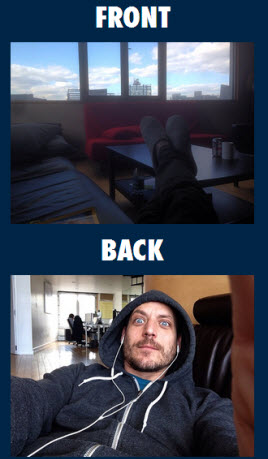
Co-founder's first frontback

I was trying to explain why a user could benefit from sharing several photos rather than a single Instagram post. I created a post on CheckThis with the words Front and Back and 2 images taken with the front and back camera of my phone. I shared them on social networks and, because most of my friends are in Belgium, they could see […] my apartment for the first time. They all thought I looked really tired, but it generated a lot of engagement.

People no longer judged CheckThis as a product but instead, for its content.

The CheckThis community was inspired by this post. Friends who are total non-geeks used CheckThis just for that purpose. It got to a point where I said to myself:

This is much more powerful than what I was expecting.

I created the first mockups to turn it into a standalone app. Since we’d already raised funds, we couldn’t get into something new because of our investors.

The co-founder of Frontback [Melvyn Hills ] came from Belgium to Brooklyn for a month and I told him “Listen, Melvyn, it’s a secret, but the two of us are going to work on this together.” We developed the app in 4 weeks [and] Frontback was immediately successful.

In 12 hours, we had exceeded the number of downloads that we had from CheckThis, which had been in the App Store for I think 9 months.

Because of my previous experience in digital advertising, I attach great importance to brands and communication. What was traumatic about CheckThis was that we had done a lot of communication, but it didn’t work.

For Frontback, we did the opposite. We didn’t have video, we didn’t have any marketing […] we only had the product. Since we had around fifty beta testers, friends in the world of emerging technologies in New York and Brussels, and also friends in the music industry, the links began to spread. We were spotted by tech media before we even contacted them.

I decided to focus my marketing efforts on one tech outlet, who finally agreed to publish an article on the app.

S: What’s your explanation for the selfies trend? Do you think it’ll last?

F: The selfie is a self-portrait. We’ve just given it a name that’s a bit cooler. But it’s always existed. In any case, we’re not a selfie company,  that’s clear!
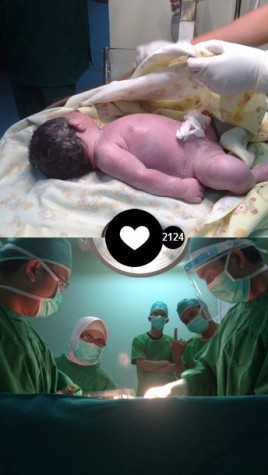
Birth frontback

S: So, if users don’t take selfies and shoot two different photos, you don’t mind?

F: The latest Staff Pick that we chose was of a child being born. That has nothing to do with the selfie. There’s a lot of emotion that comes out of this picture. People are really immersed in the hospital at the moment it’s happening. If they hid half of the screen, it wouldn’t have as much emotion.

In any case, we’re not a selfie app, that’s clear!

Of course, we still enjoy the selfies. Last summer, we felt that something new was about to pop up. Some rather sophisticated selfies were starting to pop up.

There are two Frontback user types: one who comes for the selfie and then makes a composition around it; and the ones who come for the opposite and use the selfie as the complimentary photo.

One day, an article was published by an influential blogger in Japan who had discovered that touch gestures allowed you to move from the back camera to the front camera. For him, doing this completely changed the perception of the app and its possibilities.

It’s funny because, in general, the Japanese user posts a dozen composition photos and then slowly starts to introduce themselves in the frame. That’s pretty much the opposite of the European user. Europeans usually start with a selfie, then get a bit tired of it and move on to compositions.

For the record, these gesture features came to me through talking to Jack Dorsey, founder of Twitter, who is also a friend of mine. He told me: “You should try to find a solution for us so that we can take two good quality pictures with the front camera”

Obviously, we were scared of breaking the momentum of the product. We launched these features without talking about them.

“You should try to find a solution for us so that we can take two good quality pictures with the front camera,” Jack Dorsey, founder of Twitter

S: You’ve published a post on your blog about this since then…

F: We’re only now beginning to feel a little bit better prepared [to] transform the tool into a social network. We’re also able to explain what we can do with the camera a bit better. We certainly don’t want a user to have to go through 10 screens of explanations. It doesn’t matter if they discover [touch gestures] a bit later.

S: It’s also the creative side that users likes, the idea of having an app in your hands with which you can really express yourself.

F: When someone sees this little baby, if they don’t know about gestures yet, then we assume they’ll ask questions: “Did this person really take a Frontback, or is there something else that I don’t know about in this product?” Advanced users have the right to know stuff that the user in his first session can’t grasp yet.

S: Exactly. Would you say that these are the opportunities that differentiate you from other selfie apps?

F: A photo plus a photo doesn’t make 2 photos. It’s much more than 2 photos.

A selfie is quite limited by space. Your arm isn’t 2 meters long so the frame is still pretty tight.

S: Do you define yourselves as a social network, or would you prefer to rely on the spread of links on Facebook and Twitter to increase the number of users?

F: Clearly we’re a social network, and it’s not because everyone else is doing it that we’re doing it.

We don’t share our figures, but they are impressive. There are things happening with the app. Users are asking us to move towards social networking.
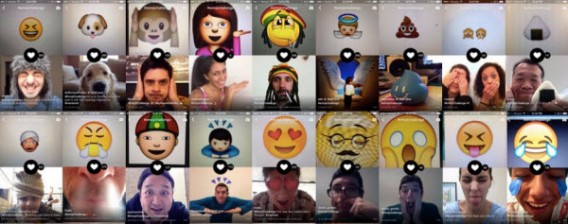
Stripes frontback

Clearly, we’re a social network, and it’s not because everyone else is doing it that we’re doing it.

For example, last week we got a nice surprise. A user in Chicago received a gift from one of our female users in Japan. They met through Frontback. Users inspire each other and get to know each other. There’s something incredibly fascinating about this, and users are pushing us to move towards more ways for contact one another.

S: Every picture posted on frontback also has a unique URL. I guess that helps you attract people to your app?

F: Yes, exactly. The idea is to create a platform and control the content viewing experience. Nowadays, it’s the cell phone that offers the best viewing experience.

S: Can you tell us about any new features you’d like to introduce in the future? For example, will it be possible to take 2 photos in one shot?

F: The hardware doesn’t allow this. If it were possible, perhaps we could try, but in any case, at the moment, neither the iPhone nor Android devices allow users to do it.

I know that Samsung has a Dual Shot function that lets you take pictures with the two sensors at the same time but […] I don’t think the Frontback user would be satisfied with this feature for taking 2 photos simultaneously. There’s this idea of composition: if the photo is going to be shared, we always want to look our best. The ability to combine 2 photos is super important to us.

S: Would importing photos from the photo gallery be conceivable?

F: No, that doesn’t fit with our philosophy, at least not yet. Uploading photos would distort Frontback. We’re in no hurry to consider that kind of functionality. We don’t have to reach a billion users, not yet anyway.

We’re really focusing on the existing community to try to understand the behavior of users, the ways they use the app, those kinds of things.

We don’t have to reach a billion users, not yet anyway.

We are extremely conscientious with regards to our roadmap. We don’t want to develop any additional functions as a knee-jerk reaction just to try things out.

S: Speaking of users, Frontback has a very international community.

F: It sure does. 60% of our users are outside the United States. As for the rest, you’ll find a lot in South America and Asia. A little less of Europe, but I know that since last Thursday [Editor’s note: since May 1], Apple has put us at the top on the AppStore in many countries in Europe. That should bring us more visibility there.

Everything is done organically. We haven’t developed any activity or marketing ideas yet. Growth is organic, since we haven’t really mastered the internalization of Frontback yet.

S: You’ve announced over a million downloads on the Apple AppStore. Do you have any other figures on the number of current users?

F: No, we don’t comment about them. Our figures are very good! From time to time, I tweet a number here and there. What really matters to us is commitment.
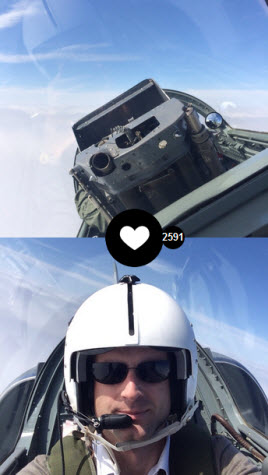
Pilot fighter frontback

It’s about knowing what a user does. Something happening with the app is what interests us the most, not just submitting incredible overall figures.

S: Finally, what are the most unusual photos you’ve seen on Frontback?

F: There are some every day. The Staff Pick is a feed that Elisa, the community manager, and I work on carefully. We see so many posts capturing so many different moments, that it becomes impossible to choose one.

A recent post that aroused a lot of emotion is the image of a fighter pilot. It’s a Frontback in full flight and that’s something really special. A Belgian firefighter has [also] posted during a mission.

Photos that create emotion are the ones that aren’t just simple Frontbacks.
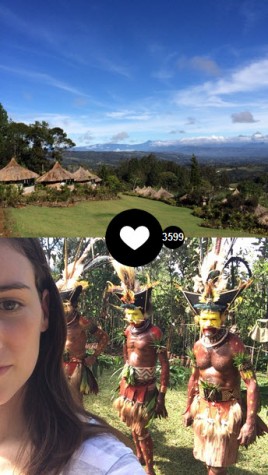
Papua New Guinea frontbackA user from Paris posted from New Guinea recently. It’s completely amazing. She got 3500 likes in 2 days. That’s completely unexpected!

You have to consider that there’s no offline mode, nor any uploading of photos, so she is really there, and that’s what creates something special.

When people use the app where you’d never think of using it, that’s obviously emotional for the team. Photos that create emotion are the ones that aren’t simple Frontbacks.

Frédéric, thanks for taking the time to speak with us.

You can find the whole Frontback community via the official app blog. If you need some inspiration, check out these 11 original ideas for creating a Frontback.

Frontback is available for both iPhone and Android.

Follow me on Twitter @bbrassart
After one month of using the unsupported XP… nothing happened

There haven’t been any more Windows XP updates for over a month now, and I wanted to test my own advice on how to survive using XP without falling prey to unstoppable malware.

For Windows XP users, April 8 2014 was the end of the world. The XPocalypse, as some of us have called it, implied the end of all security updates for XP. Those who didn’t update to Windows 8, Microsoft said, would become increasingly vulnerable to viruses and hackers.

Since not everyone has been able to migrate to Windows 8– you have to pay– I published some safety tips for those who had no choice but to stay on XP for a while. Most are common sense: don’t use Internet Explorer, update all programs regularly, and install a compatible antivirus.

Windows XP

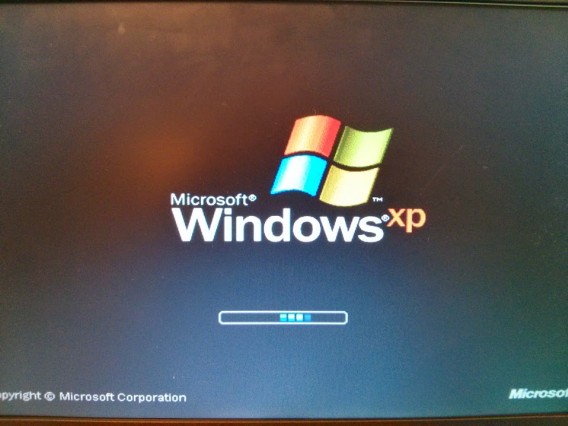
I got a little excited when I saw Windows XP’s legendary boot screen.

I wanted to check if my advice was legit using a laptop with Windows XP. The conditions were simple: I would use Firefox as a browser, AVG as an antivirus, and would try not to do anything stupid. After installing all available patches and applications, I started to use the PC for an hour a day, on average.

An uneventful month

My initial feeling was that everything was fine. Using XP with a clean install is a pleasant experience. Everything is fast and stable. Firefox is fast, and the WiFi is set without much trouble. The free version of AVG is barely annoying, although I should mentioned that I spent a considerable amount of time setting up the alerts and background scans.

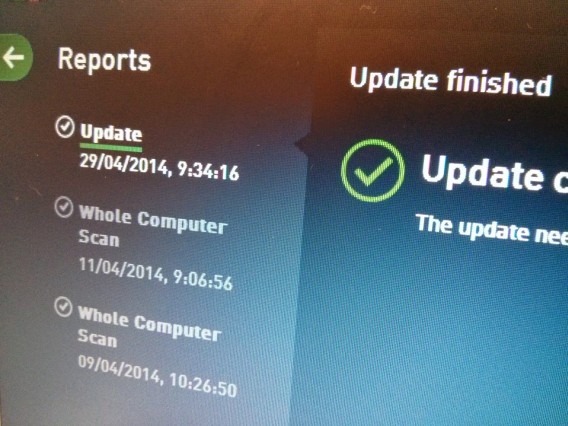
Virus scan

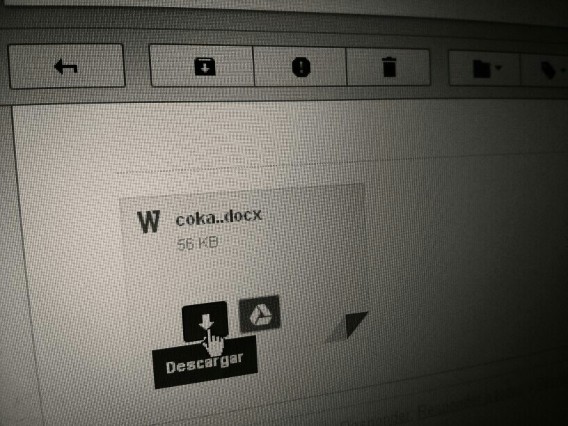
The days went by without anything too eventful happening. After one week, it was so quiet that to keep things interesting, I decided to open some suspicious attachments, only to discover that Gmail had already filtered all dangerous content (the attached files were clean –a very clumsy phishing attempt).

A very clumsy phishing attempt

I also went on file download platforms (Torrent and eMule) to share some legal files. No hacker intruded in my private network, which is protected by a simple router with integrated firewall. I didn’t notice anything unusual, and although my computer could be identified as a PC with Windows XP, no one tried to attack it.

In short: nothing happened.

All good, but with caution

I know why no virus or malware infected my PC: I was careful and didn’t do anything stupid. I was also using safe and updated programs. When after the three weeks of using XP I heard that there was a security flaw in Internet Explorer, which Microsoft quickly solved, I simply shrugged: I was already using Firefox.

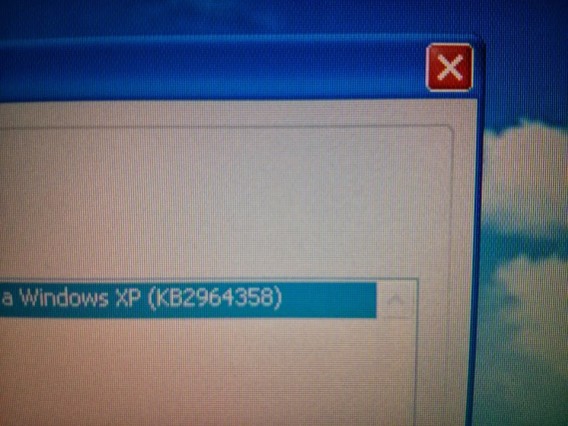
Microsoft fixed the IE patch immediately

The lat patch for Windows XP, the KB2964358, was like a miracle.

If I had browsed web pages with a bad reputation or installed pirated software, my PC could have easily become infected, but the fact is that the same thing could have happened if I had been using Windows 8. These vulnerabilities are difficult to avoid because they take advantage of the user’s trust, not of obsolete operating systems.

Security expert Mikko Hypponen, founder of F-Secure, joked that the most secure operating system is Windows 3.1 because no one makes viruses for it anymore. This made me smile, because it’s true, but it’s not what I would recommend to my friends. My advice is to upgrade to Windows 7 or 8, depending on your preferences, but if you can’t right away, at least you now know that staying with XP won’t be a tragedy.

If you insist on still using XP, follow my tips on How to use XP without Microsoft’s support.