A recipe to create the perfect password

A great password is your first line of defense against an intruder. While there might be a few important things to look out for when creating a intruder-proof password, it actually isn’t as difficult as it sounds. Here’s one of our favorite password recipes that has been passed down by generations of illustrious password chefs.

The ingredients:

Step 1. Carefully harvest 8 letters from your garden of 26. Don’t pick the obvious ones that spell your name, the street you live in, or the name of your pet hamster. Oh, and remember, select a healthy mix of BIG letters and little letters to ensure that you get a good balance of flavor.

Step 2. Place the letters in a big bowl, and liberally sprinkle in 4 numbers. Make sure they are properly distributed so that the aromas are enhanced. Stir vigorously and thoroughly until all the colors come together perfectly.

Step 3. Now turn your attention to your 3 symbols. There are many symbols littered around your keyboard, so make sure you consider them all. Pick the ones you like the most, it doesn’t matter if you select them based on shape, size, or smell. Gently ease each symbol into your mixing bowl with the rest of the mix. Where you insert each symbol will result in a different flavor profile, so be creative!

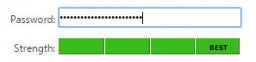
Step 4. You’re finally ready. Very carefully, ease the fruits of your labor into a checker, like this one. If it flashes green and signals its approval, then congratulations, you are now the proud owner of a perfect password!

Step 5. Celebrate for 10 seconds, then start all over again for all the other online services you use – email, social media, cloud storage… If you find it too difficult to remember every one of them, use your secret weapon, Steganos Password Manager. It’ll definitely make your life a whole lot easier.

Click here to get it now with 20% OFF!

Now sit back as intruders shake their heads in disappointment and give up on trying to access your account.

Download Steganos Password Manager

Why you should care about PDF files

Today’s world of technology is a ruthless, unrelenting beast that refuses to decelerate. We’re at a point of innovation where every six months a new leap in speed, efficiency, or cost is made to relegate something state of the art into a medieval tool. Despite this collective contest to invent the latest and greatest, one unlikely hero seems to have withstood the test of time – the PDF file.

Before you dismiss this as an exploration into the pointless, it is worth mentioning that almost 80% of all document formats shared online today are in PDF. Here are 3 reasons why we think the PDF is here to stay, and why we all should invest in a tool like Expert PDF 8 to manage our PDF documents:

1) Keep teams in order

That’s right. Teams are a complex, interdependent web of chaos. Despite all the fancy collaboration tools that seem to pop up every three days, teams are larger, and more geographically dispersed than ever before. And here’s the problem: everyone uses different tools from PCs and Macs to Linux computers, pre-2007 and post-2007 Microsoft Office, Open Office, and, increasingly, Google Docs. This web of mixing and matching contributes to a huge mess of incompatibility.

PDF files are created independent of application software, hardware, and operating systems, and that is why the layout, text, fonts, colors, graphics, and all the other information on the file are kept constant, no matter which computer or software is used to open them. It should be no surprise that PDF files are still the undisputed king of cross-platform sharing.

2) PDF is incredibly easy to work with

Most office productivity suites allow you to save your work directly into PDF. This option is generally easy to find, but if you really want the simplest solution then consider a tool that can help you further complicate working with PDF. One such tool is Expert PDF 8, a simple but powerful tool that works from within Microsoft Office and helps you convert Word documents, Excel sheets, or PowerPoint slides directly into PDF files.

3) Edits are possible

In most cases, PDF files are created to prevent someone other than the author editing or changing information on the document. However, if editing is necessary, then Expert PDF 8 can help you convert your PDF files into a DOC Word file so that you can keep your document up to date without starting from scratch.

PDF files have been the default filetype for document exchange for over 20 years, and the reason why it continues to be so popular is obvious. Now the challenge is to make the conversion of files into PDF as simple as possible, as well as making the conversion of PDF documents into editable files as painless. On both counts, Expert PDF 8 should satisfy even the most demanding of users.

If you’re ready to take the leap towards creating amazing PDF files, click here for 75% off on Expert PDF 8:

Promo

5 things you didn’t know about PDF files

Portable Document Format, or PDF files as we commonly call them, have been around for as long as most of us can remember. But how much do we really know about them? Here are 5 things that you probably didn’t know about PDF:

1) They are the most common filetype on the internet

You’ve probably seen at least one PDF file in the past week. It could be that free-ebook on Asia travel you downloaded, or a contract you’ve signed with a new client. The fact is, even today, about 80% off all documents shared online are of the PDF filetype.

2) They’ve been around for more than two decades

The history of PDF dates back to 1991 when the American company, Adobe Systems, started a small project called The Camelot Project. The project’s goal was to solve the problem of exchanging documents between different systems and computer applications. At that time, computer systems and software were still in their infancy, and most documents were exchanged through fax, a process that was tedious and resource intensive. The Camelot Project was probably one of the first examples of a collaborative system

3) They are truly cross platform compatible

Unlike DOC files which were designed by Microsoft, or PAGES files which were created by Apple, PDF files were not designed for any one specific platform or software. Because it is software, hardware, and operating system independent, the layout, text, fonts, colors, graphics, and all the other information on the file are maintained. This means that all PDF files will work natively and perfectly on any computer you can find today.

4) They’re actually very easy to work with

In fact, most modern office suites allow you to save your work directly as a PDF. But if you really want to kick things up a notch, there are very simple tools that can help you uncomplicate working with PDF. One such tool is Expert PDF 8, a simple but powerful tool that helps you create, edit, and convert your documents into PDF with just one click.

And despite contrary belief, PDF files are actually pretty easy to edit. A tool, such as the aforementioned Expert PDF 8, exports any PDF file into a Word document, so that you can make changes with ease.

5) Outstanding compression

Finally, we all know that files sizes get progressively bigger as we pile on the fancy design and graphics. When converted to PDF, a file is usually compressed by about 25% of its original file size. While that not might sound like much, think of the hundreds of files you’ve worked with in the past year, and multiple that by the number of people you work with. That couple of megabytes here and there quickly add up to a lot of unnecessary storage and bandwidth to transfer as those files move back and forth.

So there you have it, 5 things that you probably didn’t know about PDF files. Who would have thought that an unassuming file format like PDF would hold so many secrets.

The 7 commandments to avoid getting hacked

It seems like every other day a major online service gets hacked – Twitter, Facebook, Linkedin, Adobe, Gmail, Dropbox… – the list goes on. Although it is almost impossible to strip yourself of all vulnerabilities, there are still a few things you can do to better your odds. Here are the 7 greatest tips we have to help you stay safe:

1. Great passwords

It is obvious that a proper password is vital, but very few of us actually take passwords seriously. One study revealed that the most commonly stolen passwords were “123456”, “1234567”, “12345678”, and the word “password”.

A good password should include both upper and lower case characters, a few numbers, and a sprinkling of symbols. Your password should not form a recognizable word, and definitely should not relate to you at all (such as your street name or the name of your pet hamster). In addition, you should deploy a different password on every online service you use – email, social media, online banking, and so on.

If all this is just too much for you to keep track of, consider using a password manager to help you keep all your passwords safe.

2. Always be alert

If a former colleague, whom you haven’t spoken to in 10 years, sends you an email out of the blue about “An amazing deal that changed my life”, be very wary. Anything out of the ordinary could be an attempt to get into your computer, and into your personal life.

But that’s not all, even emails that appear to come from official sources might not be real. Hackers frequently impersonate banks, or popular social media platforms, in a ruse to gain access to your information. These emails could appear genuine and very convincing, but be on your guard, especially if it includes a link or an attached file. It’s best to call your bank manager or a customer support hotline to find out if the email you received is legitimate.

3. Deleted doesn’t really mean deleted

The data that you leave on the old devices you give away could also put you at risk of getting hacked. “But I’m sure I deleted everything”, you’d say, but it’s really not that simple. Instructing your computer to delete something doesn’t actually delete it, it merely marks the space as free-to-occupy for new data This means that  if no data is ever moved into that space, whatever was there before remains perfectly intact.

There are tools to help you delete your data for good, but if you had very sensitive data on your drive, it might be best to take it to a professional, or physically destroy the hard drive.
4. Free Wi-Fi

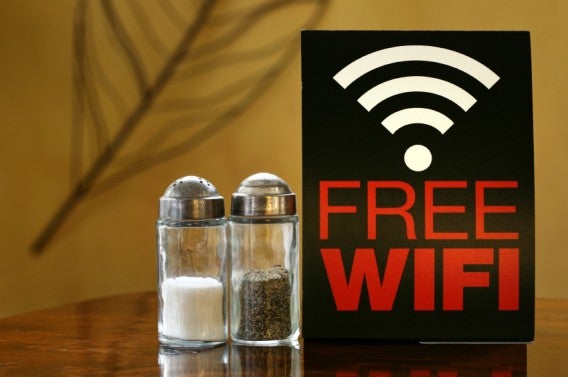
Being able to work from your favorite cafe is a dream that almost anyone would be envious of. But before you click connect, check if the network you’re about to connect to is legitimate. Just because it has an official sounding name like “Official City Wifi” or “Starbucks Free Network” doesn’t mean that it is genuine.

Connecting to a fake network gives the hacker an opportunity to access your computer, potentially stealing important personal information, or planting a hidden bug to record and report your activity and passwords back to him.

5. Online is risky

Our lives have become so intertwined with online services that we store absolutely everything somewhere on the Internet – photos, contact lists, copies of our identity cards, and even confidential documents from work. While many of these services do their best to keep your data safe, breaches still can happen. Some level of risk might be acceptable for things such as family photographs and college essays, but for others such as copies of your identity cards and financial information, it might be a good idea to keep those offline.

6. Macs are safer, but not absolutely safe

We’ve all heard the proud mac user retort that their Mac is safe from viruses and intrusions. To a certain extent they are right, but things are changing, and viruses and intruders are getting smarter and more creative. Recently, Apple was so confident about their airtight software that they offered $1 million to anyone that could hack into their system. A group of hackers managed to breach the walls and walked away with the prize. Therefore, even if you are using a Mac, Linux, or any other operating system, do not take anything for granted and take sensible precaution.

7. Antiviruses are still relevant

Antiviruses are just as important today as they were 10 years ago. By some estimates, about 1 million new threats are discovered each day – yes, that’s 1 million every day. This means that antiviruses are not just install-and-forget software, but they need to be updated regularly. Read our comparison of the best antivirus software of 2015 here.

With these 7 commandments, coupled with sensible computing habits and some clever tools, you could significantly reduce the risk of getting hacked and ensure that your personal information remains in safe hands.


Windows 10: What will the “Threshold 2” update bring?

After more than three months on the market, today marks the launch of Windows 10 first big update, known as Threshold 2. It will benefit more than 110 million computers and other devices that have Microsoft’s new operating system installed.

This update, which will be automatically installed after approval, brings some changes and improvements. In addition, if you’re still using Windows 7 or 8.1 and decide to upgrade to Windows 10, Threshold 2 will be included.

Here are the key changes coming with the update.

Interface Changes

Threshold 2 brings with it a number of improvements that were planned for the original release but never made it in. Thus, Windows 10 will have new desktop colors and themes designed specifically for Windows 10.

In addition, the tile limit has been increased from 512 to 2048. And you will be able to see more tiles at once, because you can add a fourth column to the start menu.

Finally, improved visibility and size of contextual menus… Usability = power!

Cortana, is bigger and better

Cortana comes with a few upgrades. The most talked about is how she can now recognize hand written notes, ideal for quickly storing phone numbers or addresses.

Improved Edge

The default Windows 10 browser is getting general stability improvements and some new features. For example, you can finally synchronize passwords, users, favorites, and playlists with all your Windows account, so you can move between Windows 10 devices – such as Windows 10 Mobile or Xbox One – effortlessly.

Full Skype integration

The latest version of Skype debuts with this update, bringing full integration of messaging and video. This will let you can send messages, record audio, or make video calls from inside apps, without having to launch the full version of Skype.

Did we miss anything?

Of course these new features are useful, but Microsoft still has much to improve in Windows 10. For example, we look forward to the arrival of extensions to Microsoft Edge, scheduled for 2016.

Google launches an option that helps you control what others know about you

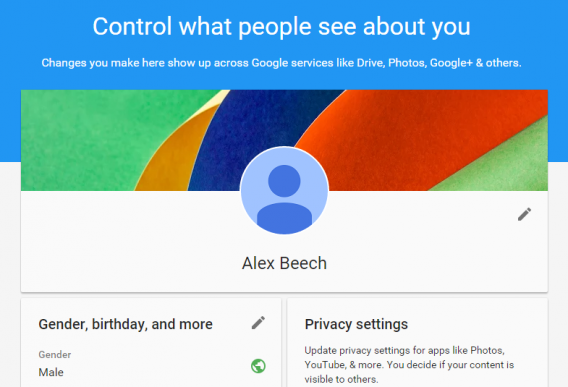
Google has so many products and services that it is easy to lose track of what data you have shared only with them and what is visible to other users. Luckily now they have released About Me, a tool for you to control what data Google knows about you and what you allow to be visible to other users and circles.

About Me is a profile in which all of the information you have shared with Google and made public is shown. Clicking on any of its options you can edit data, levels of privacy, and delete what you do not want it to display.

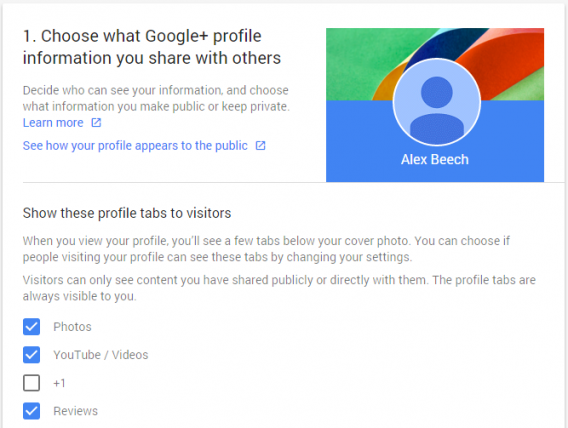
Furthermore, About Me has another interesting option: the Privacy Checkup. Clicking on this you will be taken to a page where you can decide which of your activities and interactions with Google will be visible to the communities of Google+, Google Photos, YouTube, and other Google services.

Im so interesting

Do you like this new tool from Google? I has really made me aware of the amount of information that I have been pouring into Google, and made me much more cautions of what I share.

The best three free-to-play multiplayer shooters

Every year Call of Duty delivers a gaming package stuffed full of single player, co-op, and multiplayer fun – and the new Call of Duty: Black Ops III is no exception. At this point though I think that it is pretty much accepted that the truly dedicated are coming for the series for its fast paced multiplayer.

But there are other options for multiplayer shooter fans, and today we are looking at our favorite three free-to-play shooters.

Our first pick is Gotham City Impostors, a game set in the Batman universe. The twist is that, rather than taking control of one of the famous heroes or villains, you play as a Joker of Batman wannabe. This leads to some comical customization options, as both teams deck themselves out in makeshift approximations of their idols gear. Add to this a healthy dose of fluid gun-play and a range of abilities that keep the action snappy, and you have a stylish little shooter.

If you would rather take part in some more conventional modern warfare then our second pick, Crytech’s Warface, is for you. This game balances realism with arcade action to create a compelling little package. It is a mix that has you dying regularly, but also is happy to get you straight back into the action with a newly selected class and loadout to increase your chances of survival. With an active and competitive community, Warface maybe the best pick for more traditional CoD fans.

The final free-to-play game is a no brainer, it’s the quintessential PC shooter Team Fortress 2. Released all the way back in 2007, this game has continued to evolve thanks to Valve’s continued support for it over the years. This has led to its class based action featuring more maps and game modes than any other shooter on the list. But while the volume of content is certainly appealing, it is really the varied and personality filled cast of characters that keeps us coming back for more.

That’s it for this week. Let us know what you through of our choice of free-to-play shooters, and we will be back with another three games reviews next week.

Related Stories

Call of Duty: Black Ops III review

Here’s to you Halo 5 – our favorite three cyborg games

Fallout 4 review

Five apps to survive the apocalypse

Follow me on Twitter: @DoFuss

Facebook Messenger wants to see your mobile photos

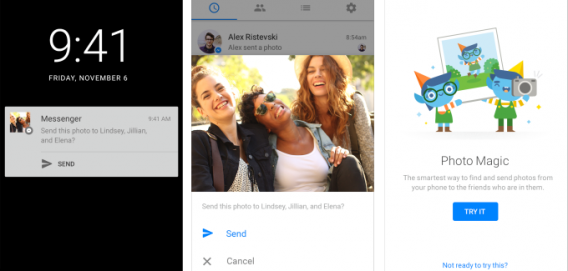
Facebook Messenger has launched a controversial new feature called Photo Magic. This option uses facial recognition technology to scan your camera roll for photos of you and your friends. For now it is available in Australia, but it should reach the rest of us soon.

Facebook does not want to spy, indeed according to a statement it is doing this for your sake. In fact it claims the new feature is to solve that age old problem of forgetting or not having time to send photos to your friends.

How Photo Magic work?

This feature will analyze your photos to search for familiar faces, comparing the photos you have with photos’ of your friends. When it detects a match between friends and a photos it lets you send the images in group messages from Messenger.

However, the truth is, this is not the first time we used this technology FB. Remember the Moments function? That standalone application that helped use to share photos with friends? Well, this looks a lot like that only with groups.

Don’t want Photo Magic? Here is what to do.

In truth the idea is okay, but I feel somewhat uncomfortable thinking that an app is automatically “seeing” what’s on my camera roll, even if it isn’t keeping a record of what it is seeing.

Luckily, if you feel the same, you can always turn it off. To do this go to your profile where you can disable the service – once it is available in your country.

Snapchat policy changes: do they have control over your photos and videos now?

One of the advantages of Snapchat over other messaging apps is that your posts are automatically deleted. At least that is the theory, but the new privacy policy says just the opposite: they can now reproduce, modify, and republish any of your content… Should we be panicking?

Well, if you’re worried about privacy and security, yes!

The Snapchat app has radically changed its terms of service and, depending on how you read the text, they can now do whatever they want with your content. And, in theory, that is something that doesn’t even happen on Facebook.

The privacy policies are much longer, but here is one of its most controversial sections:

“…you grant Snapchat a worldwide, perpetual, royalty-free, sublicensable, and transferable license to host, store, use, display, reproduce, modify, adapt, edit, publish, create derivative works from, publicly perform, broadcast, distribute, syndicate, promote, exhibit, and publicly display that content in any form and in any and all media or distribution methods…”.

A bit much, right? Especially taking into account the right to privacy on the Internet, and the fact that the majority of Snapchat’s users are teenagers.

Snapchat responds and… are you reassured?

Fortunately, the story does not end here and Snapchat has been quick to respond given the uproar caused by the new legal text. So, it has released another document explaining that these policies have been misinterpreted and don’t differ much from those of other services such as Facebook.

In fact, they insist that anything you send to your friends will be private and that what you post will be deleted from their servers, once viewed. We want to believe them but… was a text that gives rise to so many misunderstandings even necessary?

Do you use Snapchat? And more importantly, will you continue to use it? Let us know in the comments.

Panic button on iOS devices?

While we were doing our research for Fallout 4 week, we came across a patent filed by Apple back in May 2014 for a ‘panic button’ which could be integrated with Touch ID on iOS devices. According Business Insider and Mac Rumours, the panic button could be activated when a predefined finger is used to unlock your device.

When ‘panic mode’ is activated, the device could be instructed to ‘lock down’ to prevent a breach of personal data and information, and your position could be broadcasted to the authorities (or possibly even nearby devices).

It is obviously too early to speculate when this will be implemented, if at all. But we rekon that it would be a very useful feature to have on our iOS devices.