EVE Online is now a proper Spreadsheet Simulator

Even though EVE Online is a space-based persistent world MMORPG, fans have been lovingly referring to it as a spreadsheet simulator since the earliest days. This is due to the game’s proclivity to overload players with data. Now though, players have an easier way to manage all that information thanks to the inclusion of a Microsoft Excel spreadsheet extension. 

EVE Online DOWNLOAD

Anyone who doesn’t play EVE Online might be confused as to why the inclusion of spreadsheets is being celebrated to such a vocal and global extent among EVE Online players. The answer to abolishing confusion lies in the very nature of the game. The majority of EVE Online players treat the game as a corporate and industrial simulator. The game lets you create massive fleets and interstellar corporations and even become space-based mining magnates.

However, because the game focuses so heavily on essentially space domination through industry, players rely on immense amounts of critical data to expand their enterprises and dominate various sectors. Because of this, many players depend on Microsoft Excel spreadsheets to keep track of their industrial efforts. 

CCP Games has been working for a long time to try and make the user interface of the game easier for new players to grasp. This has often resulted in the game feeling like it may be trying to shy away from its core nature. But the inclusion of an Excel spreadsheet extension from Microsoft is essentially an admission of what the game truly is; an interactive, immersive spreadsheet simulator. 

During the recent EVE Fanfest, players were given a preview of what the new extension will look like in-game. However, it’s pertinent to note that this is an early version of a new mechanic, a prototype, if you will. Therefore, the mechanic may need to undergo a few changes, bug fixes, and updates before it’s as good as players need it to be. This is a game-changer, though. Gone are the days of having to hit Alt & Tab to get Microsoft Excel. 

Many other changes, such as improved graphics, new features, and additional story events, were also announced at EVE Fanfest, but the Excel extension proved the most exciting addition in the eyes of the fans. If you’re new to the program, be sure to check our Microsoft Excel expert review that also features the top functions.


Microsoft Excel review | Spectacular spreadsheets READ MORE

Microsoft plugs Authenticator app as Tech giants push passwordless future

As more and more of our lives move into the digital realm cybersecurity becomes an increasingly pressing issue. A misplaced password can see you lose pretty much everything these days. To put it simply, the stakes are getting higher, so we need to take online security more seriously. In days gone by you could take care by always ensuring you had a secure password but now the big tech giants including Microsoft, Google, and Apple are promoting passwordless solutions.

Microsoft Authenticator Download Now

In a blog post promoting World Password Day, Microsoft announced a partnership with the FIDO Alliance with the aim to accelerate the availability of passwordless sign-ins. The FIDO alliance is a broad open industry group, filled with big hitters like Amazon and Intel, that spans tech and is aiming to push the world away from what it calls an over-reliance on tech. You can learn more about the FIDO Alliance here. This new partnership, which also includes Apple and Google, marks a positive move away from passwords as there are now apps available that enable you to start replacing your account passwords with Two-Factor-Authentication solutions. Microsoft Authenticator is one such app.

Authenticator allows you to log into your Microsoft account without having to use a password at all. I’ve been using this solution for a while now and not only is it more secure, but it is also much more convenient. By using your phone as your second point of authentication you enable the use of its biometric devices to authenticate your identity. This means I can log in to Skype on my PC by scanning my face on my iPhone. It also means that my Microsoft account is extremely secure because it can only ever be accessed by somebody who is able to securely unlock my phone at that particular moment of access.

Microsoft has posted instructions for you to set yourself up with Microsoft Authenticator, which you can read below:

  1. Download and install Microsoft Authenticator (linked to your personal Microsoft account).
  2. Sign in to your Microsoft account.
  3. Choose Security. Under Advanced security options, you’ll see Passwordless account in the section titled Additional security.
  4. Select Turn on.
  5. Approve the notification from Authenticator.

This news doesn’t mean that Microsoft is turning its back on passwords, it is just a way for the tech giant to facilitate a path towards a more secure and passwordless future. In fact, the Microsoft Authenticator app has some excellent password features, which are definitely worth checking out too.

BIG update coming to WhatsApp groups

Earlier this week we updated you on a rather explosive WhatsApp update that gives group admins the ability to delete other people’s messages. This means, that when the update drops, admins will be able to wield significant power over all group conversations. Well, that power looks set to grow even further as WhatsApp is rolling out another update that will significantly boost potential WhatsApp group sizes.

WhatsApp Download Now

In a WhatsApp blog post published yesterday, the messaging app announced that it was effectively doubling the size of WhatsApp groups from 256 to 512 members. This means that when the update lands on your phone, you’ll be able to add over half a thousand other users to a group.

It may be hard to imagine how many notifications you would get from a WhatsApp group with so many users in it, but it is pretty safe to assume that most users will have groups that big muted.

What’s interesting is that when combined with the feature we reported on earlier in the week, this gives WhatsApp groups the potential to become more community-focused means of communication, with teams of moderators actively managing the groups. This allows the popular messaging app to offer something a little similar to what you can currently get on Telegram, for example.

WhatsApp getting 2GB file-sharing capabilities

Other big news to come in the same blog post is that WhatsApp is also massively updating its file-sharing capabilities. When the update lands on your phone, you’ll be able to share files up to 2GB in size using the app. This is a massive increase as at the moment you are only able to share files up to a paltry 100MB in size.

React to WhatsApp messages with emojis

If you are a big fan of emojis but think posting them as messages is a clumsy solution, you’ll be glad to hear that the same update will also bring you the chance to react to individual messages themselves using emojis. You can see an example of what this will look like above.

This update is currently rolling out to both Android and iOS users, so you can expect it to land on your phone sometime soon. These WhatsApp updates usually take a while to reach everybody though, so don’t worry if you haven’t received it yet, it is coming. While you’re waiting for it to land, why don’t you check out our WhatsApp Productivity Guide to help you get more from the app.

Image via: WhatsApp

Facebook is cutting a raft of location-based services

Over the years Facebook has grown and grown, going from a way to like your friend’s photos to a way to manage pretty much every aspect of your life. Now it seems, however, that Facebook might be starting to shrink rather than grow as as the social media giant has begun sending out notifications to app users informing them of a number of services that are to be discontinued.

Facebook Download Now

The biggest feature facing the axe is Nearby Friends, which lets you share your location so that your friends on the app can see where you are. There isn’t really any explanation for the move either, with the notification merely saying:

“Nearby Friends and Weather alerts will no longer be available after May 31, 2022. Information you shared that was used for these experiences, including Location History and Background Location, will stop being collected after May 31, 2022, even if you have previously enabled them.”

As well as Nearby Friends and local Weather alerts, other location-based services like Location History and Background location are also due to go. Facebook says that if you want to download the data related to these services you have until August 1, 2022. Facebook says that all related data will be deleted after that date and so will be unavailable to download.

If you think this news means that Facebook will no longer be tracking your location, think again. As ever, Facebook wants to know as much about you as possible and so will continue to track the information so that it can offer you other services and experiences. Make of that what you will. Of course, you can change your privacy settings to restrict Facebook’s access to your personal data. You can learn how to block Facebook from tracking your data in our handy guide. Of course, if you wanted to go further you could read our guide to deleting your Facebook account too.

Season 4 of Call of Duty Mobile adds Tournament Mode

Call of Duty Mobile launched a fourth season, Wild Dogs, on April 27th. Activision has now released new details of the brand new Tournament Mode feature dropping today. This new mode functions separately from Call of Duty Mobile’s Ranked Play. While Ranked Play is aimed at larger squads, Tournament Mode is intended for duos or solo players. 

Call of Duty Mobile DOWNLOAD

Activision has said that this new mode is aimed at players looking to prove their skill individually, not as a means to qualify for the Call of Duty Mobile World Championship, as Ranked Play enabled players to do. This new Tournament Mode is also intended to furnish players with alternative outlets for practice within a competitive environment before exploring the Ranked Play ecosystem. 

Tournament mode will be accessible from the Multiplayer lobby and will have a purpose-built hub that will display the players’ wins and losses during a specific round, as well as a mode selection feature and detailed leaderboard. Each round within the Tournament Mode will be comprised of four individual matches, which can be played in the following modes:

  • Gunfight
  • Gunfight Team Deathmatch
  • 2v2 Team Deathmatch
  • 2v2 Kill Confirmed 
  • Free for All

Should players win any matches, they’ll be rewarded with Crowns, a new tournament-exclusive currency. Winning three matches will enable players to double their crown earnings in addition to winning a dynamic Calling Card and scoring a special Tournament Crate should they win a further fourth match. Players will be able to choose whether to spend CoD points within a round for additional matches. 

Essentially, Tournament Mode is geared toward providing players with more opportunities to ‘git good’ while furnishing these in such a way that the player has numerous incentives to play. All around, this sounds like a win-win situation. 

Tournament Mode isn’t all that’s new in Call of Duty Mobile Season 4: Wild Dogs, however. We’ve also been given more maps, a new battle pass, and a new weapon, among other loot.

If you count yourself as a battle-royale enthusiast, why not check out the latest news within the genre? Fortnite’s Star Wars Day celebration is running through to the 17th of May, why not check it out?

Fortnite is celebrating Star Wars Day! READ MORE

Fortnite makes a return to iOS via Xbox Cloud Gaming

Microsoft has entered into a partnership with Epic Games to once again get Fortnite back onto iOS and Android devices. The partnership was announced on Thursday, the 5th of May, and will make it possible for Fortnite loyalists to play the massively popular battle-royale title on iOS and Android devices through Microsoft’s Xbox Cloud Gaming service. 

Fortnite DOWNLOAD

The game hasn’t been accessible through either the Google Play Store or iOS’s App Store due to a dispute between Epic Games and Apple. Even though a trial found that Apple had suitable reasons to force app creators into its payment system and take up to 30% in commissions, Microsoft has criticized the tech giant for its Store practices. 

The good news for Fortnite fans doesn’t end there, though. The game’s presence on Xbox Cloud Gaming will also enable players to access Fortnite through internet browsers, just like services such as Netflix or Amazon Prime. This means you wouldn’t need to meet any hardware specifications and could play from essentially any device that can access the internet. 

The move is expected to further solidify Microsoft’s foothold within the gaming industry and give it the ability to take on the current video game giant, the Sony Corporation. In a recent blog post, Microsoft addressed the addition of Fortnite to the Xbox Cloud Gaming ecosystem: ‘It’s an important step to add a Free-to-Play title to the cloud gaming catalog as we continue our cloud journey.’ Fortnite holds the title of the first free-to-play game to join the Xbox Cloud Gaming service. 

This latest decision by Microsoft echoes one made earlier on in the year when the company took over Activision Blizzard, the studio behind Call of Duty, for $68.7 billion. It’s a different situation, of course. However, both moves bolster Microsoft’s apparent desire to become the dominant force in the video gaming industry. 

Over 10 million people worldwide have streamed games via the Xbox Cloud Gaming service since its release in 2020. The service is currently available in 26 territories, including the US.

If you missed the recent news, Fortnite is celebrating Star Wars Day! We know it’s not May the 4th anymore, but Fortnite’s celebration runs until the 17th, come check it out!

Fortnite is celebrating Star Wars Day! READ MORE

How to remove the background from pictures in Adobe Creative Cloud Express

Creative Cloud Express is a powerful online tool for customizing image files and creating media templates. It is similar to Photoshop, but there is no download or installation required. Instead, you can use an Adobe account to upload the images you wish to work on.

One of the handiest features of Creative Cloud Express is the option to remove the background from your images. Transparent background images can make your creative projects really stand out. The best part is you will not need any specific skills to get the job done. All you need is a few minutes to follow the six simple steps described below.

Creative Cloud Express Free Trial DOWNLOAD
  1. Log in to Adobe Creative Cloud

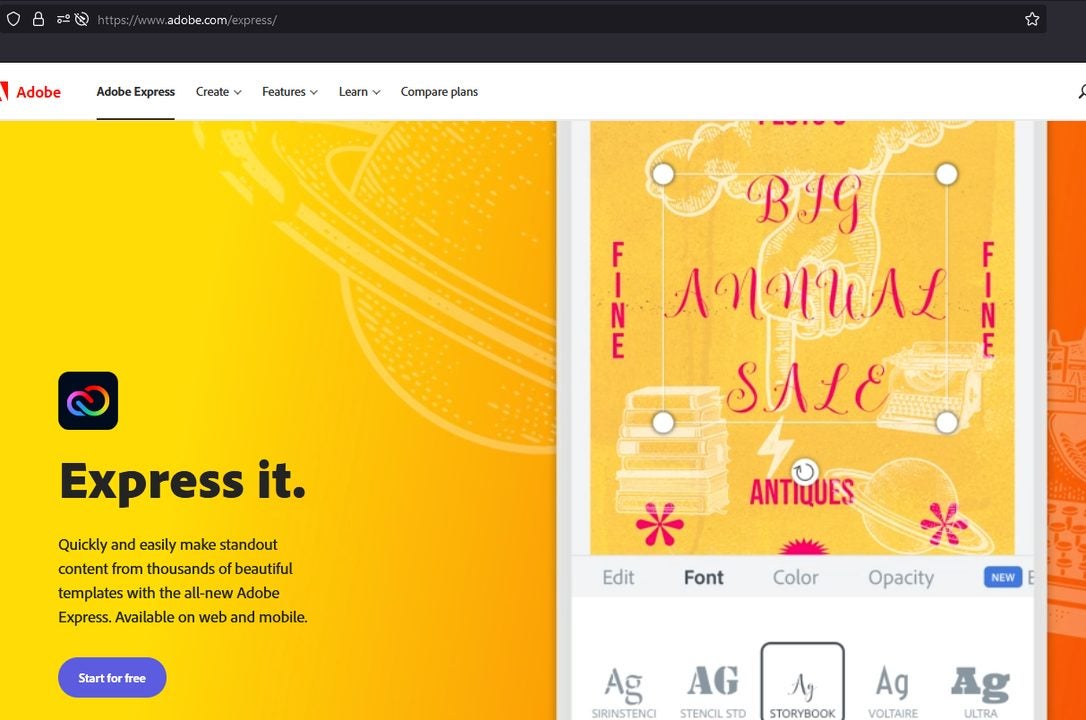
    Log in on this screen

    The first step is to log in with your account at Adobe.com. You may also create a free account if you are new to the service.

  2. Enable the remove backgrounds editor

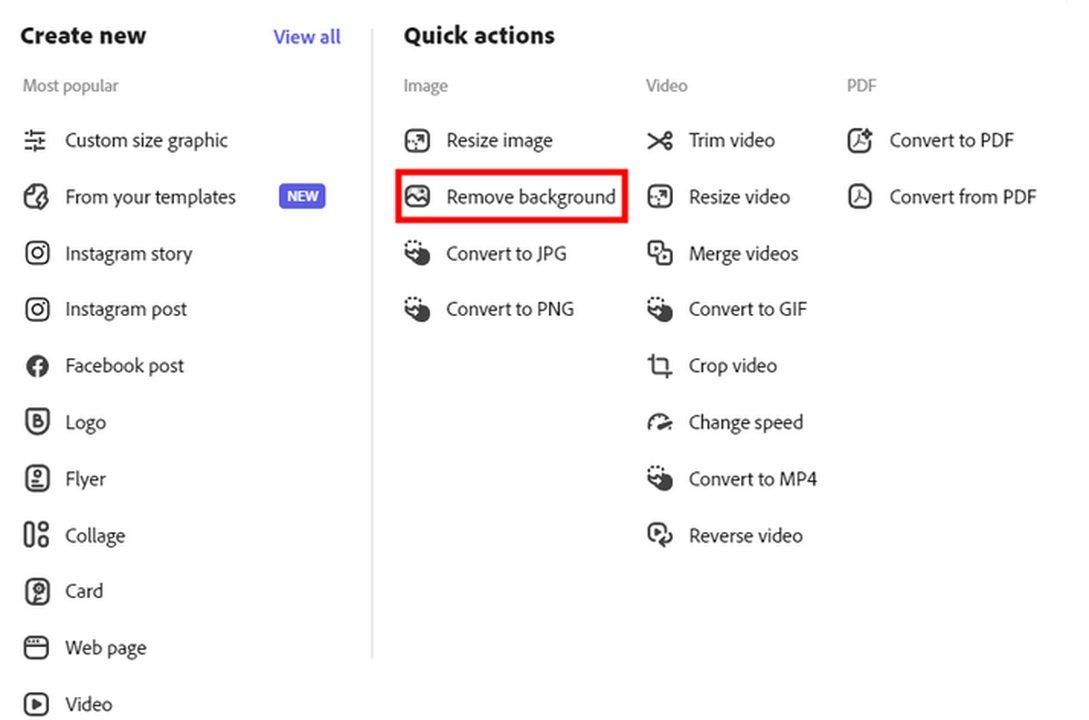
    Remove the background from an image

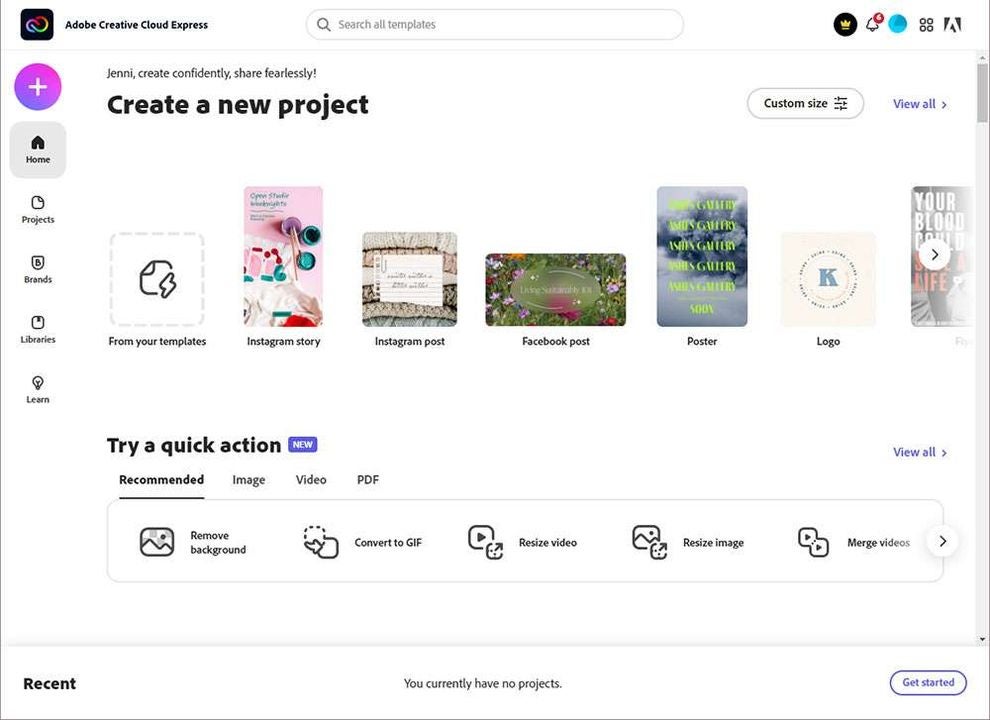
    The remove background feature is available entirely online. This means you are not required to download the optional background removal software. Only do this if you anticipate removing backgrounds away from your internet connection. You will need to access the quick actions menu to find the appropriate editing tool. To do this, click the + icon on the main page after logging in. On the list of options to your right, select remove background.

  3. Uploading your image

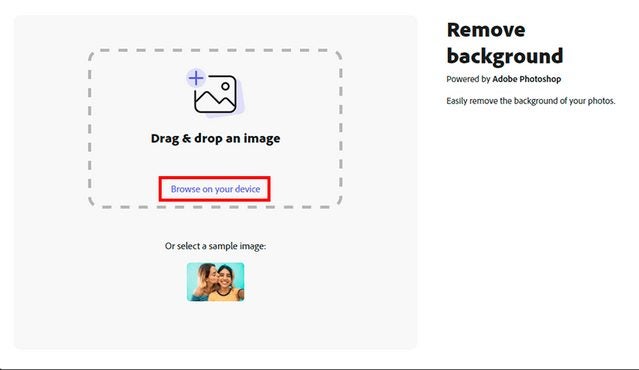
    Drag your image into this window

    Once the image preview window appears on your screen, click the browse on your device link to open the file browser. In the browser, select which photo you want to remove the background from. Alternatively, you may also drag and drop your image into the window if you already have a file browser or flash drive open.

  4. Allow the auto-processor to work

    One of the most convenient aspects of the background removal process is that it is completely automated by Creative Cloud Express. Just sit back and let the magic happen. You will have the option to customize the look of your image in a moment.

  5. Save or share the altered image

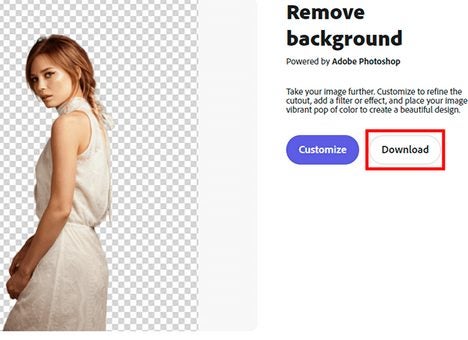
    Click download once image is complete.

    Once the automated background removal process is complete, you have the option of saving the image and then sending it to an external source. You can save the image directly to the current device as a PNG file by clicking the large download button. The new image will appear in your downloads folder in the file browser. If you wish to customize your image first, move on to the next step, and finish it up before clicking the download button.

  6. Add custom flair and refine your image

    Example templates look like this

    When previewing your altered image, click the customize button to gain access to a series of new options. If you already downloaded your image by mistake, you could access the same features by selecting start creating from the main menu.

    With your image selected on the create/customize screen, you have numerous options at your disposal. You can create text and choose from numerous fonts or colors. You can convert the image into social media posts, thumbnails, wallpapers, and many other media design formats. Choose from Adobe’s range of templates or pick individual design elements to get started. Should you download other images from around the web, you can incorporate them into your designs as well.

Take your images to the next level

The longer you use Creative Cloud Express, the more familiar you will become with the wide range of services on offer. It truly is a one-stop shop for all your creative design ideas. As you become increasingly serious about your creative output, you may wish to check out our Creative Cloud Express expert review. We will explain everything, including the other options on the market. It is always wise to learn more about the range of options available to creatives across the web.

How to use Adobe Express to simplify Instagram marketing

If you own a small business, you know how important online marketing is. You’re probably no less aware of how much time and energy goes into formatting high-definition videos and designing polished-looking graphics that will attract people to your Instagram.

Creative Cloud Express Download

In late-2021, Adobe launched Creative Cloud Express. It’s the replacement product for Adobe’s now-defunct Spark, an accessible and easy-to-use design application for beginners and creative professionals alike. The company’s latest suite of freemium, cloud-based design tools helps small business owners and influencers streamline their social media advertising plans in no time at virtually no cost.

Getting started with Adobe Creative Cloud Express

Creative Cloud Express is a template-based application that offers subscribers a myriad free of templates, original fonts, and access to a vast library of royalty-free stock images from Adobe. Perhaps the strongest appeal to using Adobe Express for Instagram is that, unlike dedicated design apps, the software gives you so much complimentary material to work with, making content creation a breeze.

You can use Adobe Express with a PC or mobile device, and the freemium edition comes with a healthy 2GB of storage. In this article, we take a detailed look at how the gratis version of Creative Cloud Express can take your Instagram business profile to new heights after just a few minutes of seamless effort.

  1. Sign up and choose your Instagram template

    In Creative Cloud Express, open a new project in the dashboard and select from two Instagram templates

    If you have an existing Adobe Creative Cloud account, use your credentials to access the app. If not, create a new profile. The app asks you to respond to a few prompts about its intended use after downloading it. This information helps the program decide which templates will be most effective for your purposes. Adobe Express even goes so far as to assess your current skill level with design apps to determine how much direction to give you.

    After navigating to the primary dashboard, choose one of the Instagram-specific templates to launch your project. If you’ve been worried about designing intricate graphics for your brand on Instagram, you’ll notice straight away how simple Creative Cloud Express makes things with its no-frills design concepts. Content on platforms like Instagram holds a low shelf life. It makes little sense to spend too much time consternating over your Instagram marketing materials.

    Adobe Express supplies the necessary tools to hold viewer attention with clean and professionally designed templates. Streamlined access to the suite of original material means you can budget your time accordingly, even automating postings while offline with the Content scheduler. Creative Cloud Express provides simple but effective visual templates to kickstart user engagement with your page.

  2. Explore your branding options

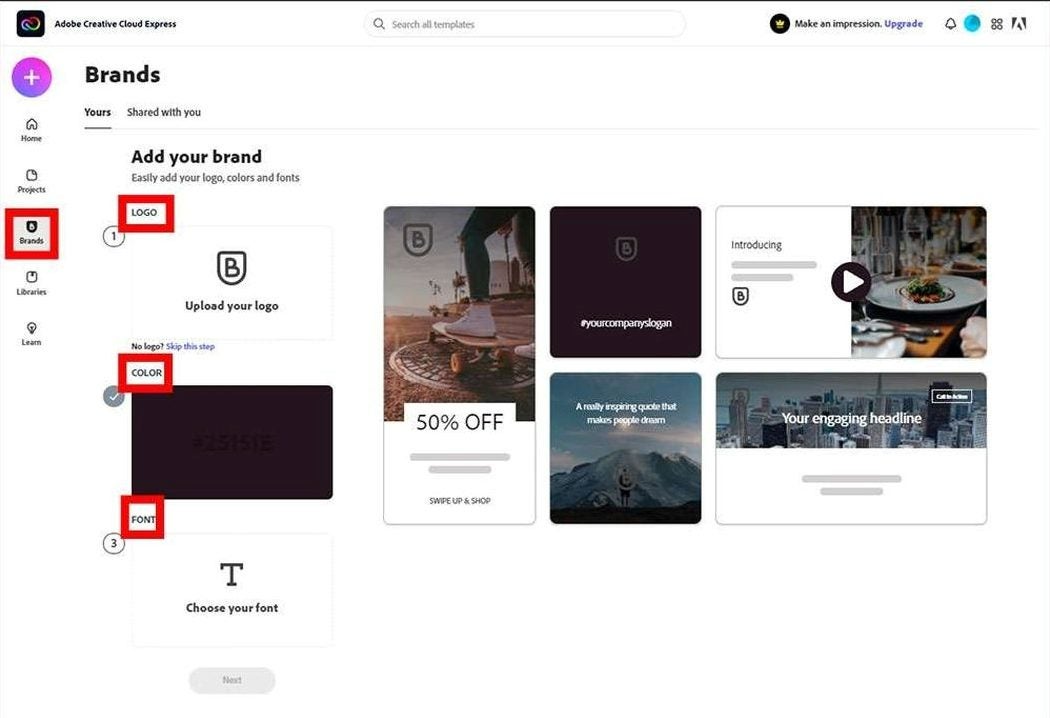
    Creative Cloud Express branding options.

    While Adobe Express is template-based for ease of use, your images are highly customizable. The Add your brand option allows you to upload your company logo. You can then further develop your brand image by adding customized text, different colored backgrounds, and pre-designed templates through a basic layering process.

    Choose from several design categories, including sales and promotion, events, lifestyle, and seasonal. After you’ve uploaded your logo and selected your preferred template, click the Edit text placeholder on the right. This tool allows you to change the placeholder text and incorporate your own unique marketing message. Edit text lets you change the font color and size, add shadow, and alter the font style. The application yields a multitude of accessible and complete templates, yet they are each customizable enough to help ensure you stay on brand.

  3. Create a dynamic Instagram story

    Adobe Express helps you grab your followers' attention quickly with unique Instagram stories.

    Upon mastering basic still image creation with Adobe Express templates, try making an animated Instagram story using a few slightly more advanced features in the application. Start by returning to the dashboard and clicking on Projects from the top left menu. Selecting the purple + sign instigates a new project and reveals an array of options.

    Click Instagram story. This brings up several preset template options again. Choose your preferred template and use the layers to apply various elements to your image. You’ll discover countless design elements to draw from in the dashboard. The Background option from the right-hand menu allows you to apply borders while Adobe uses its Sensei machine-learning to resize your content as the background changes.

A quick glance at using Creative Cloud Express for Instagram

Adobe Express is simple to use, requiring no previous experience, but even professional designers are impressed by its versatility. Adobe offers generous access to its impressive library of stock images, and you should find yourself rather hard-pressed to maximize your freemium creative options before hitting the paywall. To learn more about this app’s features, read through our guide to Creative Cloud Express.

Google Docs receives two new team-focused features

Google Docs is one of those programmes that is hard to believe it is free because of just how good it is. Sure, it may be a little light on features compared to Microsoft Word, but it has more than enough features to help most people and most professional teams get the job done. Collaboratively working in teams is one of the things Docs and the other programs in the Google Drive productivity suite do particularly well, and it is in this area that the Google Docs developer team is pushing out a handy new update.

Google Docs Download Now

A recent Google Workspace blog post introduces two new collaboration features coming for all Google Workspace customers. Let’s scroll down to take a look at these new features.

The first updated feature coming to Google Docs is called dropdown chips. These will be little chips you can add to a document that will quickly signify the status of the document or project to any teammate or colleague who opens it. The feature allows you to leave another type of chip on the document so you can also track the review process.

The options available on Project Status Chip include “Not Started”, “Blocked”, “In Progress”, and “Complete”. For the Review Status Chip, the options include “Not Started”, “In Progress”, “Under Review” and “Approved”. The new feature also comes with custom text options and different colour settings meaning you can create dropdown chips for all sorts of different types of projects.

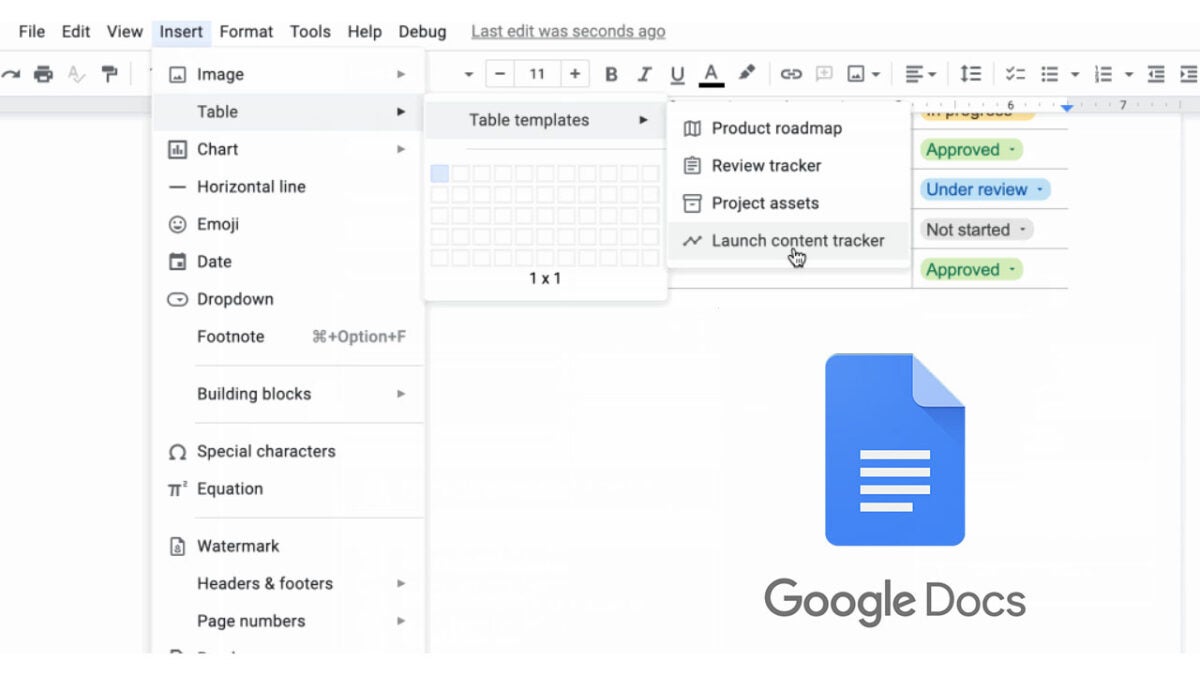
The other new feature coming in this update is table templates, which Google says will allow you to, “quickly insert building blocks for common workflows.” These include templates including Launch content tracker, Project Asset, Review Tracker, and Product Roadmap.

When combined with the dropdown chips, this tool puts powerful project management tools into the hands of Google Docs users.

These new features are already available to all Google Workspace customers and legacy G Suite Basic and Business customers too. This means you will have access to them now if you have any sort of premium subscription to the Google Workspace subscription. Unfortunately, there is no word on whether these features will come to the free version of Google Docs, but considering the collaborative nature of the features, it is highly unlikely they will be available on the free tool, which is primarily for personal use. If you use the regular version of Google Docs, why not check out some secret Google Docs tips and tricks to help you get more out of the free version of the app. You can also read our Google Docs Review to get a more rounded view of all feature.

Firefox turns 100: a look at all the new features

Mozilla Firefox is a great web browser and has been for a very long time. The app is now at version 100, meaning it has received 100 full updates since it first launched back in 2004. It’s a good job Mozilla was able to fix any potential Y2K-like issues related to the extra digit in the Firefox update number.

Mozilla Firefox Download Now

Back when it launched, Firefox was seen as the hot new kid on the block that had a chance to break through Microsoft Internet Explorer’s dominance of the market. Now that market dominance belongs to the Google Chrome browser that sits atop a crowded field that now includes the likes of Microsoft Edge and Safari. Firefox is still here though and is still innovating, so let’s dive into all the new features.

The first major new update coming to Windows, Mac, and Linux versions of the browser is the addition of subtitles and caption support to the Picture-in-Picture video feature that Mozilla added to Firefox back in 2019. To start with the feature works with Netflix, Prime Video, and YouTube meaning you can easily browse the internet while watching content on any of those platforms silently. You can in essence read what is going on in the Real Housewives of Beverly Hills while shopping for the shoes and handbags featured on the show at the office without anybody ever knowing!

The next big update comes to Firefox on mobile with the addition of new browser wallpapers. If you are an Android user, you should already have access to these new wallpapers with iOS users getting access sometime next week.

Another update to land on the mobile version of the app comes in the form of new clutter-free interfaces on history and tabs. For your browser history, Mozilla is adding an interesting feature that will actually group all related sites together. If we take our office shopping spree for fabulous shoes and bags as an example, the new Firefox features will group all visited sites browsed while searching for shoes into one tab and all the handbag sites into another. There will also be no more duplicate sites in your history either, which should make it much easier to navigate.

Tabs are another modern web browser feature that can easily get out of hand, particularly on mobile, and Mozilla is helping you deal with that through a new “Inactive Tabs” section. All open tabs that haven’t been used for 14 days will be moved to the new inactive section where you can easily re-activate or close them en masse.

The final brand-new feature is the HTTPS-only mode, which should help keep you safe online by automatically opting you into the more secure protocol. This new feature only comes to the Android version of Firefox, however, so iPhone users won’t be getting it.

If you like the sound of these updates, you should read our 4 ways to set Mozilla Firefox as your default browser guide.