YouTube is pulling the plug on YouTube Go

YouTube Go, alongside all the other “Go” variants of Google-owned and developed apps is designed to be a lighter version of the main app. It is easier to run on lower-end devices and in areas with low connectivity or high data prices. News of the YouTube Go app has to be seen as positive too, as over the 6 years since it was first introduced it has been downloaded over 500 million times. Despite this, however, the YouTube team has decided to discontinue the app, which will be “sunsetted” this August.

YouTube Go Download Now

It isn’t all bad news, however, if you are a YouTube Go user. The reason YouTube is giving for pulling the plug on the lightweight app is that it no longer thinks it is necessary to offer a separate basic version of the main YouTube app.

In the blog post announcing the move, Meaghan from team YouTube said:

“Since [we launched YouTube Go], YouTube has invested in improvements to the main YouTube app that make it perform better in these environments, while also delivering a better user experience which is inclusive of our entire community. Specifically, we have improved performance for entry-level devices or those that watch YouTube on slower networks. We’re also building out additional user controls that help to decrease mobile data usage for viewers with limited data – so stay tuned for more updates!”

This means that YouTube Go users should now be able to take advantage of the full YouTube app, no matter what their local conditions are. Depending on the functionality of the main app in such conditions, this could actually be seen as a win for YouTube Go users. YouTube Go offered a severely limited service without many popular features including being able to comment on videos, post videos or create content.

Does this news mean we could be about to see an extra 500 million potential content creators on the network? Only time will tell. If it does, our guide to monetizing your YouTube channel is here to help them all get rich!

Exciting new details for Overwatch Beta

It’s been just over a week since the Overwatch 2 Beta was announced, and the new content just keeps coming.

Overwatch 2 DOWNLOAD

The Overwatch 2 Beta was released to testers on the 26th of April 2022. That’s a little over a week ago. In that time, we’ve seen numerous new content drops for the beta, and more new stuff has just been announced. The latest content includes the addition of exciting new heroes, balance updates and added game features, and numerous changes being made to the Support Heroes. 

Blizzard, the publishers behind the Overwatch franchise, have stated that their primary goal for the Overwatch 2 Beta is to test out new maps and the Push game mode, as well as the shift to 5v5 battles. They’ll also focus extensive efforts on the overall balance of the game and server stability. 

Blizzard has also announced that the beta as it is today is merely the first test in preparation for the future PvP release. They’ve said that between then and now, we can expect more new content in the form of heroes, features, and maps. They also pointed out that they’re paying attention to bug fixes and enhancing the UI so that the game is as polished as possible. 

The current beta is integral to testing out the game’s balance and Support Heroes and will aid the devs greatly in adjusting any issues found accordingly. Numerous testers have expressed an interest in a ranked mode within the PvP beta, but Blizzard has decided, at least for now, not to include any such mode due to the current player concentration limitations. The studio also said that it is working on numerous ‘overhauls.’ 

Another thing that the Overwatch team may actively start working on is a complete reinterpretation of the Fire system. Blizzard has said it feels confident that it can provide ‘excitement for high-performing players.’ This is in addition to the changes coming to the scoreboard screen, including a real-time statistics display that mirrors other competitive esports platforms.

Register now for Overwatch 2 Beta with PvP arenas READ MORE

Microsoft nostalgia hits in Halo Infinite Season 2

April 3rd saw the release of the much anticipated Halo Infinite Season 2 FPS by 343 Industries. Season 2 of the massively popular first-person shooter came with brand-new maps, game modes, gear, and a Battle Pass. These are all things we have come to expect from games of the like and their subsequent updates. But there’s an addition in Halo Infinite Season 2 that no one saw coming; Clippy the paperclip.

Halo Infinite DOWNLOAD

Clippy the paperclip, officially known as Office Assistant, was an intelligent user interface asset in early versions of Microsoft Office that was capable of helping users perform certain tasks. He was removed from the Office ecosystem around 2007 but has since returned to Windows 11 to replace the standard paperclip emoji. 

His presence within the Windows ecosystem is practically iconic at this stage, but why has he come to Halo? The logical inclusion would have been as one of the game’s unlockable AI helpers. Perhaps that’s one of the future plans, but for now, he’s just a cosmetic Legendary-tier gun charm. 

In addition to having the smug, retired office assistant hanging on the side of your gun, you can also represent the early years of Microsoft through a new nameplate. This is due to arrive later on in the season. 

We don’t know, as of yet, how you’d be able to unlock the new Clippy cosmetics, but we can tell you one thing; They’re not bundled with the new Battle Pass. Speaking of the new Battle Pass, however, it comes with 100 tiers of rewards ranging from basic to premium. 

Season 2 also gave us three new game modes, one of which is Last Spartan Standing, in addition to other content that attempts to address the community being ‘simply out of patience’ over the lack of content.

If you’re looking for new content for Halo Infinite, check out this mod that makes Halo look eerily like Fortnite.

Halo Infinite with third-person view mod reminds us of Fortnite READ MORE

Top alternatives to Diablo Immortal until it is released

With the excitement of Diablo Immortal heating up and mobile gamers waiting in anticipation, we’re all eager to get into some action role-playing games (ARPG). There’s so much expectation for the Activision Blizzard title, especially after the long run of Diablo III and the upcoming Diablo IV.

Diablo Immortal DOWNLOAD

If you’re like us and running out of patience, we have a list of the best alternatives to Diablo Immortal that will feed your appetite for so long. There are plenty more on PC and gaming consoles, but we decided to keep our focus on mobile titles. They’ll give your fingers practice on your phones until the dark fantasy ARPG arrives.

Diablo 3 Battle.net Key Global Buy Now
Diablo 3 Battle.net Key Global

What is Diablo Immortal?

The Diablo series focuses on the titular demon from the bowels of hell who strives to enter a place called Sanctuary and destroy it and the high heavens. There’s a lengthy history and lore in each game that we fans are familiar with, as if it were our own tales. Such is the depth and connection of this incredible dark fantasy franchise.

Diablo Immortal is the first mobile game in the series, with the rest available on computers and gaming consoles. The story is set between Diablo II and Diablo III, filling in the gaps of what happened during that time. It’s an MMO ARPG, which means you’ll come across other players and can form Warbands to complete more challenging events. 

While many game elements remain the same, the MMO aspects make Diablo Immortal different from the other titles. You’ll still get to choose classes and abilities, but the mana meter is gone. There will be new and similar locations, but Blizzard adjusted dungeons and controls for mobile compatibility and touchscreen functions.

Best alternatives to Diablo Immortal on mobile

We apologize for teasing you and making you desire the game more. We’re just as anxious as you to get our fingers into the action. Until then, here are our top alternatives for Diablo Immortal on mobile.

Titan Quest: Legendary Edition

When Titan Quest first appeared in 2006, the RPG captured the hearts and minds of thousands of players. Mythology is entrenched deep in the storyline and events, while you’ll find several legendary heroes and creatures. Titan Quest: Legendary Edition is the mobile edition containing elements of all the PC games, including some DLC packs.

Titan Quest: Legendary Edition is probably the closest you’ll get to a taste of what’s to come in Diablo Immortal. You’ll find gore, loots, various characters, and more. Your primary quest is to defeat the majestic Titans across several cultures and mythologies towards supreme power.

Titan Quest DOWNLOAD
Top alternatives to Diablo Immortal

Eternium

When we searched for Diablo Immortal alternatives a few months ago, we came across Eternium. A few classes you can select are akin to how Diablo I started. The mechanics introduce an easy tap-to-move system that makes it enjoyable to play on mobile devices.

We’ve traveled quite far in the adventures in Eternium. One of the features that impressed us was the clear yet detailed inventory system that lets you compare new and current weapons or armor. You can quickly execute spells and combat from your screen, but we love collecting as many items as possible.

Eternium DOWNLOAD
Top alternatives to Diablo Immortal

Dungeon Hunter 5

Dungeon Hunter 5 is a Diablo Immortal alternative with many of the same features mentioned for the other titles. Where it stands out are its guild wars and multiplayer co-op functions. When you join the available raids, you can win Sanctuary gear similar to Legendary sets in the Diablo universe.

If you’re a fan of loot, weapons, and armor, Dungeon Hunter 5 doesn’t disappoint. There are almost a thousand items in total, and you can customize them to create a unique appearance. Of course, the fantasy ARPG also has spells and skills for you to master.

Dungeon Hunter 5 DOWNLOAD
Top alternatives to Diablo Immortal

Path of Evil: Immortal Hunter

It’s clear from the onset that TinySoft designed Path of Evil: Immortal Hunter to be almost exactly like the Diablo games. There are several dungeons to crawl, but you’ll start with selecting a class as usual. Each one has specific abilities you’ll need to master if you want to defeat the more challenging bosses.

We love how the game incorporates a map on the screen while playing, which makes us eager to see how Diablo Immortal will do it when the game arrives. The environments and battle scenes look similar to Eternium, but you’ll enjoy the crisp and clear colors and contrasts on every level. 

Path of Evil: Immortal Hunter DOWNLOAD
Top alternatives to Diablo Immortal

Raziel: Dungeon Arena

If you enjoyed the grinding experience that the seasons of Diablo III delivered, you might want to check out Raziel: Dungeon Arena. It provides more than sixty dungeons to conquer alone. For the multiplayer experience, you can join with friends and hit the co-op dungeons.

However, there isn’t a detailed plot in Raziel: Dungeon Arena as Diablo Immortal promises. The primary goal appears to be creating the best build to clear as many dungeons as possible. Still, it will keep you on your fingers and fighting away until Blizzard’s new ARP arrives.

Raziel: Dungeon Arena DOWNLOAD
Raziel: Dungeon Arena

When is Diablo Immortal launching?

Blizzard announced that we’ll see Diablo Immortal appear for mobile phones on June 2, 2022. In a surprising twist, there will also be a PC beta for Windows launching on the same day. It will be compatible with a keyboard and mouse, but you’ll have the same experience with the story and gaming elements. 

Another factor is that Diablo Immortal will have cross-play functionality. You’ll be able to switch off your phone and head to your PC to sign into your account and continue playing. It’s not often you find this functionality between computer and mobile games. Now, if only they’d also bring it to console as Genshin Impact did.

Genshin Impact DOWNLOAD

Get your fantasy RPG fix!

If you couldn’t tell, we’re on the verge of exploding in anticipation of this dark fantasy game. The Diablo Immortal alternatives listed above should keep us busy for the next month, but we’re dying to head into Sanctuary and fight the demons of hell once again.

Thankfully, we have Diablo Immortal launching on mobile and PC very soon!

Release date for Diablo Immortal announced for mobile and PC READ MORE

The Sims 4 announces May/June Roadmap

The Sims 4 team released a roadmap for content to be delivered during May and June. As exciting as it is to see new updates from The Sims 4 team, some would argue that it’s getting more and more difficult to keep getting excited only to be presented with overpriced kits and game packs that hardly contain anything truly new. 

The Sims 4 DOWNLOAD

The roadmap, teased by images on The Sims 4’s official Twitter page, seems to heavily feature a strong nocturnal theme. The Sims 4 even changed the classic plumbob reflected on their social media pages to a neon, almost futuristic style plumbob. The teasers also featured the hint’ Lights out,’ leading some to speculate we might be getting some kind of Sims 2 Nightlife/ Sims 3 Late Night-esque content. From the teaser, it’s evident that we’re getting two new kits and one new game pack over the next two or so months. 

So what can we expect in these new kits? Well, the catchphrases that accompanied the two kit teasers are ‘Chic Nights Out’ and ‘Cozy Nights In.’ The prevailing opinion within the Sims community here is that they’ll both most likely be CAS kits. We might get some outdoor furniture here and there or a light sprinkling of decor. But they’ll both most likely be CAS items. 

The game pack’s slogan is ‘Go Wild.’ Cryptic, it definitely is not. However, the Sims 4 official website comes with its own teasers. Here, you’ll see the phrase ‘Stay up with the Sims’ followed by ‘Step into the moonlight and explore who you are after dark.’ Werewolves. That’s the prevailing opinion amongst Sims 4 CC creators, players, and Game Changers. Werewolves. It almost sounds obvious, and they’re one of the only occult life states within the franchise that hasn’t made it into the Sims 4 yet. 

Honest opinion: It’s time for the Sims 5. The Sims 4 is the longest-running game in the franchise, and it’s become evident that we aren’t getting the Create-a-World tool, cars, or open-world mechanics that we’ve been asking for. So maybe it’s time to stop distracting us with overpriced kits and try and deliver the experience we’ve been missing from previous games in the next major title.

If we do get new items of some sort in one of the new kits, here’s how to rotate furniture in Sims 4 in three easy ways!

How to rotate your furniture in Sims 4 READ MORE

How to use Live Text in macOS Monterey

The latest Apple desktop computer operating system, macOS Monterey, introduced many exciting new features. One of the most useful is Live Text, the Apple version of OCR (Optical Character Recognition). 

macOS Monterey DOWNLOAD

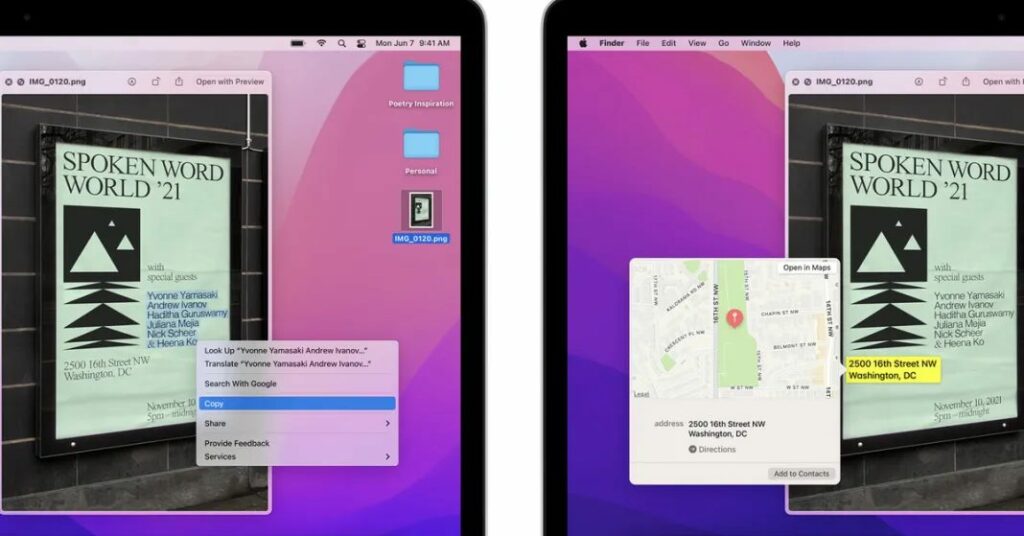
Instead of writing down the text, you find on a picture, note, or screenshot, you can copy and paste, translate, share, and save it on your clipboard. Live Text can recognize any type of text, including places, numbers, and addresses. This quick guide will show you how to use Live Text in macOS Monterey.

Where can you use Live Text?

To run Live Text on your Mac computer, you will have to have an Apple silicone chip and be running macOS Monterey. That is the operating system it was designed and introduced for, but you can also use it on an iPhone or iPad that runs iOS 15 or iPadOS 15.

Live Chat also works with Apple apps like Photos, Quick Look, Preview, and Safari, although not all features might be available in the search engine. 

How to use Live Text in macOS Monterey

Here’s how to get texts from images. You can copy it and then place it elsewhere.

  1. Open image with text

    How to use Live Text in macOS Monterey

    Launch the app you want to use and open an image with text.

  2. Move cursor

    How to use Live Text in macOS Monterey

    Place your cursor above the text in the image. The cursor will switch to the text selection tool. If you want to select a word, double-click. To select the whole sentence, triple-click on it. To make your selection manually, drag the cursor over the whole paragraph or as much text as you want to copy.

  3. Access Context options

    How to use Live Text in macOS Monterey

    Right-click or Control-click to open the Context menu, where you can access options for what to do with the text you have selected, like Copy or Look Up and Share.

What Live Text can do for you on macOS Monterey

Live Text gives you many options for easily getting texts from images. Here are some of them:

Copy text from photos

Press Command+C or right-click on the text and select Copy. Open the desired destination and paste it. If you have enabled the Mac Universal Clipboard, you can even paste the text onto an iPhone or iPad.

Drag and drop text between Mac apps 

You can drag the text you have selected from an image and drop it into another supported app or text field. You can even drop the text on the desktop, and Mac will create a .txt file for it. However, if your text is in Safari, you can’t drag it to another app but will have to copy and paste it manually. You can drag and drop text and photos across apps on your iPhone using iOS 15. 

How to use Live Text in macOS Monterey

Look up text from images with Live Text 

When you right-click on the text, the Context menu will pop up. There you can Select Look Up “text” to learn more about it. Siri knowledge, Siri suggested websites, dictionaries, news, and movies can pop up to help you learn more about the text you have selected. 

Translate text in images in macOS Monterey

From the Context menu, select Translate “text”. The translation, in the system’s default language, will pop up in a new window. If you want to change the language in which the text will appear, you can click the drop-down icon and change it to one of the other languages available.

How to use Live Text in macOS Monterey

Search the web for selected text 

You can also search the web using Safari to find more about the text you have selected from the image. Select Search with Google from the Context menu. A Safari tab with search results will open immediately.

Share the text in images with others

You can message or email the text you have selected to someone or save it to Notes or Reminders. Select Share from the Context menu and select the preferred option. 

How to use Live Text in macOS Monterey

Make a call, or send an email

If the image has a number, postal address, email ID, or website, you can add it to your contacts, call it, text, get directions, send an email, or visit the website. You don’t even have to select the text to do this. You can take the cursor near it and click the down arrow that will appear. Click it, and the Context menu will show where you can select what you want to do.

Speak the selected text in macOS Monterey

Safari mixes its default Speech feature with Live Text. It can then convert the selected text to speech. From the Context menu, choose Speech and select Start Speaking. 

How to use Live Text in macOS Monterey

Live Text makes text easier to work with

Apple’s Live Text removes all the hassle of getting texts from images. With the new feature, you can save or use the texts in many ways afterward, which is bound to become a very popular feature among the many offered by Apple’s versatile new operating system, macOS Monterey.

Tik Tok fans will either love or hate this Instagram update

Tik Tok is bigger than Google these days, which means the video-focused social network app should pretty much be considered bigger than the internet itself. It should come as no surprise then that other apps and social networks look over at the Chinese behemoth with envious eyes and maybe with a view to copying a feature or two. This latest update coming to Instagram seems to indicate that Meta has done exactly that. If you’re a big Tik Tok or Instagram fan you are either going to love or hate this.

Instagram Download Now

The head of Instagram, Adam Mosseri has taken to Twitter to put out a video describing a new test the social network is running on a new, “immersive viewing experience in the main Home feed.” In the video, Mosseri talks about the importance of video to the future of Instagram. This isn’t too much of a shock, considering that Reels, which is seen by many if not all as Instagram’s attempt at cloning the Tik Tok experience, already takes up 20% of the time users spend on Instagram.

Mosseri then goes on to describe the test, which includes displaying both photos and videos in a way that takes up much more of your screen. In a bid to be more immersive, the Instagram feed is going to start showing taller videos and taller photos. Yes, it all sounds very Tik Tok it has to be said.

Key changes shown on the full-screen image Instagram shared during the video include the likes, comments, and captions being at the top of the post instead of at the bottom. Interestingly, the Instagram Stories bar isn’t present on the screenshot, yet The Verge reports that Meta spokesperson, Seine Kime has said that screenshot is of the feed after the user has already started scrolling and that the Stories tab will in fact be there at the top of the feed.

The other key phrase that keeps coming up in the video is mobile-first. This pivot is seemingly a response to the move towards a world that will see more and more people accessing the internet using mobile devices before desktops. If you’d prefer a world where you get to straddle both mobile and desktop, you should check out our guide to using Phone Link to connect your phone to Windows 11.

Twitter testing new Circle feature and possible charges on the horizon

Twitter can be a daunting place and sometimes you don’t hit the Tweet button because you are worried about the responses you’ll receive from everybody who follows you. This is an unfortunate reality that affects too many social media users and not just those on Twitter. Fortunately, however, Twitter seems to be testing a new feature that will give users the power to Tweet what they like without having to worry about the responses they’ll get from internet trolls.

Twitter Download Now

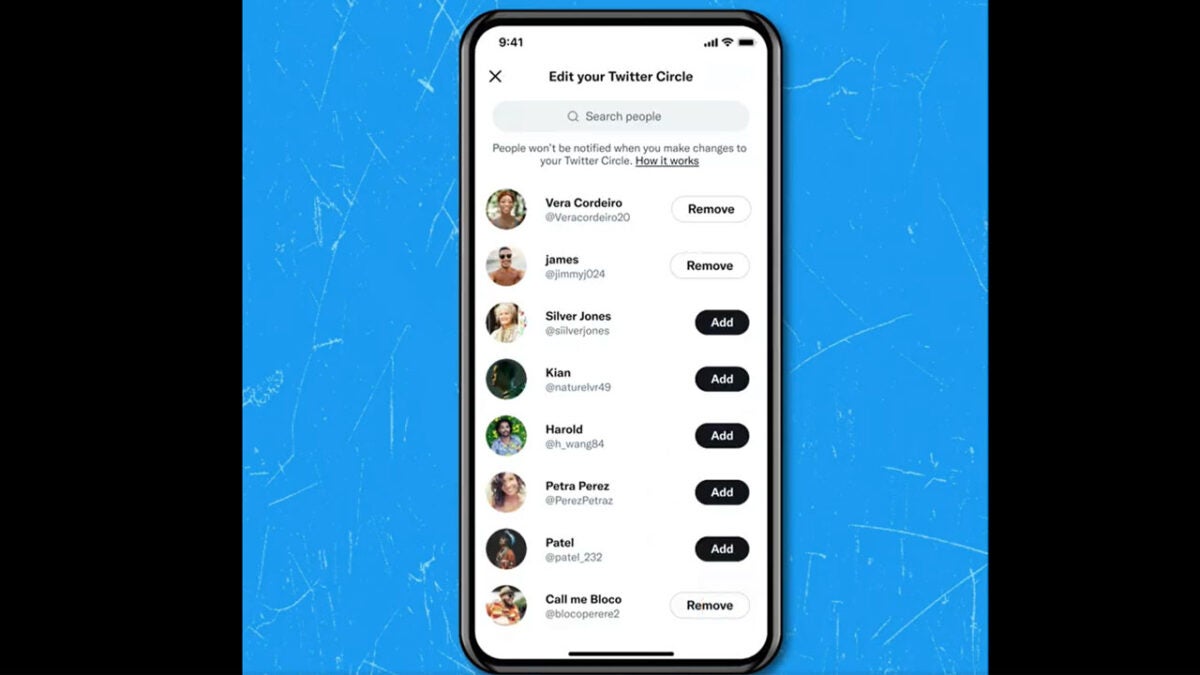
The Twitter Safety account, which posts updates about, “the latest safety tools, resources, and updates from Twitter”, has put out a new video demonstrating a new feature currently being tested called Twitter Circle. The new feature gives users the opportunity to create smaller groups for broadcasting messages that not everybody will be able to see.

The feature, which seems to be going through A/B testing at the moment, meaning not everybody will be able to see it yet, brings back memories of an old Google+ feature that allowed you to curate your own groups for sharing information with.

As the feature is only being tested at the moment there is no guarantee it will receive a full rollout to all users, but it is definitely a feature that we hope catches on. Mental health is a real issue when it comes to social media use, and we fully support any initiative that gives users more control over the online matters that may affect it.

Musk teases Twitter charges

Ever since Elon Musk bought 9.2% of Twitter stock, the social network has not stopped trending. It all went even crazier when Musk announced his leveraged bid to acquire the network, which was then accepted by the board. Since that moment, there has been a constant stream of tweets and leaks from the billionaire himself, seemingly laying out his plans for his new expensive plaything. The latest of which will no doubt turn some heads.

Musk’s latest tweet calls for the introduction of a charge for commercial and government use. It reads, “Twitter will always be free for casual users, but maybe a slight cost for commercial/government users”. It is good news that Musk is seemingly safeguarding free use of the platform, but it does indicate that he is already feeling the pressure to increase profits at the social media giant. This shouldn’t come as any surprise, though. Musk is pushing through a deal to buy Twitter will lumber the company with an additional $13 billion worth of debt. This adds up to a staggering $1 billion a year worth of interest payments alone.

Yesterday we told you about Telegram’s plans to introduce a premium subscription in a bid to increase revenue, which contrasts with WhatsApp’s Business model that charges businesses to set up official communications channels with their customers and clients on the app. It seems that Musk is looking at WhatsApp’s model for Twitter too.

What’s interesting here, is Musk looking to charge governments to use Twitter. This would mean that the guy who famously calls out governments for not being able to allocate people’s capital as efficiently as billionaires like him is, in essence, looking to spend public money to pay off interest payments on his own debt.

With Musk’s official takeover now seemingly just around the corner, it will be interesting to see how he plans to implement his ideas about freedom of speech and making the Twitter algorithm open source. One upcoming new feature that we can already see, however, is the new Twitter edit Tweet button.

WhatsApp update bringing the power to delete other people’s messages

WhatsApp groups, you either love them or you hate them. We all have friends who start a new WhatsApp group for every single social occasion and we also all have friends who make a big point of complaining about every single group they are in. Well, this latest WhatsApp feature, spotted in a recent beta version is going to change the way WhatsApp groups work forever and will affect both types of friends in the long run. Let’s check it out.

WhatsApp Download

According to WABetaInfo, WhatsApp beta for Android 2.22.11.4 includes a feature that WhatsApp has been working on for a while. As well as anupcoming WhatsApp update that will allow you to block certain contacts from seeing your status, and another making it possible to link a second mobile phone to your WhatsApp account, the messaging app will soon allow WhatsApp group admins to delete other people’s messages in the groups.

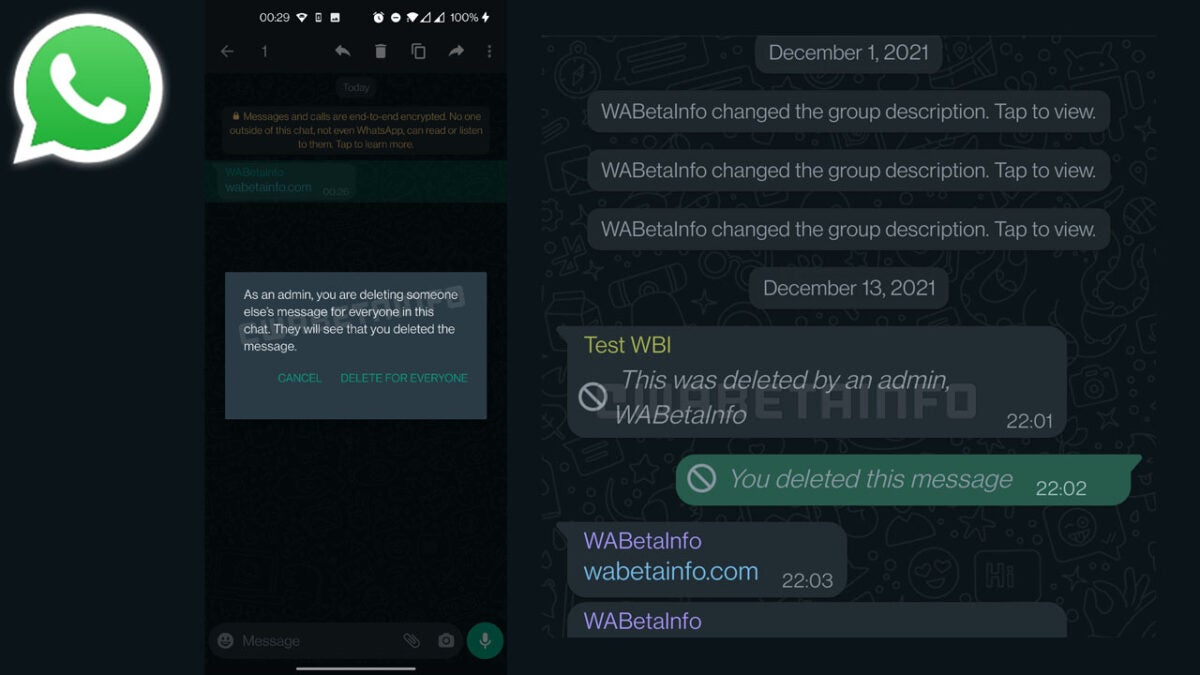
The new feature, as mentioned in the changelog of the latest beta version of WhatsApp gives admins the power to Delete for Everyone the messages of any member of the WhatsApp group. This means that every message sent to groups that have the feature enabled could be disappeared by the group’s administrator.

If this all sounds a bit draconian, don’t worry as WhatsApp will ensure that everybody knows about all deleted messages and will tell the group exactly who it was who deleted them. This will be useful for groups that have multiple admins. News of this upcoming update follows on from another recent feature to hit the WhatsApp beta, which extends the window for deleting your own messages up to a whopping 60 hours. When that feature drops you will have two and a half days to delete your messages and, theoretically, when this update drops, group admins will have the same amount of time to delete everybody else’s messages from the groups they are administrating.

As always with these WhatsApp beta leaks, we can’t tell you when exactly to expect these new features. Just know that WhatsApp is actively developing and testing them, which means they shouldn’t be too far off. What do you think? Who would you rather be wielding these new powers over your WhatsApp groups? Would you prefer your “everything needs a group” friend or your “grumpy grouper” friend to have the power to delete your messages? If you don’t like the sound of these features falling into either of their hands, check out the best alternatives to WhatsApp in 2022.

Image source: WABetaInfo

Roblox launches Spotify Island, offering players musical experiences

Roblox is a popular gaming platform where players can enjoy various worlds and games created by other fans and developers. Roblox has many fans worldwide, so brand partnerships make sense. We’re finally starting to see this happen. Spotify Island has just launched on Roblox, giving players a new and unique way to interact with music and artists.

Roblox DOWNLOAD

Spotify is the first music streaming service to enter the Roblox metaverse with its own game. Spotify Island is a paradise of sound, a space where music lovers and artists can come together, explore the wonders of sound, complete quests and collect exclusive merch.

On the main island, users will also be able to completely immerse themselves in music by creating their songs and soundtracks at the virtual beatmaker stations in the game, which are powered by Soundtrap. The game will also include numerous musical-themed easter eggs for fans to collect.

Players familiar with Spotify will notice familiar brand-specific markers all around them on Spotify Island. For one, players will be able to collect the Spotify heart-shaped ‘like’ icon. These hearts can be exchanged for exclusive merch. Providing this feature gives Spotify fans a new way to interact with the brand – and it’s entertaining as well. 

There also won’t just be one island to explore. From the main Spotify-themed island, players will be able to travel to smaller themed islands that will be brought to life throughout the year. Each new island will feature exclusive themed merch and content, artist interactions, and mini-quests. The first themed experience users can enjoy will be K-Park, a homage to K-Pop. Later this Spring, players will even have the opportunity to interact with the artists from popular K-Pop bands, Stray Kids and SUNMI.

Last year, Roblox also partnered with Sony to bring more artists to the platform, and we’ve yet to see what this partnership can bring. There should be a lot of exciting developments in Roblox in the coming months. We look forward to seeing what new themed islands appear on Spotify Island, especially with Roblox attracting professional game developers now.

Roblox attracts pro video game developers READ MORE