Fortnite X Rocket League in-house collaboration

Epic Games has launched a Fortnite collaboration with Rocket League. This collaboration has resulted in the inclusion of Rocket League’s most well-known and best-loved vehicle, the Octane, blasting into Fortnite. 
Fortnite DOWNLOAD

This collaboration shouldn’t really come as a surprise, more a move that may be slightly overdue as both Fortnite and Rocket League are Epic Games’ IP. Epic Games own Rocket League’s developer, Psyonix, so this is technically an in-house collaboration. 

You’re familiar with Fortnite collaborations by now, but this isn’t what you think. The Octane isn’t joining the Fortnite universe as a badge, skin, or sticker. Instead, this is a fully functional car. Even more than that, it’s just as functional as the real thing is in Rocket League. In a recent blog post, Epic Games announced that the Octane is heading into Fortnite with functional boosters. The car will also be able to jump and double-jump as it does in Rocket League, and you’ll even be able to drive on walls. Even more exciting than anything else said thus far, the Octane is able to fly, however, only for short bursts. 

Fortnite X Rocket League in-house collaboration 2

I swear I didn’t think that this announcement could get any more exciting, but it actually does. So, along with this incredible car that we all love to bounce around the Rocket League fields in, Epic Games has announced a competition of sorts. Epic Games would like us, the Fortnite community, to design an island around this car and its incredible capabilities.

You’ll need to check out the official contest guidelines here for the specifics, but essentially, Epic Games want us to use the car to ‘its fullest potential.’ If you’ve been wanting to design an island for a while and haven’t really had the push you’ve felt that you’ve needed, here it is. This is the push. This is the best excuse to head into creative mode and whip up something truly spectacular with the Octane and its insane capabilities in mind. 

The Octane dropped with Fortnite patch v22.10, which also introduces a chest option, a long-range weapon, and the highly-anticipated return of a Fortnite fan-favorite. If you’ve missed the latest news, the game recently leaned into accusations that it’s a dead game with a brand-new tongue-in-cheek Fortnite pack.

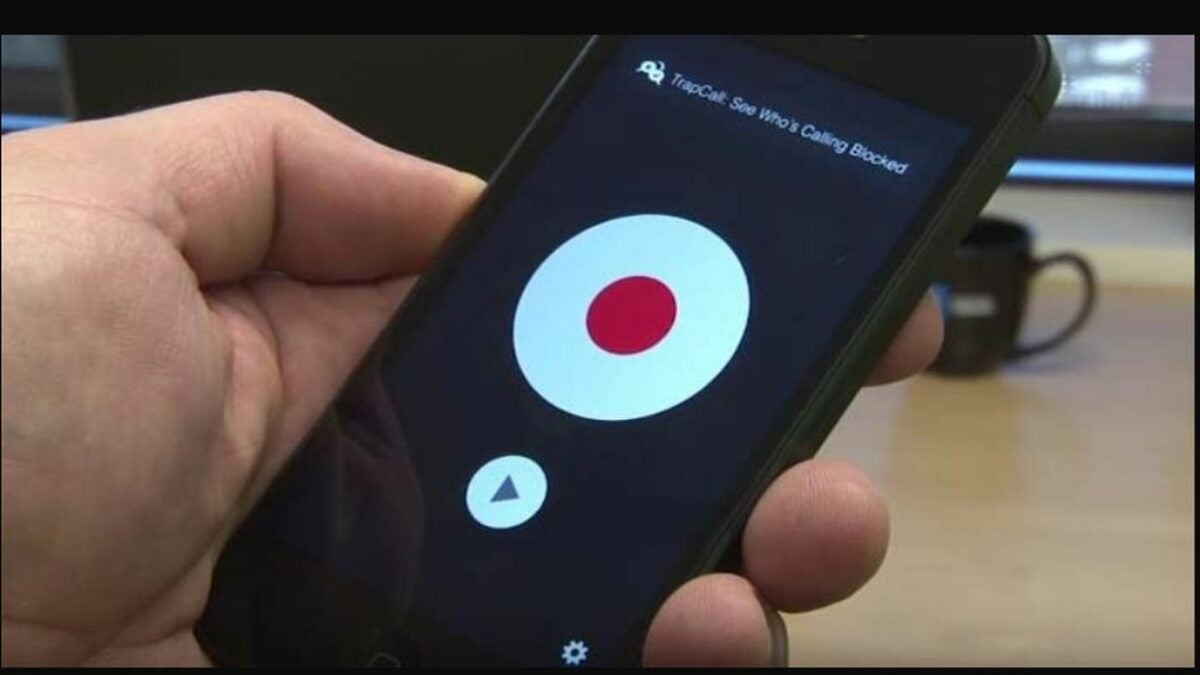
The 5 best apps for recording calls on Android phones

It is reasonable to assume that Android devices would make it simple to record calls out of the box. However, this basic option is not available in the standard operating system. With each update, users must look for external apps that remain compatible with the latest firmware. The good news is that there are many third-party solutions that you can download to get the job done on any version of Android.

There are some seriously impressive free services for recording calls on Android, and the option to upgrade to premium apps is also available. As with any market, each call recorder app has its own strengths and weaknesses to consider. The following breakdown will assist you in choosing an app that fits your needs.

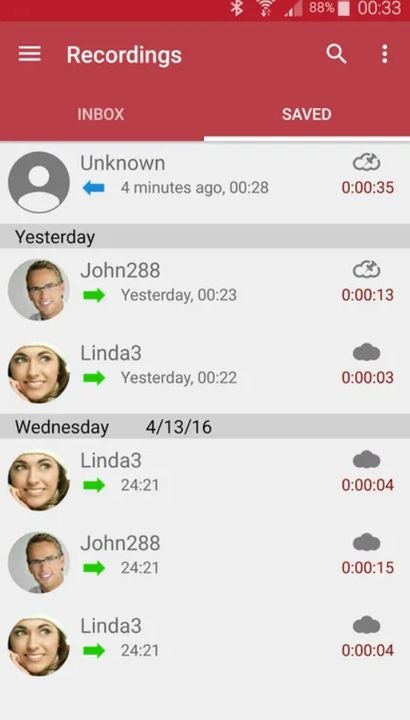
Automatic Call Recorder

As the name implies, Automatic Call Recorder by Appliqato captures each of your conversations without you having to do anything extra. You can also determine which calls are recorded by enabling individual names on your contacts list. After you make a recording, you can effortlessly upload them to a cloud storage platform like Google Drive and Dropbox for later use. There is no limit to how many recordings you can make, except for your device’s available memory.

Automatic Call Recorder APK Download
Easily view and manage your list of recordings from this screen

Google Voice

If you are in a supported region, Google Voice is an excellent free solution for recording phone calls. Before each conversation, you have the option to record it with the press of a button. The real standout here is the app’s ease of use. Much like everything else Google does, the process is streamlined enough that non-tech-savvy people can work through it. Another nice feature is the ability to forward calls from your standard phone number directly to your Google Voice line.

Google Voice APK Download
Customize which calls get recorded with Google Voice

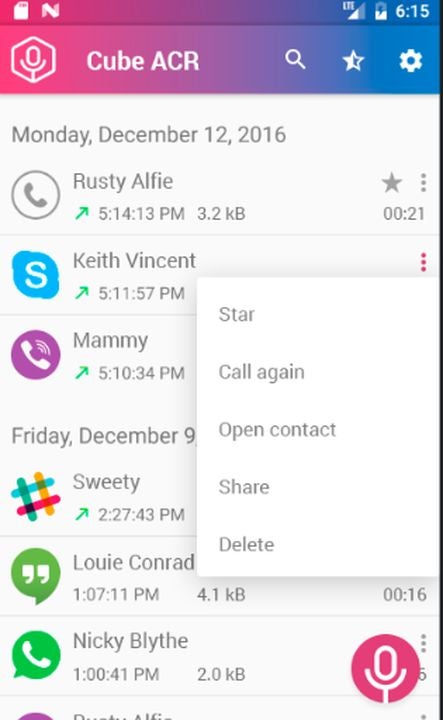
Cube Call Recorder ACR

One of the most popular apps in this space is Cube Call Recorder ACR. The app is no doubt this popular thanks to the reliable service and security features built-in. Support for VoIP services such as Slack, WhatsApp, and Facebook Messenger is also appreciated. For sensitive phone calls, you can hide the recordings from the file list on your device.

Cube Call Recorder ACR APK Download
Cube ACR makes managing your recorded files a breeze.

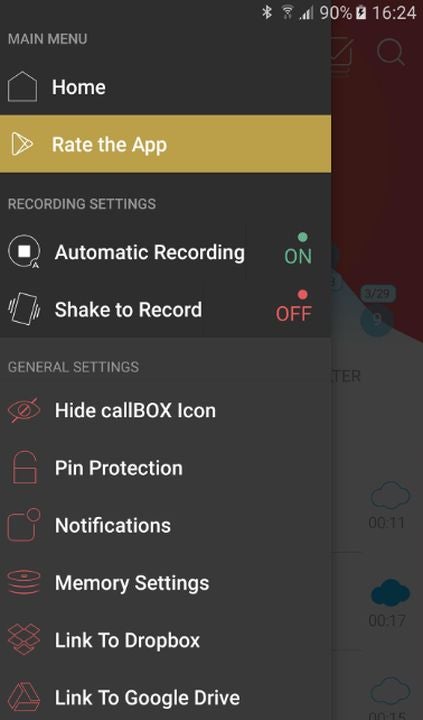
Automatic Call Recorder Hide App Pro callBOX

SMS Robot delivers one of the most fully featured call recorder apps available on Android. Not only can you record each call in HD quality, but you can even remove sounds and traces of other apps while recording. When you need crisp audio quality with no distracting noise, callBOX will provide the clarity you need. Each call is automatically recorded and stored as an mp3 file. The advantage of the mp3 format is that you can easily transfer the file to any other device or software.

Automatic Call Recorder Hide App Pro callBOX APK Download
Back up your recordings to cloud storage with just one tap of a button.

RMC – Android Call Recorder

Record My Call is another simple option for capturing the most important conversations had on your phone. You can set up automatic recording for both incoming and outgoing phone calls. Better yet, there is a manual record feature that allows you to instantly start capturing audio mid-call with the press of a button. After you complete a recording, you have several options for which file format you would like to export as. You can even backup your files on the cloud storage platform of your choice.

RMC: Android Call Recorder APK Download
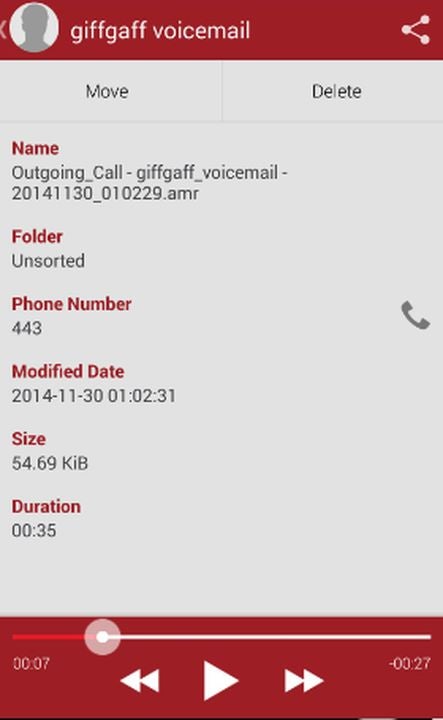
RMC allows you to record voicemail messages in addition to regular calls.

Protecting yourself from spam calls

One of the most common reasons for recording phone calls is to have some evidence in case you get scammed. The abundance of telemarketers and robo-callers puts you at risk whenever you use your phone. However, you can mitigate most spam calls with the help of the Truecaller app for Android. This handy software automatically blocks the onslaught of spam calls that could potentially result in your data or money being stolen. Having fewer dishonest phone calls to record will make your life much easier.

The EU now requires all portable iPhone consumer tech to use USB Type-C charging ports by 2024

The EU is one step closer to the common-charger dream shared by millions of Europeans. This means that as unique as Apple has consistently tried to keep its products like its iPhone, it’ll soon be legally required to use the same USB Type-C charging ports on its iOS 16 devices as other brands. 

iOS16 DOWNLOAD

‘The common charger will finally become a reality in Europe. We have waited more than ten years for these rules, but we can finally leave the current plethora of chargers in the past.

This future-proof law allows for the development of innovative charging solutions in the future, and it will benefit everyone – from frustrated consumers to our vulnerable environment.

These are difficult times for politics, but we have shown that the EU has not run out of ideas or solutions to improve the lives of millions in Europe and inspire other parts of the world to follow suit.’

The law was first proposed in 2021 as a way to reduce e-waste. This is so that consumers don’t have to purchase an endless barrage of charging cables to fit all of their devices. Under the new law, consumers also won’t have to purchase new chargers every time they acquire a new piece of portable tech. 

The USB Type-C charger was selected as the de facto common charger due to the numerous advantages it has over other charger configurations, such as unified fast-charging capabilities. 

EU now requires all portable iPhone consumer tech to use USB Type-C charging ports by 2024

As expected, the new legislation is going to affect Apple more than any other company due to its avoidance of USB Type-C charging ports on its devices in favor of the Apple-exclusive Lightning connector and port. Apple has spoken out against the law, claiming that losing the Lightning connector will actually create waste as it would make Lightning-compatible devices obsolete. 

We’re not worried, portable devices see such frequent upgrades these days that devices don’t typically make it past the two-year use point. Apple, and other companies, have until 2024 to change their charging ports to the new standard USB Type-C, which is likely in time for the next iPhone range in any case. 
In other news, you might think you’re downloading a legitimate piece of software, but, as we’ve found out, some iOS 16 and Android apps are complete scams.

Pokemon GO announces increases in in-game prices on all platforms

The developers of Pokemon GO made an announcement regarding in-game prices that upset some fans. Niantic announced that due to Apple’s Eurozone price hike, players in certain countries would see an increase in in-game prices. What has fans in an uproar is the fact that this price hike will come to all platforms, not just Apple.

Pokemon GO DOWNLOAD

Fans in Ireland and mainland Europe can expect to see those increases from today. Countries that use the pound are spared for the moment, but many others will still be affected. Pokemon Go players in Poland, Sweden, Chile, Egypt, Malaysia, Pakistan, South Korea, Vietnam, and even those in the birthplace of Pokemon, Japa, will be affected by this Apple price increase.

Apple may drive this increase, but Niantic has decided to increase prices across all platforms in these countries, including Android. This decision has received some pushback from fans that are upset about the increases when they don’t own an Apple device. While some fans understand this move as Niantic is trying to be fair to all players, regardless of the device they chose.

Pokemon GO announces increases in in-game prices main

The changes in Apple’s prices are significant, making it understandable that developers on this platform might have to adjust their prices accordingly. Apple tiers that charged apps €0.99 have increased to €1.99, and tiers that were €9.99 per app increased to €11.99.

Niantic has also stated that aside from these increases, they won’t be making any other changes and will monitor the impact this has and then decide how to navigate changes on a global scale.

These changes can have a significant impact on Pokemon GO and players alike, so we’ll monitor the situation to see how things develop. On a lighter side, player surveys have recently narrowed down who the least favorite Pokemon Go character is.

VLC prepared to fight back against India’s nationwide ban

VideoLAN, the creator of the free video player and editing utility, VLC media player, has hit two Indian ministries with legal notices in response to the country’s recent ban on its software. The company asserts that the ban was illegal and is in contravention of prior decisions made by the Supreme Court of India. 

As VideoLAN asserted in a recent press release: ‘This was done without any prior notice, or affording VideoLAN an opportunity of hearing, which is contrary to the 2009 Blocking Rules and the law laid down by the Supreme Court in Shreya Singhal v Union of India.’ VideoLAN is not on its own, however. India’s Internet Freedom Foundation (IFF) has joined forces with VideoLAN to try and get to the root of the block and appeal the ban. 

India’s Department of Telecommunications, the entity that instated the ban in the first place, has remained silent on the matter. In June 2022, the Internet Freedom Foundation submitted an application for the Right to Information. The application was issued to the DoT, which then pushed it through to the Ministry of Electronics and Information Technology (MeitY). Despite being the best equipped to level a meaningful response in the matter, MeitY issued the standard ‘No information is available’ retort. 

VLC developer gets serious over nationwide ban main

Even though India has yet to respond to VideoLAN’s correspondences, some people suspect that the reason behind the ban may have to do with Cicada. Cicada is a Chinese hacking group with links to the State. Cicada is mentioned in a Symantec report that details the group’s use of VideoLAN IP, particularly the VLC media player, as a means of delivering remote control malware to unsuspecting devices across Asia, Europe, and North America. The report describes evidence of an ‘advanced persistent threat group’ that targets legal, religious, governmental, and civilian organizations in these territories. 

Even though VideoLAN’s recent actions don’t guarantee that the company will take legal action, there is every chance that the situation could end up there in any case. Should India not be forthcoming with its cooperation in this matter, VideoLAN has warned that it ‘will be entitled and compelled to initiate legal proceedings against you for failing to protect our rights.’

VLC media player is an incredible utility and the solution to those weird visuals you used to get on Windows Media Player when trying to play ‘unsupported content.’ If you’ve always wondered how to run multiple instances in VLC media player, we’ve got you covered.

CD Projekt Red announces new IP, new Witcher trilogy, and Cyberpunk sequel

We’ve all been hyperfocused on Rockstar and the recent GTA VI gameplay leak lately. However, there’s big news coming at us from all sides this week. CD Projekt Red is the focus of our attention today, and the Warsaw-based studio has made an announcement that might overshadow Rockstar for weeks to come. CD Projekt Red has announced no less than five new projects coming our way within the next few years, one of which includes The Witcher 4 and the news saga.

The Witcher 4 DOWNLOAD

The announcements came during a presentation delivered by the Warsaw-based studio yesterday. The purpose of the presentation was to highlight future plans, but the studio focused on its recent successes at the onset. CD Projekt Red started by delivering an update on how much the company has grown since the first quarter of 2022, stating that more than 65 million copies of the Witcher trilogy were sold during this time.

It added that Cyberpunk 2077 had simultaneously seen over 20 million copies sold worldwide. The company then introduced its plans to keep the upward momentum going with three new games in The Witcher franchise. The games were unveiled under the working titles Project Polaris, Sirius, and Canis Majoris. The studio also announced a sequel to Cyberpunk 2077 under the working title Project Orion

CD Projekt Red has a new Witcher trilogy

Project Polaris will be the jump-off point for the new Witcher trilogy, and the studio has said that it will pick up where we left off with The Witcher 3: Wild Hunt. In contrast, Project Sirius has been described as an ‘innovative take on The Witcher universe telling an unforgettable story for existing Witcher fans and new audiences.’ Project Canis Majoris brings even more variation into the new trilogy and is in development by a third-party studio. Worry not, however; the development is being steered by ex-Witcher veterans. CD Projekt Red has stated that all three of these projects are expected to release within the space of six years. 

The previously mentioned Project Orion is set to be a sequel for Cyberpunk 2077, capitalizing on the success of the franchise’s current iteration. Cyberpunk 2077 started off strong but experienced a wane in popularity until around two weeks ago. The resurgence of the game’s popularity coincides with the release of Cyberpunk: Edgerunners, a new anime on Netflix. The studio hopes to ‘prove the full power of the Cyberpunk universe’ with the next iteration of the game. 

CD Projekt Red could have left it at that, but it didn’t. Instead, it announced a brand-new IP under the working title Project Hader. The studio has confirmed that the new project is completely separate from Cyberpunk 2077 and The Witcher. However, the new title will introduce multiplayer game modes to CD Projekt Red’s single-player games going forward. This means that Project Hader is likely the most significant announcement as it’s set to change the way that CD Project Red approaches its titles from here on out. 

I don’t want to brag, but we knew this was coming, especially concerning The Witcher franchise. Shaun M Jooste posted his thoughts early in September, and now that the announcement is official, it’s fun to go back and see how we did with our predictions of the future of The Witcher 4 saga.

Businesses are losing against cyberattacks as shocking stats are released

We frequently hear about new cyberattacks in the news, but the effects these attacks have on businesses are astronomical. Despite more businesses using measures such as Atlas VPN, proxies, and other security measures, the frequency of cyber attacks is climbing, and especially small and medium-sized businesses are suffering

Atlas VPN DOWNLOAD

The 2022 US Cybersecurity Census report has been released. It illuminates just how bad these losses are, with 37% of businesses reporting that they lose over $100 000 per successful attack. This percentage is broken down into 22% of businesses reporting losses higher than $100 000, with 11% of businesses losing between $500 000 and $999 999 and 4% claiming to have lost more than a million from successful cyber attacks.

As if the above statistics weren’t bad enough, the report also stated that businesses face approximately 42 cyberattacks annually. Out of those attacks, about three are successful. One cyber-attack can cause significant damage, and more than one can cause a catastrophe, especially for small and medium-sized businesses.

Aside from the major financial losses that successful cyber attacks cause, businesses also have to deal with other damages. 31% of businesses reported disruptions in partner and customer operations, and 28% reported damages to reputation and theft of confidential financial information. 24% had to manage supply chain disruptions, with 23% experiencing a major disruption of business operations. Furthermore, 19% of businesses noted a loss of business contracts, while money theft was present in 18% of companies.

cyberattacks stats

More worrying than all these statistics is that 48% of businesses were aware of the successful cyberattack but did not report it to the appropriate authorities. This significant lack of transparency causes further damage to the company’s reputation and can make these attacks more dangerous and prevalent.

Businesses are doing more to improve their cybersecurity, such as using VPNs, proxies, and stronger security protocols. However, this isn’t enough if a business can’t also be transparent about attacks. Therefore a data security and response plan is essential for any business. Remember, it’s best to always ensure you remain safe online.

How to use Telegram Download Manager in 5 simple steps

The Telegram messaging app has grown increasingly popular over the last few years. This messaging platform is serious about user privacy with enhanced privacy measures, powerful encryptions, and features like secret chats. However, it isn’t only these enhanced privacy features that make the messaging app so popular.

Telegram DOWNLOAD

It also has many other features that make it a worthy contender to other popular apps like WhatsApp. One of these features is sending and receiving files up to 2GB with unlimited cloud storage. Monitoring these downloads is also possible with a new native download manager. Let’s take a look at how to use Telegram Download Manager.

How can I use Telegram to download?

The Telegram Download Manager is a new feature that was released in March 2022. Many users are still unaware that it’s available since it is hidden quite well. However, for those that want more control over their downloads, having a download manager available directly in the app is very useful. 

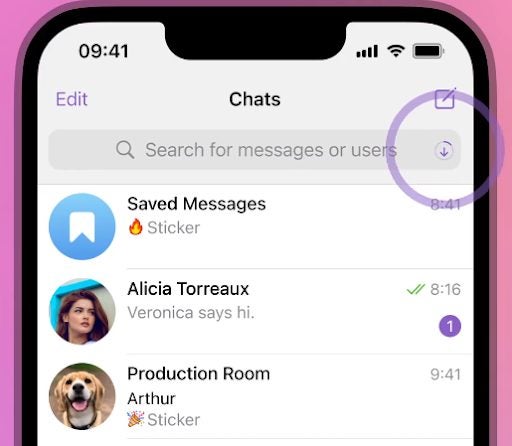
You can use the Telegram Download Manager to monitor the status of downloads, set the priority to ensure what’s downloaded first, and more. You may notice that while you’re downloading a file on Telegram, a download icon progress bar will appear in your search bar showing how far the file has been downloaded. Once the download has been completed, this progress bar switches to the next download file in the queue or vanishes completely if there’s nothing left to download.

How to use Telegram Download Manager

Let’s take a look at how to use Telegram Download Manager to monitor and manage your downloads.

  1. Launch Telegram

    How to use Telegram Download Manager

    Launch the Telegram app on your smartphone by tapping on the app icon found in your app tray.

    Tip: For easier access, add Telegram to your home screen.

  2. Tap on the search bar

    How to use Telegram Download Manager

    You first need to access your tabs on Telegram to get to your downloads. To do this, tap on the search button in the screen’s upper-right corner.

    Tip: This step is different on the Telegram desktop client. Instead of clicking on the search button, you need to go into your settings by clicking on the four vertical stripes. Then click on ‘Establishment,’ next click on ‘Advanced,’ and you’ll access the download manager.

  3. Navigate to ‘Downloads’

    How to use Telegram Download Manager

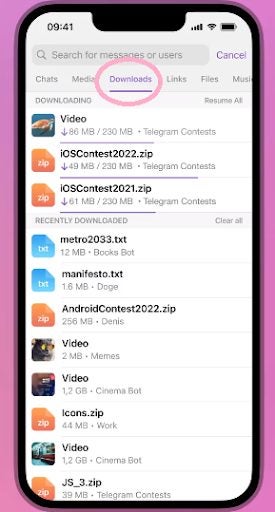
    Once you’ve tapped on the search button in the mobile app, you’ll see different tabs appear. You can move to other tabs by swiping the screen. First is the ‘Contacts’ tab. By swiping right, you’ll go to the ‘Media’ tab. By swiping right once more, you’ll reach the ‘Downloads’ tab.

    Tip: By clicking on the download icon in the search bar while a file is downloading, you’ll be taken straight to the download manager. However, this is only available while a file is downloading.

  4. Monitor and manage downloads

    How to use Telegram Download Manager

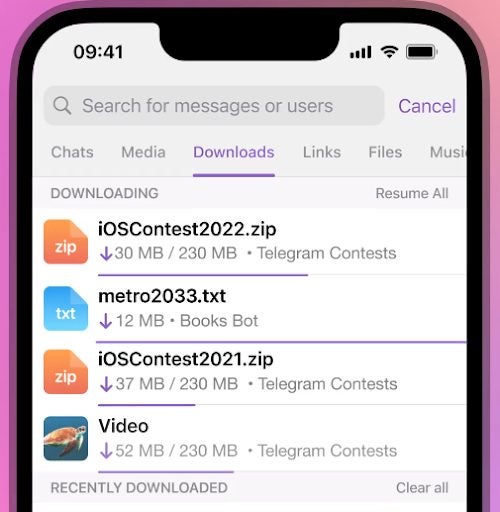
    In the ‘Downloads’ tab, you’ll be able to see all of your past downloads, with the most recent ones at the top. Any downloads that are in progress will also be visible here, along with how far they’ve progressed.

  5. Change download priority

    How to use Telegram Download Manager

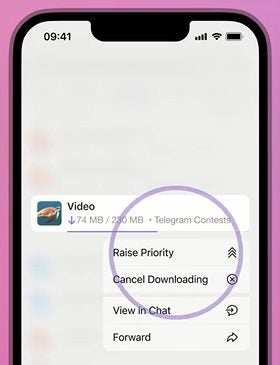
    You can also rearrange the download lineup to download certain files first. To do this, simply tap on the file in the lineup and choose ‘Raise Priority’ to move that file up the list and get it downloaded sooner.

Benefits of using Telegram Download Manager

You may be wondering why it’s even worthwhile to have a download manager. Well, there are quite a few benefits. In the past, downloads were done in each individual group or chat with no central system to manage them. While this isn’t a problem for some users, others found it extremely difficult to find certain files. The download files are extremely difficult to find as new messages come in, obscuring where the files were originally located. 

The download manager makes it possible to conveniently find all the downloads from any of your chats or groups in one place. It also makes it possible to remove sensitive downloads from this general list. Or you can change the order of your current downloads to complete important ones first.

Have more control over your downloads

Telegram is a very privacy-conscious messaging platform, and now with an easier way to manage your downloads, it’s even more useful. Use the above instructions to learn how to access and use the Telegram Download Manager easily.

You can also check out our on how to kick inactive members in Telegram groups.

4 easy ways to open WebP images in Windows 11

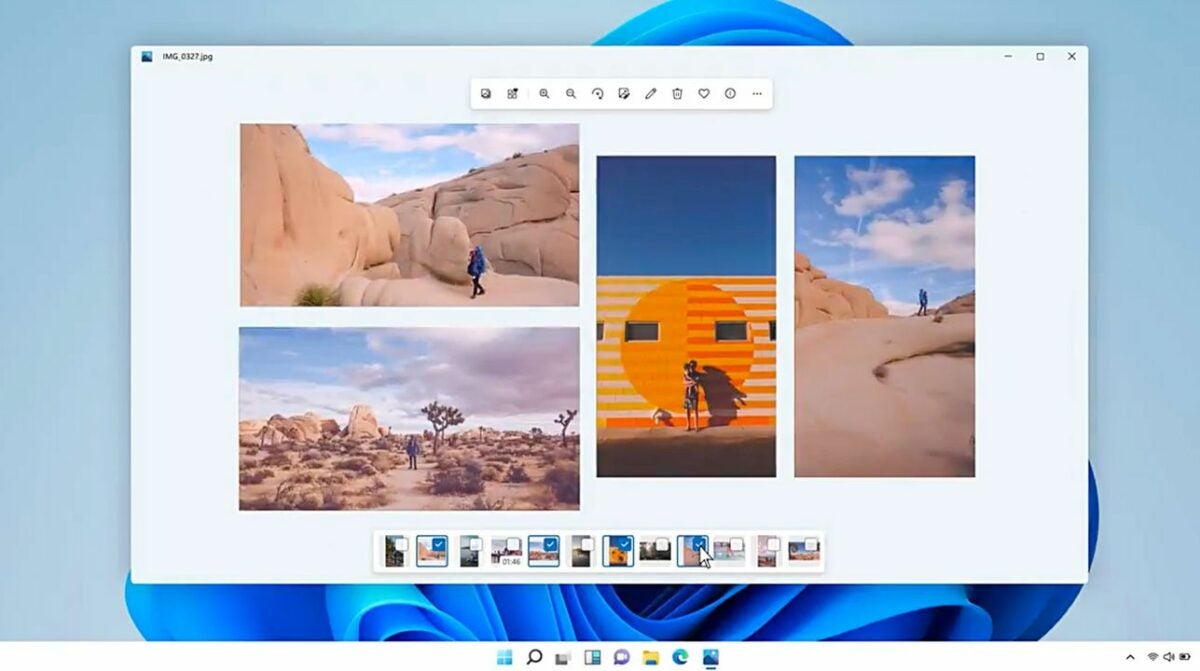
When you’re surfing the web for images, downloading the typical JPG or PNG file from the primary modern browsers is relatively simple. You just right-click the image before selecting save or dragging and dropping it to your desktop. However, Google has recently introduced a loss image compression file called WebP that requires slightly more effort to open on a Windows device.

Windows 11 DOWNLOAD

Google Developers describe WebP files as roughly one-third smaller than the typical JPEG image encountered online. Google’s WebP format is meant to help website developers and owners reduce their bandwidth usage and enable faster page load times. Yet, the two main Windows 11 image viewers still don’t recognize the new file format. The following four methods will give you a set of easy options for opening WebP format files in Windows 11.

  1. Open a WebP file with your web browser

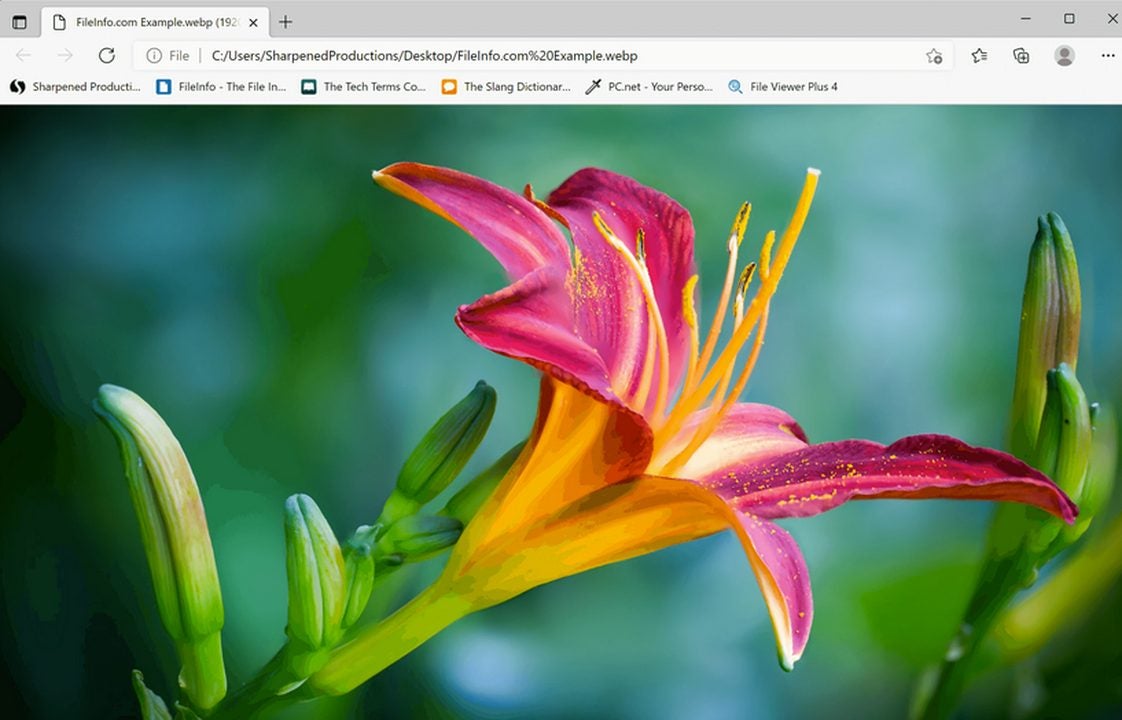
    Locate a WebP image file and drag and drop it into a new browser tab to open it.

    The primary web browsers like Chrome, Firefox, and Microsoft Edge support the WebP image format. Finding a WebP file online shouldn’t take long. And this first approach shows you how to use the browser itself to open a WebP file as an independent link.

    Once you’ve located a WebP image file, use your mouse to drag and drop it into a new tab at the top of your browser. The image will appear, and this is the quickest way to open a WebP image on a device running Windows 11. The approach, of course, requires a network connection to display the file.

  2. Install the WebP Codec to open your WebP files in the Windows Photo Viewer

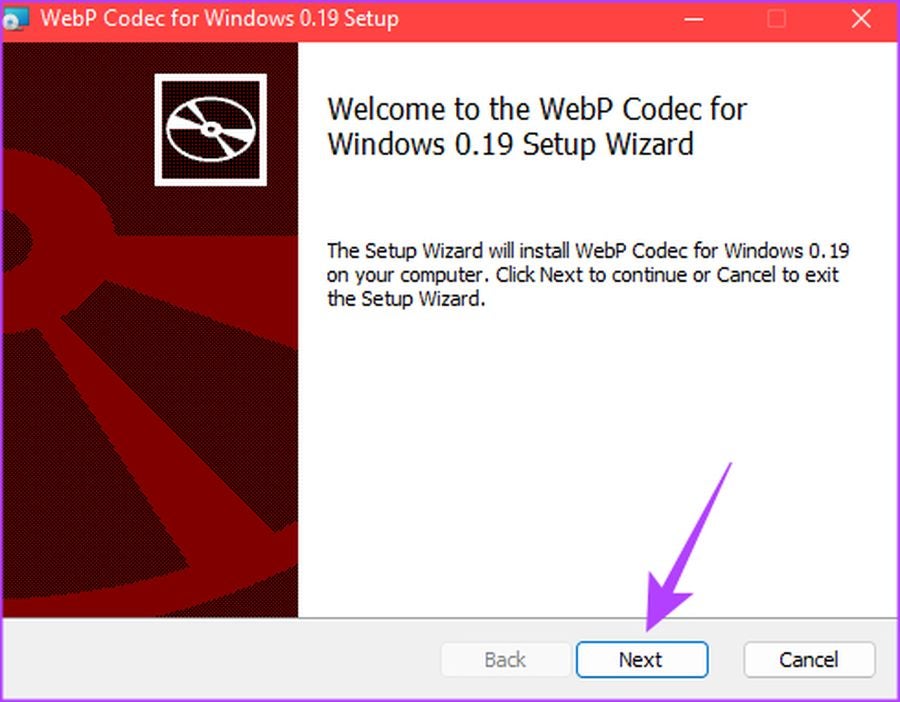
    Install WebP Codec by Google to allow your default image viewers in Windows 11 to open WebP files.

    There may come a time when you need to open multiple WebP images on your desktop and sort through each of them independently. In this case, you can access the Windows Photo Viewer or Microsoft Paint to open the files. But the two viewers must support the WebP format first. Windows has not yet adapted to this new file format, so there is currently no option for opening WebP files by default.

    Google offers a solution for this problem in its WebP Codec. To view WebP files with your Windows 11 Photo Viewer, install the WebP Codec by Google. This add-on allows you to use your inbuilt applications like Windows Photo Viewer and Microsoft Paint.

  3. Open your WebP file in the Windows photo app and replace the .WEBP extension

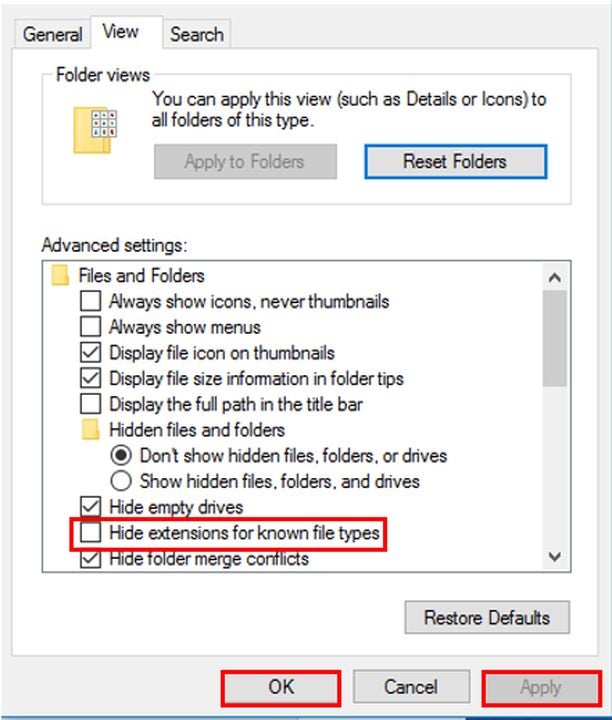
    Download WebP files by changing the file extension in your advanced settings.

    If, for some reason, you can’t download the Google WebP Codec to your device, you can still open the file using the Windows 11 Photo Viewer or Microsoft Paint. This approach requires you to alter the File Explorer Options.

    To open a WebP image on Windows 11 under this method, find your search bar and type in File Explorer Options. Next, click on the folder titled File Explorer Options.

    After opening File Explorer Options folder, select the View tab. Within Advanced settings, locate Hide extensions for known file types and disable this option by unchecking it. After that, click Apply and then OK to activate and save your changes.

    Now, locate your WebP file, right-click on it, and choose Properties or type in Alt + Enter to pull up this function. Replace the .WEBP extension trailing the file name with .JPG, .JPEG, or .PNG. After you made this change to the file extension, select OK and then Yes to bypass the confirmation prompt.

    Next, use your Photo Viewer to open the file you just renamed by right-clicking on the image and selecting Open > Photos. This method lets you view WebP images on Windows 11 without installing the WebP Codec by Google or adding a file converter.

  4. Download a file converter to open WebP images in the Windows image viewer

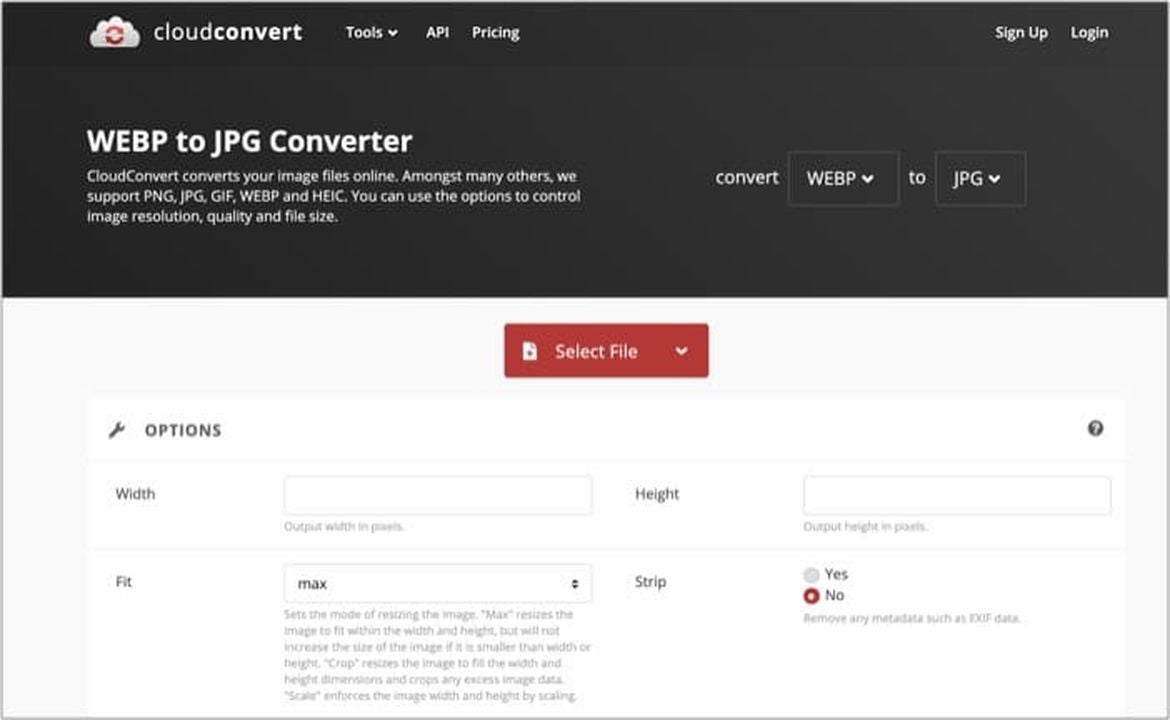
    Download your preferred file converter to switch the WebP image's output format to a JPG or PNG file.

    The last reliable method for opening WebP image files in Windows 11 you can try is to download a free application like cloudconvert and switch them over to JPG files automatically.

    Download and access your file converter before uploading your WebP image. Next, click Convert, and choose your output file format type.

Managing your WebP image files on Windows 11

WebP files aren’t especially challenging to deal with on Windows 11 as long as you’re prepared to complete a few additional steps. One can undoubtedly envision a future update to Windows that eventually incorporates a default option for viewing WebP image files, but there’s no telling when. In the meantime, the four approaches listed above give you a few simple options for completing the task. If Windows updates interest you, read more about the latest Windows build 25211.

How to use FF Tools to optimize Garena Free Fire

Garena Free Fire is a multiplayer battle royale game for PC, Android, and iOS devices. This is one of the most compelling expressions of the term battle royale, and the game provides players with hours of entertainment, legendary kills, and tons of loot drops to keep them stocked up. The one issue with Garena Free Fire is that it’s prone to lagging on many mid-range devices. This is especially true for Android devices running Android 7 and below. To try and fix the lag, you could install an app like FF Tools. 

FF Tools DOWNLOAD

Unfortunately, while FF Tools can streamline your Garena Free Fire experience and mitigate lagging, it also has a host of tools that are classified as hacks or exploitation. Therefore, we cannot recommend installing FF Tools as using this utility can result in your account being banned. However, the choice is yours, and if you choose to download this potentially detrimental software, we’ll walk you through how to install it.

Clearing up misconceptions about FF Tools

Disclaimer: Before we even start with the guide, we’d like to issue a warning. If you are found to be using FF Tools in Garena Free Fire, your account can be banned, and you will not be able to play the game again. FF Tools, while not affiliated with Garena Free Fire, is a utility designed to be used in conjunction with the game. However, it is also regarded as a hack and illegal software. We do not recommend nor condone the use of utilities like FF Tools.

Many downloads hosting websites will have you believe that FF Tools is this free utility for Garena Free Fire that you absolutely cannot live without. Fact check, you can play the game without FF Tools, and you probably should. Apart from the decrease in lag, FF Tools offers only exploits and hacks such as auto headshots. Essentially, this takes the fun out of a game like Garena Free Fire, where the exhilaration comes from making those tricky shots yourself. If you want to rely heavily on tools like FF Tools, you’d be better off watching a pro video gamer do their thing on Youtube because that’s essentially what FF Tools is. 

Another point that many APK download sites will make is that FF Tools is completely safe and kitted out with the latest anti-ban technology. Fact check: this is not the case. Anti-ban technology is not something that the developers behind FF Tools invested in or care about. The developers of exploitative tools like this don’t care about you or your Garena Free Fire journey.

You can, however, rest assured that if you use FF Tools to enhance your gameplay and trick other players into believing that you’re just that good at the game, you run the distinct risk of being banned from the game altogether. So-called ‘hackers’ can be spotted a mile away in a game like Garena Free Fire, and anyone who sees you ‘hacking’ the game will likely not hesitate to snitch on you. This is the law of the land. Don’t cheat. 

However, if you’re still reading this, you’re definitely not going to be deterred that easily from downloading this product. By the way, if you want the so-called ‘anti-ban’ benefits as well as access to the other exploitative tools, you’ll have to pay for them. Even FF Tools doesn’t let you cheat for free.

How to use FF Tools

In this section, we’ll briefly explain how to use FF Tools for Garena Free Fire. This is not an endorsement. Using this software can get you banned.

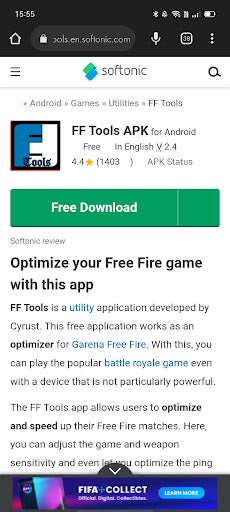
  1. Download FF Tools

    How to use FF Tools to optimize Garena Free Fire

    The first step is to download the utility from our website. All you need to do is click on the FF Tools link, and you’ll be whisked away to the download page. From there, simply click download, and the utility will download in your browser. Once downloaded, you’ll find the file in your downloads folder.

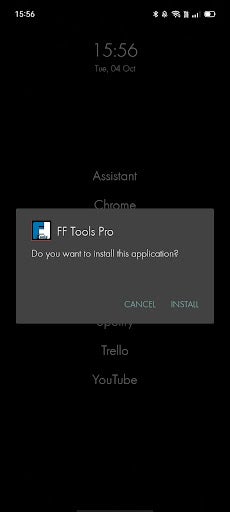
  2. Install

    How to use FF Tools to optimize Garena Free Fire

    Next; you’ll want to install the utility from your downloads folder. Simply click on the file in your downloads folder and hit Install when the Android system pop-up appears.

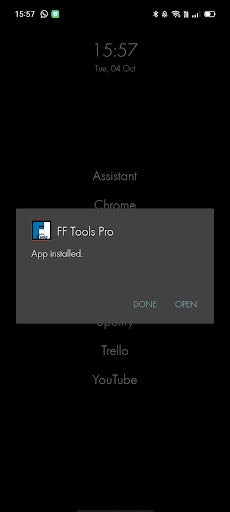
  3. Open FF Tools

    How to use FF Tools to optimize Garena Free Fire

    Once you’ve installed the software, you’ll need to open the utility by clicking on the FF Tools icon on your home screen or your app drawer. You are now free to use the free version of FF Tools in conjunction with Garena Free Fire for Android. Again, if you want the capabilities mentioned in the app overview, you’ll need to activate and pay for the pro package. Cheating isn’t free.

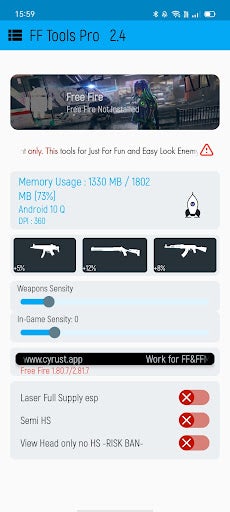
  4. Activate features

    How to use FF Tools to optimize Garena Free Fire

    Once you’ve opened the utility, you should see a bunch of options. The only option you’d be interested in unless you want to cheat is the little rocket next to all the device stats. Click this to optimize Garena Free Fire and make it run smoother.

Don’t cheat

It’s incredibly easy to reach for the easiest option in gaming. Often, this option is cheating. However, with an online game like Garena Free Fire, the only person you’re deluding is yourself. Rather play the game the honest way and earn achievements in a way that you know with certainty that you deserve them. I understand that Garena Free Fire is a massive app and that not all Android devices can run it smoothly.

But keeping your Android free of junk is a good way to optimize overall performance. If your device is incompatible with the game, FF Tools won’t help in any case. You could, however, try an emulator like BlueStacks which lets you play Android games from your PC.