IObit Does It Again: Advanced SystemCare Ultimate 14 Wraps Your PC in a Super-Strong Shield

As more of us work, shop, communicate, and consume content online, it’s become more important than ever to protect our PCs with adequate safeguards against a dizzying array of threats. Our machines are vulnerable to viruses, spyware and ransomware; our personal data is at risk from phishing schemes and endless online tracking; and even the embedded software that we use can hide dangerous code that hackers can use as backdoors to enter our digital lives. 

Unfortunately, getting adequate protection on our PCs as well as shields to guard our data online can be almost as complicated as understanding the different kinds of threats we face. That’s why we’re big fans of Advanced SystemCare Ultimate 14 from IObit, a major force in providing safe and secure PC system utilities

Updates Specifically for 2021

Coming just about one year after the last SystemCare Ultimate update, IObit has packed this release with up-to-the-minute protections that shield you from threats anywhere they might leak in – and we mean anywhere. 
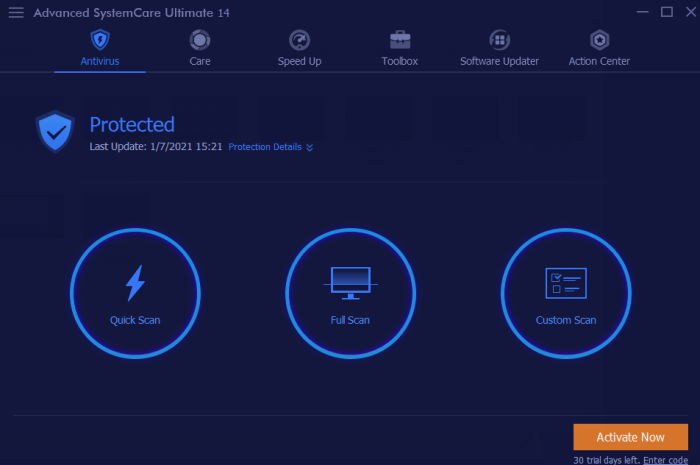
Software screenshot“Cyber attacks have increased dramatically along with the worldwide spread of the COVID-19 and people are facing more varied types of cybersecurity risks,” said Bing Wang, IObit Product Director. “IObit attaches great importance to developing easy-to-use tools to strengthen PC’s defense against cyber threats, especially those that have recently emerged. Now at the very beginning of 2021, we are proud to present Advanced SystemCare Ultimate 14, a system tool that not only makes your PC clean and fast, but, more importantly, safe.” 

For starters, IObit’s continued partnership with Bitdefender – a leading producer of antivirus software – has led to a supercharged database of malware threats. Now, not only will SystemCare Ultimate 14 protect you against the usual threats from Trojans, spyware and ransomware, but it will also guard against the unique viruses that are emerging faster than ever as we enter 2021. IObit’s algorithm and defense engine works tirelessly in the background of all your activity to spot these threats and eliminate them in real time.
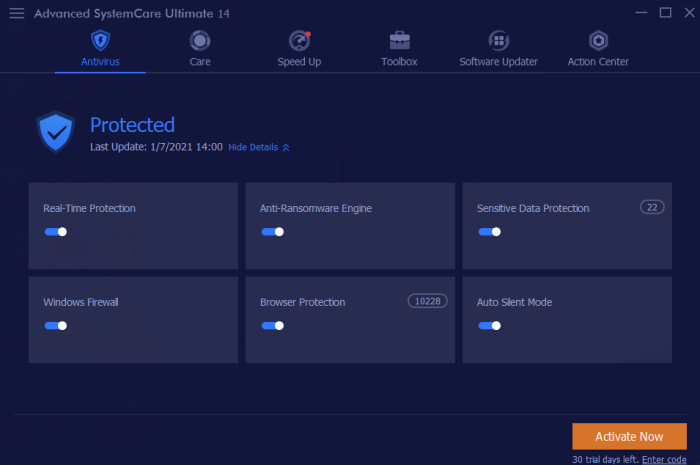
Software screenshotBeefed-Up Browser

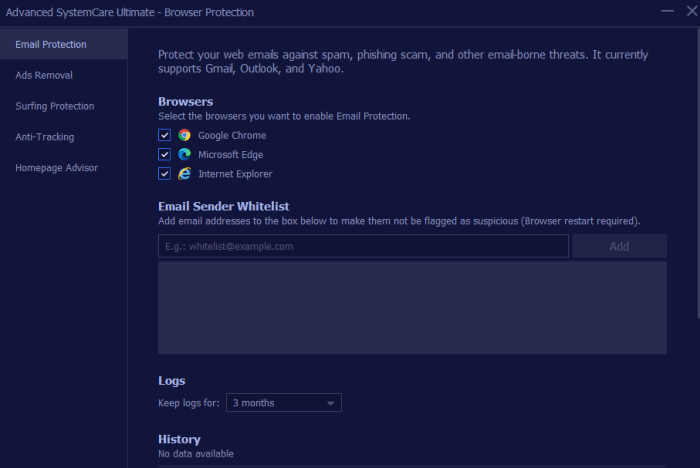
Browser-level security has also been significantly improved with this release. SystemCare Ultimate 14 now offers surfing protection that is more comprehensive than ever, thanks to a newly updated database that blocks dangerous websites – some of which have merged to make them even more difficult to find. On top of that, you’ll get enhanced email protection, ad removal, and anti-tracking functionality to keep you safe from annoyances like targeted ads, as well as more serious threats like phishing scams. 
Software Screenshot

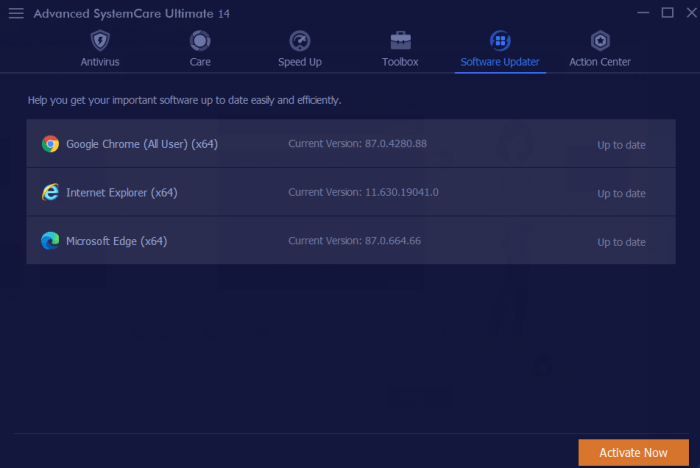
As if the significant online protections offered by SystemCare Ultimate 14 weren’t enough, this Swiss-army-like software also offers system enhancements that will keep your PC running safely and smoothly. It has greatly expanded and diversified its software database, which lets users access the latest updates to the programs on their machines with one click.
Software Screenshot

This not only keeps computers running better, but it also takes advantage of the latest security patches from software makers that prevent hackers finding their way onto your machine through vulnerabilities. Additionally, SystemCare Ultimate 14 also provides a registry cleaner to eliminate bloatware or unnecessary files, as well as the ability to manage your startup items to improve boot times.

Rarely do so many powerful functions converge in one software, but IObit continues to impress with its offerings. And the best part? You can download a copy completely free! Just follow the link below and a cleaner, safer, glitch-free PC is just a few clicks away.
Cyber Monday’s Best Digital Deals From Top Softonic Partners

When you think of getting a deal on Cyber Monday, you most likely think about scoring great prices on electronics, home goods, clothing, or other tangible items. While those bargains will certainly abound on the extremely popular shopping day, you can also snag amazing deals on digital products like software, VPN services, and more. Here we present six of the very best deals our partners are offering during the Black Friday and Cyber Monday shopping season. You can thank us later.

Express VPN

If you don’t already protect your online identity with a virtual private network, or VPN, there’s never been a better time to try one out than with this offer from Express VPN. In case you are unfamiliar, VPNs provide you a secure virtual location that’s off-site from where your computer is physically located. This makes it pretty much impossible for your internet activity to be tracked, or for your personal data to be harvested. Express VPN is one of our top picks for providers in this field as they offer an extremely user-friendly interface, a robust “no logs” privacy protection policy, and the rare “split tunneling” functionality, which lets you use different pathways to access the internet at the same time, choosing what you’d like to have hidden, and what you don’t. With its three-month free Black Friday offer, it’s one of the best ways to try out a VPN without spending a penny.

Get 3 months free with ExpressVPN SAVE UP

Cyberghost

Cyberghost, another top VPN provider, already comes with a 45-day free trial policy, so it’s a great way to dip your virtual toes into the world of VPN privacy. On top of that, for Black Friday and Cyber Monday, the company is offering a deep discount plus three free months on its 3-year plan, which works out to the unbelievably low price of just about 2 Euros per month. Cyberghost is an outstanding VPN for those who like to stream content from services like Netflix or the BBC iPlayer, as they have special servers to handle such demand. It also has “No-Spy servers” which are located at the company’s physical location in Romania, where privacy protections are incredibly strong.

Cyberghost VPN: 83% Discount Off 3-year Plan PLUS 3 Extra Months FREE SAVE UP

Adobe Creative Cloud

When it comes to powerhouse software for creatives, Adobe Creative Cloud truly is the gold standard. The software suite includes over 20 apps such as Photoshop, InDesign, Acrobat, Illustrator, and more. You also get Adobe Spark to help you create graphics, web pages, or video stories, and great mobile solutions as well, including the ability to run Illustrator on the iPad. On top of that, it offers a dizzying array of thousands of fonts, the chance to collaborate with other creatives, an extensive library of over 60,000 royalty-free images, and 100 GB of cloud storage. For all it offers, the usual price of $52.99 a month is already a solid bargain, but during the Black Friday period, you can get all Creative Cloud offers for 25% off and pay just $39.99 per month.

All Adobe Creative Cloud apps 25% OFF SAVE UP

Ashampoo Photo Commander 16

If you’re like most people, you’ve got a huge collection of digital photos on your computer that you never quite have the time to organize. Ashampoo’s Photo Commander 16 makes the task easy – and fun. The software works on all PCs running Windows 7 or later, and lets you organize your photos with ease, and even arrange the shots on a map using the geo-tagged information embedded in each image. It also allows you to easily edit your photos with a robust one-click fix plus gives you the ability to remove elements, straighten horizons, apply effects, and more. On top of that, you can easily create cards, calendars and other creative projects using the software’s easy, step-by-step guidance. Normally $49.99, thanks to a Black Friday deal, you can now get Ashampoo Photo Commander for just $9.99!

Edit like a pro with Ashampoo Photo Commander now at $9.99 only! SAVE UP

Microsoft Surface

Microsoft’s Surface has forever changed our idea of what a laptop can be. Light and sleek, yet incredibly robust, the tablet/computer has become an instant favorite for both professional and home use alike. During the Black Friday period, Microsoft will be offering some great Surface deals on their site, saving you up to ⅕ off the mighty machines and their accessories. For example, you can score the Surface Pro 7 with the Pro Type Cover, (which truly makes the Surface a full-service laptop), for just $599.99, a savings of $359.99 off the usual bundle price of $908.98. You can even get the new foldable Surface Duo along with the Slim Pen and earbuds in a bundle for $1498.67, a savings of up to $276.00. If you’ve been putting off adding these slim, sleek tools to your digital life, there won’t be a better time than during this Black Friday special sale.

Get your Microsoft Surface! Bundle and save up to $330 Get the deal

Udemy

Want to learn how to speed read or improve your mindfulness? Looking to learn how to build a website or leverage social media to improve your brand? Thinking of learning how to code? Then Udemy is the site for you, offering over 130,000 online video courses on a huge array of categories including personal development, IT and software, photography, design, music, and more. The courses are great if you’re looking to pick up a new skill for professional purposes, or if you just want to satisfy personal curiosity and keep your mind active. During its Black Friday sale, Udemy will be offering an amazingly generous 90% off all courses, making many of them as low as $9.99 – a true steal considering the high quality of the courses and the skills you could gain by taking them.

Upgrade your skills now for only $9.99 with Udemy Save up and upgrade

4 Reasons why you should upgrade to Avira Antivirus Pro

Four major reasons why you might want to upgrade to Avira Antivirus Pro 2020. Get your pro version of online security with a 20% discount! For Softonic users only.

As you might already know, one of the strongest free antivirus software packages out there comes from security experts, Avira. Avira Free Antivirus has been offering users protection from hackers for years with a continuously updated database of viruses, malware, ransomware, and spyware.

While that’s a remarkably complete package for a free offering, there are four major reasons why you might want to upgrade to Avira Antivirus Pro 2020, aside from the fact that it is currently on sale for 20% off its normal rate.

Internet Protection

Stepping up to Avira Antivirus Pro 2020 adds another layer of protection to your devices thanks to its internet-level scanning function. This aspect of the software protects delicate information such as banking details, credit card numbers and other personal data from potential theft on unsecured websites. It also alerts you to suspicious websites that are known to lead to data leaks, and blocks ransomware attacks. The internet protection option is turned on from the antivirus software itself, so it covers you regardless of the browser or app that you are using to get online.

Scanning Function

Avira Antivirus Pro 2020 will also allow you to scan your entire system for files that may have been compromised by malware and keeps scanning in real-time to alert you to potential infiltrations. It can even examine downloaded software to spot hidden applications that you may not want installed on your machine, often known as bloatware. On top of that, it scans removable devices such as thumb drives or microSD cards to ensure that they are free from any malware that could damage your computer, tablet or phone.

Email Protection

The Pro level of the software adds an email scanning feature that will alert you if an attachment contains malware or if there is a link that might be infected or one that will direct you to a shady website. We so often use antivirus programs to protect our surfing activities but forget about the open pipeline that email provides to our devices. Pro 2020 expands your protection to this vital potential vulnerability.

No Adds plus Premium Customer Service

Finally, Avira Antivirus Pro 2020 grants you access to a dedicated customer support team via a toll-free number or email. You can get help with installation, operation or any other product questions you may have quickly, efficiently, and accurately. On top of that, the Pro version of the software is also completely free from ads, which is a nice upgrade from the free version.

Driver Booster 8 Now Helps Offline Computers

Just like any machine, computers need maintenance. More specifically, the drivers that power your computer’s hardware and game components have to be kept up-to-date or you could experience sound and display glitches, slow downs, crashes, or even the complete disabling of certain components such as your mouse or monitor. Yet, keeping up with the dozens and dozens of drivers your PC needs to function correctly is a practically impossible task for a human. Fortunately, IObit – leaders in PC health solutions – have just released a new version of its Drive Booster software to get the job done for you.

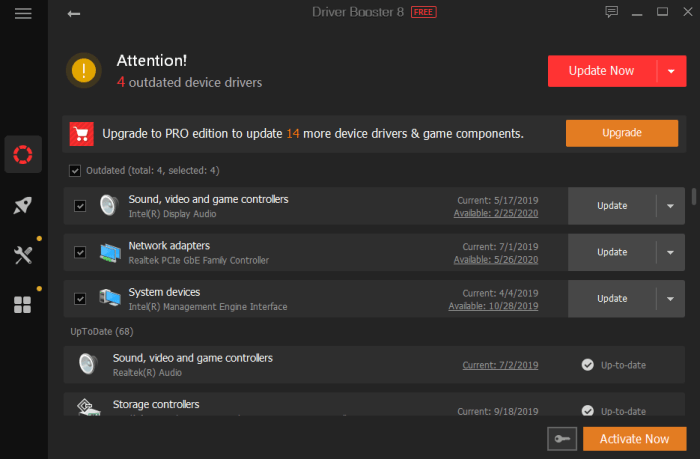
ScreenshotDriver Booster 8

Now in its eighth release, Driver Booster continues to improve the way in which it keeps PCs humming along with the right driver updates as soon as they are released. 

For this version of the software, IObit has once again upped Driver Booster’s database. It now monitors over a whopping 4.5 million drivers and game components. Once updates are identified, they can be installed quickly and safely, thanks to the fact that all updates come from the official manufacturer’s website, and have passed both IOBit testing as well as Microsoft’s Windows Hardware Quality Lab (WHQL) tests, which gives the stamp of approval to drivers made by companies other than Microsoft. 

The updates can fix problems with a simple click that might otherwise take hours of searching and experimenting to solve. 

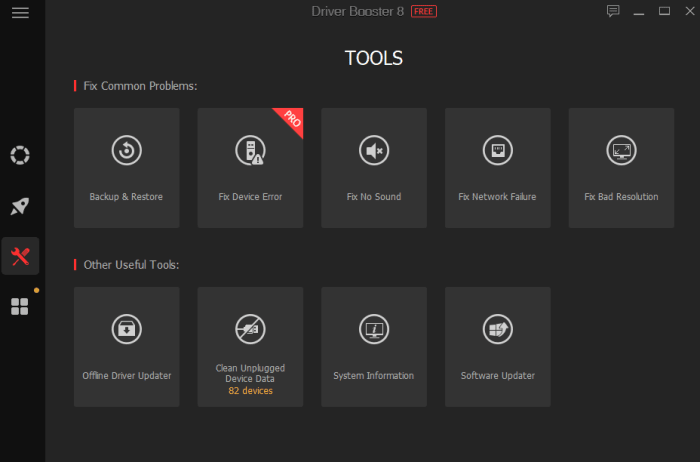
Screenshot“According to TechRadar ’s article: Windows 10 has killed off driver updates via Device Manager“ said Bing Wang, Product Director at IObit, “So now it could be harder for common users to get the latest device drivers. Driver Booster 8 is a great choice for all PC users, as it includes fresh but safe drivers in its database, is easy to use, and it can help users solve common driver issues like no sound and network failure problems.”

 Offline Update Now Included

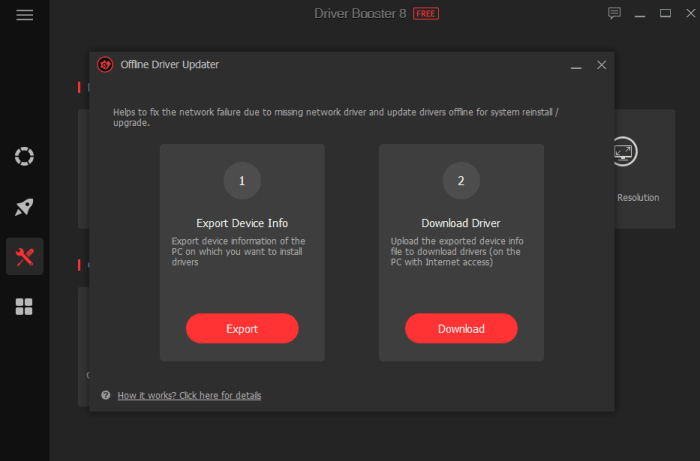
Keeping your drivers up-to-date is hard enough when you are connected to the internet, but what happens when the drivers that get you online (like your wireless adapter) fail and your computer has no way to connect? Driver Booster 8 now has a solution.

ScreenshotThanks to its Offline Driver Update, the software can get your unconnected computer back online in a few short steps. You simply download the drivers to a computer that can connect and transfer them over to the non-functioning machine. The software walks you through every step of the process and fills in a vital gap that was missing in the driver-update landscape.

Driver Booster 8 is now available on IObit and Softonic. It can fully support Windows 10, 8/8.1, 7, XP and Vista.

TikTok Blocked? Here are 5 Worthy Alternatives

While TikTok is nothing but harmless fun for millions of users around the world, for major governments, the short-video sharing app is a political thorn. Because the app is owned by a Chinese company, several governments including the United States and India worry about the threat the platform poses to national security. India, in fact, has banned the app along with nearly 60 other Chinese apps citing security concerns, and the United States is threatening to do the same – especially after Apple discovered that TikTok was secretly accessing users’ clipboards. While TikTok claims that was a simple glitch and insists that the app isn’t used for spying or any other nefarious purposes, the app’s future may be threatened. 

Most likely, though, if you’re a TikTok user, you’re not all that interested in geopolitical maneuvers. What you’re interested in is using a fun, easy app to shoot short video clips that make people smile. Fortunately, no matter what happens with TikTok, there are plenty of other apps that can deliver the same good time without the controversy. Here are five of our favorite TikTok alternatives.

Byte

dubsmash

Of course, if you’re a fan of short-form videos, you are familiar with Vine – the app that pretty much kicked off the genre when it was released in 2012. It was shortly bought by Twitter, who closed it down in late 2016. Now, one of Vine’s founders has released Byte, to bring back a super-short video platform to the masses.

While TikTok allows you to shoot 15-second videos, Byte goes back to Vine’s micro format with a cap of 8-seconds. Beyond that, the two apps are fairly similar, except that Byte doesn’t quite yet have all of TikTok’s excellent video-editing tools. As a newly released app though, Byte is constantly improving. It has already announced new features including “byte beats” (unique to the iOS version): mini audio tracks that are automatically adjusted to users’ videos; Floaties, which are objects you can place into your camera’s view and then record; and the ability to add and manipulate text on top of videos.

Byte’s true differentiating factor is the ability to join different communities, which are basically video genres such as horror, comedy, and animation.

Android; iOS

Dubsmash

dubsmash

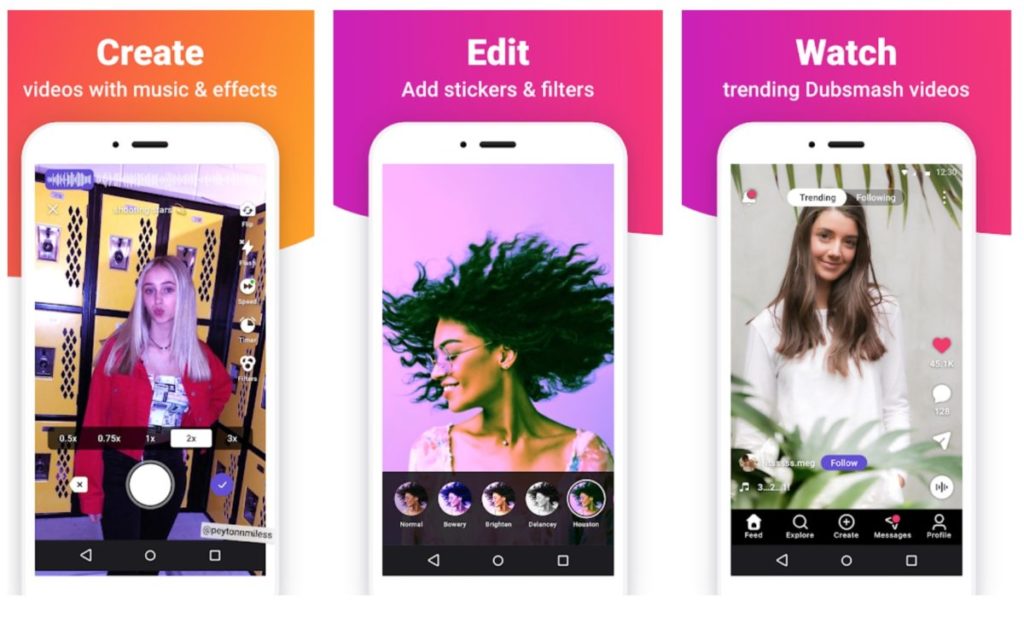
Most video-sharing apps start with the video portion of the process. You shoot a clip then you can juice it up with special effects, sounds and text. Dubsmash, a German company founded in 2014, takes the opposite approach. It contains a huge library of music clips and quotes from movies and elsewhere. So you basically start with an audio clip and then add your video, which usually consists of you lip syncing to the track. Filters and emojis help dress up your clips, and a newsfeed lets you see what’s trending and what your friends have posted. 

Android; iOS

Triller

triller

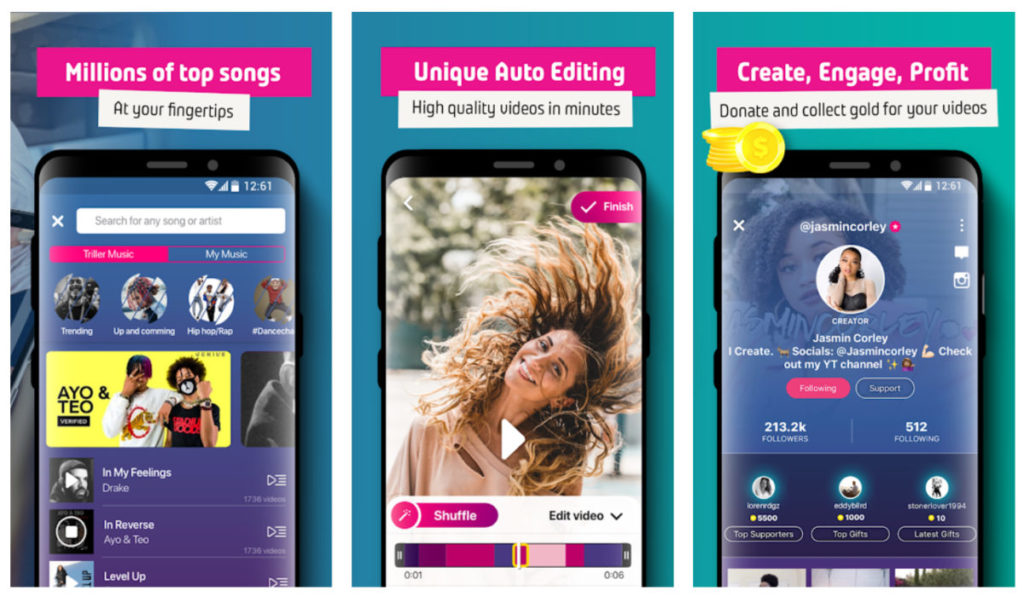
Like Dubsmash, Triller provides a treasure trove of songs to help inspire your video creations. And like TikTok, the platform allows you to record 15-second-long video clips. Where Triller sets itself apart is that it offers super-simple video editing at the push of a button.

Creating impressive videos is as simple as choosing a song, selecting which portion of it you’d like to use, choosing a series of video clips, and letting the software do the rest. It will stitch everything together for you into a professional-looking video that will make it seem like you truly know your way around more sophisticated video-editing software. Videos are represented by a color bar at the bottom and swapping out or reordering clips is as easy as swiping and dragging

Triller also stands out because of its very impressive collection of songs and videos. Because the app has partnered with major music-production companies and other apps like Spotify, your choice of tracks is nearly limitless. Triller also features more than 100 filters that let you play with the look of your clips to an impressive degree.

Triller clips can be shared through the Triller platform, or they can be shared on other social media platforms like Instagram and Facebook, which has made it a tool used by a significant number of celebrities including Kevin Hart, Chance the Rapper and Rita Ora. 

Android; iOS

Instagram

Instagram

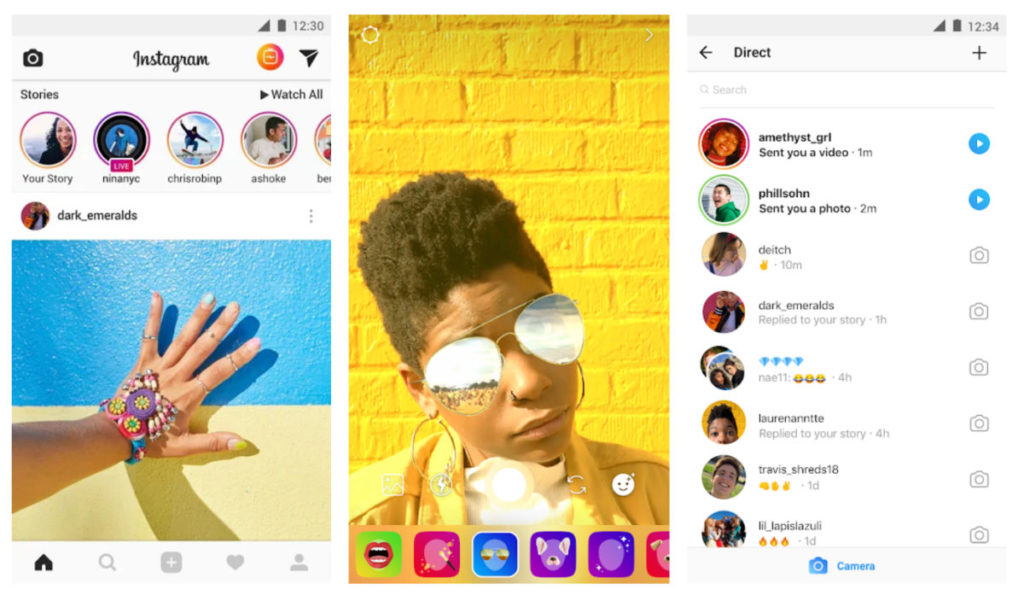
While Instagram is commonly thought of as a photo-sharing platform, the fact is that there are thousands of users sharing videos there as well. While it doesn’t really have the robust video editing tools of some of the other apps on this list, because of the popularity of the platform (can you say over 500 million daily active users?) it’s well worth considering as a video-sharing tool.

Instagram also doesn’t feature the limited-time function of many other video-sharing apps, so if you’re looking to create longer-form videos, this is your app. You can upload clips under 60 seconds as “short videos” but longer vids can be uploaded to IGTV to share with your followers. And, because Instagram is free from lots of gimmicks like animal-head overlays and stickers, it’s an excellent place to share videos with more serious or engaging content.

Android; iOS

Likee

likee

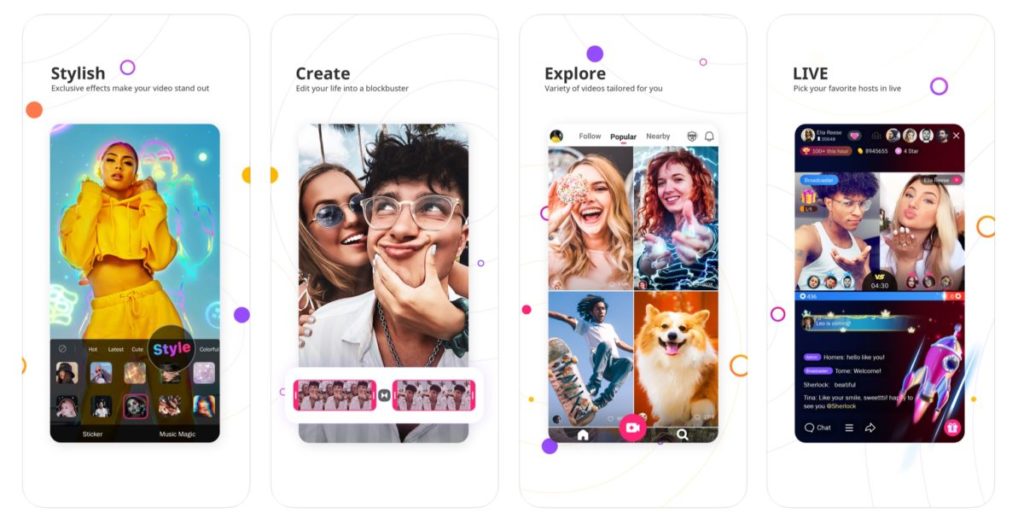
Likee, (which used to be known as “LIKE” before a rebranding) is the rocky road ice cream of video apps – which is to say, it’s got a lot of stuff crammed into it. In addition to crazy filters that do everything from adding fireworks to a video to causing you to dematerialize in a bolt of lighting, the app also has a Tinder-like feature of letting you search for nearby video creators and sort them by gender. 

The app also offers a pretty impressive face-swap option that lets you step into the role of your favorite actor with a touch. There are thousands of stickers and filters to choose from; “Makeup and Micro Surgery” functions that let you fine-tune your videos or bedazzle the people in them; a “Hair Color” feature that lets you try out any color you’d like on your ‘do; plus a function known as “Supreme” that turns your photos into movies with a tap.

On top of this, the app allows for more serious content by showcasing instructional videos in addition to lip syncing and other entertainment-style videos. While the app might be overwhelming for some, if you’re already familiar with video creation apps and want to take your abilities to the next level, Likee should get the job done.

Android; iOS

IObit Malware Fighter gets even more impenetrable with version 8 release

Leaving a computer unprotected against malware is like leaving the front door to your house wide open in a dangerous neighborhood. Arming your computer with basic malware protection is more like locking that door and maybe using a home alarm system. Malware protection from major cybersecurity companies, on the other hand, is like placing your home inside a bank vault. That’s exactly the kind of protection IObit delivers in its latest release of its famous Malware Fighter software.

Already a leading name in consumer-level online protection IObit has beefed up several protections in an already robust software package with Malware Fighter 8

Smarter and faster

Understanding that anti-malware software is really only as good as the last bug to hit the internet, IObit has super-charged its malware database by increasing it in size by 100% and making it faster and smarter as well. 

It can now scan your entire PC 50% faster than before. Plus, by using advanced heuristics (basically faster, computerized decision-making processes), the new software release can spot even more threats than before including such as viruses like BackDoor.Lokibot; Ransom.Robbin; Malware.Coronavirus and Ransom.WannaRen.

“IObit Malware Fighter 8 further optimizes threat detection and removal processes for a better user experience,” said Bing Wang, Product Director at IObit. “In the face of the growing number of cyberattacks and identity theft hacks – like the popular coronavirus-themed threats at present – IObit Malware Fighter 8 gives users more comprehensive protection to better deal with various PC security issues.”

Vault-like protection

Our earlier analogy of good anti-malware software acting like a bank vault around your data is particularly true of IObit Malware Fighter 8, thanks to the combination of something the company calls Sensitive Data Protect with its Safe Box feature. This creates even stronger, multi-layer privacy protection to the files you most want to keep safe. As a result, there’s virtually no chance of a hacker getting a hold of your files and holding them ransom for cash. 

Plus, the new release has also beefed up its web-based email protection features so that your inbox stays safe and clean from spam, phishing scams, and other email threats. 

All of this is on top of the software’s already impressive ability to keep your web-based activities away from prying eyes and potentially catastrophic invasions of your privacy by protecting you against spyware, adware, ransomware, Trojans, keyloggers, bots, worms, hijackers, viruses and more. 

An unbeatable deal

Right now, Softonic readers who act fast can sign up to get a copy of IObit Malware Fighter 8 at up to a 25% off discount. If you have a PC running Windows 10, 8/8.1, 7, XP or Vista, simply click the link below to visit the download site to start enjoying worry-free computing.

IObit Software Updater is even stronger with its third release

If you’ve never heard of IObit Software Updater, now’s a great time to download the helpful free software. And if you’ve been a regular user, you’ll want to redownload the program. The reason for both is the same: Version 3 has just been released and now it’s an even more powerful and comprehensive software management tool than it’s been before.

What is IObit Software Updater 3?

Before we tell you about what’s new, we thought you should know a little about the program’s capabilities. 

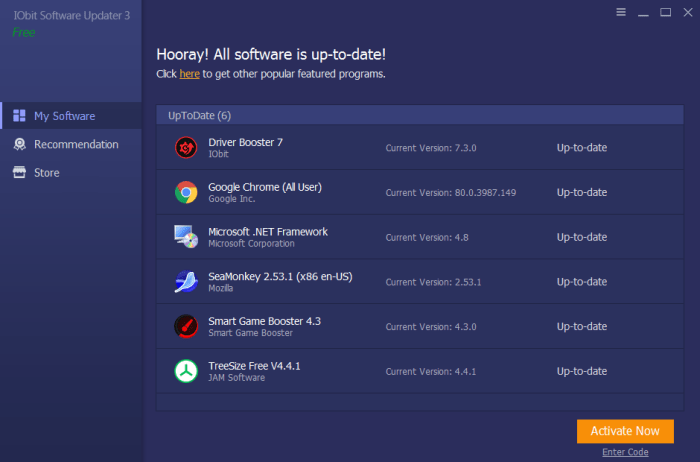
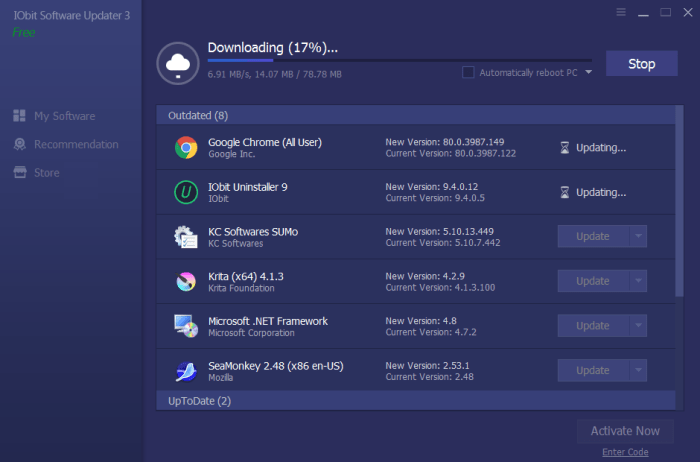
IObit Software Updater is a light yet effective program that can be installed on any computer running Windows (10, 8/8.1, XP or Vista). It operates in the background to automatically keep your applications up-to-date, so that you never miss a critical release that might bring more stability to your machine, or offer enhanced features. 

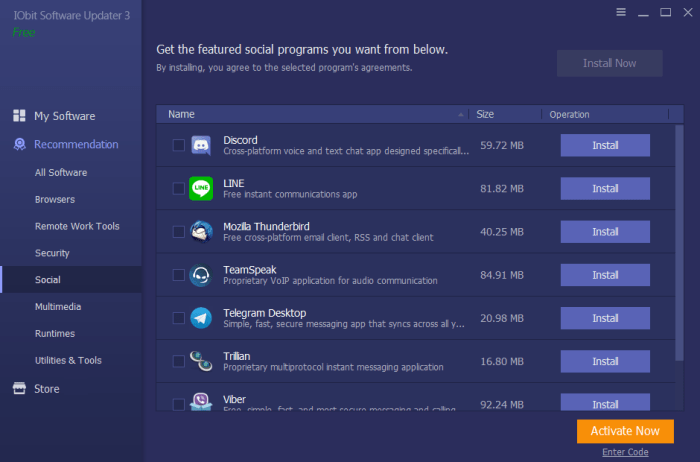
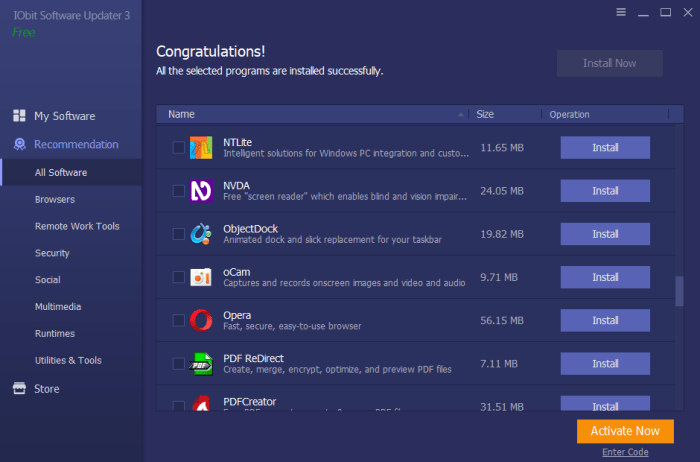
Software UpdaterIObit Software Updater also ensures that any new software you download is a correct and clean version for your operating system – and not a version that might be a scam or one filled with ads or bundleware. The program also helps you navigate the complicated world of software options by categorizing trusted downloads into distinct categories. So, instead of combing the web and reading dozens of reviews, you can simply pull up the category in IObit Software Updater (for example, for social, multimedia or remote work tools) and download the program that sounds best for your needs.

software updaterFinally, IObit Software Updater allows you full control over which programs are auto-updated and which aren’t. This allows you to keep a version of a program that might suit your needs better than a newer option, while choosing to have the very latest releases of other programs.

software updater

What’s new?

When IObit Software Updater was last updated to version 2, it included a 180% increase in the amount of software it could monitor, download and keep up to date. Now, with the release of IObit Software Updater 3, this database has been increased another 150% – meaning that the program’s capabilities have increased over 300% since its initial release. This is quite a commitment for a company to make in a free software tool.

Also improved in this version is the amount of time it takes to download new programs and updates. This too has been ramped up by 150% over version two.

Software Updater“IObit Software Updater 3 is a very light and simple tool for those who want to install or update software for their Windows computers”, said Bing Wang, Product Director at IObit. “Through the program, users can get the most popular software with a few clicks. IObit Software Updater 3 saves users’ time and effort and keeps their computer away from bundleware, infected installers, and annoying ads while installing or updating software.”

While IObit Software Updater 3 is quite robust as freeware, users can also upgrade to a paid option for a discounted price of $10.00. This allows users to schedule software updates, access 24/7 customer support, and it removes the ads that come with the free version. A smart strategy would be to start with the free version and upgrade if it turns out you need or want the expanded functionality – or if you find the ads too distracting.

The latest release of Smart Game Booster will turbocharge your computer’s performance

As any gamer will tell you, speed is critical. Whether you’re hunting aliens, driving an F1 car, or fighting off enemy troops, you need your computer to function at a flawless level with no glitches, slowdowns or stalls of any kind. By optimizing your computer’s performance in several ways and overclocking (see below) several of your computer’s functions, Smart Game Booster will keep you at the top of your game. And its latest release has some extra goodies that make it an indispensable piece of software for any serious gamer – or PC user.

What Smart Game Booster does

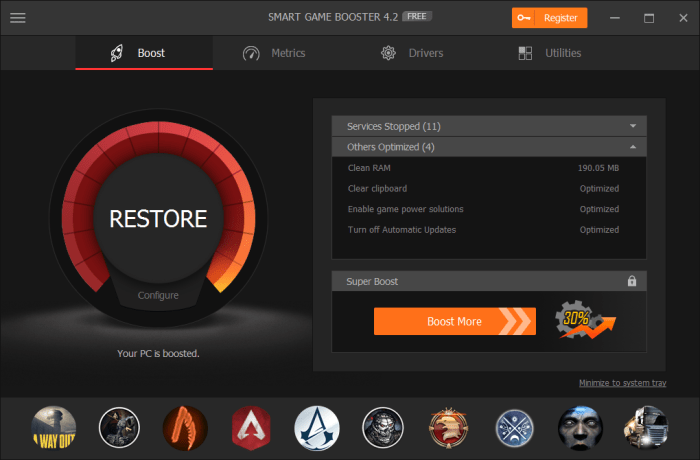
First and foremost, Smart Game Booster overclocks your CPU, GPU (graphics processing unit), and your memory card. Overclocking is a process in which these systems are pushed to behave at a higher level than that set by the manufacturer when you received your computer. The result is increased performance and often, an increase in your frames per second (FPS), which not only helps you game glitch free, but it will make your games look better as well. In the latest version of Smart Game Booster, this feature is built in as an easy slide switch called Super Boost.

Smart Game Booster also shuts down background operations whenever you launch a game, so that maximum system resources are directed to your gaming, rather than being wasted on non-essential functions. And, because overclocking can cause your computer to run a little hotter, an onscreen temperature monitor is now included. This helps you keep your CPU in the recommended range of between 75-80° C and your GPU lower than the recommended temperature of 85°C. If you see the range climbing higher on the monitor, you’ll know it’s time to give your system a rest – or install a better cooling system.   

Smart Game Booster

What else is new

Smart Game Booster 4 has a collection of new tools that seriously clean up your PC for some seriously fast gaming.

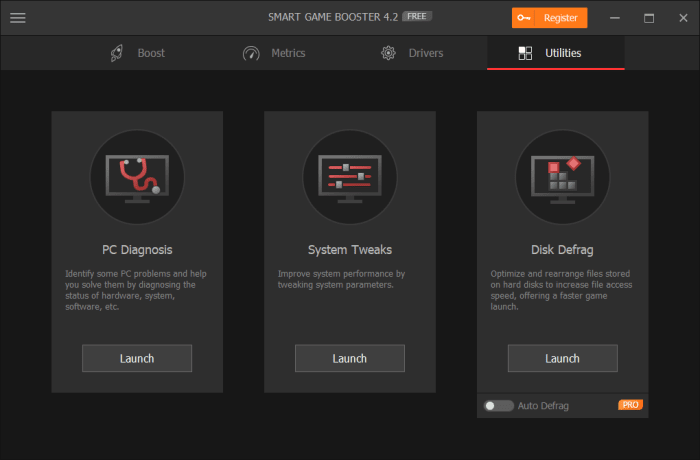
For starters, it has a disk defragmenter utility, which organizes data on your hard drive to make it more accessible and efficient, which naturally makes it faster. The new version of the software also contains a PC diagnosis feature that lets you examine your entire system at a glance, and a system tweaks feature that lets you further boost your computer’s speed by allowing you to set different system parameters.

Smart Game Booster

On top of this, Smart Game Booster 4 lets you easily take still shots or videos of your gaming exploits and comes with a do-not-disturb feature that means the software won’t interrupt you if you’re working on another task in full screen mode. The software also automatically checks popular gaming sites for new releases and now has a more powerful detection algorithm, so that you’ll always know what’s new and updated from your favorite sites like Steam, Origin, Epic and more. 

Great for non-gamers as well

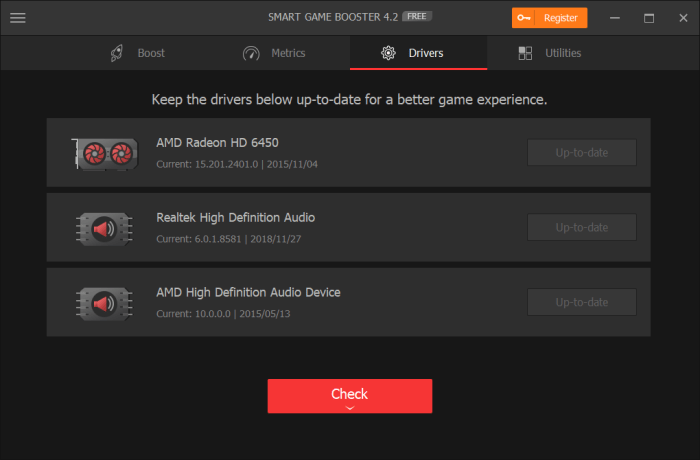
While Smart Game Booster 4 is aimed at improving the gaming experience, it is also valuable software for anyone who wants to boost his computer’s performance. With the disk defragger, the system tweaks and PC diagnosis, the software can improve computing performance for anyone. On top of that, the new release also automatically checks for driver updates so that the components in your computer are always functioning their best – another valuable benefit to all PC users.

Smart Game Booster

Get the deal

You can download a trial version of Smart Game Booster 4 to see just how much it can improve your gaming – and computing – experience. After that, a license for one computer is being offered for Softonic readers for just $14.99 per year, while a license for two computers is a very reasonable $19.99.

How to become a power shopper with Wish

Wish could save you a ton of money. What’s the catch?

Wish app

Originally designed as a simple app that allowed users to save items they liked to a list, Wish has steadily grown since 2010 to become a powerful online shopping portal. The site allows individual merchants, overwhelmingly based in China, to sell products directly to consumers. Without the middlemen, this means exceptionally low prices for users. Looking for a $6 watch? Check. A $2 necklace? You got it. An $81 refurbished Chromebook. Sure thing.

Of course, with prices this low, quality sometimes suffers and delivery times can exceed three weeks. But if you know how to work Wish, it can be a good tool for getting fun gadgets, interesting fashion and other items without crushing your credit card.

Here’s what you need to know to shop successfully with Wish.

Pick A Platform

Wish’s photo-based interface makes the phone shopping experience very appealing, and the app is available for both iOS and Android platforms. It is also possible – and pleasant – to shop through Wish’s app for Windows or the company’s web-based storefront, which is what we will focus on in this article. All of the same functionality exists in the app, so the lessons here apply to mobile shopping as well.

Sign Up

Wish Sign UpThe Wish site and app require that you sign up, which consists of providing your name and email address, or using your Facebook or Google accounts to log on. Once you satisfy this requirement, you are free to get shopping.

After logging in, you are frequently greeted with an announcement offering some kind of discount. While these discounts don’t often amount to much savings, it’s worth jotting down the code you are given to shave a little more of your grand total when you are ready to check out (although the code will likely also appear as a banner as you shop).

Shop

Wish Main Page

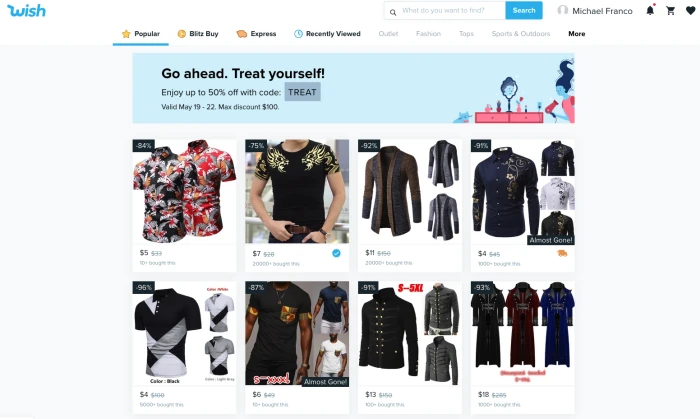
The main Wish screen will show you a random selection of items in which the AI thinks you might be interested. As you use the platform more, the selection will become tailored to your apparent interests. If that selection doesn’t appeal, or you’re looking for something specific, use the search box at the top of the screen.

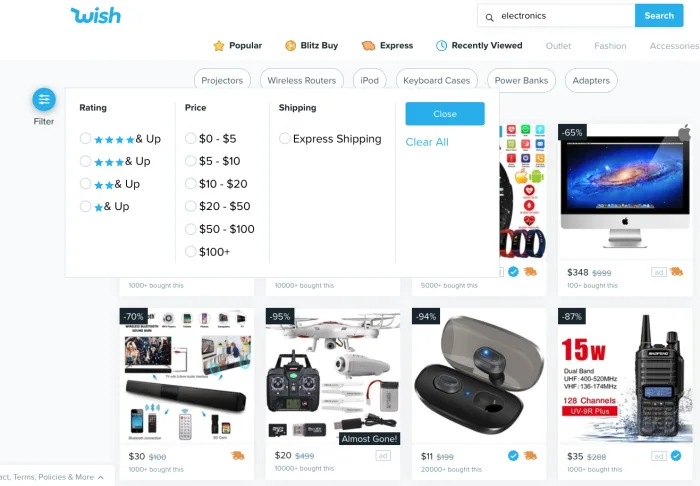
You can also use the “filter” option on the right side of the screen (or by tapping the slider icon in the app) to sort products according to star rating, price and shipping speed.

Wish Filter Feature

Once you find an item you like, click it and you’ll be able to choose your size and color (if applicable). Oddly enough, the Wish interface doesn’t allow you to choose your quantity from this page. To do that you first have to click the “buy” button, and then visit your cart to adjust quantities.

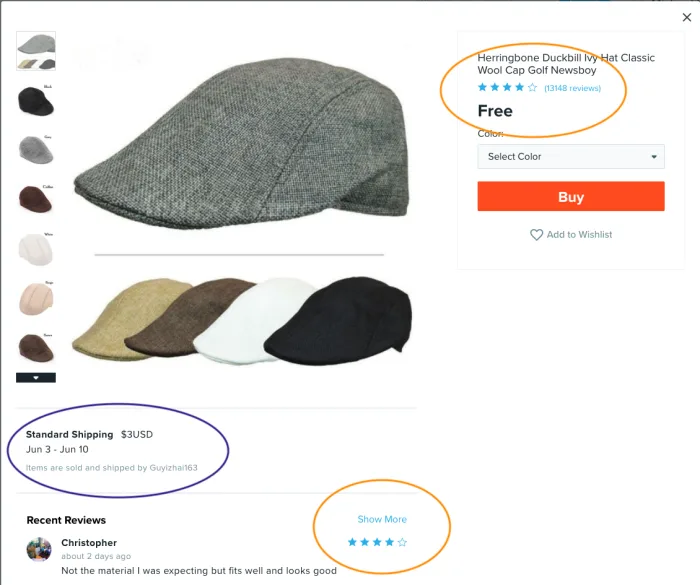
First thing to note here is your shipping cost. It’s a figure that can often be as much or more than the product itself, so pay close attention. This field also shows you how long the product will take to arrive.

Wish Product Page

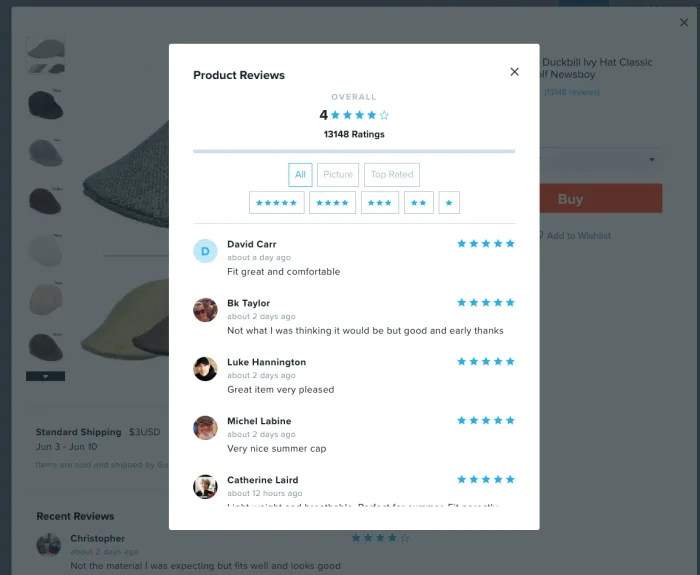
After determining the shipping cost, you’ll want to take a few moments and research your product. Particularly helpful here are the reviews, which you can access by clicking on the blue stars at the top of the screen or on the “show more” link further down. Once in the reviews section, you can sort by star rating or you can see only the reviews featuring photos. Because quality can vary wildly on Wish, the reviews are key to helping you make a good purchasing decision.

Wish Reviews Screen

If you scroll down a bit on the product screen, you’ll also find the “Description” category.

Wish Description OptionClick into this to get more details about the item. This is where you’ll find out what material a piece of clothing or an accessory is made from and also get a sizing chart if you’re shopping for clothes. Here’s where you can also see what condition electronics are in (refurbished, scratched, etc) and find out if accessories like power cables and other cords will be included in your purchase. The description field is hidden until you click on “Show More,” so it’s easy to miss this step – and important not to.
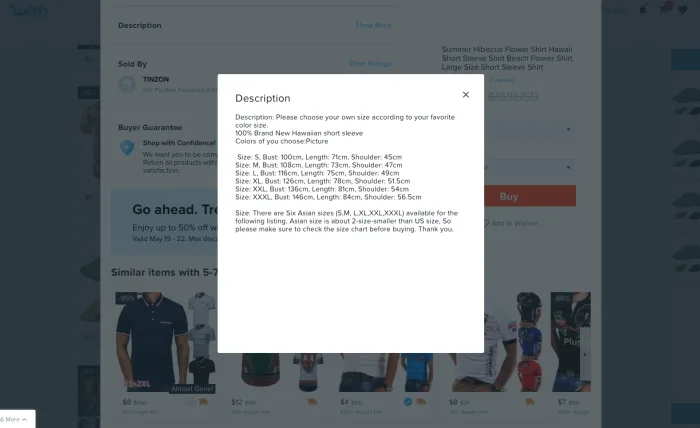
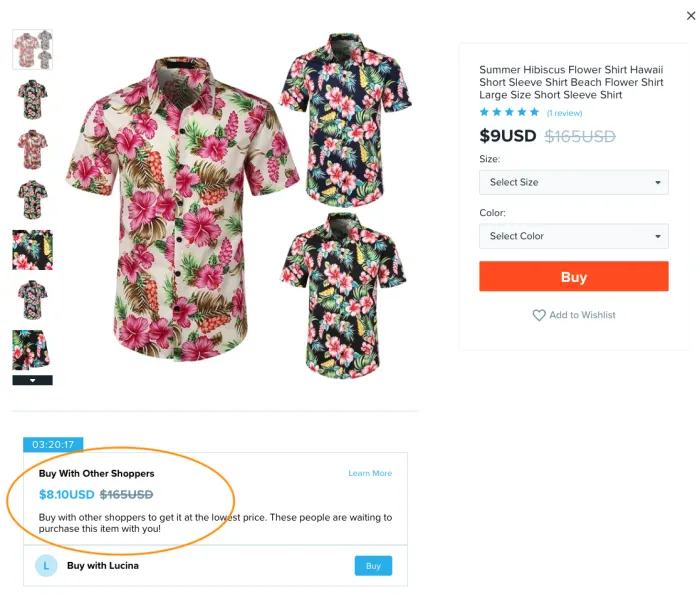
Wish Description Pop UpLastly, the product screen will occasionally show you a “Buy With Other Shoppers” field.

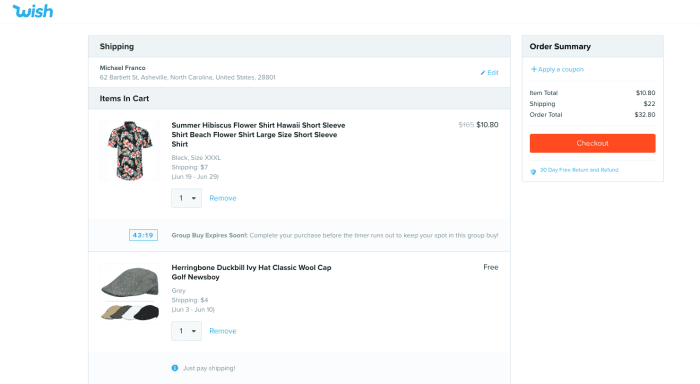
This is a feature that gives you a slightly better price on some items if someone else is shopping for it at the same time as you. To get the savings, be sure to click the buy button in this field instead of the main buy button. This feature is limited by a countdown clock, so to get the deal you need to complete your purchase in the time shown. The timer will also appear next to the item in your cart. Is it a gimmick? Sure. But it can save you some cash.

Wish Other Shoppers

Other ways to shop on Wish

Blitz Buy

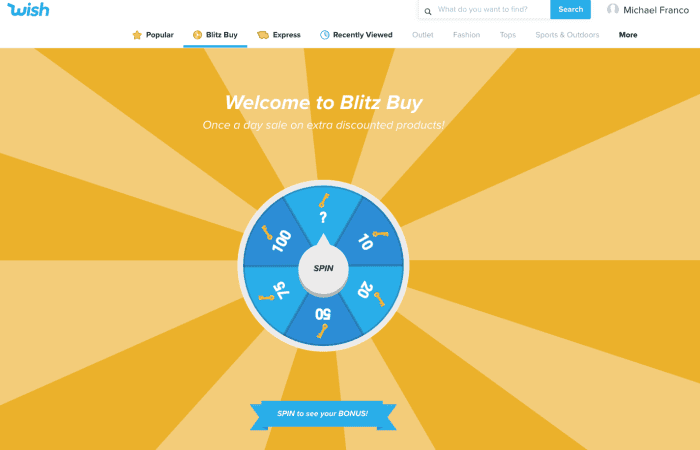
Wish Blitz Buy

At the top of the main screen, you’ll see a golden wheel (which is also labeled “Blitz Buy” on the web store). Clicking here will bring up a game that allows you to spin a wheel to see products that are discounted for one day only. The wheel determines how many of these products you can view by somewhat counterintuitively clicking “Play Now.” The whole thing is pretty much a gimmick and in a recent test, the products revealed after spinning the wheel were no cheaper than they were in the standard store interface, so you might just want to skip the whole thing.

Express

Clicking the orange truck at the top of the screen (labeled “Express” on the web store) will result in a list of products that will arrive in 3-7 business days, which can be a helpful way to sort the products if you are in a hurry to receive something.

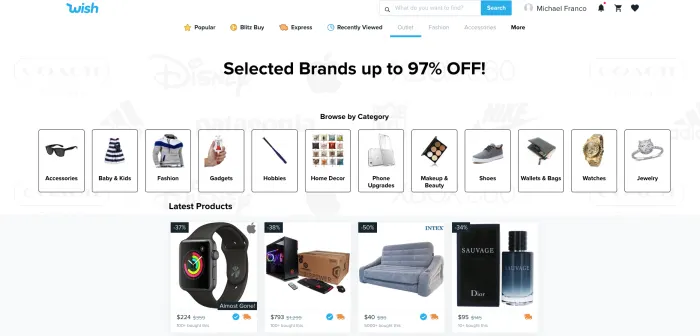
Outlet

Wish OutletClicking on the word “Outlet” on the web shopping page or on the shopping bag icon in the app will bring you to the Wish Outlet. Unlike many of the products in the main store, all products featured here are from popular brands, so shopping through this interface improves your chances of getting higher quality items still at impressive prices.
Cart and check out

Wish Cart

The shopping cart interface on Wish is clean and simple to understand and is accessed by clicking the cart icon at the top of the page. It’s where you can adjust quantities, or set them to “0” if you want to remove something. It also shows you any countdown clocks or group buy deals you might be involved in which ostensibly pushes you to make your purchase decision a little faster, but can also save you a bit of coin.

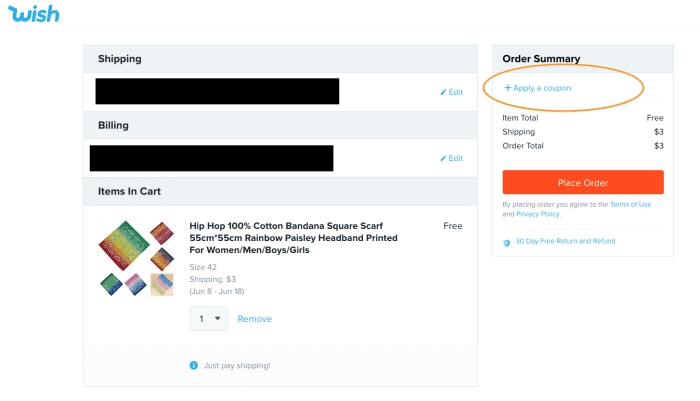
After clicking “checkout,” you’ll be taken to the payment page where you can enter your payment details. Here is where you can also enter that code we discussed earlier to take a few more percentage points off your total sale. On the app, you can find the box to input the code by scrolling down, while on the website, you simply click “Apply a coupon.”

Wish Check OutAlso, be on the lookout on this screen for any last-minute promotions. Sometimes you are given a free gift for purchasing a certain amount, and the gift actually is free – you don’t even need to pay shipping, so it’s worth tossing in to your order.

Slide the orange bar on the app to pay, or click the red “Place Order” button on the web store and you’ll be all set.

Post Order

After placing your order, the company does a good job of keeping you up-to-date on its progress via email alerts or, if you choose the option when you check out, text messages. If you decide that your purchase was a mistake within 8 hours of placing it, you are free to cancel and receive a store credit known as Wish Cash. If your item arrives damaged (not uncommon) or the wrong item is shipped, you can apply for a refund within 30 days of receiving it. You can also apply for a refund if your item never arrives.

Happy bargain hunting!