You can now type shortcut commands on Messenger

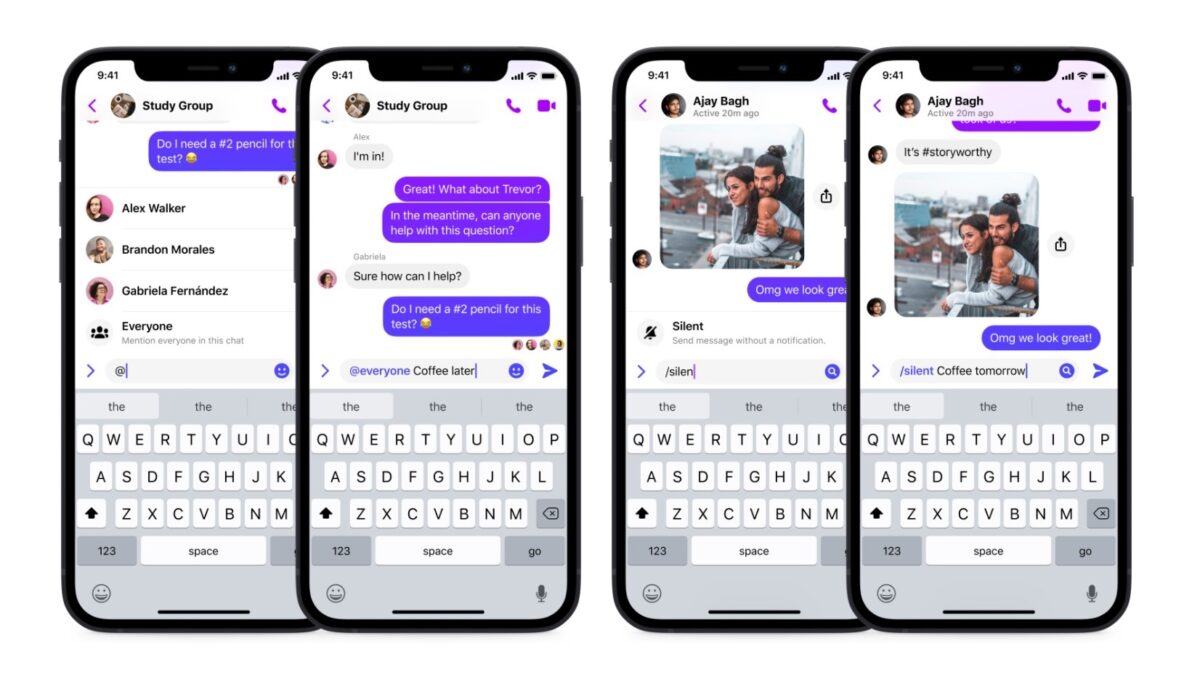
Popular instant chat app Messenger has recently launched a new shortcuts feature, which is a command system similar to Slack’s commands. With it, you can tag everyone in a group chat and silence your messages so they won’t be notified. This is currently available on both Messenger for Android and Messenger for iOS. 

Even with Messenger being one of the most widely-used communication apps, Meta still continues to make improvements to its features in order to stay in the competition. The addition of chat commands isn’t a new concept but it’s definitely going to set Messenger in a more efficient and creative direction.

There are two shortcuts you can do so far: “@everyone” and “/silent.” The former is similar to the current “@” feature that lets you tag someone but instead, it tags every member of a group chat. Meanwhile, the latter is for sending messages that aren’t urgent and so won’t disturb anyone with pop-ups or notifications. This is great for groups with different time zones.

Messenger plans to roll out more shortcuts in the coming weeks. So far, four have been revealed: “/pay”, “/gif”, “/shrug”, and “/tableflip.” Coming soon to iOS and Android in the US, “/pay” will be Messenger’s own built-in payment system, letting you send and request money in your one-on-one chats. “/Gif” is simply an easier way to access the GIF feature and is coming soon on iOS.

Meanwhile, “/shrug” and “/tableflip” are for instantly pasting the popular kaomojis, “¯\_(ツ)_/¯” and “(╯°□°)╯︵ ┻━┻”, respectively in your message—and are also coming to iOS for now. Messenger plans to add more shortcuts within the year, but there’s no news yet on when they’ll be available on PC.

These new shortcuts are bound to make things much easier for users—if not a good reason to prefer Messenger over its competitors. In case you’re interested in knowing more about the app, here’s a guide on how to use Facebook Messenger.

Image credit: Messenger News

Google Play’s April update adds new features and fixes

The Google System updates—which are collectively Google updates to the Android operating system, Google Play Store, and Google Play services—will soon be rolling out a boatload of new features and system fixes for the month of April. These include new stuff for the Play Pass and Play Points programs and improvements to the Play-as-you-download feature.

While it’s gearing up for the beta test of Google Play Games’ PC version, Google Play isn’t just limited to its mobile game service. It also covers apps from different platforms, as well as device system features unique to Google. That’s why April 2022’s planned update comes with a variety of content for all users to appreciate.

The major updates to Google Play Store are new features for the Play Pass and Play Points programs, letting users access apps through various means. There are also new ways to discover apps and games on the Play Store, and the Play-as-you-download feature’s waiting times have improved. Other optimizations for the Play Store include faster and stable downloads and installations, enhancements to Google Billing and Play Protect, and various bug fixes.

Meanwhile, other parts of the update cover critical fixes for security and system management services for some devices, and new developer features for Google and third-party app developers. The last one is for ad support, accessibility, security, and the like in their apps. All of these will roll out by April 1, and users must ensure that their Google Play services version is v22.12 while their Play Store version is v29.9.

The bigger updates here aren’t too groundbreaking for most users, but they’ll definitely be handy for those who frequently use the Google Play Store app. Just be sure to always stay alert regarding the apps you download, as some can still slip through the Play Store’s policies. One app, in particular, can maliciously steal Google Play users’ credentials.

WhatsApp will soon support file sizes of up to 2GB

Popular chat app WhatsApp is planning on expanding its media-sharing file size limit to 2GB on WhatsApp for Android and WhatsApp for iOS. This follows the latest update on the iOS version’s support for iOS 15 and they’re currently rolling out a test for this new feature in Argentina.

While WhatsApp is constantly improving its existing features, it still has some ways to go before it can fully catch up to its competitors. It finally released the message reaction feature in WhatsApp for Android to some beta testers and this time, it’s working on file sizes for sharing media.

Currently, the file size limit for uploading and sharing on WhatsApp is 100MB. This typically lets you send images and short videos with compressed quality. Anything larger than that, however, gets the classic pop-up that says your file’s size exceeds the limit. The new feature in development aims to expand that up to 2GB for more options in sending media to contacts.

As the screenshot displays, the beta test now shows the file size limit reminder to be 2GB. However, this test is only limited to Argentina and to a certain number of users. There’s also no news yet on whether WhatsApp will be letting other countries join the beta test. Fortunately, it works on both Android and iOS versions of WhatsApp Beta.

The upgrade to the limit is a very welcome one for WhatsApp since it encourages users to share more media that’s longer and of higher quality than usual. While this test they’re rolling out doesn’t seem promising just yet, it’s still a step in the right direction for the app—especially when all platform versions can now sync for one account with the latest WhatsApp multi-device feature.

Image credit: WABetaInfo

A full list of Gboard’s emoji mashups are being compiled

So far, over 15,000 possible stickers have been discovered in Google’s virtual keyboard app Gboard. These come from the app’s Emoji Kitchen feature, which allows users to combine different emojis and generate brand-new stickers for use. There’s no official list from Google so other sources are compiling one themselves.

It was previously reported that Gboard is getting more new emoji mashups to improve Emoji Kitchen. There are over 2,000 expected stickers, but encountering them all will be difficult if you don’t have a guide in creating them in the first place. Fortunately, various online sources have begun updating their list of Gboard emoticons to help discover these new mashups.

Gboard’s Emoji Kitchen tool is pretty easy to use as you usually just have to choose two emojis from the displayed list to start combining them. Above the keyboard’s emoji picker is a blank space that shows possible combinations. If the emoticons can’t generate one, it’ll say “Nothing to see here.” You can also keep adding emojis to continue creating new combos—although it’s unclear how the generation works for more than two emoticons. 

When you’re satisfied, just tap the new sticker to send it to your chosen messaging app. Emoji Kitchen works on most chat apps. A cool little trick you can also do is add either the Sparkle emoji or the Magic Wand emoji to any smiley to create Google’s iconic blob emojis as stickers. This doesn’t always guarantee the appearance of the sticker to be converted into a blob but it works well enough.

Some of the new emoticons available include Pretzel, Burrito, Popcorn, Apple, Clover, Hibiscus, Potted Plant, Real Heart, Brain, Copyright, Registered, Exclamation Question, and Trade Mark, to name a few. There’s a lot to go through if you plan on exploring all of the new emojis and stickers from the lists, but that’s the fun part of using this cool feature.

Image credit: @jenniferdaniel / @yeemachine / Twitter

Multi-device support finally arrives on WhatsApp

At long last, WhatsApp is finally rolling out a stable multi-device support to all users. This was previously only available as a beta feature you could opt-in and out of. The update, which includes some improvements, will be coming to iOS within the end of this month and to Android in April.

WhatsApp is always eager to expand its reach and functionality—whether through a more secure WhatsApp Web version or through a new direction for WhatsApp Business in India. While it has different versions and platforms, the option to sync and share data between any app version you own is still quite handy so WhatsApp is constantly trying to improve its multi-device feature.

WhatsApp’s multi-device beta allowed users to link up to four desktop devices and one phone—whether their app version is WhatsApp Desktop or WhatsApp Web on a computer or laptop. If you joined the beta through the Linked Devices settings, it lets you use WhatsApp on your devices without having to keep your phone online. However, if your phone remains inactive after 14 days, the linked devices will get disconnected.

Regardless, this is a useful feature as users aren’t always on their PCs or phones when they want to use WhatsApp. Now, after the update, it will be applied to all users—although you still have to register your WhatsApp account and link new devices through your phone. Some features are still missing, though, like being able to view live locations on linked devices and deleting chats on linked devices if your primary phone was an iPhone.

Fortunately, these will eventually be added as future updates after this stable version. Additionally, they’re also planning on allowing users to link a secondary mobile device, too. That will make things easier for users who own more than one phone. In case you need your data transferred between operating systems, though, here’s a tutorial on how to transfer WhatsApp from Android to iOS.

Image credit: WABetaInfo

You can now don an animal avatar in Zoom meetings

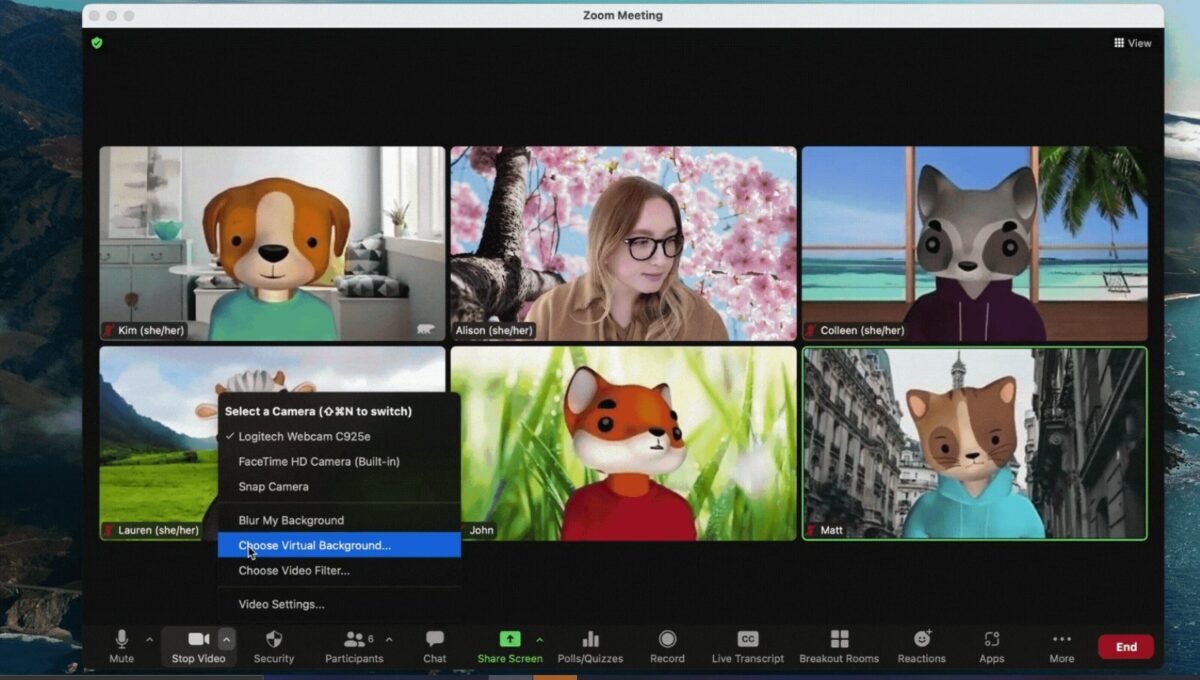
Popular video call app Zoom has recently rolled out the Avatars feature, which allows users to wear virtual 3D avatars in Zoom Meetings and Zoom Webinars. This feature is similar to how Apple’s Memoji app works. It’s currently available on Windows, macOS, and iOS.

Zoom is among the most used video conferencing applications around and has continuously been improving its features to stay at the top. One of its most-used features is the ability to enable a virtual background screen. This time, you can now hide your appearance, as well, with the use of Avatars.

The Avatars feature is highly reminiscent of Memoji’s augmented reality emojis, which tracks a user’s movements and overlays a virtual mask on them via the camera. These are usually caricatures—and in Zoom’s case, the Avatars are currently all animals. Now, users can hide behind cool-looking 3D masks to either entertain those at the meeting or get in character for an online event. 

To enable this feature, first make sure that your client is running version 5.10.0 or higher. Your web camera must be on and the video option is enabled during a call. In the meeting toolbar, open your video options by selecting the “Stop Video” menu. Then, select the “Choose Virtual Background” or “Choose Video Filter” option. After that, go to the Avatars tab and choose your avatar.  

If you want to change it, just go back and select a new one. If you don’t want the filter, choose “None” there. You can also choose “Turn off avatar” in the self-view video tile and the “Stop Video” menu during meetings. Otherwise, here’s a quick guide on how to use Zoom filters during calls. 

Zoom assures that while its technology can detect where a face is on the screen, it doesn’t actually use facial recognition and so doesn’t distinguish between features or log images of users anywhere. Your privacy is still a priority here, which is great as future updates on this feature will be centered around adding more avatar options.

Image credit: Zoom Blog

Reacting to messages is now in WhatsApp Beta

The long-awaited message reaction feature is now available to WhatsApp beta testers. This was previously reported to be a WhatsApp Beta feature in development and is now accessible on WhatsApp Android for those eager to try it out. With it, you can react to chat messages using 6 ready-to-use emojis.

While WhatsApp is a popular messaging app, it actually lacks several functionalities that its competitors have long since had. One of these is the ability to react to messages, for some reason, but now this feature is making some real headway.

As mentioned before, the message reaction feature does exactly what it says: users can now “react” to specific message bubbles in their conversations by tapping and holding onto the bubble briefly. This will bring up a small row of 6 emoticons: a thumbs-up, a heart, a laughing and crying face, a shocked face, a teary-eyed face, and a praying gesture. These are more known as Like, Love, Laugh, Suprised, Sad, and Thanks. 

After they pop up, users can choose one emoji that attaches itself to the bottom of the message bubble, indicating that it’s been reacted to. This even comes with a cute little animation when the emoji is applied. At the moment, there’s no option to add custom reactions but we can hope that that may become a future update once this one has been publicly released.

Currently, this has only rolled out on WhatsApp Beta for Android to a handful of beta testers. You will have to wait for the next beta update to test it if your latest version doesn’t have it yet. At this rate, the other anticipated WhatsApp features in development will soon be available for testing, too. 

Image credit: WABetaInfo

The thing about WhatsApp deleted messages

If you’re curious, you can actually uncover deleted messages on WhatsApp using a neat little trick. Officially, however, the popular instant messaging app has yet to add this to the list of WhatsApp Beta features under development. It’s not surprising since it is technically a breach of privacy to other users.

WhatsApp is constantly improving its features across all platforms. Most recently, it’s launched a new security function for WhatsApp Web and has even started developing a new WhatsApp Business interface for India’s Kirana stores. There are a lot of areas to improve upon so WhatsApp Beta is always busy testing them out. However, some features that would sound cool aren’t exactly for everyone’s best interests.

One of these is the ability to check deleted messages in your chats. Typically, you can delete your message or someone else’s—although you only have one hour after the message was sent before the option becomes unavailable. Once deleted, you can’t ever see or retrieve the message again. This is pretty useful if you’ve sent something and want others in the chat to avoid finding it when they log back in.

WhatsApp Beta is actually working on two new features for deleted messages: a longer time limit of 2 days and 12 hours for the “Delete for Everyone” option, and the ability to delete any group message for group admins. It’s quite obvious that the app has no plans on working on any feature that lets users sneak a peek into what messages were deleted, as that would violate user privacy.

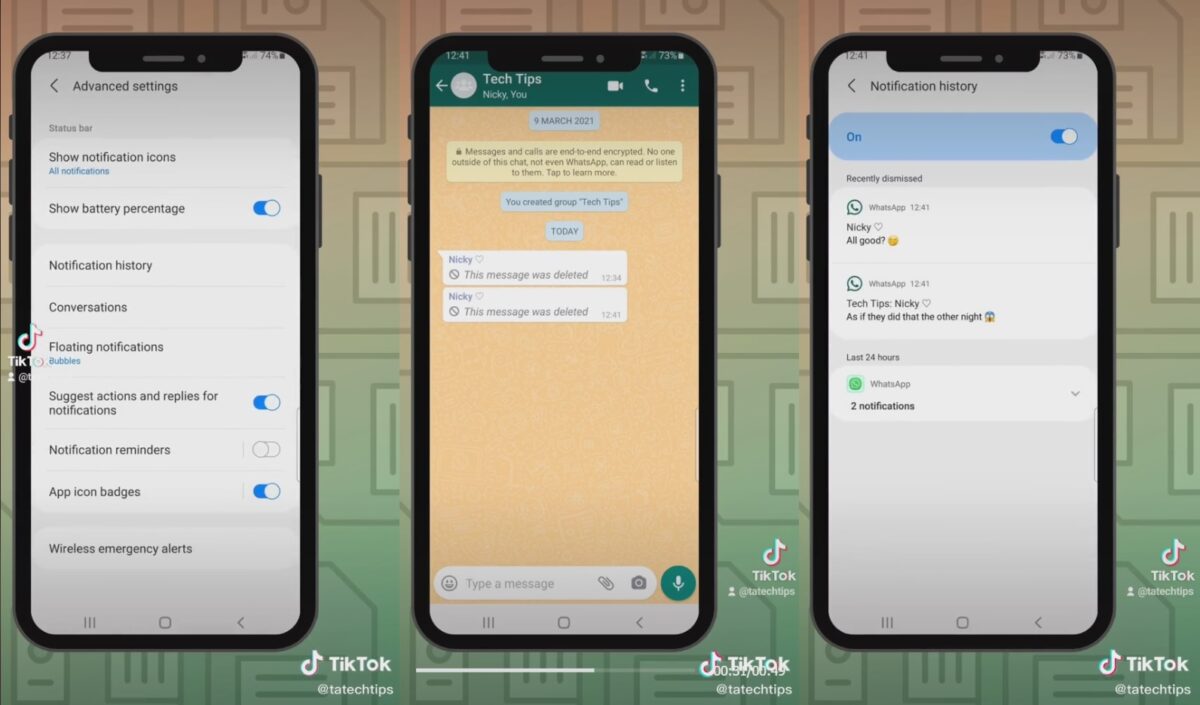
This doesn’t stop people from finding workarounds, though. One old hack for deleted messages lets you view them via the Notification History function in your Settings. Turn it on and any message sent to you will be displayed in your Notification History, regardless of whether they were deleted or not. This isn’t the only hack around, too, as you can also use WhatsApp without a phone number.

Image credit: @tatechtips / TikTok

Instagram finally introduces a parental control feature

In light of the recent issues regarding mental health relating to app usage, Instagram has finally launched its parental control feature called Family Center. This allows parents and guardians to supervise their children’s activities on the app and keep their experiences safe and healthy. 

As a popular social media app, Instagram is known for having millions of active users but its fame can be a double-edged sword. It’s frequently criticized for quietly promoting more user engagement via its features. One of Instagram’s time management tools lost two options without a proper update announcement, for example. However, this new parental control feature aims to give back some user agency.

Instagram’s Family Center tool is actually a website section for parent company Meta’s apps. With it, parents can view their children’s app usage time, set time limits for them, be notified if their children report a user, and view updates on the accounts that they follow and are following them. Additionally, the feature offers resources from experts on parental control, social media, and how to talk to children and teens about such topics.

It’s currently available in the US and will roll out to other countries in the coming months. Instagram also plans to implement more features, like letting parents set specific hours during which their child can use the app and allowing more than one parent to supervise a child’s account. Plus, the website is expected to be integrated with other Meta apps in the future. 

This announcement also included the app’s plans to roll out VR parental supervision tools on Oculus Quest headsets. Some of the updates include expanding the existing unlock pattern functionality to prevent younger users from accessing anything that isn’t age-appropriate and launching a Parent Dashboard to easily monitor a child’s account. 

As sensitive issues become more widespread online, Meta continues to improve its apps and services in order to cater to everyone. Even older users are being protected through new features—such as Instagram live streams now having moderators in charge of curating the chatbox for offensive behavior. Let’s hope that such useful tools get even better over time.

Image credit: Instagram

Duolingo shows support for Ukraine and those studying its language

In an official statement from its CEO, popular language app Duolingo expresses solidarity with Ukraine by donating all of the ad revenue from people studying Ukrainian via the app to Ukraine relief movements. This is a huge help as the app has detected a 485% increase in users studying the language in the wake of the conflict between Ukraine and Russia.

While it’s not the only language app around, Duolingo is among the more popular options and offers tons of helpful features. In providing support to its Ukrainian language students, the app hopes to further lessen the burden on people during these trying times.

Duolingo has noted that the sudden spike of interest in Ukrainian mainly comes from the US and Poland, which is currently welcoming and hosting Ukrainian refugees. Thus, to further aid both students and refugees, all ad revenue from studying the language will be donated to organizations like the United Nations Refugee Agency and the International Rescue Committee, which are part of the relief efforts. 

Additionally, the app will partner up with these organizations to distribute codes so refugees and hosts can use Duolingo Plus for free. It will also be providing fee waivers so English proficiency tests for university applications are more accessible for Ukrainian students. Duolingo learning streaks will be frozen for users in Ukraine, too, so they don’t have to worry about maintaining their daily progress.

On the other hand, Duolingo remains completely free in Russia and Belarus, but all monetization will be disabled to avoid paying any taxes to the Russian government. The escalation of the Western European conflict can mean a lot of changes to how some apps will operate, but this is exactly a good time to pick up some useful skills that they can teach.