Are you tired of so many video calls? You might be experiencing this new fatigue

The team measured electrical activity in the heads of 35 college students who watched a 50-minute lecture, while others watched another…

Since the pandemic started, streaming meetings have surged like never before. We spend hours in front of the webcam on video calls with bosses, clients, and coworkers. This can exhaust anyone. Now they’ve studied it.

Zoom Meetings DOWNLOAD

Feeling particularly exhausted after a day on Zoom isn’t just in your head: Video Conferencing Fatigue (VCF) is real, according to a study conducted by a group of Austrian researchers.

According to the authors of a study published in Scientific Reports, a journal edited by Nature Reports, “data collected worldwide indicates that video conferencing fatigue is a significant issue.”

A very interesting experiment

However, most available research on VCF relies on personal accounts of the problem and focuses more on the cause than the consequences, explain the researchers.

To determine the effects on the brain caused by hours of video conferencing, the team measured electrical activity in the heads of 35 university students who watched a 50-minute lecture while connected to an electroencephalogram (EEG).

The researchers asked another group to watch the same content live. Additionally, the researchers measured the effects on the heart rate of both groups using electrocardiography (ECG), measured before and after the video conferencing sessions.

Subjects were also subjected to cognitive attention tasks and asked for self-reports about their mood.

The surprise came as attendees of the live lecture reported feeling more upbeat, happier, and active, and less tired, drowsy, and fed up compared to their online counterparts. The EEG results mirrored the self-assessment by displaying brain activity indicating harder work, potentially leading to fatigue.

Cardiac data also indicated more fatigue among those who watched the conference online, suggesting that the video version also impacted the nervous system.

The team admitted that the study has its limitations. On one hand, the conferences did not take place in an office environment but an academic one, with an average age slightly under 24 years old.

Zoom Meetings DOWNLOAD

Zoom uncomplicates your contact center

Zoom is upping its game with a fresh feature update aimed squarely at call center clients, all in the name of enhancing interaction and client contentment. And guess what? Artificial intelligence is in the mix.

With the debut of its comprehensive Workforce Engagement Management suite, Zoom is aiming to become a one-stop-shop for businesses, negating the need to piece together various software from multiple providers.

In the words of Kentis Gopalla, who’s steering this innovative suite at Zoom:

“The contact center is at the heart of every customer experience, and the Workforce Engagement Management suite ensures that Zoom customers have everything they need to deliver excellence to their customers.”

Zoom Meetings DOWNLOAD

A closer look to Zoom Workforce Engagement Management

Zoom’s newly unveiled suite brings together two unique components: Workforce Management and Quality Management, each with a specific focus to enhance customer engagement and business operations.

Quality Management comes in strong with AI capabilities that scan and analyze customer interactions. The objective? To elevate agent performance by ensuring they’re asking the right questions. This AI-driven analysis helps not just the agents but also lessens the workload for supervisors who are keeping tabs on performance metrics.

Workforce Management, on the other hand, is the operational heartbeat of the suite. Its role is to make certain the contact center is adequately staffed, aligning the workforce with customer demand. How does it do this? By leveraging AI to analyze past data, up to a month back, and generate staff schedules right within the Zoom app.

While it’s still early days to gauge how Zoom’s Contact Center tools measure up against competitors, the company’s earnest embrace of AI technology could well be the convincing factor for customers seeking the most streamlined workflow solutions.

A holistic suite

Zoom has introduced a holistic suite aimed at optimizing contact center operations, and one of its pivotal elements is Workforce Management. This tool is designed to fine-tune the staffing levels within contact centers, ensuring that the right number of agents are on hand to meet fluctuating customer demand.

Forecasting tools powered by AI

Workforce Management deploys artificial intelligence to facilitate the decision-making process for contact center leaders. The tool allows for the extraction and analysis of historical data from Zoom Contact Center. This aids in predicting upcoming call volumes and expected handling times, enabling advance scheduling for up to a month.

Automated scheduling for flexibility

The tool goes beyond simple forecasting by automatically generating schedules based on predicted data. This removes the need for cumbersome spreadsheet calculations, allowing leaders to have a bird’s-eye view of agent activities and shift patterns. Schedules can be adapted on the fly, providing an agile approach to workforce planning.

Intraday oversight for quick adaptability

Workforce Management also offers intraday management features. These allow leaders to keep a real-time pulse on staffing adherence, making it easier to adapt to unexpected events or changing needs throughout the day. Metrics on agent performance can be monitored in real-time, offering immediate insights into areas for improvement.

Availability and more information

Both the Workforce Management and Quality Management tools are part of the Workforce Engagement Management suite, which is now available for Zoom Contact Center customers. For a deep dive into what Zoom’s Workforce Engagement Management suite has to offer, you can visit Zoom’s official website.

Zoom Unleashes the Power of AI: Collaborates with OpenAI to Enhance Video Conferencing Experience

Zoom stated that it is working with OpenAI to improve the implementation of artificial intelligence in its products.

In an announcement on Monday, Zoom said it was working with OpenAI to improve the implementation of artificial intelligence in its products.

Zoom Meetings DOWNLOAD

The biggest beneficiary here will be Zoom IQ, Zoom’s virtual assistant, which will become a kind of “intelligent companion”. Thanks to these improvements, the assistant will be able to summarize chats, organize ideas and even write content, among many other things.

A necessary update

Microsoft 365 DOWNLOAD

These capabilities are in addition to others already available on the platform, such as screen sharing, integration with other applications and the option to record sessions. For Zoom, AI is key to its strategy.

The company not only uses models from other companies, such as OpenAI, but also its own. This allows it to offer a flexible and customized solution that is able to adapt to the specific needs of each user.

There is no doubt: Zoom’s commitment to artificial intelligence is paying off. Among the features launched, we have one that will automatically summarize everything that is said in a meeting. In addition, specific things can also be included, such as a list of members, a transcript of everything that was discussed and we can even ask questions in real time in case we have any doubts.

Zoom IQ also has email integration. In essence, it will extract the most important information related to scheduled meetings or video calls. In the event that an email includes a phrase indicating a future meeting (“let’s meet soon”), our assistant will suggest dates based on our agenda. Will you make use of these features in your video calls?

Google announces improved interoperability between Zoom and Google Meet

One of the key aspects of the battle between Google Workspace and Microsoft 365 in recent weeks has been interoperability. We have seen both productivity suites announcing a raft of features designed to make their programs able to work with third-party apps more efficiently, including even boosting interoperability between the likes of Microsoft Word and Google Docs. Today we can report on a further move in this direction as Google has announced it is partnering with Zoom to ensure Google Meet users can hold virtual meetings with more people.

Google Meet Download Now

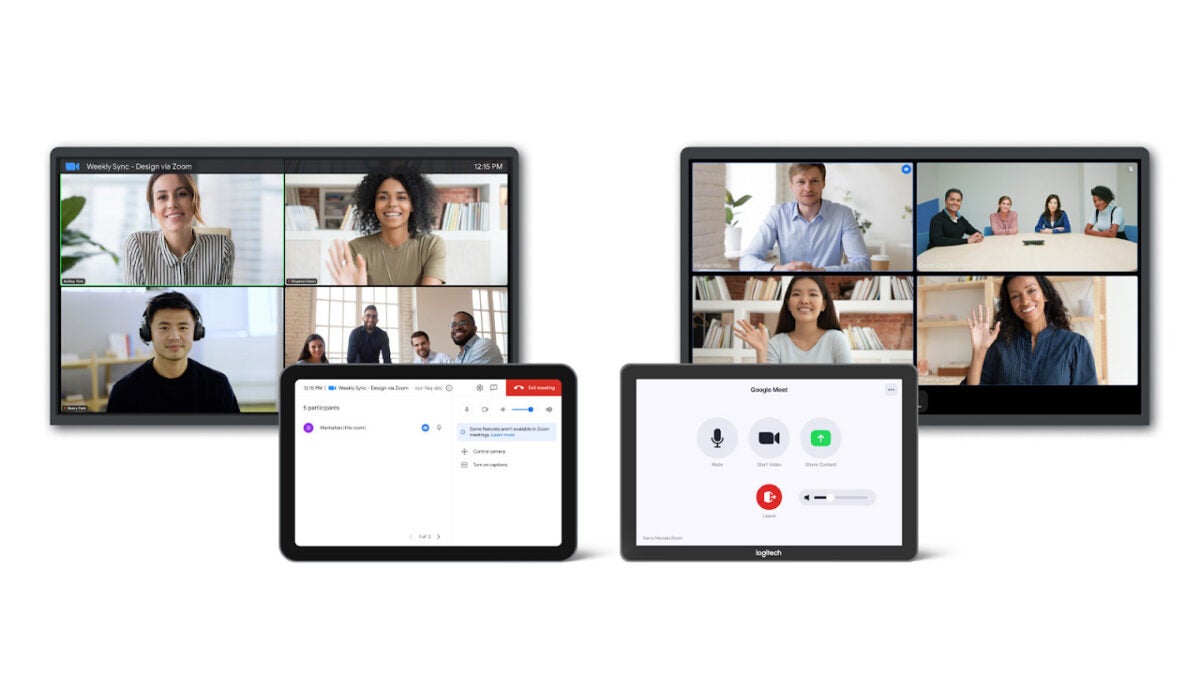
Google has announced via a Google Cloud blog post that it has finalized a partnership deal with Zoom that will enable bi-directional interoperability between the two video conferencing apps. The move means that users across both platforms will be able to meet with each other, simply by clicking on a calendar invite or entering a meeting code.

There is one interesting consideration, however, that users will need to take into account. All Zoom users will be able to seamlessly join conference calls and meeting on Google Meet but there will be limitations on which Google Meet users can join Zoom calls. Only Google Meet users who are running ChromeOS-based Meet devices will be able to join Zoom calls. There is no news about why there is this limitation but the Google Cloud blog post announcing the move did mention that it would be like this “at launch” meaning the interoperability features may roll out to all Google Meet users at some point in the future.

Traditionally, Zoom and Google Meet would be competitive apps trying to get one over on each other, but this is a smart move from Google as it opens up seamless interactions for businesses that use Google Workspace with the many businesses that use Zoom for their video communications.

In other Google Workspace news, users now have access to enhanced scheduling options when organizing meetings.

Zoom Team Chat is in development with new features

The Zoom platform we know today mostly lets you have video meetings with colleagues and clients with only a few tools. With brand new development underway, Zoom Team Chat is the new name that’s set to challenge the likes of Microsoft Teams and Slack. One such feature is having discussions in channels and sending quick meeting invites.

Zoom DOWNLOAD

The entire Zoom app is getting redesigned, and it sounds like the browser version will also receive most of the changes. In one of the latest updates, the company speaks about the evolution from video conferencing to effective communication. In effect, you’ll be able to make channels like in Pumble and Slack but with enhanced meeting tools. 

Zoom conducted a survey this year to determine the needs of its clients. One of the findings was that 95% of workers needed messaging capabilities due to working from home or remote locations. To follow that, 90% use messaging to chat with their colleagues on a daily basis. More time is spent working and conversing than holding actual meetings.

Zoom Team Chat is in development with new features

There are also progressive web developments, which means you’ll also see several of the new features on your browser and not only on the desktop app. It’s helpful when you don’t have much storage space or if you prefer to work online. Zoom also promises that you will be able to integrate with a few other apps, but it hasn’t stated which ones as yet.

It’s clear that Zoom wants to compete with other tech giants that offer more than video meetings. Recently, it added the ability for hybrid workers to reserve workspaces on the Zoom platform. The app is doing a complete rebranding, and you won’t recognize it when the developers are done with all the latest features.

Zoom gets translated captions for video meetings but there is a catch

The digital transformation of the workplace has gone into overdrive ever since the pandemic forced many of us to work from home. To begin with, the mere fact of being able to carry on with meetings, etc. in such circumstances seemed almost unbelievable but now that the dust has started to settle, it is the interesting new possibilities that digitalization can offer us in our daily work and personal lives that are really starting to impress. This update from Zoom is a fine example of these incredible new possibilities.

Zoom will soon start rolling out live language translation captions for video calls that will support 12 languages at the time of launch. This means that you will be able to have video meetings and conferences with users speaking in up to 12 different languages and you will be able to understand them, and they will be able to understand you. There is, however, a slight catch.

When this impressive update rolls out to Zoom users, it will only be premium users that will be able to access and take advantage of it. In fact, not even all premium users will be able to use it as there will also be an added premium payment required on top of the subscription fee to access the new translated captions feature. The price will be $5 a month per user, on top of the user’s subscription fee.

At launch, the translated captions feature will support Dutch, English, French, German, Italian, Portuguese, Russian, Spanish and Ukrainian. The beta version will also include Mandarin, Japanese and Korean . As well as displaying the captions in real-time to facilitate communication during the meeting, the captions will also be added to the transcript of the meeting too.

You can find the full instructions about how to use this interesting new feature over at the Zoom blog post the company published to announce the update. If you are a big Zoom user, you should check out our ultimate guide to using Zoom in 2022, which details all the latest features to come to the video conferencing platform.

Zoom launches Workspace Reservation for hybrid workers

Your general 9-5 no longer looks like it did three years ago, especially with platforms like Zoom. While we used to spend all day in an office amongst other people, the Covid-19 pandemic saw most of us moving into isolation at home where some of us still find ourselves working. Now, however, the world is adjusting to a new normal, and with that adjustment has come the rise in hybrid workers.

Zoom DOWNLOAD

As hybrid workers spend increasingly more time at work, companies like Zoom have put in an effort to ‘close the distance between the office and the remote workspace.’ Zoom’s latest innovation, Workspace Reservation, hopes to take the working world by storm. 

The dreams for this innovation are best described by Zoom’s Head of Zoom Rooms and Whiteboard, Jeff Smith: 

‘Employers continue to prioritize hybrid office management as they seek a secure, easy-to-use, and comprehensive solution to help connect in-office and remote workers. Workspace Reservation expands on Zoom’s already robust hybrid work offerings and helps employees have access to the tools they need to do their best work on a given day.’

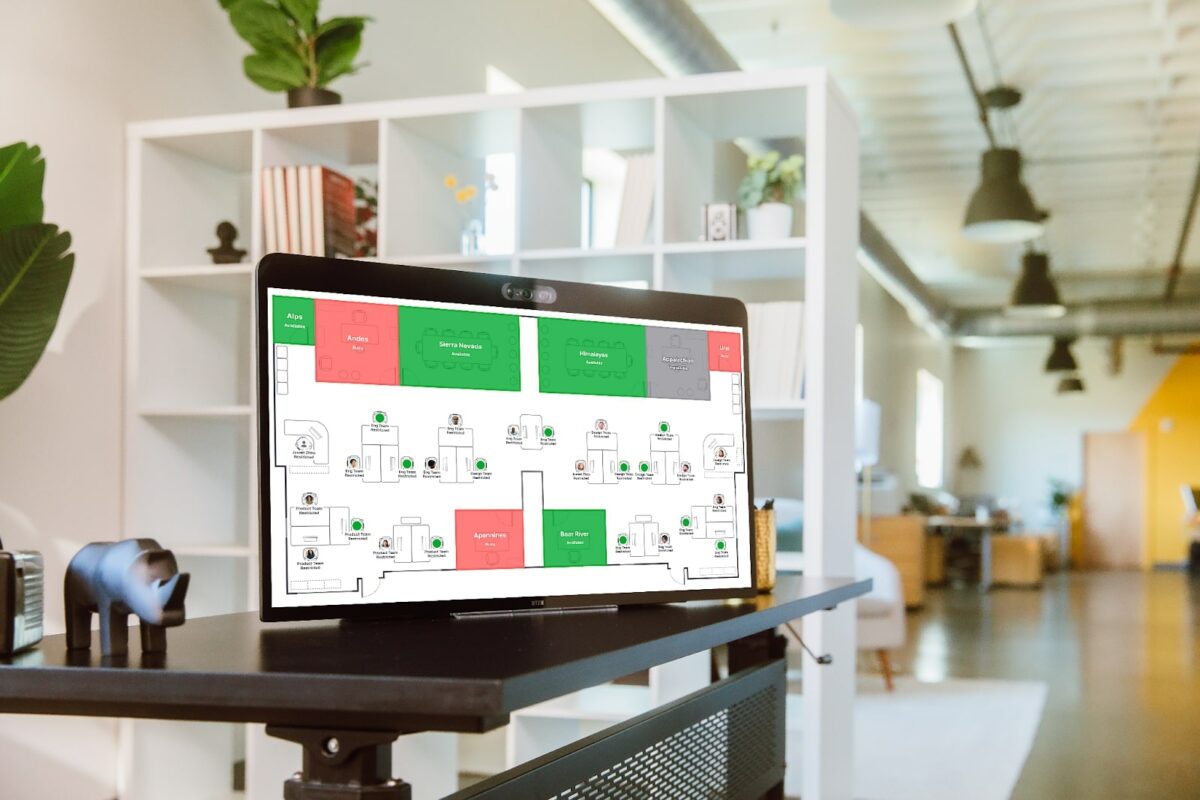
Essentially, Workspace Reservation will let workers pre-book workspaces, let them know who else is booked for those spaces, and furnish them with optimal seating recommendations. Through this new resource, workers will be able to book Zoom Rooms, Work desks, Zoom Phone Appliances, screening rooms, meeting rooms, and all sorts of other spaces and integrated solutions.

Users of the beta version of the service can even book parking spaces prior to their arrival at a specific work location to save time and skip out on the search for an available parking space on the day. 

According to Zoom, the new service offers hybrid teams and system admins separate features and space management solutions:

Hybrid teams

  • Flexible hotdesking options: Choose your space reservation time and duration – only a few short hours or a full day.
  • On-demand booking: Reserve spaces upon your arrival by using a kiosk at the front desk, the scheduling panel outside of a Zoom Room, or directly at a workspace.
  • Intuitive user experience: Teams can use a familiar interface and platform they know and love to book in-office workspaces.

System admins

  • A streamlined process: Easily upload custom office maps and seating locations directly from the admin portal to create a seamless booking process.
  • Simplified space management: Add printable QR codes to workspaces and reserve a space on the fly.
  • Workspace optimization with analytics: Use data collected by Workspace Reservation to learn more about how your teams are using their workspace and assist you in planning and building a more efficient and effective workspace.

In other Zoom news, apparently the company wants to scan your emotions with AI during video calls.

Zoom wants AI to scan your emotions READ MORE

Top new Zoom features to try in 2022

Zoom has quickly become the world’s go-to app for online meetings and professional communications. If you are unfamiliar with the service, check out this handy guide to get started. For returning users, we have prepared a rundown of all the latest features implemented in 2022. The added functionality and enhanced performance make this the best iteration of the program yet.

Zoom Meetings Download

The five tabs

Zoom’s latest update introduced five new tabs that organize each of the main functions of the app. The following list of functions and improvements will be split into five different tab categories. Tackling the tabs one at a time is the most efficient way to highlight all the new features.

Change tabs at the top of the application window

The home tab

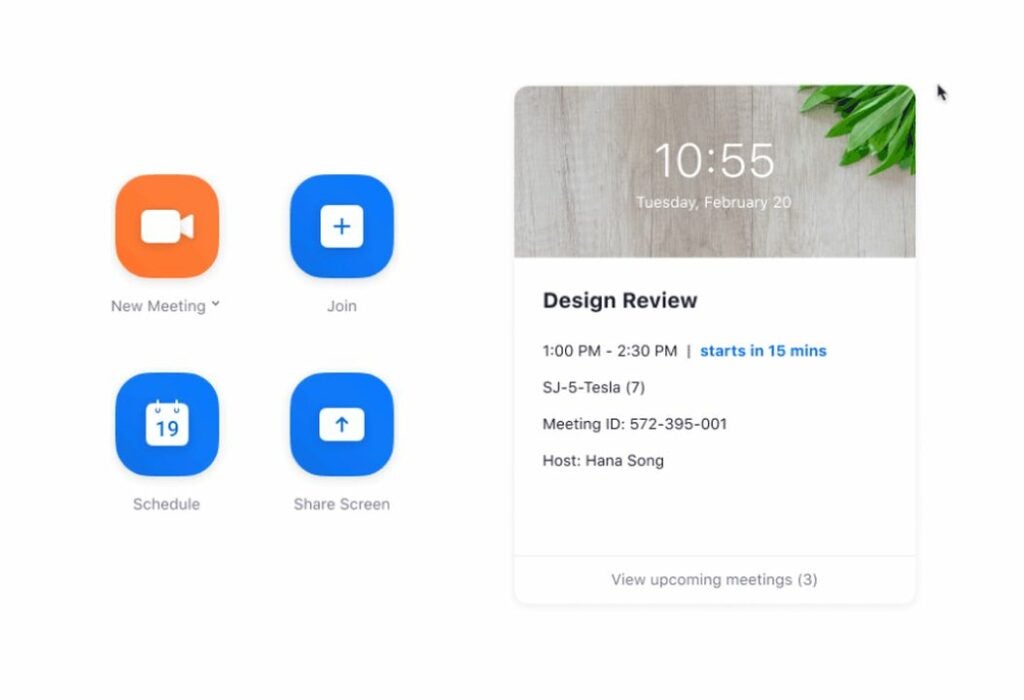
The main page is the first thing you will see when loading the software. The expanded view of the home tab now allows you to view upcoming appointment details. With a single click, you can join any of the meetings listed on this screen. The home tab also provides the option to change your background picture. The elevated search functionality has been improved by suggesting relevant files, chats, messages, and contacts as you begin typing. To make navigation easier, a collection of keyboard shortcuts has also been added.

Get an overview of your account via the home tab

The chat tab

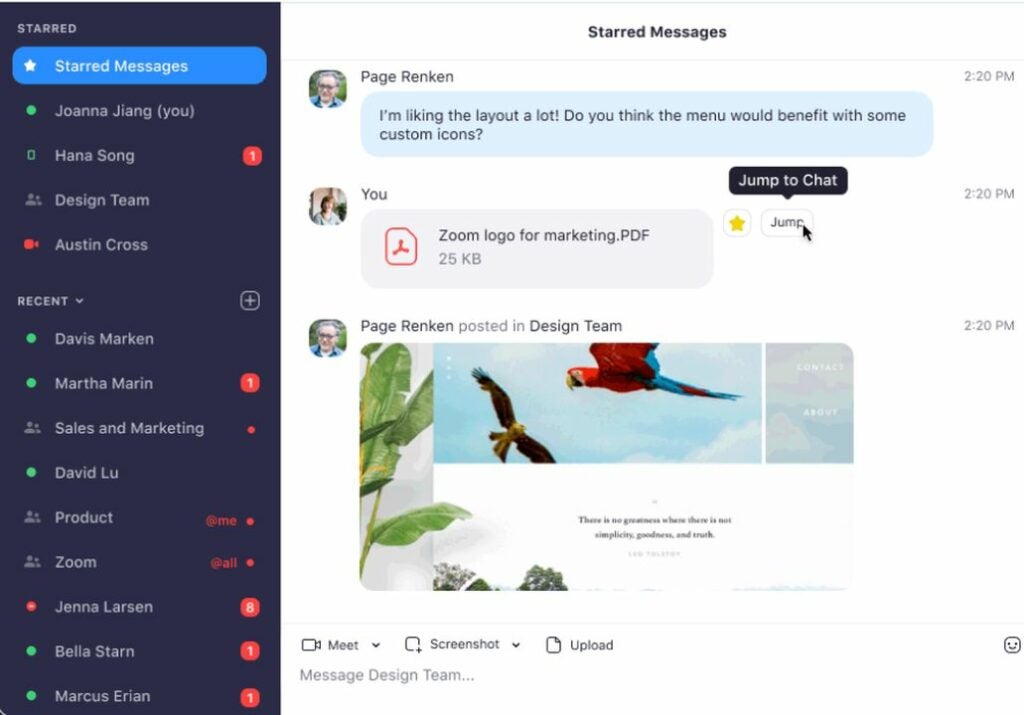
The first of the new tabs act as a messenger hub for all your contacts. Each person now has their own chat channel, and you can create group channels for multiple users. Each channel gives you the option of starting a meeting with the group via a right-click. There is even a personal chat channel for your notes and other storage. When chatting for extended periods or late at night, you can toggle the dark mode interface from the sidebar settings. You can also assign special importance to a chat by starring it. A star keeps the chat pinned to the top of your list of ongoing communications.

Chat with your contacts with the new messaging features

The phone tab

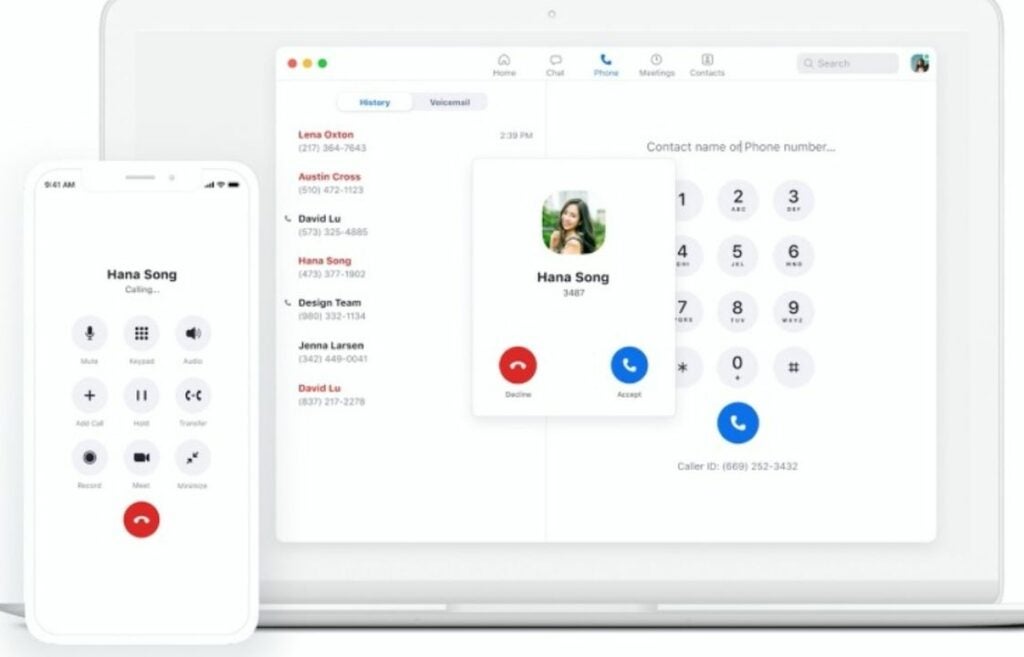
One of the biggest additions is the Zoom Phone add-on available to businesses who subscribe to the cloud service. Employees can make and receive phone calls on any device connected to the company network. Company extensions are supported with the virtual dial pad that enables you to enter numbers with a click or tap. Employers can see call history and use existing PSTN phone lines to connect with modern computers. Voicemail functionality is also included, so the Zoom Phone add-on is an all-in-one-telephone solution for businesses.

Make and receive calls with a Zoom Phone subscription

The meetings tab

Meetings are the bread and butter of the Zoom software. There are a variety of quality-of-life improvements to go over on this tab. For starters, you can now blur your background to conceal the space directly behind where you are sitting. You can also conceal background noise to further enhance your privacy. There is even the option to insert a PowerPoint presentation as a background overlay. To round off the accessibility features, live call transcription is a toggle away.

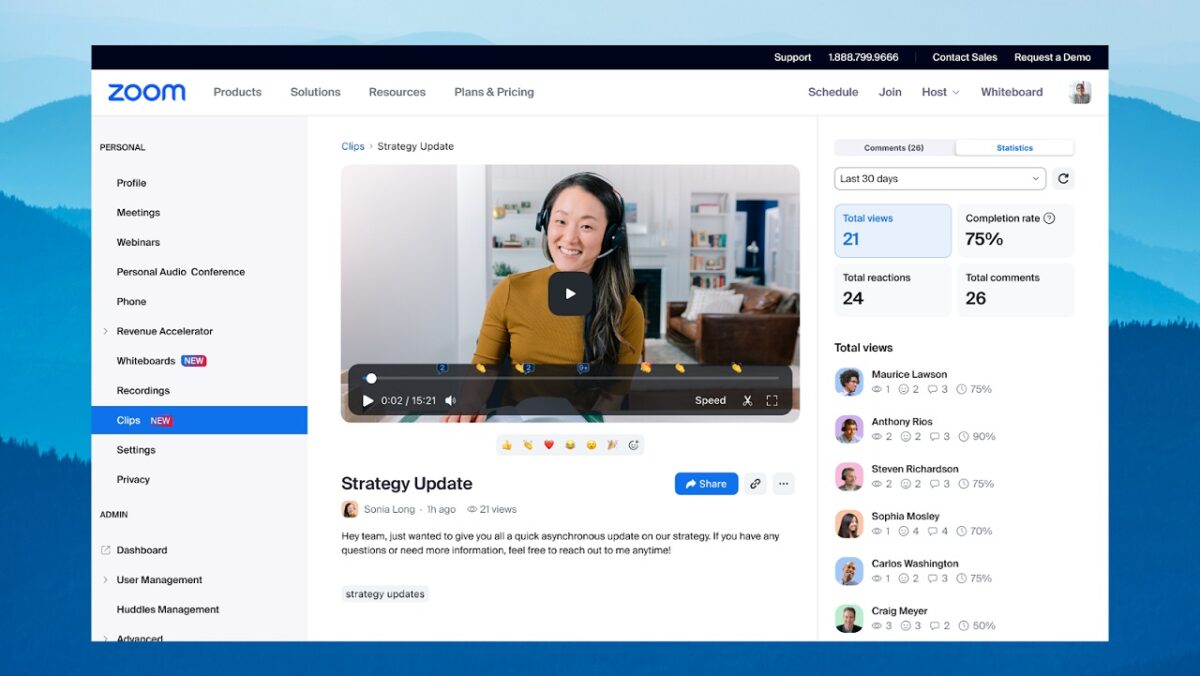
Once a meeting is wrapped up, the host can clip and share highlights instead of posting the full recording. The backend also features increased data protection that keeps the connection secure during calls and meetings.

Blur backgrounds and enhance your privacy during meetings

The contacts tab

This tab organizes your contacts into a convenient list. Here, you can sort, star, delete, and add new accounts you wish to connect with. The “+” button allows you to invite additional people via email. In addition to individual contacts, this tab displays the group channels you belong to.

View both your contacts and group channels in a simple list

The exciting pipeline ahead

Even though Zoom just completed this major overhaul, the company continues to expand the functions and services it provides. To get all the latest news and updates surrounding the Zoom platform, check out the latest Zoom news featuring all the fresh headlines. It seems that there’s no stopping this tech giant from securing additional market share.