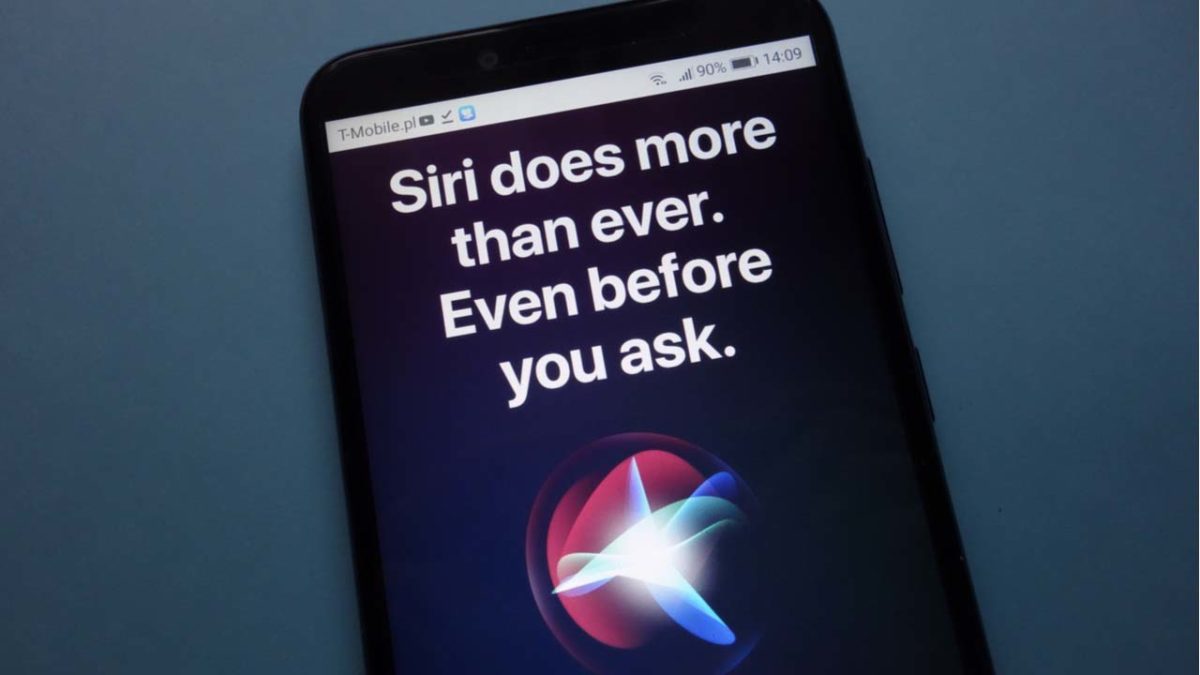
How are they hearing this? They’re doing it through Siri!
Contractors hired by Apple are paid to listen to user recordings. Their job is to grade the responses that Siri is giving to determine if it is functioning properly. The problem is that Siri sometimes picks up on something inappropriate, and has been known to wake and record unintentionally.
These contractors are working to improve Siri’s human understanding so that it only wakes when it is supposed to wake up. They’re also working to make sure Siri actually says something of value when you ask it a question.
When you hear about issues like this, the first thing that comes to mind is probably all of the issues with Amazon’s Alexa listening in on users. Unfortunately, Siri is just as guilty as Alexa.
Amazon Alexa keeps conversations forever and shares them
This information came from a whistleblower who worked for one of these contracting firms. They chose to remain anonymous but came forward as they thought the lack of disclosure from Apple was so egregious.
In a statement to the Guardian, Apple said that the recordings are not tied to a user’s Apple ID. However, according to the whistleblower, the recordings typically come with location information, contact information, and app data.
What should I do if I have an iPhone?
We’re not going to act like there aren’t also security issues or concerns with Android.
Privacy scandal: Thousands of Android apps have been recording everything you do
There’s no need to throw your iPhone in the nearest blender. However, you might want to disable Siri from listening in on you. On your iPhone, go to Settings and choose “Siri & Search.” From here, if you tell Siri to stop listening and if you remove the option to “Press Home for Siri,” you’ll get the option to turn it off altogether.
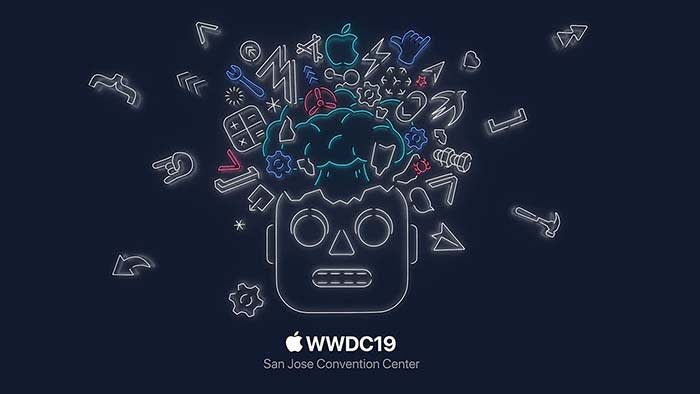
At Apple’s recent WWDC, the company gave users tons of information in a huge privacy push that they are making. It looks like the company really needs to put more effort into how Siri works, and what she listens to without your knowledge.
We took the key takeaways from the WWDC and compiled them for you below. This way, you can save yourself from listening to Tim Cook’s bad jokes and Apple’s constant humblebrags, and go straight to the important stuff.
WWDC key takeaways
The new iOS 13 is coming this fall
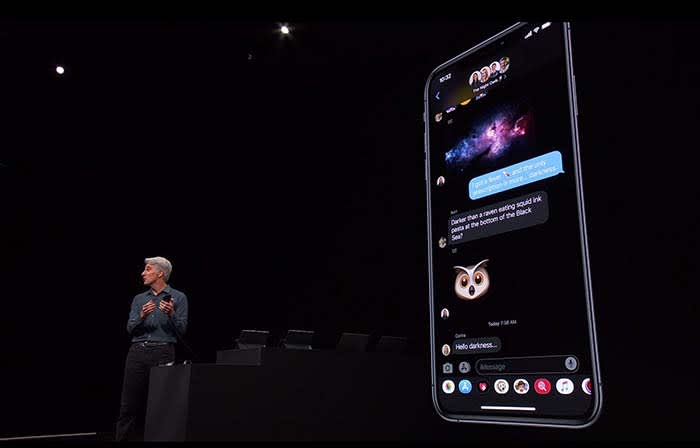
Not gonna lie, Dark Mode on Messages looks clean
Going with the trend, Apple announced that iOS12 will be replaced with iOS13.
The theme of iOS13 is “faster.” Face ID unlocks 30% faster, app downloads are 50% smaller, and updates are 60% smaller. Because of this, apps will launch twice as fast.
Dark mode is coming to iOS. Different apps such as Messages, Safari, and even your home screen will appear darker, giving them a cool sleek new design.
Google Calendar and Keep apps get the dark mode treatment
You will soon be able to sign in with Apple rather than Facebook or Google to help protect your privacy.
For apps that still require an email address, signing in with Apple can also give apps a fake email address. Apple will forward emails sent from your fake address to your real one. This way, the apps will not have your real email address, and you can disable those fake addresses if you want to stop receiving messages.
Your iPhone is probably packed with thousands of trackers sending private data
While talking about a new cycle-tracking feature for women coming to the Apple Watch, a spokeswoman talked about sharing data with apps. The new takeaway from Apple is that “you control your data, and you control what gets shared with what apps IF you want to share anything at all.”
Basically, Apple is trying to be more transparent about what data users are sharing with apps. The message is that they don’t want you to divulge what you don’t want to share, and what you don’t have to share.
Facebook steals information about your menstrual cycles, home buying, more
These tools can help edit photos as well as videos. You can even rotate videos and give them filters.
Other key takeaways from WWDC:
An OS system for all devices!
Every Apple device will have its own OS system. iPhone will be keeping iOS and Mac is keeping MacOS, but iPads will get iPadOS, Apple Watch is getting WatchOS, and AppleTV is getting TVOS.
What’s new with iPad?
The new iPadOS will have all the same features that iOS13 will have.
However, probably one of the wildest features coming to the iPad is the ability to plug in a thumb drive.
This small little change sparks a slew of questions. The new iPad they showed did not appear much thicker than your typical iPad. That said, we don’t know if a new iPad is coming that is thick enough to receive a normal USB. We also don’t know if a special type of USB must be purchased, or if you have to use an intermediary device to connect a USB to an iPad.
With all Apple devices getting thinner and thinner, we find it hard to believe that that the iPad will break the mold in this regard. However, being able to plug in a USB can potentially save us a lot of headaches.
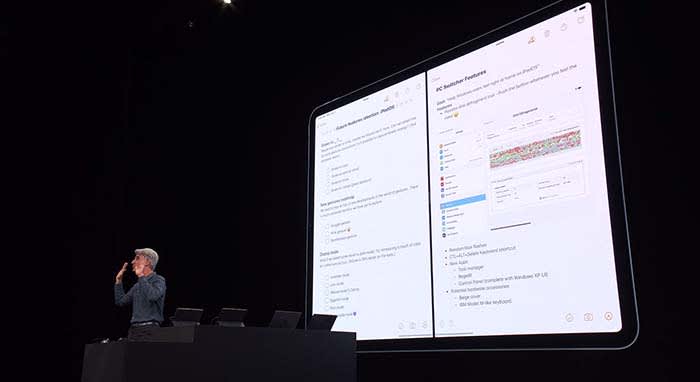
Apple wants users to be able to use their iPad as if it were a normal desktop computer. Going along with this change, iPads will be able to use split-screen to view multiple apps at once.
Going along with this theme, when viewing websites through Safari, you will now see the desktop version of the page rather than the mobile version.
Along with new keyboard shortcuts being added, you will be able to use touchscreen commands to copy, paste, and undo by extending or retracting your fingers.
If you need extra space when working on your Mac, a new app called Sidecar will allow you to use your iPad as a second display screen for your Mac.
Apple TV+ is coming this fall with an original show
Apple TV+ will stream video in 4K. Along with featuring music and music-related content like videos, Apple TV+ will also have its own original show called “For All Mankind.”
“For All Mankind” takes place in a reality where the Soviets beat the U.S. in the race to put a man on the moon. It goes into how the U.S. would react to this reality, and how we would try to bounce back.
The show looks… okay, but not good enough to warrant purchasing Apple TV+. We will have to wait and see what other original content might come our way before making a decision. For now, we will just plan on buying Disney+, and be happy with that call.
Siri will be able to read your messages to you while you’re listening to your AirPods. You can even respond to her. This works for other messaging apps as well.
During the demonstration, a man was on an exercise bike listening to music when Siri informed him that a friend sent a message. After reading off the friend’s message, the man was able to immediately reply by telling Siri what to say. Throughout the process, the man did not have to stop riding.
It’s a cool feature, but we can’t help but point out a flaw in their demonstration. Apple also owns Beats by Dre, which is coming out with a wireless headphone of its own, similar to AirPods. These are supposed to be used while working out, not AirPods. Basically, we’re all sorts of confused.
Apple Watch is a proud, independent device that don’t need no iPhone
Apple Watch will soon be able to operate completely independently without needing to be managed through an iPhone app.
The App Store is also coming to Apple Watch. New apps will include, but are not limited to:
Audiobooks
Voice Memos
Calculator
Podcasts
Homepod hopes to compete with Alexa
Homepod can now understand who in your house is talking to it and can personalize the request. For example, if your roommate asks it to play a song, HomePod will play a song it knows your roommate will like.
With more than 100 titles to choose from, Apple Arcade will be a subscription service like Netflix or Hulu, but for gaming. Gamers will be able to play with both an Xbox One and a PlayStation 4 controller.
Wrapping up
Some of these new features are far more significant than others. When the iPad’s split-screen capabilities were unveiled, the audience members erupted. Why they went bananas for a feature we’ve had on computers for years, we don’t know.
However, the new privacy tools from Apple do deserve praise.
We can’t wait to see how some of these new features and products will unfold for Apple, and we will keep you updated the whole way.
Can Apple overthrow Netflix, Visa, and the digital news ecosystem?
Today was “Show Time” at the Steve Jobs Theater in Cupertino, and the company proudly announced four new innovations they’re bringing to the public – some won’t be here until Fall 2019, others you can get right now. Take a look:
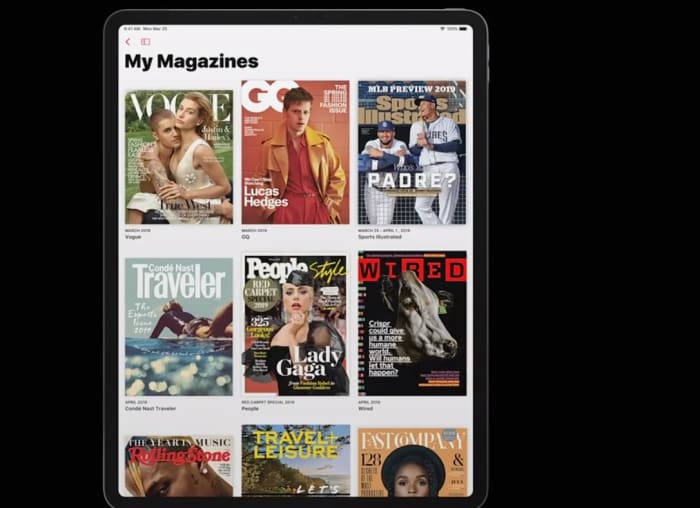
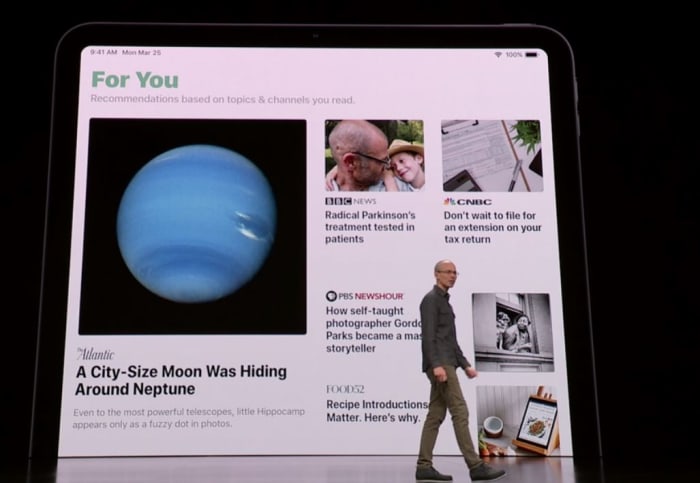
Tim Cook announced at today’s keynote that Apple News has become the leading news app on mobile devices, with over 5 billion articles read per month. Now the company is aiming to widen the news net by adding a subscription service that also includes popular magazines and digital media. Cook praised “the power of journalism and the impact it can have on our lives,” and the new Apple News+ service adds big names like Time, Vogue, People, National Geographic, Popular Science, Billboard, The New Yorker, Sports Illustrated, and Fortune.
You can now access your favorite magazines on your phone
The service covers “over 300 magazines across all sorts of topics,” said Apple’s Vice President of Applications, Roger Rosner, “all in a single package. Once you’re in the tab, all you have to is tap on a cover and you’ll be brought to the table of contents. Some articles may even have moving images like in Harry Potter, or animated headers or cross-outs, and there will also be a section specifically tailored to your preferences and previous viewings.
See your recommended articles and publishers all in one place
Subscribing to this many magazines would take over $8,000 a year, but through Apple, it’s all available to you for a monthly fee of $9.99. The first month of the service is free, and it’s available in the U.S. and Canada right now. Apple News+ will reach Australia and the UK later on this year.
Apple Card
Apple cuts out the middle man, offering their own new credit card
Cook said Apple Pay is the “simplest, most secure, and private way to pay.” The service has seen a great response since its launch. According to Cook, it will soon pass 10 billion transactions in over 40 countries. To take its success to the next level, Jennifer Bailey, the VP of Apple Pay, announced that Apple has “completely rethought the credit card [to encourage] a healthier financial life.”
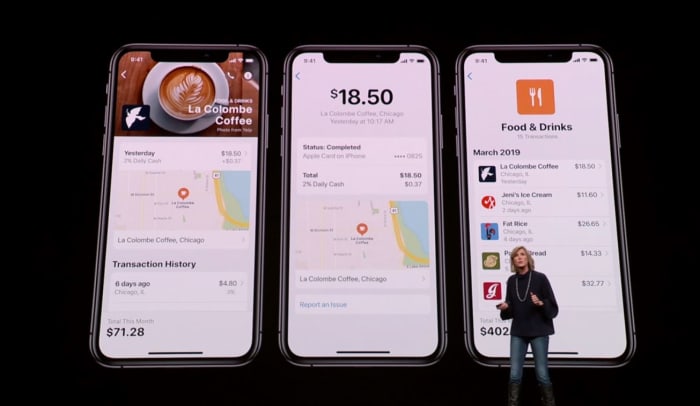
Track and manage your spending easier than with Apple Pay’s new update.
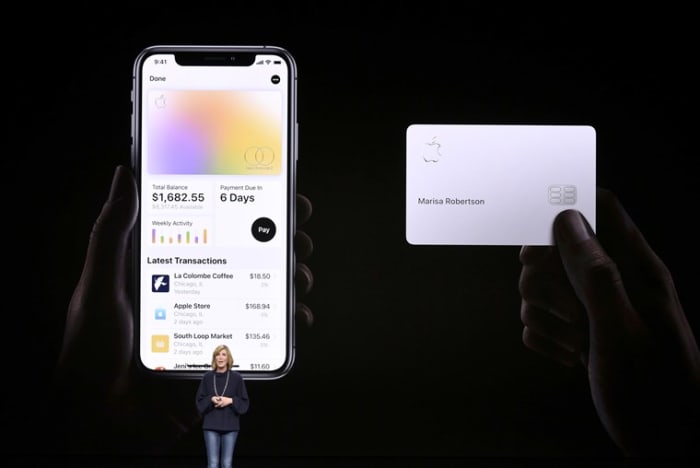
This innovation comes in the form of the Apple Card, a new credit card that’s the result of Apple’s new partnership with Goldman Sachs and MasterCard. The new card comes with a unique number stored in a security chip, and can only be verified through touch or face ID any time you use it to make a purchase. The card also focuses on user privacy, and Apple guarantees they have no way to track what you bought with the card, how much you paid, or when the transaction was done. The Apple Card doesn’t even have any numbers or cvc; all that information is in the wallet app.
The new Apple card is sleek, safe, and secure.
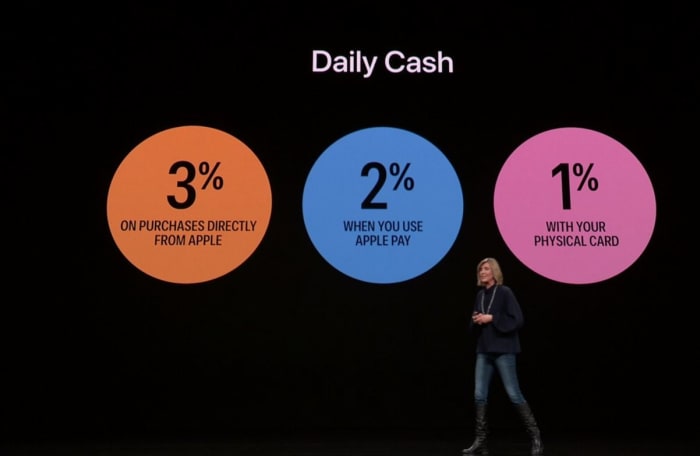
The Apple Card was made to help users avoid high interest rates and to help keep better tabs on payments. The new Daily Cash feature also allows users to receive 2% daily cash any time you use Apple Pay, 1% any time you use the Apple Card, and 3% any time you purchase directly from Apple.
Enjoy immediate cashback with every purchase you make with Apple Card
The amount of Daily Cash you can receive is unlimited, and the Apple Card will be located in the wallet app starting this summer.
Apple Card: Designed for iPhone. Sign up on iPhone, begin using it immediately anywhere Apple Pay is accepted. Uses machine learning to provide easily recognizable transactions. Shows spending trending. Daily Cash gives you cash back, every day you spend. Added to Apple Cash.
The upcoming Apple Arcade service offers over 100 unique games to subscribers.
Apple’s App Store is now visited by half a billion people each week, and the most popular category is games. According to Tim Cook, iOS is now the largest gaming platform in the world, and over a billion people have downloaded games from the app store: a collection of over 300,000 games, both free and paid.
Apple is directly collaborating with game creators to bring this collection to subscribers.
Apple Arcade aims to shine the spotlight on the paid games, which are often overlooked and overshadowed by the more enticingly-priced free games. These are “games that redefine games, both curated and backed by Apple” says the company, and Apple Arcade will offer over 100 games when you subscribe – games that are not available anywhere else, and new titles will be added frequently. Even better news is that all the games can be played on or offline, and will never have ads, additional purchases, or track or mine any of your user data.
Apple is proud to have teamed up with these companies and more to make Arcade possible
Apple Arcade will be available in over 150 countries around the world this Fall, though Apple did not yet specify pricing.
Apple TV+
Apple TV+ is an upcoming subscription that adds both unique and simplified content to your home.
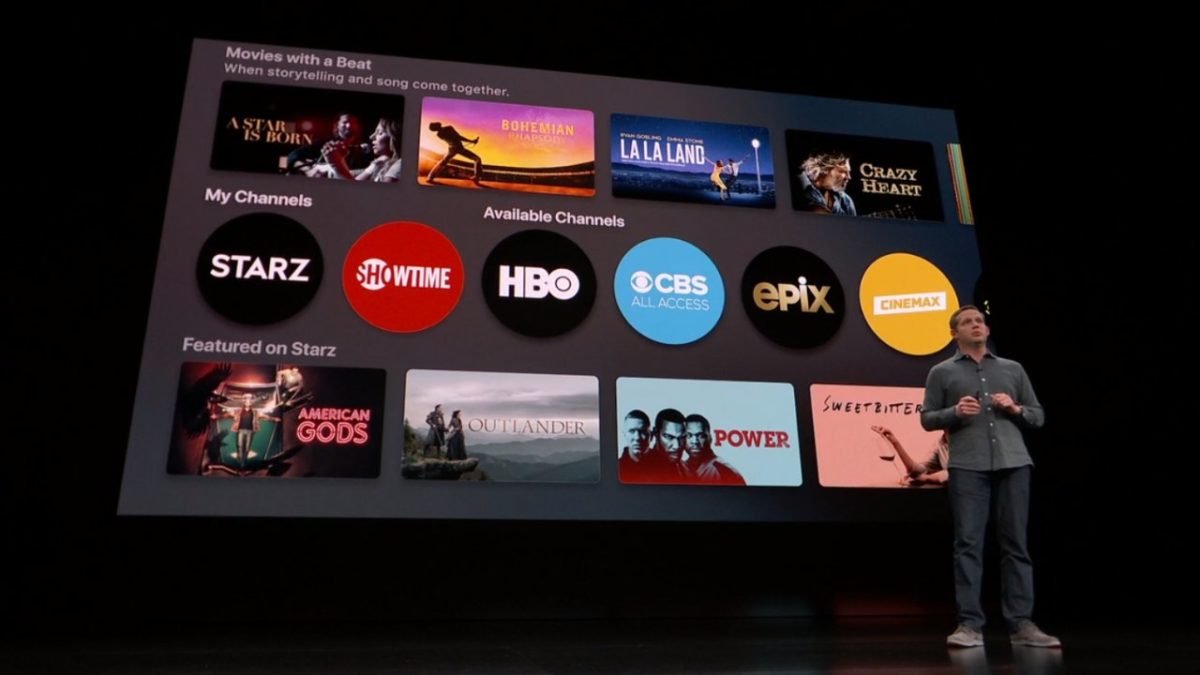
Lastly, Tim Cook introduced a new paid subscription service to Apple TV: Apple TV+. Like Netflix, this lets users “pay for only the channels they want – all in one app with the password you already have.” It enables you to “watch everything on-demand and add-free, online or offline” with a subscription that also allows for family sharing.
Apple’s tv streaming platform is about to become much more user-friendly and accessible
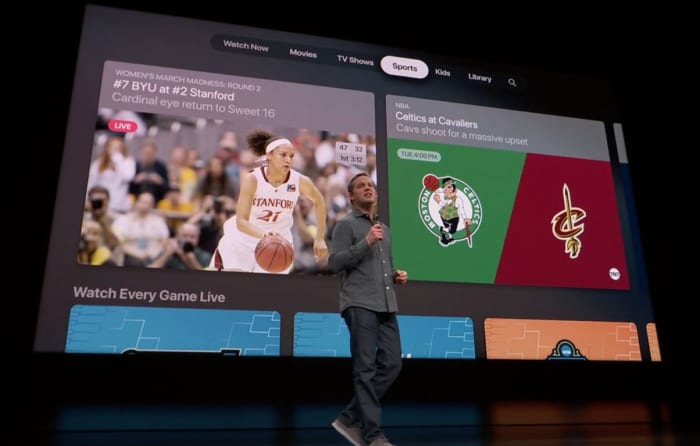
Apple TV+ has redesigned the app so that it’s both easier to use, and also offers exclusive content that’s both recommended to you and that’s completely fresh and new. It’s got movies, sports, news, network tv, HBO, Showtime, and even a kids mode that makes Apple TV+ “a safe place to explore together.”
A number of guest celebrities greeted the audience at today’s event, including Oprah Winfrey, who’s bringing a new book club to Apple. And Steven Spielberg is partnering with Apple to revive the “Amazing Stories” series he produced in the mid-80s.
Steven Spielberg made a surprise appearance, championing Apple TV+ and introducing his new show.
The ad-free subscription service will be available across 100 countries starting this fall, with “commitment to quality story-telling” that can be watched on all devices both on and offline. This also includes series such as “Little Voice,” “The Morning Show,” “Sea,” “Little America,” and the Sesame Street spinoff “Helpsters” for kids.
Apple TV+ will also feature “Helpsters” among other programs for children.
We’ll also get the general software update that will bring Apple TV to all devices this May. For the first time, this software will also be usable on Mac (but that will be later this year). Apple has also partnered with leading Smart TV partners in hopes of integrating Apple TV and Apple TV+ with this growing market as well. Again, no prices were given yet, though a family plan was mentioned.
Apple teams up with big names in Smart TVs with Apple TV+
This announcement marks an exciting new series of innovations from Apple, with the general theme of a safer, more private experience between the company and user, while simultaneously attempting to bolster the community’s internal networking and the sharing of culture to a medium that’s (as Winfrey put it) “in a billion pockets.”
Will you be subscribing to any of these new products? Let us know in the comments below which you’ve got your eye on, and stay tuned for more news as it’s made available.
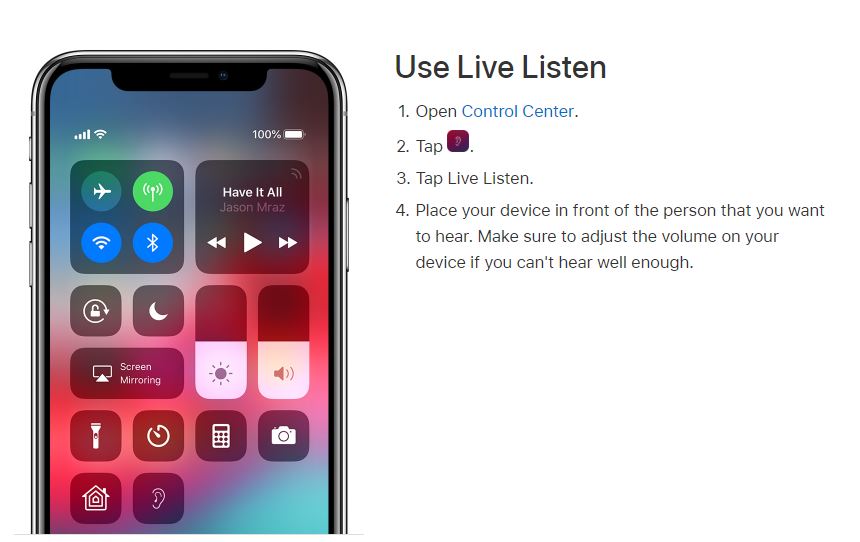
Live Listen helps you to better hear anything near your iPhone.
What is Live Listen?
Live Listen allows for iPhone users with hearing impairment to hear people across a room, in a noisy environment, or even tune into a TV without having to crank up the volume. All they need to do is enable the Live Listen feature on their iPhone and sync it to their hearing aid (or AirPod) and their iPhone turns into a directional mic.
In Apple’s own words, “with Live Listen, your iPhone, iPad, or iPod touch becomes a remote microphone that sends sound to your Made for iPhone hearing aid. Live Listen can help you hear a conversation in a noisy room or hear someone speaking across the room.”
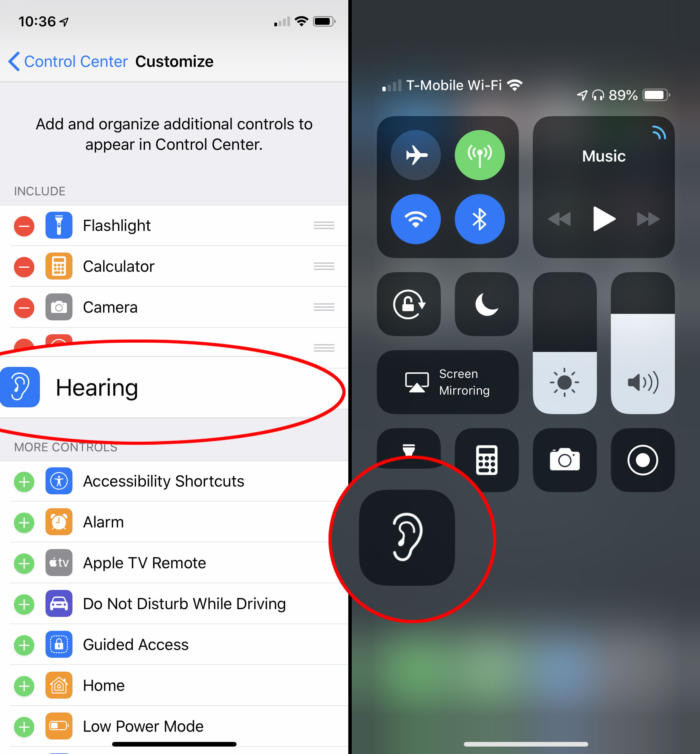
Will people with hearing issues really be able to use this tech to help in their daily lives? Apparently, they already have. Apple has always been known for their intuitive, user-friendly gadgetry and the Live Listen feature is no exception. There’s even an option to adjust volume on the fly, and set it as a preferred Accessibility Shortcut like we mentioned earlier.
Access Live Listen with a simple downward swipe.
No good deed goes unpunished, however, and for all the help that this feature is giving to the hearing-impaired, it’s also creating some more questionable uses.
The problem with Live Listen
Live Listen works well – maybe too well. Users have discovered that if you leave your iPhone in another room, it still transmits sounds straight to your AirPods. The result is that you can now use Live Listen to pick up conversations you wouldn’t normally be a part of: Eavesdropping.
If u have AirPods ?, u can press “Live Listen” to “On” and leave your phone in the room with someone and u can hear what they saying, thank me later? pic.twitter.com/fC6KYmqpB4
The feature works from up to 15 meters away, which makes it very easy to conveniently leave your phone a couple rooms over and still remain privy to what others are saying. The Twitter user above also commented that Live Listen could be used as a makeshift walkie-talkie, or even to cheat on school tests.
Apple still promises privacy
It’s 2019 and we’re all very quick to be afraid and point fingers at anything that threatens our privacy. The great data breaches and leaks of late have made us more fearful than ever. Apple is still standing resolute, however, and maintains their stance that privacy is of the utmost importance to them. Besides, can you really hold Apple accountable for something that you could have already done with a standard recording device? If you’re that concerned you could always just disable the Live Listen feature like this:
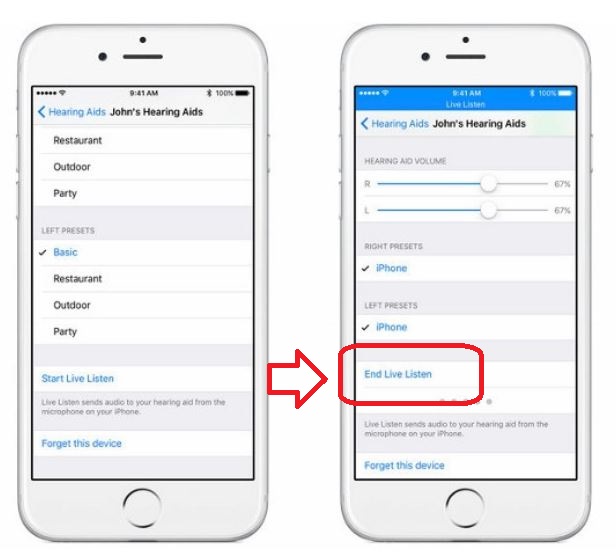
How to turn off Live Listen
1. Open your iPhone Settings
2. Go to General
3. Press Accessibility
4. Open MFi Hearing Devices
5. Tap on the name of your hearing aid or AirPod
6. Select End Live Listen
Press this to end all feed to the synced AirPods.
Is this a helpful feature that will help the hearing-impaired from this point forward? Or should Live Listen be removed from all future models of iPhone? Let us know your thoughts in the comments below, and stay tuned for the latest in tech news.
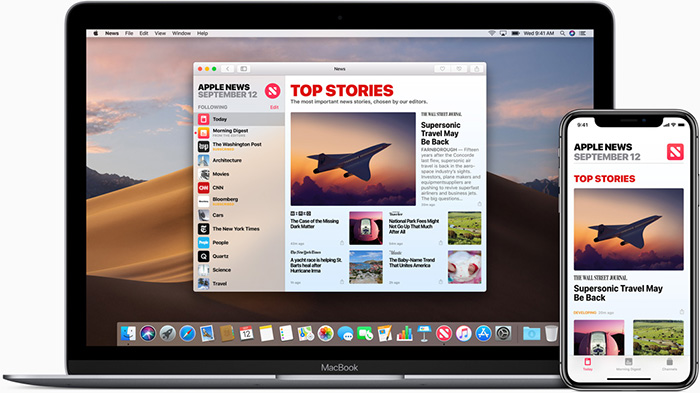
Make the Apple News feed better with these simple steps.
Everyone likes to receive news in different ways. Some learn about the latest headlines on Twitter, others prefer to watch their favorite station on television, and still others may go the old-fashioned route by reading a newspaper. But millions of Apple users rely on their Apple News feeds to stay up to date on world happenings.
While everyone has different preferences for how they consume the news, the same is true for the type of news that they are interested in reading. For that reason, Apple has made it easier for users to customize their news feeds according to their interests. Below, we’ll take a look at how to do just that.
How to personalize your Apple News feed
7 steps to personalizing your Apple News feed
1. Open up the Apple News app on your iPhone.
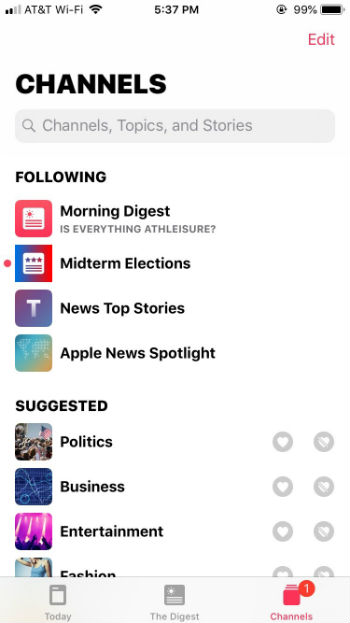
2. To personalize your news feed, click on “Channels” in the bottom-right corner. You’ll see a list of the channels you’re currently following, followed by a “Suggested” list of channels to follow.
If you don’t want to follow “News Top Stories” or “Apple News Spotlight,” click “Edit” in the upper-right corner and click the minus (“-”) button on the left side to remove them from your list.
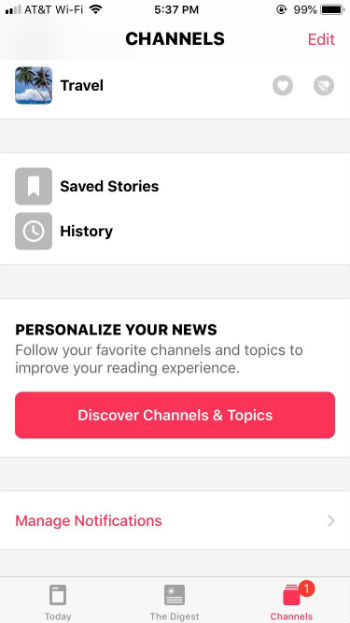
3. If you want to follow a suggested channel, click the heart icon next to the topic you’re interested in. If you’re not interested in a channel that the app suggests, click the icon with a crossed-out heart so that the app knows you don’t want to see channels related to that topic in the future. This channel will then be moved to “Blocked Channels & Topics,” which will appear at the bottom of the Channels section, right below “Manage Notifications.” From there you can easily remove a blocked topic if you clicked the crossed-out heart by accident.
4. If there’s a particular channel or news source that you want to follow that wasn’t in the suggested section, scroll down to the bottom of the Channels section to click on “Discover Channels & Topics.”
To follow a topic or channel, tap on the news channel that you’re interested in to “heart” it. Once you’ve selected all of the channels you’re interested in, they’ll show up in the “Today” tab on the bottom-left corner of the Apple News app. Scroll down and you’ll see an organized list of news topics from each channel you’re following.
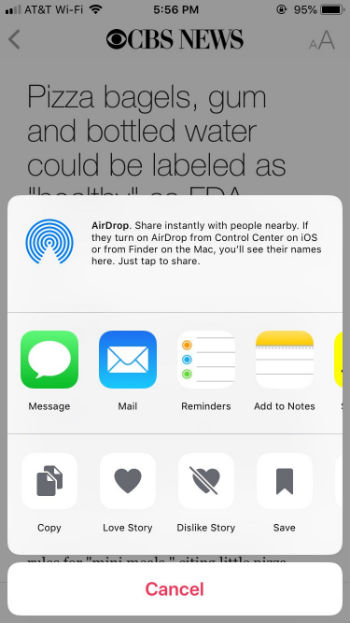
5. If you want to save an article to read later, you’ll want to click on the icon of a box with an upward-pointing arrow. You’ll see this icon to the right of a headline or in the bottom-left corner of the screen after clicking on an article (next to the heart icon).
Click the box icon and then select “Save.”
To view your saved articles or article history, go back to Channels and scroll down to “Saved Stories” and “History.”
6. The more you customize your Apple News app, the better it will learn your interests and behavior. To do this, click the heart icon (“love”) or the crossed-out heart icon (“dislike”) so that Apple News will be able to better personalize your news feed. You can also swipe left on an article headline to save, share, or “love” a story. Swipe right on a headline to “dislike” that topic (and see less of it), or report an article.
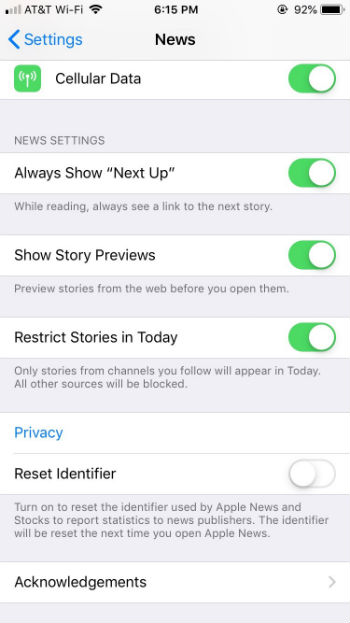
7. To change your Apple News settings, first close the app. Then, go to your phone’s settings and scroll down to Apple News. From there you can choose to see links to the next story, story previews, or restrict stories to only channels that you follow.
It’s as simple as that! If you’re looking for a better way to personalize your news experience, give Apple News a shot.