Volkswagen has launched a new subscription model that allows ID.3 owners to access a power increase of 27 hp for a cost of £16.50 per month or a one-time payment of £649. This strategy has been described by some as an approach similar to business models in the video game industry, where subscriptions and downloadable content (DLC) have become common. This policy could leave consumers feeling dissatisfied, as they have to pay extra to unlock features that were previously considered standard. This is not the first time they have done […]
Volkswagen has launched a new subscription model that allows ID.3 owners to access a power increase of 27 hp for a cost of £16.50 per month or a one-time payment of £649. This strategy has been described by some as an approach similar to business models in the video game industry, where subscriptions and downloadable content (DLC) have become common. This policy could leave consumers feeling dissatisfied, as they have to pay extra to unlock features that were previously considered standard.
It’s not the first time they do something similar
The Volkswagen case is not the first of its kind. BMW has already experimented with features like Apple CarPlay and heated seats that were subject to an additional payment system. This practice generated discontent among consumers, leading the company to retract some of its decisions. Public perception of these monetization strategies can become critical, especially as vehicles are increasingly becoming part of the ‘internet of things’.
Modern cars are becoming smart devices that can offer subscription-based features, allowing brands to continuously implement new capabilities. However, this also raises questions about the real value that drivers get from their initial investments in purchasing the vehicle. As automotive companies adopt these new practices, consumers will need to decide if they are comfortable with this monetization model and what it really means for their driving experience.
The trend towards subscription models in the automotive industry can be a pathway for innovation, but it could also be a source of frustration for those expecting full access to their car’s features after purchase. Public acceptance will largely depend on the clarity and honesty of the communication regarding what this new approach entails.
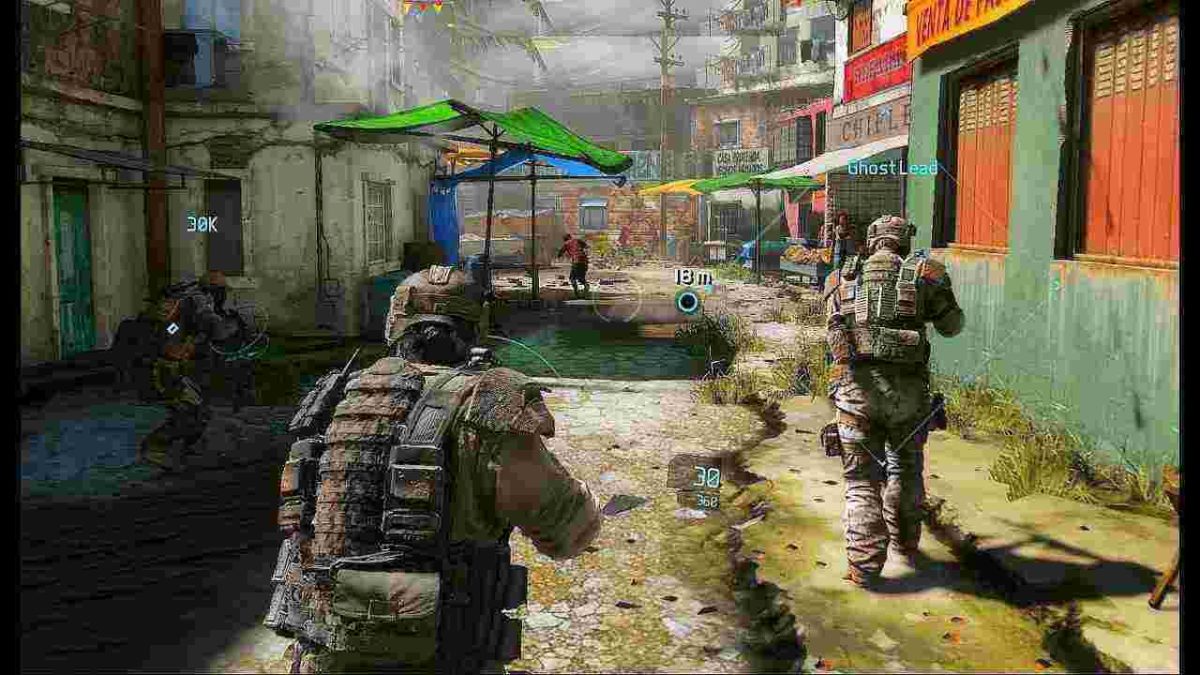
We all like to play the lone wolf, running into an enemy outpost like Rambo and swinging a chain gun around while yelling “Leroy Jenkins!” It’s the way shooter games may play in our head, but unfortunately it’s not going to net you many wins (and if it does, thank your teammates). The best shooter games take inspiration from actual squad-based combat, and even if at the end of the day you’re still just playing Fortnite or Battlefield, some strategies and maneuvers still bleed into the experience. Here’s our selection of squad-based military tactics that will give you an edge over players, even when the odds are stacked against you.
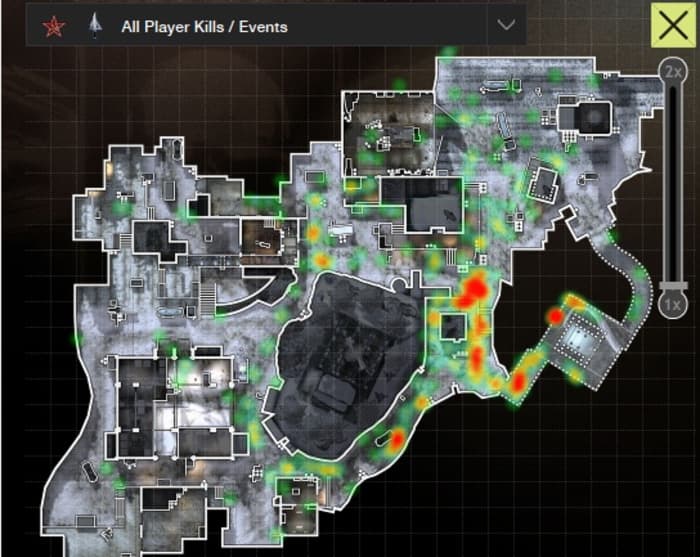
If you’re a fan of shotguns in video games, you’ll need to stay out of wide, open fields. Likewise, you’ll want to keep far away from close quarters if you’re playing a sharpshooter. Where the fight happens is up to you; avoid running into a place where you’re outnumbered, outmaneuvered, or have poor mobility. Before Napoleon Bonaparte sent off his invading armies, he hired cartographers to sketch maps of enemy settlements and terrain.
Studying this heat map of Outpost from Modern Warfare 3 can shed light on areas to avoid.
Instead, keep to familiar territory where you have a clear advantage. If you’re not sure where that is, look up the map online. Check your loadout. Plan where you want to make your stand. This tactic also works great in games that offer gadgets like thermal vision, smoke grenades, or trip mines. Keep your entrances covered, and outlast your opponents.
2. Use team chat
You know how people like to scream and hurl insults about your mother over game chat? While this is charming you can also use this tool to coordinate a team (provided you can establish the ethos for them to take you seriously). Don’t just use it to call out enemy locations either. In an actual military situation you’d be doing a lot more communicating than shooting, and it’s this way for a reason – knowing is half the battle. Which of your teammates can offer cover fire with a sniper rifle? Does anyone have eyes on the objective? How many enemies are converged over x position? If you know what you’re up against you won’t be understaffed.
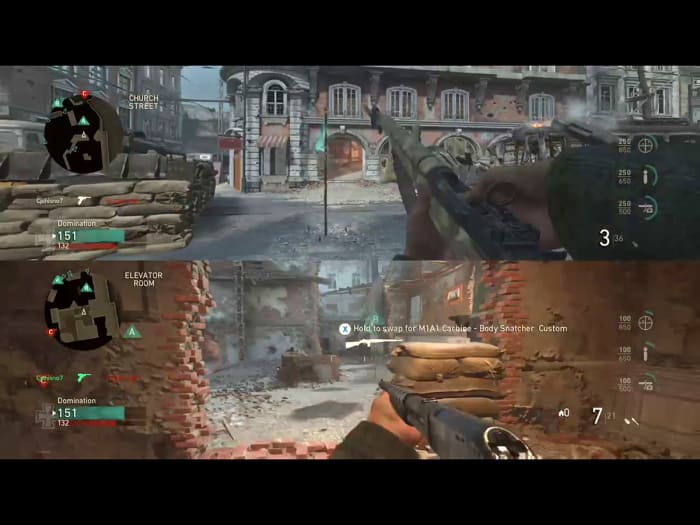
“Who needed a carbine? There’s one by me.”
If you’re on a team with some outlandishly good players, but you find you’re still having trouble capturing a territory or completing an objective, it’s probably because your team’s talents aren’t being put in the right places. Stop banging your head against the wall and coordinate an effective push. Take a second to rethink your strategy. There could be a weakness you were too frustrated to see. Re-evaluate and exploit it, this time with numbers behind you!
3. Move in formation
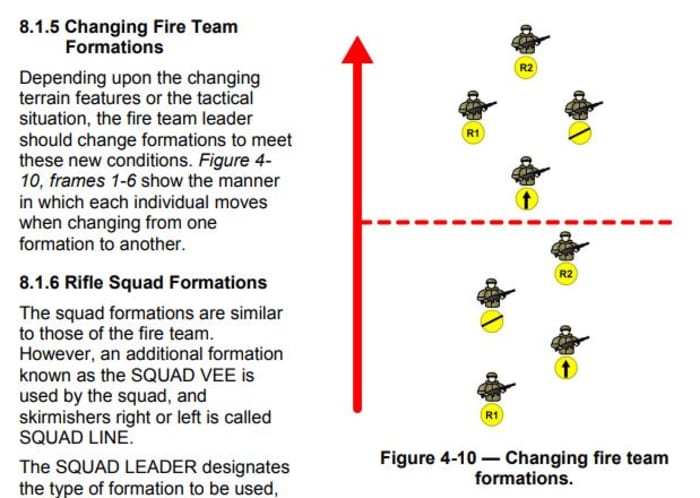
The military deploys its units in small squad formations, and it’s not just because it looks cool. The way your team is positioned can make all the difference once a firefight erupts. Where are you positioned? Where are your teammates positioned? Can you effectively move, react, and shoot as one cohesive unit, or could one well-placed grenade take you all out at once? Know the best time to employ the best shape.
One of the most effective formations in a game like PUBG or Battlefield is the Fire Team Column which positions your squad mates in a parallelogram (the bottom formation pictured below). This is a great shape for controlled mobility in any direction, and also allow for an immediate, reactive counter in case you get ambushed. If you move together and keep moderately spread out you’re forcing your enemies to pick a single target. Once they do, communicate and retaliate as one cohesive unit. It’s also great because you can easily and intuitively switch formations from the Fire Team Column:
4. RTR
RTR stands for React, Take Cover, Return Fire. If you find yourself separated from your team for whatever reason, this is an effective defensive strategy should the enemy gets the drop on you. In a more realistic shooter experience you’re not going to have health bars a mile long, or shields made out of magic. Your best defense is to threaten with your own firepower, and retreat to a more advantageous position. That’s what RTR is all about:
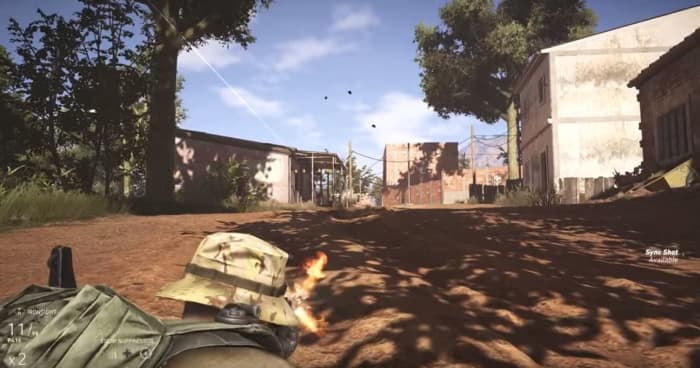
No one likes getting shot at. Go prone and return fire. See how they like it.
When you get shot at, your first reaction may be to run or hide, but it’s actually better to shoot back at the enemy – even if you know you can’t kill them; that’s not what you’re trying to do. You’re trying to get them to stop shooting at you. If you lay down suppressive fire (React) you can buy yourself enough time to do step two (Take Cover). If there isn’t a decent cover to duck behind, crouch down, drop to the ground, or at least zig-zag back and forth. It’s better than standing there doing nothing, and jumping around isn’t as helpful as you’d think. Once you’re in a better spot for avoiding enemy shots, you can take proper aim (Return Fire) from a safer position.
5. Flank
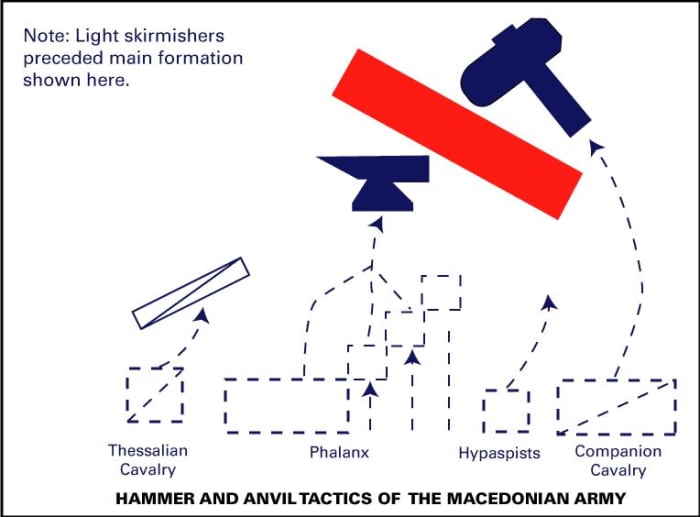
This is a classic ‘hammer and anvil’ tactic employed by the Alexander the Great and the Macedonians. The idea is to keep your opponent preoccupied with an unbreakable force in front, while you’re circling around to hit them with a hard-hitting elite force from behind. It looked something like this:
Flanking is such an overused, obvious tactic that it’s often discarded as a something overly predictable. The whole point of a good flank is that it is unpredictable. If you’re just attacking from two directions at once, you are technically flanking an enemy, but there are ways to do so more effectively: Surrounding and pincering, misdirecting, or attacking from a wholly unexpected angle.
You may have noticed that most of these strategies involve working with a team. Yes, that’s the point. Even if you’ve spent the entire match bad-mouthing your teammates for a having bad K/D, at the end of the day even bad players can group up and at least hold the advantage of numbers – they just need to be properly coordinated. Hop on team chat and start playing the macro game! If they won’t listen and just keep shouting insults about your mother … at least you tried.
Games are hard. That’s the not-so-secret reason a YouTube channel like LetsPlay has 3 million subscribers, or why Fortnite tournament champions can bring home millions of dollars. Sure some games are easier than others, but you can usually tell the difference between a novice and a veteran gamer no matter what title they boot up or what controller is in their hands.
Even if you can win every Fortnite match, dominate the Mortal Kombat leaderboards, or build Minecraft castles in the sky, you still might not be the greatest when it comes to beating Riddler in Arkham Knight, winning races in Forza, or leading a nation in Civilization 6. Gaming has grown into a huge umbrella, and it covers a lot of ground. No matter what game you pick up, though, there are some universal tips that will always start you off on the right foot. Here’s our list:
1. Save often, use different slots
Mostly gone are the days of classic Sierra-style point-and-click adventure games like Quest for Glory or Gabriel Knight. You know, games that punish the crap out of you for forgetting to save your progress. Most games use auto-saves or checkpoints nowadays, but take it from a guy who grew up with the classics: If there’s an option to manual save, do it often. It can save you hours of having to replay the same territory.
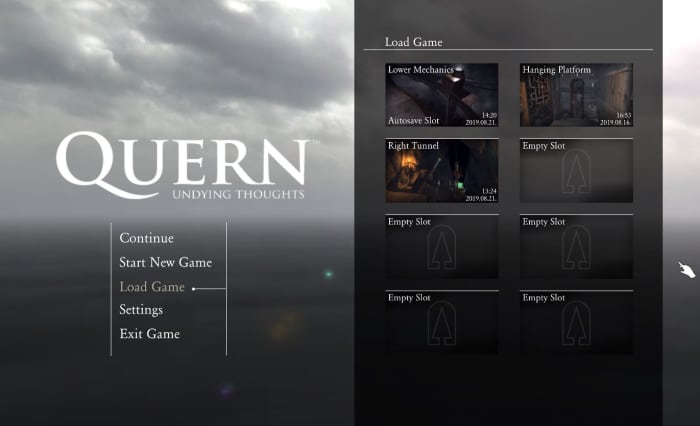
Use multiple save slots to set up a safety net
Saving in different slots is also smart. You may make a decision that you regret, like overspending your resources, killing a character, entering a place before you were ready, choosing a poor team for the job – the list goes on. We recommend having at least three saves that you go between. That way you have a safety net in case you royally screw something up.
2. Everything is rock, paper, scissors
Rock, paper, scissors is the most basic game of all time (besides maybe Pong) and yet it permeates everything. Hilariously enough, it’s usually even praised for making games complex. The idea is that for everything there is a counter. We can’t stress how important it is to take that into consideration no matter what game you’re playing. It’s the foundation for RTS titles like Total War or Battle for Middle Earth (spearmen –> horses –> archers –> swordsmen –> spearmen), but rock-paper-scissors can apply to practically any genre.
Total War: Three Kingdoms – Complete beginner’s guide
Look at fighting games (who’s the best match for Braniac in Injustice 2?), RPGs (when should you use ice spells instead of fire in Skyrim?), and even shooters (when will an SMG beat a shotgun?). If you find that your usual tactic, your favorite character, or your best weapon isn’t getting the job done like you expected, it’s time to consider a new tactic.
3. Read the manual
We know what you’re thinking. ‘I don’t need to read a manual! That’s for wimps!’ Well then it’s time for a personal story: One of the first games I ever played was Jedi Knight: Dark Forces II. In the sixth level (ugh, I still remember every detail of this game) there’s a room with a bridge that has to be manually extended in order to progress through the room. The catch is that the extension controls are quite far from the bridge itself, and the bridge doesn’t stay extended long. Bottom line: You have to run across the bridge really quickly before it pulls back in again. It went something like this:
I was stuck at this part of the game for seven months because I kept trying to walk across it as fast as possible. Because I didn’t know there was a ‘run’ button. Call me dumb, but since this was one of my first games I didn’t know that was standard practice. If I’d read the manual I would have known this right off the bat and saved myself monthsof frustration. It pays to know the tools in your toolkit. Read the manual. Don’t be like me.
4. Hotkeys are your friends
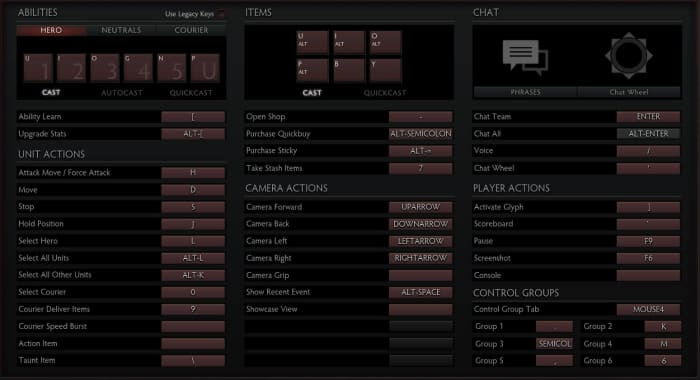
If you’re a console player this tip isn’t quite as important, but for all you PC players looking to up your game this is huge. Any level where you’re on the clock (and we’re not just talking about racing games like Need for Speed. If you’re playing a shooter you need to react quickly.) you need to be able to do a lot of things in a short amount of time. Hotkeys might take some extra memorization, but trust us; it’s worth it. You’ll be able to do so much more, so much faster.
With a bit of practice and the right hotkeys set, you can operate as fast as you can think.
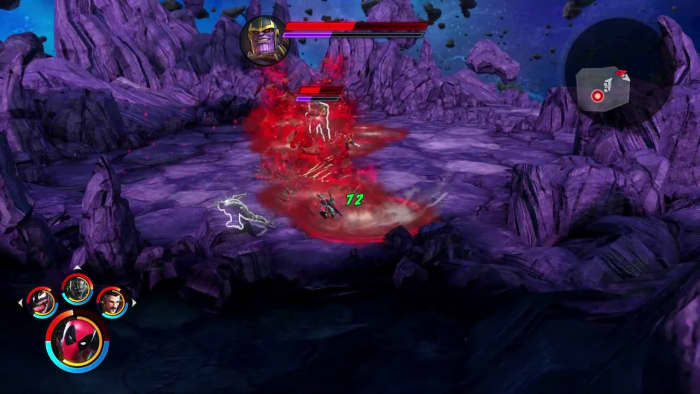
Some games let you set the hotkeys yourself, which means your experience will play as intuitively as you choose. You can even look at a new console game like Marvel Ultimate Alliance 3. If you’re having trouble adjusting to the gameplay (like we did) you can change the control scheme right in the Options menu. You can also re-assign powers to different buttons if you don’t think it makes sense where they are. If the controls don’t make sense to you, look to see if you can change them.
If it feels like you’re running into a brick wall, it might be because you are. How could the game designers be so cruel? Why would they make a level unwinnable?? Odds are, that isn’t the case; you’re just not approaching it the right way. Attacking from a different angle can make all the difference. A melee brawl with a tough opponent might spell death, but a sniper shot to the back of the head? Can’t argue with that! Sometimes it’s like Sam Fisher instructs, you’ve got to “re-position and reacquire:”
This doesn’t just go for single-player games either. If another player in an FPS game seems untouchable, try and undermine him. Go at him with strategies he doesn’t expect. Use equipment that your teammates discarded. Get around the obstacles, flank him, and hit him where he least expects you. Be patient and, to quote Napoleon Bonaparte, “never interrupt your enemy when he is making a mistake.”
6. Everything is min/max
Remember when we said that everything is rock, paper, scissors? That only works if your rock is heavy, your scissors are sharp, and your paper is … uh, it’s not a perfect metaphor. The point is that when you’re trying for an specific build, strategy, or angle in a game you need to push it to its fullest extent. There’s an important balance you need to consider: Do you want to create a loadout or character that’s a jack of all trades? Or would you rather make a specialist who’s unmatched in one category, but vulnerable in another (a la rock, paper, scissors)?
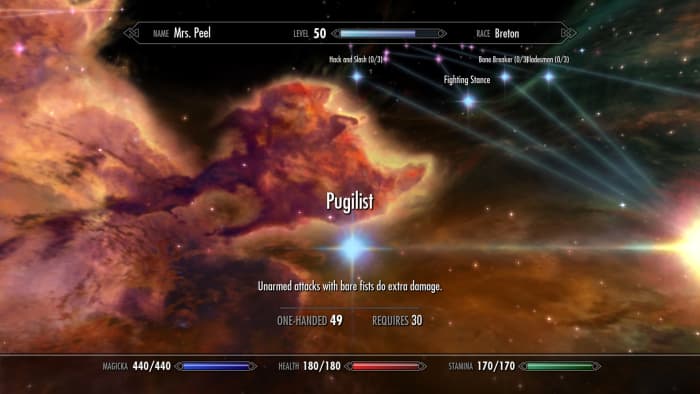
Don’t even TRY an unarmed Skyrim playthrough without investing in this perk.
While it may be tempting to raise the HP of a weak character, or beef up someone who’s not doing much damage, remember that teamwork makes the dream work: Operating as a cohesive unit of properly min/maxed characters ensures that no matter what you go up against, you have a solution for it. In RTS games that means moving units with stacked bonuses. In shooter games that means teammates are covering all the angles in a firefight. In an RPG that means leveling up the right skills and traits.
7. DODGE!
A good player can roll with the hits, but a pro player doesn’t get hit to begin with. In the words of Piccolo, the most valuable skill you can learn is to dodge. This applies to literally every game: When you’re under fire there’s a spot where you’re safe and there’s (usually many) spots where you are decidedly not safe. Dodging in video games is an art, but it’s also a test of patience. Defensive playing can keep you alive long enough to get that coveted weapon in Halo, elude that persistent zombie horde in World War Z or outlast that infuriating Dark Souls boss.
It’s usually clear where to stand and where NOT to stand.
This tip also extends to using cover properly in a game like Mass Effect or Dragon’s Dogma. Silly as it may seem, trees, pillars, and rocks are usually indestructible, so dipping behind them will shield you from mightier aoe attacks and buy you valuable time to heal or plan your next move.
8. Retread old ground, but remember your current objective
Going back to explore old territory might sound boring if you’re itchy to move along in a game’s plot, but it’s often worth doing. Sometimes a place you’re stuck actually is unsolvable unless you go back to investigate earlier ground with a little more scrutiny. This is especially true in puzzle games like The Room or Myst where being observant is half the battle. Maybe there’s a subtle clue you overlooked. In RPGs like Dragon Age backtracking is a good way to save characters who would otherwise have died or complete easier quests, and in shooter games it’s a great way to hone your skills in a controlled environment.
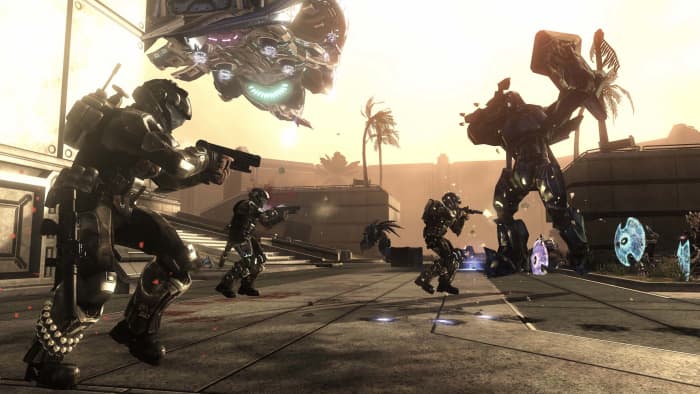
Having trouble winning online Halo matches? Practice in Firefight.
On the flip side of the coin, if you’re stuck at a difficult juncture in a game don’t just endlessly replay easier points. It may not be fun to hammer away on a tough boss in Street Fighter 2 for hours, or sit there stumped trying to beat a difficult stealth section of a game like Shadow Tactics, but we promise – you’ll beat it eventually. You just have to keep grinding away. Never give up, never surrender!
9. Tinker
If a game has a place to tweak your equipment and tools, it’s always worth doing. Whether its smithing your weapons and armor in an RPG like Kingdoms of Amalur or Witcher 3, managing your ISO-8 in Ultimate Alliance 3, upgrading your Mother Base in Metal Gear Solid V: The Phantom Pain or memorizing those multi-hit juggle combos in Injustice, practice makes perfect and every little bit counts.
If you’re really trying to fine-tune your experience, the same goes for the often-ignored Options menu. Small tweaks here can have a huge impact on your gameplay, like raising your joystick sensitivity. In Call of Duty that will open a ton of doors. Even something as small as changing the reticle color in Apex Legends could make an unexpected difference in your performance. Trial and error might lead to an adjustment you didn’t know you needed.
10. The Internet already did it
Last but probably most obvious: It’s 2019 and “if it exists, it’s on the Internet.” That goes for strategy guides, tips and tricks (like this article!), video walkthroughs, Twitch streaming, and even Facebook groups or companion apps for certain games. If you’re struggling with a point in a game, we swear you’re not the first. Look to the gigantic network of players and you’ll undoubtedly find someone who’s gotten past where you’re stuck.
Hopefully these tips will help you up your gaming skill in whatever franchise you’re currently enjoying, and that you’ll tackle the next milestone with a bigger bag of tricks.
Let us know in the comments below if there are any universal gaming strategies that you’ve used, and stick with Softonic for more gaming tips and tricks!
Tired of every having 20 apps open when you log onto your Mac? Here’s how to stop them!
If you have this problem, it’s either really annoying or getting to that point: you open up your Mac laptop, and that app (for us, it was Adobe Acrobat) pops up again. While it doesn’t ruin your whole day, the event brings your momentum to a halt and derails your thought process. Every day. For months. Eventually, we asked: is there an easy way to solve it?
Oh yeah. There sure was! Let’s get right in and talk about how to…
Stop Mac apps from automatically opening
The quick and easy way
While this route usually works, you may want to check the full list of programs that open automatically from the settings. Still, if you want to go through this quickly…
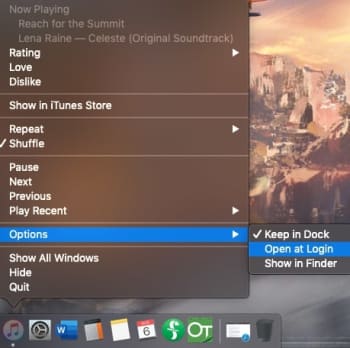
Right-click the application in question, either from the Finder menu or the App Dock. Once you have the information menu open, head into the Options bar and visit the “Open at Login” choice. If there’s a checkmark beside it, click the tab to turn off that function. Boom! Easy as that:
The surefire way
If you want to make sure this doesn’t happen again and check for any other programs that are opening when your Mac starts up, follow these comprehensive steps:
Step 1: Go to Settings
Pro tip: there are two ways to find this. For the longest time, we’ve used the System Settings app in our dock:
However, you can also visit your Mac’s info tab, which generally is found at the top left of the screen. From there, choose System Settings in the drop-down menu:
If you’re dying to clear up space in the dock, you can delete the app and use this shortcut instead! It’s just a suggestion, of course. If your dock looks fine or if you enjoy the shortcut too much, by all means, keep it around.
Step 2: Get to users and groups
Here’s where we get tripped up: to make the settings easy to understand, Apple combined apps in different categories. However, sometimes the specific function you’re searching for isn’t in an intuitive place.
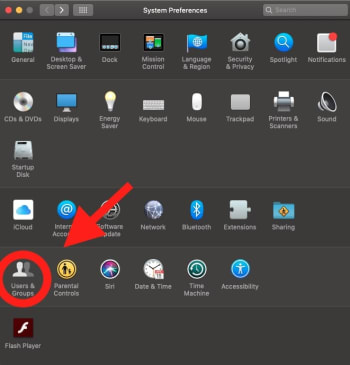
We spent a good amount of time searching through Security and Privacy (we’ll bring this up again later when discussing app permissions) when the real tools were located in Users and Groups:
Step 3: Go to login items
Within Users and Groups, you’ll want to choose the subtab for “Login Items,” the codename for apps-that-open-always. From here, you can choose to delete them from the list! Simply select the offending app, and click the minus button (-) below the box.
(Safari added for example)
We were able to alter this particular window while changes were locked. However, if your computer doesn’t allow it, make sure to unlock your system by selecting the lock pictured at the bottom left. You’ll need to enter your computer login password immediately afterward:
Once that’s finished, you’re good to go! Except…
Step 4: For future reference
You may have noticed we skimmed past a very important question (get ready for this reveal)…
Why does this happen in the first place?
We didn’t put Adobe Acrobat into the Login Items box, and you probably didn’t either. So how do they get in there? Can you stop it in the future? Here’s one method that might help:
Go back to settings. This time, take a right turn into Security and Privacy:
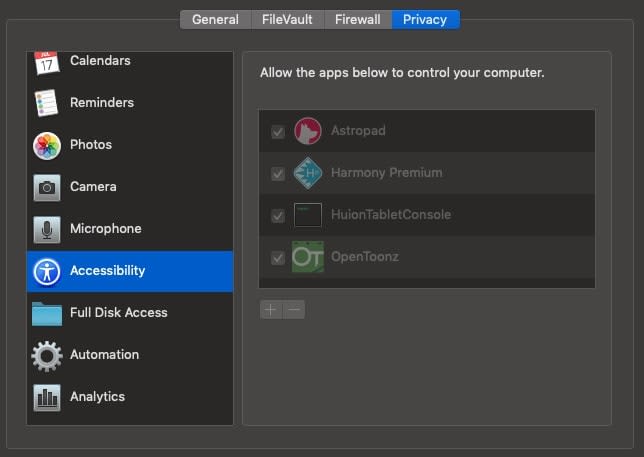
In the left bar, find Accessibility.
The apps within this section are given the ability to control your computer, which is likely how unwanted apps voyage to the Login Items section. We recommend keeping only apps you trust in this section.
Still, sometimes even AAA apps like Adobe Acrobat can decide they want attention. If anything starts acting up, we recommend checking this section and removing the app in question!
And that’s about that
It’s funny how little settings and changes can make such a large difference over time. We hope this quick fix helps keep your sanity in check by stopping legitimate apps from becoming irksome pop-ups!










 However, you can also visit your Mac’s info tab, which generally is found at the top left of the screen. From there, choose System Settings in the drop-down menu: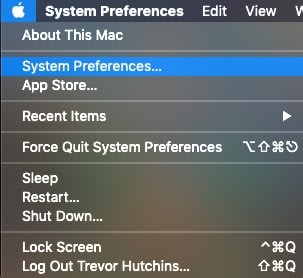
 Step 3: Go to login items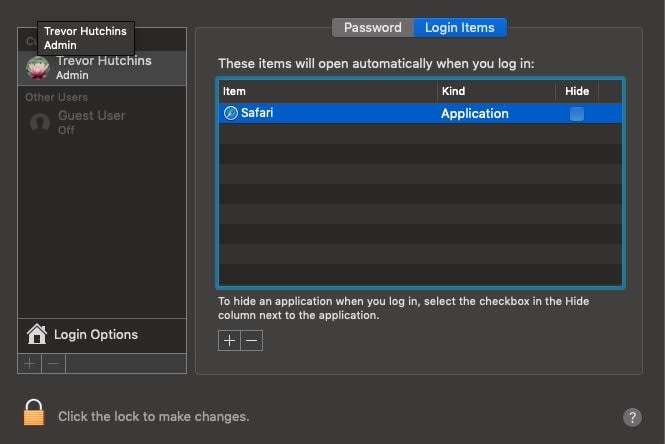
 Once that’s finished, you’re good to go! Except…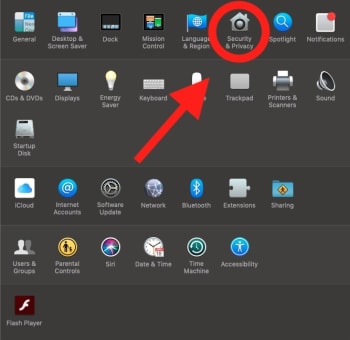
 The apps within this section are given the ability to control your computer, which is likely how unwanted apps voyage to the Login Items section. We recommend keeping only apps you trust in this section.