Instagram gives you greater control over who sees your Stories

Instagram rolls out ‘close friends’ so that you can share your Stories with smaller groups

beach selfie

Instagram, like all social networks, is a digital place for getting together with friends. Like all social networks, however, Instagram is a place where we’ve all built up networks of people that aren’t our actual friends. We can find ourselves sharing our posts with people we barely know. For people who value their privacy, this is a real problem and for months Instagram has been working on a solution to this problem, a solution called ‘favorites.’ Now, after over 18 months of testing, the hip social network is ready to roll out the feature to everybody.

Instagram Download Instagram
7

Instagram rolls out ‘close friends’ so that you can share your Stories with smaller groups

The new feature will only be limited to Instagram Stories. This means that anything you post to your profile will still be shared with everybody. Instagram hopes that the new limited groups of close friends will encourage users to share more.

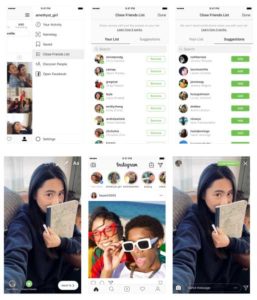
Instagram update close friends for Stories
Image via: Instagram

When you post your Stories, you’ll be given an option to create a list of close friends that represent your inner circle. Instagram will suggest friends based on your prior interactions but ultimately, it’ll be up to you who you add to your list. According to Instagram, during the testing phase, people usually added around two dozen people to their list.

How to use Instagram close friends

When you’ve created an Instagram Story you want to share, you’ll notice a green circle with a white star on it. Clicking it will bring you to the “close friends” list where you can decide who will and won’t make the cut. As well as the friends Instagram suggests, you’ll also be able to search for friends using a search box. When you’ve completed your list of close friends, you’ll then be able to share your Stories exclusively with them by clicking the green circle before you hit share.

From the other end, whenever your friends receive a Story that has only been shared with close friends, they’ll see a green ring around the Story as it sits in the tray at the top of their feed. This means whenever you see a Story with a green ring instead of the typical pink ring, you will know that it is something personal that has come from a close friend. Other than the green ring, your close friends will receive no notifications telling them whether they’ve been added to or removed from your close friends list. This is because Instagram wanted to make sure there was no social stigma attached to the process of adding or removing friends from your list. (Shout out to memories of the MySpace Top 8.)

This is a positive move from Instagram that should encourage people to share more via Instagram Stories. As our Followers lists grow and we add more and more transient acquaintances to our social networks we become less and less likely to be as open. Adding close friends takes social networks back towards one of their main original purposes. Putting us in closer contact with the people we care about the most.


Instagram cracks down on fake followers

Instagram fights back against fake accounts.

Instagram

Fake followers seem more like a myth than reality, since most celebrities and high profile people don’t need fake followers since they have so many real ones. In most cases, however, these aren’t the people who are paying for fake followers. The people who do try to get fake followers are typically easy to spot, since they’ll have thousands of followers and very little likes or views on their actual content. There are tons of apps and sites specifically dedicated to giving you followers (for a price). It may not seem like a big issue, but Instagram has decided to crack down on these apps, and the fake accounts that they use.

These “inauthentic” accounts, as Instagram calls them, are being targeted by a new software that Instagram has created specifically to hunt out inauthenticity. Accounts who are suspected to be using third party apps to increase their follower count are being contacted by Instagram with a request to change their password.

According to Instagram’s blog post on the subject, they believe that inauthentic accounts are bad for their community, and have upgraded their auto-detection and removal software to crack down. 

If you don’t know anything about fake followers and inauthentic social media activity, there have been a few YouTubers who have covered this topic. They also explain why these inauthentic activities aren’t as helpful to the user as third party apps try to make you think they are. It is not very difficult to spot inauthetic behavior, and it doesn’t help your statistics on most social media sites.

One can assume this crack down on fake accounts was spurred in early November, when Facebook announced they had removed 30 fake Facebook accounts and 85 fake Instagram accounts to curb digital interference in the midterm elections. Clearly, Instagram had a much larger portion of inauthenticity, which may have led to Instagram’s improvement of their auto-detection system.

How to find out who views your Instagram profile the most

Who’s Insta-stalking you? Here’s how to find out.

selfie

Wondering if your crush has been viewing your Instagram profile? (Or, God forbid, your mom?) Currently, Instagram lacks a feature that allows you to see who has recently looked at your page. However, with these tips and tricks, you can play detective and figure out who has likely looked at your Instagram profile the most!

How to find out who views your Instagram profile the most

Check your Instagram Stories

If your profile is public, anyone can view your Instagram Stories even if they don’t follow you. Also, people who view your profile are more likely to watch your Story. When you click on your Instagram Story, it will show you a list of users who have watched it.

Now that you can save Stories as permanent Highlights on your profile, it’s easy to go through each Story and see which names come up most. The people who view your Stories most frequently are very likely the same people who view your Instagram profile most often.

Instagram Download Free ►
7

Use a Third-Party App

If you download an app that offers insights, then you will have a better idea of who has been viewing your Instagram profile. Apps such as Followers Assistant and UnFollowers can track who follows or unfollows your Instagram account. Many also offer insights into who likes your photos most often, who comments most frequently, and who has blocked you. From this information, you can gain better insight regarding who tends to view your profile.

Followers Assistant Download Free ►
7
Unfollowers Download Free ►
7

You can find several apps that promise to tell you who views your Instagram profile most. These apps claim they simply collect data from your Instagram profile and calculate who has viewed your profile the most. Unfortunately, no app is able to do this, because the Instagram API does not share that information — so buyer beware.

Sometimes it’s frustrating to post photos on social media and not know who’s even seeing them. If you want to find out who is viewing your Instagram profile, try one of these two solutions.

Your Instagram profile is getting a makeover

Instagram is testing a redesigned profile page, which emphasizes the user bio over follower count

instagram

Instagram is the most visual of all the social networks. Users take the utmost care ensuring that the images they post are perfect and look fantastic on their profiles. This latest news from the social network could be seen as a little worrying for many Instagram users, particularly those with lots of followers.

Instagram Download Instagram
7

Instagram is testing a redesigned profile page, which emphasizes the user bio over follower count

If you are reading this and worried about how your Instagram posts will look, take a deep breath. User content will remain untouched and all your posts will stay as they were in a grid. The big changes are to the positioning of buttons, icons, and other profile elements like your user bio.

Image via: Instagram

Your follower count will now be displayed in much smaller writing and further down the page than it used to be.

Instagram hopes that this change will make user profiles cleaner and much easier to use. In the blog post announcing the changes, Instagram said, “Your profile is where you share who you are on Instagram, so starting today we’re testing ways you can better express yourself and more easily connect with the people you care about on your profile.”

This change, however, is still very much a test so there is no guarantee it will prevail in the long term. The test will be rolling out to different Instagram communities around the world over the next several weeks. Instagram will be monitoring feedback on the experience and updating the test based on what it can learn from its Community.

Recently, Snapchat suffered a huge backlash from its userbase when it revamped its user experience and there is a good chance that Instagram is trying to avoid a similar situation.

If you’ve received the Instagram profile update, we’d love to hear your thoughts on it in the comments below.

If you miss Vine, you’ll love byte

Don Hoffman, co-founder of Vine has announced byte, a follow up to Vine that will launch in spring 2019

6 second videos with byte

One of the main criticisms thrown at the internet is that it is constantly distracting us. We’re now distant introverts constantly trying our hardest to not check our phones for notifications, no matter the social situation we are in. One of the main culprits in the destruction of our attention span is Vine. Its six-second looping video format meant we could be genuinely entertained in less time than it takes most of us to finish a sentence. Vine didn’t last. But you can’t keep a phenomenon down.

Don Hoffman, co-founder of Vine,  announced byte, a follow up to Vine that will launch in spring 2019

Vine was originally founded by Dom Hoffman, Rus Yusupov, and Colin Kroll back in June 2012. Twitter bought Vine before its official launch but competition from the likes of Instagram, Snapchat, and other more traditional video platforms like YouTube led Twitter to stop new videos from being uploaded in 2016. Yusuprov and Kroll went on to found the now-famous interactive game show app HQ Trivia, but Hoffman stated that he was working on a Vine V2 app that wouldn’t be affiliated with Twitter.

It looked as though Hoffman’s project wasn’t going to see the light of day though, when he posted on the V2 community forums that the project was being indefinitely postponed, citing “financial and legal hurdles.” This all changed just a couple of days ago, when Hoffman tweeted that he would be launching a new looping video app called byte in Spring 2019. We’ll have to wait to find out more details about byte, but if it will be based on Hoffman’s published plans for V2, it should be a place for publishing videos between two to six-and-a-half seconds.

The short length of Vine videos forced users to be creative in ways never seen before. Vine might have helped shave minutes off of our attention spans, but it did it bring something fresh to the internet. When Twitter choked off new uploads, it left a hole that needed filling. Hopefully, when byte launches next Spring, we’ll start to see a whole raft of new creators rising to internet stardom.

To find out more about byte you can head over to www.byte.co and sign up for updates. If you’d like updates about all your favorite apps and programs, sign up to our newsletter by entering your email address in the form below.

Some of our favorite Vine creators

ProZD

Thomas Sanders

David Lopez

If you want Photoshop for free, you’ll love this news from Google

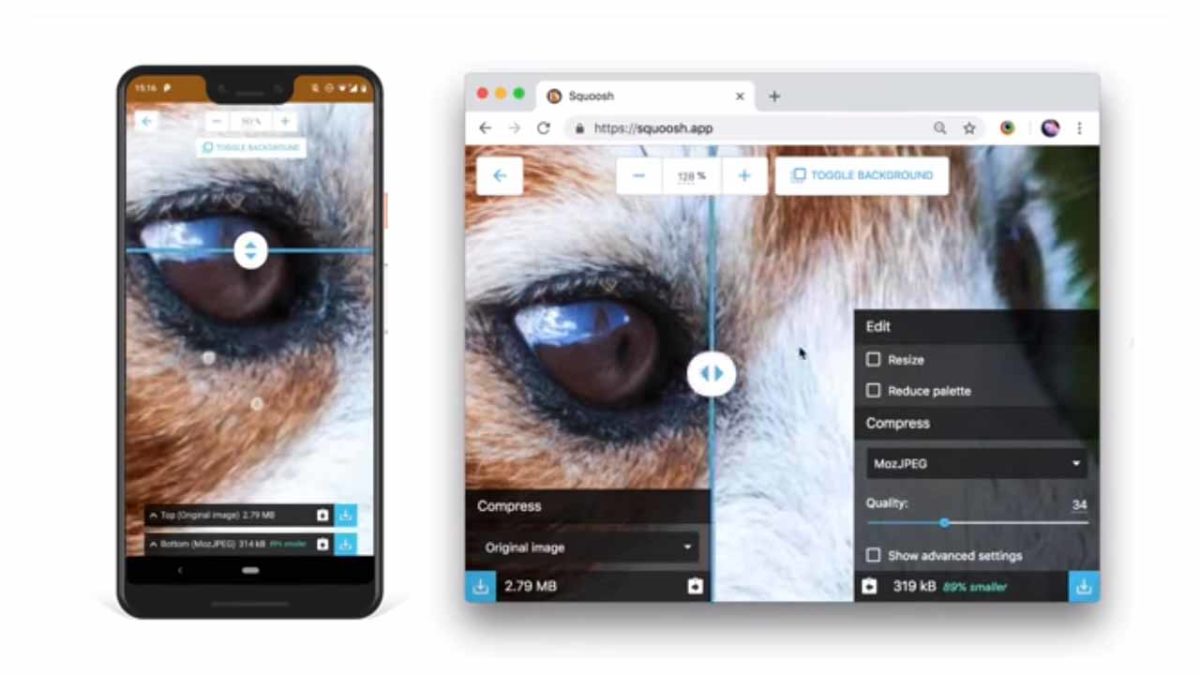
Google Chrome Labs has just launched a brand-new browser-based image optimization tool that is completely free to use

Adobe Photoshop is the holy grail for all budding digital graphic designers and image manipulators. At Softonic, we get lots of people trying to find out how to download Photoshop for free or even looking for free alternatives to Photoshop. The good news is that there are a lot of great alternatives out there and there is even better news from Google.

Google Chrome Labs has just launched a brand-new browser-based image optimization tool that is completely free to use

Squoosh, as the new piece of software is called, is designed to help users convert and optimize images for use across a variety of digital platforms. It runs entirely within your web browser, using the many capabilities that modern browsers now have built-in. Once it has been loaded into the browser, Squoosh doesn’t need access to the internet, meaning the image optimization and manipulation can take place offline.

Surprisingly, although Google obviously recommends using Squoosh on Google Chrome, it will work with all modern browsers on both desktop and mobile.

Squoosh isn’t a direct competitor to Photoshop, but it does offer enough options to fulfill the needs of many amateur designers who need a simple tool to help them play around with their images. Squoosh can resize pictures and photos, manipulate the color palette, and even offers options like image dithering, and smoothing and sampling. There will be different editing capabilities available depending on the selected output format of which Squoosh offers quite a lot of options. As well as common file formats like JPG and PNG there are also options like OptiPNG, MozJPG, and WebP.

With Squoosh being a browser-based image editor tasked with getting images ready for the web, compression is a big part of its skillset. Previews of changes are readily available and there is even a slider for seeing the changes in real time as you pull it across the image. Users will even be able to see what the file size of the new image will be once all of the changes made will have been implemented.

If you think you might like to give Squoosh a try, all you have to do is head over to squoosh.app. Once the page has loaded, you’ll be able to edit your images even if you lose your connection to the internet. If you think you might need something a bit more powerful than Squoosh, or if you know what your specific image editing needs are, you might want to check out our guide to all best Photoshop alternatives below.

How to become a micro-influencer on Instagram

You don’t need a million followers to make money on Instagram. Here’s how to become a micro-influencer.

microinfluencers

Micro-influencers are on the rise.

If you’re unfamiliar with the concept, the term refers to someone with a few thousand followers (no one can agree on the entry point) up to around 50k.

Brands love these small-scale influencers because, they’re knowledgeable, authentic, and tend to engage with their audience more often than full-fledged celebs.

If you love Instagram and have a good-sized following, you may have an opportunity to make some cash.

However.

Becoming a micro-influencer takes more than a cute Instagram. Between strategizing and content creation, influencing on any scale is an actual job.

Here’s a rundown on what micro-influencing is, and how to get into the game.

 How to become a micro-influencer

What are micro-influencers?

Ok, micro-influencers aren’t exactly on par with the YouTubers and Instagram models with followers in the hundreds of thousands or higher.

Instead, these are individuals in their category with a certain level of expertise in a specific niche.

The ideal micro-influencer is passionate and authentic—someone with a relationship with their followers who is seen as a go-to source for information and recommendations.

First of all, your account needs to be up to par

VSCO examples

Your success as a social media personality—macro, micro, or somewhere in between lies in your photography skills and your activity.

Because just about anybody can take a decent photo these days, you probably should be a great photographer and editor.

There are a million apps out there that can help you do this–from Boomerang’s GIF maker to VSCO, an editing tool that adds a professionalism to your feed.

Instead of thinking in terms of individual shots, your entire feed should represent your personal brand–develop a palette, identify your favorite filters, and keep things on topic.

personal branding microinfluencerThe second part of this is activity, meaning you need to post consistently and engage with other users’ content.

Friendly, thoughtful responses and positivity will help you create connections with others. The old, “do unto others” rule, right?

Engagement is everything

Being a successful micro-influencer doesn’t require you to build an empire millions deep. It’s not always about amassing the largest number of followers possible, even though there are plenty of apps to help you do that. What matters more is who is following you and how interested or engaged they are with what you’re doing.

This year, there’s been something of a shift in the influencer marketing space. See, brands are learning that working with top influencers doesn’t provide the return on investment they were hoping for.

How to calculate your engagement rate

On Instagram, your engagement rate is the total number of engagements (likes, shares, comments) over a specific period divided by the number of total followers x 100%.

The average engagement rate on Instagram is 3%, while Facebook and Twitter are much lower, both hovering somewhere between 0.5% and 1%.

How do you get work?

In the beginning, getting work means doing a ton of pitching. You’ll send thousands of emails and InMails, and direct messages. But before you start blindly emailing brands, do a little nurturing.

Brands monitor digital conversations through a range of alerts and reputation management tools. Platforms like Mention, HootSuite, and countless others let brands know when someone mentions them. Get on their radar by posting about the brands you want to work with, well before you reach out.

You’ll also want to engage with those brands directly. So—try posting comments or positive micro-reviews of products you’ve tried.

Pick potential clients wisely

If you’re new to the space, any business probably sounds like good business. This approach is fine if you’re working behind the scenes as say, a ghostwriter or social media manager.

A micro influencer, on the other hand, is the brand. So, you need to make sure you’re pitching brands that align with your niche.

Ask yourself the following questions:

  • Do you think this brand offers something interesting and marketable?
  • How can influencer marketing help?
  • Does this brand share my values?
  • Which areas to they need help with?

In the long run, compromising your values or faking expertise won’t get you very far.

Reaching out

Create a short cover letter and introduce yourself. This shouldn’t be more than a few short paragraphs and should mention your follower counts, brands you’ve worked with, and why brands should work with you.

Create a media kit

Put together a media kit to use as a promotional tool. A media kit is a PDF document that showcases your experience your social counts, accomplishments and how you can help brands achieve their goals.

Things to include:

  • Bio: who are you, what’s your niche, etc.
  • What can you offer?
  • Handles
  • Follower counts
  • Engagement rates
  • Contact info
  • Past collaborations
  • Branded header, logo, and a professional photo

This example, from Le Fashion Fetish blogger, Anna Shearer, is a nice example; it’s short, contains key details, and gives the viewer a sense of her aesthetic.

Le Fashion Fetish Media Kit Example

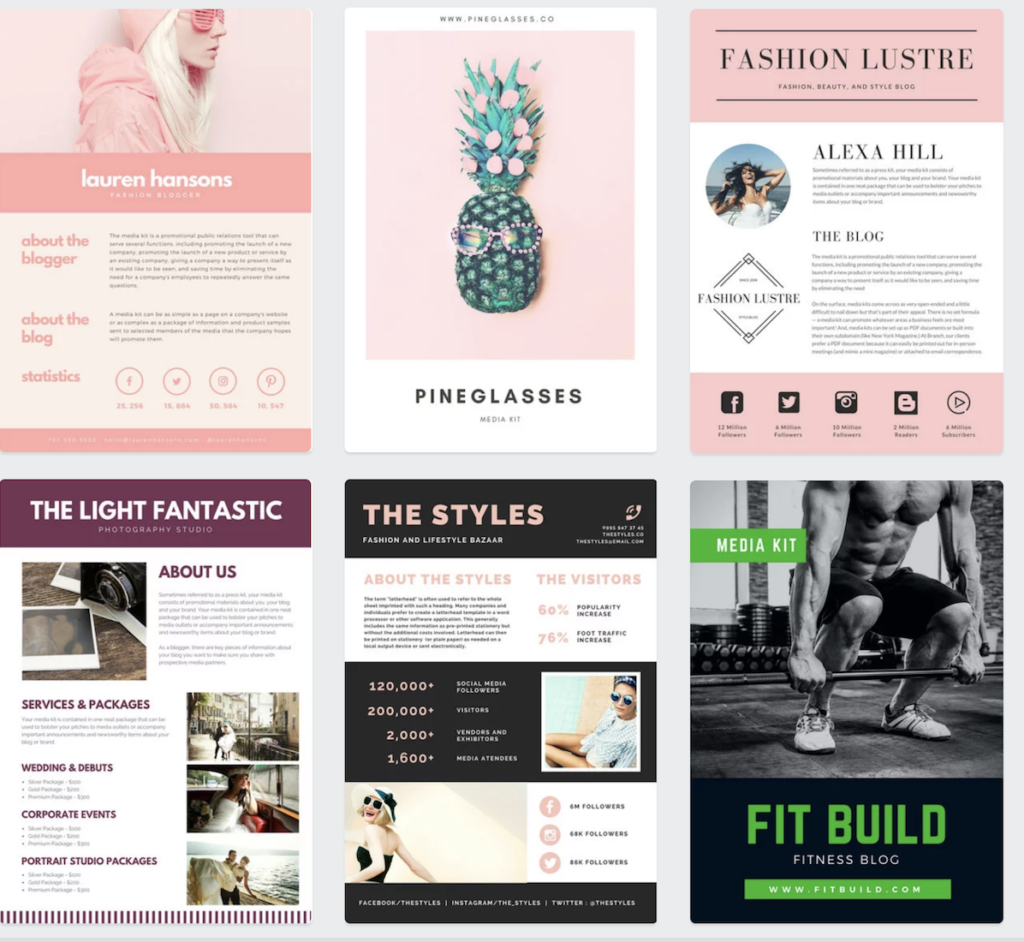
There are also a million sites, like Canva, where you can download customizable templates. The benefit here is that they deal with the design and you make it your own.

10

Some of Canva’s media kits:

Consider working for free at first

If you’re just starting out, you may need to do a few free posts to prove your value.

In the beginning, aspiring influencers should be eager to work with any brand that fits their value set and aesthetic. So, start by fleshing out your portfolio.

You’ll have to work harder to prove yourself, so overdeliver. If you get a brief requesting one post, do an extra or throw in a story.

You want to make sure the brand has a good experience working with you.

Content creation is a ton of work

The hardest part about becoming a professional blogger or social media influencer is, you’ll need to wear a lot of hats.

You’ll end up as the face of your brand, the receptionist, the strategist, the CEO.

You do sales and marketing, you edit your photos, and chances are, you’re figuring out how to do your own books.

Your workload will vary depending on whether you’re a blogger or you’re social-only. Still, in both cases, you’ll be spending a good deal of time creating content.

And those extra hours spent coming up with quippy hashtags and styling selfies will add up.

Final thoughts

Instagram is a great opportunity for hobbyists to turn their passion into a source of income.

That said, the main appeal of micro-influencers is a certain level of expertise, coupled with the high engagement rates of a known face, who isn’t too big to make a genuine connection.

While you’ll need to know your way around filters, copywriting, and understand at least a few basics from business 101, dipping your toes into the world of micro-influencing might not be a bad idea.

And who knows, maybe someday, you can drop the “micro.”

8 steps to to get more people to see your Instagram posts

Need a bigger Instagram audience? Here’s how to build an army of followers.

selfie

Instagram adopted a new algorithm in 2016. Since then, Instagram users have given it mixed reviews. Many users are now seeing more content that’s relevant to them — and seeing it in a timely manner. In fact, since the change, Instagram claims that users are now seeing 90 percent of posts from the people they care about most.

But what does this mean for brands that have seen a drop in engagement since the algorithm was adopted? And what does it mean for new brands that are trying to grow? In both cases, the issue could be that too many users aren’t seeing your posts. Luckily, there are many ways you can boost your standing in Instagram’s algorithm so more people will see your posts.

How to get more people to see your Instagram posts

1. Create better content

The key to getting more people to see your posts on Instagram is to create more relevant and valuable content for your audience. This will encourage more of your followers (and viewers) to engage with your content by liking, commenting on, saving, or sharing your posts. By engaging with your posts, these users essentially send a signal to Instagram that viewers find your posts interesting and valuable. They are showing Instagram that they’d like to see more content from your brand (or even a brand that’s similar to your brand) in the future. A post with more likes, shares, views, saves, and comments will then rank higher in each follower’s Instagram feed because it is deemed more valuable than posts with less engagement.

Instagram’s algorithm also factors in how long viewers spend looking at your post. If they click on a post and then immediately leave the post, it signals to Instagram that the content isn’t all that valuable. If viewers take the time to read the caption or comment on the post, this will signal to Instagram that the content is of better quality. This is where video content can really help you out: It can take longer for viewers to watch a video than view a photo, so Instagram’s algorithm often sees video content as more valuable.

2. Use the right tools to boost visibility

To boost engagement, you need to use the right hashtags for your posts. Ideally, you’ll use currently trending hashtags or the most popular hashtags overall. Hashtags can also help your chances of being seen in the Explore feature. You should also take advantage of as many Instagram features as possible, because the app will reward you for using more of their features. For example, use the polling or swipe up features in Instagram Stories, or experiment with Instagram Live.

3. Get to know your followers

With a business account on Instagram, you’ll have free access to Instagram Insights. This is an incredibly useful tool for figuring out basic information about your followers, such as when they’re most active on Instagram and where they’re located. You’ll also learn their gender or age, if applicable. This information will help you to determine when you should be posting and what type of content you should focus on based on your audience in order to get the most Instagram followers.

Followers for Instagram Download now ►
8

4. Encourage viewers to engage with your content

Encourage your followers to engage with your posts by liking, commenting on, or sharing your posts. This is known as a “call to action.” By asking that they perform a certain action, you’re showing that you care about your followers and how much they are interested in your content. Make sure that your call to action is strong and clear. You may want to ask them a question (to encourage them to comment) or invite them to visit your blog, buy a specific product, or simply share or like your content. Don’t forget to respond to comments, either! Instagram rewards brands that engage with their followers, particularly within the first hour of posting.

5. Post content frequently

Another big factor in increasing the visibility and rank of your posts is to post content more frequently. Instagram’s algorithm not only cares about general post engagement, but also how recent the post is and how quickly you receive engagement.

6. Post content when your viewers are most active

If you want to really boost your chances of being seen, you’ll need to figure out the best time to post your content so that you’re more likely to receive more likes, comments, shares, views, etc. While there are certain times of day that generally see better engagement than others — such as before people go to work, around lunchtime, and in the evening — you’ll mainly want to consider when your specific followers are more likely to see and engage with your content. That said, if your followers and viewers are located in many different time zones, you should post content at the peak times for each time zone.

7. Take advantage of content management software

Obviously, you’re not going to want to get up to post content in the middle of the night on the east coast so that followers in California see your content. That’s where content management software becomes handy (and necessary) for scheduling posts. Two of the most popular content management services are Hootsuite and Joomla.

HootSuite Download Free ►
8
7

8. Analyze your results

Whether you use content management software or share posts manually, you should keep track of when you post (days and times), the type of content you post, and the different types of engagement you receive (how many likes, shares, comments, and views). You may also want to track the hashtags you use for each post, among other details. After some time, analyze your data. If you’re still not seeing the results you want, go back and see how you can improve your Instagram strategy to receive more visibility.

How to create your own geotags and geofilters on Snapchat, Facebook, and Instagram

Did you know you can make your own geotags and geofilters on social media? Here’s how.

geotag

Geotags can be a really useful tool that a variety of social media sites have begun to adopt. It started on Snapchat, but has since made its way to Instagram and Facebook as well. It can be perfect for promoting a business event, or even just helping to celebrate a friend’s birthday celebration. If you’re interested in understanding how you can use geotags and geofilters, here is an easy explanation of what they are and how to use them.

How to create your own geotags and geofilters on Snapchat, Facebook, and Instagram

What are geotags and geofilters?

Facebook “check ins” are the easiest example of a geotag. Essentially, a geotag links a particular location to a social media post. Similarly geofilters are photo-filters built into Snapchat and Facebook that are location-specific. This makes both of these great for sharing your location with friends and family on these social media sites.

Snapchat Free Download
7

How to create a geofilter on Snapchat


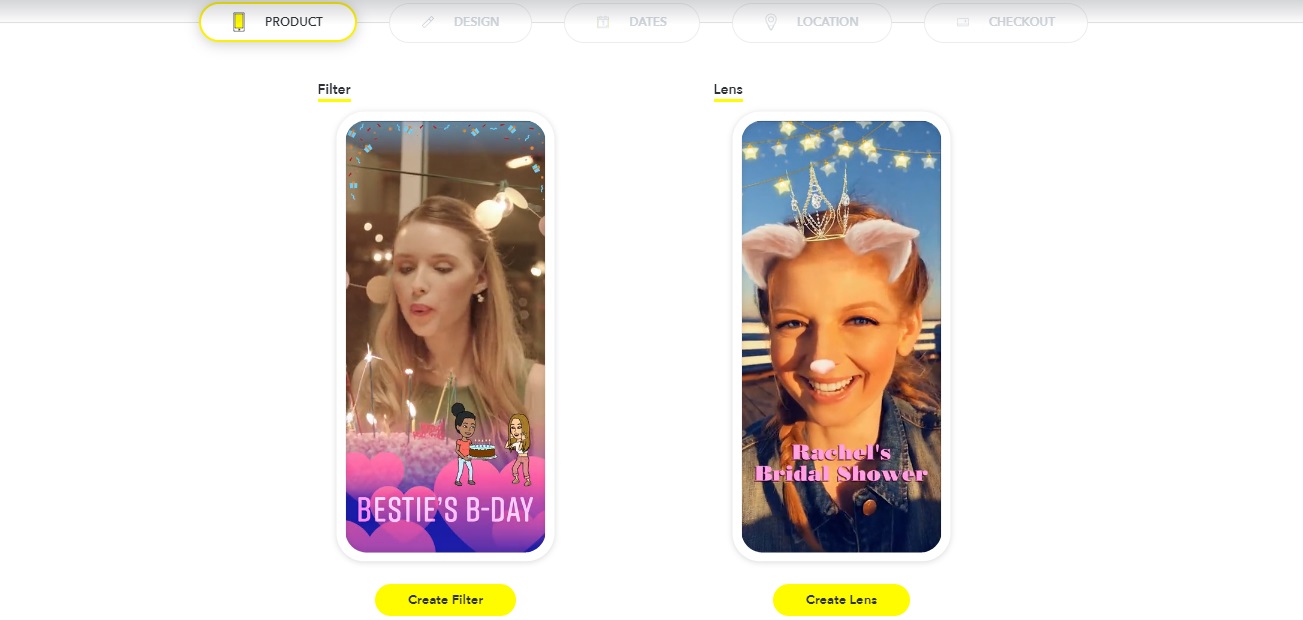
Snapchat makes it pretty easy to create geofilters, which makes sense since they were the ones to start the trend. The first thing you want to do is go to their create your own filter/lens site.

Snapchat filter

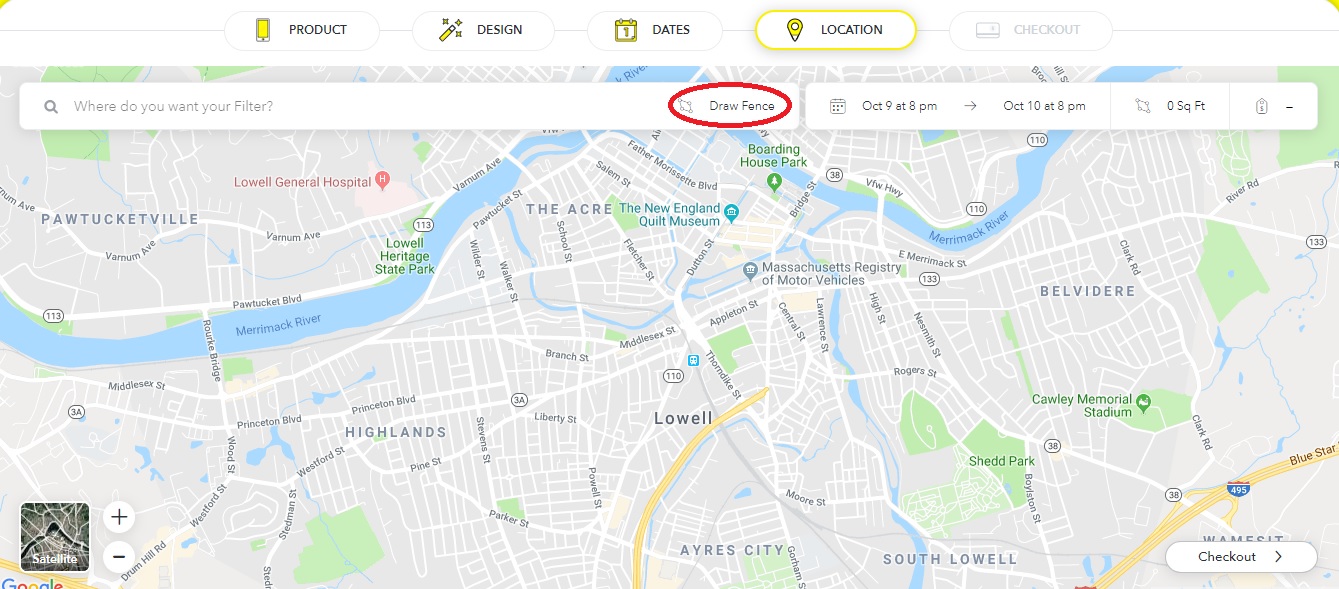
From here, you can choose to create your filter, and then customize it however you want. You can either upload your own art or use the filter creator that Snapchat has itself. Afterward, you can choose the dates and location of the event. Make sure to press “Draw Fence” and then click the points you want the location to be in.

Snapchat

You do (unfortunately) have to pay to create your own Snapchat filters. However, thankfully, it’s a relatively cheap cost, at roughly $5 per 20,000 square feet. So small events won’t end up paying a fortune, but larger ones may be a bit pricey if you don’t have a business paying for the expense.

Note that it may take a bit for Snapchat to process your request, since they have to make sure that the filter is appropriate.

How to create a geofilter on Facebook

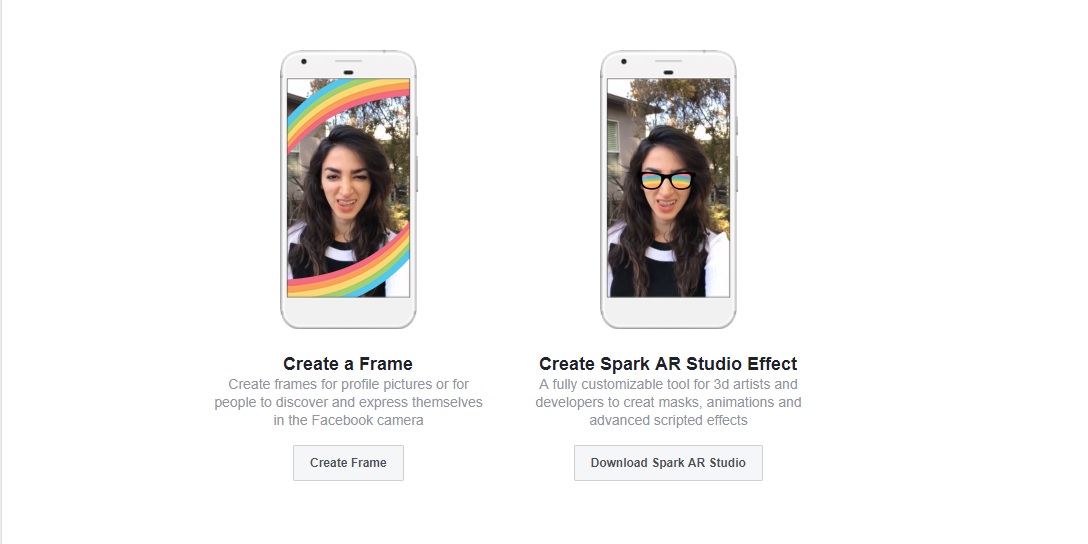
The process for creating frames on Facebook is similar to Snapchat. First, you’ll have to go to Facebook’s frame studio page, that gives you roughly the same options as Snapchat did. Choose “Create Frame” to get started. 

Facebook

Unlike Snapchat, you’ll have to create your filter outside of Facebook before being able to upload it. Afterward, you can name, give it a specific location (using Facebook’s “place” pages), and create keywords for people to search for it online. Once you’re done, you can publish the filter and make it available for anyone to use. Also, unlike Snapchat, these filters are completely free!

Instagram Free Download
7

How to create a geotag on Facebook and Instagram

Most people know how to geotag on both of these sites by simply using the “check in” or “add a location” features. However, creating your own geotag can be a bit confusing, especially on Instagram, since you can’t create one on the site itself.

Thankfully creating a geotag on Facebook actually creates one for Instagram as well. You can do this by pressing the “check in” button on the Facebook mobile app (it won’t work on the browser version of the site). From here, type in the name of the location you wish to add. Then press “add ‘Location name’” at the bottom of the “places” list. From here you can fill in details about your location, such as what type it is, and where it’s placed. Once this is done, you’ll be able to publish the location to both Facebook and Instagram for future use. Note that the location information becomes public after you publish, and you won’t be able to edit it in the future.

Instagram clamps down on bullying

Instagram is now using machine-learning AI to detect instances of bullying and to help “Spread Kindness”

Instagram has exploded over the last few years. As of June, the social network was registering over 1 billion active users each month. Success for a social network, however, brings its fair share of problems. With Instagram being a social network with a relatively young user base, bullying can be a big problem. To combat this, Instagram is now implementing a new system to work alongside its regular reporting process.

Instagram Download Instagram
7

Instagram is now using machine-learning AI to detect instances of bullying and to help “spread kindness”

The normal way for bullying to come to the attention of Instagram is if it is reported by either victims or witnesses. With online bullying being a very complex issue, this often falls short, particularly in cases when victims themselves do not feel sufficiently self-empowered to act. To boost its ailing defenses against cyber-bullying, Instagram is now unleashing a new AI toolset. There are two ways Instagram will use these new tools to help stamp out bullying.

The first is using AI to spot bullying in photos posted on Instagram. Now Instagram itself will be keeping an eye out for bad behavior in photos or the captions posted with them. If Instagram detects anything that it classes as bullying, it will alert its Community Operations team to review the post in question.

The second is the expansion of its bullying comment filter. Instagram first introduced this feature a few months back to hide comments that could be bullying users from the Feed, Explore, and Profile tabs. Now, this filter is being widened to also include live videos in the Live tab. With bullying being such an insidious phenomenon, it is good to see Instagram acting to shut it down across the social network. Blocking one part and leaving another open will only push the behavior from one corner of the social network to the next. This is an important move from Instagram.

The new photo monitoring AI is being rolled out across Instagram now and will continue for the next few weeks. The Live bullying comment filter is now available on all live videos around the globe right now.

Instagram fighting cyber bullying
Instagram’s new filer is designed to help spread kindness and support to people who need it

On top of this, Instagram has also announced the introduction of what it is calling a “Kindness Camera Effect.” Launched in conjunction with teen author and anti-bullying activist, Maddie Ziegler, the new filter comes with a number of cool features. For selfies, the filter will add hearts and ask you to tag a friend you want to support. If you activate your phone’s main camera, it’ll fill the image with goodwill messages in many different languages. If you want to give the new filter a try for yourself, all you have to do is follow Maddie and you’ll be able to access it automatically.