How to download all your Instagram data

Facebook’s privacy scandals have caused millions of users around the world to worry about their security on social networks. Many have gone to the extreme, deleting their profiles. If you’re thinking of doing this on Instagram, first let us show you how to download all your Instagram data in one click.

Instagram Download Instagram
7

What is downloaded

When we access this part of Instagram, the app gives us a file with all our uploaded photos and videos, as well as direct messages, comments, profile info and saved stories. In other words, Instagram has all your activity on the social network, which you can get nicely organized in a file. 

How to download it

Although you may think it’s been available for a while, this feature was launched on the social network relatively recently. To access it, you can either use the mobile app or the PC website. But there’s a key requirement for both: logging into your account (obviously).  

Once you’ve done that, go to this webpage. You’ll see this message: “We’ll email you a link to a file with your photos, comments, profile information and more. We can only work on one request from your account at a time, and it may take up to 48 hours to collect this data and send it to you.” Instagram stipulates a few days, depending on how much you’ve used the app. The more activity, the more difficult to collect all the data.

Once you’ve read the disclaimer, you’ll see that the “email” listed is the one you registered with on the social network. Click “Next,” enter your password and confirm “Request download.”

Ta-da. That’s it. In general, the file usually appears in your inbox within 24-28 hours, though as the previous message makes clear, it could take a month and a half. 

You can now mute accounts on Instagram. Here’s how.

Tired of seeing pictures of your old roommate’s dog on Instagram every. single. day? As much as you might love ol’ Scraps, your old roommate should really throttle back on the pictures. Until he gets his act together, you might want to mute him. Starting now, you can.

Instagram Download Instagram
7

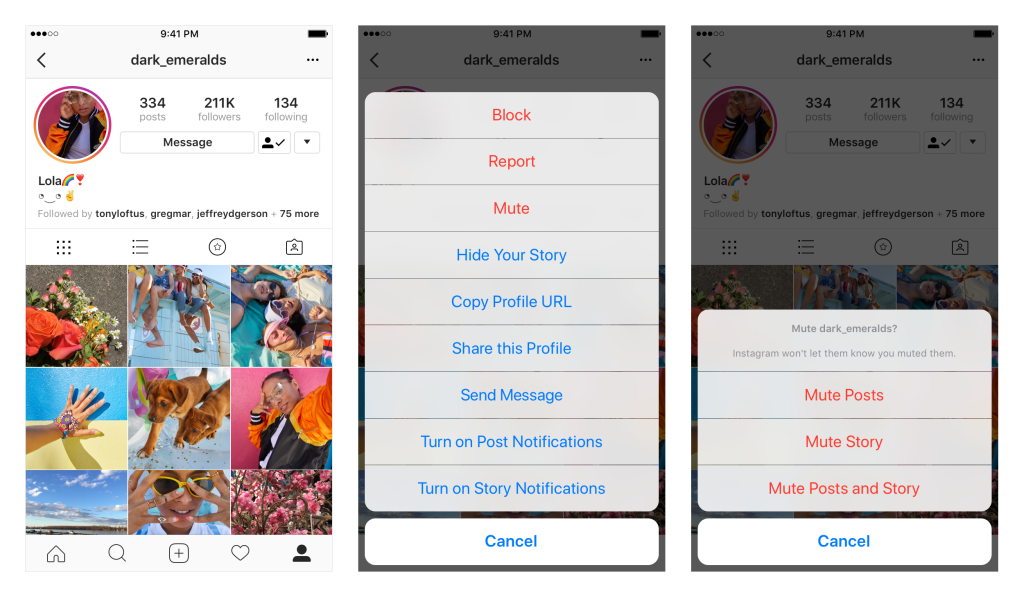
Instagram now allows you to mute accounts. That means you still follow them, but you won’t see their photos in your feed. If you ever want to check in on them, it’s as simple as going to their profile page. You can also unmute the account to return it (and all those dog photos) to your regular Insta-stream.

To mute an account, tap the … menu in the corner of the post. From there, you can choose whether to mute posts, or mute posts and stories from an account. You can also mute posts and stories by pressing and holding on a story in your tray, or from a profile.

So why not just unfollow someone instead? Consider that if you unfollow a private account but want to check in on them later, you’d have to ask permission again, and that could kick off an awkward conversation about why you unfollowed them in the first place. It might be safer just to mute someone and then you always have the option to reconnect down the road without drawing attention to yourself.

Instagram also wants to explain why they stopped sharing posts in chronological order, so if you’re curious about the random algorithm goofiness they’re sending your way, you can read more here.

And if you’re curious what we’re up to, why not follow Softonic on Instagram? We’d be honored.

5 tips that will make your Instagram videos pop

If you are looking to step up your Instagram game, we’re here to help. If you are trying to become more popular, build a personal brand or maybe a business, video is a crucial part of your strategy.

But not any kind of video will do the job, especially on Instagram. You want to create videos that get hundreds of thousands of views, tons of comments, likes, and more followers. Here’s how to find success on Instagram.

5 tips that will make your Instagram videos pop

1. Make it catchy right from the start

Our collective attention span is terrible these days. According to this research, humans now have an attention span of roughly eight seconds, which puts us just under a goldfish, which can focus for a monumental nine seconds.

How crazy is that?

You need to make the first few seconds really, really catchy. Otherwise, the people will continue to scroll down and your video will get no views.

You can make a video really catchy in just two simple steps:

  1. Ditch the intro. Nobody wants to know your name, where you are from or your life history. Get right to the point and tell or show people what you can do for them or what you are all about.
  2. Make it either really funny or emotional. Or both at the same time if you can. Videos that entertain or touch people’s emotion are more likely to grab their attention.

So definitely put some thought into your video before you actually start filming. You can even write a short script for it.

Don’t worry about telling people to follow you, or trying to sell them anything. If they like your video they will be more likely to follow you and they can become customers down the road.

For example, the guys over at GoPro do a really good job at it without trying to sell anything in the video.

Check this out.

2. Focus on telling a story

Plan how you want your video to go or even write a short script. Plan the scenes, think about what you want to film, what you will say, what audio will you use, and how you want the final edit to come out.

People love stories they can relate to. So think about your audience and about their interests, their problems, their everyday lives, and craft your video based on that.

Travel-related videos such as the one below are a perfect example of great storytelling.

Since Instagram videos can’t be longer than 60 seconds, you can’t pull off a Martin Scorsese epic, but you can build tension, create intrigue, and have people follow you for future videos. If you’re really good, you can send traffic to your YouTube channel or website.

3. Step up your filming game

The average Instagram user will shoot using a smartphone, right? That’s convenient, given the way Instagram works. Even though there is nothing wrong with filming with a smartphone, you want to keep an eye out for a few things if you want to have really crisp videos.

Lighting

Lighting can really make or break a video regardless of how expensive the device or camera you are using is. Most cameras, including the ones on smartphones, have small sensors which will overexpose, so you end up with washed-out scenes and blown-out colors.

If you are shooting indoors make sure you are sitting in a bright room, preferably with the camera between the window and the subject and plenty of natural light coming in. If the natural light is not good enough, you will have to use studio lights.

Generally speaking, you need one “key” light on one side and one “fill” light on the other side. That’s the bare minimum when it comes to a lighting setup.

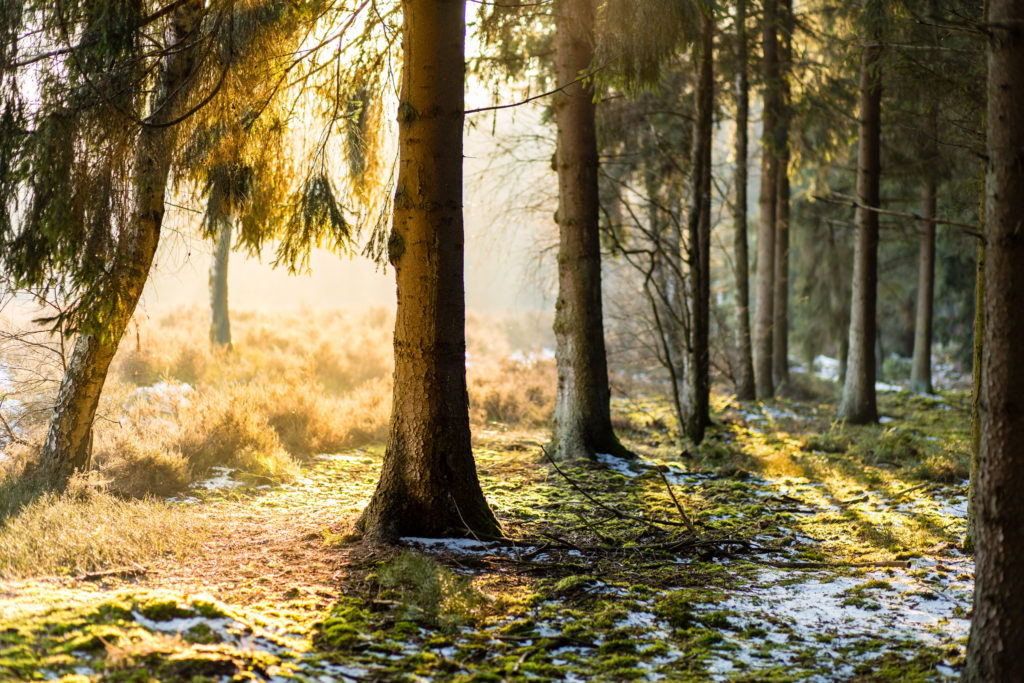
If you are shooting outdoors you will probably be fine with any conditions. A pro tip is to shoot during the so-called “golden hour.” That’s just after the sunrise or right before sunset. That’s when the light looks epic and it will really make your videos look awesome.
Stabilization

Another thing you want to keep an eye out for is stabilization. Most handheld shots will look pretty bad, especially if you are using your smartphone and you are holding it just with one hand like the majority of Instagram users do.

Shaky footage looks amateurish and it will put viewers off right away. That’s why it is super important to keep your camera as steady as possible. If you don’t need to move it at all, use a tripod.

If you do need to move, we highly recommend investing in a gimbal. It will probably run you around $150-$200 but your videos will look buttery-smooth. It is totally worth the cost.

If your footage ends up looking shaky, you can add some digital stabilization in the video editing process as well, but that will work to a lesser degree.

Camera settings

The maximum video resolution supported by Instagram is 640 x 640 pixels – the app’s default square format. If you are shooting specifically for Instagram you will be fine with using a resolution of 720p or 1080p and a frame rate of 24 of 30 fps. But if you plan on doing slow-motion effects, you will need to crank up the frame rate to at least 60 fps (preferably 120 or 240 fps if your camera supports that).

Instagram Download Instagram
7

4. Take video editing seriously

Once you are done filming you are actually just half-way through your job. All videos need to be edited, and that alone can take just as much time as the filming did. Don’t skip this step because this is where all the magic happens. This is where you make your videos stand out from the crowd.

Video Editing Software

There’s an entire debate about which editing software is better, but it all really comes down to a matter of personal preference. When you are editing for Instagram, pretty much any software will have all the features you will need.

If you are editing on a computer (which we recommend) you can try out iMovie, VSDC or Lightworks which are all free and will offer most of the options you need. If you are more serious about your edits, you can get your hands on Premiere Pro or Vegas Pro which will cost around $200 – $300.

If you are after a quicker editing process there are mobile apps which work really well, too. In that case, consider iMovie which will let you cut and stitch your video easily, you can add transitions, audio, and filters.

For the Android users out there, check out Quik, which is really fast and easy to use as the name suggests. You literally can have your video done with just a few taps.

Editing style

When you are editing specifically for Instagram, fast-paced videos tend to perform well. Since you only have 60 seconds to showcase everything, a quick pace allows you to fit more footage in less time.

So it’s a good idea to try to pack as many different shots as you can in your Instagram edits and use jump cuts to tighten up your edit. This will make the video more engaging. Make the shots sorter, the edit snappier and sync everything with the beat of the music.

Here’s what we mean.

Export settings for Instagram

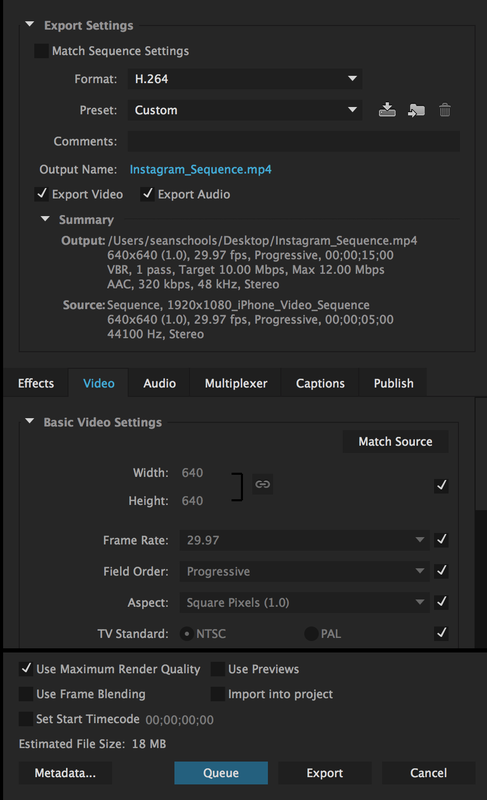
If you are editing your Instagram videos on a computer, you need to pay attention to the export settings you’re using when you render your videos.
Instagram doesn’t like big video files so you need to keep your resolution, frame rate and bit rate low. Here are the best settings you can use.

For widescreen videos, the resolution should be 640 x 360 pixels and for square videos use 640 x 640 pixels. Keep the frame rate at 24 fps and the bit rate to a maximum of 4 Mbps. This will keep the video file size really small while keeping the quality as high as it can be for a Standard Definition (SD) video.
5. Instagram Stories

This is one tiny part of the Instagram app which you should be using if you don’t want to miss out anything.

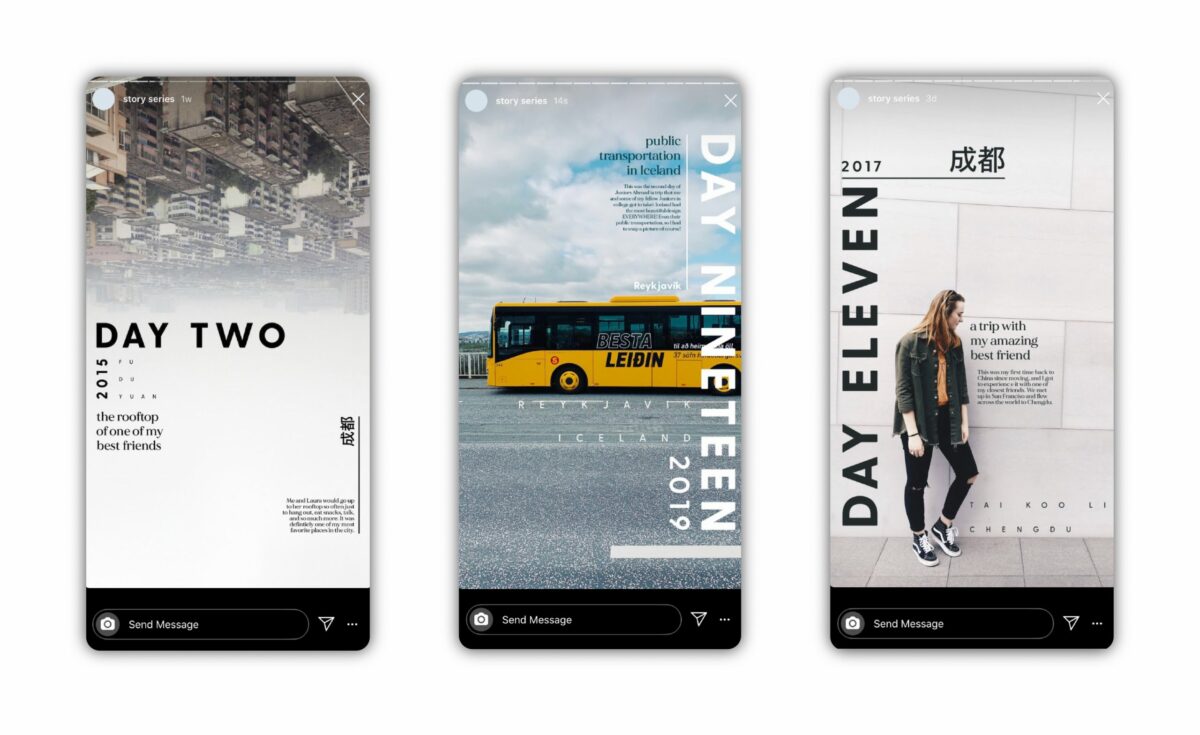
Even though everything you post as an Instagram Story will be gone after 24 hours, it does a great job at keeping your followers updated on your everyday life. Think of it as a mini-vlog that can fit your entire day in just 15 seconds.

You can try making your Instagram Stories out of those Boomerang loop videos, but if you really want to step up your game, you want to treat stories just like any other video you make for Instagram. Just tighten it up even more. Use 1-2 second shots and pack all of them in just 15 seconds so that you have a really small video which highlights whatever you do on a day to day basis. Check out @jessedriftwood. His Instagram Stories are out of this world.


Whatever methods you use, it’s important to use your imagination! It’s fine to copy other people to start, but you’ll have the most success when you share that special vision that only you have.

Related Articles: 

Top apps to improve your Instagram experience

How to post on Instagram from your PC

How to become a brand ambassador on Instagram
 

How Insta Stories help brands connect with their audience

Instagram – love it or loathe it, you can’t deny the impact the photo-sharing application has had on how we present ourselves to the virtual world, and on the way that companies reach out to their customers and market themselves.

Instagram introduced Stories to let you “share all the moments of your day, not just the ones you want to keep on your profile.” The feature enables you to share multiple photos and videos, add text and doodles to them, and have them appear together in a slideshow format that’s only visible for 24 hours.

Sound familiar? Instagram has raised some eyebrows in the tech world for borrowing very heavily from competitor app Snapchat. It’s working out well for Instagram though, as they continue to outgrow Snapchat. 

Co-founder Kevin Systrom recently revealed that Instagram now has more than 700 million users, with an estimated 400 million users checking the website or app every day. Snapchat currently boasts upwards of 160 million daily users.

These are the sort of numbers that give Marketing Execs butterflies in their stomachs. Many companies and brands now see Instagram not just as a platform for unsatisfied millennials to share their wanderlust, but as a place to reach out to an engaged and captive audience, in unique and creative ways.

Instagram Download Instagram
7

Best use of Instagram Stories

1. Cheerios

Cheerios is an American brand of cereal manufactured by General Mills, consisting of pulverized oats, rice, and wheat shaped into small “O”‘s. Cheerios’ switched-on marketing team uses Instagram Stories to give personalized shout outs and positive messages to their followers.

This kind of engagement is sure to brighten up someone’s day and helps cement the cereal’s brand as one that is full of good vibes.

2. NASA

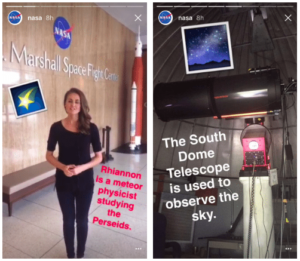
During the Perseid Meteor shower in 2016, not only did NASA post beautiful pictures of the annual cosmic spectacle, but they also made clever use of Instagram Stories to make the images more meaningful.

They shared facts about the meteor shower, their ongoing research, talked to the scientists and engineers involved, and showed the equipment they used every day.

This “behind-the-scenes” content is an excellent example of a brand knowing what its followers want, and supplementing their primary feed with additional information and posts. It’s educational, too.

Story Saver for Instagram Download Story Saver Now
7

3. Chris Bukard

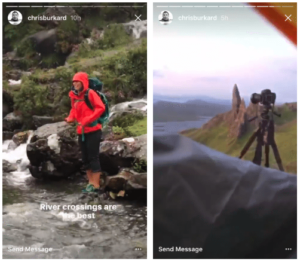
Blogging since 2009, Chris Bukard is a landscape photographer, and top travel influencer, with 2.6 million followers on Instagram. People come for the stunning pictures and detailed captions offering the story behind the photos, but the photographer also understands how to use Instagram Stories to maximize his feed.

He uses Stories to take his followers through the adventures involved in taking a shot, such as showing the river crossing they had to make, and the misery of pitching a tent in sideways rain. It’s a smart tactic that engages his audience with more than just a pretty picture and helps them feel connected to all the work put into taking that perfect shot.

Three very different brands, with three inventive and intelligent uses of Instagram Stories. Hopefully, these will serve as an inspiration to getting your brand out there in the big, wide world of Instagram.

How to become a brand ambassador on Instagram

Like most Instagram users, you’ve probably noticed posts from brand ambassadors — also known as influencers — on the social media platform and felt a twinge of envy.

What’s better than growing your Instagram audience, supporting brands you love and getting paid to do it?

In addition to receiving money for posts, you’ll usually get free products to try. Those items drive the content posted to your Instagram feed.

Being successful as an Instagram brand ambassador isn’t hard. However, it requires a careful strategy.

Instagram Download Instagram
7

Continually offer high-quality, relevant content

As a brand ambassador, you’re one of the online voices representing a company. That’s why it’s a good idea to start publishing your best content now. Avoid grainy photographs or snapshots you took after having a little too much to drink at a party.

Also, try to publish material that has a common theme relating to your interests. For example, if you’re a car enthusiast, it’s probably not worthwhile to post numerous pictures of what you ate for dinner.

If you choose carefully when deciding what to post, your Instagram feed could become a reliable indicator of authority. Brands look for authoritativeness because they want an assurance of knowledge.

Make it easy for brands to contact you

Image via Pexels

Consider including your email address on your Instagram profile. Evan Mungo, a user who gets paid to post content on the platform and elsewhere online, put contact details in his profile, and his first moneymaking Instagram opportunity came about when a company reached out to him.

Mungo thinks his use of hashtags and emphasis on polished content caused that brand to take note. Including your contact details is helpful, but other actions you take can also make brands interested.

Get creative with your hashtags and cross-promote them

Speaking of hashtags, pick one that represents your personal brand. Also, go beyond that one and come up with several others that are funny or memorable.

Demonstrating your effective use of hashtags shows brands you understand one of the fundamental aspects of getting noticed on Instagram and helping others find your posts.

Furthermore, don’t overlook ways to spread the word about your hashtags offline. For example, you may want to get a personal hashtag printed on your business cards.

If you get interviewed on television or a radio station and asked about your Instagram usage, naturally work the hashtag into the conversation. Brands love it when ambassadors bring up product names naturally. By doing that with your hashtag, you’re getting good practice.

Recognize the power of pictures for stimulating curiosity

Image via Pexels

Instagram is one of the most popular ways brands use photographs for promotional purposes online. Events and meet-ups in any industry are likely to include photo booths and other inviting opportunities for social media promotion.

You can do the same and build your brand with Instagram photos that draw people in and make them curious.

By capturing viewers’ attention, you’re more likely to make them want to return to your profile — and keep coming back. When that happens, your number of followers grows, making your Instagram profile even more attractive to brands.

Know what your audience wants

Your overall reach matters substantially to brands when they decide whether to hire you as an ambassador. Besides populating your Instagram profile with compelling images, another beneficial way to

grow your audience is to understand the needs, desires and pain points they have. Then, come up with outstanding content that answers the call.

When brands look for Instagram ambassadors, they prefer to hire people who already have clear understandings of their target audiences. An existing connection to followers fosters ongoing trust.

Join an influencer network or similar service

Image via Pexels

Once you’ve amassed at least 1,000 followers, consider joining an influencer network that relates to your niche.

Doing that could make it easier for brands to find you, and you can discover which brands align best with your content to potentially contact them first.

Also, Heartbeat is a female-centric service that allows Instagram users to apply to become brand ambassadors. If accepted, you’ll get offers from Heartbeat’s brand partners and can decide whether to get on board or decline them.

Even if you decide not to take an offer, you’ll remain in the system for future possibilities. Payment for campaigns occurs via PayPal, typically in less than a week.

Pay attention to requests

After hiring you, the creative freedom each brand will give you varies. In some cases, you might not receive any direction.

However, companies might prefer certain camera angles or methods for showing off their products, too.

Always take specifications into account. By doing that, you demonstrate an ability to follow instructions, which could lead to more work and a stronger reputation.

These suggestions should help you make progress while aiming to break into the world of Instagram brand ambassadorship.

Then, you could use a platform you love to showcase products to your followers — enjoying perks like money and freebies while you’re at it.

Top apps to improve your Instagram experience

Instagram has been with us for many years, but it started out rocky until Facebook bought it. When that happened, the social network mixed two elements: enhancing its strengths and copying Snapchat’s best ideas. That’s how Instagram began to grow in users to this day: around 1,000 million users, almost half created in 2017.

Instagram Download Instagram
7

The popularity of the platform shows no sign of stopping, so we’ll tell you how to make the most of it: here you’ve got the four best apps to improve your Instagram experience.

Ins Story Repost

Instagram stories have tons and tons of followers. Stories are very demanded content from users since they’re both easy to create and consume. As you know, you can download personal stories, but what about from other profiles?

INS Story Repost for Instagram Download Story Repost
7

Though you may think it’s impossible, it can be done. On iOS, you can do this with Stories Repost. If you download this app, you’ll have access to all the stories of people you follow. It’s as easy as permitting your account to be linked to the program. You’ll then see stories available at that moment. When we want to download one, click on it and ta-da. The downside: the number of downloads per day is limited.

If you’re looking for an alternative on Android, we recommend Story Saver, which has the same features as Stories Repost. If you want to learn more about this app, click here.

Story Saver for Instagram Download Story Saver Now
7

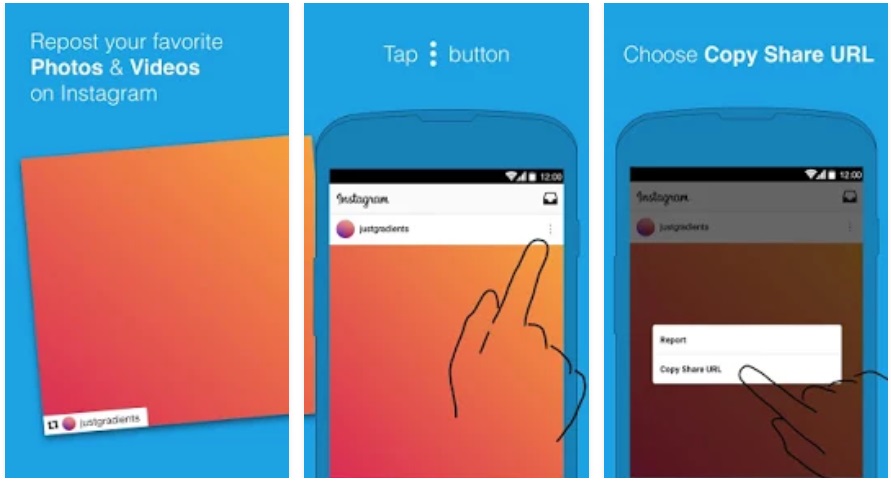
Repost or Regram

On Twitter or Facebook, you only have to click retweet or share respectively, so content appears on your profile. But how is this done on Instagram? For this, you have to download the app Repost or Regram.

Repost for Instagram Download Repost
7

Once you enter your username and password, Repost or Regram works the same as Instagram. The difference? A little button with that word is the key to “retweeting.” With this mechanism, if there’s a photo that you really want to appear on your profile, click on it and you’re good to go.

To the lower right, a box will appear to indicate who the photo belongs. Give credit where credit is due.

VSCO

Instagram filters are quite useful; we’re not going to lie. But if you really want to make the most of the photos you upload, the app VSCO is for you. It’s possibly the best quick touch-up tool that you’ll find for mobile devices.

6

Why is it so good? Well, first because it has a huge number of filters, but above all, because it lets you touch up numerous photo fields: saturation, light, brightness, clarity, focus and a long list of other options. In fact, we don’t just recommend it for Instagram, but also for any photo you want to upload online quickly and easily.

Hyperlapse

Stories, reposts, images… and videos. We’ll wrap up this list of must-have Instagram apps with Hyperlapse. With this service, you can create fun videos with a time-lapse effect.

Hyperlapse Download Hyperlapse
10

Its options are diverse, from cutting frames that you don’t like to changing the speed of each one of them. Also, you can adjust the final format for Instagram.

Now that you have all these recommendations don’t forget to download them from the app store.

How to view your Friend’s Instagram Stories without them Knowing

Instagram Stories are one of the best features of the app but they do have certain problems and limitations. For a start, they’re only available for 24 hours before they disappear completely. Also, whenever you watch a friend’s story it notifies them that you’ve seen it.. Well, what if I told you that there is a way you can watch Instagram Stories without your friend knowing that you’ve done so?

Instagram doesn’t have the function for doing this so you’re going to have to use a 3rd party app. This is where Story Saver comes in and now I’m going to show you how to use it.

How to save your Contact’s Instagram Stories

1. Download and Install Story Saver

Go to the Google Play Store and install Story Saver on your mobile. Unfortunately for iOS users, this program is currently only available for Android so this tutorial will be geared towards to Android users but there is an iOS option called Stories Repost.

2. Enter your Account Details

Open the app and introduce your Instagram username and password.

3. Search for your Friends’ Stories… or for anyone else’s for that Matter

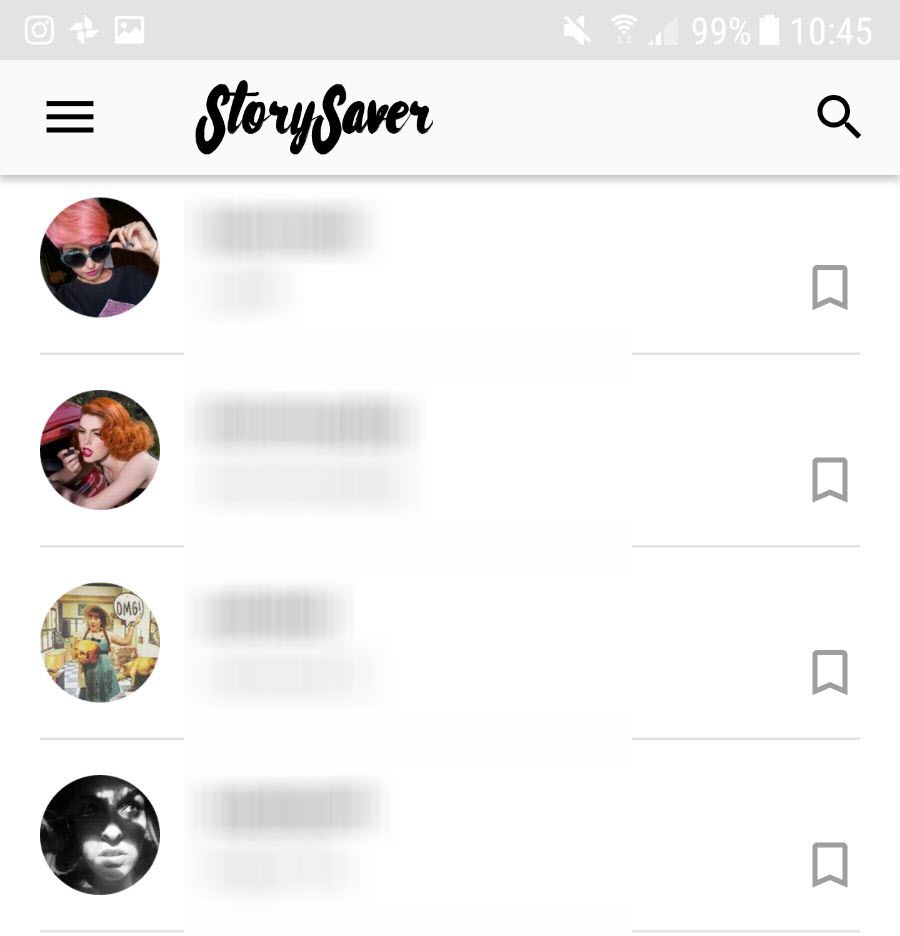
The main menu of Story Saver will, by default, show you a list of your friends latest stories in order of their publication. You can select any of these or you can also search for stories of people who aren’t in your contacts list. You simply type their name into the search bar at the top and press “Go”.

Keep in mind that you need to know the exact name of the user you’re trying to find. No spelling mistakes errors.

c91bda94-8464-4aa8-aef0-248f0256a1da

4. Choose a story and save it

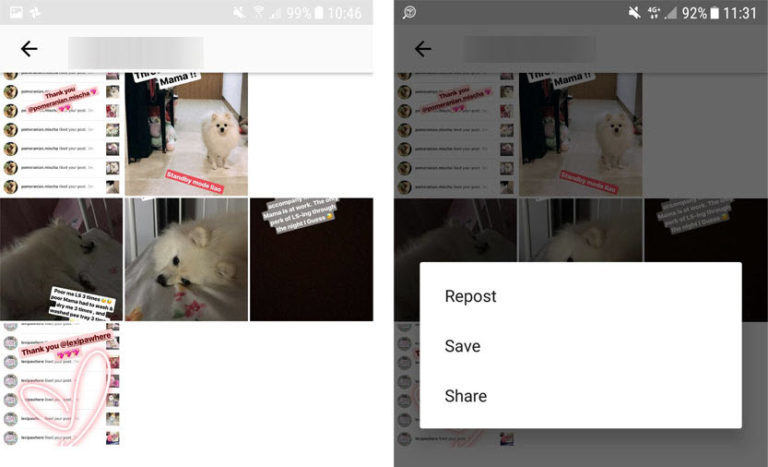
Once you’ve found who you’re looking for, the next page will give you 3 options:

  • Repost gives you the option of reposting the story to your Instagram account. We don’t recommend this option unless you want everybody to think that you’re happy to steal somebody else’s content.
  • Save (Recommended) allows you to save the story as a video on your phone so that you can watch whenever you want to.
  • Share also saves the video on your phone but gives you the option to share it with friends via WhatsApp for example.

SAVE-768x467

5. Enjoy Watching the Videos without being seen

If you follow these steps you’ll be able to watch all of your friends Instagram Stories without them knowing that you’ve seen them.

Make sure you don’t use Story Saver with bad intentions, like stealing somebody else’s content or reposting things without permission.

Need some more Instagram influence> Check out the best photographers on Instagram below:

The top 10 photographers on Instagram


Instagram guide: make the most of Instagram online

In this eighth episode of our Instagram special I’m going to show you how to make the best possible online profile on the social network from your PC. I’m also going to present two services from third parties which will really help you take full advantage of Instagram. The instagram.com site is a valuable addition to the app, because it allows you to manage your social activities much more easily than from your smartphone, letting you mold your image as a social photographer.

One of the features of the new generations of digital artist is that much of your work is done away from the desk. And so you’ll find that the best way to take care of yourself and your colorful tribe of Instagrammers is to do so from the web. So here’s what instagram.com allows you to do, perhaps with a little help from some extra services.

A better way to Instagram

The Instagram app is really intelligently organized, and it works pretty well. As well as taking photos and applying filters and tags, you can also manage your network of contacts. But the ideal place to view your friends’ shots, add comments and like, repost pictures and generally keep in touch with your Instagram network is online. The organization of the home page is almost identical to that of the app, but seeing the pictures in a reasonable size is obviously quite different. If your contacts publish images that are particularly beautiful and well executed, it’s nice to enjoy them at a suitable scale.

instagram.com home

The button with the three dots in the lower right corner of each shot is used to report a photo as inappropriate, or to look at it in its original size. We recommend that you use the latter option every time you want to see a shot properly. To add a like, you can double click on the photo (this doesn’t work with videos: instead, you have to use the button in the shape of a heart), and adding comments when you’re on a PC is much more practical than on a smartphone.

If you’ve decided to take your public relations on the photo social network seriously, then the computer is definitely the ideal way to do it. Even the page on your personal profile is beautiful and functional, with thumbnails of all your photos in reverse chronological order and a header made ​​up of 7 shots taken from your library in a random rotation.

An Instagram profile

Profile and privacy

Under Your Account, you can do several things. Edit Profile: you can enter or edit your name, the email linked to the account, username, phone number, and you can add to or edit your bio. You can also add the URL of your personal website. Change Password: you can change your Instagram password here. Manage Applications: this section is particularly interesting, because it lets you revoke permissions to any apps you’ve allowed to access your Instagram data.

Applications you've authorized

In episode number 2 of our series we discussed managing your privacy in detail. From here you can control another important aspect – Badges. These are used to get the code to insert a badge that directs people to your Instagram account from your website or blog. You can also create a personalized badge by downloading the camera icon.

Two excellent 3rd party services

The Webstagram feed

Webstagram: If instagram.com doesn’t quite satisfy you, you can also use Webstagram, a viewer that also allows a variety of operations, including viewing shots in three different formats (Thumb, Mid, and Large) and reposting of photos and comments via Facebook accounts. This service also provides you with an RSS feed, a good search engine for finding users and hashtags and a statistics section with commonly-used filters, the most popular hashtags and instagrammers with the most followers. These are just a few of the services offered by Webstagram. Among the others there’s one with which you can easily add your own Instagram image gallery to your blog or your website. It’s an excellent tool for professionals and enthusiasts who take their shots seriously, and who want to have total control of their profile.

Webstagram - Instagram gallery code

Statigram: If you’re obsessed with statistics, Statigram offers a set of tools which let you take the pulse of your success on the Instagram network, and to get a detailed picture of what you post.Statigram 1

It provides information on the filters and hashtags you use most, the popularity of your photos, the engagement they generate among your followers, the number of likes and comments you receive, the growth in the number of followers, the distribution over the month of what you posted, the density by day of week…and plenty more!Statigram 2 If you decided to use Instagram to promote yourself or your business, Statigram is a powerful tool that helps you understand if you’re on the right track, and a great ally to plan exactly what and how to post.
And now…get to work!

And so we’ve arrived at the final installment of our guide. If you followed our advice, you’ll now have a few tricks for taking interesting shots, you’ll know how to set the privacy of your profile, repost photos from other users, how to create and manage your videos, how Instagram Direct works, for attracting new followers and how to import photos from your computer on to the app.

In short, Instagram has no more secrets for you. You have all the tools you need to become a instagrammer with a solid identity. Whether you do it for business or pleasure, you can create a far-reaching social network, finding people with whom you share your passions and discover new ones in time. And above all, you can paint your world with whatever filter you want!

Thank you and good night…or should that be good light?!

"Under African skies" on Instagram

Instagram guide: how to get the most from Instagram Direct

In this fifth episode of our complete guide to Instagram, we want to introduce three original ways to use Instagram Direct, a new feature launched in December 2013 to send pictures to a small group of people.

A message to those who still haven’t used Instagram Direct. What are you waiting for?! It opens up a world of possibilities for interaction with your followers. Available for iOS and Android, with this feature you will be able to send a private photo or video to one or more contacts (with a maximum of 15).

Before introducing this feature, the social network offered only two privacy settings: public or private. Your pictures were therefore to be seen by either the world or your followers. To be honest, it wasn’t a sustainable situation for one of the world’s largest social networks.

Related story: Instagram guide: Protecting and sharing your profile

There are two ways to start a conversation on Instagram Direct. For the first one, all you have to do is go to your home page and click on the mailbox icon in the top right corner. The second option is to choose Instagram Direct on the last screen, just before you share the photo or video.

There are 2 ways to use Instagram Direct

There are two ways to start a conversation on Instagram Direct

Now that you are familiar with Instagram Direct, it’s time to discover three specific uses that can surprise your followers, increase your visibility or simply help you get the most from it.

1. Invite friends to a party or event

Instagram Direct does much more than just sharing a picture. After you’ve shared a photo or video –  in other words, you can’t start a conversation without sharing something – your chosen followers can comment on the publication.

That’s why Instagram Direct becomes the ideal tool to send a personalized invitation to your closest friends. You’ve organized a party? Send your friends a preview of what they will miss if they don’t go. They won’t be expecting that!

Instagram Direct #party

Send an invitation to your friends via Instagram Direct. They won’t be expecting that!

An alternative for organizing a party or get-together: Doodle

2. Share a private photo or video with your friends

Since it’s a completely private communication channel, Instagram Direct offers a retreat from the bustle of hashtags and your news feed. A private group (limited to a maximum of 15 followers) is perfect if you want to comment on the newest addition to the family, your favorite band’s new album or the results of yesterday’s game.

Share a private photo on Instagram

Only the selected followers can see and comment on what you’ve published

An alternative for sharing private pictures or contents: WhatsApp

3. Offer unique content to your followers

Are you behind a successful blog? Are you an entrepreneur or a CEO crazy for new technologies? Then this is what will grab your attention! Big brands can also make the most of Instagram Direct to launch marketing campaigns.

Instead of speaking to the hundreds or even thousands who follow you, why don’t you choose 15 lucky winners and interact with them via Instagram Direct? This is a qualitative approach that your followers will enjoy!

Run competitions via Instagram

An alternative for organizing a give-away: Twitter

A feature struggling to find its audience

It seems that Direct Instagram is struggling to find its audience. However, we can imagine that new uses, whether commercial or not, will soon appear. What we know for sure is that with the Direct function, Instagram has stepped into the world of instant messaging for smartphones.

For more information on this competitive and coveted sector, you can find our comparison of messenger apps for Windows.

Read our Complete guide to Instagram to get all the info you need to become an Instagram pro!

Do you know about the Instagram Direct feature? Have you used it?

Instagram series

This Softonic guide is for people who want to be Instagram stars, using the app to make the most beautiful photos and videos you can, increasing your followers and making them happy in the process!

Instagram represents a tiny revolution in the world of the smartphone, transforming non-professional photography into a self-contained world bursting with possibilities. How? By mixing a social network with an evocative world of Polaroid-like vintage filters. That’s why we decided that to get the most from Instagram, we needed to give you tips and tricks that bridge the two worlds that make up Instagram: photography and social networks.

What will you learn?

Lots! From basic photo techniques and video editing to tricks to increase your followers and use Instagram Direct. And that won’t be all. If you’ve got an Android or iPhone, and an Instagram account, you’re going to see just how easy it is to go from taking your first steps as an Instagrammer to becoming a bona fide professional of the social network.

Who should read it?

Anyone who has Instagram installed and uses it from time to time, but who also wants to learn how to get more from it, both in terms of maximizing the quality of the photos you take, to building a solid identity in the world’s largest photographic community.

The series

The episodes planned for this series are below, and will be updated as they are published:

So grab your smartphone, and lets start taking some beautiful photos!