Twitter for Windows Phone 7 released

Twitter has released its official app for the new Windows Phone 7 platform, joining a growing rank of important developers bringing their software to Microsoft’s mobile operating system.

The Windows Phone Twitter client includes similar features to the Android and iOS versions of the app, including a timeline, messages, lists, and suggested users. It’s packaged in a streamlined interface that sits perfectly with the understated design principles of the Windows Phone 7 OS.

Although it appears very simple to use, thanks to its Pivot-based swiping system, it still looks a bit light on features. For example, there’s no indication that it will support third party tools for photo and video uploading.

[youtube]http://www.youtube.com/watch?v=ovH8rLJ9qGY[/youtube]

The release of this official Twitter client provides further confirmation of how seriously the major players in the mobile app realm are taking Windows Phone 7. The big developers appear to be rolling out their software into the Windows Phone Marketplace a lot quicker than they did with the iPhone and Android stores. Already, Windows Phone 7 users can download heavyweight apps such as Facebook, Shazam, YouTube, Tetris and Netflix. Encouraging news for Microsoft and its new baby.

CCleaner 3.0 released with new Drive Wiper

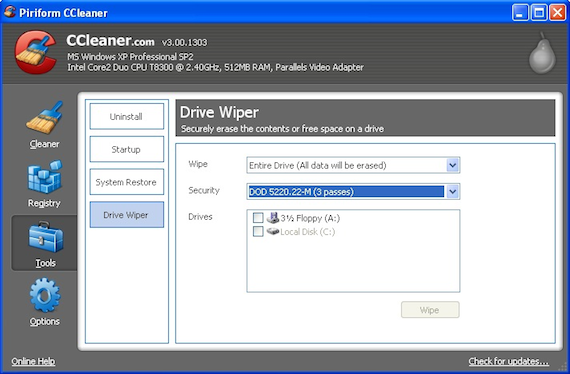
CCleaner, the popular free hard disk cleaning tool, has just been released in version 3.0 and features a new Drive Wiper which can completely erase a hard drive for you.

Drive Wipe can be accessed in the Tools section of CCleaner and allows you to choose whether to scrub only free space or an entire drive using three levels of strength – Department of Defense-level three-pass option, a National Security Administration-level seven-pass cleaning or a 35-pass Gutmann-level deep scrub.

cclean80.png

There are several other interesting improvements too. You can now choose which Cookies you want to keep while cleaning and CCleaner prompts you whether you want it to keep your most recently used log-on cookies when cleaning:

Continue reading “CCleaner 3.0 released with new Drive Wiper”

New Nokia web browser unveiled

Nokia’s new mobile web browser is coming along nicely, by the looks of things. A video published by My Nokia Blog shows the new browser in action on an N8 device. The revamped web browser appears to be much less cumbersome than the previous version of the Symbian browser, and has significantly reduced clutter.

[youtube]http://www.youtube.com/watch?v=pRH3WdI4KOo[/youtube]

In the new browser, web pages now automatically load in full screen. There’s a simple address bar and stop button above, and a back button and settings button below the page, finally bringing the Symbian browser in line with its more streamlined iOS and Android equivalents. Other welcome features include a search feature built into the address bar, more simple page switching, and more comfortable web form entry.

Update: Nokia has now filed a copyright complaint against the video and it has been withdrawn from YouTube.

Editorial: Limewire is no great loss

The popular P2P program which was finally shut down yesterday was a mine of pirated, illegal and malicious content.

LimeWire, the banned peer-to-peer file sharing application, was a pioneer in its field. Launched in May 2000, it enabled millions of users to download an unimaginable quantity of almost exclusively unlicensed content (I can’t work it out but it’s somewhere up there between an exabyte and a zettabyte). But few in the know are mourning its demise, even if it comes at the hands of the sometimes reviled RIAA.

limewire-legal-notice.png

LimeWire, you see, despite having the most complete feature set of any of the major Gnutella clients, was not a piece of software that engendered much love from software experts. Sure, it was hugely popular. But with network-specific software, popularity just breeds popularity: it is not a sign of real objective quality. Continue reading “Editorial: Limewire is no great loss”

Google Place Search helps you with local searches

Google can help you discover great new places if you know how to use it – like combining Google Search and Maps to find a sushi restaurant nearby. Now Google has made this function even easier to use with Google Place Search, a new local-oriented search feature.

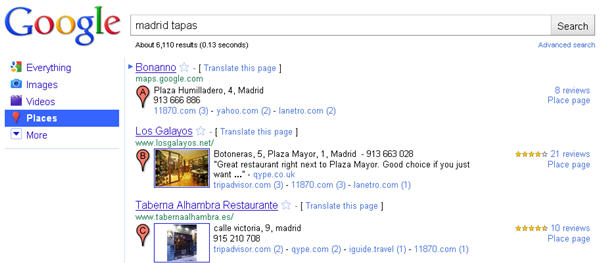
The idea behind Google Place Search is simple, and so is the way it works. Whenever you type a local search in Google (like “sushi restaurant Barcelona”) the website will display results as a Place search, with extended information about each item. Of course, you can also use Google Place Search from the very beginning if you click on the Place logo on the left sidebar. Google will use either the name of the location you entered, or an estimate of your current location.

Google Place Search

Each place listed in results includes relevant information such as the complete address and phone number, pictures and even reviews from other users posted on different sites across the web, all neatly presented and organized. Definitely much better than combining Google Search, Google Maps, TripAdvisor, 411 and more!

Google Place will be slowly rolled out to all Google users in more than 40 languages over the next few days. If you don’t see it yet, you can use this special link to have a sneak peek at the new results.

Firefox 4 delayed until 2011

Things are quite hectic at the moment at Mozilla’s headquarters. Not only are they working on new releases of Firefox 3 (with version 3.6.12 released just today) but also on the next major milestone in the history of this web browser: Firefox 4.

Firefox 4 in 2011

However it seems that the schedule for the launch of this new version was too optimistic and had to be revised in order to adapt it to the actual amount of work. Development on Firefox 4 has not been slowed down, but completing all the tasks and solving all the bugs is taking longer than expected. And as Mozilla won’t approve the release of its flagship before it’s completely ready, the final release has been delayed until 2011.

Taking into account new time estimates and the pending work to get Firefox 4 ready for its final release, Mozilla developers have come up with a new beta and release candidate schedule that includes the release of frequent beta versions – up to four in the next few weeks – and a first release candidate in early 2011. The final release date, according to Mozilla, will be soon after that RC.

Bigger, faster Yahoo! Mail launched

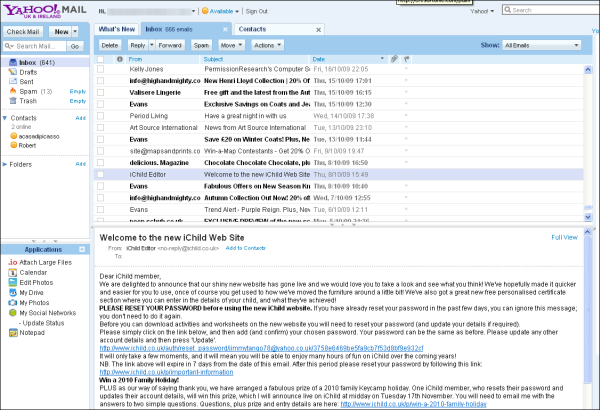
Yahoo! has today rolled out a new version of its Mail service. The new Yahoo! Mail Beta brings a number of interesting new features to the plate and boasts a redesigned interface that looks like what would happen if Gmail and Outlook mated.

The polished new interface design includes the ability to view Twitter and Facebook updates via Yahoo! Mail’s What’s New page, open multiple IM and SMS chats in separate tabs, search your mail from a panel on the sidebar, and to preview mail in a separate window without leaving your inbox. Another nice addition to the new Yahoo! Mail is the ability to enjoy Picasa and Flickr slideshows and watch YouTube videos from within the email.

Under the hood, Yahoo! claims to have made its mail client twice as fast as the previous version. The spam filter has also undergone a much-needed overhaul, although we’ll wait and see if this goes far enough to come anywhere near the standard of Gmail’s excellent spam filtering system.

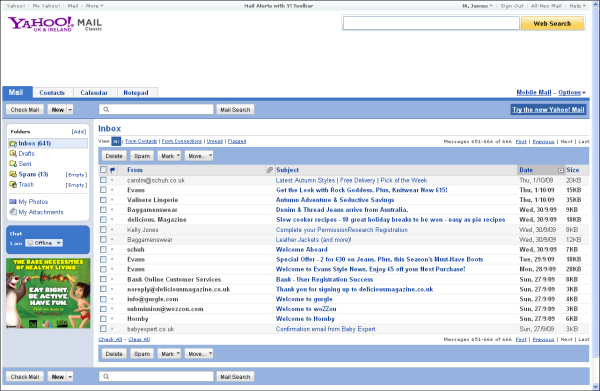
Before

Yahoo old

After

 Yahoo new

Free Browser Game: Get Home

Get Home is a funny little platform game that manages to play with our preconceptions about what we are expected to do in video games! With simple controls and a really nice song to accompany it, you must guide your player home before the music stops. You’ll find power-ups along the way that help you reach those hard to get to platforms and speed you along your way.

Unusually, Get Home really needs to be completed twice to get the full experience. Don’t worry though, it should only take you a few minutes, making it a great coffee break game that might make you think! Play Get Home in your browser here. Requires Flash.

Halloween apps on iTunes – trick or treat?

A quick look at iTunes is enough to tell that we’re just a few days away from Halloween: pumpkins, bats, witches and ghosts wander around the App Store in a bunch of Halloween-themed apps of all sorts. You get countdown clocks, photo editors, costume creators and creepy sound generators, among others.

But there’s also another type of Halloween apps on iTunes – those that are released as special Halloween editions instead of having been created from scratch just for the holiday. They’re usually very popular apps already, and having a special Halloween edition makes them even more enjoyable. Let’s take a look at some examples:

Special Halloween EditionsAngry Birds Halloween HD – One of the most downloaded games of all times on the App Store, Angry Birds, has released a Halloween special edition for iPad with spooky night backgrounds, smashable pumpkins and grizzly sound effects. The game won’t scare the hell out of you but is as fun and addictive as the original edition.

Special Halloween EditionsMosaic Photo Halloween – While the original Mpsaid Photo app enables you to create original image mosaics with your photos, the Halloween version will boost your creativity with new Halloween-themed pictures. Like in the standard version, you can also import photos and share your creations on Facebook and Flickr.

Special Halloween EditionsDoodle Jump Halloween -The latest version of this popular game is entirely devoted to Halloween. A new haunted game theme and lots of creepy creatures such as vampires, witches and zombies are the most outstanding new elements in this special version, where the main character has evolved from being just Doodle to becoming a scary Doodlestein.

Microsoft Messenger 8 for Mac out of beta

messengermac.png

The release of Microsoft Office 2011 for Mac means that Microsoft have now taken Messenger 8 for Mac out of beta. Softonic users will be hoping however that Microsoft have taken note of their many negative experiences with it and made some changes to the final release. Although Messenger for Mac 8 has been rapidly climbing up the download charts, users have given it a very mixed reception since its Beta release in March.

I speculated then that the long awaited webcam function in Messenger 8 might spell the end for aMSN. While aMSN download stats have halved over the past 13 weeks (mainly due to the fact that Microsoft have changed a protocol in Messenger meaning that aMSN’s webcam function no longer works) many Softonic users have found the performance of Messenger 8 to be sub-standard with the average user rating just 4 out of 10.

One of the most recommended comments from other users comes from BartyBoy who says Messenger 8 constantly crashes for him:

i dragged the MSN 8 beta to my application folder, then double clicked the icon. it started running the version 8 beta MSN, but after i logged in to my MSN account successfully, the program stopped responding. so i had to force quitting the program, then i started to run the program again but the same problem occurred. so i thought i might need to restart my mac (mac pro, 2 x 2.8GHz Quad Core Intel-Xeon with 10GB memory). After restarting the computer, double clicked on the MSN 8 beta icon, still the program stopped responding after i logged on to my account successfully. i gave up! i went back to the Microsoft website and downloaded MSN 7.0.2 and it works all fine.

Meanwhile Mr. A says web chats are poor but still hasn’t given up hope:

Well, just downloaded. This one is okay, the features added are wisely done. But still, bugs bugs bugs. When a video call starts/end it stops working and have to force quit it. Very annoying, it’ll be fixed soon (at least, I hope so). After it, it’ll be awesome to use.

And jazkohli reports that both Skype and Yahoo work better for him:

Its a nice messenger upgrade with good features and same good old messenger touch and feel. but still chance of improvement are there, compared to windows version. Few points are troubling me, Video or Voice chat is very lousy currently always keep disconnecting, where as Yahoo and Skype works perfectly fine on the same internet speed. When ever i tried to do video/ voice chat, it signs me out in few minutes and i have to re-login. second problem, still not being able to send or receive offline messages. Until now i found only these problems.

Microsoft Messenger has always been a contentious application because it’s so widely used, loved by some, loathed by others and there are so many variables that may affect its performance. However, it’s clear that even after half a million downloads, Microsoft Messenger 7 for Mac still gets a mixed reception perhaps proving that Microsoft really need to take a closer look at the fundamentals of Messenger before putting out more releases.