Netflix raises subscription prices by $1 for new subscribers

Video streaming service Netflix is increasing its subscription plan by $1 for new subscribers. The company needs the additional cash to add more TV shows and movies to its library.

Current subscribers who pay $7.99 per month won’t have to worry about the price hike for two years. New subscribers will have to pay $8.99. If you can’t afford that $1 per month increase, you can opt for the standard definition only streaming plan for $7.99.

As Netflix focuses on becoming a content creator with shows like House of Cards and Orange is the New Black, the company faces high production costs. There are reports that creating 26 episodes of House of Cards cost Netflix over $100 million.

Source: Netflix

Via: The Verge

Follow Lewis on Twitter @lewisleong

RELATED STORIES

The Softonic Minute: FIFA 15, TuneIn Radio, Unreal Tournament, and Google Maps

New details of FIFA 15 are revealed, TuneIn Radio gets a huge redesign, the next Unreal Tournament will be free, and Google Maps gets a huge update. Check out this week’s hottest software news in The Softonic Minute.

Default player

<!–
By use of this code snippet, I agree to the Brightcove Publisher T and C
found at https://accounts.brightcove.com/en/terms-and-conditions/.
–>

<!–
This script tag will cause the Brightcove Players defined above it to be created as soon
as the line is read by the browser. If you wish to have the player instantiated only after
the rest of the HTML is processed and the page load is complete, remove the line.
–>
brightcove.createExperiences();

New FIFA 15 details revealed

EA has confirmed that the soccer game, based on what we’ve already seen in FIFA 14 World Cup Brasil, will be released in Fall 2014, appearing on both PC and consoles. Check out what else to expect from EA at this year’s E3. Continue reading…

TuneIn Radio wants to be a social network for radio lovers

The quintessential radio app has added features to make it more like a social network, letting you follow your favorite radio stations, shows, or other users.  Along with new features comes a complete redesign. Continue reading…

Next Unreal Tournament announced, will be free

Epic Games has announced the next Unreal Tournament, the popular game saga of competitive online first person shooters. The installment will be free, but users can create and sell in-game items in the community marketplace. Continue reading…

Huge Google Maps update improves turn-by-turn navigation, adds Uber integration

Google Maps has been updated to include improved step-by-step navigation, as well as an offline mode to save maps offline. Among other big new features is integration with the controversial car service Uber. Continue reading…

Make sure to check out all of our past Softonic Minutes.

19 essential tips to stay safe on Twitter

Stay safe on Twitter. Simply follow these 19 tips.

Twitter is a virtual and public place. As a social network, it’s more open than Facebook or G+, as it’s designed to share and discuss events and opinions of all kinds, without filters or barriers. Anyone can follow you and you can follow anyone. In this sense, there are very few restrictions.

Due to its public nature, Twitter is also one of the most dangerous social networks for your personal privacy and security. But that doesn’t mean that you’re doomed: follow the tips below to tweet safely.

Check suspicious links

Most tweets have shortened links. Occasionally, these links lead to dangerous places, like fake forms or viruses that are downloaded onto your browser. Since clicking where we shouldn’t is the main cause for malware infection on social networks, avoid clicking on links you don’t trust.

Dangerous shortened links

The easiest way to know what is hidden behind a shortened link is to use a browser extension to do it for you. Some of the best are Unshort.me (Chrome) and Unshorten.It! (Firefox). You can also use AVG LinkScanner, which checks if the link is safe.

Use a unique, strong password for Twitter

The greatest security mistake you can make is to repeat passwords across multiple services, because if a hacker gets hold of one of your passwords, trying it in multiple accounts is the first thing a hacker will try. That is why you must pick a unique and secure password for Twitter. Too lazy? Use a password manager.

Don’t share your account with others

Sharing your account with others is very tempting and even fun, if that’s the whole purpose of the account. But if you care about your account information, don’t ever share your password with somebody you don’t fully trust: the more people know your password, the more likely it is it will be stolen.

Enable two-step verification on your mobile

If you enable two-step verification, you’ll have to enter a code that is sent to your phone every time you try to access your account from a new computer or phone. So, even if someone knows the password to access your account, they won’t be able to access it. To enable two-step verification on Twitter, click here.
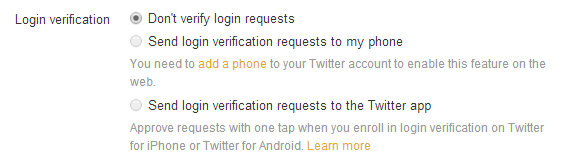
Two-step verification

Enable personal information verification to reset the password

Another good idea is to make Twitter ask you for personal information when you forget your password. If you tick the box on the Security menu, you will be prompted to enter your email and your phone number. It’s more reliable than just asking for the username.

Resetting password on Twitter

Remove unknown apps from your Twitter account

The app to see who’s not following you anymore, the photo app, the chat… There are loads of apps that want access to your Twitter account, and sometimes we grant permission without really thinking about it. The result? If an evil app sneaks in with the good ones, your data will be in danger.

Apps that ask for access to Twitter

From time to time, check the list of apps that have access to your account from the application settings menu: just click on ‘Revoke Access’ and the app will be disconnected instantly, unable to continue reading your data. If you click on the wrong one, click again and it will be restored.

Pay attention to the signs of a compromised account

There are a number of signs that indicate that your Twitter account is compromised. Some of these signs are:

  • You have been notified that you have sent direct messages that you didn’t
  • You get answers to tweets you don’t remember sending
  • You follow, or stop following, accounts you don’t remember
  • You receive non-requested or strange security notifications
  • The appearance of your profile has changed, but you didn’t do it.

If you see these signs, revoke the authorization of unknown apps (previous tip) and change your password immediately. And remember you can always use a password manager.

Don’t reply to emails that ask for your password

It could be possible that, taking advantage of the panic caused by a recent password theft, you receive an email that looks like it was sent by Twitter. If the email asks you to send your current password or write it in some form, ignore the message. In general, be wary of any suspicious email: if you haven’t asked for it, don’t click.

Download a backup of your tweets periodically

Imagine that someone accesses your account and then closes it. Or that you authorize an app that deletes half of your posts. That could be a disaster, especially if you use your account for work. Luckily, you can download full backups of your Twitter profile from the account menu. When the file is ready, you’ll receive an email with the download link.
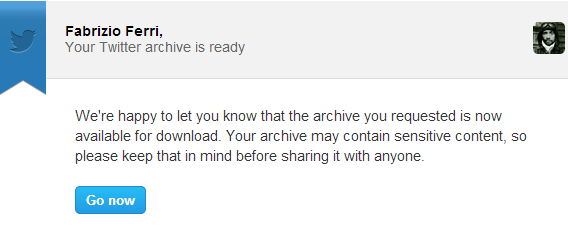
A Twitter archive

Block those who bother or offend you

Your time is too valuable to waste it ignoring the responses of anonymous trolls. Twitter will let you block any user at any time: when you block them, the messages you have exchanged disappear from your account, and the other person won’t be able to send you tweets or tag you.
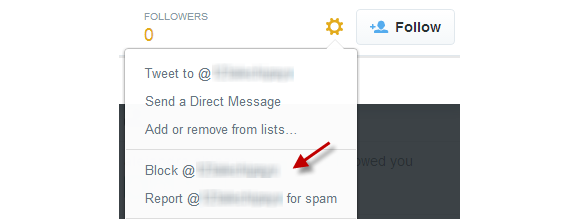
Prevent others from finding you by your email address

Your email account is a separate universe that shouldn’t be mixed with that of Twitter. When you uncheck this box, no one can find you by your email. Ideal if you don’t want your ex, creditors or customers to find your anonymous profile.

Disable this setting

Disable photo tagging

Someone tagging you without permission can be very annoying. If you think something like that could violate your privacy, go on to privacy settings and choose whether you want to be tagged by anyone, only those who you follow or no one. You decide.

Photo tagging on Twitter

Disable tailored ads

Internet advertising is becoming increasingly intelligent and increasingly disturbing. This is called ‘behavior-based advertising’, which guesses your interests from the content you share and access online. Twitter does too, but you can disable it here.

Twitters tailored ads

Disable the geolocation of your tweets

For some years now, Twitter lets you attach geographic information to your tweets (via GPS). It has never been very helpful, and could be a privacy risk. Imagine, for example, that a potential thief discovers that you are temporarily tweeting from a different country: it’s an open invitation to rob your house. Disable this function from the privacy settings.

Twitter geolocation

Flag inappropriate tweets, ads or images

You can also help make the internet a more secure and pleasant place. When you see images or inappropriate messages you can flag them so Twitter can take action. Don’t RT or answer messages that are clearly dangerous or illegal: just use the link to flag the message.

Flag inappropriate material

If you are threatened, report to Twitter and the authorities

Cyber bullying is a serious issue. If someone harasses you, threatens or verbally assaults you via Twitter, report the problems using this form. At the same time and if you consider your physical safety is at risk, contact the authorities. For impersonation, use this other form.

Think before you post personal information

Anything you post on Twitter that includes personal data could be used against you. Think before posting any of this information on Twitter. Advice? Use tools like Hootsuite, which allows you to schedule posts and follow their impact easily.

If you don’t want to worry, protect your tweets

This lock is a classic feature, and offers a way to have control over who follows you. When activated, from the security settings page, your Twitter profile will become as private as Facebook, with the exception that you can’t pick and choose who sees your tweets: all publications will be private, and only your approved followers will be able to see them.

Make your account private

Follow the Twitter rules

You also must be a good Twitter ‘citizen’. If you don’t want your account to be blocked, you must follow its rules: don’t impersonate another person or brand, don’t post other people’s confidential information, don’t threaten anyone, don’t violate any copyrights and don’t use Twitter for illegal purposes. If you are blocked, you can appeal the decision.

Above all, don’t let panic take over

Twitter is a public place, but it’s a safe one. If you don’t attract the attention of the bad guys, you use a good password and don’t post any compromising data, the chances of something bad happening to you are close to none.

Follow me on Twitter: @remoquete

RELATED ARTICLES

Minecraft developer Mojang can survive for 10 years without making more money

Mojang chief and Minecraft creator Markus “Notch” Persson says his company can survive as is, without making another hit game like Minecraft, for ten years.

He explained this in an interview with Rolling Stone, and later cleared up some fan’s doubts on Twitter. Some people took his comments to mean that Mojang would cease to exist in ten years, but that is not what he meant. Notch believes that the company has enough money saved to exist without making any more money. Obviously he does hope that Mojang will create another hit game, and have a bigger legacy than just Minecraft.

Notch said on Twitter last year that he worried that he would never be able to ‘top Minecraft’, but that game has been so successful, and continues to be so, that it might not matter. Mojang has also developed Scrolls, the card trading game, although it hasn’t been as popular as Minecraft. Notch also gave up his last project 0x10c as he reached a creative block with it. Whatever Notch creates next, the popularity of Minecraft will ensure that people take notice.

Source: Eurogamer, Rolling Stone

Follow me on Twitter @jonathanriggall

RELATED STORIES

FTC find Snapchat misrepresented its privacy and security

When Snapchat first got popular, it was because it allowed you to send photos that disappeared after a short time. Users believed, because Snapchat said so, that all the data they sent via Snapchat was ephemeral, and not stored anywhere. But the auto-erase feature of Snapchat wasn’t perfect, and now the company has had to make a settlement with the US Federal Trade Commission (FTC) about this failure.

It was actually quite easy, via third party apps and tricks, for users to save the supposedly ‘ephemeral’ messages, the FTC found. Users should not have felt as safe as they were led to believe about using the app. On top of this, it emerged that Snapchat was taking user data like location and contacts.

Snapchat’s error was making big claims for privacy, but not creating secure enough systems to make them true. Hackers and researchers were able to get data that should have been deleted from devices when connecting them to computers.

Since its beginnings, Snapchat has changed how it describes itself. ‘Screenshotting’ is now accepted practice, and users are aware that it is possible. However, the FCC decided that as it originally marketed itself with privacy and security as key features, Snapchat should have kept those promises. It faces 20 years of monitoring by an ‘independent privacy professional’.

Source: Engadget

Follow me on Twitter @jonathanriggall

RELATED STORIES

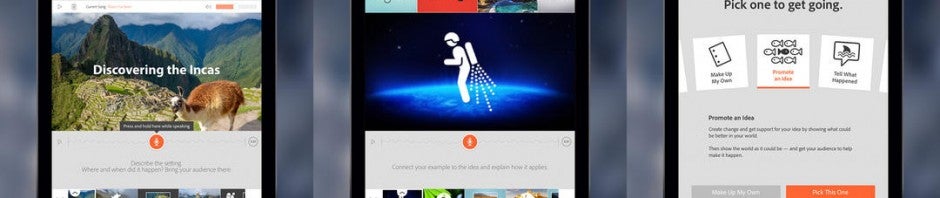
Adobe Voice for iPad lets you narrate your slideshows

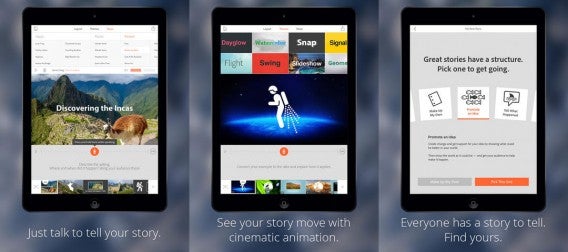
If you want to add a bit of personality to your slideshows, Adobe Voice for iPad can help. The app lets you record your voice for each slide, making your presentation just a bit more personal.

Adobe Voice lets you import your own images from your Camera Roll, as well as offering over 25,000 images and iconography. You can even import images from the web.

Adobe Voice for iPad

Once your slides are imported, you can tap on the mic to begin recording your voice. The app won’t keep previous recording so make sure not to overwrite a good one.

Adobe see the app being used for business and fun. Business users can personalize their slides before a presentation and regular users have a fun way to tell short stories. Your video slideshows can be between 60-90 seconds long.

Default player


brightcove.createExperiences();

Once you’re done recording, you can upload your work to Adobe’s cloud. Unfortunately, you cannot save the file on your iPad. From the cloud, you can set your video as either private or public. You can also share your story to social networks like Twitter and Facebook.

You can download Adobe Voice for iPad now if you have an iPad 2 or later running iOS 7.

Follow Lewis on Twitter @lewisleong

Source: Adobe

Via: 9to5Mac

RELATED STORIES

Cinamatic brings retro filters to your short videos

Hipstamatic, one of the first photo filtering apps on the iPhone, is now bring filters to video with Cinamatic. The app will compete with and compliments Instagram and Vine for recording and sharing short videos. Users will have a fifteen second time limit and can apply various stylized filters. Here’s an example.

Default player


brightcove.createExperiences();

After you’re done shooting your video, you can share to Instagram, Vine, and Facebook. This is smart as Hipstamatic knows these three social networks have the most users. Cinamatic will give you the tools to make your videos just a bit more creative than if you shot them directly within Vine or Instagram.

Line Vine and Instagram, your videos will be shot in a square format for a retro look. Touch and hold the record button the begin recording. Lifting your finger stops recording and lets you stitch multiple clips together.

The app itself costs $1.99 and you can buy additional filter packs with in-app purchases.

Download Cinamatic for iPhone

Source: Hipstamatic

Via: Engadget

Follow Lewis on Twitter @lewisleong

RELATED STORIES

Next Unreal Tournament announced, will be free

Epic Games announced the next Unreal Tournament over Twitch today. The game will be developed with fans and will be completely free, meaning there won’t be any microtransactions. As for the name, it will simply be called “Unreal Tournament.”

Instead, Epic hopes to monetize the next Unreal Tournament by taking a cut of profits from community generated content. Players will be able to create and sell in-game items in the community marketplace. This is similar to what Valve does with Team Fortress 2.

“We see a unique opportunity to reinvent the competitive FPS,” said Senior Programmer Steve Polge. The last Unreal Tournament was released seven years ago, but is still popular with dedicated fans.

The game will launch on Mac, PC, and Linux. Sorry console gamers.

Development starts today and those who want to help Epic create the next Unreal Tournament can sign up here.

Source: Twitch

Follow Lewis on Twitter @lewisleong

RELATED STORIES

Yahoo News Digest summarizes and delivers top news stories twice a day

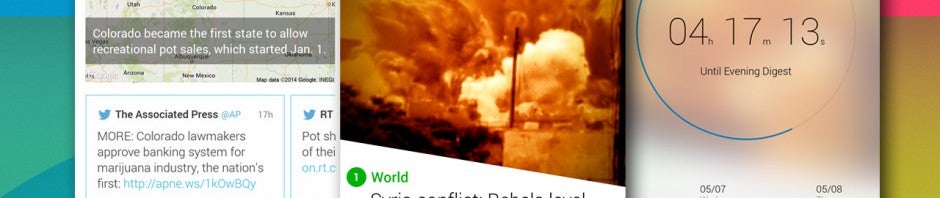
Last year Yahoo integrated its Summly technology into its mobile apps to summarize news stories. Today the company released Yahoo News Digest for Android to focus on curating the top news stories of the day. The app has been out on the iPhone since January.

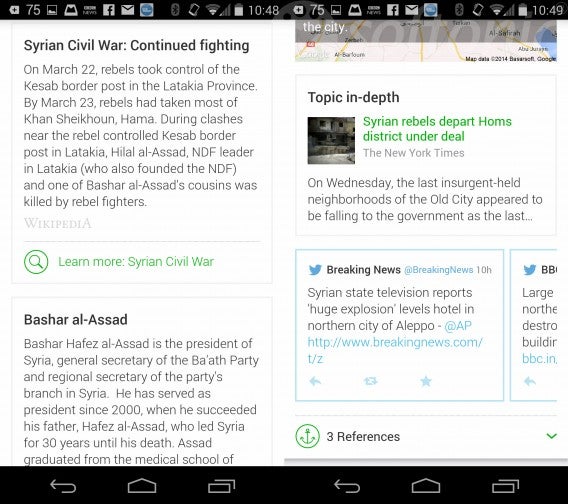
The app will deliver top eight news stories to you everyday at 8AM and 6PM. The stories are summarized and include links to more in-depth information. In-depth information comes from other news sources, Wikipedia, and Twitter.

Yahoo News Digest in-depth combined

The summaries are just enough for users to read what’s going on but offer no history or analysis. Those who want more in-depth news will want to look elsewhere.

Yahoo News Digest has a slick interface that’s controlled using gestures. Scroll down to read more about the story or swipe left or right to navigate between stories. There are no news categorizes so you’ll only have the most important news curated by Yahoo. Users have the ability to read old digests to see what news they missed.

For now, Yahoo News Digest has editions for the US, UK, Canada, and International news. The option to switch editions is buried in the settings, making it impossible to switch editions quickly. Hopefully Yahoo will make it easier to switch editions in a future update.

The app is available now for Android and iOS globally.

Download Yahoo News Digest for Android

Download Yahoo News Digest for iOS

Follow Lewis on Twitter @lewisleong

Source: Yahoo

RELATED STORIES

OS X 10.9 Mavericks: improve your battery life

Does the battery on your Macbook run down too quickly? Here are some tricks to make it last that little bit longer. When Mavericks stepped into the spotlight during WWDC 2013, we saw an operating system capable of managing energy a little bit differently. The new low consumption universe presented by Apple was based on a suite of technologies called Advanced Technologies, which included tools to optimize the use of the CPU (Timer Coalescing), multitasking (App Nap) and Safari and, consequently, improve the battery performance of Macbooks. Here’s what you need to know to help your laptop battery last a bit longer.

Activity Monitor, your new best friend

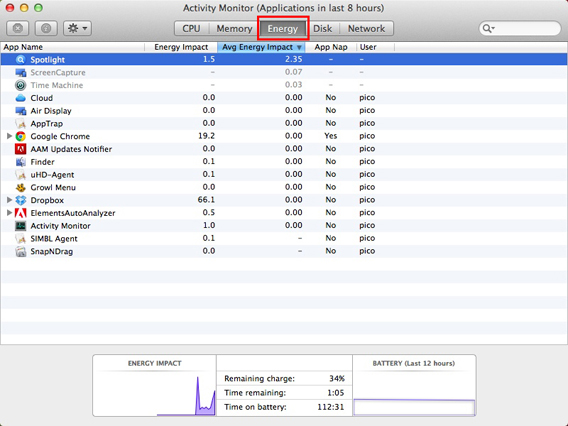
In Mavericks, the app to control resource usage on your Mac (Applications> Utilities> Activity Monitor) has a very useful, and practical tab: Energy.

Energy panel 01

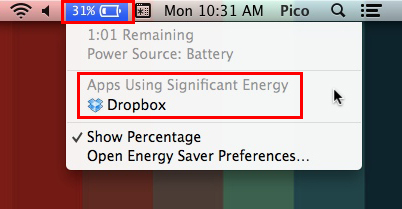
This gives you a very clear idea of which programs are using the most battery. If you need your battery to last as long as possible, for example, because you’re traveling and won’t be able to recharge your Mac, this tab will let you find and close all applications that might reduce your computer’s battery performance: just select them and, with the first option on the top left, force them to shut down. To check which programs are consuming the most battery at a glance, you can also just click the battery icon in the menu bar, and see what the Apps Using Significant Energy report says.

Apps using significant energy

Dual video card? Choose automatic switching

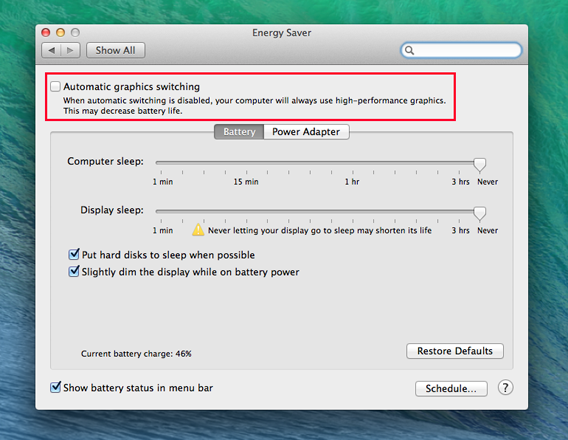
Some Mac models are equipped with a dual video card. One is less powerful and consumes less energy, and the other is very powerful and demanding in terms of battery consumption. In OS X 10.9 Mavericks you can choose which to use, or, you can switch on the automatic switch between the two. In this case, the operating system will decide which video card to assign to each application, so as to best balance needs in terms of performance and energy saving. If you want to save your battery, check the box for Automatic graphics switching. If it’s not a priority, leave this option unchecked.

Mac graphic card auto switchIf you don’t tick the automatic switch box, as in this case, your Mac will always use the highest performing video card (i.e. the one that consumes more)
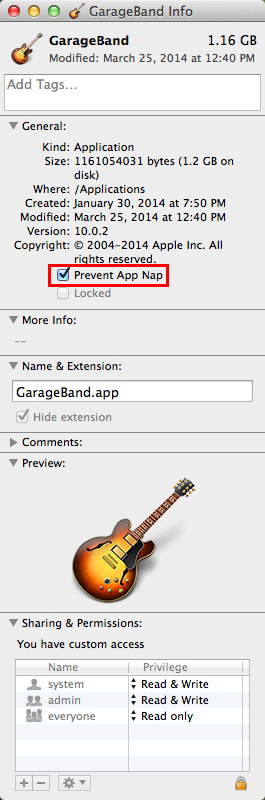
App Nap: you manage it

Mavericks has implemented technology that allows significant energy savings while minimizing the resource allocation for Mac applications not in use. It’s called App Nap. When the window of a program is completely hidden and you’re not doing a particular task (for example, playing music), App Nap will reduce consumption to a minimum, slowing it down. When that window becomes visible again, the necessary resources are reassigned. The process is quick and accurate, and doesn’t cause any delays. It also saves you a lot of battery life. If you’d prefer not to “suspend” some apps in terms of resources, maybe because you always want to work at full capacity (perhaps for sequencer music, or video editing programs if you’re working on large projects), select them, press the Command + I (info), and in the General tab, tick the box Prevent App Nap.

Block App Nap

Safari…always popular

safari The browser is probably the one of the apps that we use the most. It’s usually constantly open. So it’s easy to see how the way it handles resources can make a difference to the battery life of a laptop. Safari 7 was equipped with everything you could wish for – excellent performance flanked by energy saving. As has been happening in Chrome for some time, each tab is a separate process, but in resource allocation the tab in the foreground is favored most of the time, and just the bare essentials are assigned to the others.
Apple’s browser now includes a tool called Safari Power Saver, which prevents plugins loading automatically. Its surveillance weapons are Flash and Silverlight. How many times has a video (usually an ad) started straight away when you open a web page? With Safari, it’ll be blocked by default. If you decide you do want to start it, just click on it. With these two measures, you’ll definitely notice an increase in battery life on your Mac. Moral of the story: changing Chrome or Firefox to Safari could prolong the battery life on your Mac.

If you don’t need it, turn it off

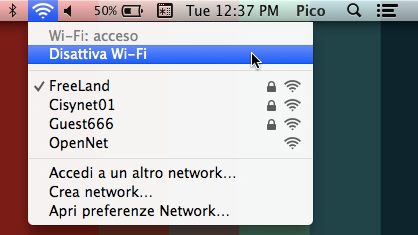
We often forget that we’ve left something active. Everything you leave enabled, however, will consume valuable energy. A classic example is the Bluetooth connection, which isn’t always needed. Of course, if you want to be findable on AirDrop, then you’ll need to keep it active, but otherwise just turn it on and off as and when you need it. Occasionally, you might also leave your wi-fi connection on. If you don’t need the internet, or if you’re in a place where there’s no connection, turn it off. Your battery will be grateful.

Deactivate wi-fi

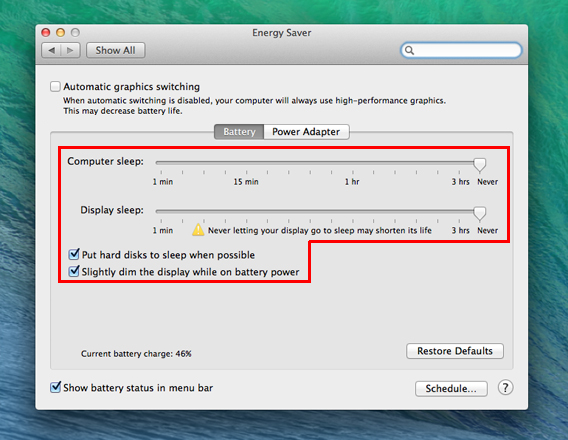
Another good idea is to adjust the brightness of the screen according to your actual needs (no need to always have it at maximum), and also set up your Mac so the screen and the hard drive are put to sleep automatically (go to System Preferences> saving energy).

Schermo e hd in pausa quando possibile

These are a few changes you can make to save energy

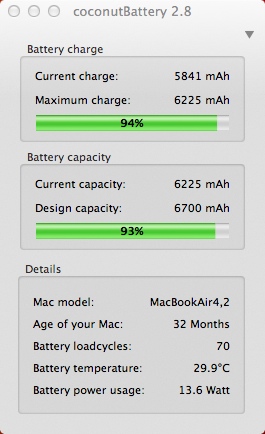
To preserve battery power as much as possible, move the Computer Sleep and Display Sleep as far to the left as possible, thus shortening the time between you stop using the Mac screen and when it goes to sleep. Also check the boxes for putting the hard disks to sleep and dimming the display while on battery power. If you want to check the status of your battery, you can use Coconut Battery, which will show you the total capacity in milliamps, the number of charge cycles performed, the temperature of the battery and other information so you can keep a check on your battery’s health.

CoconutBattery

Pamper your battery

With Mavericks, Apple has done great job with intelligent use of the battery. Considering how small laptops are now, this is essential, because the physical size of the batteries are clearly decreasing, and to obtain reasonable battery life you need to make the most efficient use of them as possible. If you use the technology and add a little ingenuity, your life as an on-the-go Mac user will be better and, more importantly, easier. As an added benefit, there’s the fact that saving energy is eco-friendly. That can’t hurt either.

RELATED ARTICLES