Google Docs can replace your word processor

Coming from the days of Microsoft Office or another free productivity suite like OpenOffice, I found I do most of my writing inside a browser. Whether it’s in WordPress or a quick memo for myself through email, I rarely write offline or in a standalone program.

Google Docs is a word processor and if you’ve used a productivity suite before, you’ll be familiar with the basic layout of the web app. But can Google Docs compare to the utility of something more established like Microsoft Word? Actually it makes things much simpler.

I’ve switched my writing from Word to Google Document in the past year and haven’t see a difference. Google Docs actually makes writing much simpler.

All the basic tools are available

Since Google Docs is a browser-based word processor, it has mostly basic tools.

Starting a new document loads a simple page layout that people will recognize. One of the best features of Google Docs is that everything is simplified so your options bar only contains the most common tools like fonts, alignment, lists, and indentation. There are a few extra tools like Undo and Redo which makes correcting mistakes very easy.

Google Docs Document menu bar

Under each different menu there are other tools like Download, which supports downloading documents in multiple formats like Word, OpenOffice, Rich Text File, PDF, and HTML. The ability to download multiple file types allows you to write and export without worrying about strange formatting that happens when copying and pasting into other word processors.

One interesting feature is the option to translate an article into a different language. Google Docs will load a new tab containing the new copy translated using Google Translate, which admittedly can result in some questionable translations.
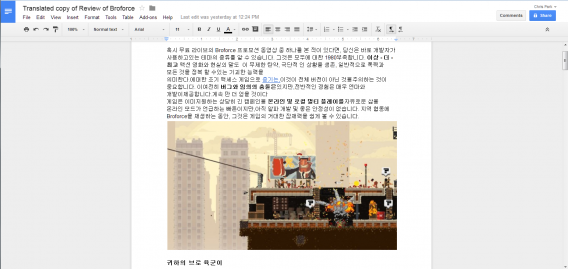
Google Docs Document translated post

Arguably the best feature of using any of the Google Docs apps is automatic saving, so you have the latest version stored online. The Revision History feature allows you to jump back to an old version of the document if needed.

If you ever need to see what’s going on with each file, you can view your activity across Google Drive in the Details and Activity tab.

Collaboration

All Google Docs apps support real time collaboration allowing multiple people to write and edit at the same time. It also features a chat tab inside the document, so you can talk with collaborators when making changes. This makes using Document a great tool when working on group projects. As a productivity tool, being able to share and have one designated document rather than a file that’s being passed around is a lot more useful.
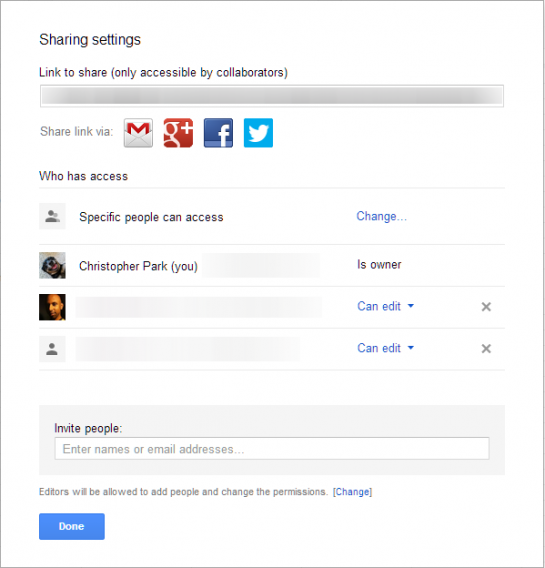
Google Docs Document share

Depending on the number of people contributing, however. things can get a bit overwhelming when there are a lot of changes happening. The constantly reloading in-chat window adds to this clutter.

Import and Export

I copy and pasted an article I did on Broforce from the web to see how it would import the images and text.

While it couldn’t import the video that was embedded in the post, it was able to import all the text, pictures, and links. It did change the text to the Google Document standard Arial font, but that’s not a big issue.

Google Docs Document imported image

Since the most important content was imported, it will be easy to make edits and export the new post. The most common export format will probably be Microsoft Word or a text file. The problem with Word is that it has trouble importing images. Straight text is great for importing words into a publishing platform, but it can’t export the images and only supplies the alternative text of the image (if included).

Google Docs on Android and iOS

Google recently released separate mobile apps for Docs and Sheets, but did that have an impact on its usability? The usefulness of the Android Google Docs app is best as a plain text editor. Editing exiting documents works well enough to correct or add text. It’s more for quick fixes on smaller screen devices. I see it more useful when someone is proofreading while on a commute, but not actively creating a document with pictures and tables.
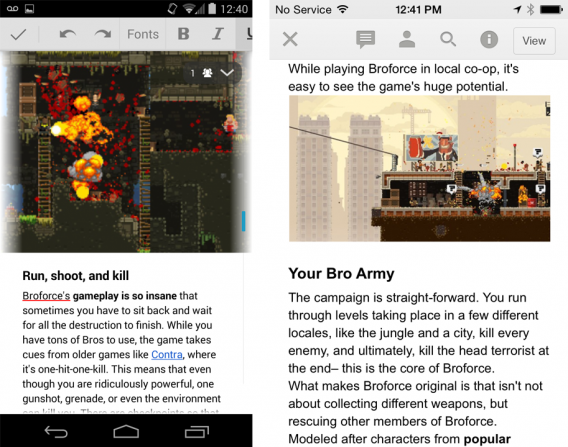
Google Docs Android iOS

Google Docs on iOS is very similar. If you open a document on Google Drive, it will automatically load the Google Docs app. It functions the same as the Android version, offering a place to edit text, but not much else. It’s like laying the base of the document that will be improved on the web app.

The lack of full editing features found in the web app is disappointing, but considering the limitations with screen sizes, it makes sense. Why add an image that you have to manipulate on smaller screens? Since Google still lacks a strong photo editing tool, you’ll probably have to use another app.

I’m curious if the ability to add photos from the device will be supported in the app because it might have some use with people who want to do more than just create text files.

A worthy replacement
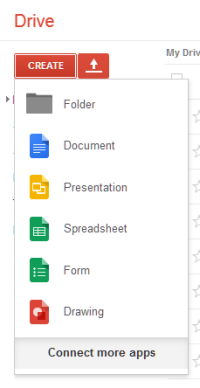
Google Drive create documentsI enjoy using Google Docs for writing. The continuous saving makes me more comfortable than using Microsoft Word and its timed auto-saving feature. Of course, you can change the setting for auto-saving, but even then if you’re in between saves and the computer crashes, you’re left hoping that Word can retrieve a backup.

Google Docs is still best on the web app rather than its mobile apps. Collaboration and chat options make participation in group projects very easy and having the most up-to-date version available anywhere is helpful.

Google Docs is a great tool and frees resources for other heavier apps that you might need to use. This is very helpful when you don’t want to install a full productivity suite to your computer. The fact that Google Docs also supports offline editing (which requires the installation of the Google Drive desktop app) is also helpful when you can’t be connected to the internet.

Next up: Google Slides.
Related Articles

What is Office 365 and why should you use it?

Check out Office 365, Microsoft’s subscription-only office suite, and see if it’s the tool for you.

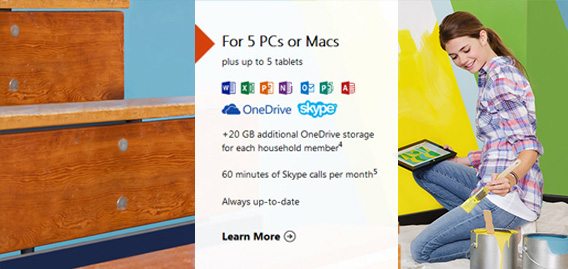
Office 365 Home Premium is a subscription version of Microsoft Office. It includes the programs and apps that you’ll know from the software for PC, Mac, iPad, iPhone and Android, like Word, Excel, PowerPoint.

In addition to having to pay, the main difference between Office 365 and the desktop suite, Office 2013, is the ability to install programs under different user accounts on more than one computer and to use the Office app on iPad. Office 365 Home Premium also includes extra cloud storage call credits for Skype.

Office 365 will appeal to a variety of users and offers several subscriptions to suit your needs. Many subscription plans are aimed at small and medium-sized enterprises, but Home Premium is designed for families who want to use of the suite on several devices. In this article, we’ll focus on this type of subscription.

What does Office 365 Home Premium offer?

Office 365 Home Premium costs $10 per month and includes:

  • Word, Excel, PowerPoint, OneNote, Outlook, Publisher and Access that you can download and install on 5 PCs (Windows 7 or higher), Mac (OS X 10.6 or higher) or tablets (iOS 7.0 or higher)
  • An extra 20 GB of cloud storage on OneDrive for each account (up to 5)
  • 60 minutes of Skype calls per month
  • The Office 365 web apps include Word, Excel, PowerPoint and OneNote, and are already included in Office Online. You can use them from your browser and they offer the main functions of the corresponding desktop apps

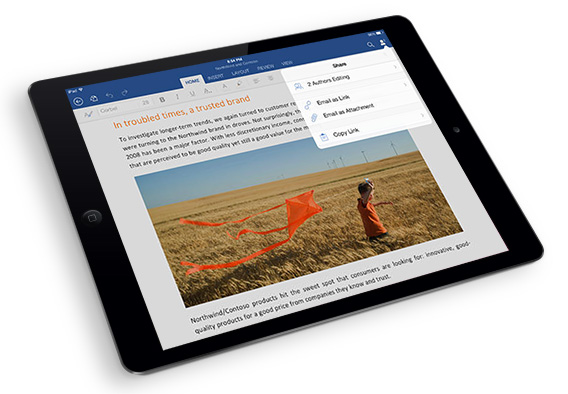
 Office 365 Home Premium

Why should you use Office 365 Home Premium?

The main difference between Office 365 and Office 2013 is the payment method: with the desktop suite, you buy individual programs, while with Office 365, you pay a subscription for the whole family, which allows you to use the PC, Mac and iPad versions (the version for Android and iPhone is still free).

So, why Office 365, and not 2013 or the online version? The answer depends on what you wan to do with the suite. If you’re using Word sporadically to open files, open Excel and PowerPoint only occasionally, and you don’t need an email client such as Outlook, then the desktop version of Office (or just Office Online) are more than enough.

Office on iPad

However, if there are multiple users in your house who make heavy use of Microsoft Office programs, especially for professional purposes, Office 365 is the right choice. Also, if you want to use Office on iPad, a subscription to Office 365 is essential.

This way, by paying a single monthly or yearly fee, you and 5 other people you can install programs on (nearly) all your devices, meaning you don’t have to buy a version for each computer or family member.

The disadvantage – compared to Office 2013 – is that you’ll never own the software and must continue paying your subscription. On the other hand, this means that your Office 365 programs will always be up to date and available no matter what device you’re using. The choice is yours!

Follow me on Twitter @zoltan__v

Facebook removes Poke and Camera apps from stores

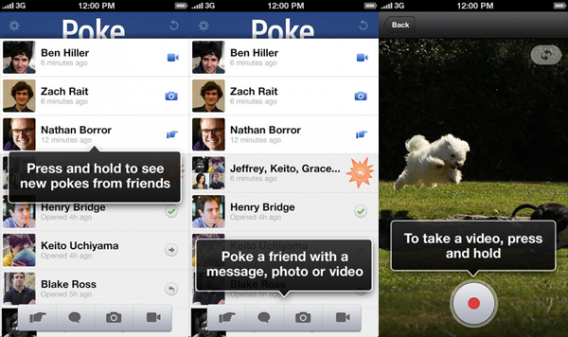
Facebook released Poke at the end of 2012, as a response to the rising popularity of Snapchat. However, the app failed to catch on with users, or halt the rise of its competitor. Facebook has removed the app from app stores, along with its photo uploading app, Camera.

Since Camera and Poke, Facebook has taken a different path with standalone apps. The company now has a Creative Labs department to create and test new apps, the first of them being Paper. We also know that the company has a policy on launching beta apps – if beta tests are popular with users, they will try to push them to 100 million users, and only at that point try to monetize them.

Poke’s demise is obviously fueled by its failure to become popular, but it’s a different story with Camera. That app was released when Facebook’s mobile app had a limited photo-upload capacity. Camera’s innovations and improvements have been integrated into the standard Facebook app.

Follow Jonathan on Twitter @jonathanriggall

RELATED STORIES

EA closing online services for 50 games on June 30th

June 30th sees the closure of online services for 50 EA games, the company has announced. Online support for games does not last forever, and is typically stopped when less than 1% of the peak user base is still playing.

The list of 50 games includes some very obscure titles, but there are also some big names like Crysis 2, Battlefield 2 and 1942, various Command & Conquer and Need for Speed games on PC, and others. In an Online Serve Update, Electronic Arts explained that these games no longer have big enough communities of players to merit the resources needed to maintain them. See the full list in the source below.

While the number of players affected by this closure will be relatively small, it’s certain to make some nostalgic for games they may no longer play, but will never be able to play again after June 30th.

Source: EA

Follow Jonathan on Twitter @jonathanriggall

RELATED STORIES

Mozilla: Firefox will not become a mess of sponsored content

As we reported back in February, Mozilla is introducing changes to the new tab page in Firefox, which may include some sponsored links in the future. The original announcement was controversial, and Vice President of Firefox, Johnathan Nightingale has tried to calm user fears that this could mean ‘ads in Firefox‘.

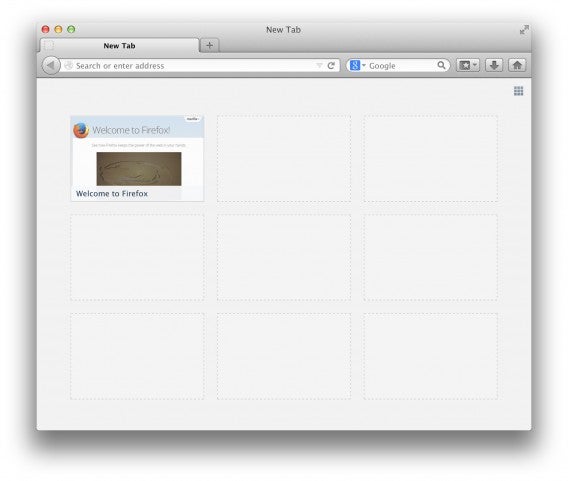
The original idea was to make the new page tab more useful. When you open a new tab page in Firefox, you will see a grid of tiles which lead to websites. These tiles are based on your own history, so they are a neat way of getting to your most visited sites without having to type. You can choose to turn these tiles off with a button in the top right corner of the tab. The new plan, called ‘Directory Tiles’, is for brand-new users without any browsing history.

In the current system, new users see nine empty tile spaces. Mozilla is experimenting with ways to populate the space so new users get something useful in new tabs. One of the options was for Mozilla to sell this space for sponsored tiles.

Johnathan Nightingale says the new Directory Tiles will be tested in the pre-release channels. They will mix Mozilla sites with other useful sites on the web, and will change the around to see how new users respond to them. Nightingale says any sponsorship of Directory Tiles will come later. Either way, current users with saved browser history will not be affected.

Source: Mozilla Blog

Follow me on Twitter @jonathanriggall

RELATED STORIES

Security expert Mikko Hypponen talks online safety: “The war is not lost”

Mikko Hypponen is Chief Research Officer and virus specialist at F-Secure, an Antivirus company in Finland. Along with being a leading internet security expert, Hypponen has also been a speaker in TED talks.

We had the opportunity to meet Hypponen at the Next14-Conference in Berlin this week,  where we talked to him about Google as a data collector, privacy, and the internet after the NSA scandal.

Softonic: Mr. Hypponen, a very simple question – are you using Google Services?

Yes. I am. So are you. It’s very hard to avoid them. I would prefer not to use them, but how the hell do you avoid Google? Even if you find alternatives for Maps and Gmail, how are you going to replace the search engine? You can’t get rid of YouTube, because all the videos are in YouTube anyway. Even if you avoid all of that, you’re still not going to escape Google Analytics and Google AdBanner, which will track you across the Web.

If you do the math, how much money did you make Google last year? If you take the profit and divide it by users, that’s $17 billion profits in 2013 from 1 billion users, meaning you made them $17. You didn’t pay them any money, yet you made them $17 in profit. Although I would prefer to pay for it, they don’t give me the option. I am more valuable by giving my data than by giving them money.

By the way, that wasn’t a very easy question.

You say Google, Yahoo or similar services know more about us than our families. As a user, can I do something differently?

You could delete your Google cookies. You can use their service without logging in, which is its main method for linking your profile between your computer, your tablet, and your phone. But they will convert your data. Not logging in won’t really solve the problem, so we have no real solution.

When it comes to social media, you’re only actively using Twitter. What’s the reason for that?

Twitter is completely open; there is nothing private on Twitter, and nothing to hide. I’m not really against any social media. People ask me why I’m not on Linkedin, why I’m not on Facebook: I try to maintain my own privacy. If you go on Facebook and use it as normal people use it, there’s no ways to hide your life.

The easiest way is to stay away from Facebook, although it hurts me. If you’re not on Facebook today, like me, it’s hard: I have no idea which one of my friend’s got divorced, or who had a baby, or who got married, or where the party is. I’m the last guy to know. Everyone else knows. I don’t know because I’m not on Facebook.

NSA, the Heartbleed Bug– another security disaster seems bound to happen, and people are scared. They don’t really know what’s happening on the web. How can I, as a normal user, protect myself better online?

There are easy things you can do, like changing the whole password culture. Bad passwords or recycling passwords doesn’t only invite surveillance, but all kinds of problems. Use password managers. Take care of backups. Accidents happen to everybody. Your house could burn down– take backups to restore you children’s pictures.

When going online, I’d recommend using the Tor network for browsing. And not just when you’re doing something you want to hide; do it at all times. I’d also recommend using VPNs. Tor will hide who you are, while VPN will encrypt your data. And I must stress: encryption works. That’s a quote from Snowden. Use encryption. Encrypt your email. If you store your data in the cloud, encrypt it first. Encryption works.

Mikko Hyponnen

You and your company have been fighting for years against the virus industry, which seems to become more powerful everyday. Is this fight lost?

No, it’s not lost. It’s not easy being an online criminal. Many people become one because it’s the best option out of many bad options they have. It’s people who have the skills, but don’t have the same opportunities that you and I have. There are many cyber criminals coming from poor countries, and there’s a reason for that.

But it’s not easy being an online criminal. You have to stay incognito, which is hard. They only have to make one mistake, and they’ll get caught. The war is not lost. It’s hard to make big visible changes, but we are catching more online criminals than ever before. We are definitely not giving up.

Malware is getting more and more popular, especially on Android phones. What possibilities do I have as an Android user to protect myself?

Android users right now will not be hit by online attacks unless they install the malware themselves.

The risk is when you take your Android phone to Google Play or third-party app stores, and you install Angry Birds or Boom Beach or whatever. And it looks like the real game or real app, but it’s not the original. There’s no way for you to tell until you get your next phone bill and you realize that the app has been making expensive phone calls while you were using it. That’s the problem on Android. Be careful what you install.

Edward Snowden said that his greatest fear was that nothing would change after the NSA leak. Do you thing anything’s changed in the past few months?

Yes, I see change. I am hopeful. It’s not a drastic change, it’s not a landslide as you’d hope for. But I see people waking up. I see people thinking about this and asking questions. Initially, people have this powerless feelings, like there’s nothing you can do.

When I talk about these things, I try to point out that it’s not like that; there are things you can do. Just sitting in apathy isn’t going to change anything. You don’t have to be worried. You can be angry about it and do something. I am hopeful.

Mr. Hypponen, thank you very much for this interview.

Photo: Mikko Hypponen

RELATED ARTICLES:

How to fix Wi-Fi issues after waking your PC

This is a very common problem with Wi-Fi adapters, especially on Sony Vaio laptops (I have one with the same problem) – the Wi-Fi seems to fall into a coma after suspending the PC.

There are several solutions that you can try, whatever version of Windows you are using.

Enable Wi-Fi through your Control Panel

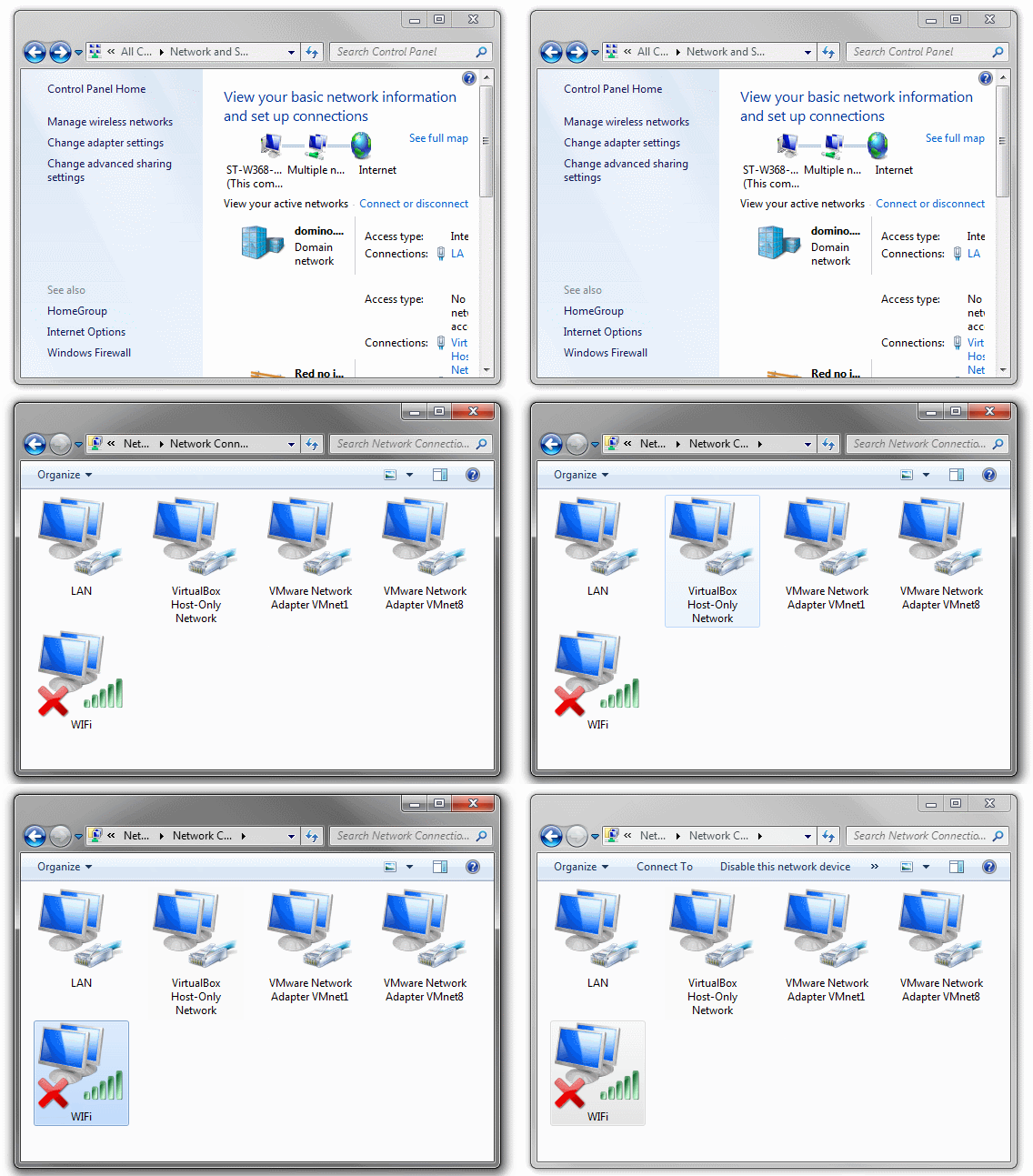
Instead of turning your computer off and on again every time, it’s faster to disable and enable the network adapter. Go to Control Panel > Network and click on Change adapter settings. Next, you’ll see a list of the network devices.

Control Panel

The name of your device may vary but the icon for the Wi-Fi one always has four green bars

Drag the Wi-Fi icon to the desktop to create a shortcut. If, next time you re-start the laptop, you have no connection, right-click the icon and select Disable. Wait a few seconds, right click again and select Enable.

Disable

Disable the Bluetooth adapter on the Device Manager

On many laptops the Wi-Fi adapter is also a Bluetooth adapter, used to connect devices such as a wireless mouse, keyboard, headset or printer. Sometimes it’s the Bluetooth that’s keeping the Wi-Fi from working.

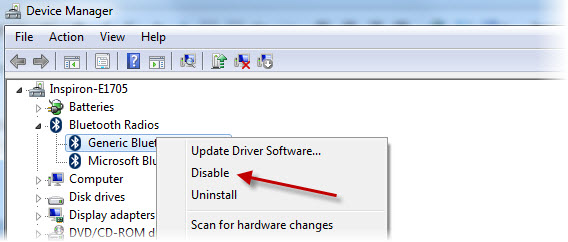
If you don’t need Bluetooth for anything, go to the Device Manager (Control Panel> System) to turn it off. Just right click on the Bluetooth device, and again on Disable. That way it will not interfere with the WiFi anymore.

Disable Bluetooth adapter

If you want to enable the Bluetooth again, follow the same steps

Change a hidden Windows feature

There is a hidden option that turns off the WiFi following some energy saving policies that are not normally visible. To change this option, go to Control Panel > System > Device Manager.

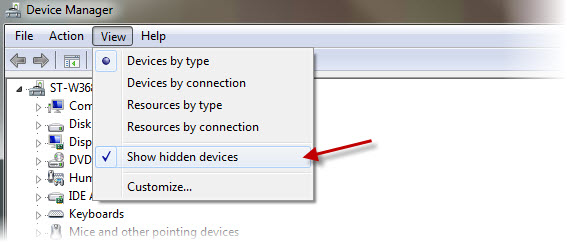
Open the View menu and select Show hidden devices. In the Network adapters section, locate the Microsoft Virtual Wi-Fi Direct. Right click on it and open Properties. Click the Power Management tab.

Show hidden devices

Disable the option Allow the computer to turn off this device to save power. You can repeat these steps for all other network adapters to make sure they don’t go “to sleep” whenever you suspend your PC.

Disable this setting

Reset TCP/IP

Sometimes this problem has nothing to do with energy saving, but with the network configuration, called TCP/IP on Windows. It’s very easy to reset: simply run Microsoft Fix-It on Windows Vista or 7.

Disable the Bluetooth adapterIf it doesn’t work, or if you are using Windows 8 or 8.1, then you should reset the TCP/IP utility manually. Follow the steps on Microsoft’s support site. This should be done only as last resort.

Update the Wi-Fi adapter drivers

One last thing you can try is to update the drivers for your Wi-Fi device. You can use a tool to search and update drivers, such as Ma-Config or DriverMax, or search directly on the drivers’ official site.

Ma-Config

Ma-Config helps you find, download and update drivers

If you want more help with Windows, check out ourWindows Tip of the Week Series.

The best Android games to play with kids

Kids love to play and never miss an opportunity to steal your smartphone. Fortunately, there are Android games that are perfect for them.

It’s inevitable: if you’ve got a smartphone and small children, it’s likely your phone will end up in their hands. But rather than get angry and take it off them, you can let them play with it, provided that they play games suitable for their age and that you can play with them. Fortunately, there are plenty of apps that tick these boxes on Google Play.

Racing, puzzles, guessing… The most popular genres have great games for children. Today we’ll look at five which are sure to be a hit with little kids.

Frozen Free Fall

‘Frozen’ is already the highest-grossing animated movie in history and a film that has captivated big and small kids equally. If your kids worship Anna, Elsa and company, then you’ve got to install Free Fall on your Android ASAP. Free Fall is a puzzle game based on the movie, of course.


Frozen Free Fall is like Bejeweled (or Candy Crush), with the difference that it’s accompanied by the characters in the film. Like most games in this style, there are in-app purchases, but the game has a system for avoiding them: after installation, select the age of your children; this turns off purchases and prevents any accidental expense.

Download Frozen Free Fall

Frozen Free Fall

Angry Birds Go!

Other really popular characters with kids are the birds and pigs from Angry Birds. If your kids usually go crazy with cars too, then they’ll love Angry Birds Go!

This karting game doesn’t require too much skill as everything is handled with a single action and moving your phone. The only thing you may need to help with is upgrading the vehicle. It’s a great game for playing together and teaching them the basis of role play and strategy games, such as getting and activating upgrades.

Download Angry Birds Go!

4 Pics 1 Word

One of Google Play’s biggest hits is perfect for kids and adults to play collaboratively. The simple game mechanics (guess the word with four images as a clue) is good not only for fun, but to exercise the mind.


A child-adult tandem is perfect for this game, as some puzzles will require an adult logic, and vice versa. You’ll be surprised how quick your little one “gets” it!

Download 4 Pics 1 Word

Dropdot: Kids Connect the Dots

I’m sure that, like me, when you were little you played “connect the dots”. We followed the numbers or dots and, in return, we got a nice drawing. Dropbot brings the game to modern kids.



Dropbot is the digital version of the game and has many advantages: the drawings are HD images, you can choose from many topics and there is a narrator who helps you in your task.

Download Dropbot: Kids Connect the Dots

DropBot

Dr. Panda’s Kindergarden

We begin to teach children good values​​, like the importance of being responsible, from an early age. This can be done conventionally or via apps, like this game from Dr. Panda.

With Dr. Panda’s Kindergarden, kids will enjoy caring for animals and creative activities, such as playing in a band or cooking. Meanwhile, you can rest assured that it¡s a great game that’s also teaching them important qualities such as caring for younger kids and teamwork.

Download Dr. Panda’s Kindergarden

From enjoyable to…educational

These five apps are only a sample of all the material suitable for children on Google Play. The truth is that any game can be suitable for children as long as you make sure it doesn’t include content that’s not suitable for their age and always supervise them.

My recommendation, though, is to always try to find a balance between education and fun: they will have fun and you will be sure that your children are not wasting time on the small screen.

Make sure to check out the rest of our The best Android games to… series.

Touch Browser for Windows 8 with Chrome and Firefox tablet mode

Is Internet Explorer losing the advantage of its Windows 8 head-start? These days, Firefox and Chrome can also be used in Modern UI-mode. However, unlike on the desktop, they’re still significantly behind IE.

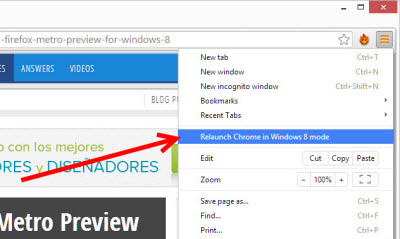
Chrome in Windows 8 Mode

With Google Chrome version 32, the touch version of Internet Explorer gets its first official competitor. Instead of selecting a tile, you start tablet mode by selecting an option in the browser menu.

Windos 8 mode in Chrome 32

When you click the option, a selection window for your installed web browsers opens. After clicking again, Google Chrome opens in Windows 8 mode.

Choose your browser

By doing this, you also make Chrome your default browser. A downside of doing this is that the tablet version of Internet Explorer disappears from the Start menu and can no longer be opened. Unfortunately Microsoft doesn’t allow an alternative – this means that if you want to use Internet Explorer again, you’ll need to set it as the default browser. Fortunately, Internet Explorer automatically queries this next time you start your program.

Chrome’s Windows 8 mode isn’t very different from the desktop version. There are no finger-friendly buttons, no multi-touch gestures for zoom and navigation and Chrome for Windows 8 can’t cope with the practical snap mode either. The browser is really only suitable for computers with a keyboard and mouse.  You can still use the more versatile desktop version though.

Firefox in Windows 8 Mode

Firefox version 29 introduced a touch mode. To start Firefox in touch mode, you use the same principle as Google Chrome. A menu item allows you to set Firefox as the default browser. Then, when you start Firefox in future, it automatically loads the tablet-friendly interface.

However, unlike Google Chrome, Mozilla offers a browser that is genuinely optimized for tablets. Since our detailed analysis of the first test version, very little has been done to the interface. The design has been partially copied from Microsoft. As with IE11, you’ll now find the address bar below and there are two large arrows to flip ahead and back, as well as new tabs.

Firefox for Windows 8

Unlike Chrome, the controls are sufficiently large, there’s a tab bar with thumbnails like in Internet Explorer, and Snap mode and touch gestures for the zoom work perfectly.

Further strengths of Internet Explorer vs. Chrome and Firefox for Windows 8

Firefox and Chrome on tablets are still no real alternative to Internet Explorer. In addition to the weaknesses already described, two practical functions of the Microsoft browser are missing.

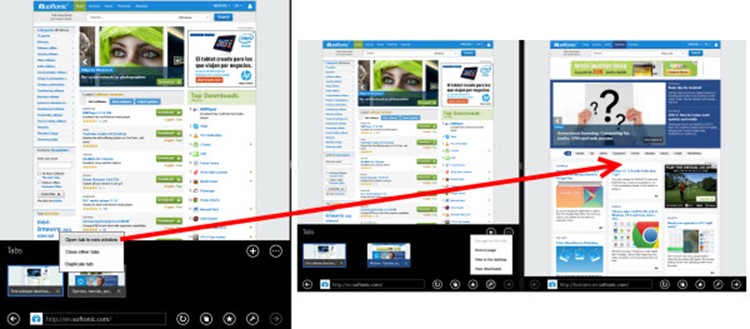
In Touch mode, only Internet Explorer is able to offer simultaneous viewing of two pages with Windows Snap.

Two page view

The handy Reading List App as a bookmark manager only works with Internet Explorer and a similar function is still missing from Chrome and Firefox Apps.

Reading list

Anyone wishing to select and copy text will also be disappointed. There’s no touch-friendly selection tool. Clearly, Google and Mozilla have more work to do if they want to give Microsoft on Windows Tablets a run for its money.

Copying

Related reading:

Watch the trailer for The Walking Dead Season 2 Episode 3

The next episode of The Walking Dead Season 2 will launch next week. We’ve got the official launch trailer below for a little taste of what to expect. If you haven’t played finished the previous episodes, don’t watch the spoiler filled trailer!

Default player


brightcove.createExperiences();

Episode 3, “In Harm’s Way,” takes place immediately after Clementine’s capture by a mysterious group of survivors. She’ll have to lie and kill to survive, a stark contrast from the fragile girl we saw in Season 1.

The game will be released on all platforms next week. PC, Mac and PS3 players will get the game first on May 13th, followed by the Xbox 360 on May 14th, and finally iOS on May 15th.

Source: Telltale Games (Twitter)

Follow Lewis on Twitter @lewisleong

RELATED STORIES