Chrome 64-bit is faster and more secure

Google’s Chrome browser is already quick but is about to get quicker with 64-bit support. Google claims it is seeing a 25% average increase in performance.

Security will be tougher with a 64-bit version of Chrome too. Without getting too nerdy, 64-bit software allows more memory randomization, making it harder for hackers to steal information from your RAM.

If that’s not enough to get you excited, 64-bit Chrome claims to crash half as much as the current 32-bit version.

If you’re brave, you can install an experimental version of 64-bit Chrome from the Canary and Dev Channels below. The browser is currently only available on Windows 7 and Windows 8. Since the browser is still experimental, expect to see some bugs.

Download Chrome 64-bit for Windows 7 and 8

Source: The Chromium Blog

Via: Ars Technica

Follow Lewis on Twitter @lewisleong

RELATED STORIES

Massive Instagram update adds new effects

Facebook wants Instagram to be a serious photography app and is introducing new effects and filters in a massive update. You can now control the intensity of each filter, as well as the brightness, contrast, saturation, warmth, and more.

You can even adjust the strength of a filter, which has been a long requested feature. Tapping on a filter brings up a slider to adjust the filter. You can change the look of the filter further by playing with contrast, brightness, and saturation.
VSCO Cam
Before today’s update, Instagram provided basic editing features like crop, straighten, frames, and simulated “HDR.” More seasoned photographers will enjoy the new editing features but I expect most people will stick to the default filters.

The update reminds me of VSCO Cam, another popular photography app for Android and iOS. Even after the update, Instagram falls behind VSCO in editing features. Still, Instagram has more users and VSCO users often post to Instagram using the hashtag #VSCOcam. Facebook undoubtedly took notice and has taken some of VSCO Cam’s best features.

The update will be rolling out today for Android and iOS. You can wait for the update in the app stores or download the apps below.

Download Instagram: Android | iOS

Source: Instagram

Follow Lewis on Twitter @lewisleong

RELATED STORIES

Discover new apps from Japan during Apps Global Debut Day

If you’re curious about what apps are trending in Japan, tune in to the livestream of Softonic Japan’s Apps Global Debut Day. From June 12th to the 13th 12:40 – 14:10 Japan Time, Softonic Japan will be hosting an event to highlight apps that could rise to global popularity.

This will the be the second Apps Global Debut Day that Softonic Japan has put together. During the last event we saw Henshin kudasai (“Please reply”), a game where players text virtual characters to simulate having friends.

Henshin kudasai

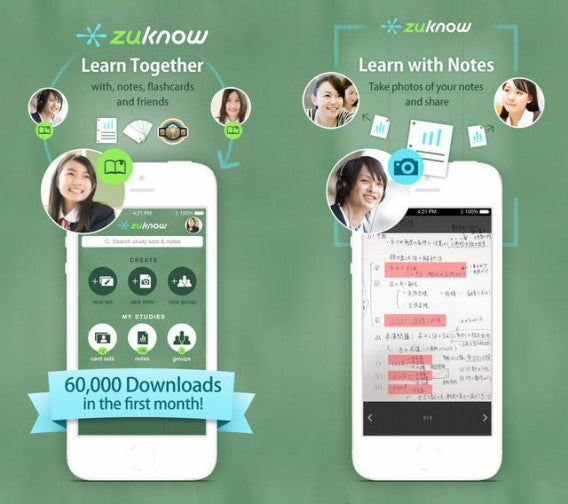
We also saw zukonow for the iPhone, an app that allows you to share notes and other study materials with your friends.

zuknow combined

To find out what exciting apps are coming out of Japan, tune into the Softonic Japan Ustream channel during Apps Global Debut Day. You can also RSVP for each day of the event on Facebook (Day 1, Day 2).

Opera 22 out now

Opera 22, the latest version of the innovative browser, is out today. It adds new themes and introduces smaller silent updates.

Version 22 came to the Opera development channel in March, and was described as a major update. ‘Silent updates’ is a big change, and means you will no longer be asked to update Opera, or be interrupted with requests to do so. Opera now updates automatically, so you’ll never have to worry about having the latest version. Of course, this also means you can’t choose to stay with an older version.

Opera 22 also includes five new themes showcasing Norwegian scenery. The browser was ‘born’ in Norway, and the development team apparently decided it was time to give Opera a Scandinavian feel! You’re not forced into decorating Opera with dramatic and beautiful scenery – more themes can be added from the themes section of the Opera add-ons site.

Opera 22 is available now for Windows and Mac.

Follow Jonathan on Twitter @jonathanriggall

RELATED STORIES

Goat Simulator patch 1.1 out now (video)

Today sees the release of Goat Simulator patch 1.1, which adds a new map, local split-screen multiplayer, new achievements, ‘Goat Parkour‘ and more. Check out the brand new trailer, below!

The new map also features a hotel called the Put-In Hotel, a dig at the president of Russia, Vladimir Putin. The building is decorated with pride flags, meant to be a criticism of recent legal changes in Russia.

But it’s not all serious political points – there is also a big Ferris wheel you can ‘overcharge with car batteries’, and you can ride a bike, more or less, as illustrated in this video.

Default player


brightcove.createExperiences();

Goat parkour means you can walk on your front legs, and jump around the landscape in a vaguely parkour style. There are also new playable goat, including Tornado Goat, Shopping Goat, and Repulsive Goat, and a new local multiplayer mode. Developer Coffee Stain Studios explained that online multiplayer was proving difficult to develop due to ‘physics synchronization issues.’

The patch is free if you bought the game, which is available through Steam for $10.

Read our review of Goat Simulator.

Follow Jonathan on Twitter @jonathanriggall

Source: Polygon, Coffee Stain Studios

RELATED STORIES

iPhone: how to send an MP3 via WhatsApp

Want to send a music file with WhatsApp for iPhone? For Android users it’s easy to send a song via WhatsApp, because it’s the operating system itself that offers the option. For iPhone users, it’s another matter.

WhatsApp for iOS allows you to send pictures, videos, contacts and geographic location…but not music. Fortunately,  sending an MP3 via WhatsApp for iPhone is still possible. All you need is the help of a free app that offers an Open With option. There are a few of these, but iZip seems to be the most suitable for our purpose.

Here, I’ll take you through how to send an audio file with WhatsApp for iPhone.

How to send audio files using iZip

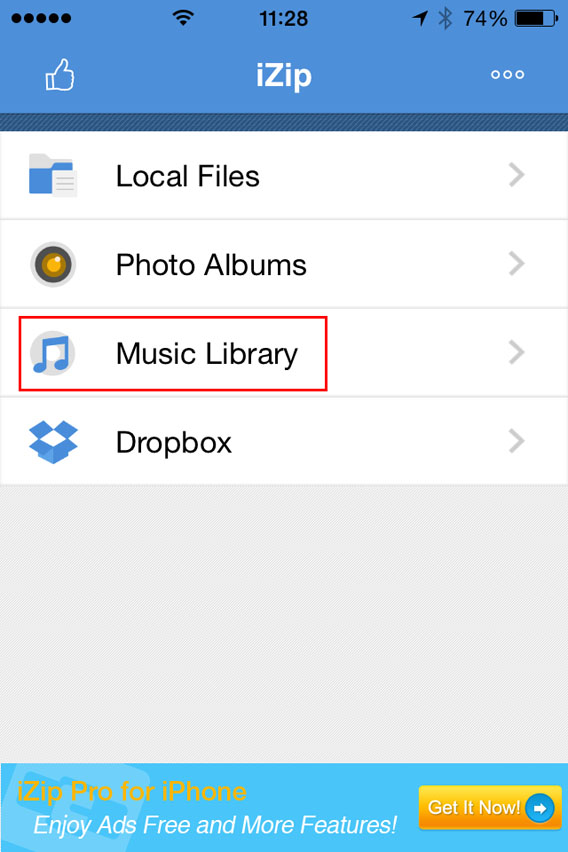
1. Install iZip on your iPhone. Open the program.

2. Select Music Library.

Select Music Library from the menu

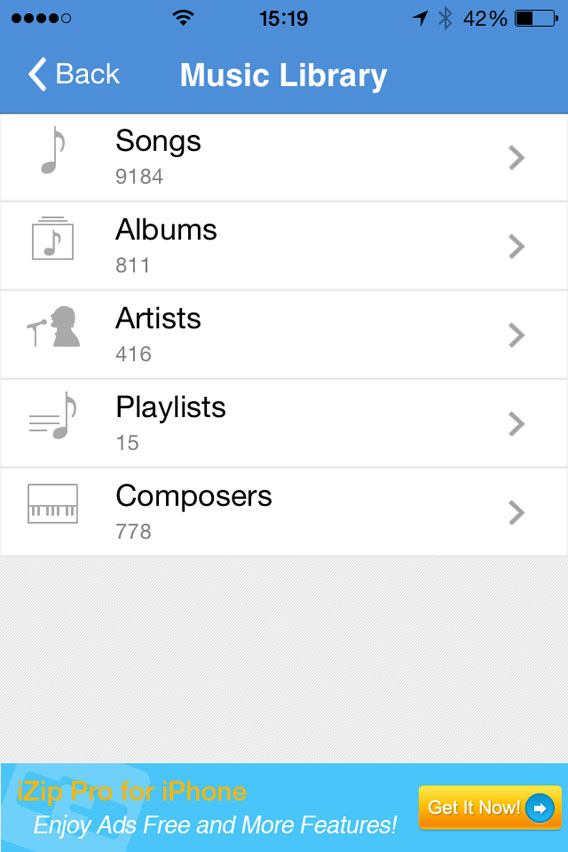
3. Open a folder (e.g. Albums).

Select a folder in the Music Library

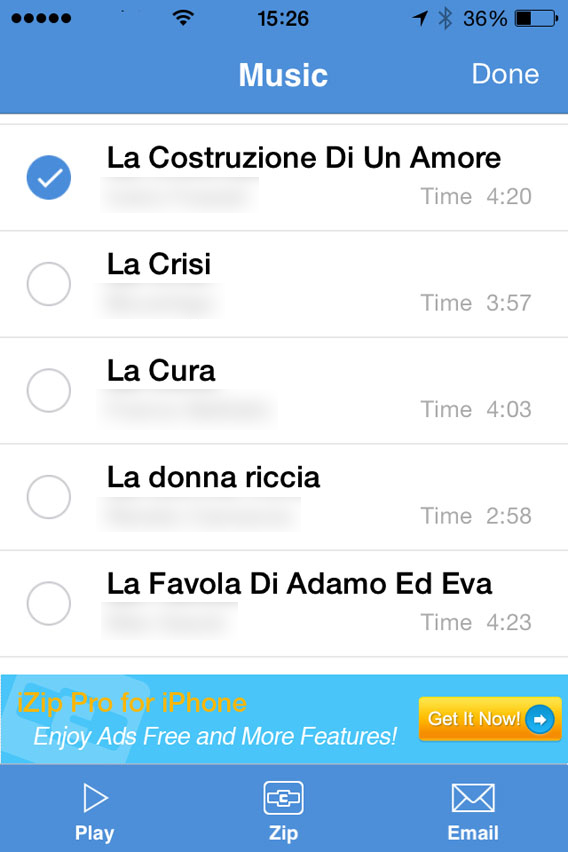
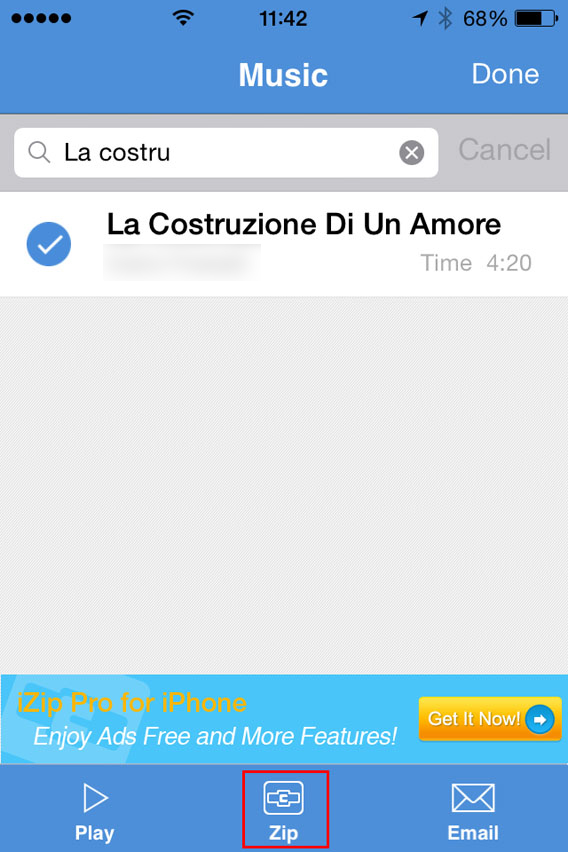
4. Tap Select in the top right of the screen and choose the song you want to send with WhatsApp. At this point, Select will be replaced by Done.

Select the song you want to zip

5. Tap the Zip button at the bottom center of the interface. The app will compress the file.

Select the song and then zip

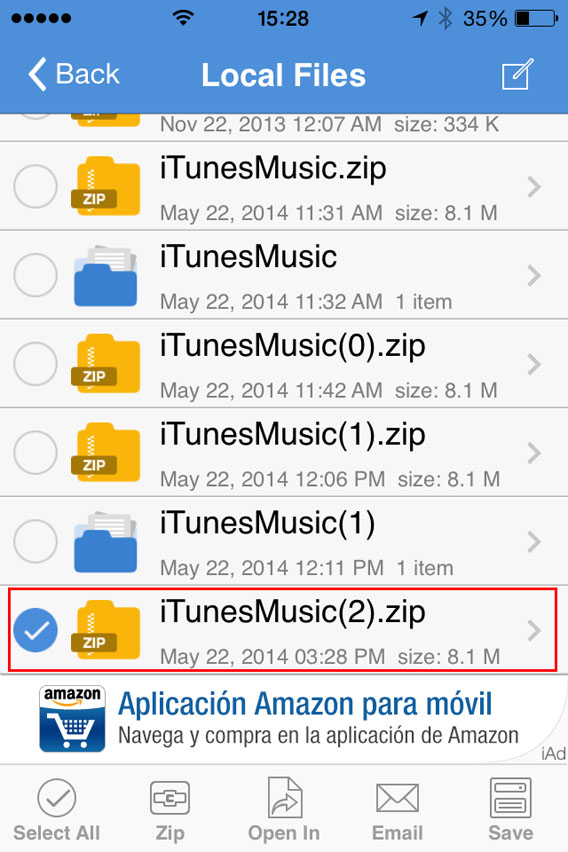
6. This will open the folder Local Files. From there, you can select the ZIP file you just created.

Select the ZIP file you just created

7. You’ll be asked Would you like to extract all files? Tap OK .

Do you want to unzip the file

8. This automatically creates and opens a folder in Local Files with the decompressed song. Then select the file .

Select the file to be opened with

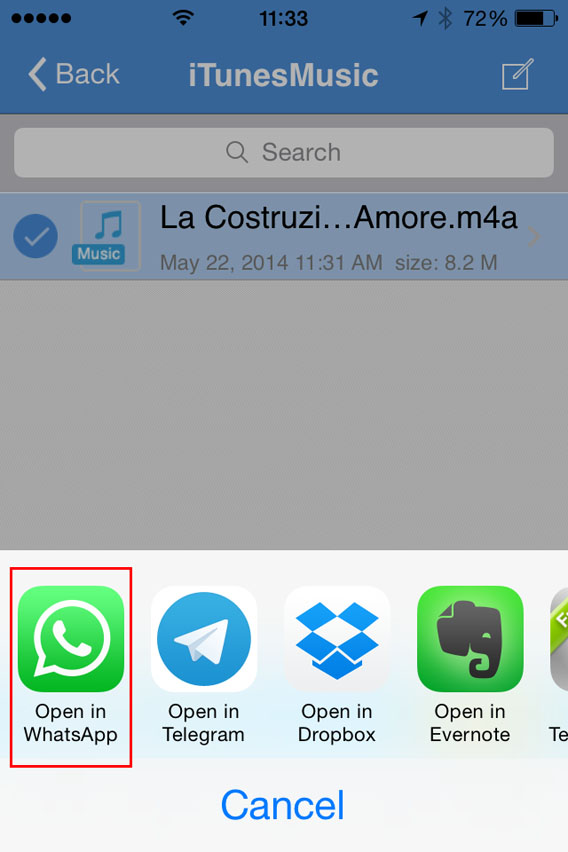
9. Now, tap Open In (at the bottom center of the screen) and, from the choices that appear, select Open in WhatsApp.

Select Open in WhatsApp

10. It will open WhatsApp automatically. Select the user you want to send the MP3 to, and when it asks you to Send to [contact name], click on Yes.

Confirmation sending files to contact

At this point, the file will load and send. When the recipient receives it, you can listen to it by tapping the Play icon next to the music file.

Listen to the file received

Beware of copyright

This method lets iPhone users exchange music via WhatsApp, even if the procedure is a bit more complicated than for Android users.Remember, however, that sharing music files protected by copyright laws is illegal, so only send audio or music that can be freely shared.

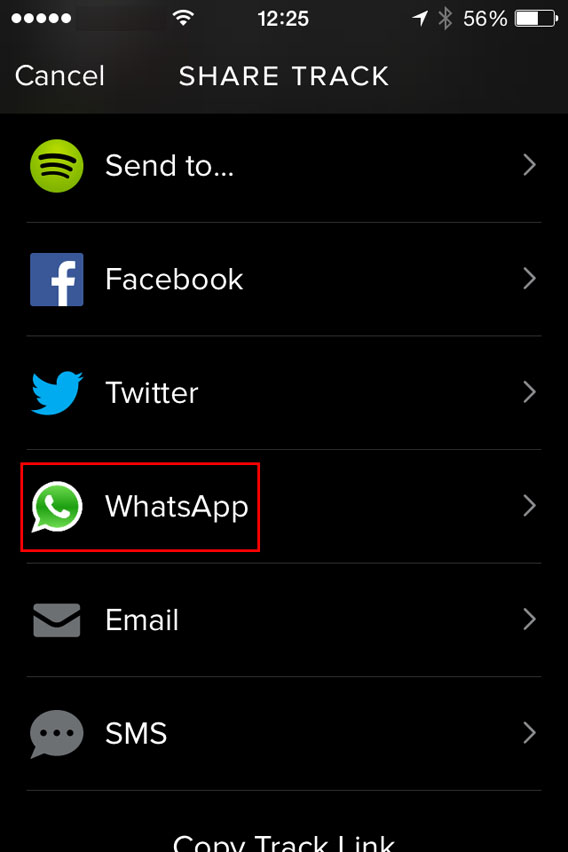
One last tip: if you want to share a new song with a friend, instead of sending the file, you can share it with them via Spotify. To do so, just find the song you like, tap the menu with the three dots next to it, and select WhatsApp.

Spotify - Share with Whatsapp

Then, select the contact, confirm you want to send it, and you’re done. Simple, fast, safe and totally legal.

If you’re looking for other tricks for using WhatsApp, look for them in the index of our comprehensive guide to WhatsApp.

iPhone 4 won’t get iOS 8

Apple announced iOS 8, the upcoming update to its mobile operating system. The company has a good history of supporting older devices but iPhone 4 users are out of luck this time.

Although Apple didn’t announce a new iPhone today, iPhone 4 users will want to update to a newer iPhone for all the new iOS 8 features.

The original iPad and fourth generation iPod Touch join the iPhone 4 in not being able to run iOS 8.

Want to check if your device will run iOS 8? Below is a complete list of compatible devices.

  • The iPhone 4s
  • The iPhone 5
  • The iPhone 5c
  • The iPhone 5s
  • The iPod Touch fifth generation
  • The iPad 2
  • The iPad with Retina Display
  • The iPad Air,
  • The iPad Mini
  • The iPad Mini with Retina Display

It’s surprising that a device as old as the iPad 2 will still be able to run iOS 8. Of course, expect some power hungry features to be disabled on slower devices.

Find out everything you need to know about iOS 8 here.

Via: CNET

Follow Lewis on Twitter @lewisleong

RELATED STORIES

Everything you need to know about iOS 8

Apple has announced the latest version of its mobile operating system, iOS 8. There are tons of new features and updates to existing apps. Although none of the features are groundbreaking, they do add quite a bit of polish to the operating system.

Here’s what’s new with iOS 8.

Spotlight search
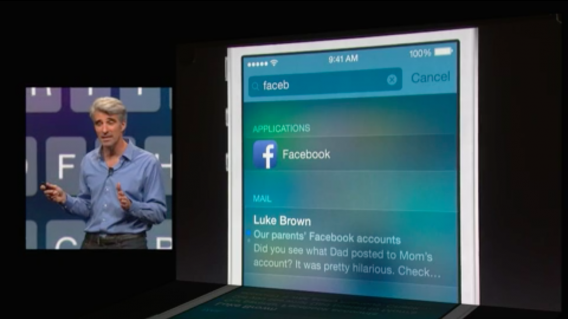
iOS 8 spotlight

Searching in iOS 8 is now more useful than ever. Typing search terms in Spotlight will automatically pull information from the web.

For example, if you’re looking up something like “Golden Gate Bridge,” Spotlight will pull up information from Wikipedia. The information is displayed at the top of the search results. You can tap on the article to bring up the full Wikipedia page.

Spotlight can also look up nearby restaurants, movie times, and suggested websites.

Notification Center
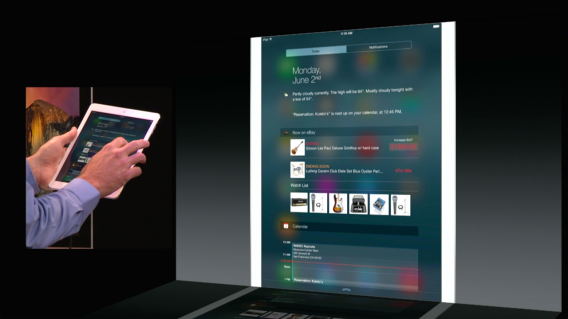
iOS 8 widgets

Notification Center received a massive update, bringing widgets and other new features. You can now reply to messages within Notification Center without opening the app or unlocking your iPhone.

Quick actions also extend to the multitasking menu, which now shows your favorite contacts. Tapping on a contact’s picture will bring up options to text, call, FaceTime, or FaceTime Voice.

iMessage
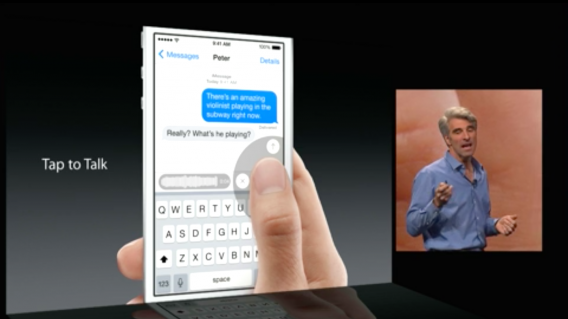
iOS 8 messages tap to talk

iMessage is getting its biggest update ever in iOS 8. The messaging app now supports voice and video messaging to compete with the likes of Snapchat and Facebook Messenger.

Those of you who hate getting group messages will be happy to know you can now mute individuals within a group. You will also be able to remove people from a chat and name a conversation.

Apple also copies Snapchat’s self-destructing messaging feature too. You can now set messages to automatically disappear after a certain time.

Since iMessage isn’t available on non-iOS devices, I can’t see it being more successful than Snapchat. Still, it’s a nice set of features for users who live in Apple’s world.

Mail

iOS 8 Mail

Mail for iOS 8 gains gestures we’ve seen in Mailbox, which was bought by Dropbox. You can swipe left to remove a flag or reply to a message. Swipe left even further and you can delete the message entirely.

This isn’t anything new if you’re already using Mailbox.

Safari

iOS 8 Safari tab view

Safari for iOS 8 remains pretty much the same except for the new tab view, which is also available on OS X Yosemite.

QuickType keyboard

Apple’s iOS keyboard has stayed relatively the same since its introduction. With iOS 8, Apple has added predictive typing suggestions at the top.

The keyboard learns how you type and will adopt your language. The feature is apparently so advanced it knows to suggest formal language when chatting with your boss.

We’ve seen predictive typing in many third-party keyboards for Android, but never this advanced.

Speaking of other keyboards, Apple will finally allow you to use a third-party keyboard by default. Apple showed off Swype, which is a keyboard that lets you type using gestures.

Photos

Photos for Mac teaser

The Photos apps for iOS is getting a minor face lift with gesture-based editing. Swipe left to right to modify your image before it syncs across all your devices using iCloud.

Apple finally lets you sync all of your photos across your devices. Photos are synced with their original file type and in full resolution. This means you’ll be eating through your free 5GB of storage very quickly. Apple offers yearly subscriptions for more storage: 10GB for $20, 20GB for $40, and 50GB for $100.

Continuity

iOS OS X Continuity

One of the slickest features of iOS 8 and OS X Yosemite is Continuity. The feature allows you to continue working on any Apple device if they’re on the same network.

A small icon will show up on the lock screen or in the dock of your Mac, letting you know you can pick up editing a photo or finishing an email on that device. From the iOS 8 lock screen, swipe up and you’ll be taken to your work immediately.

Extensions
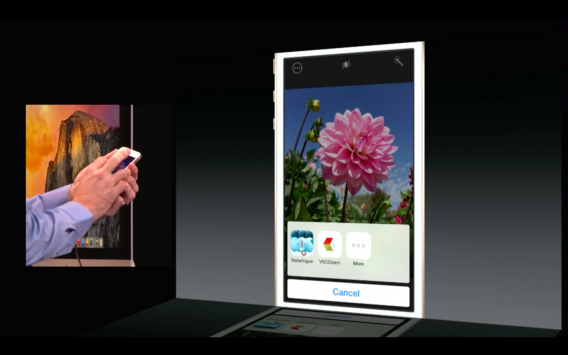
iOS 8 extensions

Perhaps the most powerful tool announced today is extensions for iOS 8. Extensions allow app developers to integrate provide features and services to other apps.

For example, you can use VSCO Cam‘s excellent filters within Photos instead of using the built-in editing tools. Apple also showed off a Bing Translate extension for Safari, which translated an entire webpage from Japanese to English.

iCloud Drive

iCloud Drive

Apple hopes to take on Dropbox and Google Drive with iCloud Drive. The new feature syncs all of your documents across iOS, OS X, and even Windows.

Health

We heard many rumors of Apple’s Healthbook app but we didn’t get that today. Instead, we got Health, an app that will be a centralized hub for all your health apps.

Developers can tap into this database of health information for their apps. Privacy is a big concern so Apple is storing everything privately but giving users the ability to share information securely.

Family Sharing
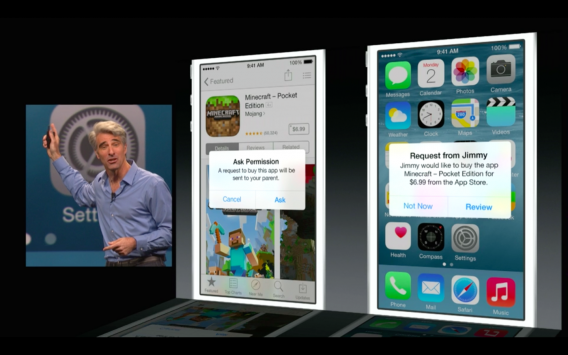
iOS 8 Family Sharing

Parents can now share their apps, photos, videos, and music with their spouse and kids. Calendars, reminders, and device locations can also be shared between family members.

Most importantly, Family Sharing prevents kids from racking up huge bills from in-app purchases. iOS 8 sends a request to a parent every time an in-app purchase is attempted.

Siri

Updates to Siri are pretty minor in iOS 8. You can now activate Siri without touching your phone by saying “Hey, Siri.” This is exactly how Google Now works on Android.

Siri also gets Shazam integration to help you identify songs, TV, and movies.

When will iOS 8 be available?

iOS will be available to everyone sometime this fall. Developers have access to the iOS 8 beta today.

Be sure to check out what’s new with OS X 10.10 Yosemite, which was also announced today.

Widgets and extensions finally come to iOS 8

One of the most requested features from iOS users is widgets. This has always been something Android users held over their friends using iOS.

Widgets will be integrated into the Notification Center in iOS 8. Apple showed off the eBay widget, which lets you quickly bid on products from its notification.

Apple even showed off the Bing Translation widget, which translated a web page from Japanese to English.

Apps are also getting extensions, which adds powerful tools into third-party apps. Apple showed off how VSCO Cam could integrate into another photo editing app.

Extensions will be helpful for those who want to mix and match features from different apps. It doesn’t let you set third-party apps as your default mail, messenger, or calendar app but it’s a start.

Follow Lewis on Twitter @lewisleong

MORE iOS 8 NEWS

Apple working on Photos app for Mac

iPhoto is a great tool for editing and organizing your photo collection but it never played with iCloud that well. Apple knows this and is working on a Photos app for Mac.

The app features simple editing tools for exposure, contrast, cropping, saturation, and much more.

The biggest feature will be the iCloud integration, which lets you continue editing your photos across all your Apple devices and even Windows. All of your photos can be synced across all your devices. Apple previously limited users to syncing 1,000 of their most recent photos to their Photo Stream.

Images are in their original format and in full resolution. This means big photos will take up your free 5GB of iCloud storage for free. You’ll need to upgrade to more space if you want to leverage these new features.

Apple hopes to release Photos for Mac some time next year.

Find out what else is new in Mac OS X 10.10 Yosimete.

Follow Lewis on Twitter @lewisleong

MORE iOS 8 NEWS