5 things every student needs to excel at school

It’s that time of the year again. The nights are drawing in, the air’s a little cooler, and students everywhere are dreading a return to the books.

But it’s not all doom and gloom. For many, the end of the summer holidays is a chance to start afresh. To right some old wrongs, chase those high grades, and really think about what you want to do with your life.

We believe in second chances, so we’ve put together a list of all the things you need to score higher, finish faster, and have a little more fun in the classroom.

Let’s take a look…

1. A high performance laptop (that won’t break the bank)

Your laptop is the centre of your studies – where you research, write, or design. You’re only as good as your tools, so you want the very best machine. Something that has the power, speed, and capacity for all of your upcoming projects, but doesn’t cost a fortune.

HP have been building affordable computers for decades, and their recent models include full HD screens, long battery life, dual or quad-core CPUs, and a ton of RAM and HDD space. They have a “back to school” sale on at the moment, so now is the perfect time to convince your parents for that much needed upgrade. After all, your grades depend on it, right?

2. Adobe Creative Cloud

If you’re a budding designer, photographer, or other visual creative, then the Adobe Creative Cloud will be your second home. It’s a subscription based service to all of Adobe’s famous apps such as Photoshop, Dreamweaver, and InDesign – all considered the gold standard by millions of successful artists all over the world.

Now, you can get your hands on a massively discounted subscription thanks to our friends over at Adobe. For a limited time only, you can download the whole suite – from Illustrator to Premiere Pro – at a 40% discount.

3. Microsoft Office 365

Whether you’re writing an essay or giving a presentation, Microsoft Office has got your back. It’s the world’s most popular productivity suite for good reason, and makes doing any kind of academic work a piece of cake. You’ve probably been using it for years on your school computers, so it’s time you got your own version on that shiny new laptop (see number 1 above).

But that doesn’t mean buying the software and then kicking yourself next year when the new one comes out. Oh no. Now for a low monthly fee, you can get Office 365 – a cloud-based suite of all Microsoft productivity apps. You’re always on the latest version, and with a massive 1TB of cloud storage you’ll have plenty of room for all your assignments.
4. Norton antivirus

 If you’ve got a new computer for school, you’re probably going to store all your essays, projects, and research on it. With all that precious data in one place, you need to ensure it’s protected. The last thing you want is to open a dodgy email and find your computer doesn’t work anymore, and you have to do everything all over again.

We recommend Norton antivirus software to help  protect against malware, viruses, ransomware, ad trackers, and other digital threats. Norton has been in the cybersecurity business for years, and has won more PC Magazine awards than any other security company. So, do yourself a favour and sign up for Norton today!
5. HMA! Pro VPN

You’re probably wondering why I’ve put a virtual private network (VPN) on this list. Well, every student needs a bit of downtime, and if you’re on your school or college’s wifi, your teachers or principal could – potentially – track what you’re up to, such as which sites you visit. Now I’m not suggesting you would be surfing “inappropriate” websites, but a VPN will help you bypass wifi restrictions on non-academic sites like Facebook, Netflix, or Instagram.

HMA! Pro is perfect for keeping your internet activity private, whether that be for surfing on school wifi, researching censored sites, or simply ensuring your home internet provider can’t throttle your internet connection.

Nothing on our list will actually do your work for you, but will certainly help get it done. So to give yourself the best chance of success, gear up with our top five – who knows, maybe you’ll fly straight to the top of the class.



What’s new: Fall update for EA Star Wars: Battlefront II

EA and DICE have finally released the first of Star Wars Battlefront II’s fall content, along with a (mostly) complete roadmap detailing what we can expect from now through the winter season. The updates are a wide mix of cosmetics, new content, updates to game economy, as well as some slight changes to gameplay and modes.

Fall update for EA Star Wars: Battlefront II

New skins

Star Wars Daily Crate

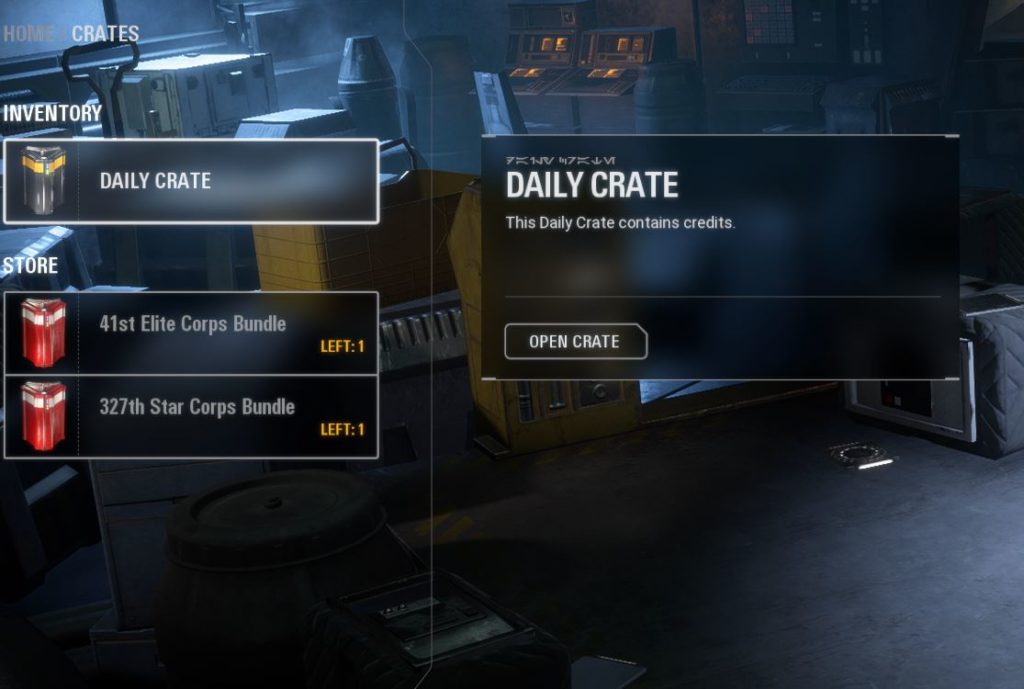
The big news for this week is the addition of new appearances for the Galactic Republic faction. This includes both 327th Star Corps skins and the 41st Elite Corps.

327th Star Corps skin

These skins are for clones only, and will only be applicable to the Heavy, Assault, and Specialist classes (the Officer will remain the same). To equip them, your best bet is to go to your crates and buy them both – it’ll cost a pretty hefty 40,000 credits for each crate, but considering that each skin separately costs 20,000 (500 crystals) you’re essentially buying two and getting the third for free if you get the crates.

41st Elite Corps skin

Buy emotes and victory poses

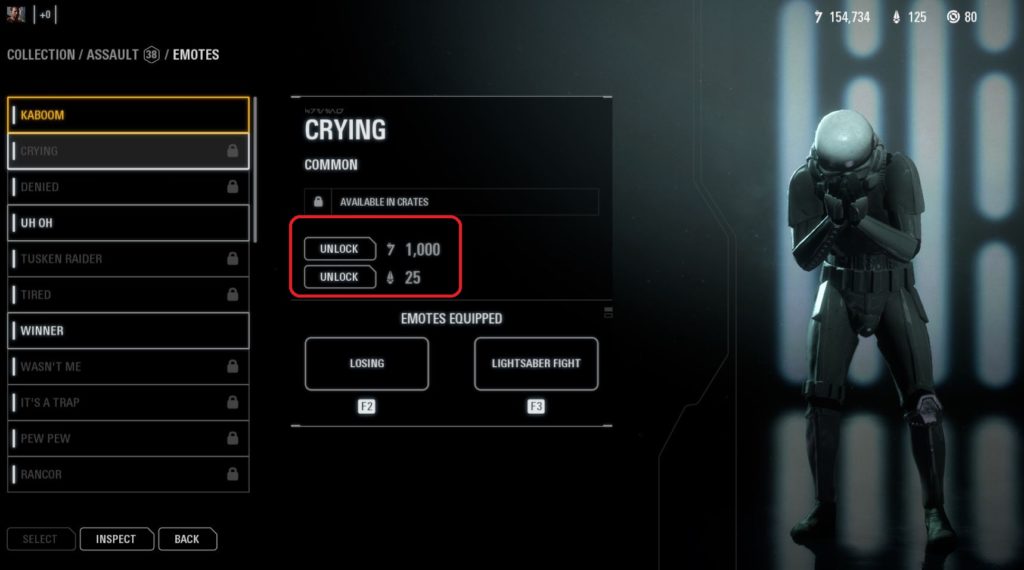
After EA removed all loot crates from Battlefront II, a big question has been how players can unlock new emotes and victory poses for their troopers and heroes. Today that question was answered: You can now purchase them with in-game credits and crystals.

Crying emote

Any emotes for troopers will cost 1,000 credits or 25 crystals, and the same goes for victory poses. Our recommendation is to spend credits, as 1,000 credits is not hard to come by in Battlefront II, particularly if you complete the typically manageable daily challenges.

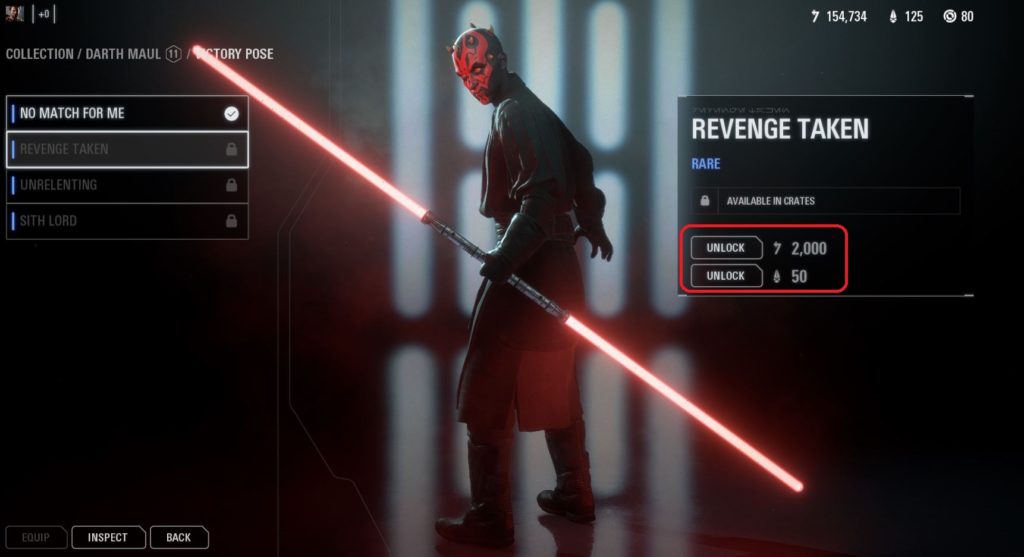
Darth Maul

Victory poses and emotes will cost double for Battlefront II’s array of famous heroes and villains, totaling 2,000 credits or 50 crystals. Is it worth it to hear Vader say he finds your lack of faith disturbing?

… Yes.

New modes

Ewoks

Not a whole lot has been added in the way of new game modes, but you can expect a ton more in the coming months. See below for more detail. However, the fan-favorite Ewok Hunt has been made a permanent addition to the roster of game modes, and can be found under the Operations tab. Unfamiliar with this terrifying mode? Check our run-down here.

Star Wars Battlefront

If you’re a fan of Heroes vs Villains mode you’re likely already familiar with this map. It’s not new to the game, but it’s now making its debut in both Blast and Custom Arcade, so if you frequent either of those, prepare to see this awesome location in the new lineup.

Star Wars battle

Changes to gameplay

Star Wars Battlefront II

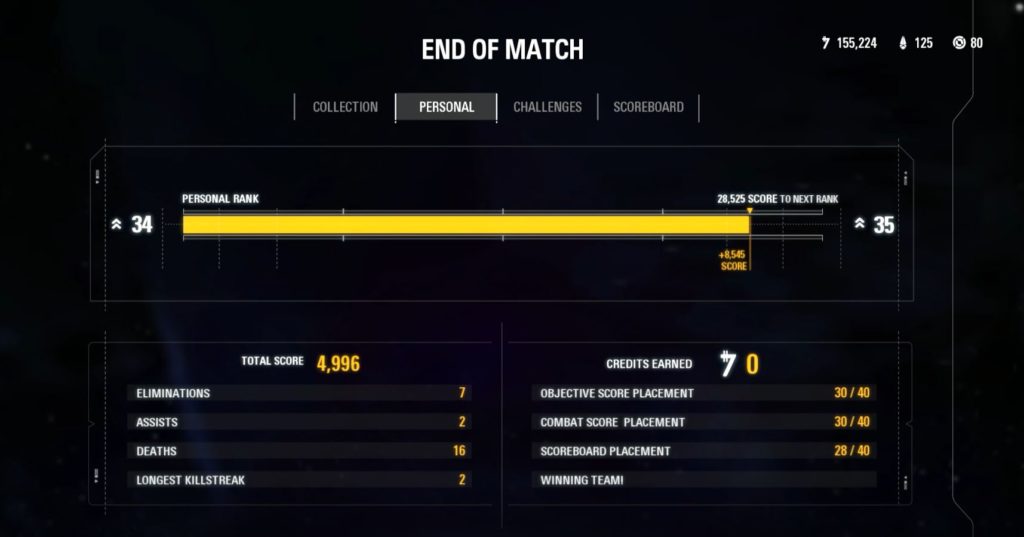
If you’ve been playing Battlefront II’s multiplayer lately, you probably noticed a couple bugs with the game’s scoring mechanic. Most obvious of these was the broken post-match stats screen, which at times would not display at all. You also may have noticed that the 2x multiplier that hovers near your reticle no longer lights up to indicate that you’ve acquired the boost.

Star Wars Battlefront II End of Match

Fear not. The reason it was bugging out was because EA was working on adding some new info to your post-game stats page. Now when you play, it’ll look something like the above picture. As for the 2x, EA has removed that feature to be later reinstated and modified in the up and coming squad system (again, more on that in just a sec).

Battlepoint cost changes

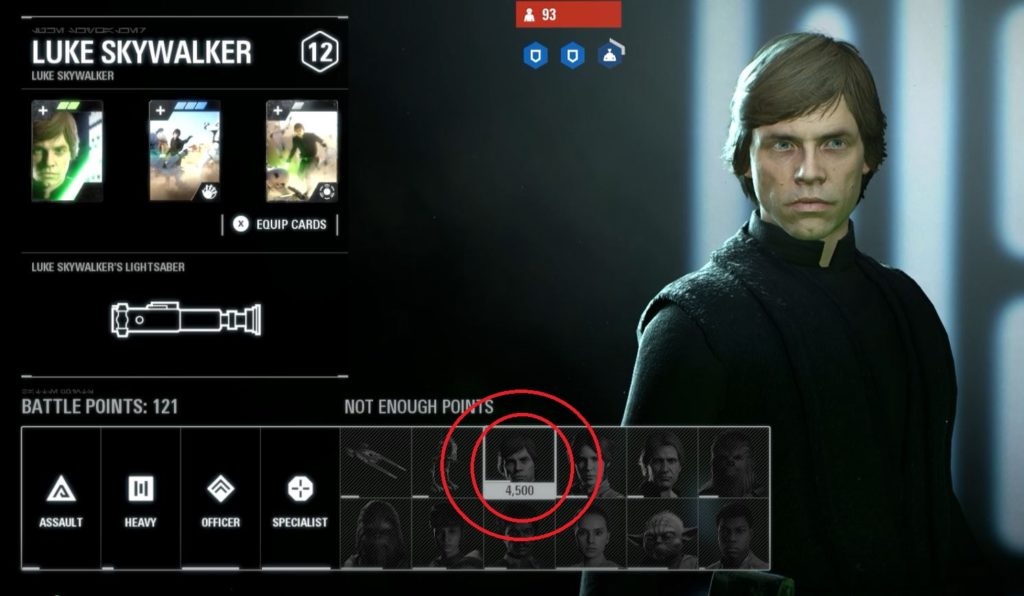
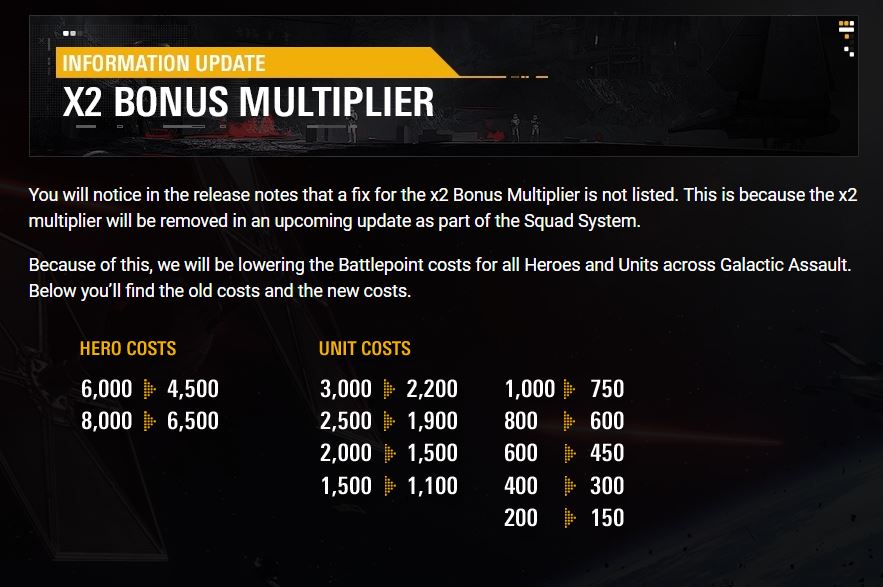
Again because of the squad system, Battlepoints have undergone a pretty big update. The bottom line is that everything’s about to cost a whole lot less. Heroes that used to cost 6,000 will now cost only 4,500 which is a pretty huge change. Enforcers are now 2,200 Battlepoints instead of the previous 3,000, and small vehicles that were once 200 are now only 150.

Battlepoints

While this means you won’t have to work quite so hard to play as your favorite heroes, keep in mind that other players will now have earlier access to them (and powerful vehicles) far earlier. In short, expect things to get way more chaotic way faster, and try to earn your points early!

Bonus Multiplier

What’s coming next

Everything we just covered is the tip of the iceberg; EA released their new roadmap today which highlights a bunch of new additions to the game that we can be expecting in the coming months. Here’s what we know so far:

Squad System

The new Squad System is EA’s way to help give more focus to playing team-based scenarios, the way the game was originally designed to play. “Aimed to encourage team play, the Squad System is an improved and streamlined way for players to stick together in Star Wars Battlefront II,” they explain.

Star Wars Battlefront II

As for specifics, all we know so far is that this means players will now be able to spawn on squad members in modes like Blast, Galactic Assault, and Strike. How the new system will affect point scoring or balancing during capture and hold scenarios, we’ll have to wait for more information.

More heroes are coming

As EA announced this past spring, we will soon be getting four new heroes – General Grievous, Obi-Wan Kenobi, Anakin Skywalker, and Count Dooku – as well as a new Geonosis map, which they claim to be their largest map yet. What we didn’t know until today was exactly WHEN we’d be getting these new heroes, and how many in-game credits they would cost.

Obi-Wan and Anakin

Grievous will be landing in-game first, and should be showing up in October. Obi-Wan will be arriving the following month, and the Geonosis map will be coming along with him. As for precise dates for Anakin and Dooku, we don’t have those just yet, but EA says to expect them this coming winter. Once they’re added you can also expect some new skins for both Obi-Wan and Grievous.

The heroes will cost 35,000 credits each, which should be approachable given the space we have to wait between receiving them. “We came to this price by using our in-game telemetry data to determine the speed in which players are earning credits, as well as the average amount of credits that each player has saved up,” EA explains. “What this tells us is that for newcomers, or players with a credit balance of 0, it shouldn’t take too long to earn the credits needed and for veteran players, you most likely have enough credits already or are very close to reaching that amount.”

Large-Scale mode

Geonosis battle

EA also just teased the eventual arrival of a new game mode that they’ve simply referred to as Large-Scale. Likely taking place on the upcoming Geonosis, this mode will be a massive-scale “non-linear Star Wars sandbox experience” in which two teams will be duking it out over capture points and attempting to bring capital ships down from the sky.

Star Wars Battlefront II

This might end up looking something like the non-linear pushes in the Galactic Assault modes, where teams have to wrest control over specific locations in order to progress forward. It’d be pretty cool if there was some back-and-forth between the two factions, like an AT-TE that the clones could capture, but that the droid army could sabotage. It could make for some very organic, albeit long, matches.

EA have also said they have addressed and are continuing to address multiple issues with the game’s balance to be patched in later updates, and that we can expect more skins as we reach more landmarks – including favorites such as the 501st legion once Anakin arrives.

Until then, we’ll keep you posted on any news, or you can check EA’s Battlefront II site right here.

Fortnite meets GTA with new Getaway game mode

Big changes are coming to Fortnite, and no, it doesn’t have anything to do with the upcoming Battle Royale Season 6. Epic Games made waves at PAX West with the reveal of an entirely new game mode, High Stakes, which looks to be a totally different Fortnite experience… and an experience that’s sure to please fans of games like Payday 2 and Grand Theft Auto 5.

Fortnite: Battle Royale Download Fortnite: Battle Royale ►
10

High Stakes, the new limited-time game mode that appeared at PAX West, centers around a jewel heist. That’s right, heisters, it’s time to mask up.

The mode is similar to squads, with each team comprised of four players. Teams will parachute into the map with the goal of locating one of several safes containing the mysterious and valuable Crystal Llama. Your gang will have to crack the safe and run the Llama back to your getaway van, all while fending off rival heist crews and trying to stay alive. If the footage revealed at PAX West is any indication, it’s going to be an action-packed experience:

Payday 2 DOWNLOAD NOW
7

A new game mode isn’t the only part of the High Stakes event. Every criminal knows a proper heist must be executed with style, and to that end new skins and cosmetic items have been added to the game.

The first new skin is known as The Ace, and is unlockable as part of the new Ace Pack, which replaces the old Wingman Starter Pack. The Ace appears to be a female criminal, wearing a slick red and white suit beneath a black kevlar vest. Topping it all off is a black and white ballistic mask to conceal her true identity. In addition to the skin and a handful of V-Bucks, the pack also contains a new back bling item, the Swag Bag. It is, as the name implies, a duffel bag bursting at the seams with stolen cash. The Ace Pack is purchasable right now for the equivalent of $5.

Fortnite Ace

The second new skin being added to the game is The Wild Card. It’s a sleek new skin and a take on the classic bank heister, and fans of movies like “Heat” or games like GTA V or Payday 2 are sure to recognize the aesthetic.

$28.95
GTA V

From: Amazon

The Wild Card wears an impeccably tailored white three-piece suit with black leather gloves and a black tie. Topping off the look is a ballistic face mask. The mask is customizable, with each mask themed after a different suit of playing cards: Clubs, Spades, Hearts, and Diamonds.

New masks can be unlocked by completing a new set of themed challenges that will be introduced as part of the event. The Wild Card also comes with a new briefcase back bling and a themed glider that contains mountains of gold and cash. Details haven’t been revealed yet as to whether the Wild Card will be unlockable or purchased content.

Fortnite High Stakes

Capping off the event, as mentioned before, is a new set of themed challenges that are part of the new game mode. Challenges encompass goals such as doing damage to players carrying the Llama, stealing the Llama a certain number of times, and other similar activities. Completing these challenges will allow players to unlock High Stakes themed cosmetic items.

High Stakes is slated for launch on September 6, so polish off your masks, get your suit dry cleaned, and load up your assault rifles. It’s heisting time.

7 WhatsApp keyboard shortcuts for PC

Do you use WhatsApp for PC? If so, try these tips for a better experience.

If you use WhatsApp regularly, you may also run it on PC. The popular messaging service WhatsApp Web is a valuable extension, especially for users who work at a computer and can’t easily get to their phones. After you’ve downloaded the program, make note of our tips to use it even better.

8

WhatsApp keyboard shortcuts for PC

Quick access to the emoji button

If you are holding a conversation and want to press the emoji button quickly, all you have to do is press the “TAB + SHIFT” and WhatsApp Web will take you to the emoticons.

Search emojis with quick commands

To do this, type a colon, followed by the keyword. If, for example, you put : happy”, WhatsApp launches all the related emojis that are related.

Chat search engine

If you want to go directly to the chat search bar, just hit Ctrl + F“. This will let you type in the text box to search for the contact you want.

WhatsApp

Change text format

Would you like your words to be bold, italic, or crossed out? Here’s how to do that:

  • Bold (text between asterisks): * Softonic *
  • Italics (text between underscores): _Softonic_
  • Strikethrough (text between tildes): ~Softonic~

Move between chats

Speed up your communication between multiple contacts! Press “Ctrl + Shift +]” to go to the front chat and “Ctrl + Shift + [” to go to the back.

Mute a chat

The mute button is one of the best tools that WhatsApp has. Especially if you have really big groups, you almost have to mute them or you’ll go crazy. Just hit “Ctrl + Shift + M” to quiet things down. You can even set the mute for 8 hours, a week, or a year.

Change read status

Sometimes we open conversations we shouldn’t. Maybe you’re busy and it would be convenient to come back to it later. To mark messages as “unread”, all you have to do is press “Ctrl + Shift + U“.

Instagram will launch its own shopping app

Instagram is preparing a standalone app to encourage you to buy stuff. Here’s what we know.

Instagram is preparing a standalone app to encourage you to buy stuff. According to the sources, this application will be called  IG Shopping.” It’s no surprise this is happening. The social network is huge promotion tool for online stores.

Right now, online stores are working overtime to get their products in posts or stories. Creating an app specializing in this will be a good way to separate the feeds: Instagram will continue to be an app to share our photos or videos. If we want to go further and buy, we can do it in a dedicated app.

Everything indicates that IG Shopping will adopt all the purchase options that Instagram already has, such as buying products directly through posts with a few clicks.

Instagram

Will the Instagram strategy work? Competition from Amazon is fierce, but IG has a big advantage: 80% of Instagram users follow a business or brand, so they assume many of them will be interested in buying products within the app.

Facebook takes its battle with YouTube to the global stage

Facebook has rolled out its Watch tab to audiences all around the world in a bid to take on YouTube

facebook vs youtube

Facebook has rolled out its Watch tab to audiences all around the world in a bid to take on YouTube

Facebook has seen quite a bit of success recently, implementing some of the key features of its competitors’ social networks into its own products. In particular, Instagram Stories has taken Snapchat’s ephemeral messaging concept and served it up to hundreds of millions of users.

Facebook Access Facebook
7

Another competitor that Facebook is creeping up on is YouTube. The Facebook Watch tab launched in the U.S. last year, allows users to access premium video content as well as curated user generated content. This week Facebook has rolled out Facebook Watch globally meaning that its attempt to take on YouTube will now play out all over the world.

As well as rolling out Watch globally, Facebook is expanding the service in several ways. For the original launch only a select number of content publishers were able to monetize their content using ad breaks in their programming. This has now changed with all content creators having the option to run ad breaks if they are able to hit certain targets. According to the BBC, Facebook is asking for videos that will last longer than three minutes and will attract more than 30,000 viewers from creators who have at least 10,000 subscribers. The bad news for publishers is that Facebook will take a massive 45% cut of all advertising revenue generated by the content.

Another way Facebook is expanding the Watch tab is through the acquisition of well-produced drama. This will add to the numerous news and documentary style shows that were announced a while back in Facebook Watch’s first round of TV shows. In Particular, Elizabeth Olson’s new 10-part drama series, called Sorry for Your Loss, will air on Facebook Watch instead of Showtime, where it was originally due to be broadcast.

On top of simply offering a passive viewing experience, Facebook is keen to highlight that Watch will offer more. In the blog post announcing the Watch expansion, Facebook described what it has to offer:

“A place to discover new videos: Find the latest videos spanning entertainment, sports, news and more — all in your personalized Watch feed.

A way to catch up with creators and publishers you love: At the top of your Watch feed you’ll see your Watchlist, a collection of recent videos from Pages you follow. Customize this section by following more Pages or removing Pages from your follow list within Watch.

A home for your saved videos: If you see a video in News Feed but don’t have time to watch it right away, you can save it to watch later in Watch.

Videos you can participate in: We’re building new video experiences that put people at the center, giving them the ability to shape the direction of the content. Over time you’ll be able to find new video experiences in your Watch feed, like Watch Parties, Premieres, and videos focused on audience participation — like the new trivia game show, Confetti. And we’ll make it easier to find live videos so you can discuss the big moments as they’re happening.”

This global expansion into media is big news from Facebook. Watch is now available on PC and Mac, but also iOS, Android, Apple TV, Samsung Smart TVs, Amazon Fire devices, Android TV, Xbox One, and even in virtual reality via Oculus TV. Content is king though, so we’ll just have to wait and see how the content develops on Facebook’s new platform and if it’ll have the power to compete with YouTube’s established content creators.


Twitter is about to look more like Facebook

Twitter co-founder Jack Dorsey tweeted that he is toying with two new features to add to Twitter – presence and threading. Here’s what that could mean.

Twitter has wisely been observing some of the key evolving features of today’s online networking and conversation. Namely, that means following the lead set by social networking titan, Facebook. On August 31, Twitter co-founder Jack Dorsey tweeted that he is toying with two new features to add to Twitter – presence and threading.

Presence And Threading

Presence

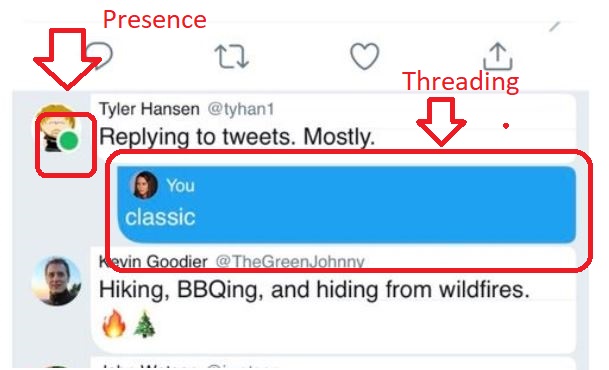
Twitter’s presence feature would see the introduction of the telltale green indicator below someone’s profile picture, signaling whether they are currently online. This feature can be seen on Facebook (both on computer and mobile devices) and Instagram.

Facebook People Are Online

The implication here is to encourage live back-and-forth, something that Twitter is often accused of minimizing or restricting. The hope is to have dialogue “feel more conversational here,” explains Director of Product Management, Sara Haider. It would also help to provoke response to tweets made longer ago; you may find someone responded to your tweet, but did so many hours ago.

MaybeYouWantTheIndicator

Ordinarily, responding might seem awkward given how much time has passed, but if you saw the person was online, it might change your mind. Haider also suggested that this feature would help to distinguish whether a person was simply going logging on to throw a quick tweet or scrolling out of boredom, looking for someone to talk to.

The danger of this feature was shrewdly pointed out the next day – an online indicator could easily open doors to unwanted conversation. While this complaint may simply seem antisocial to some, it could mean entirely different levels of discomfort for victims of verbal abuse and harassment.

The initial response to the presence concept was mixed-to-negative, with many of the mixed crowd saying they would be alright with it if the feature could be toggled on and off by the user. This seems a good idea that would help to further Haider’s hypothetical scenario of being on a train: It would mean that you can have your presence indicator set to “off” by default, but then switch it on if you’re actively looking to converse, or are actively waiting for a response from somebody.

Threading

Threading is the more straightforward, less divisive concept that Dorsey proposed. This would simply afford a more streamlined, readable visual for any conversations held on Twitter. Much like Facebook, it would color, indent, and nest responses, making for a cleaner, neater thread. Twitter  threads might soon end up looking more like this:

TheNewTwitterLook?

While this idea wasn’t met with abundant enthusiasm, it did not receive any of the backlash that the presence concept did. As such, you might expect to see the feature implemented some time soon. We’ve yet to get a date on when either feature will be added, but stay tuned because change is coming!

Uber pushes electric bikes for short trips

Ride-sharing giant Uber is making an unexpected investment into electric bikes and scooters for inner-city trips. Uber CEO Dara Khosrowshahi cited the inefficiency of moving cars through the absolutely hellish urban slog that is rush hour traffic (not his words).

Bike-sharing startup Jump was acquired by Uber back in April, with Jump’s technology being assimilated into the upcoming Uber Bike program. Uber explains the process behind Uber Bike in a post on their website here.

JUMP Bikes Download Free ►
7

Electric bikes are being touted as a cheap, healthy, and environmentally friendly transportation option for urban living. Most bikes include GPS technology, as well as features like “e-assist”, which helps riders bike up steep hills.

Because rented bikes have much lower fares than car rides, people are questioning the short-term financial viability of adding bikes to the Uber lineup. In particular, Uber drivers are questioning why their employer is introducing an option that competes with them, especially after the rising number of complaints among drivers about low wages. Uber is assuring its wary drivers that bikes will satisfy the customer need for short urban trips, while the longer, more lucrative trips are reserved for drivers.

5 best back to school apps

Heading back to school? Make studying smarter with these 5 apps.

It’s back to school season, and that means it’s time to go shopping for school supplies. Typically, this includes folders, planners, notebooks, etc. But we have some apps that can be just as helpful!

5 best back to school apps

5. Duolingo

You’ve probably heard of this app if you’ve ever tried to learn a foreign language outside of school before. This app teaches you the foreign language of your choice. This can be an extremely effective way of studying and practicing the foreign language you are learning at school. The best part is, it’s completely free, so you don’t have to worry about spending money on it as a practice tool.

7

4. Grammarly Keyboard

Grammarly is a keyboard extension app that is essentially a better auto-correct. It’s particularly helpful for writing papers and emailing with your phone. Not only does it offer corrections for your mistakes, but it also explains why it was a mistake and how to fix it in the future. By doing this, it’ll help you with long-term grammar issues you may already be struggling with.

Grammarly Keyboard Free Download ►
8

3. EasyBib

Some schools go out of their way to share EasyBib with their students. But for those that don’t, EasyBib is a simple an easy way to create bibliographies for your papers. It can be a huge hassle to put all the time and effort it takes to creating perfect citations all on your own. While it is important to know how to do it, no matter how well you know it, it’s going to take a long time. EasyBib really cuts this time down by helping you generate these bibliographies without needing to format them yourself.

EasyBib: Automatic Bibliography Generator and Citation Machine Free Download ►
7

2. Google Drive / Docs / Slides

Being able to access your Google Drive from your phone can be an invaluable tool. You will be able to write papers and make edits on the go. You can even use it to email your projects to yourself or your teacher/professor in case you forgot to print them out at home.

Google Drive Free Download ►
7

1. MyHomework

As the name suggests, this app is really useful for keeping you organized, especially when it comes to managing homework and activities outside of the classroom. It is a general student planner that can really help you stay organized in your day to day school life.

myHomework Student Planner Free Download ►
7

Each of these apps is useful in its own way, and all of them can be used together to optimizing your experience at school. They can help keep you organized and on track for a great year. Now hit the books, kids!

How to see your favorite musician live with Spotify

Spotify is one of the leading names in distributing and cataloging music, and you’d be hard-pressed to find a more versatile platform for making playlists of your favorite tunes. Spotify’s also got it when it comes to discovering new sounds and artists. With Premium you can take Spotify with you on the go, putting its massive library of music in your pocket or on the road.

With high quality mixes and remasters readily at your disposal, the only way to get a more lifelike sound would be to see the same artists performing live. Though most users may not know it, Spotify can help you do that, too.

Spotify Free Download
7

Though Spotify is best known for its huge catalog of streamable, downloadable music and podcasts, it has a number of features at your fingertips that you might not even know about, such as these. One such feature shows when and where your favorite artists will be performing live, and Spotify can help you get tickets at the press of a button.

If you are an artist who’s not sure whether Spotify is the best medium for you, this feature alone might be enough to reconsider; you’ll be getting a lot of followers and concert-goers!

See if and where your artist will be performing

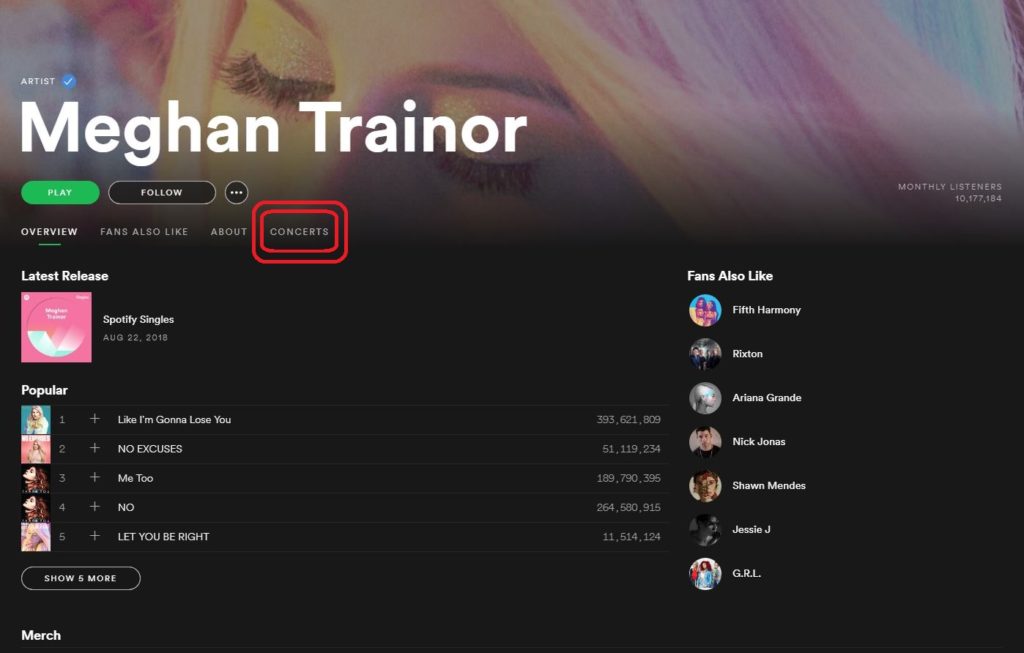
The first method for seeing whether your favorite artists will be performing live is to check out their page on Spotify. This is done simply by typing their name in the search portal on the top left of Spotify (if you’re on computer) or by searching their name under Browse on either computer or on your mobile device. Click on your artist’s name and you’ll instantly be transported to their page.

Spotify

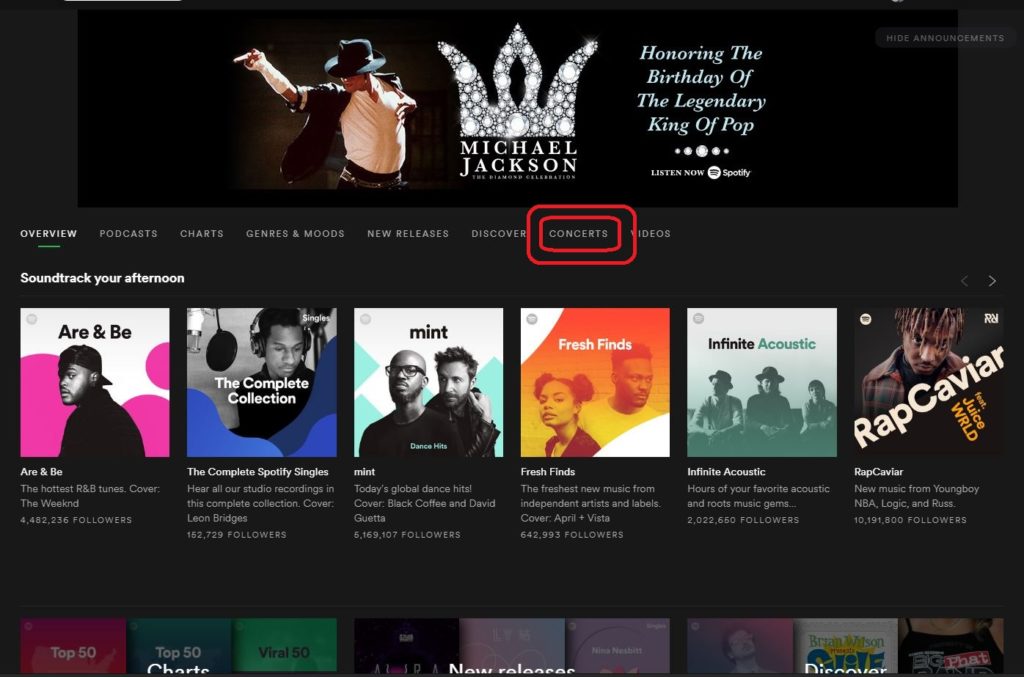
Up top you’ll see four tabs: Overview (where you currently are), Fans Also Like, About, and Concerts. Click on the Concerts tab.

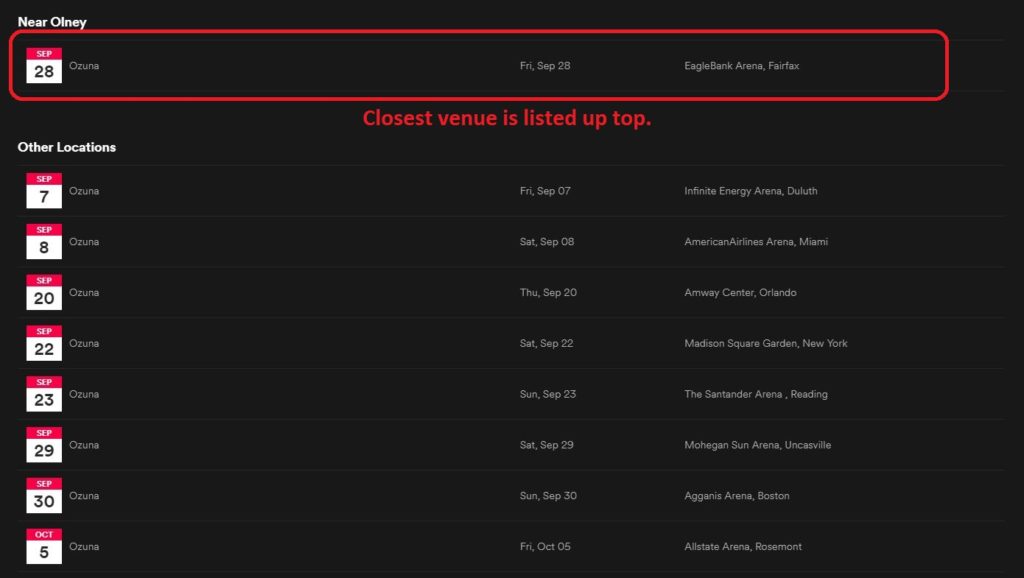
At the top of the list, it’ll show you the date and location of the concert that will take place closest to you. It will list the venue on the right.

Spotify

See all upcoming shows

This second method is our preference: If you navigate from the Browse menu you’ll be able to see a list of all artists who will be performing near you soon. If you’re not looking for a specific artist and just want to go see someone you like in a live show, this is the best way to do it.

Paul Simon

Click on the Browse tab again. Right up top, you’ll see a tab for Concerts. Go ahead and click it.

Spotify

You’ll see a list of artists that are recommended to you based on the music you listen to on Spotify, so if you listen to R&B you’ll be seeing mostly R&B artists. Listen to country, you’ll see mostly country concerts coming up nearby. Like before, you’ll see the artist on the left, the date, then the city and venue where the concert will take place.

Get your ticket

Spotify - Pat Metheny

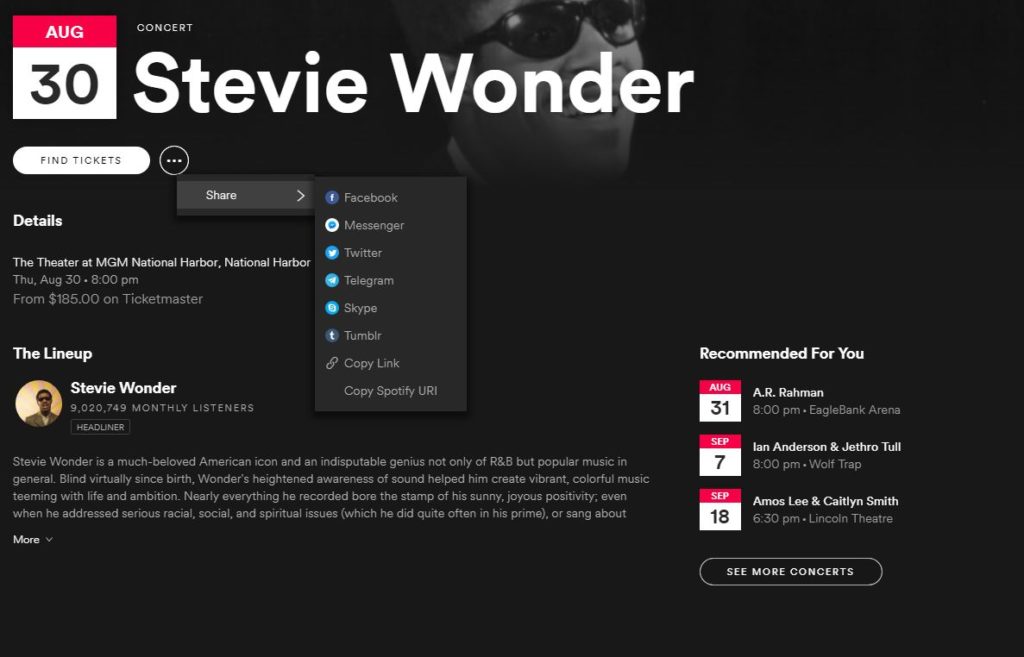
Click on the concert of your choice and Spotify will take you to a concert page for that date and venue. It’ll even list the day of the week, the time, and the ticket cost. To get a ticket, click the Find Tickets bubble right up top.

Spotify - Stevie Wonder

Fun fact: If you click the ellipsis next to that bubble, you get a share option where you can post this concert to social media. Concerts are always better when you bring a friend!

Pat Metheny

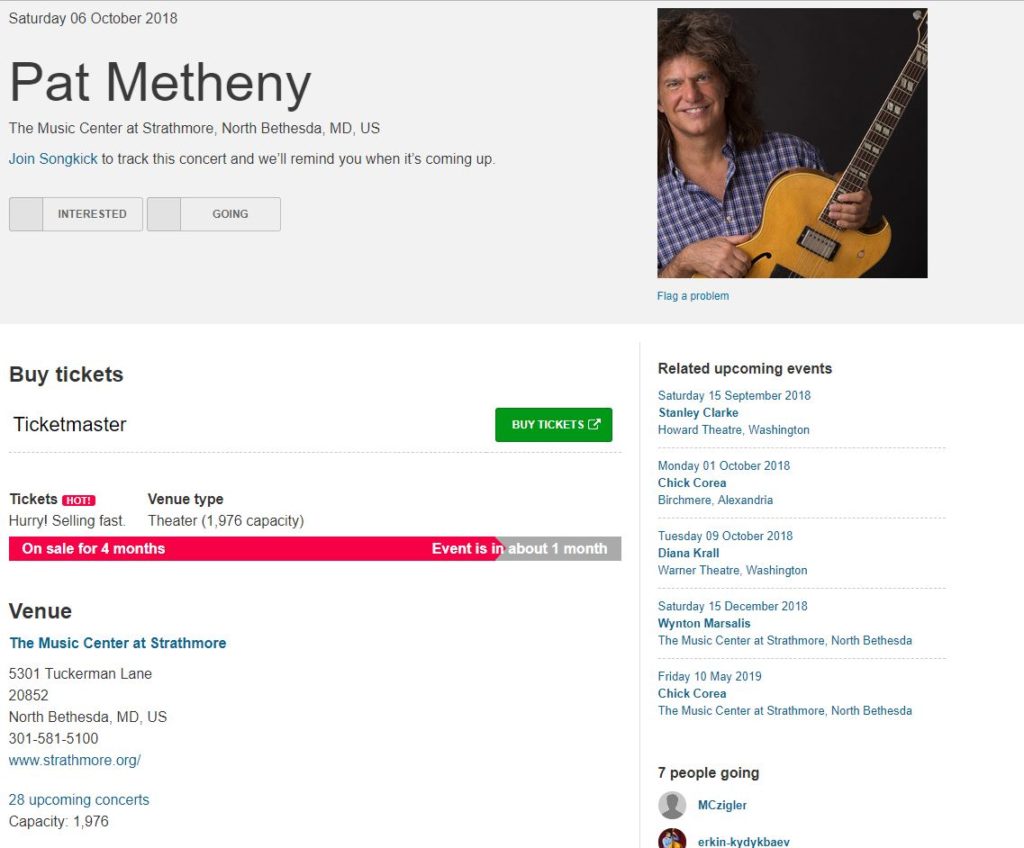
After you’ve clicked Find Tickets, Spotify will open your default browser to a proxy website like Ticketmaster or Songkick where you’ll be able to buy your tickets then and there.

Enjoy your show!