Google Chrome is 10 years old. Here’s how the browser is being tweaked for the big anniversary.
Happy birthday, Chrome!
Google’s popular browser debuted 10 years ago on September 2, 2008. Since then, Chrome has gained a 59% market share, over three times that of its nearest rival. Its popularity can be owed to its many plugins, clean interface, easy-to-use design, and strong Google branding.
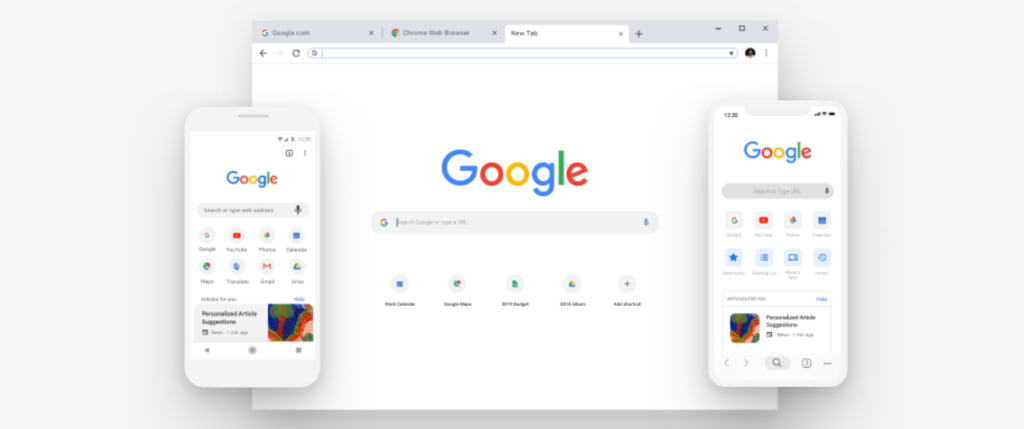
To celebrate their milestone, Google is giving Chrome a facelift. Google Chrome 69 (the latest update) comes complete with a subtle UI overhaul that rounds out edges and softens up the interface. Tabs are now rectangular, allowing them to be more closely grouped together without losing header clarity. The edges of the search bar have been rounded out, losing the edges in exchange for a more minimalistic design more in line with the mobile version.
Also, the tab page is now more customizable, with users able to upload their own custom icons and backgrounds. Google claims these UI changes not only look good but will increase productivity by reducing distractions.
In addition to the digital touch-up, Google has introduced some new quality of life features. A new “smart answer” tool will answer simple questions that you type into the search bar. A revamped password manager can now generate and save secure passwords for trusted websites.
Perhaps most importantly of all, the infamous T-rex minigame has been updated, which shows the 8-bit dino chasing a birthday cake. Happy birthday, Chrome!
Kids everywhere are now heading back to school. While it’s a hard adjustment for any child, French schoolchildren have a brand new rule to worry about. French president Emmanuel Macron fulfilled his campaign promise to ban smartphone use in school among French students under 15 years old.
Students were previously forbidden from using phones during class, but the ban now extends to breaks and meal times. Individual schools are allowed to decide for themselves if they want to maintain the ban for students over 15.
Speaking on smartphones, French Education Minister Jean-Michel Blanquer said: “These days the children don’t play at break time anymore, they are just all in front of their smartphones and from an educational point of view that’s a problem.” Macron, Blanquer, and other officials consider smartphones to be a distraction to today’s children, causing them to be inattentive and anti-social.
Recess has never been more fun.
Critics of the policy have said the ban is overreaching and ineffective. While they realize the potential smartphones have to be highly distracting, a blanket ban will not stop determined students from using their phones. A more mediated approach, such as letting students use their phones in the hallways or during breaks, will prevent a phone-itchy student from breaking it out during a lesson.
The implementation of the law came as a surprise to some, as Macron repeatedly made promises during his campaign that France would become a premier “startup nation.” Some fear that this smartphone ban would put future French innovators at a technological disadvantage compared to their Silicon Valley counterparts. If France wants to be competitive in the startup department of the digital age, they must balance the harmful aspects of smartphones with the responsible use of technology.
PC gamers could have access to an incredible range of titles with Humble Monthly. Here’s why we think it’s worth the money.
For the uninitiated, Humble Bundle is an awesome distributing platform for video games (like GOG or Steam), but that also puts out products like eBooks, software, and various digital content. Making a Humble Bundle account is free, and users get to enjoy new bundles every so often – packs of as many as 10 games included in one semi-adjustable purchase.
Humble Monthly is the site’s paid subscription service, and in addition to providing players with monthly bundles of games and discount prices everywhere else, it also provides access to the Humble Trove.
For more information about Humble Bundle in general, check out our article here.
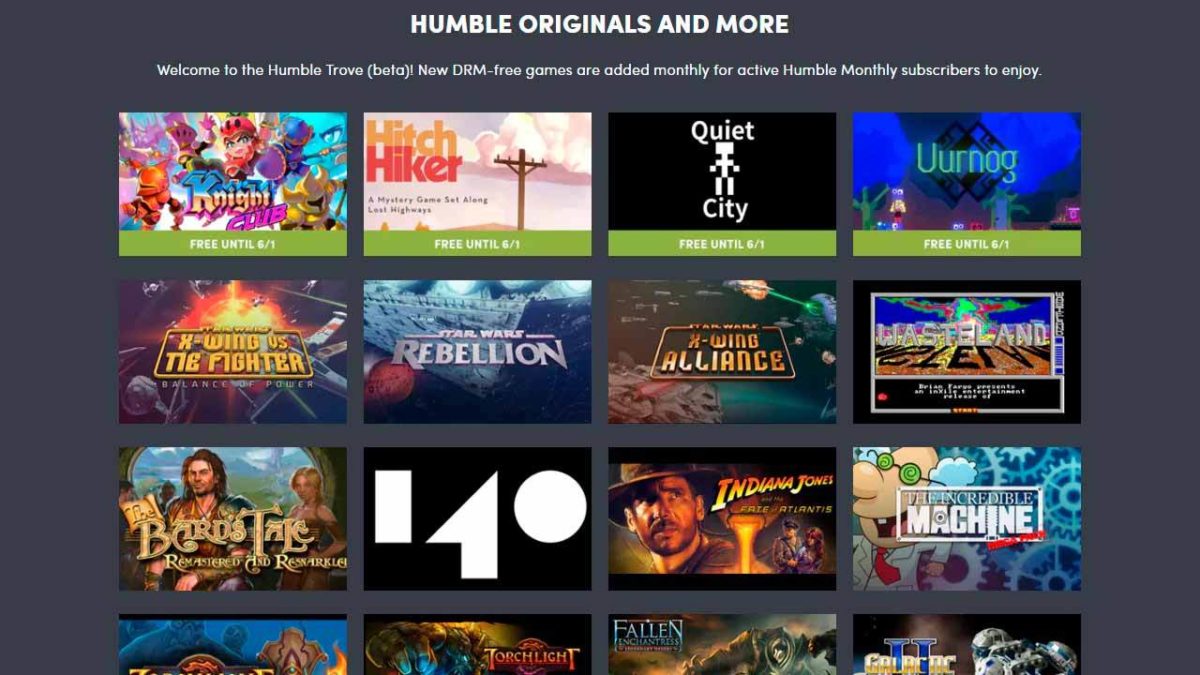
Humble Trove might just be the best reason to get a Humble Monthly subscription – even if you cancel it right after. The Humble Trove is a subscriber-exclusive access area that’s got dozens of games, some of which are still pretty hot-ticket. All the games are DRM-free, and many of them are actually Humble Originals.
There are too many games in the Humble Trove for us to mention them all, but to name a few you can grab Amnesia, Limbo, X-Wing vs Tie Fighter, Bard’s Tale, Torchlight, Torchlight II, 140, The Sexy Brutale, and Indiana Jones and the Fate of Atlantis. And there’s a ton more.
Once you make a Humble Monthly account ($12 for one month, $35 for three months, $67 for six months, or $132 for a full year), you’ll immediately have access to every game in the Humble Trove. It’s as easy as clicking on one you want and pressing the download button. Done.
The game will appear in your downloads folder by default (you can change it to wherever you’d prefer) and all you need to do is extract the files and you’re ready to play. We recommend using WinRAR and putting into its own separate folder somewhere easy to find.
Once you’ve downloaded the game you want, you’ll have it forever, even if you cancel your subscription. If you cancel your Humble Monthly subscription, though, you’ll no longer be able to access the Trove to get new games, so if you do plan on canceling be sure to get all the games you want first. You can find the status of your account on Humble Bundle’s Account Settings page.
For more information about how to manage your Humble Monthly account, check out this FAQ page. In the meantime, get access to the Humble Trove today right here! Enjoy your new games!
As malware evolves to be more malicious by the day, so too must the anti-malware tools we use to fight back and keep our data safe. Software like Bitdefender,Kaspersky, or Norton can keep your computer secure and virus-free. Some, such as Bitdefender or Avast, are available in both free and premium versions, with the latter provided wider coverage, less taxing processing power from your PC and more customization options. If you’re interested in checking out our top five recommended anti-malware tools, check out our article!
Haven’t upgraded to Windows 10? You can get it right here:
Windows Defender is one such anti-malware program, and it comes for free with the installation of Windows 7, 8, or 10. Since it’s free, users are often dubious as to how effective Defender actually is. This skepticism is justified, as reviews of Defender are mixed at best.
Most of the criticism directed towards Defender stems from its inability to detect and stop malware. Many threats seem to simply pass through its net. While this may have been largely true even last year, Microsoft has made significant improvements to Defender over the years to keep up with increasingly potent malware. The result has been a more scrutinizing product that may actually be worth your attention.
Windows Defender continues to evolve, growing stronger with every revamp and update. What was a criticism last year may be a moot point in 2018. Check out this video to see the results:
How does Windows Defender detect and stop threats?
It’s important to understand what Defender does in order to compare it to other products on the market. Windows Defender uses basic signature-matching scanning to compare unknown files with its database of known threats. Essentially, it’s checking the file in question against a catalog of viruses. Defender also uses heuristic analysis, which monitors software behavior to catch malware or malware that rapidly changes its code to dodge detection.
It lacks the bells and whistles of Avast, Bitdefender, or Norton, but it is a semi-effective line of defense nonetheless.
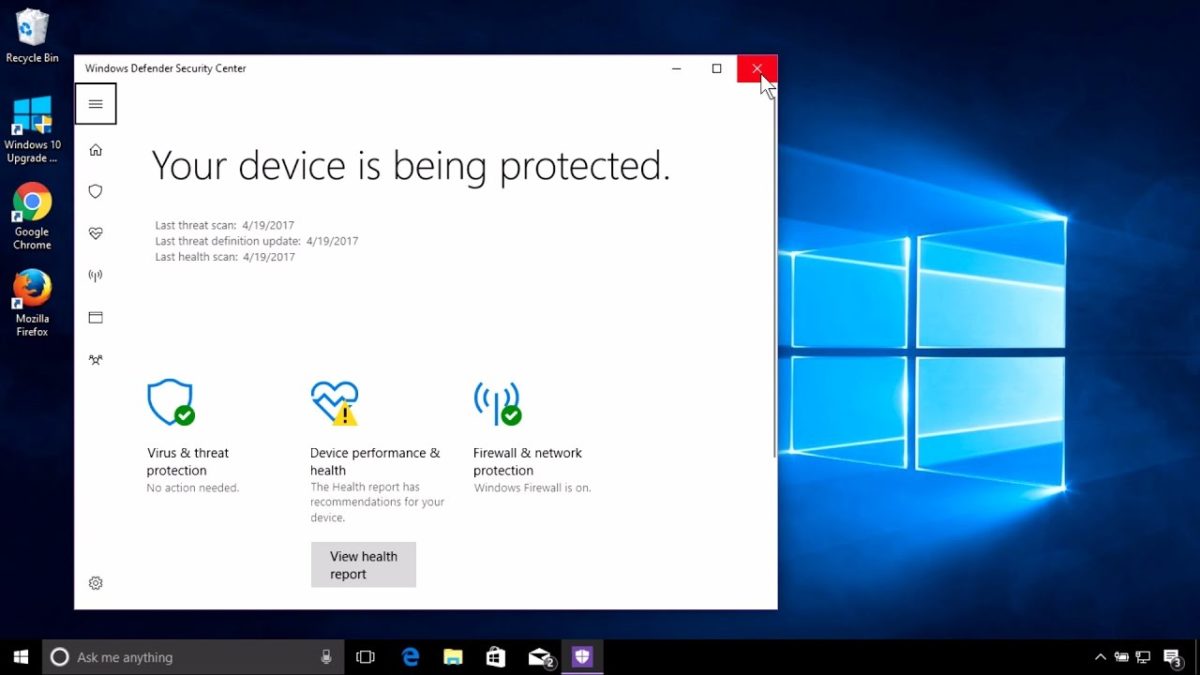
Windows Defender Security Center
“Windows 10 respects your freedom to choose AV products of your choice,” says Rob Lefferts, Partner Director of Windows & Devices Group. In this article, Lefferts accepts that people will frequently opt to forego Defender in order to use other software, and, in fact, encourages users to seek the “protection software and services that they like best.”
As of January 2017, the Windows Defender Security Center was introduced, bringing in new security features and controls. This included firewall and network protection, device performance and health, app and browser control, family options, and of course protection against viruses and threats.
The final consensus
Defender is steadily growing into a more reliable means for data protection, but it’s not there yet. Defender still has a long way to go before it can go toe-to-toe with powerful names like Bitdefender, Norton, or Kaspersky.
That said, considering that Defender is a relatively lightweight program that you get by default with Windows 10, you’re actually getting a pretty decent product. We recommend pairing it with something else for double the safety, such as Bitdefender. Set Windows Defender to run a scheduled quick scan every now and again, then do a full test with Bitdefender when you’ve got the time and processing power to spare.
Did you know you can order food through Facebook? Here’s how it works.
Hungry? Scrolling through your Facebook feed and someone just posted a food vid, so suddenly you’re trying to figure out what you want for dinner tonight? You might not know it, but Facebook can actually help you decide!
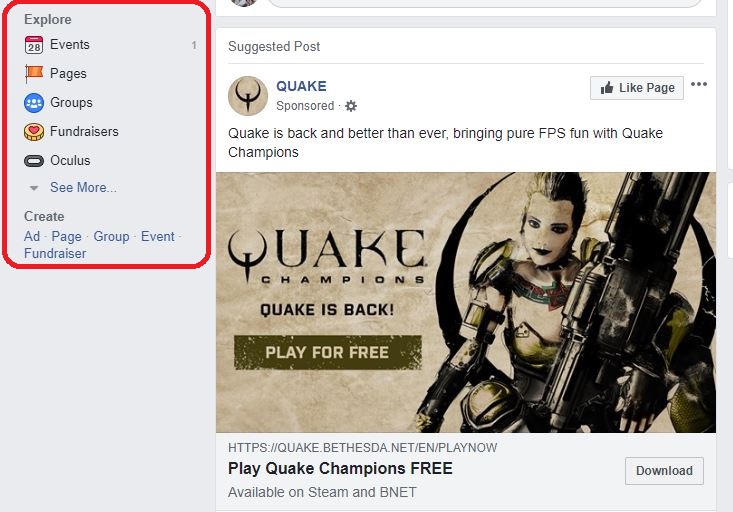
The reason most people don’t know about this little gem is that it’s usually tucked away under a bunch of other toolbar options. On your main feed, look over on the left. You should see a list of shortcuts and below that a cluster of features listed under explore. It’s where you’ll find options like events, groups, or fundraisers and will look something like this:
Click on that See More and suddenly you’ll see a ton more options that most people aren’t even aware of.
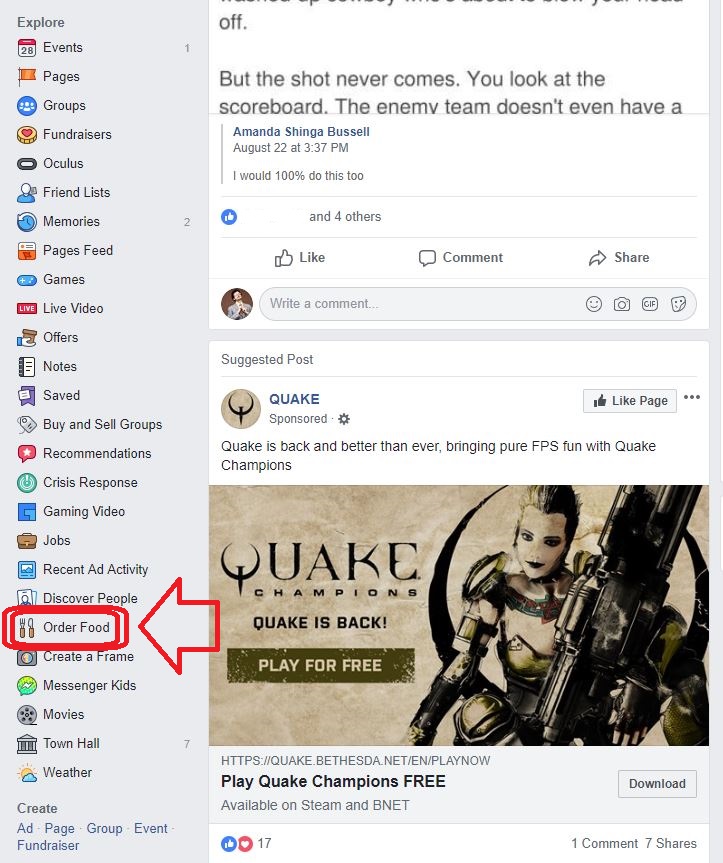
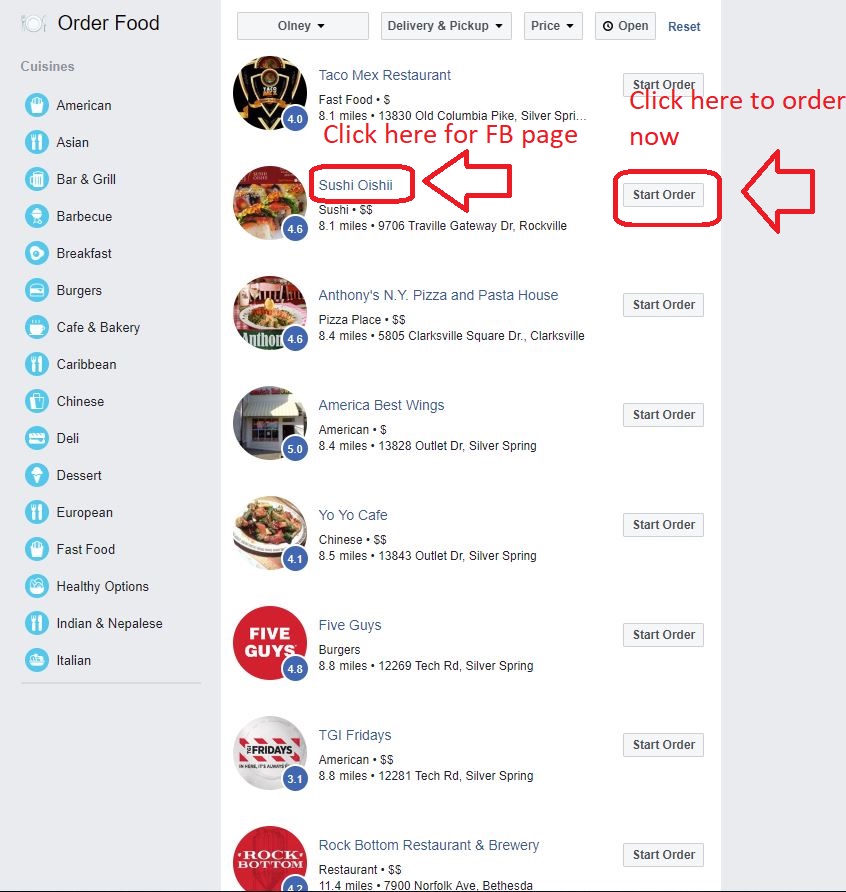
Among these hidden options is a cute little Order Food option. Click it and it will take you to this screen:
The list goes on for a while, so keep on scrolling until you find something that jumps out at you. Alternatively, you can filter specific types of cuisine by clicking the options on the left. Facebook does a pretty thorough job of listing any place that’s available via online order. It even says how far it is from your current location if you’ve told Facebook where you are.
Clicking on the thumbnail or the restaurant link will also take you the restaurant’s Facebook page, which is useful if you want more about them, like phone numbers, reviews, or community info.
If you’re hungry now, go ahead and click on the Order Now instead. This will take you directly through a food ordering proxy like GrubHub or ChowNow. For restaurants connected to multiple online food ordering and delivery services, a window will come up that asks which you’d prefer to use. Pick, and then it’s just a matter of placing your order.
For more great tricks and tips on Facebook’s more hidden features, check out the above video. In the meantime, enjoy your meal!
It’s time to come back to Minecraft. Here’s a breakdown of all the recent changes that make the game more fun than ever.
There was a point in time where Minecraft was completely inescapable. The game’s iconic blocky graphics and freeform gameplay inspired millions of Let’s Plays, t-shirts, and countless blocky creations. Minecraft became the second best selling game of all time, only behind the Tetris. Nowadays, while the game is still very popular, its ubiquity and core demographic has seemingly been replaced by the massive success of Fortnite.
While you may have quit Minecraft long ago, it’s received constant updates throughout the years. These updates have provided new content that put a fresh spin on the core game without overwhelming new or returning players. Below is our guide for returning players and all of the new content to explore:
There are two main versions of the game: Bedrock Edition and Java Edition
While this may sound confusing, it isn’t. If you’re playing on PC and you’re repurchasing the game, we highly recommend buying the Java version, as it comes with the Bedrock version for free.
Anyway, the differences between the two versions are as follows. The Java version is the original version of Minecraft built for PC which has been continually updated. Most mods have been built for this version, so if you’re a PC player who loves modding the game, go for Java.
The Bedrock edition is the version of the game built for Windows 10, mobile devices, and all current gen consoles (minus the PS4). Crossplay is possible across the Bedrock edition, which means Windows 10, mobile, Xbox One, and Nintendo Switch players can all adventure together.
While the Bedrock and Java editions follow different update paths, the gameplay differences between the two versions are minuscule. If you value crossplay, play the Bedrock edition. If modding is the most important part of the game for you, play the Java edition.
Big content updates are here
The most recent big content update is the Update Aquatic, which released this summer for both the Java and Bedrock editions. The Update Aquatic adds new ocean biomes, populated with plenty of sea life and sunken treasures. You can befriend dolphins and sea turtles, plunder shipwrecks, and fight aquatic zombies. The update is colorful and jam-packed with content, adding a whole new dimension to the already expansive game.
The Java edition also received the Combat Update. Released in 2016, the update heavily revamped the barebones combat featured in previous versions. Players can now dual-wield, equipping weapons, shields, or tools in their left hand (dominant hand can now be toggled for you left-handed folks).
The combat system has gained new attacks, such as a sweeping sword attack, as well as more depth, including an attribute and strength system. In this update, changes have also been made to the End. The Elder Dragon boss fight can now be restarted, and the End is now populated with outer islands with structures and ships to explore.
More things are coming
For those who want some more visual flair into their game, the Bedrock edition is getting an update called the Super Duper Graphics Pack. Though the pack has been delayed multiple times, Mojang has assured fans that the pack will come. The update will be optional, free, and playable on any device that can play the Bedrock version of the game. The enhancements of the pack can be viewed in the video below:
The U.S. and Russia don’t seem to be too concerned with killer robots.
Last week, the two superpowers, among other countries, blocked the United Nations from proceeding with talks regarding the dangers of advanced robotic warfare. This talk, which took place at the UN’s Convention on Conventional Weapons, prevents the topic of killer robots from reaching a formal level that would allow a ban, treaty, or regulation.
According to the succinctly named “Campaign to Stop Killer Robots,” 26 countries agree on a full ban of robotic warfare. The main countries besides the U.S. and Russia who are avoiding the discussion are Israel, Austrailia, and South Korea. For years, the controversial use of military drone strikes has only risen. Arms manufacturers are also currently developing military robotic technology that is not only cheaper than traditional technology but more effective.
Apparently, our elected officials have not watched enough sci-fi movies to know that this sort of technological arrogance will lead to a robotic nuclear apocalypse. At this point, we probably deserve it.
The way Google Chrome interacts with your router could be putting your home Wi-Fi network at risk
The way Google Chrome interacts with your router could be putting your home Wi-Fi network at risk
Anybody who has ever asked somebody for a Wi-Fi password will know just how long and crazy they can be. In the interest of securing the network, Wi-Fi passwords are often long and contain both capital and lower-case letters, numbers, and symbols.
Using strong passwords is highly recommended, but researchers at cybersecurity consultants SureCloud have found that even networks protected by the strongest passwords could be vulnerable to attack thanks to a weakness in the way Google Chrome and Opera browsers communicate with routers.
The vulnerability, called Wi-Jacking, stems from browsers based on Google’s Chromium open source project, which include Chrome and Opera. Chromium browsers save Wi-Fi router admin credentials and then re-enter them automatically to save time and effort. This credential saving, combined with the fact that most home Wi-Fi networks don’t use encrypted communications for management tasks, enabled the researchers to steal the router login credentials and then capture the Wi-Fi network password.
SureCloud listed five factors that are required before the vulnerability can be exploited. They are:
“There MUST be an active client device on the target network.
Client device MUST have previously connected to any other open network and allowed automatic reconnection.
Client device SHOULD* be using a Chromium-based browser such as Chrome or Opera.
Client device SHOULD** have the router admin interface credentials remembered by the browser.
Target network’s router admin interface MUST be configured over unencrypted HTTP”.
Although there are five prerequisites, they are pretty common. Most of us use Chrome, most of us will have connected to an open network and hit connect automatically, and most browsers prompt us to save credentials automatically. SureCloud points out that even with two other pre-requisites necessary there are still a lot of people who are vulnerable to this type of attack.
This could be the beginning of the end for WPA2 Wi-Fi
Fortunately, SureCloud reported this vulnerability to the Chromium project and Google has already responded. According to SureCloud, the latest Chrome update has changed the security protocol, which means a successful attack would need much more specific action to be taken by the individual user.
Chrome is still vulnerable, but a successful attack would be much more like a phishing attack with a fake site or being needed to prompt users to act in the way required to steal the Wi-Fi credentials. For more information on avoiding phishing attacks check out our infographic on detecting fake emails and avoiding phishing scams:
This is much more in-line with the vulnerability as it was first detected on other browsers like Edge and Safari. Unfortunately, however, at the time of publication Opera browser is still vulnerable to this type of attack. SureCloud offered the following ways to protect yourself against this particular type of attack:
“Only login to your router using a separate browser or incognito session
Clear your browser’s saved passwords and don’t save credentials for unsecure HTTP pages
Delete saved open networks and don’t allow automatic reconnection
As it is nearby impossible to tell if this attack has already happened against your network, change your pre-shared keys and router admin credentials ASAP. Again, use a separate/private browser for the configuration and choose a strong key.”
Reports suggest Google Maps will soon have a new Commute tab.
Reports are saying Google Maps will soon have a new Commute tab
Google Maps is one of the search giant’s stalwart apps that offers a clear indication of just how good Google can be. Using the Maps app on our phones is almost second nature these days, and we take for granted just how easy it makes everything. When we’re that little blue dot in the middle of the map, the world revolves around us. This is nothing short of miraculous compared to using a static map.
Miracles and revolutions, however, will never be the end of the story. Evolution must follow revolution and so Google is tasked with constantly improving upon something that changed our lives forever. Small changes to a big product.
The latest update that has been spotted in Google Maps can be found at the bottom of the app. According to a report by Android Police, the team at Google Maps have been testing various new tabs to go along with the common Explore, Driving and Transit tabs at the bottom of Google Maps when it is first opened.
Google wants Maps to get you where you’re going quicker
Some users in the U.S. have spotted a For You tab, but the most commonly spotted new tab is the Commute tab. If these early reports are correct, the Commute tab will replace the Driving and Transit tab, meaning when Google Maps is first opened users will find two options on the new bottom tab, Explore and Commute.
Opening up the new Commute tab offers users the options to commute to home or commute to work. Selecting either will open the map and present commuting option cards at the bottom of the page. There will also be a menu for going through the various commuting options including sharing the directions you’ll be taking or your location, toggling the various map layers, and managing your route options.
We constantly see minor updates to big Google products that aim to shave off precious seconds from our interactions with them. The recent big Google Chrome update saves us time and the Google Maps Commute tab also fits into this philosophy perfectly. Commute may seem to an updated way of showing us the same information Maps has always shown us, but the new design focuses more on getting us the information we need about where we are going quicker, and with fewer steps.
After ten years as the most popular web browser, Google Chrome is getting a significant update
On Saturday, Google set tongues wagging when it reminded us that its all-conquering web browser, Google Chrome was turning 10 years old. All we got was a tweet of a pixelized birthday cake, but the big news was the promise of a surprise that would come on Tuesday, September 4, Chrome’s official birthday.
Since Google first released Chrome, and it started dominating how we use the internet, it has only ever been the recipient of small, under the hood, updates so the tease of a Chrome-related surprise caught everybody’s attention. Now that we’ve had a couple of days to digest the big Chrome update we thought it’d be a good time to go through what has changed.
Chrome is a young, fast browser that can browse any web page. It supports all major technologies and standards such as HTML5 and Flash.
The big Google Chrome update
An Easter egg inside an Easter egg
First things first, before we get into the nuts and bolts of the Chrome ten-year anniversary update, let’s look at a cool little Easter egg Google has hidden away in the update code. We’ve all played the little runaway dinosaur game that pops up whenever Chrome can’t connect to the internet.
The No internet page sports a little T-rex and if you hit any key or the mouse, the dino will run off and you have time his jumps to get him over cacti and, later, other flying beasties. To celebrate Chrome’s tenth birthday, Google has added a little something to the game. If your internet is too reliable to access this little secret, you can just put chrome://dino/ into the address bar on Chrome and hit enter.
The Chrome dino wants to celebrate Chrome’s birthday too
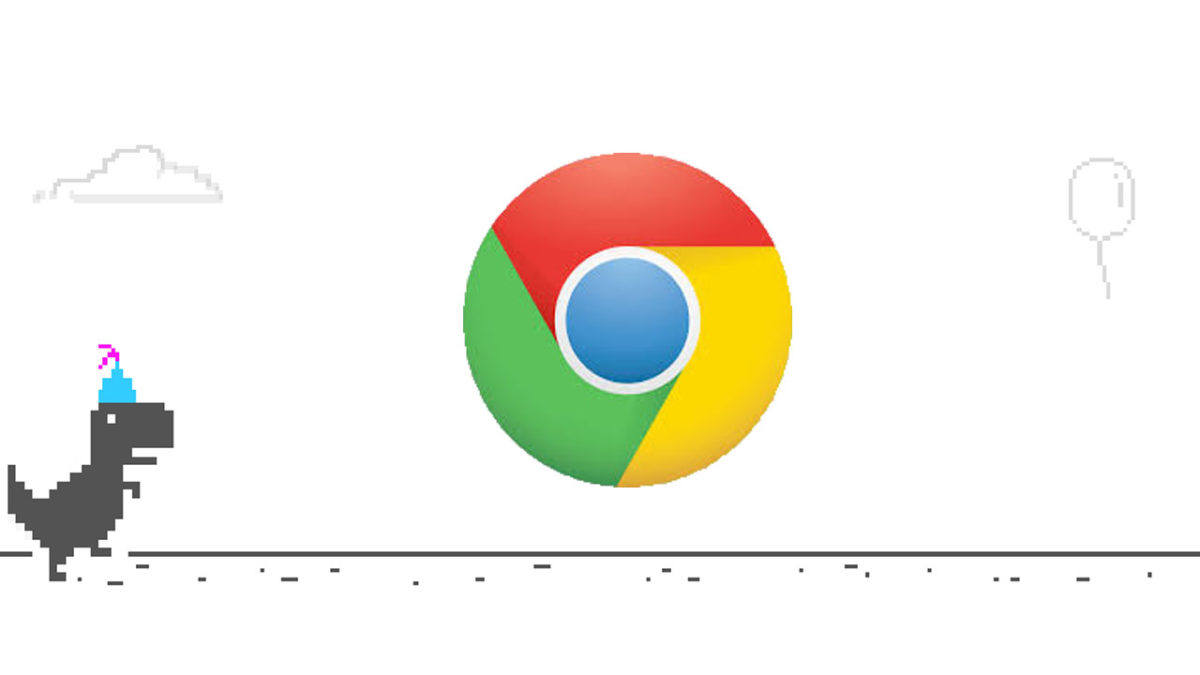
The tenth anniversary Easter egg hidden in the original Chrome Easter egg is the addition of all you need for a good birthday party. Yes, our little dino friend wants to get in on the celebration too and Google has given him a birthday cake to eat, a party hat to wear, and even party balloons to help get him into the party spirit.
Ten years ago, Google Chrome introduced two huge innovations that changed the way we use the internet. The first was Chrome’s omnibox, which turned the simple address bar into a much more intuitive tool. The omnibox allows users to enter search terms as well as web addresses.
The other big innovation was the introduction of tabs. Thanks to Google Chrome, all other web browsers now allow users to open multiple tabs in the same web browsing window. Tabs allow us to use the internet for many different reasons all at the same time. Both revolutionary features have received a significant update on their tenth birthday.
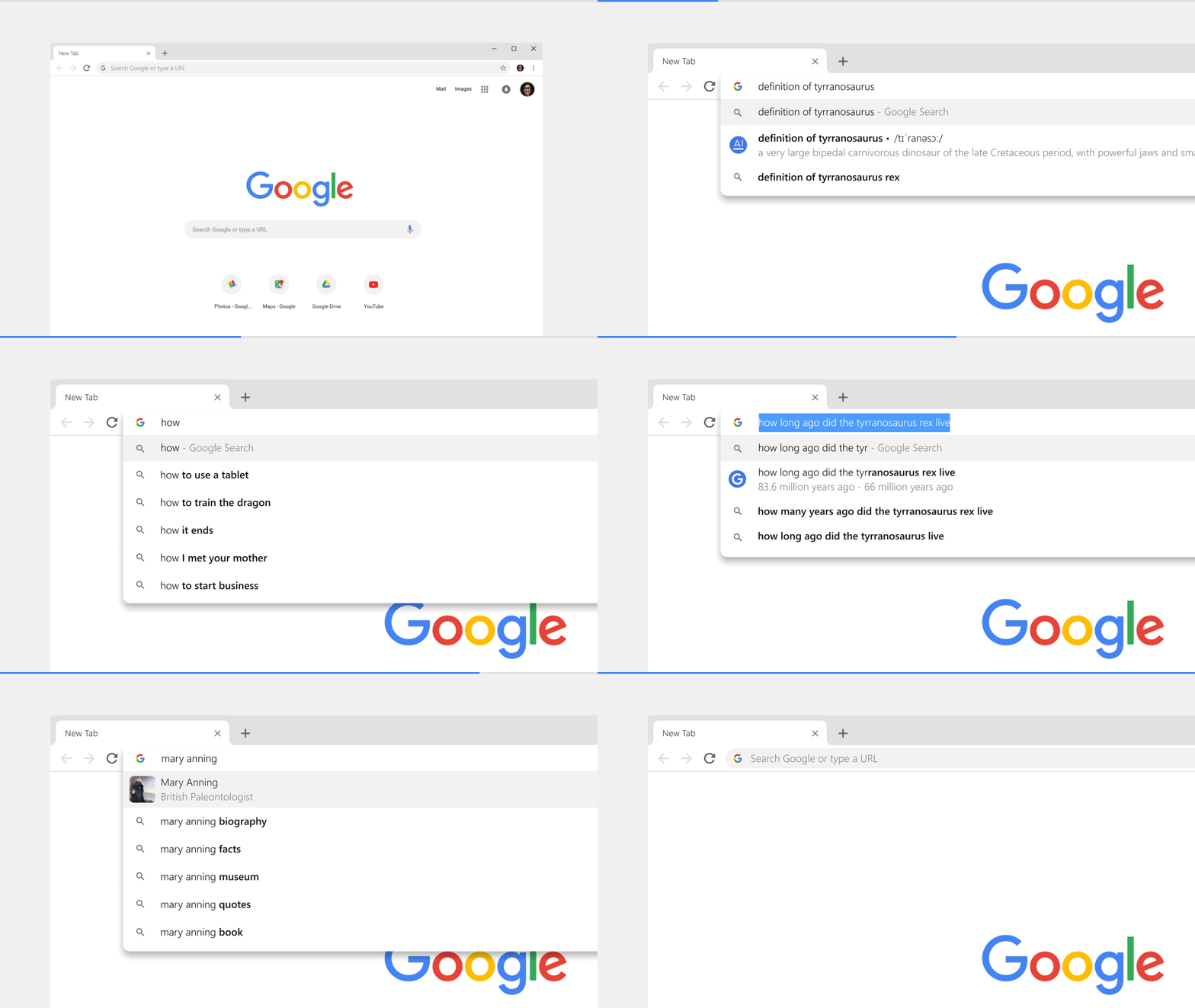
The omnibox, once Chrome has been updated to the latest version, will include short form answers to search queries. This means that you’ll see basic information relating to your search query (like the weather for example) before you hit enter. Other information that will be subject to these short form answers will include celebrities, word definitions, and sporting events.
Chrome’s tabs are getting a redesign in-line with Google’s wider Material Design policy. This means that once you’ve updated your version of Chrome they’ll look much more rounded and sleeker than they do now. You’ll also be able to use the omnibox to help you find a particular tab that you have open.
Improved Chrome password manager
In a move that will worry password manager apps like Lastpass and Dashlane, Google is improving Chrome’s password manager. The update will offer users a strong password whenever they sign up to a new site. The password will then be saved and will be available for use on Chrome for both mobile and desktop. Once you’ve updated to the latest version of Google Chrome, you’ll also have access to an improved form filling feature, which will more accurately fill in things like passwords, addresses, and credit card details.
Google has big plans for the next years of Google Chrome
Chrome has always been one of the smartest browsers and Google has been working hard to squeeze more and more AI into the Chrome experience. A huge focus of Chrome’s 10-year celebrations is how AI will affect your Chrome experience going into the future.
Until now, Google’s AI has been trying to help users stay ahead of the bad guys. The focus has been on preventing us from ending up on phishing or malware infected sites. Obviously, Google wants this to continue, but the search giant also wants its browser to be a step ahead too, offering more and more useful information before it has been asked for.
Chrome is a young, fast browser that can browse any web page. It supports all major technologies and standards such as HTML5 and Flash.
Google has web experiences like planning a vacation or searching for a song in its sites and hopes Chrome will be able to offer a much simpler experience for users looking to take care of multiple tasks all centering around a single search term. Flights, hotels, sightseeing, and more could all be much easier to take care of, as could finding out who sings a song and when they’ll next be performing near you, if Chrome keeps improving in-line with Google’s vision.
The new Chrome update will be available on desktop for both PC and Mac and on mobile for Android and iOS.