Ready to fight in the skies? Follow our guide to airplane combat.
With the introduction of Season 7, many changes have come to the world of Fortnite. From the icy new map areas to new weapons like the Heavy Assault Rifle, Fortnite players have a ton of new content to add to their Battle Royale experience. Perhaps the biggest change, though, is the addition of planes. That’s right, fully-armed biplanes have been added to the world of Fortnite, and combat is about to take to the skies. Here’s everything you need to know about these new vehicles so you can become the next fighter ace.
Fortnite: The Complete Guide to Plane Combat
The Basics
The first and most important step to getting airborne is actually finding yourself one of these planes. They’ve been scattered all over the Battle Royale map, but the most obvious place to locate a plane is on the airfield at Frosty Flights. It’s a risky strategy, though: most players will also converge on this area looking for a plane, so if you head that way, be prepared for a bloodbath.
Alternately, you can usually look for planes by finding one of these red buildings:
An airfield and the red control building.
These buildings are usually located on top of hills adjacent to small airfields that usually house a couple of planes each. Though they aren’t marked on the map, that also means they’re less likely to attract enemy players, meaning you won’t have to frantically race to get airborne.
Once you’ve chosen a plane, a control layout should appear on the side of your HUD. The thing about planes is that once you start moving, you can only move forward, and you can’t stop. You’ll want to make sure you’ve got a clear path to take off before you start the engines, or you might find that your flight will end a bit prematurely.
Air vs. Air
Once you’re in the skies, you’ll find yourself up against two kinds of targets: aerial targets and ground-based targets. Of these two, aerial targets tend to pose a bit more of a threat. Players in other planes are usually easy to spot from a distance, which means you become a large, loud target the second you get in the air.
If you find yourself getting shot at, there’s really only one weapon you have to defend yourself: the plane’s main guns. These only fire forward, so you’ll have to have a direct line of sight to your target if you want to damage them. There is a way around this, however: if you’re playing a team mode, like Squads or Duos, your allies can ride on the plane’s wings and use their guns to fire in all directions. It can give you a definite advantage over your opponents.
A plane mid-flight.
When fighting another plane, the best strategy is to attack from behind. This allows you to fire on your opponents without them being able to counterattack. The key is maneuvering your plane to stay to your opponents rear, which is no easy feat. You’ll need to master the way your plane moves to keep the upper hand. In a pinch, you can also attack opponents head to head but this usually ends up with you taking just as much damage as your opponent.
Air vs. Ground
While in the air, you’ll also find yourself taking on ground-based opponents. It might be tempting to think of yourself as having the upper hand in a plane, but players on the ground can be extremely dangerous and do a lot of damage to your plane in a short amount of time. They’re more maneuverable and can hide easily, making it hard for you to target them.
That said, your plane’s guns can do a lot of damage to ground-based players. Line up for a strafing run or target groups of players, then unload with your machine guns and wreak havoc. The only problem is, if you don’t kill them in a single run, they’ll have time to hide and regroup.
There is another very powerful weapon in your arsenal that can counter hiding players, however: your plane itself. Use your plane’s boost and you’ll be able to ram through certain buildings, and skilled players can even fly low enough to run over players on the ground. As a last ditch effort, you can point your plane at a building that players are hiding in, boost, and then bail out kamikaze-style to wreak widespread destruction.
The aftermath of a successful kamikaze run.
For players who know how to use them, planes can give you a distinct advantage on the battlefield. Using the tips in this guide, you’ll be able to master the art of flight in no time.
From page clicks to Facebook likes, every little action creates a picture of you – a digital footprint. These are extremely valuable to the data industry (worth almost $50bn), and can be used to spy on you or censor your web experience.
Thankfully, new privacy app FigLeaf can help you regain control of your privacy. FigLeaf reveals how much of your digital footprint is exposed and what you can do about it. Choose when to share your information with people you trust and when to mask your information before sharing it with people you don’t.
FigLeaf is in beta currently and we recommend you test it for yourself. It’s free for you to use and they are looking forward to your feedback to make it better.
FigLeaf: A new way to protect your data
Protecting your online privacy can be a pain. Usually it means installing lots of different tools like browser extensions, VPNs, and privacy browsers such as Brave or TOR.
FigLeaf puts your privacy first. Be the first to try it.
But with FigLeaf, everything is done for you. FigLeaf is your personal online bodyguard that keeps nosey ISPs, governments, and advertisers from snooping on your data.
You can try the beta app for FREE now – simply download it from the FigLeaf website.
Why FigLeaf?
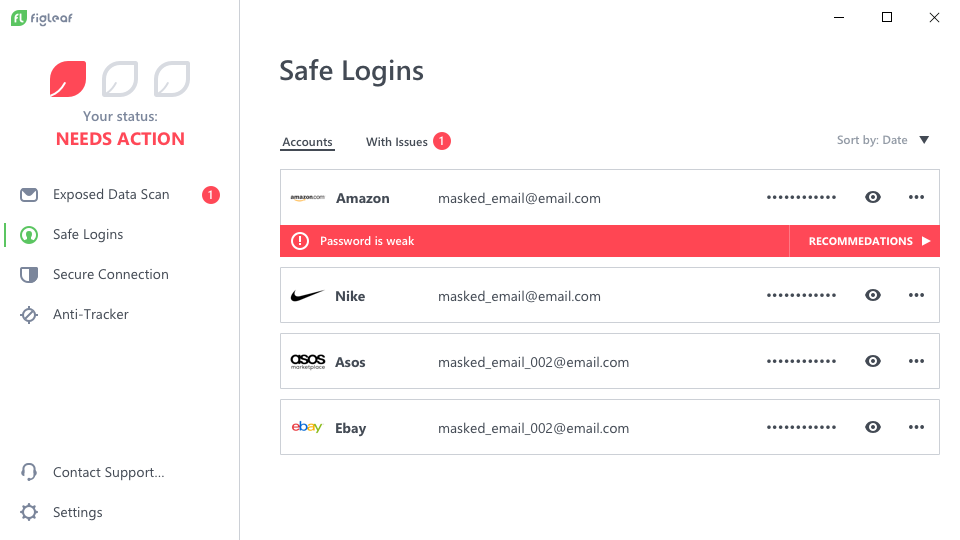
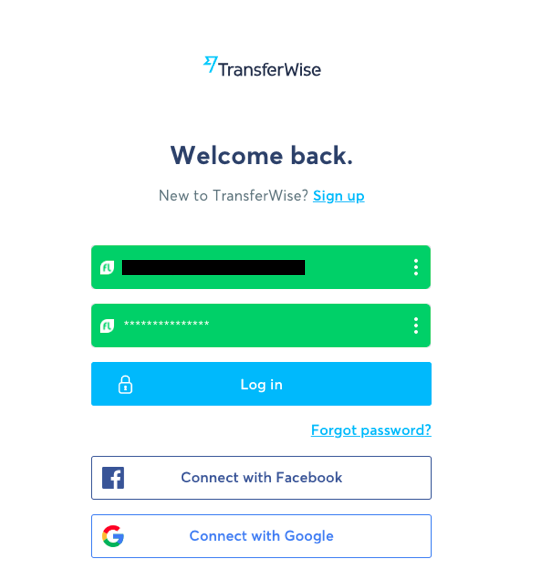
1- It gives you a masked email address for signing into websites. This avoids spam and protects you should the website get hacked. (I’ve blacked out my email in the example below.)
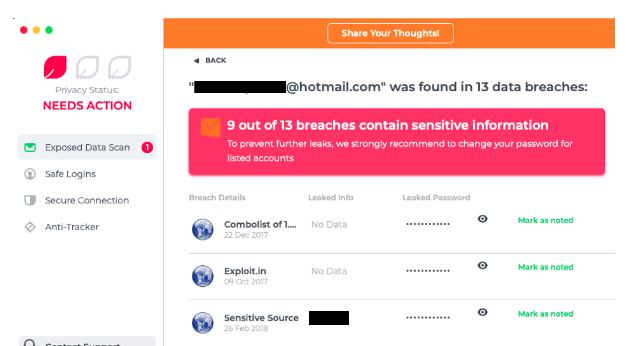
2- It scans all known data breaches, email hacks, and other security threats. This lets you know if your data has already been compromised, and when to avoid sharing anything at all. You can also change passwords for affected email accounts, and then mark each alert as “noted” to clear them.
I was impressed (and slightly shocked) by the amount of breaches FigLeaf found that had exposed my data. Thankfully I’d changed my passwords a few times since then.
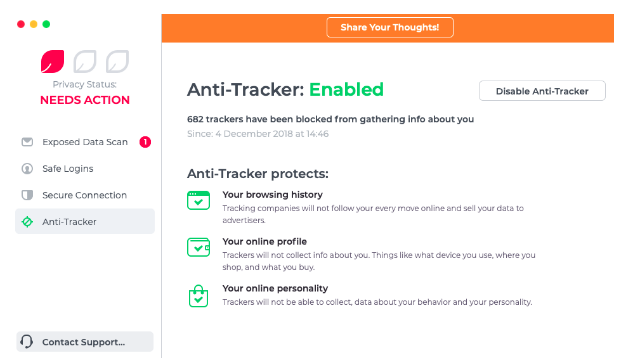
3- It blocks trackers. These are the little programs that watch what you do on the internet and then report back to their masters (marketers, usually). FigLeaf prevents anyone tracking your online activity, so you won’t see those creepy ads that follow you around the internet.
I’d only been using the app for a few minutes and already it had blocked hundreds of trackers. I’d like to see a list of them (the last 100, for example) just out of curiosity – maybe FigLeaf will add that in a future update.
4- It gives you a virtual credit card linked to your real one. This means you can still shop online but websites (or spyware) won’t ever see your true details. This feature isn’t yet live, so I can’t share any screenshots.
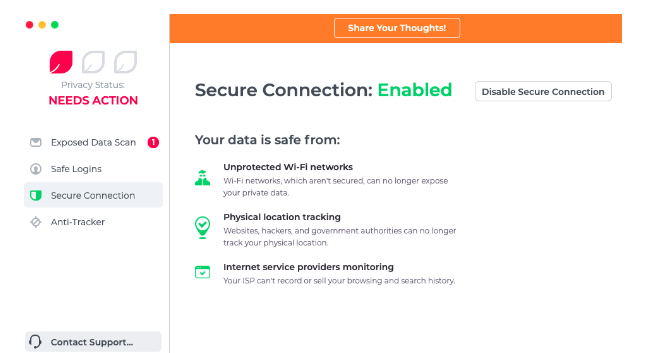
5- It secures your internet connection. Public wifi hotspots are notoriously unsafe, and you should never do any sensitive admin (like banking) over public wifi. However, with FigLeaf, your connection is upgraded and secured to ensure no-one can hijack your connection and steal your details.
When I enabled this feature, I was notified that FigLeaf was going to set up a VPN to create a secure connection. This is great, however I’d like to know a bit more about their VPN servers, such as their location, number, and so on.
FigLeaf is desktop-only at the moment, but will soon be available on mobile so you can control your privacy everywhere. Importantly, none of your data is stored on FigLeaf servers, so you don’t need to trust FigLeaf to use it.
And as you might want to reveal your details to trusted websites, you can choose what you want to share online. That’s a big advantage over other privacy tools, since most of them work on an all or nothing basis.
FigLeaf puts your privacy first. Be the first to try it.
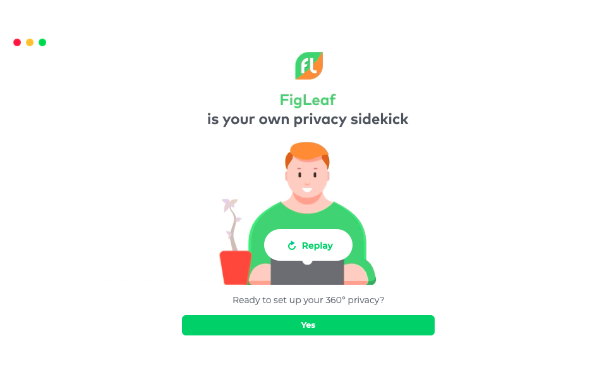
How to set up the FigLeaf app
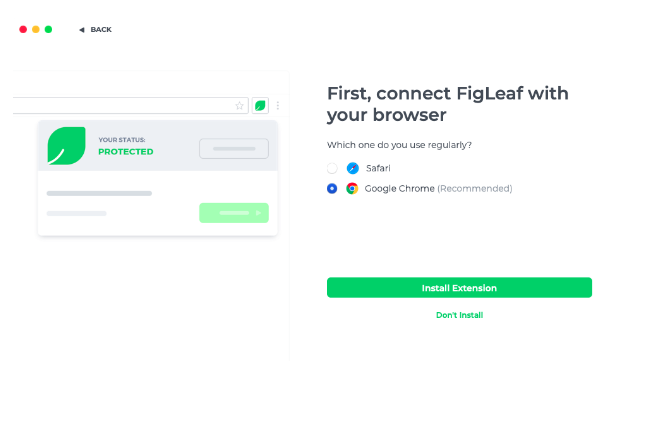
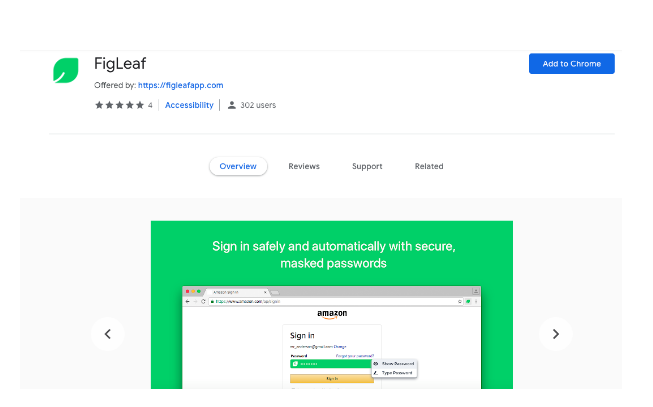
You then choose your regular browser (below) to install the FigLeaf extension.
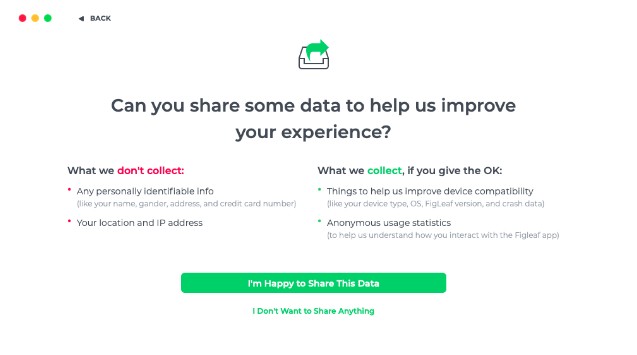
FigLeaf never stores any of your personal data on its servers, but it does ask if you’d mind sharing some usage statistics (see below). This information helps make FigLeaf better in the future.
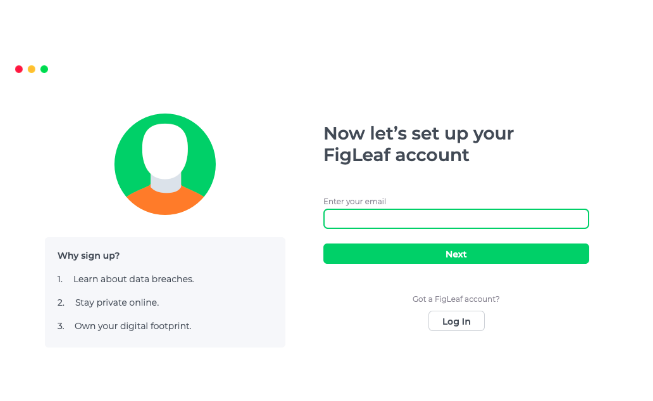
Finally, you need to set up your FigLeaf account (below).
We think FigLeaf is a really exciting privacy tool that takes the hassle out of staying private online. If you’re worried about your digital privacy, download FigLeaf now for FREE to prevent others from exploiting your data.
See the future of the web with cutting-edge features available only on Firefox.
With any product or service that we use, we hope the company takes our voice into account. Take Twitter, for example. Recently, the characters per tweet increased from 140 to 280, but there still isn’t an option to edit a tweet in case of typos, which users have been asking for since Twitter was created. Wouldn’t it be useful to have the ability to choose what we want most in our services?
Enter Firefox’s Test Pilot. Essentially, Firefox creates product concepts called “Experiments” in the form of browser add-ons and features. Users get to test-drive them for a short period of time. Concepts are created by Firefox team members, but anyone can submit ideas that could be a good addition to Firefox. Once beta testing is complete, some Experiments graduate to become official features.
The Test Pilot Wiki shows every single step taken by the Firefox team, and is completely transparent about how they come up with ideas for features with the Test Initiator Journey. As users, an in-depth A to Z timeline really makes us feel involved with the process and that our contributions, like feature submissions or just giving general feedback, are appreciated.
Once you’ve joined Test Pilot, you’ll have access to cutting-edge new features that will make browsing better. Do you remember life before tabs? It was brutal. Now, every browser has them. As Firefox continues innovating, Test Pilot gives you access to new features that are likely to become the essentials of the future.
If you’d like to see what Experiments are happening now and take part in building a great browser, head over to the Test Pilot page.
Try them now on Firefox before every browser scoops them up.
Want a glimpse of the future? Firefox offers a program called Test Pilot that lets users test features and add-ons called “experiments” for a short period of time to see if they’re worthy of becoming an official part of the browser. With this program, you can try out new features from the Firefox team, or even submissions from other users that help the Firefox browser become even bigger and better than it already is. Check out the experiments below that you can test out right now!
5 cutting-edge features from Firefox
1. Price Wise
Who doesn’t love a bargain? Especially during the holiday season, it’s a hassle trying to keep track of who has the best prices and when they change. Fortunately, Price Wise does all of the work for you.
Price Wise tracks prices from the top five U.S. retailers: Amazon, Best Buy, The Home Depot, eBay, and Walmart. To start tracking, add the Price Wise extension to your browser. Every time you’re online shopping and you see something that you want to track the price for, click the Price Wise icon to add it to your watchlist and Price Wise will notify you every time the price drops or increases. Add the same item from multiple retailers and compare. A green arrow next to the item means the price dropped, and red means an increase. It’ll be such a relief not to have to keep tabs open to check on items repeatedly throughout the day. Check out more about Price Wise in Test Pilot here.
2. Email Tabs
This feature is one of our favorites. If you’re a big planner, the person heading up a group project, or the family member who always ends up making the reunion itinerary, the Email Tabs feature will make your job a breeze.
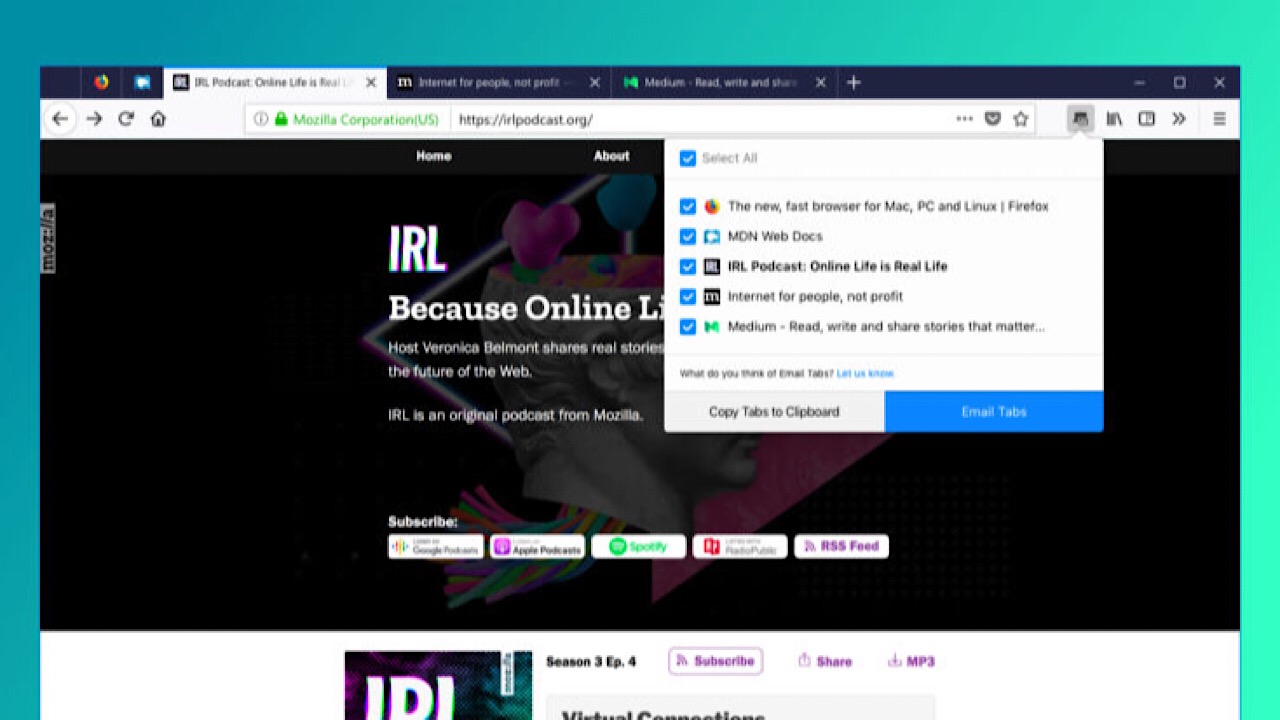
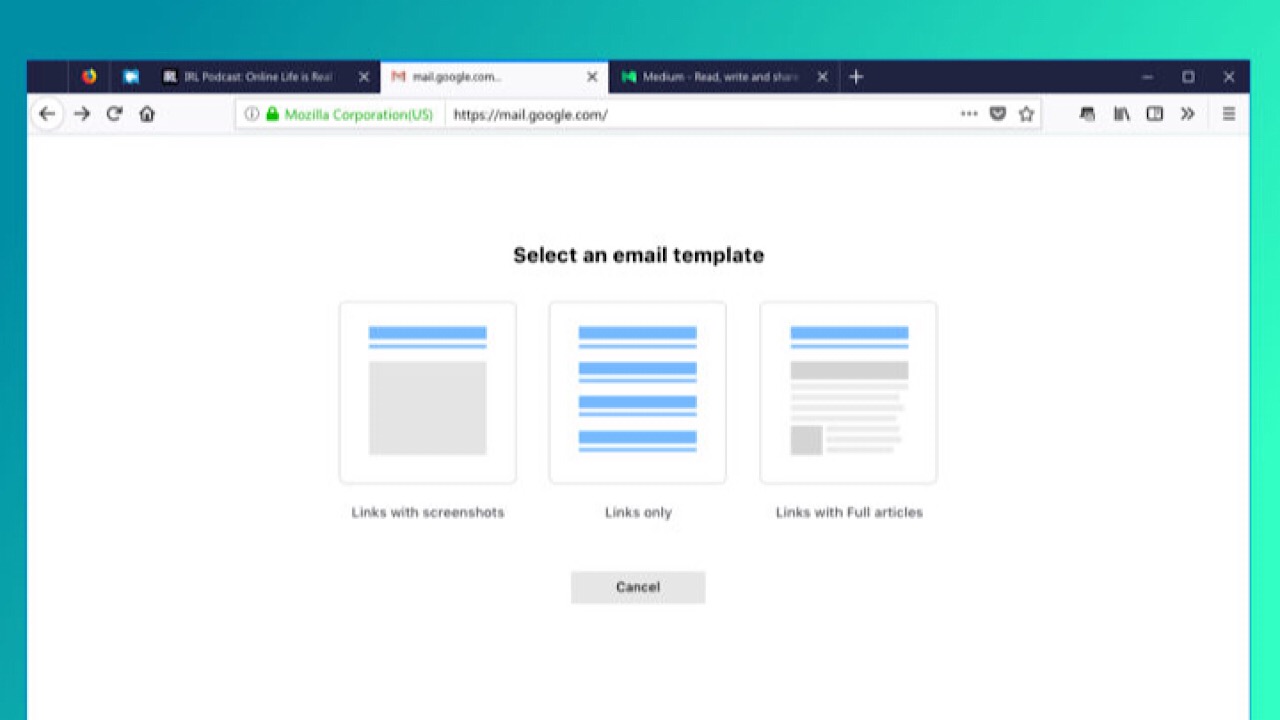
In the family reunion scenario, imagine you have a ton of tabs open because you’re trying to decide which hotel to stay at. Instead of copying and pasting all of those links into an email, just click the Email Tabs icon. It lists all of your open tabs, and once you pick the ones you want, it creates an email with all of the links for you.
If you expect Grandma might only opening the email instead of the link, you can include a screenshot of the entire web page. Don’t worry Grandma. We’ve got your back. Check out more information on Email Tabs here.
We bet you’ve never multi-tasked like this before.
Side View is a feature where you can see two browser tabs at the same time, within the same window. This feature is amazing for literally everyone you can think of: college students writing end-of-year papers, your dad comparing his fantasy football stats, or writing your grocery list inspired by online recipes.
You don’t have to resize one tab to see two simultaneously, and it makes everything so much easier. More about Side View here.
4. Color
Everything is made better when you can customize, and the Color feature lets you do a lot of that in a bunch of different ways.
Make all that text that you have to analyze for that big work project a little more pleasant to look at by making your Firefox browser neon orange. Sprinkle your theme texture with purple flowers, or channel your inner Harry Potter nerd and throw in a few lightning bolts. Icons, toolbars, tabs, search bars, and more can all be Bubblegum Pink, and nobody can take that away from you.
If you’re not sure what you want, you can always choose from the preset themes until you’re ready to utilize all the functions of Color. Save themes that you like for later, and share them by sending the link to friends. Learn more about Color here.
5. Screenshots
What’s unique about Screenshots is that it isn’t part of the Test Pilot program anymore. It was so popular that it became a built-in part of the browser, and we can see why.
There are a lot of reasons why we take screenshots: to post a picture to social media, to add a picture into a document for your boss, or to highlight the most important part of an article instead of sending the link for the entire thing.
Screenshots skips the steps of having to save to your desktop, then drag and drop or upload somewhere else by giving you the ability to copy the screenshot directly into a document. This feature also supports Private Browsing mode, so if you want to keep your guilty pleasure meme collection out of the cloud, all of your downloads are deleted when you exit that mode.
And as the Test Pilot program rolls out, Firefox gets better by the day. With a continual flow of great new features that you can’t find anywhere else, Firefox becomes a better browser by the day.
Discover how Firefox can alert you when your data has been compromised.
In recent years, privacy on the internet has been a hot topic. With data breaches happening nearly every week, your personal data is at risk in more ways than ever before.
Pretty much everything can be done on the internet now: check your account balance with your bank’s app, have Siri tell you what the weather will be like during your vacation in Greece next week, or buy a custom-made cowboy hat in China and have it shipped to your grandma in Florida. Most apps now don’t even require you to enter your password – just scan your thumbprint and unlock.
But there’s a simple rule on the internet: if it can be hacked then someone has probably tried. Taking quick action after a security breach is vital. Thankfully, Firefox Monitor is here to watch your back.
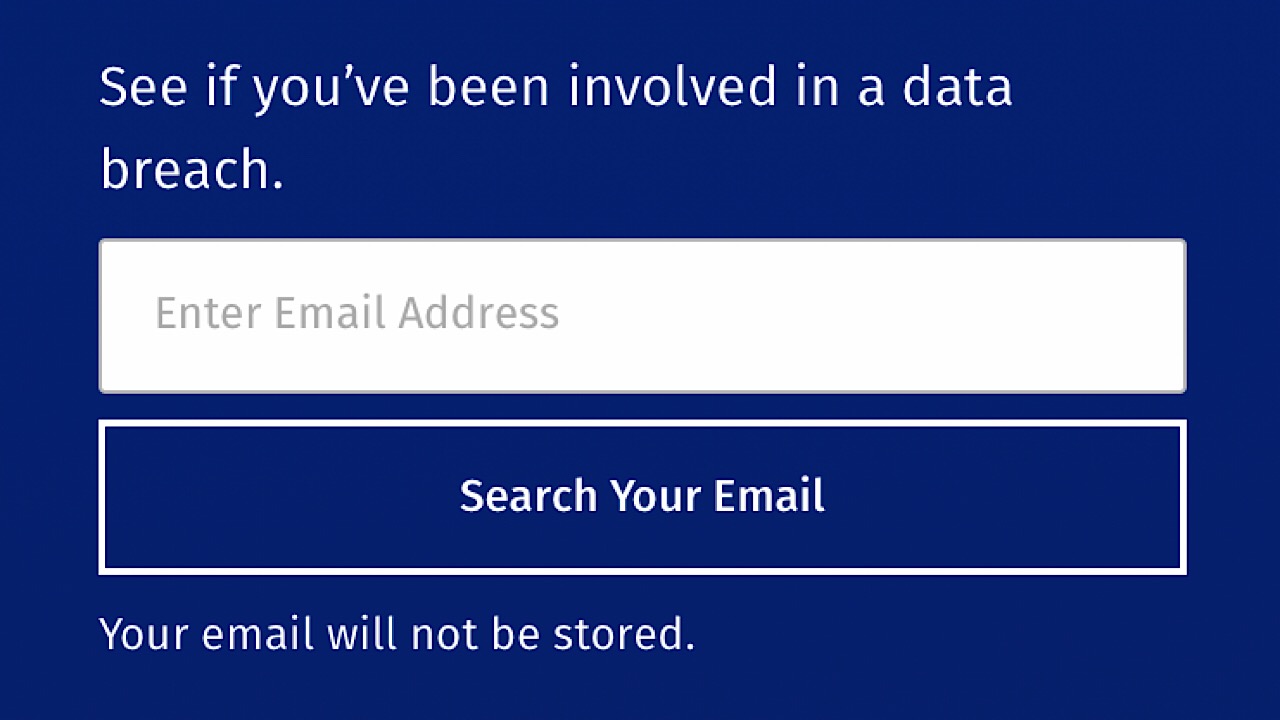
Firefox Monitor is a free service that gives you alerts whenever your email is associated with a business or service that has experienced a data breach. To find out if your information was at risk in the past, visitFirefox Monitor’s website and enter your email. Your email will not be saved, and the Firefox’s servers won’t retain any other bits of your information either.
If your email was associated with a breach, Monitor will let you know what was leaked, where it was leaked from, and when.
On the website, you’ll find tips on what to do next, like making sure that your passwords are unique and not easy to guess, and that you have a different password for every website. Change your old passwords, and passwords with services that you’ve recently signed up for if it is one that has been recycled.
When you add Monitor to your browser, it will let you know every time your email address or password has been part of a breach so you can take action immediately. Your safety is most important, and Firefox Monitor is a must have to make sure that your personal information is secure.
Learn how Stan Lee created some of the best bad guys of all time.
“There’s no such thing as a villain,” Stan Lee claimed with a cryptic smile. Coming from the man who created the Green Goblin, Dr. Doom, Venom, Magneto, and a staggering surfeit of other mischievous malefactors and wretched wrongdoers, this may seem like an exercise in hypocrisy. When you’re telling a superhero story, the good guy’s got to have a bad guy to go up against. Doesn’t every film in the Marvel Cinematic Universe have an antagonist for the hero to face off against? What about Loki for Thor? Whiplash for Iron Man? Killmonger for Black Panther? What about Thanos? Can we really say these characters aren’t villains?
How Stan Lee created some of pop culture’s greatest villains
“[They] may be viewed by you, me, and the general populace as dirty, rotten scoundrels and vile villains,” Stan Lee said, “but – and here’s the takeaway – they don’t see themselves as villains! Each and every villain in comics, in movies, in novels – and especially in real life – thinks of him or herself as the good guy. He’s the hero of his own story.”
“Doctor Doom just wants to take over the world. That’s not illegal!”
‘History is written by the victors’ and the late Stan Lee took pride in reflecting as much in his writing. For sure, the villain is cast in an ugly light, and it’s because he or she is the one going up against our hero.
But what made Stan Lee’s villains so different was that acting against the protagonist did not disqualify them from having real character arcs: Driving motivations, emotions, goals, internal conflict, and tragic backstories of their own.
“The school bully wants your lunch money because he feels like he’s misunderstood and picked-on himself and he’s fighting for all the picked-on people in the world,” Lee said. “They and only they know what’s right and they and only they have the guts to do what needs to be done.”
Real villains of the world aren’t evil for the sake of being evil. Rather they act with goals in mind and seek to achieve them by whatever means necessary. If the cost is steep, the ‘bad guy’ deems it a necessary casualty in order to accomplish a greater good. “No one ever thinks ‘I’m about to do an evil thing, even if I have another option,'” Lee said. “We humans are champions at rationalization, at convincing ourselves that we’re doing the right thing, no matter how we must twist logic to get to that conclusion.”
Magneto isn’t killing humans because he’s simply evil; he’s doing it because mutants are discriminated against and he wants to promise their safety. Kingpin runs a ruthless mob through Hell’s Kitchen because he believes it’s the only way to maintain a semblance of order in an otherwise chaotic city. Killmonger asserts that he will do take Wakanda to its rightful position as a global ruler, looking after those oppressed and in need.
Giving the villains of his comics empathetic motivations and real personalities that weren’t just ‘comic book villain’ was what set Lee’s characters apart from the competition. We as readers can certainly dream of flying, lifting tall buildings, firing lasers out of our eyes, or lifting objects with our minds, and that’s the fun of reading superhero comics. Of course, we have no way of actually doing these incredible things. Jealousy, fear, anger, resentment, the desire for revenge, though; these are familiar emotions, and strike closer to home.
“Sure your hero might be extra strong or might be able to fly or run as fast as a comet. But unless you care about the hero’s personal life, you’re just reading a shallow story,” confides Lee. “And just because the guy’s got a superpower doesn’t mean he hasn’t got the same problems that you or I might have! Maybe he doesn’t have enough money. Maybe he has a family problem. Maybe the girl he loves doesn’t love him.”
Unrequited love? We’ve been there, buddy.
“I like to get villains who have some sort of a background so we know about their personal life – just like I like to know the personal life of my heroes,” Lee said.
Instead of aiming for a simple binary black vs. white heroes vs. villains, Stan Lee opted to make his antagonists’ issues relatable, even if their solution to these issues was typical diabolical behavior, like robbing a bank or kidnapping someone. “Even though what you’re writing amounts to a fairy tale for grown-ups, try to keep enough facts and try to give enough detail that the reader will say ‘well, it could have happened!'”
Since his villains had sympathetic problems, Stan Lee’s characters were often presented as believable foils to their counterpart hero in some way, serving to highlight his or her weaknesses and strengths. This similarity in personality or issue forced the hero to address and power through their shortcomings, and to do so in the proper way, unlike the bad guy. Spider-Man and Venom are classic examples of this:
Both Peter Parker and Eddie Brock fell victim to the same alien symbiote, a suit that granted its wearer incredible strength, durability, speed, and power. However, it did so at the cost of the wearer’s personality and self-control.
It was Peter Parker’s strength of will that defeated the symbiote
Eddie Brock gave in to his love for power, gave in to his addiction to the suit and the high it gave him to wear it. Peter Parker, the hero of the story, fought back against the symbiote after seeing the damage it was doing to people he cared about. Any reader can enjoy a good power trip looking at pictures of Venom going on a rampage, but it’s clearly Peter Parker who demonstrated stronger willpower, more maturity, and a strong moral compass.
Write your villain with your hero in mind
Venom is also a good example of a baddie that’s more than a match for the hero of the story. “The first thing you have to do is get a villain who seems to be unbeatable by the hero. That makes your job tougher because the hero has to beat him in the end.” Villains need to suit their heroes, and provide a solid counterpoint to their powers and, more importantly, their personality.
The good guy needs to match the bad guy. Look at Batman and Joker, or Punisher and Kingpin. “Would you have Robocop fighting giant alien flying jellyfish or a house-haunting apparition?” Lee exclaimed. “Of course not! Those aren’t the kind of opponents Robocop squares off against.”
Every hero needs a suitable challenge; succeeding against all odds makes for a far grander (and more exciting) story than simply pummeling a few thugs and sending them to jail. Abomination wouldn’t be a great pick for a superhero like Captain America, but he’s great against Hulk!
Stan Lee made it a focal point in his narrative to introduce new villains that provided a real threat to the hero. “You can’t know how heroic or resourceful your hero is unless he goes up against someone who is not just his equal in power or determination or intellect,” says Lee, “but up against someone faster, stronger, smarter, and more ruthless!
“In the beginning, writing the hero is very exciting, but once you’ve created the hero, you’ve got him. And he’s going to be pretty much the same in every story,” Lee said. “But each story needs a new villain. So it is more interesting to keep coming up with new villains because each one is a new problem.”
“Villains are the most important people in the story”
The hero has no choice but to become predictable. Every protagonist has a personality, relationships with other characters, a tried-and-true method for solving his problems, and (if they’re the rough-and-tumble, Hitler-punching type) a specific style of combat and a striking visual aesthetic. Day in, day out that can get dull to read, even for the best of heroes.
“That’s only natural,” Lee said, “because we’ve had time to get to know him, to learn to anticipate his reactions.” That hero needs an antagonist to shake up the formula, to introduce some needed chaos to the mix. “Our villain has to be unique, clever, inventive, and full of fiendish surprises.”
Surprise! You can’t punch him.
Adversity shapes us into stronger people, and that adversity comes in all shapes and sizes. The same goes for the antagonists of Stan Lee’s works. Sometimes Tony Stark went toe-to-toe with big bad dudes like Thanos or Ultron, but other times it was Obadaiah Stane, an executive on his own company’s board. Other times Stark was fighting with his own inner demons – his paranoia or his alcoholism.
The Winter Soldier was an equal match for Cap both as a combatant and due to their history
Stan Lee considers this raising the bar for the hero. “Villains have a great responsibility that comes with their great power: They have the responsibility to make you, the reader, believe that the hero doesn’t stand a chance against them.” When all seems lost and things seem hopeless, that’s when the protagonist has to rise up and meet the challenge.
Peter Parker wins. Not Spider-Man.
What’s more important than the monster of the week is how the hero defeats it. It’s easy to say Spider-Man punches his way through a group of thugs, but what does that give us other than some popcorn-munching theatrics and flashy visuals? Looking deeper, there has to be a moral behind why the good guy succeeds. What lesson can be learned? On what part of the hero’s skill should this issue capitalize? Maybe it’s their bravery. Maybe it’s their ability to coordinate a team. Or their persistence and dogged determination:
Presenting challenging monsters and showing how to conquer them is a cathartic way of coming to terms with our fears and finding the internal strength to surmount them. Lee credits this catharsis as one of the chief reasons audiences love superhero stories.
By showing the hero defeating the scary monster we see that “the superhero – the absolute pinnacle of human nobility and virtue – takes on the monster – the physical manifestation of humanity’s irrational fears. If they can beat it, you can too.” To emphasize that the reader too could triumph over his difficulties, Stan Lee seldom had his heroes win fights through brawn. Instead, most of Lee’s heroes were smart: Reed Richards, Bruce Banner, Peter Parker, or Stephen Strange. Their smarts were how they won the fights, not their superpowers.
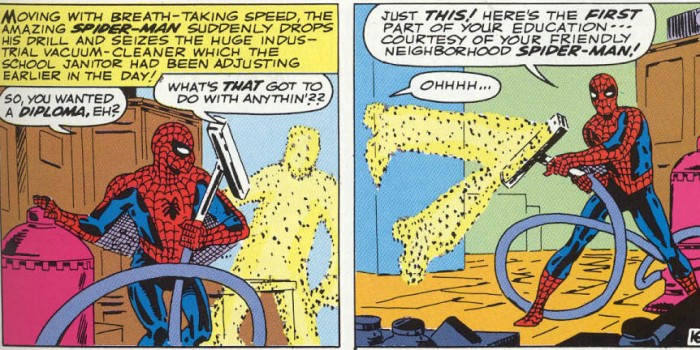
Peter Parker does with a vacuum cleaner what Spider-Man failed to do with his fists.
Stan Lee showed his readers that while superpowers were fantastic, fun, and marvelous, the heroes didn’t need them conquer their fears.
In the end, the antagonists that Stan Lee created were so successful not because of their bulging biceps, exorbitant wealth, or their mighty superpowers. Quite the opposite: It was because they were more believable, more relatable, and more human. This closeness makes them both more empathetic, but also more frightening; seeing yourself in both the hero and the villain of a story is like listening to the angel and devil arguing on your shoulders – both voices are a part of you, and it’s up to us to know which path is the right one, even if the wrong path can seem awfully tempting. But that’s what resisting that bad side of you does: It means you get to play the part of the hero.
You could be interacting with a chatbot without even knowing it.
Chatbots are spreading like wildfire.
You’ve seen them around the web; on retail sites or popping up when you’re getting some online banking done.
We’ve already seen digital assistants like Siri and Alexa have become staples in the home, but it seems that the chatbot is poised to help people at work, too.
Sure, bots are already pretty ubiquitous. However, there’s a shift happening. The technology isn’t just for the Amazons and Apples of the world, now, even”regular Joe e-commerce,” can have a bot all his own.
Oracle just announced the availability of Oracle Digital Assistant, which allows companies to incorporate existing chatbot technology into their own solutions. And they’re not the pioneers, here.
Google, Amazon, and Facebook have already released the algorithms behind their smart assistants, which allow third-party providers to build on top of an existing chatbot framework.
Here’s a little more about where chatbots can fit into the small business space, as well as some of the capabilities that extend beyond IM-ing with algorithms.
How chatbots are changing the internet
So what can a chatbot do?
Well, the idea is a chatbot can carry on a conversation with users like a real live human. Companies across all industries from banking to food delivery and retail are taking advantage of this technology is growing numbers.
Chatbots, though, do promise some answers to some of the problems that small organizations have faced since, well, forever.
Between picking up the slack for overwhelmed owners or boosting customer engagement, small businesses should really consider jumping on the bot bandwagon ASAP.
1. Chatbots becoming live assistants
Chatbots are now being used as a way to deliver information to customers and provide a tailored customer experience in businesses of all sizes.
In small businesses, these digital assistants serve as the first point of contact, offloading customer questions, while you attend to other things.
For example, one might integrate a bot into an event app. So, when attendees show up to a conference or music festival, the bot can fill them in with all the basics: Wi-Fi passwords, bathroom locations, last-minute changes, the list goes on.
2. Bots offer some sales support
A bot can take orders from customers using simple commands. So, instead of making a phone call or manually adding items and credit card details to a website, customers can tell the bot what they want.
And your bot can explain add-ons or upgrades to visitors, just like a sales rep might—minus the commission check.
Chatbots can be customized to upsell items and cross-sell related products. Small businesses can use bots to fill in the blanks created by a smaller sales force.
It’s not so much that chatbots are replacing jobs in this case. Instead, small businesses can only hire so many people and employing chatbots as a way to sell products means, they don’t need to bulk up their salesforce—and get on the hook for payment if they don’t end up bringing in the money promised.
3. Increase engagement
A helpful chatbot on your social profiles can help you boost engagement. For example, if a customer visits your Facebook page and asks a question, your bot can direct them to your site—delivering the content that matches the question.
Or take Sephora for example. The cosmetics brand developed their own bot on Kik, which functions as a shopping assistant. The bot works to understand customers by gathering data that informs the content they serve up.
Here’s a look at the glamorous bot in action:
How exactly do chatbots collect data?
The chatbot records all conversations, saving a repository of data that it can reference to get better as time passes.
The chatbot, when coupled with natural language processing, or NLP, gives bots the potential to identify specific keywords. And those keywords (think “return,” “refund,” “exchange”) help bots recognize context and route inquiries accordingly.
The benefit of the bot is, it remembers the small stuff. Even the best customer service rep is going to be focused on several other things while talking to a customer—they need to focus on providing the best service right then and there.
Chatbots are predictive. Meaning, they can remember an earlier conversation with a customer and make targeted recommendations based on likes, dislikes, and habits.
Based on that, small brands stand to offer highly customized service, without adding to their workload.
Big data is no longer just for big business
Big data, buzzword of yore, is another potential area where chatbots can thrive.
Here, the value comes in the form of deep analysis. Chatbots’ core algorithm works to identify patterns. That’s how they mimic our conversational patterns, after all.
More sophisticated bots can be trained to identify tones or specific groups of words that signify whether a customer is upset or pleased with a product or service.
The goal is to catch underlying issues as they emerge before they become a problem.
Conclusion
While chatbots have been cropping up as something as an annoyance across every site with something to sell, there are stirrings of something else happening in the space: accessibility.
As humans, we crave a certain personal touch.
We want bots that toss the conversational “ball” back and forth, not chat partners who spit out a link and call it a day. But today’s AI helpers are starting to take on a more conversational tone.
Developers are working on making these digital assistants more helpful and industry-specific. And, eventually, it seems, we’ll start seeing the payoff in the form of better service and more personal solutions.
The exciting thing about chatbots is, most of the benefits they provide are about making things personal. Where small businesses of the past got to know their customer in person, they’re now operating on this global scale. The automated, tailored experience makes customers feel seen.
Set to release in late January, Resident Evil 2 is perhaps one of the most anticipated releases of 2019. A ground-up rebuild of the survival horror classic, the game will include the familiar characters, enemies, and locations that Resident Evil fans have come to know and love. However, not everything is staying the same for the remake. One of the major changes will be the addition of microtransactions, proving that even the classic series isn’t immune from this modern gaming trend.
Resident Evil 2 will include microtransactions
The ESRB recently finalized Resident Evil 2’s rating (M for Mature), a rating based on the game’s inclusion of strong language, blood, gore, and intense violence. In other words, it’s everything Resident Evil fans have come to expect from the series. The rating also mentions, however, that Resident Evil 2 will include in-game purchases in the form of microtransactions.
So far, Resident Evil 2 appears to be a single-player only experience, so it seems unlikely that microtransactions will pertain to a multiplayer experience of any kind. That said, Resident Evil is no stranger to multiplayer, such as the fan-favorite Mercenaries mode included in several titles or the less-popular Agent Hunt mode in Resident Evil 6. Perhaps this does hint at there being some type of multiplayer component involved in Resident Evil 2.
It seems more likely, however, that the microtransactions will pertain to campaign-mode goodies. Several unique DLC weapons and skins have already been confirmed for certain pre-order editions of the base game, so cosmetic and vanity items seem like the most likely candidates for these mysterious microtransactions. Capcom has given no official word on the subject, so it’s likely that players won’t know for sure what these transactions entail until the final game is released.
Otherwise, the official rating from the ESRB does tease a typically Resident Evil experience:
This is a survival-horror game in which players assume the roles of a policeman and/or a college student battling a zombie outbreak in the fictional Raccoon City. From a third-person perspective, players explore environments and use pistols, shotguns, tasers, explosives, and flamethrowers to kill mutant creatures and zombies. Combat is highlighted by realistic gunfire, screams of pain, and large blood-splatter effects. Cutscenes also depict instances of intense violence and gore: a character’s throat ripped out by a mutant’s teeth; a man’s body cut in half, leaving entrails dangling from his torso; a man’s head crushed by a zombie’s hands. Some areas also depict mutilated corpses/zombies with exposed organs and viscera. The words “f**k” and “sh*t” are heard in the dialogue.
Based on this official ESRB statement and the already released trailers, Resident Evil 2 promises to be one of the most intense games in the series.
Resident Evil 2 is slated to release January 25, 2019 for PC, PS4, and Xbox One.
Increase your productivity with these great Chrome extensions.
The internet can be an extremely distracting place. You tell yourself you’re going to buckle down and focus, but soon you get distracted and your productively drops. Lucky for you, we’ve found four great Chrome extensions that will take your productivity to new heights!
Sometimes it can be tough to focus when everyone around you is chatting. If you work in a busy or loud office, then Noisli is perfect for you. This Chrome extension plays background noise like falling rain or a bonfire to help cancel out the background noise. In addition to the relaxing sounds, Noisli also comes with a timer to help you break down your work into sessions. Finally, one of the best features of all is that Noisli has a built-in text editor to help you gain productivity you while you write.
This is the Chrome extension for anyone who wants to be as efficient as possible. Strict Workflow lets you set a 25-minute timer that will block all popular, distracting websites so you can focus and get your work done. After your work period, you will get a 5-minute break where all of the popular websites will be available again. This timer system is great for holding yourself accountable while still giving yourself a reward for hard work.
This extension is a must-have for Gmail users. With it, you’ll be able to effortlessly stay on top of multiple Gmail accounts without even opening Gmail in Chrome. You’ll receive real-time notifications, and you’ll be able to read, listen to, or delete emails immediately. Other cool features include receiving notifications even when Chrome is closed, monitoring emails with custom labels in your Gmail account, and offline viewing.
Best apps and online tools to stay focused and be more productive
Pocket is the perfect Chrome Extension if you want to be productive without missing out on some seriously interesting articles. With Pocket, you can save any interesting website or article in one simple click. Then, when you’re done with your work you can open your Pocket and check out all the articles that you’ve saved throughout the day. (It’s also our favorite for offline reading situations, like catching up on interesting articles when you’re on a plane.) If you find yourself getting distracted by the latest news of the day, Pocket is the Chrome extension for you!
The holiday season means it’s finally time to kick back and relax. Watch a movie, catch up on your favorite TV shows, and blissfully browse the internet to your heart’s content. Be aware, however, that just because you’re relaxing and enjoying the time off your connection isn’t necessarily safe or secure. If you’re in the market for a VPN, you won’t find a deal better than PureVPN‘s sweet offer: an unheard of 88% off.
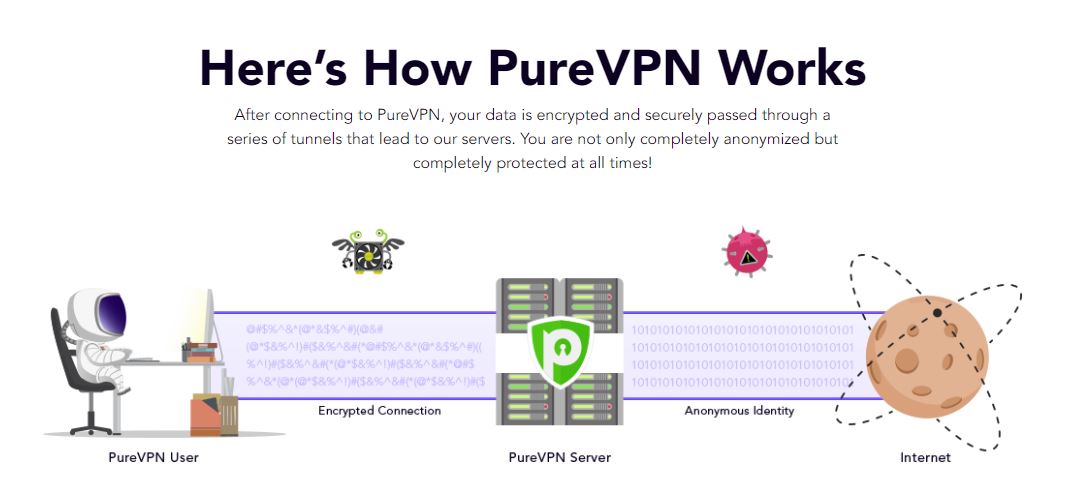
PureVPN is renowned for providing complete online freedom to its users while still keeping them under its wide umbrella of privacy and security. It offers over 2,000 VPN servers in over 140 countries globally, including popular regions like the U.S., UK, Canada, Australia, Germany, and Europe. Their DNS server leak protection is top of the line, with a powerful AES 256-bit encryption, and and features a system-wide killswitch for your convenience.
PureVPN has Antivirus and Antimalware built in, and its extensive network ensures that you can access any site on the web, regardless of any censorship or geo-restrictions that might be in place at your location. Browse the web without leaving any footprint, unblock restricted streaming services, play online games without getting DDoSed and a ton more.
PureVPN has over 2,000 fully optimized servers built to provide you a secure and buffer-free experience. You can use it to safely access your favorite streaming sites at the fastest speeds: Netflix, Hulu, or Amazon Prime.
PureVPN is the most secure VPN available. Its encryption is military-grade, and keeps any of your online communications safe and hidden from prospective hackers or nosy surveillance agencies. PureVPN boasts over 3 million active users globally, and the huge audience only serves to illustrate the network’s reliability.
How is PureVPN different from other VPN services?
There are a number of other VPN providers and most of them rely on shared servers from third-party providers. Doing so decreases their overall efficiency and speed, and raises concerns regarding their dependability and the privacy of your data. Typically, other providers employ this cookie-cut VPN setup for ease of access and distribution.
By comparison, PureVPN owns a self-managed global network of more than 2,000 servers, a service spanning over 140 countries. As of late 2018, PureVPN is the sole provider that can boast that level of global presence. It features a self-engineered service with proprietary apps optimized for an evolving broadband connection, helping it to run seamlessly in the background and guarantee speedy and secure anonymity all across the globe.
Lastly, PureVPN supports all protocols on any kind of server – protocols that are limited when it comes to other providers. Every PureVPN server supports every security protocol: OpenVPN, L2TP/IPSec, PPTP, SSTP, and IKEv2. This ensures you the ultimate choice of security, regardless of the server you choose to connect to.
Customize PureVPN to work the way you want
PureVPN accepts tons of crypto-currencies and also has a Multi Port option which scans for open ports that are unblocked by your Wi-Fi network or region. It does this on your pick of 5 simultaneous devices per household, including mobile.
PureVPN has a readable, intuitive UI that makes it as easy as possible to allow users to engage and set its many useful features such as: Automatic redial if connection drops, ping servers on startup, the option to disconnect from the VPN when exiting the app, and a toggle for launching PureVPN on start-up. You can even have PureVPN launch your default browser for you upon connection or create your own VPN hotspot. Here’s how to do it in 5 easy steps:
1. Restart PureVPN as Admin
To do this, right-click on the PureVPN icon in the System Tray and simply select Restart as Admin.
2. Open your App Settings
From this screen go to Settings. Click App Settings.
3. Select your chosen protocol
PureVPN offers three different protocols for initiating the hotspot function: TCP, UDP, and Stealth. You can access them all via the Protocol dropdown and pick whichever you prefer to use. Once you’ve decided, simply click on it.
4. Connect your VPN
Your VPN should connect in a matter of seconds.
5. Enable the hotspot
Once you’re fully connected, you’ll see a VPN Hotspot icon on your left menu. Click on the icon and enable the VPN Hotspot. Congratulations! You now have a VPN hotspot! You can further manage the hotspot as well as set your Network SSID and password by clicking Manage VPN Hotspot.
Why is PureVPN the best for streaming services?
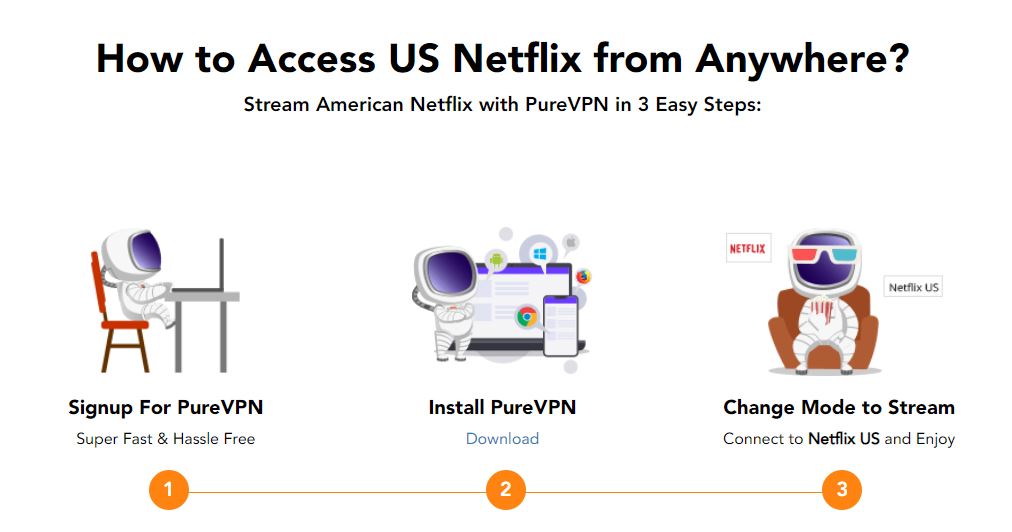
PureVPN is the best VPN for streaming Netflix. Hands down. Netflix is leading an ongoing crusade against users streaming with a VPN, but it can’t really do anything to stop PureVPN; they can only restrict VPNs that provide shared IPs. PureVPN does not do that. Instead, it provides dedicated IP addresses to each user, rendering them totally anonymous online. Doing so makes it impossible for Netflix to detect that you even are using a VPN. Streaming Netflix with PureVPN engaged is so simple it can be shown in under two minutes:
There are many reasons why you’d want to use PureVPN whenever you’re streaming, but here’s five right off the bat:
1. It’s fast. REALLY fast.
PureVPN has a 1Gbit connection speed, ensuring that you’re getting the fastest speed from start to finish.
2. Protection against DNS Leaks
Send and receive data safely thanks to PureVPN’s unparalleled DNS protection.
3. Universal Access
You can stream any service you like, be it Netflix, Hulu, Amazon Prime or any other service.
4. Split Tunneling
PureVPN allows users to Split their Internet data between ISP and VPN, bolstering speed and performance while nullifying buffer time.
5. PureVPN enables P2P
You can safely download any torrents and files over P2P networks through PureVPN’s secure servers with absolute peace of mind.
PureVPN also has 24-hour live chat support should any issue arise, and boasts the highest coverage and accessibility with servers spread across 6 continents. If you have more questions about how to stream Netflix with PureVPN, you can check out their FAQ right here.
Right now, you can get the sweetest deal PureVPN has ever given: For $79 you’ll be able to hop on their 5-year plan. That’s an 88% discount, saving you as much as $578. That’s $1.32 a month. You can also elect to enjoy 73% off on their annual deal, which will cost as little as $4.08 per month.