The MMORPG sensation that is Fortnite Battle Royale released a brand new update yesterday. In the promotional content released alongside the update, you can see new gameplay mechanics, loot, guns, and tweaks on all the usual contenders for new game updates. But Epic Games is also making good on their announcement that they’d be celebrating Star Wars Day in a big way this year. Get ready for the multi-week celebration of your dreams!
Epic Games is known, at this point, for incredible content drops surrounding pivotal events. Who can forget the Season 4 Marvel collab for Avengers: Infinity War or Fortnite x Marshmello in Season 7? The team is at it again, this time bringing you loads of Star Wars merch, alongside other great content, in celebration of Star Wars Day 2022.
One of the most important inclusions in this collaboration is the lightsabers. All the lightsabers deal the same amount of damage and have the same capabilities, so in terms of the gameplay, it doesn’t really matter which you choose. But true Star Wars fans know that it matters a great deal which color you wield. We’d have loved to have seen Rey’s yellow lightsaber, even if just for further variety, but what we have is a good lineup of fresh weapons in any case.
The weapons drop doesn’t end there, though. In addition to the four lightsabers, we’ve also now got the E-11 Blast Rifle back! Epic Games have also released new Star Wars-themed Quests that will be available until Monday, May the 16th. In these Quests, you can expect to do things like confiscate a landspeeder and use ‘Jedi contraband,’ which here most likely means a lightsaber. Here’s the best bit; If you complete five of these Quests, termed the Empire Accreditation Quests, you’ll earn yourself the Empire Banner.
Fortnite has also added a brand new non-Star Wars battle – The Battle for Tilted Towers. Join the resistance and push back the IO in this new POI Battle. You can also now attack from above in the brand new Choppa!
Star Wars day in Fortnite won’t just be one day. It officially kicked off on May the 3rd and will run until May the 17th, 2022. In other Fortnite news, we might be seeing a Fortnite x Attack on Titan collab soon.
Is Fortnite crossing over with Attack on Titan?READ MORE
Adobe Premiere Pro is the raw video editing app from Adobe’s Suite. Its timeline-based interface, organized workspaces, and powerful editing tools, effects, and motion graphics are loved and lauded by some of the most innovative directors and content creators around the world.
It can take a while to get to know all its capabilities, but that’s only because Premiere can really do just about any video editing task imaginable. The app has been used to edit everything from Hollywood blockbusters and Super Bowl commercials to humble YouTube sketches and video podcasts.
If you’re a beginner, you’ll be able to understand the basic features and start editing with Premiere Pro after reading this article or watching a few brief tutorials. If you’re a professional video editor, read on to find out where Premiere shines and where its weakness starts to show.
You can no longer buy the Premiere Pro app outright; it’s only available as a subscription service with monthly or yearly payments. If you’d like to try the demo version, you can download a free seven-day trial of Adobe Premiere Pro.
How does Premiere Pro compare to other video editors?
Compared to other video editing apps, the subscription price is pretty expensive. How much Adobe Premiere Pro will be worth it to you depends on your budget and what kind of video editing you’ll be doing. Although there isn’t a single standout alternative to Adobe Premiere Pro, it does have a few interesting competitors.
Premiere Pro is currently the most popular choice in the general video editing world, but there are several groundbreaking apps that can perform certain specialized tasks better or work more efficiently in different operating systems. Alternatives to Premiere Pro include:
• Final Cut Pro has a lot of the same features but is optimized for macOS users. • DaVinci Resolve is cheaper and more focused on color correction. • Adobe After Effects has better visual effects and motion graphics tools; however, Premiere Pro is better at overall video editing and assembly.
Adobe Premiere Pro’s system requirements
If you use a PC, you’ll need the 64-bit version of Windows 10 or 11 to run the latest version of Premiere Pro. If you use a Mac, you’ll need at least macOS 10.15.
Make sure your CPU is at least a sixth-generation Intel or an AMD Ryzen 1000 Series or better with a minimum of 8 GB of RAM. Premiere now also has full support for Apple’s Silicon M1. Your display’s resolution should be a minimum of 1920 x 1080.
A look at some of Premiere Pro’s newest upgrades
Older versions of the app had workspaces for Assembly, Editing, Titles, Audio, Effects, and Color. Now, it’s been simplified to just three main modes: Import, Edit, and Export.
The welcome screen now has a Learn option that can guide beginners through the workflow or show experts all the latest upgrades. The app comes with eight built-in interactive tutorials that demonstrate how to import clips, add titles, use color correction, edit audio, etc.
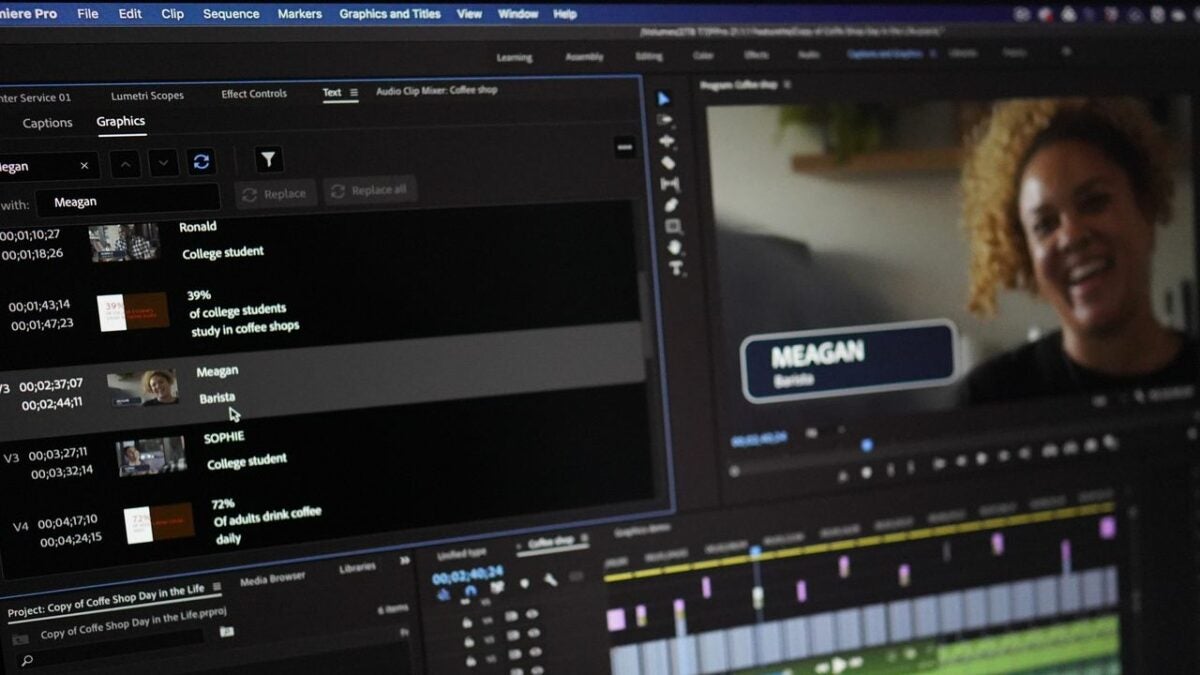
Many features and graphics now come with ready-made templates and animations. For instance, you can select one of the available animated motion graphic templates and just replace the default text with your own message or logo to make an instant intro.
The captioning workflow has been overhauled to allow for easier formatting and editing of your captions. There’s also a new automatic captioning feature that is currently in beta.
If you upload your videos to various social media sites, you may have to export to a different aspect ratio for each site. Premiere now has an Auto Reframe feature that uses AI to identify the most important things in your video and crop it to various aspect ratios, whether horizontal, vertical, or square, without losing sight of your subject. Auto Reframe also lets you adjust the keyframes it automatically creates in case you want to make some manual corrections. Final Cut Pro also recently released a similar feature it calls Smart Conform.
When you subscribe to the Adobe Premiere Pro service, you now get a free online video sharing account at Frame.io with 100 GB of space. The service includes a web viewer and reviewer that allows your collaborators to check out your beta project and give you notes without having to install Premiere Pro.
Import practically any format
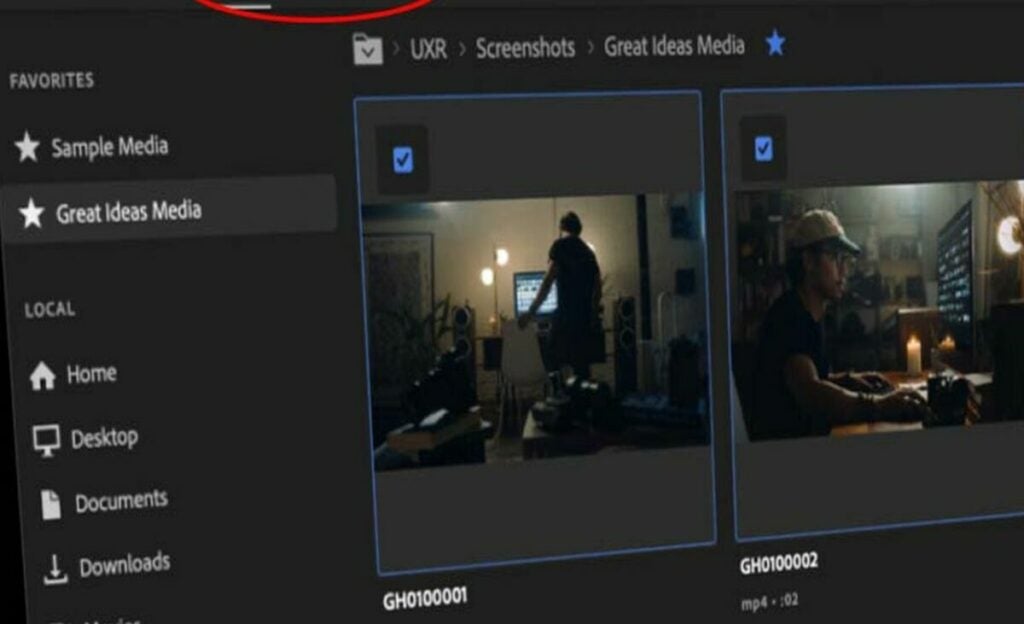
Premiere Pro can import video footage from pretty much any device that can record it. This includes practically any raw format from any professional camera, smartphone, or DSLR with resolutions up to 8K. With the right cables, you can even import video from tape with the timecodes intact.
Premiere’s editing layout is intuitive and adjustable
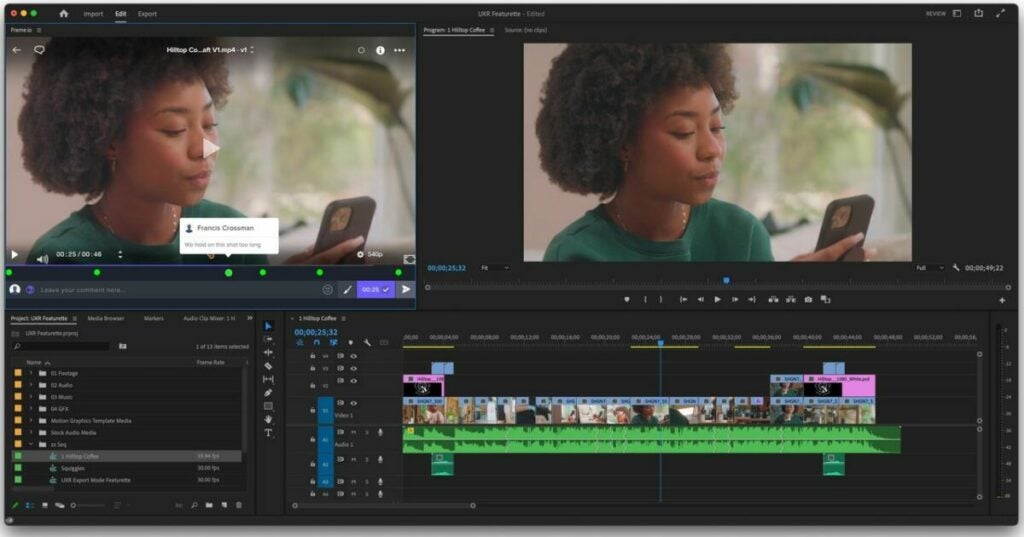
Once you’re in Edit mode, the workspace shows you four panels. If you like, you can undock these panels and move them around or remove them and add different ones.
Previews and thumbnails of your source footage are at the top left
A preview of your project video is at the top right
Your project’s assets are at the bottom left
Your track timeline is at the bottom right
Your track timeline has two separate sections to help keep you organized. All the audio tracks are placed in the bottom section, and all the video tracks, including images and graphics, are in the top section.
If you want to skip the Import screen, you can just drag and drop almost any type of media file from any file explorer straight into your timeline. Premiere Pro will automatically create separate but linked video and audio tracks and place your media in them so that you can jump right into editing. The app will also automatically saveyour project at regular intervals to make sure you don’t lose too much if the power goes out.
The basic editing tools are easy to learn
Premiere Pro offers four classic editing tools that sound like they might feel at home in a waterpark: Slip, Slide, Roll, and Ripple. These give you different ways to trim or shift clips quickly while preserving the length of the project or adjacent clips. You can edit tracks even while the project preview is playing.
The app also has a regular Trim mode that trims without shifting, which you can access by double-clicking on either end of any clip. In Trim mode, your preview window will split to display the outgoing frame of the clip you’re editing as well as the incoming frame of any adjacent clip. This mode gives you easy options to make adjustments one frame at a time or add transitions.
Adobe Premiere Pro’s transitions
Premiere Pro comes with a large library of transition effects, and you can find plugins online with many more. Once you have at least two clips in your timeline, you can search for a transition in the assets panel at the bottom left and then drag and drop it to where the clips meet.
Transitions are just as user-friendly as clips. You can drag the edges of a transition in your timeline to change its length or select the transition and delete it. Selecting a transition will also open a transition control panel beside your project preview panel where you can dig in and change even more details.
Lots of highly maneuverable effects
The app comes with hundreds of video and audio effects, all of which are searchable from a search box in the assets panel. These include toolkits for
Lighting
Colorizing
Keying
Warping
Stylizing
Premiere Pro lets you drag and drop any effect onto any track to apply it directly. You can also go to File > New > Adjustment Layer to create a new adjustment layer on your timeline. When you add an effect to an adjustment layer, it affects all the tracks below it.
You’ll find the Effects Controlwindow in a tab in the top left panel. When you select any clip or adjustment layer, you’ll be able to tweak any effects you’ve applied to it here. That includes adjustments to the opacity, speed, position, scale, rotation, anchor point, and Lumetri colors of the clip. This window is also where you can apply time remapping to any effect by using keyframes.
Premiere’s built-in effects are user-friendly and powerful enough that they’ll work for most home content creators and even many professionals. If you’re making the next “Avatar” or you need advanced tools like automatic motion tracking masks, you may need a more powerful engine like Adobe After Effects.
Export as simple or advanced as you like
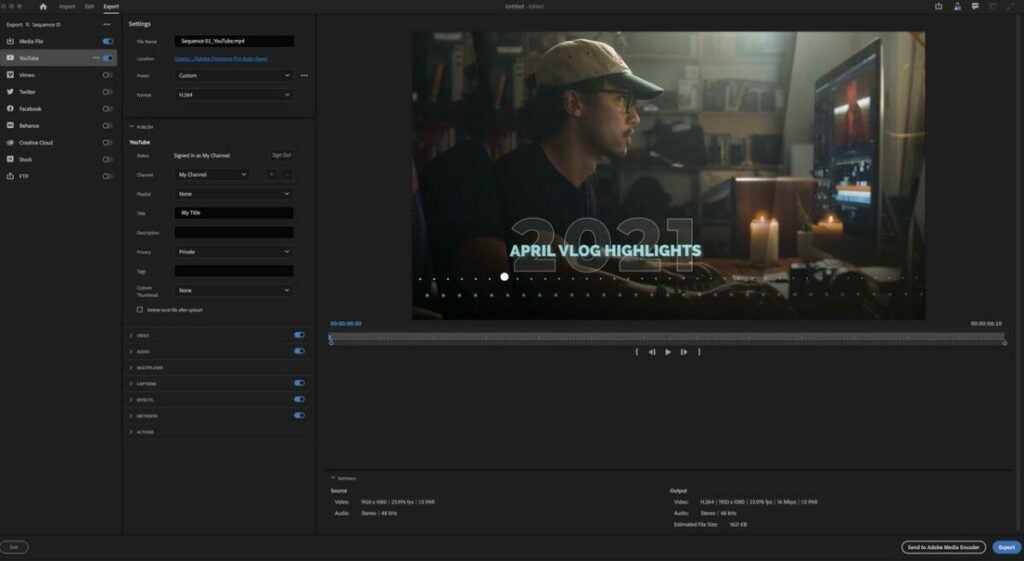
When you’re happy with your project, you’ll move seamlessly to the Export workspace. The Export mode gives you a list of handy export templates you can pick, from common social media sizes to high-quality media files. You can also select various formats together to export to all of them at once.
If you want to get into the details, Premiere gives you dropdown menus in plenty of advanced categories so that you can tweak your export specs to taste. If not, the interface lets you breeze past the specifics and just export your video.
Final verdict: Adobe Premiere Pro is the king of raw video editing
Whether you’re a novice video editor or a demanding pro, Premiere has the best for both worlds. Its large professional-level toolkit has plenty of simple entry points for newbies. The app runs and renders quickly on most computers and fits into an expansive ecosystem of products and services that let users create and collaborate easier than ever.
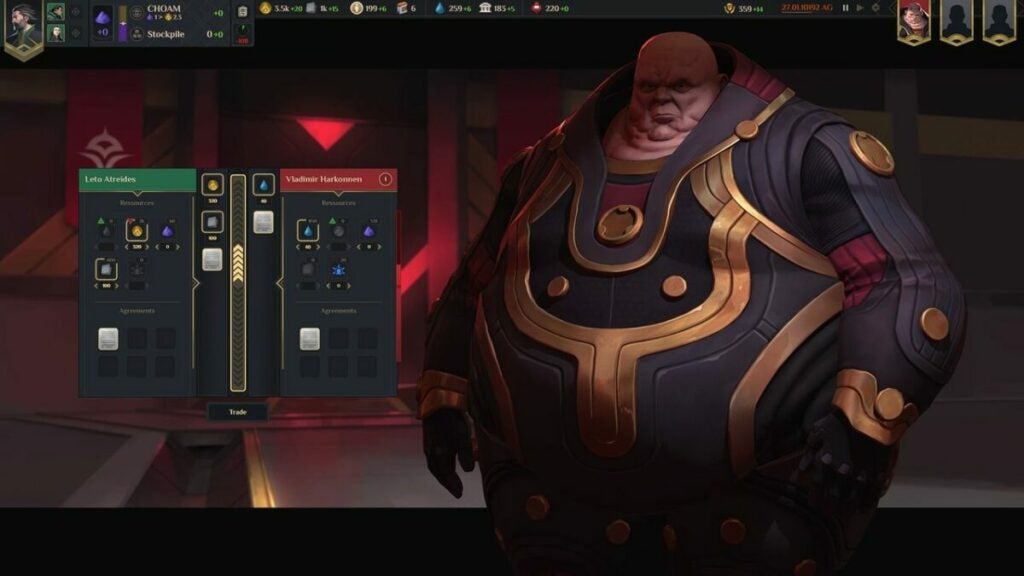
Developed by Shiro Games, Dune: Spice Wars is a science-fiction strategy game that takes full advantage of all the political intrigue of Frank Herbert’s expansive Dune Universe. Spice Wars follows up other real-time strategic adventure games from Shiro, including Northgard.
In Dune: Spice Wars, your objective is to lead factions and capture villages to take over the Arrakis world. You’ll have to harvest special spices to pay taxes to the Spacing Guild and achieve votes to become the leader. An ornithopter will also explore the lands to gather spices and avoid sand worms who will attack and kill them.
Utilize 4X strategies to get a general knowledge before gameplay
Dune: Spice Wars is considered a 4X strategy game, which means you’ll need to expand, explore, exploit, and exterminate. Keep these in mind before starting the game and adjust your settings to fit your skill level. You can choose to make the Arrakis map smaller, specify how many AI characters you will encounter, and even choose to conquer one singular enemy faction.
In addition, you can make it so your ornithopter is set to auto-recon so you can focus on the game without having to direct it around the desert. The harvester assigned to each village can also be set to an automatic setting and recalled back when they encounter sand worms. This will set you back 5% of spices though.
Strengthen your village with necessary resources to gain power and popularity
You will start with nothing as typical in an RTS, or real time strategy game where you play as the faction leader and create military bases to take over villages. Once you have obtained a harvester who is willing to mine spice for gold, or Solari as they call the currency in the game, you gain power to build up your resources whether through defense or trade.
You can keep your villagers happy and on your side to get the highest vote from the Spice Counsel. This requires building windtraps and hegemony for tech progression to create crafting workshops for your citizens to learn new skills in order to win the game.
Look to other elements than spice in rare regions
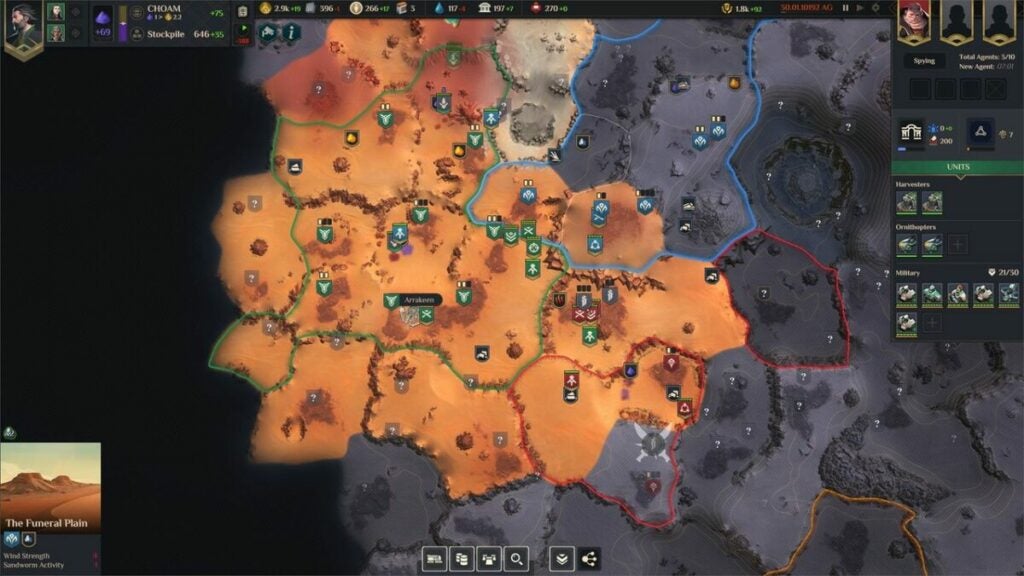
By unlocking new regions, you can also find new elements to help build up your villages and faction influences as a leader. Use your map to seek out special colors and hot spots when you’re in a specific area. Three vertical red waves can mean fuel cell energy, grey stone minerals increase the region’s plascrete factory output, and rare yellow orange stone elements you find upgrades your processing plant for more Solari.
Keep in mind to keep your military healthy with the right resources as they will lose energy traveling across unknown lands. Look to special equipment and staying in one area before conquering another for extra HP.
Stay close to the political gameplay of Dune: Spice Wars
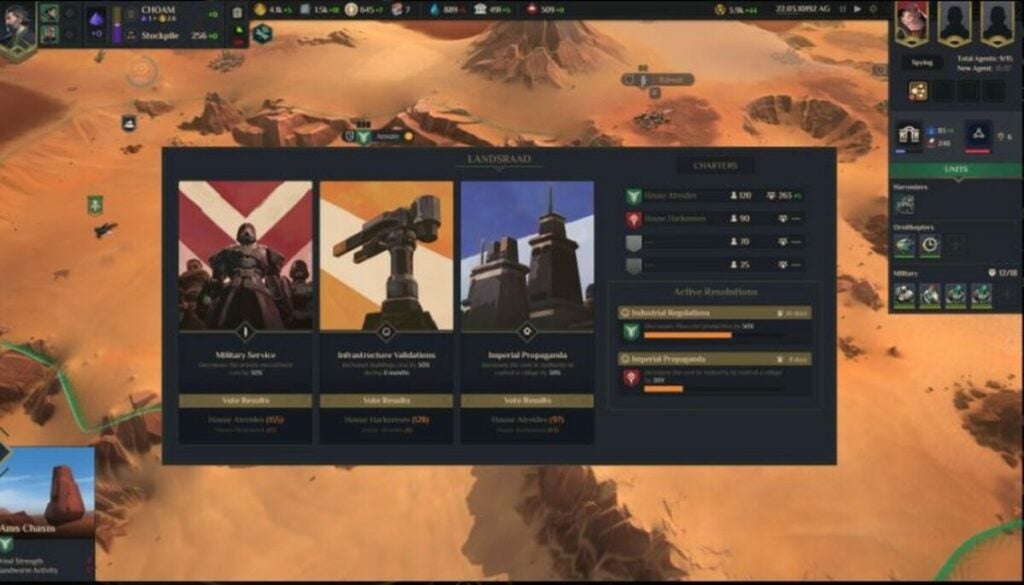
Your ultimate goal in Dune: Spice Wars is to become a political affiliate who overthrows your enemies with conquering villages for strengths and committing espionage against your rival factions. You will find yourself in a vote with Landsraad to press support or decline on decisions such as water upkeep and military control. Your character starts with 100 votes and increases with further gameplay.
Another addition is the technique of your secret agents assigned to your faction. They will provide intel as they gain more power and you can use the intel points to unlock extra votes when it comes time to meet the counsel – this can also include assassinations against your enemies!
Look to these three ways to win Dune: Spice Wars
Spoilers ahead! There are three key ways to win the entire game depending on your skill sets. The first is domination, where you have assassinated other leaders and destroyed enemy bases through the espionage technique. This is the “exploit” part of the 4X skill strategy.
The second way to win at your own game is hegemony. This currency is just like hit points in any video game and you will need 50,000 to collect throughout Dune: Spice Wars. These points can be collected through the long game with gathering spices and defeating enemy military units.
Lastly, you can win the game by governing your people and the world of Arrakis. This rare moment comes up within the Landsraad Council vote for ownership. Simply hold onto your leadership role for 60 days in gameplay and you can emerge a winner.
Use your experience with real-time strategy games to conquer Dune: Spice Wars
Politics, weapon tactics, and action gameplay are important throughout Dune: Spice Wars. You’ll have to use your skills as a mastermind in the factions as well as keep in mind that you’re also in control of villages and your individual plot to take over the lands. A great strategy is to monitor your stats and use your resources as quick as possible to stay up to date with the game. You can also fast forward and pause the scenes when you need a break.
Use espionage skills to spy on your enemies by viewing their statuses in order to increase your own point. Feel free to leave your harvesters to find spice or make the game your own by picking where they land and escape sand worms. Let us know in the comments any other tactics you use for Dune: Spice Worms and share this article to help your friends!
Norton 360 AntiVirus products are designed to offer all the cybersecurity features you need in one package. However, the range of offerings can be a bit overwhelming to those only familiar with the brand’s popular malware-scanning engine. The key to getting the most from Norton 360 AntiVirus is to understand how the product works and take advantage of its five core features, which are device security, cloud backup, VPN security, password management, and parental control.
Here are some tips on using each of these core functions.
Norton device security
Offering protection from viruses, spyware, and other online threats, Norton 360 is one of the most comprehensive security programs available. Its device security scanner is called the SONAR System (Symantec Online Network for Advanced Response). This antivirus system uses heuristics and file emulations to detect and remove threats that have not been identified by traditional means
The SONAR System is constantly updated with the latest threat information from Symantec’s Security Response team. However, to get the most from Norton 360, you need to make sure your product is set for regular updates. You can do this by opening the Norton 360 Control Panel and navigating to Update.
Of course, it’s also essential to run regular computer scans with Norton 360. It’s tempting to just stick with Norton’s quick scan option, which examines key areas of your computer in about five minutes. To get more out of your subscription, however, be sure to periodically use the full system scan. This could take longer, but you can use your computer during the scan, and tests show SONAR eliminates 100% of threats on average.
Norton 360 cloud backup
Losing data is one of the most common and frustrating computer problems. It can be caused by various issues, from hardware failures to accidentally deleting files. That’s why Norton 360 offers cloud backup as part of its comprehensive protection package.
With Norton 360 Standard, you get 10 GB of storage for your backups. This can be a bit low for many users, so we recommend upgrading to the Premium package that offers 75 GB. Premium provides this backup for up to 10 devices, which you’ll want to take advantage of to get the most out of Norton 360.
Norton 360’s cloud backup is easy to use and configure. You can set it up to run automatically or manually. And you can choose which files and folders you want to include in your backups. It’s smart to put all your important documents in the cloud backup since it also provides ransomware protection.
Norton 360 VPN security
Using a virtual private network is essential to keep your online activity private and secure, especially when using public networks. Norton 360 comes with a VPN service that encrypts your internet traffic and hides your IP address. This means that your Internet Service Provider or anyone else spying on your online activity will not be able to see what you’re doing.
Norton 360 offers VPN with 256-bit AES encryption speed, the highest level of encryption available. Norton 360’s VPN is also straightforward and has a no-logs policy, which means that your online activity is not tracked or monitored.
The best feature of the VPN protection, which comes with all Norton packages Standard and above, is that you get unlimited data. You may also want to take advantage of the option to change your IP location. This lets you get localized content from other countries.
Norton Password Manager
One of the most valuable features of Norton 360 is the Password Manager, which allows you to securely store your passwords and other sensitive information in an encrypted format. Do you hate coming up with new, strong passwords on your own? Then take advantage of the Password Manager’s ability to generate passwords, check password strength, and automatically change passwords.
The Norton Password Manager is available on all major browsers and platforms, making it a very convenient tool to use. To get the most out of this feature, enable two-factor authentication. This allows you to log in to your account even if your password is compromised.
Norton Parental Control
If you have children who are at the age where they can use their devices unmonitored, it’s important to set internet browsing restrictions. Norton 360 provides parents with the tools to protect their children from exposure to inappropriate content and contact with strangers.
With Norton Parental Control, you can set limits on what your children can do online and monitor their activity to stay safe. Be sure to take advantage of the Norton Family app, which gives insight data that you can use to create a healthy life balance between your kids and their devices. In addition, you can also set a curfew for your children so that they cannot use the internet during certain hours.
Take advantage of all your Norton 360 features
Taking full advantage of your Norton 360 AntiVirus subscription doesn’t have to be complicated. By following the tips above, you can ensure that you’re getting the most out of your investment. For more information, check out our article on how to use Norton AntiVirus to protect your computer.
ClipGrab lets you download your favorite YouTube videos or even videos off sites like Facebook. The open-source software makes it easy to convert file types, as well.
Let’s review the program’s main features and compare them to competitors.
The video download manager is totally free to download and use. As donationware, it operates thanks to the work of Philipp Schmieder Medien and any donations users wish to provide.
Originally launched in 2007, the download manager uses the GPL v3 license and is available in English, French, and German. It can be used on Linux, macOS, and Windows devices. While users can download media from multiple websites, the sites Dailymotion, YouTube, Facebook, and Vimeo work best.
Being able to copy and paste the video link is a fan-favorite feature.
What is “donationware”?
The term “donationware” simply refers to any software that runs on donations from users. The software is free to use and the donation is optional, but encouraged, and always stipulated by the user. It can also be considered “freeware” as it does not require purchasing a plan to get more features.
Is ClipGrab safe?
Some security programs might ping ClipGrab as unsafe but it is totally safe to use. As an open-source program, it is free to use for anyone who can download it.
Some anti-malware products mark ClipGrab as malicious due to installCore getting marked as a “potentially unwanted program.” However, there is a download option that does not use installCore available.
How do you use ClipGrab?
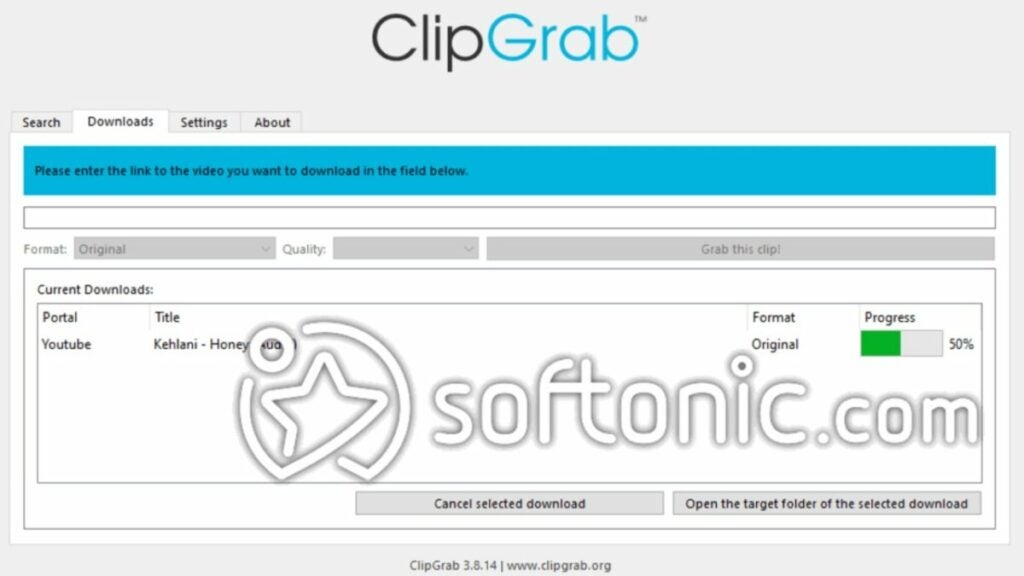
Using ClipGrab is almost easier than using a web browser. The interface is very simple with just four tabs at the top left as you can see in the image above. All of your downloads will be listed to view along with the file format and download progress.
Users can select which quality to download the video in such as low, high, or standard definition. You can also convert videos into various files such as:
OGG Theora
WMV
MP3
MPEG4
The “Search” tab allows users to find specific files more quickly. Then, you can just copy/paste the link or URL into ClipGrab. After a short moment of analysis, the program will prompt you to select a file format before downloading it.
ClipGrab competitors
There are many video download managers available (though not all of them are free). Some are restricted to specific operating systems, as well. Here are four direct competitors to ClipGrab.
Youtube-DLG
Some users have called Youtube-DLG the “best free YouTube downloader” available. It has a very similar interface to ClipGrab with the following tabs:
General
Formats
Downloads
Advanced
Extra
This tool does offer more supported audio and video formats. However, it does place limits on how many things you can download.
4K Video Downloader
4K offers many tools for multiple platforms. For instance, they have an app for downloading TikTok videos or Instagram Stories. But 4K Video Downloaderfocuses on Youtube and other websites.
Users can also download YouTube playlists or extract subtitles and get videos of 4K quality. But it does place limits on playlist downloads and it is not totally free to use like ClipGrab, but a “freemium” program. Typically, the full suite of features costs around $20 US; however, you can usually find it on sale.
yt-dlp
This command-line program works to download videos from YouTube and other sites. It works across multiple platforms and comes with significant Reddit support.
Anyone interested in a community around video downloading and management may consider this option.
Video DownloadHelper
This cross-platform program offers a freemium experience for downloading videos in web browsers on sites that use HTTP. Created by Michel Gutierrez, Video DownloadHelper now ranks as the third most popular extension in the Firefox browser.
The Premium registration costs $16 USD, but grants additional features such as:
Converting videos directly to mp3 files
Support for the conversion feature
Removal of Download Helper QR code on converted videos
Removal of HLS download restrictions
While the licensing fee is a one-time payment, ClipGrab does offer some of these features for free.
Verdict
ClipGrab is an easy-to-use and totally free file manager that lets you download videos off sites like YouTube and Facebook. It’s great for that simple task — especially if you have a good internet connection.
Beyond that basic task and the useful integrated YouTube search function, ClipGrab can be limited. Download it today to start cataloging your favorite videos.
PROS
Totally free to use
Includes a search function
Compatible with multiple websites and media types
Supports file conversions
Easy-to-use interface
Ability to select the download quality
Support for proxy servers
CONS
Slow download speeds for large files or across unstable internet connections
Not all files maintain the same quality
Can come with installCore, a potentially unwanted program
Microsoft’s latest flagship PC operating system, hasn’t exactly been setting the world on fire. Windows 11’s popularity and uptake has been slowing down recently. Windows 10 remains popular among Windows users and the Windows 11 launch hasn’t exactly been a smooth one with issues affecting key features such as Windows Defender. Even updates themselves, designed to improve usability, have been causing problems with a recent updatebreaking the Windows safe Mode, used by so many to help fix problems they come up against. Well, here at least there is some good news for the ailing flagship OS.
One thing that Windows 11 does have going for it is an engaged user community always on the lookout for features that need improving or fixing. This is why the Safe Mode flickering problem that made it unusable when users clicked the Start Menu, File Explorer or Task Bar was so quickly picked up and reported on the Windows 11 Feedback Hub.
Microsoft has released an Issue Details document outlining that the problem relates to the “Safe Mode without Networking” option. This means that the workaround for the problem is to only activate “Safe Mode with Networking”.
The good news, however, is that Microsoft is rolling out a fix, or maybe we should say rolling back a fix. The software giant has initiated a Known Issue Rollback (KIR), to address the issue. The company says that users should allow for up to 24 hours to receive the update and that a system restart may help to resolve the issue sooner.
When Microsoft launched Windows 10 it told us that it would be the last operating system we’d ever need on our PCs. We were assured that the software giant would continuously update windows 10 keeping us safe from online threats and up to speed with all the latest innovations and features. Now that we’ve been moved on to Windows 11, not all users are happy with the experience. If you have experienced any other problems with Windows over the last few months, either Windows 10 or Windows 11, you may want to check out our guide to the Best free Windows 10/Windows 11 repair tools.
League of Legends is known as being a really fast-paced battle experience, and while many enjoy that the average duration for a team fight these days is around 14 seconds, Riot recently alluded to the fact that the uptick in gameplay speed may have been an overcorrection. The studio has also announced that they intend to ‘slow the pace of combat’ in the coming changes.
We’re 13 years into League of Legends’ lifespan now, and, understandably, this isn’t your older brother’s LoL anymore. Gone are the days where team fights could keep you busy for as long as a full minute, and the entire game seems to have undergone a massive shift toward much shorter durations of combat. A recent Reddit thread acknowledges this change that has occurred within the game over the years and even saw the leading gameplay designer at Riot, Bryan Salvatore, known on Reddit as Riot Axes, address possible changes in the game’s future surrounding its fast-paced nature. When posed a question about time-to-kill in League of Legends matches, Ryan had the following to say:
‘We believe League of Legends is best when it is on average be[ing] fast-paced and exciting. But yeah I think it would be fair to say it has overcorrected towards damage, which is hitting away at clarity (‘I can tell what just killed me’ / ‘I can tell what I should have done differently’) and skill expression (‘That assassin/mage hit their whole kit, so they earned the kill’).’
Salvatore also pointed out that Riot’s primary focus at this stage has nothing to do with mage supports. He went further to say that even though the mages’ damage output could be construed as outsized, it’s not a new concept within the context of the game and is ‘not the cause for any recent damage creep.’
In another statement, Salvatore said: ‘Allowing players to pick damage-oriented supports and get enough gold to really scale with them was a major part of the changes that ultimately solved support autofill problems and we’d be hesitant to go back on those. We’d prefer to tune durability around the reality that many teams swap a defensive character (support or tank) for a damage dealing one and balance the two approaches against each other.’
As of yet, we have no established timeline for when the intended changes could hit the game. But one thing Salvatore was clear on is that the studio would reveal more information ‘within the next few weeks.’
While you wait for Riot to release more on the changes they intend to make to LoL gameplay, why not delve headfirst into our tips and tricks for League of Legends?
As a spinoff based on the hit web game, Wordle, Heardle tests die-hard fans’ knowledge of the music and soundtracks appearing in their favorite games. Resident Evil is the most recent game series to receive a Heardle version, and you may even find a few tracks from the popular Resident Evil 7.
One of the leading horror game leakers, Dusk Golem, created and put together the Resident Evil Heardle. Dusk Golem decided based on a poll left on Twitter asking what followers wanted to see more. Between the options of a strictly Resident Evil Heardle, a combination of Resident Evil and Silent Hill, or general horror game Heardle, the result came to a Resident Evil Heardle with 40.3% of the votes.
This Heardle game works by playing only a few seconds of audio from a track within any of the Resident Evil games. Players will then have to guess the song/music clip to ‘Stay Alive’. The music changes every night, so if you didn’t get it today, you might be able to survive tomorrow.
Dusk Golem also reported that one of the exciting elements of this game is that it includes official Resident Evil music that many die-hard fans might not even recognize. He also warned players that the song choices were specifically selected to give players some ‘deep cuts’, so be warned.
The Resident Evil Heardle is becoming a lot more challenging than many players anticipated. While all the levels aren’t notoriously difficult, some of them are nearly impossible for anyone that doesn’t eat, live and breathe the Resident Evil series. Many players can expect the occasional message that you’ve died after making too many wrong choices. Instead of a message stating ‘Game Over’ or ‘Unlucky’, you’re just told that you didn’t survive.
It’s exciting to see how new games are developed based on popular series. These games also give fans a way to continue enjoying their favorites in a new way. Many different Heardle options are available, from general music and video games topics to more specific games and series. If you’re a fan of horror games and music, check our Mirror Forge preview to see how incredible the free demo is.
Mirror Forge Preview | Intense horror gameREAD MORE
While Netflix is undoubtedly one of the top streaming platforms online, the media giant discovered a drop in sales towards the end of 2021. Many people share accounts with friends and family. The feature is made easy with the ability to add profiles on the main screen.
To ensure that it still made enough funds to support all its expenses, Netflix cracked down on account sharing. That shouldn’t stop you from enjoying the best experience in online streaming. Read further to see the best alternatives to Netflix if you’re not happy with the new limitations.
Why did Netflix stop account sharing?
Technically, Netflix isn’t removing account sharing altogether. The feature of adding another profile to your account still exists, but you’ll just need to pay morefor anyone else you want to add. You don’t need to worry about anyone living in the same house as you. They can still share without any additional charge.
The system works by detecting the I.P. address used to stream the movies and TV shows on Netflix. There’s no issue as long as everyone uses the same network. As soon as it sees there’s someone outside your household using your account, you can expect your monthly installments to increase.
Best alternatives to Netflix to stream shows
Fortunately, you’re spoilt for choice when it comes to alternatives to Netflix. There are plenty of other streaming services waiting for you to join them instead. Here are our top selections.
Besides the standard movies available for streaming on most platforms, HBO Max has several original films and shows. Some of the top names include The Sex Lives of College Girls, Doom Patrol, and The Flight Attendant. That final one stars Kaley Cuoco, a face you may recognize from the popular TV series, The Big Bang Theory.
You can stream on up to three simultaneous devices, which is lower than Netflix’s limit of four. The platform is available for most operating systems on computers, mobile, TVs, and gaming consoles. The one downside is that content changes more frequently than on Netflix. You’ll need to binge seasons a lot faster.
With the Marvel Cinematic Universe and Star Wars under the same umbrella, many streamers are signing up for Disney+. New original series and movies arrive on the platform monthly, including new content for children. Since it’s more family-oriented, it’s ideal for parents who worry about what their kids are watching on Netflix despite parental controls.
While Netflix is mostly universal in its distribution, Disney+ restricts which countries can access the content. May 2022 finally sees it open its virtual doors to South Africa, but it’s been primarily available in the United States and the U.K. since its inception. Still, it’s a delightful alternative to Netflix if you want a different line-up of shows. There are also several movies with Oscar awards jam-packed with famous stars.
Here’s another broadcasting service that loves to produce its own series and movies. One of the latest to arrive on Amazon Prime Video is The Wheel of Time, based on the bestselling books by Robert Jordan. Of course, if you already have an Amazon Prime account, you won’t even need to pay more than your current monthly subscription to see movies and listen to music.
Sadly, it’s not available on as many platforms as Netflix. Also, you can’t download content on Amazon Prime. You’ll need to rent or purchase the titles if you want to own them. Still, it’s a valid alternative to Netflix if you also plan on using your account for shopping online.
If you’re fond of cable television, we recommend you turn to Hulu. It has most networks available, so you can binge shows all day and night long. There’s also a live streaming option if you want to watch channels like CBS. While it may not appear as often, there’s a small selection of original shows.
As with cable TV, Hulu is hounded with adverts between shows and episodes. We still prefer Netflix, but it’s a viable alternative if you’re unhappy with paying more for extra accounts.
One aspect that Netflix lacks is live streaming. SlingTV is ideal if that’s what you’re after when it comes to online streaming. Many people moving from cable television switch to this platform to ensure they don’t miss any live sports or TV shows.
There are two reasons why you may not want to change from Netflix to SlingTV just yet. Firstly, the subscription becomes incredibly costly when you want to add other features and packages. It also suffers from buffering issues if you don’t have a strong internet connection. We know from experience that Netflix has never had this issue.
This streaming service combines the best of several worlds. You can watch original movies or switch to one of the live shows. There are plenty of sports, including WWE, which is an aspect that Netflix missed out on entirely. The best you’ll get is an interactive movie where you make decisions to escape the Undertaker.
If you’re an Xfinity customer, you can already watch Peacock shows for free. Where Netflix outshines Peacock is its ability to recommend shows based on your tastes and show you what’s trending. It’s also available on more platforms than Peacock.
All is not doom and gloom. It’s a small price to pay if you want to add family or friends to share your Netflix account. They’re already testing a subscription model in Chile, Peru, and Costa Rica where Netflix adds an extra cost for any additional members outside your household.
On the flip side, Netflix is busy looking into placing adverts on the platform for cheaper payment plans. It means you’ll need to put up with commercials, but at least you won’t need to pay as much to view the content.
Also, we’re not just talking about movies and TV shows. With the new gaming division, Netflix is looking to have more than 50 games on its platform by the end of the year. We suggest sticking around a little bit longer to see what else they have to offer.
Netflix is getting serious with its venture into video gamesDOWNLOAD
Just like pretty much everybody else on the internet, we here at Softonic have been tracking rumors of a Twitter edit button for years and years. The Twitter edit button news finally broke last month that the social media giant was finally working on the long-requested feature, with the Twitter Comms account posting that they’d actually been working on the feature for over a year. Well, now things have kicked up a notch further as leaked footage of the new edit button in action has come to light.
A Twitter edit button has for too long seemed like an obvious update for the social network to implement. You’ll know this if, like us, you’ve ever had to delete a tweet because of a typo or some other silly mistake. It’s not that simple, however. With people’s tweets often being cited in everything from articles to governmental reports, an edited tweet might actually attribute a citation to something that has a different meaning from its original intent. At least this is the main reason, Twitter has been giving for dragging its feet on this update. Well, it seems that Twitter has found a way to fix this potential problem and this leak proves it.
The ever-vigilant social media watcher Jane Manchum Wong has tweeted a screengrab of the Twitter edit feature in action. Interestingly, it clearly seems that Twitter still has a lot of work to do before the feature will go live.
the current unreleased version of Edit Tweet reuploads media (images, videos, GIFs, etc) instead of reusing them. an inefficient use of the bandwidth and media processing power, might be lossy too. plus it turns my video into an image (mishandling media type) pic.twitter.com/HjoIA0CZhO
Reuploading all media with every edit, as is currently the case, will put a lot of strain on the network and is a kink that will need ironing out before launch. It is becoming clear though how Twitter will deal with the potential misrepresentation of viral tweets issue. Wong has previously reported that all edits will in essence become their own tweets. This means that should you like or comment on a tweet that is subsequently edited, the edited version will actually become another version of the tweet and the original version you liked will still be available on the network.
Once a tweet has been edited it will show a little “Edited” tag, which you will be able to click to access the Edit History of the tweet. The history will list all the edited versions of the tweet with users able to see them all. If you click on an older version of the tweet, it’ll have a “There’s a new version of this Tweet” tag.
Although it’s clear there is still work to be done on this feature, it is good to see that Twitter has come with an elegant solution to a historic problem. To learn about another solution Twitter is testing, read our article on Twitter’s new ‘Unmention’ feature.