These days there are apps for getting pretty much anything delivered to your door from take-out food to groceries and more. The likes of Uber and DoorDash might be in for a bit of competition, however, as Meta has released details of a brand-new end-to-end shopping service that will work from within WhatsApp. The new service is only available in India for now, but that doesn’t mean it won’t be rolled out to other regions in the future. Let’s go through the details.
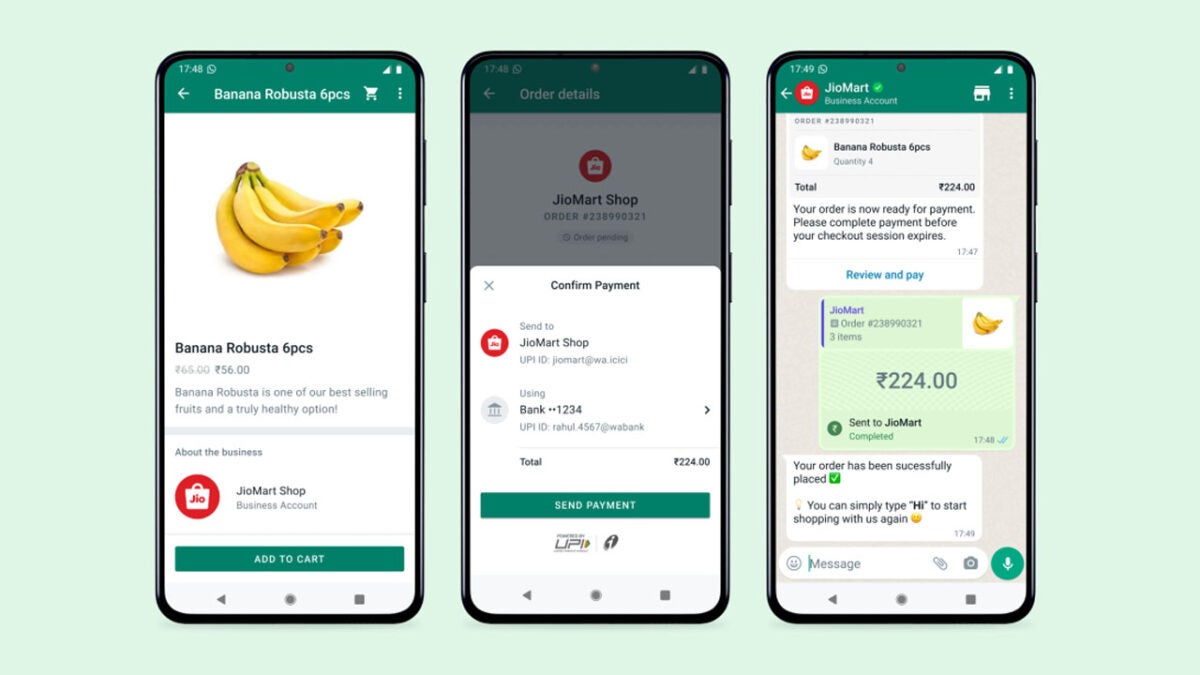
As WhatsApp’s parent company, Meta has released a blog post detailing a new partnership between the messaging app and the Indian supermarket chain JioMart. The partnership marks a considerable step up from WhatsApp’s WhatsApp Business app, which allows companies to set up official company WhatsApp accounts that clients can use to contact them. Instead, the JioMart partnership almost turns WhatsApp into a shopping app, complete with JioMart’s full catalog, a delivery and payment system, and more.
One of the main objectives of the partnership is to make online shopping much easier for users who have never done it before. All users have to do to start browsing through the JioMart catalog is open a chat with JioMart and say Hi. Once they have done so they will be able to, “to seamlessly browse through JioMart’s entire grocery catalog. Shoppers can add items to their cart and make a payment to complete the purchase — all without leaving the WhatsApp chat.”
As well as the blog post announcing the move, Mark Zuckerburg also took to Facebook to talk about the launch, with adds further weight to the idea that this more than just your average collaboration. Another giveaway is this line from the Meta blog post:
“The JioMart on WhatsApp experience will revolutionize the way millions of businesses across India connect with their consumers while bringing unparalleled simplicity and convenience to people’s shopping experience.”
It looks like in India at least, JioMart won’t be the only business getting this considerable upgrade over the standard WhatsApp Business offering. Does this mean, that an expansion could also reach out to other regions? We will have to wait and see.
There have been a lot of stuffy business-related updates coming to Google Docs recently as Google works hard trying to turn heads away from Microsoft word. That is all well and good, and they mark important updates for the app, but it is nice to get to report on an update that is bringing a little more fun into the app as well as updates that bring serious utility. Today we can tell you that it is now easier than ever to add emojis to Google Docs and we can show you exactly what you need to know.
Back in April, Google added emoji reactions to Google Docs, giving users the ability to react to comments and express opinions and give feedback on work in a less formal manner. Now, Google is making it easier than ever to add emojis directly into the text of your documents.
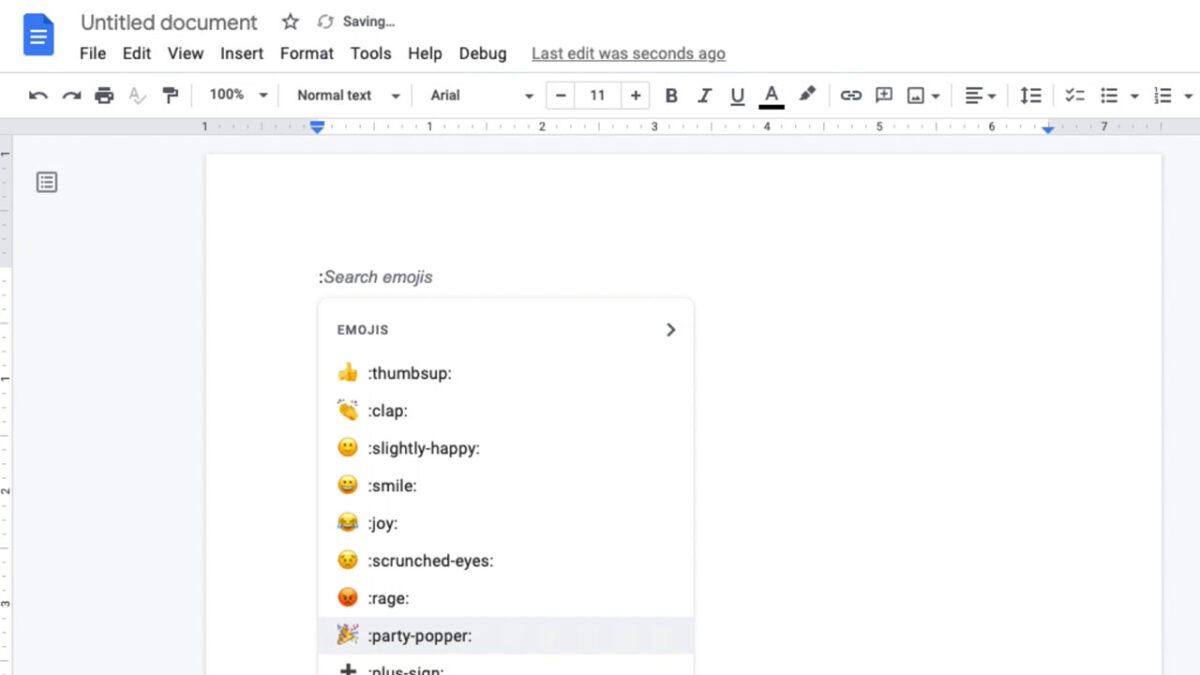
The new feature couldn’t be easier to use either. All you have to do is type in the @ symbol and then start typing out a word that describes the emoji you want to react with. Think of it like the @ symbol opening up an emoji search bar that you can then use to directly add emojis to your document.
What is also great is that Google Docs will provide you with a drop-down menu of emojis related to the word you are searching for. You could, for example, type in dog and then scroll down through all the different types of dog emojis available until you find the one you want. If you simply want to see a list of all the emojis available you can access that by typing @:.
This new update has already started rolling out to rapid-release domain and should have reached all of them by September 12. It will then start rolling out to scheduled release domains and will take 15 days to reach all users from then. The new update will be available to all types of Google Docs users including personal account holders.
Snapchat has been innovating cool new features ever since it burst onto the scene with its disappearing messages. There have been a couple of missteps, we’re looking at you Snap Glasses, but generally, new Snapchat features tend to impress., This latest update definitely follows that tradition and is one of those feature updates that makes you think, why didn’t anybody do that before? Let’s check it out.
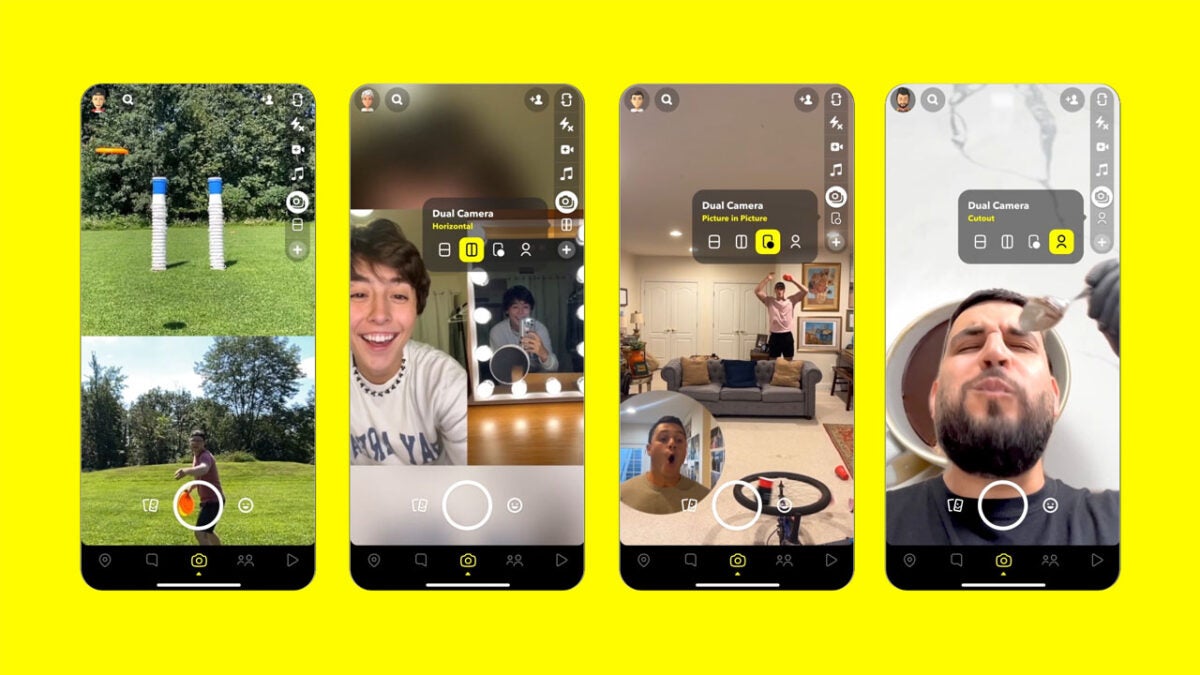
Snapchat has published a blog post detailing the rollout of a new feature called Dual Camera. The feature will enable users to take photos and selfies at the same time by snapping pictures from both of your smartphone cameras.
The new feature offers users four perspectives for their double pictures, which are: Picture in Picture, Vertical, Horizontal, and Cutout. According to Snapchat, these new types of photos will also work with other Snapchat creative tools such as music, stickers, and lenses.
Of the new Dual Camera update, Snap says:
“With one simple tap, you can start creating Snaps and Stories, or more polished Spotlight videos, with double the perspective. Dual Camera is a creative way for our community to capture exciting moments while being part of the memory – like rocking out at a music festival, or everyday moments like your culinary adventures in the kitchen.”
The feature has already started rolling out to iOS users who will simply need to look out for the new Dual Camera icon once they’ve updated their version of Snapchat. Android users will have to keep an eye out for the update, however, which is due to roll out in the coming months.
Once again, this is a cool update from Snapchat that feels like it should have been rolled out years ago. It is funny to think that millions of dollars have been spent developing 360 cameras and all Snapchat has done is take advantage of technology that almost everybody already owns. Sure, the pictures won’t offer full 360-degree images, but the average user isn’t really looking to take those types of photos anyway.
After the success of Mafia 3, we’ve all been waiting on news on the next installment. Hangar 13 celebrated the 20th anniversary of the series, delivering a statement that a new Mafia game is indeed in development. The catch is that you may have to wait a few years before the company provides a trailer for it.
Roman Hladik, General Manager for Hangar 13, shared what little news there is at this stage of design and development. The best he could do was let us know that the company is working on a new Mafia game, reflecting on how well the Mafia Trilogy was received. Also, he happened to mention that it was all for the fans.
A few months ago, Hangar 13 needed to let some staff go when Mosaic and Volt projects both received red lights, promptly cancelling them. With more jobs on the line, the company quickly made a plan for a project code-named Nero. It’s not clear if project Nero will become the new Mafia prequel, but it’s also working on a new title called Hammer featuring tennis.
With new technology available these days, maybe this will give Hangar 13 and Take-Two time to develop something epic for the game. It’s only at the start of the design cycle, but finding the funds for new investments may be an issue for the company. If it wasn’t obvious before, these gaming businesses will need to pull something magnificent from the gaming development hat.
Rockstar has recently started hunting for new employees for GTA 6, which might spur Hangar 13 to get started with the Mafia prequel. Both game brands have similar features, although Mafia has a more relaxed pace with Noir themes. However, the Take-Two company will have to deal with fewer staff.
We all knew it was coming. Netflix is in dire need of improved financial stability with Disney+ expanding across the world and stealing more subscribers. In a desperate attempt to fight back, it’s going to release an ad-supported payment tier at a lower cost.
Bloomberg was able to obtain some details in a new report that reveals how much this new Netflix tier will cost. Estimations set it between $7 and $9 per month. If you look at the current price of $15.49 for the full package, it’s roughly half the amount.
The reduced Netflix plan does come at a cost, if you’ll excuse the pun. You’ll have to suffer through at least four minutes of adverts per hour, which will feature before and during movies or shows. There are no plans to place ads after shows, as no one really sticks around that long. Unless it’s a Marvel movie, of course, which usually has a teaser in the credits.
We’re expecting to see the new ad-supported tier towards the end of the year. This package has two benefits for Netflix. The first is that it can draw in new subscribers so they can see if the streaming platform is worth using. When it comes to the ads, it will surely advertise upgrading to the Premium plan a hundred times a day.
The second benefit is that it will accrue income from the commercials. According to the report, Netflix estimates it can make up to $8.5 billion annually by the time we reach 2027. Not too bad for a company that thought it was doomed a few months ago.
To make sure it doesn’t lose too much money from password sharing, Netflix has already implemented extra payments. So someone else is watching on your account, expect your bill to be a bit higher soon.
Netflix starts charging for sharing passwordsREAD MORE
The latest version of Mozilla’s Thunderbird now supports leading-edge end-to-end encryption, and this feature is fully integrated into its main application. The new encryption tool is good news for those who use the service because the recent integration means the application no longer requires add-ons like Enigmail.
The OpenPGP nonproprietary encryption is free and lets you send encrypted messages directly from your Thunderbird account. You can also digitally sign your emails to alert your recipient that the message wasn’t modified in transit. Now, let’s take a closer look at how to get started with encryption in Mozilla’s Thunderbird.
Install the latest version of Thunderbird
The first step is to download Thunderbird. You will need version 78.2.1 or later to access the OpenPGP encryption tool. Thunderbird works with both macOS and Windows. If you use the Ubuntu operating system, Thunderbird comes installed by default.
Set up your Thunderbird email address
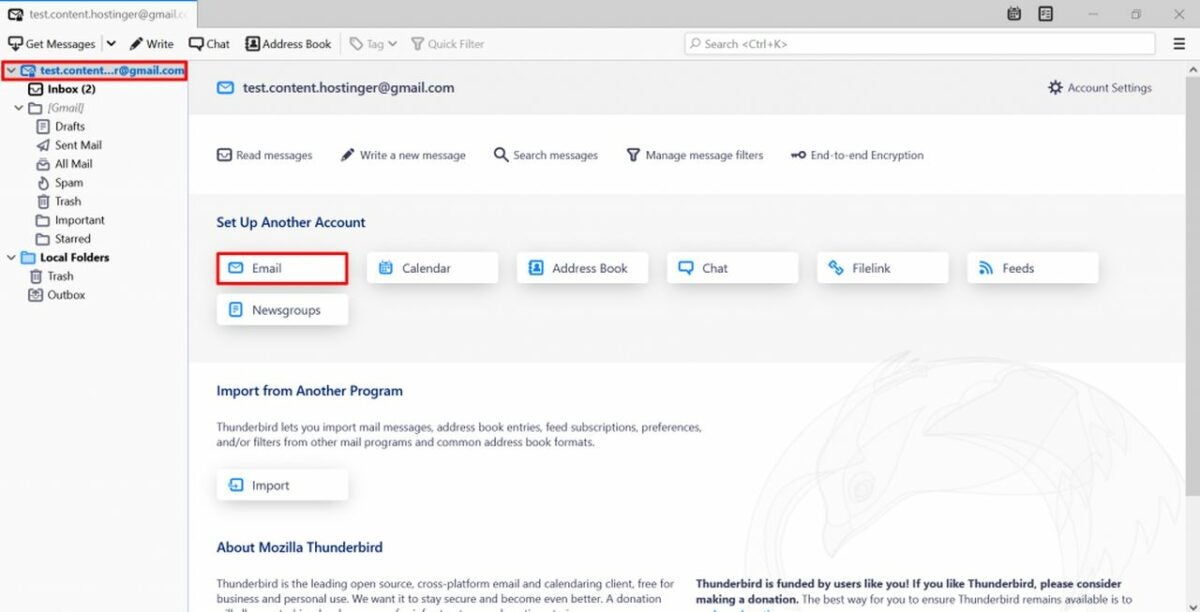
Once you’ve opened a Thunderbird email account, proceed to choose a personalized email address. This process is rather straightforward since Thunderbird walks you through each step in a series of prompts. If you have an existing Thunderbird email, you can skip this process. In that case, all you will need is your email address and password to get started.
After establishing your new email or logging in with your existing credentials, verify that the outgoing server is not set to port 25. Thunderbird blocks this port because of spam, so set your account to port 456 with SSL/TLS. Alternatively, if you have issues with port 456, try port 587 with STARTLS.
Generate a unique key pair
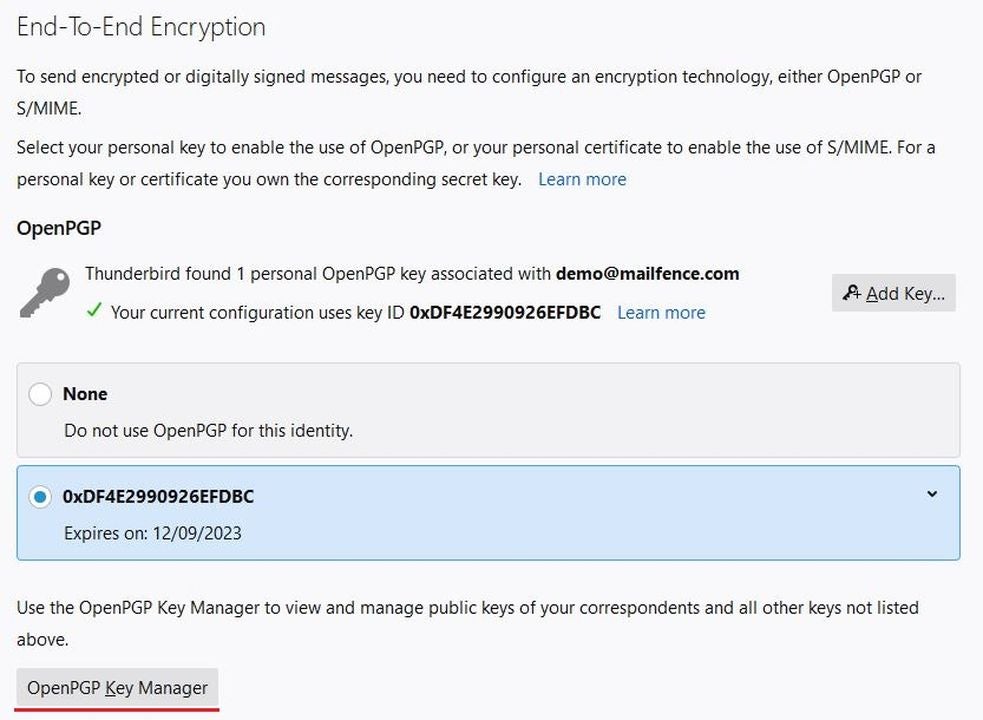
Now that you’ve opened a Thunderbird email account, you can click on the email address on the side of Folders in the side panel and open Settings. You will see End-to-End Encryption displayed in the menu. Click on this option.
Again, if you’ve already set up a key, then bypass this step. If not, you’ll see a message that reads Thunderbird does not have a personal key for your account. Alongside this prompt, you will encounter the option of adding your own key pair. Click on Add Key.
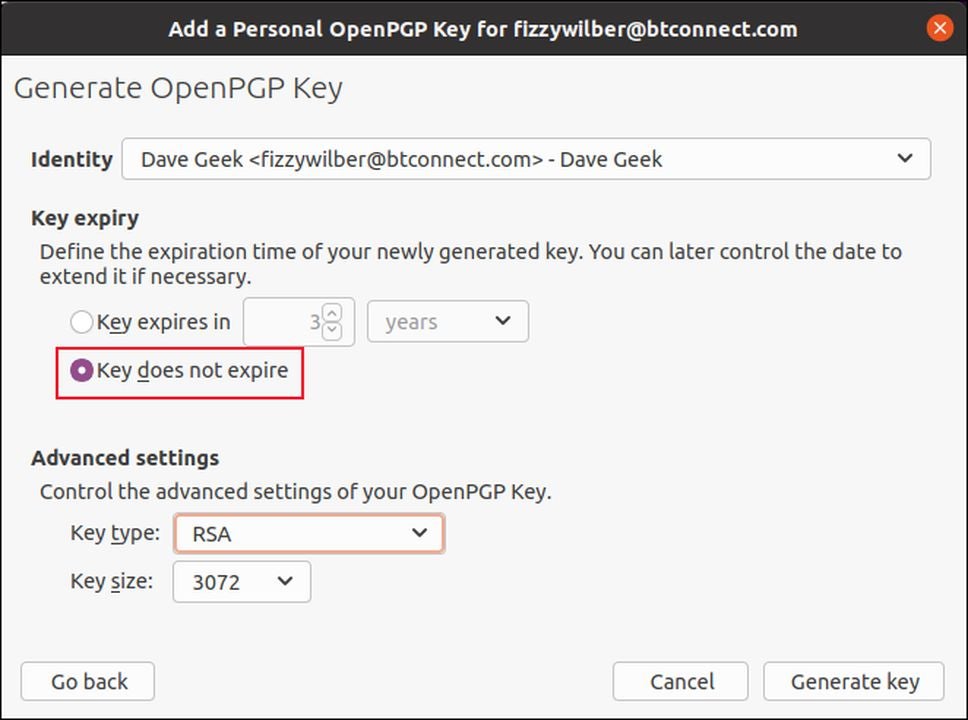
Next, confirm that Create a new OpenPGP Key is selected, and press Continue. Thunderbird does give you the option of importing an existing key if you have one. If that’s the case, you can proceed to import it at this stage of the setup. If you haven’t established one, go ahead and select the key type RSA and the key size 4096. Finally, choose Generate Key, and press Confirm. Now, wait for the Thunderbird email application to produce a unique key pair. You will see a green confirmation box indicating the key was successfully created. The new key pair automatically applies itself to your account.
Once the system generates your new personal encryption key, click Close. At this point, you’re essentially ready to start sending encrypted emails after completing these last few steps.
Configure Thunderbird to attach your public key and sign your emails automatically
If you want to ensure your outbound messages are always encrypted and attach your public key to every mailing, go to Account settings and navigate to End-to-End Encryption again. Check the Add my digital signature by default box. Now, under Advanced settings, find Attach my public key when adding an OpenPGP digital signature, and check this box.
Import your recipient’s public key
This process shouldn’t be overlooked. You need the key pair you generated in step three and your contact’s public key to send encrypted emails. Here are the procedures for importing one:
Whenever you receive a public key as an attachment, right-click on the file and choose Import OpenPGP Key. To locate publicly available keys, try searching for them by entering your recipient’s email. Find the user’s email in your inbox, and click on their address. You’ll notice a pop-up that reads Discover OpenPGP key. Click on this, and the recipient’s public key will display.
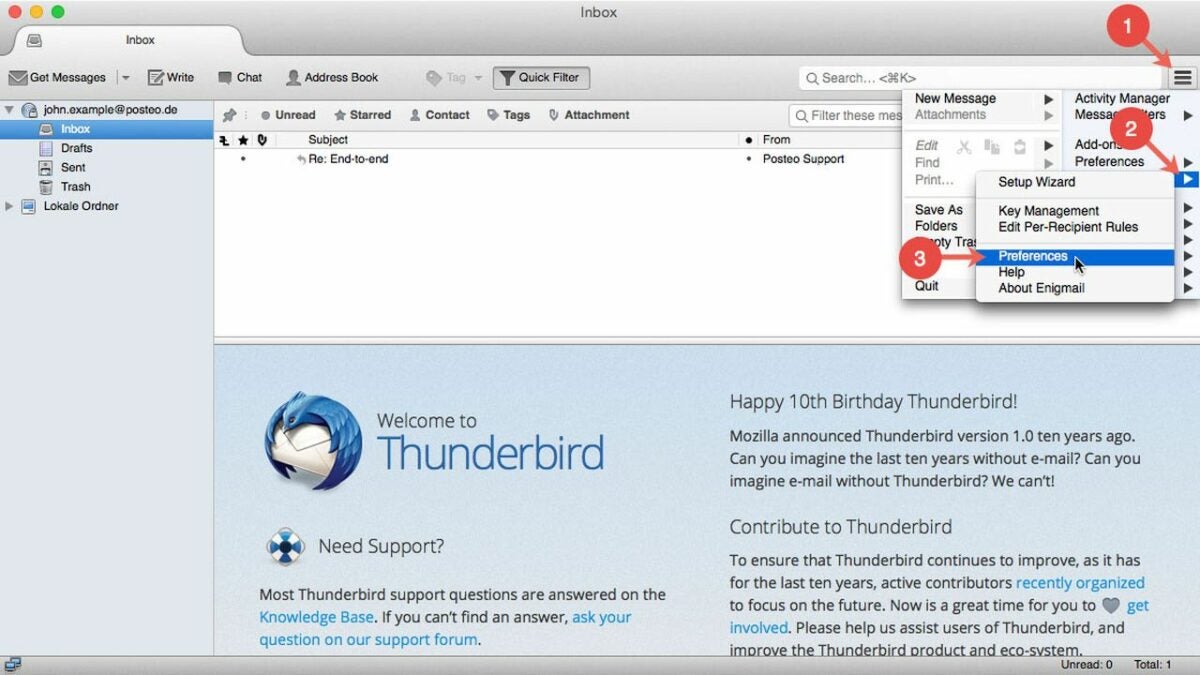
Thunderbird also lets you manually import a public key for users who display them on their websites or a key server. Companies that routinely handle sensitive information will often publish their public key so that you can deliver encrypted messages. To manually import a public key, select End-to-End encryption. Click on OpenPGP Key Manager. Locate File, and choose Import Public Keys from File. Now, you can select the OpenPGP Public Key from your device.
In the final steps, you’ll need to navigate to the Keyserver tab and choose Discover Public Keys Online. Click Okay to confirm the key’s validity and fingerprint. This completes the process of manually importing a public OpenPGP key.
Access free end-to-end encryption with Thunderbird
End-to-end encryption use is on the rise, and it’s a great way to add an extra layer of protection to your electronic communications. What’s most appealing about the Thunderbird application is that it’s free, and you don’t have to be an IT expert to set it up. For more on encryption, check out this recent article on how to use Encrypted Client Hello for a safer browsing experience on Microsoft Edge.
While cloud storage is becoming more popular, computing hardware remains a common way to store important data and files. However, computers are also fickle beasts that can glitch out at any moment. These errors sometimes result in vital information being lost or corrupted.
Luckily, you can restore any corrupt or missing files that were previously on your system via the simple-to-use Data Recovery app. In addition to being a completely free resource, the app can recover lost data in a manner of minutes. The next time your PC or phone eats an important file, be sure to have the Data Recovery app handy.
First things first, you must ensure you acquire the correct application for your computer. As there are many data recovery solutions clogging search engine results, the best bet is to click on Free Data Recovery download page. Upon clicking the green download button, a .zip folder will begin downloading on your system. To open a .zip file, you will need software designed to work with the file extension. If you do not already have such software, then 7-Zip is an excellent choice.
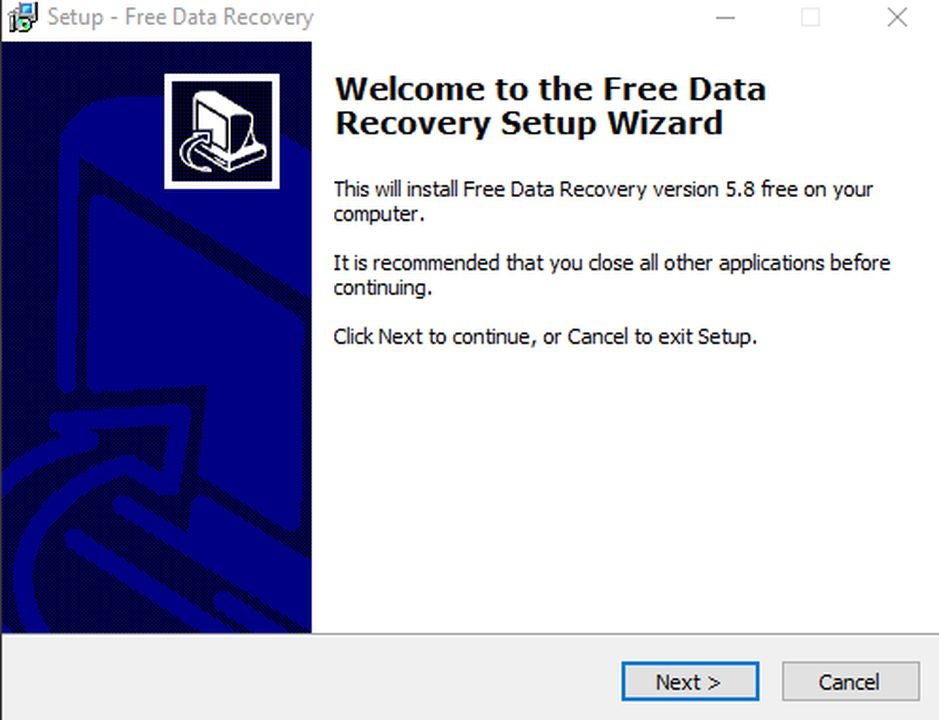
Upon unzipping the Data Recovery folder, click on the application file to start the installation wizard. Follow the simple steps to place the program on your device. If you wish to have a start menu shortcut or quick menu icon, be sure to check those boxes during installation. After the install, click the Launch Free Data Recovery box to have the software open immediately.
Select “data recovery” or “lost partition recovery”
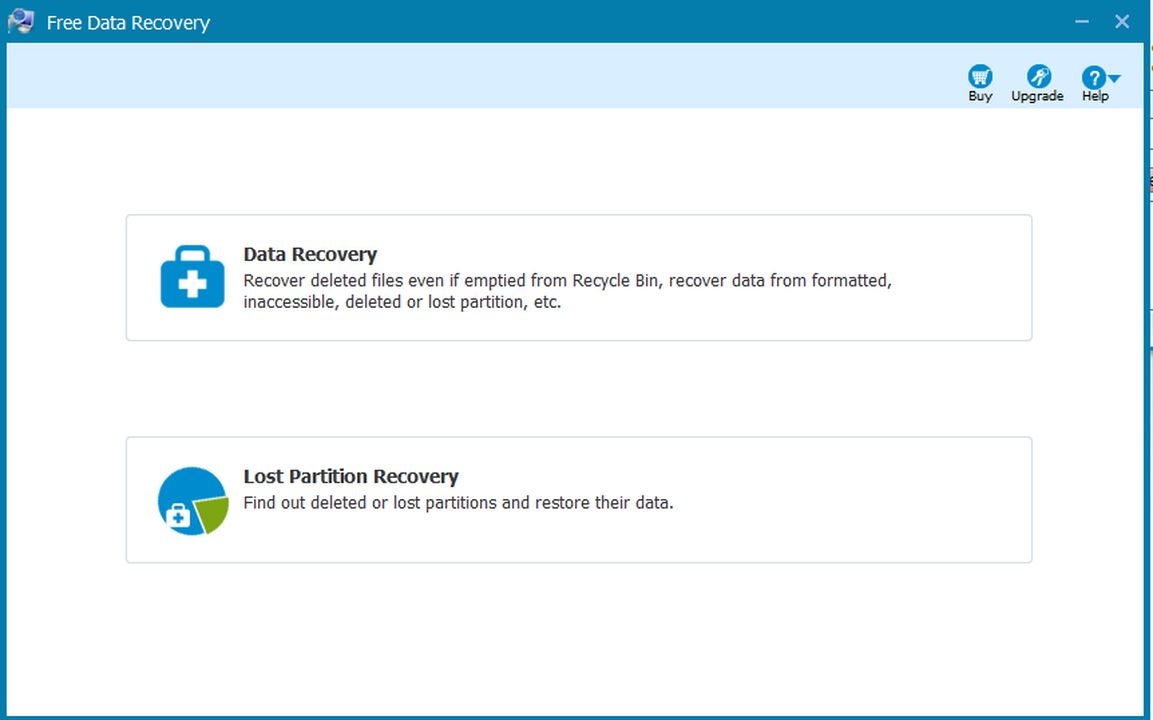
The first screen asks you to pick between Lost Partition and Data Recovery. The option you need depends on the nature of the information you wish to restore. Data Recovery is perfect for information from existing drives and folders. For instance, you can recover files from your C drive or downloads folder. Lost Partition Recovery is for entire drives and folders that have since been deleted. For example, you can recover information from a previously plugged in USB flash drive via the traces of the files that still linger on your hardware. Click the option that most closely aligns with your file recovery goal.
Using the data recovery feature
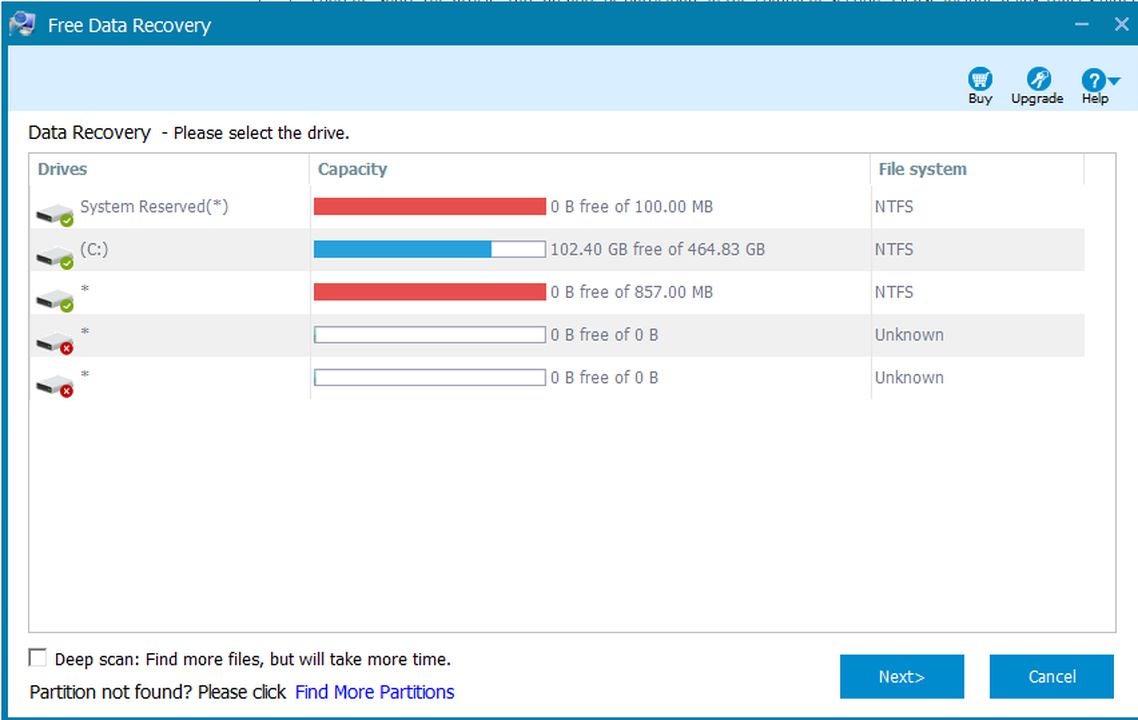
The Data Recovery screen lists all the visible drives and partitions on your system. Click the one you wish to scan and click next to begin the search for missing files. It is a good idea to click the deep scan box at the bottom of the screen before proceeding with the data recovery check. Although a deep scan takes longer, it ensures the maximum amount of data is restored.
Using the lost partition feature
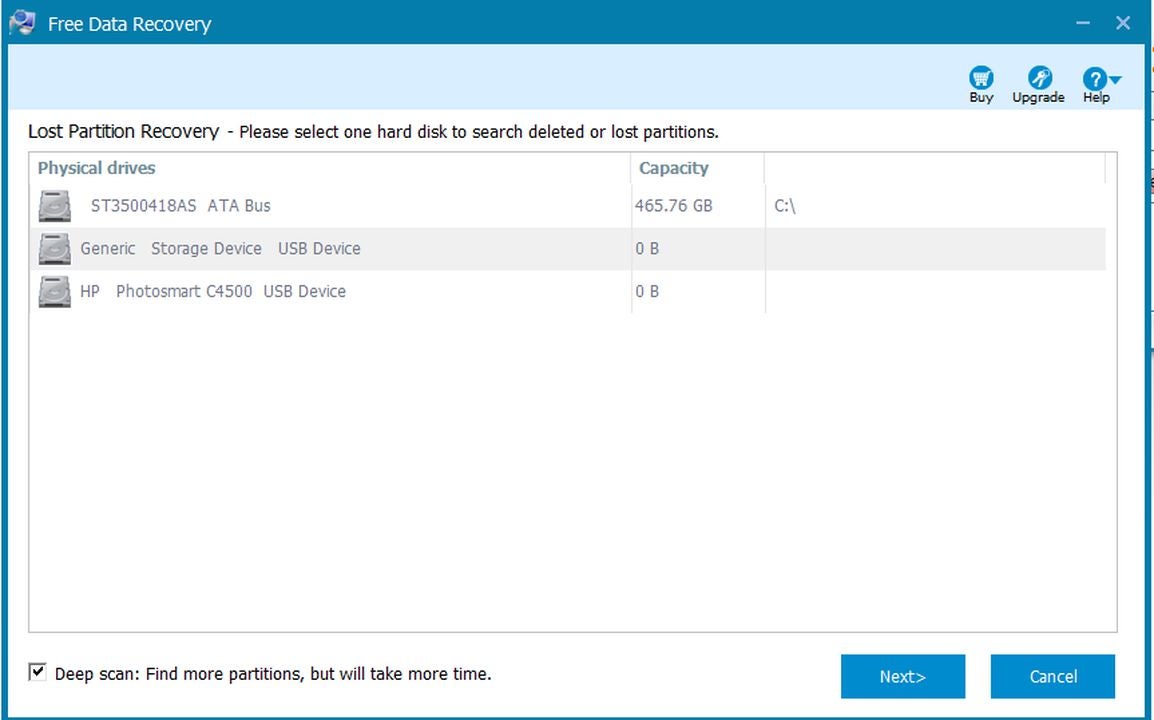
The Lost Partition screen allows you to select a drive to scan for lost file partitions. As with the Data Recovery screen, be sure to check the deep scan box at the bottom of the window to perform a complete search. After clicking on the drive you wish to scan, click next to begin the search. The search process can take up to an hour, depending on the size of files on your drive and the data transfer speed you are working with. Once the scan is complete, you can manage any file that is found as you would any other file on your device.
Backing up your data
The ability to restore lost files is incredible, but never losing them in the first place is even better. Managing your data with a cloud storage solution is a fantastic way to access your information on any device. Should one piece of hardware act up, you can continue right where you left off on another machine by redownloading the files from the cloud. A solid recommendation for cloud storage is Dropbox, a free application that gives all users 2GB worth of room to play around with. If you like the service, you can subscribe to acquire vast amounts of storage.
Gamescom 2022 has come and gone, and many of us gamers are still living in the aftermath of our dreams. While there are plenty of titles from AAA publishers, some indie games also caught my attention. It’s impressive what many of these independent developers are making these days.
I’ve decided to pull together a list of the top 10 indie games from Gamescom 2022. They should wet your gaming appetite so long while we wait for other titles to appear. Be sure you don’t miss my guide on the best games announced overall at the gaming convention.
Demons entering our world and destroying it has become a common theme in modern gaming. The Devil Within: Satgat forms a foundation with that concept, presenting a 2.5-dimensional perspective. The action looks intense from the gameplay videos shown at Gamescom 2022.
Even though you’re a hero trying to rid the world of evil, you eventually need to accept the dark powers to become more powerful. It will be interesting to see what abilities you’ll unlock. For now, the graphics and effects look outstanding.
I’ve just come from a weekend of testing Ikonei Island for a review, so it’s no surprise that Orbisia appeals to me. It’s an open-world survival game where you explore and craft. Sure, there’s a nice story that goes along with it, but that’s all I need to know.
Slated for December 2022, the main goal of Orbisia is to maintain the balance of the fantasy world. It will have multiplayer features, which means you can join with friends. While you may want to fight some of the creatures, it may be best to focus on strengthening your shelter first.
I love indie games that try something new that we’ve never or rarely seen before. When Wetory appears at Gamescom 2022, it blew many minds with the twisted gameplay mechanics. It may look like a basic game at first until you see how much is involved at a later stage.
Wetory has a combination of several genres. In some ways, it has elements of horror and mystery. It’s a 3D action platform game that also includes puzzles and battles. The premise is a small child that was abandoned, leaking colors, and determined to get them back. Each color has a different ability, which links to the skill tree. It’s truly fascinating.
Now here’s an interesting twist on a familiar fairy tale. Remember Pinocchio, the wooden puppet that wanted to be a real boy? In Lies of P, he’s a mechanoid, and he still has the same dream. When he arrives in the city of Krat, he receives a note that he needs to find Geppetto.
Lies of P will be a thrilling action-adventure game with stunning visuals and effects. The Gamescom 2022 trailer was breathtaking, and I can’t wait to see what Neowiz does with it. Also worth noting is how they use the lying trait as an objective toward becoming human.
I’m sure you’ve already heard about High in Life before Gamescom 2022, but it was good to see more highlights. With independent developer Squanch Games at the helm, you’ll have a good laugh at some of the things those alien guns have to say. Just be sure not to have your children around, as there’s some swearing involved.
The story focuses on aliens invading Earth to harvest humans for drugs. It’s a weird concept, but you’ll quickly take to your alien guns as you blast the alien cartel to smithereens. It looks like we’ll see it in action in December later this year. Of course, it depends on if they don’t delay it. You know, for quality’s sake.
Wizardry: The Five Ordeals
Are you looking for a classic dungeon-crawling game that hails from 2006 with improved interfaces and features? Wizardry: The Five Ordeals appeared at Gamescom 2022 with fans glad to see the return. It retains most of the retro look and functions, but you’ll find more intuitive gameplay elements.
I’ll be honest; I didn’t get much into dungeon-crawling games back in the day as I was told Dungeons & Dragons was evil. While I might have missed out on it in that period, it will be nice to get my hands on Wizardry: The Five Ordeals. I like that you can choose various scenarios, at least.
If you can’t wait anymore for Diablo IV, you’ll be happy to see ANVIL finally leave Early Access in the next year or so. With an initial release in December last year, you use machines called Breakers to visit distant galaxies and planets. The goal is to find vaults, fight the aliens guarding them, and then loot the buildings.
The fighting mechanics consist of shooting and evading while unleashing your abilities. ANVIL will ask you to grind away at the planets, as they randomly generate resources. Even if you die, you can rebuild the Breaker with the earned experience and make it more powerful.
Ever since Among Us became popular, we’ve seen a plethora of social deduction games appear. Gamescom 2022 was no different with independent developer Mumu Studio entering the scene with DUBIUM. It’s very similar in terms of a space shuttle and science fiction, but in a realistic 3D environment.
Even the premise is the same. All crew members need to attend to tasks to make sure the spaceship survives and everyone doesn’t die. One among them is a traitor, wanting to escape the ship and make sure no one is left alive. I think DUBIUM is going to be surprisingly popular when it launches.
For the last two indie games from Gamescom 2022, I decided to aim for two mobile titles. First up is Angel Stone, an RPG game by Skywalk. It’s a dungeon crawler with PvP elements that appear to have excellent graphics.
There are different classes like you’d find in Diablo Immortal, and there’s plenty of action on the battlefield. Each class has a different set of skills you’ll have to unlock. You’ll also have timed quests in some situations, so the pressure will be on you to complete them.
Here’s a team battle game that features football as the main element. ZOOSPORTS – The Football will have interesting characters and playing fields with only two buttons on mobile devices. The beta is already out for testing, but I’m expecting more updates as the year progresses.
Each match is only about three minutes long, so you’ll have to have your fingers and wits ready. There is a small element of strategy involved. It should be noted that they’re talking about American football as opposed to soccer. You can expect some tough matches ahead.
Valve has started rolling out a brand new Steam app for mobile devices. While the app is already partially up and running, not everyone will be lucky enough to give it a go yet. Valve has said that it plans on doing a public release, but only once the app works on ‘many different phones and devices.’ For the moment, the app is only available as part of a very limited beta test.
Valve is optimistic about their new app, though. In a recent blog post on its website, the company delivered a few details about the changes that have been implemented in the new app. We’ve rebuilt the app on a new framework and modernized the design.’ In a witty aside, the company stated that the reason for the new app was ‘2015 called and wanted their app back.’
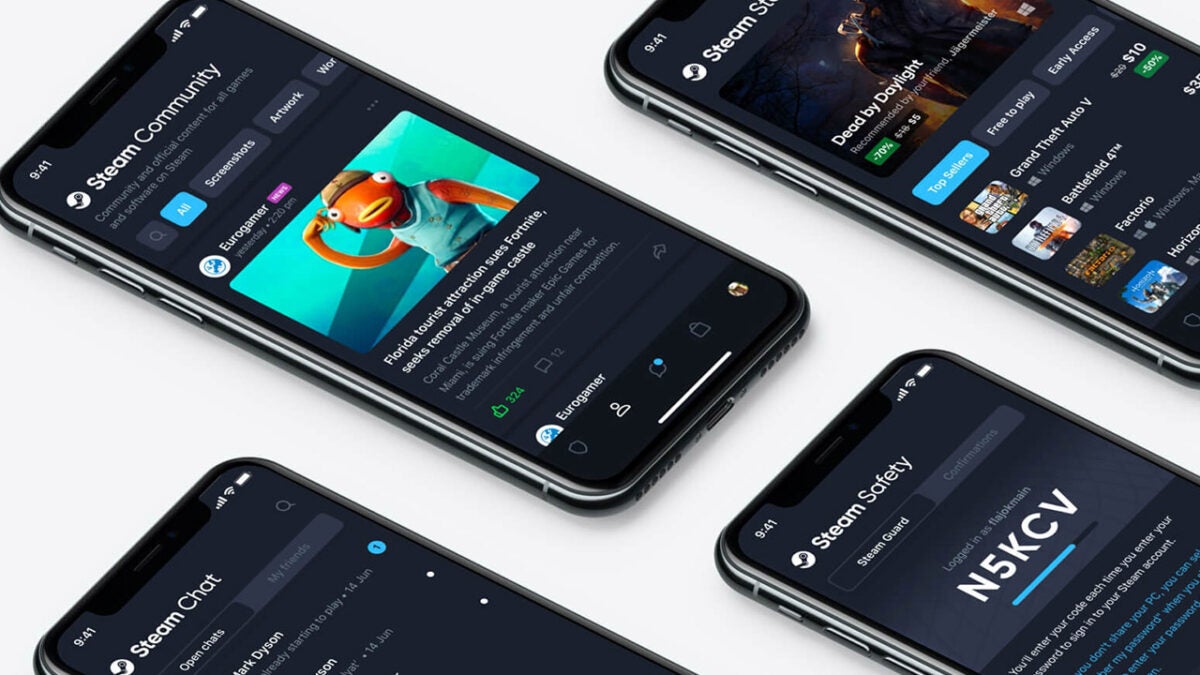
Valve elaborated further; ‘You’ll still be able to browse the store, get Steam Guard codes, and confirm trades, but now the app comes with QR code sign-in, smarter notifications, an improved Library, and multi-account support.’
Valve ended the post off with an appeal that those given access to the limited beta deliver their feedback on the product as soon as possible. That way, the company can ‘test our assumptions, learn what you like and don’t like, and find things that need to be fixed.’
In other Valve news, the company recently updated its desktop Steam client. Fans of the PC gaming utility have fallen in love with the features of the new update. Why not check the update out for yourself to see what all the fuss is about?
Spaces is an old Google app that aimed to muscle in on Slack’s territory as the workplace chat app of choice. Even though the app is no more, the feature set is as Spaces simply became a part of Gmail rather than having its own app. Google has recently announced details of a Gmail update that will make using Spaces much easier and will likely help users who weren’t aware of it get to know the feature better. Here is what you need to know.
Google has announced via a Google Workspace Updates blog post that it is rolling out a Gmail update to all Google Workspace users. The update is specifically focused on Spaces and will make all of the Spaces at your workplace more visible.
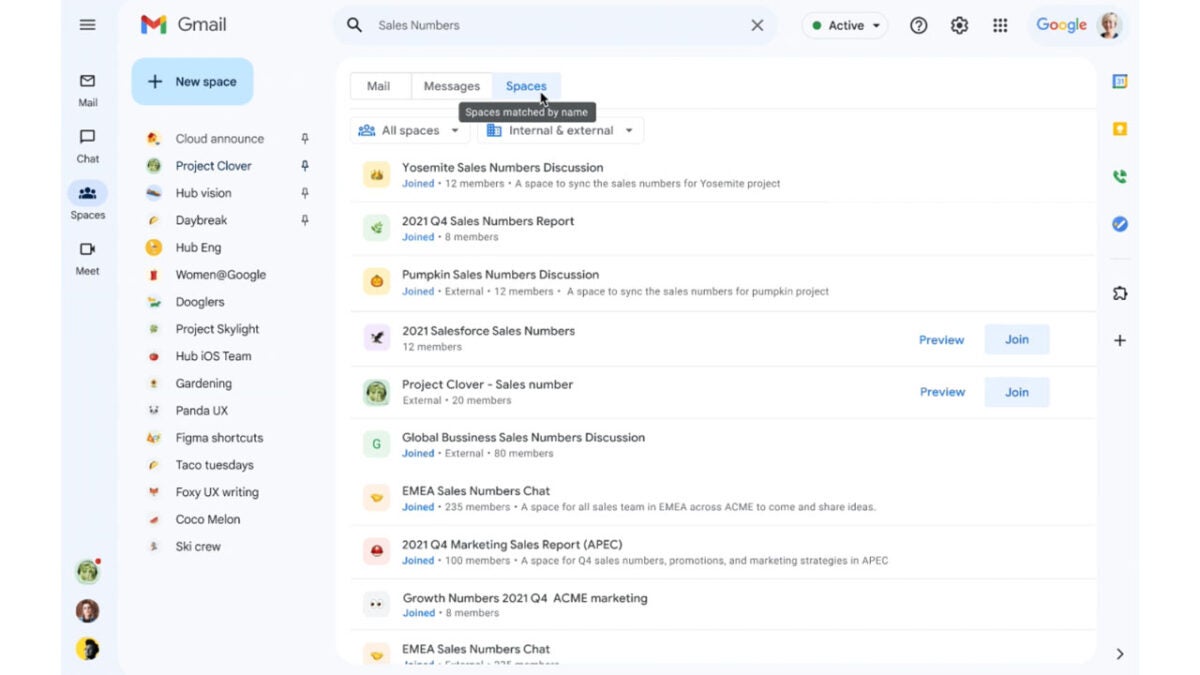
Gmail search is getting a Spaces boost meaning users will be able to search for Spaces using the Gmail online search function. This means that when users carry out searches using the Gmail search function, as well as the regular results, they will now see a list of Google Spaces related to the search term. Furthermore, these will not just be Spaces that the user has joined, either. It will present a full list of all public Spaces as well as any private ones the user has been invited to. The update will also enable users to preview the Spaces before joining them.
Google says that the update is an important one as more and more workplaces are taking advantage of the feature to help foster professional communities between their workers, saying:
“As the number of spaces within your organization continues to grow, we’re offering a better way for you to discover and find the exact space you’re looking for, while also providing a path to join spaces for specific teams, projects, shared interests, and more.”