Starbucks will open its first store in the United States built with 3D printing technology this Friday in Brownsville, Texas. This location, which will be self-service only, stands out for its compact design and ribbed walls that mimic stacked tubes. The construction process was largely carried out by a computer-controlled robotic arm, which poured layers of concrete, one on top of the other, to shape the building. A robotic arm builds the new and innovative Starbucks location This step places Starbucks among the few major chains that have experimented with 3D printing in construction […]
Starbucks will open its first store in the United States built with 3D printing technology this Friday in Brownsville, Texas.
This location, which will be self-service only, stands out for its compact design and ribbed walls that mimic stacked tubes.
The construction process was largely carried out by a computer-controlled robotic arm, which poured layers of concrete, one on top of the other, to shape the building.
A robotic arm builds the new and innovative Starbucks location
This step places Starbucks among the few large chains that have experimented with 3D printing in commercial construction, a technology that, until now, has predominantly been used in residential construction.
Although Starbucks has not confirmed whether it will open more stores of this type or why it chose Brownsville, the opening is generating curiosity among local residents, who have been closely following the progress of the construction.
The implementation of 3D printing in construction still carries higher costs compared to traditional techniques, according to industry experts. Andrew McCoy, associate director of research and innovation at the Myers-Lawson School of Construction at Virginia Tech, stated that this technology could help address the labor shortage and streamline the construction process. “Technology is advancing, and it will soon be more cost-competitive,” he said.
James Rose, director of the Institute for Intelligent Structures at the University of Tennessee, also expressed that, while the technology is still in its early days, the various current applications are a positive sign of innovation in the industry.
Local observers like Faviola Maldonado, former owner of a nearby jewelry store, comment that the store is an example of “high technology,” highlighting its uniqueness compared to other establishments in the chain.
Tesla has announced plans to ramp up production of its highly anticipated electric semi-truck, the Tesla Semi, at its new factory adjacent to Gigafactory Nevada, aiming for volume production to commence in late 2026.
The vehicle, which was originally slated to enter production in 2019, has faced multiple delays, pushing back Tesla’s timeline significantly.
The automaker targets an ambitious production capacity of 50,000 units per year once operations are fully underway. In a recent update, Tesla confirmed that construction of the new factory is complete and that efforts are now focused on deploying the production lines necessary to manufacture the Semi.
Production Problems Force Ryder to Cut Tesla Semi Order from 42 to 18 Trucks
However, challenges remain as initial customer Ryder has reported further delays and a substantial increase in costs associated with the Tesla Semi. Ryder has now reduced its initial order from 42 to just 18 trucks, further complicating the vehicle’s market introduction.
The company’s expectation for deliveries has also shifted to later in 2026 instead of the earlier anticipated timeline.
When the Tesla Semi was unveiled back in 2017, base prices were set at $150,000 for the 300-mile range version and $180,000 for the 500-mile model, with a premium “Founder’s Series Semi” priced at $200,000.
However, since the launch of the production version in late 2022, Tesla has not updated these prices, despite speculation of potential increases. As users await clarity on pricing, interest in the vehicle’s capabilities and performance continues to grow.
Industry observers remain cautious but hopeful, aware that while Tesla has vowed to iron out production issues, the dramatic price changes noted by Ryder can affect trust and demand for the Semi as the trucking industry continues to evolve toward electrification.
Japan is experiencing a significant change in its work dynamics, marking a 180-degree turn in the traditional loyalty of workers to their employers. According to a survey conducted by the job search company Mynavi, approximately 45% of full-time employees in the country practice what is known as “quiet quitting,” a phenomenon that involves only meeting the minimum requirements at work, without seeking satisfaction or advancement opportunities. This change is especially notable among younger generations, where 46.7% of workers in their twenties identify as “quiet quitters.” The […]
Japan is experiencing a significant change in its work dynamics, marking a 180-degree turn in the traditional loyalty of workers towards their employers.
According to a survey conducted by the job search company Mynavi, approximately 45% of full-time employees in the country practice the so-called “quiet quitting,” a phenomenon that involves only meeting the minimum requirements at work, without seeking satisfaction or opportunities for advancement.
This change is especially notable among younger generations, where 46.7% of workers in their twenties identify as “quiet quitters.”
Some 45% of full-time employees in Japan are “quiet quitters” — workers doing the bare minimum to meet their job requirements — according to a survey by job-matching company Mynavi. https://t.co/dgpAO0Np68
Young Employees Embrace “Quiet Quitting” in the Japanese Labor Market
This data reflects a growing trend towards the reconciliation of work and personal life, an aspect that has become increasingly relevant due to the stress and long working hours that previously characterized the Japanese work environment.
Additionally, the study reveals that 60% of workers who practice quiet quitting are satisfied with their life decisions, longing for a healthier balance between work and leisure time.
More than 70% of these respondents believe that feeling fulfilled at work is closely linked to their personal life, a clear indicator of how work values are evolving.
On the other hand, 56.9% of the surveyed employees admit that, if they could avoid it, they would not want to work. This feeling resonates with the idea that the relationship between work and personal life should be holistic, enriching each other mutually.
Experts like Akari Asahina, a researcher at Mynavi’s Professional Research Laboratory, suggest that to adapt to these changes, companies must embrace the diversity of workers’ values and offer flexible work styles that reflect these new priorities.
You’re under a tight deadline. Your client is waiting on you. And yet, here you are rummaging through files like ‘Final_v2_Updated-v7_Final-Final.ai’. You manage to uncover ten iterations of this identical logo. One has the wrong color profile. Another is outdated. The actual final version? Still missing. If you’re a creative type, that probably sounds familiar, right?
Managing creative assets shouldn’t feel like detective work, but for many of us, it does. As a photographer, designer, or a member of a team syncing across devices, the volume of content grows fast. The whole “structuring” part? That rarely comes into the equation, though we all know it should. Digital disarray drains your time, clouds your focus, and quietly derails productivity. Looking for a solution? Enter Adobe Bridge.
In today’s article we will discuss why creative workflows often become disorganized, introduce Adobe Bridge’s advanced features tailored for creative pros, and present how it simplifies your workflow to save you precious time.
Why Creative Work Gets Messy
None of us want to become disorganized, but it’s not uncommon for your files to get out of hand when you’re dealing with client work, revisions, deadlines, and threads of feedback at the same time.
Here’s what that usually looks like:
File names that make no sense two days later
Assets saved somewhere… but you’re not sure where
Three “final” versions of the same file, none of which are actually final
A folder system that felt clever at the time but now lives across four platforms
These things slow down solo creators by forcing them to waste time finding things, get distracted switching between folders, and struggle with uncertainty about which one to trust. They make problems multiply exponentially for teams. Someone edits the wrong asset, a critical revision goes missing, and then everyone wonders how long they will be blocked from progressing while they sort it all out.
Most creative individuals burn a huge amount of hours every week simply searching for files or redoing missing assets they can’t find. What might initially feel minor is a constant drain on your time, energy, and creativity.
Understanding the True Causes of File Chaos
In most cases, file management is not caused by carelessness alone, but rather it is a combination of behavior, process, and tools that do not work well together. Here are a few examples of what we mean:
Ad Hoc Storage Practices: Most artists begin small, saving files hastily without a plan for the long term. It may suffice initially, but it falls apart as projects increase and file numbers scale.
No Common Structure: With no shared structure, everyone creates their own rules. Files become scattered across a variety of personal systems, and that makes collaboration across those systems cumbersome.
Overloaded Drives and Tools: Local drives quickly become filled with files and eventually your storage clutters, access speed slows down, and you’re predisposed to human errors or duplication if not maintaining your system on a regular basis.
Lack of Unified Search and Tagging: Even if the files are well-organized, inconsistent tagging or no searchable metadata makes it difficult to quickly find them. This is exacerbated in hybrid situations where teams constantly switch between apps or storage systems.
Collectively, all of these points will generate friction without you even realizing it. Each one stacking more complexity, making it more difficult to remain productive.
Quick Wins to Organize Your Files Right Now
Without the most recent tools, you can still substantially improve how you organize creative assets. Here are some useful tips to maintain your files organized:
Use familiar Naming Conventions
Develop clear, consistent file-naming conventions that your team can readily incorporate, streamlining file retrieval, and versioning management.
Implement Basic Tagging Systems
Although it’s more work upfront, manual tagging systems will enable you to sort through and locate files more quickly. Tags must be exhaustive as well as consistent so that they address all potential search situations. Use metadata within files or save your tags in a text file by the same name as the asset so that you can search for them later by keyword.
Create a Clear Folder Hierarchy
Create a standardized folder organization template for use across all projects. Consistency makes it clear to everyone where files should be located and stored, saving everyone time searching for them.
For instance, while it may vary based on project, you might utilize a template like:
ClientName_ProjectName/
01_RawAssets/ [Originals straight from the camera or source]
Try to keep all project files together in one repository wherever you can. This might be a server, cloud solution, or a digital asset management platform where everyone is using the same version of every file.
Recognize the Limitations
These Do-It-Yourself approaches, although effective to a certain extent, might not go far enough for professionals. This is particularly true within bigger or high-demand teams. Manual systems become clunky and vulnerable to mistakes. They do not possess the dynamic functionality of AI-empowered ones, such as automated tagging and built-in search mechanisms, which can grow with your team’s demands.
By recognizing these boundaries, you will better understand the importance of investing in specialized solutions as your projects become more complex and scaled.
Adobe Bridge: Solving Your Asset Management Chaos
You can go only so far with manual approaches, but there will eventually come a point where the number of files and complexities of digital content outpace even a high-quality do-it-yourself solution. If you’ve ever thought that there must be some easier, more straightforward means of managing your projects, then you’re not alone.
There is an industry-standard, go-to tool for asset management, and you’ve probably heard of it before. Adobe Bridge is Adobe’s solution built to simplify asset management headaches. It makes it easier to find, organize, and use your creative files, no matter how many you have or how scattered they’ve become.
This is how Bridge specifically addresses the typical problems we’ve already mentioned.
Visual Search Fuelled by AI
Rather than using only keyword tags, Bridge’s artificial intelligence driven search identifies visible content within your documents. For instance, searching for “beach sunset” or “concept logo” returns results based on content, not on filename or metadata.
Smart Tagging That Actually Saves Time
Bridge organizes applicable keywords and metadata onto your assets automatically. You can devote less time to tagging activities and more to work. Your photos, designs, and videos start sorting themselves without the need for manual overhead.
Effortless Batch Renaming and Version Control
Bridge enables batch renaming and multiple file management. It can maintain a clean version control within your naming and keep track of iterations without descending into “final-final-v2” madness.
Seamless Integration with Creative Cloud Apps
Bridge seamlessly integrates with Photoshop, Illustrator, Premiere Pro, and other Creative Cloud apps you use on a daily basis. You browse, preview, and send assets directly to your editing environment without the need to switch applications or waste clicks.
Instant Previews and Detailed Information
You don’t have to open every asset to review file contents. Bridge displays high-quality previews and extensive metadata at a glance, so you can sort, select, and prioritize more efficiently, without having to wait for apps or files to open again and again…
So, How Does Bridge Compare to Manual Asset Management?
Manual
Adobe Bridge
Tagging
A tagging workflow and management system are required
Automatic visual tagging
Renaming
Limited and cumbersome. Typically on a file-by-file basis.
Quick, easy batch processing
Integration
No. Via Explorer / Finder
Seamless, direct integration with Creative Cloud Apps
Search Efficiency
Depends on your naming/tagging consistency
AI-enhanced visual search
Think of Adobe Bridge as your creative hub, tailored to manage large-scale asset management. Instead of being overwhelmed by a complexity of your own making, you get clarity, speed, and workflow confidence.
Bridge Keeps Evolving
These quality of life improvements to your workflow won’t stop with what’s available today. Adobe continues to evolve Bridge to keep pace with the rhythm of the professional creative industry. Some of the newest features at the time of writing include:
AI Visual Search 2.0: Better accuracy, quicker content detection with enhanced object detection and contextual search cues.
Smart Tag Context Hints: Context-aware prompts are now included in auto-suggested tags based on project type, file affiliations, and recent use.
Faster Creative Cloud Sync: Improvements to speed and stability enable syncing between devices and teams to happen faster and more consistently, even for large media collections.
Who Benefits Most from Using Adobe Bridge?
Adobe Bridge is at its most useful when it streamlines real creative workflows. Whether it is one creator operating independently or a full team that produces together, its capabilities fit with the actual work being done.
For Photographers
Bridge imports camera metadata automatically and organizes it. You can categorize photos by subject, place, or date, filter by lens or options, and preview photos by the hundreds without ever having to open them individually.
For Designers
Keeping brands consistent across many files and formats is a challenge. Bridge unifies your fonts, color assets, templates, and logos so you’re not starting over from square one. Smart tagging and batch renaming keep things clear across changing projects as well.
For Video Editors
Time is important. With Bridge, scanning high-resolution clip previews is quick, organizing footage by duration or date is swift, and batch processing files for import is a breeze before adding them to your timeline. It saves time even before editing is started.
The larger the portfolio you manage, the more value Bridge becomes.
Where Adobe Bridge Excels and What you Should Keep in Mind
Adobe Bridge provides ample value where it is most important. Here is a brief summary of the things it does well and where you may experience some rough spots initially.
Pros – What It Does Really Well:
Efficient: Makes it easier to move quicker with batch operations, automation, and smart searches.
Intelligent: AI tagging saves you manual effort by recognizing metadata automatically.
Centralized: Makes all your assets visible and accessible in one place.
Visual-First: Previews allow for effortless browsing without needing to open every file.
Cons – Where You Might Hit Friction:
Learning Curve: Bridge might not feel intuitive at first if you’re not accustomed to organized file management.
Discipline Required: Bridge glows most brightly with consistent routines. Without them, even great tools can’t fully eliminate chaos.
In short, Bridge enhances workflows but is not going to cure an already tangled one. The payoff is greatest for you when you are willing to work within the structure it can offer and you genuinely desire greater control over your digital assets.
Ready to Cut Through the Clutter?
If it seems like organizing your creative files is a job within itself, perhaps it’s time to stop struggling with your folder structures and let this software do the work for you.
Try Adobe Bridge and experience the change it makes to your workflow. Start with Adobe’s free trial or jump into a quick tutorial to experience how quickly it can automate your workflow. Do less searching and spend more time where you’d rather be: Creating.
Is Bridge Worth Integrating into Your Workflow?
Disorganized assets cause everything to slow down. Disorganization hinders creative flow, squanders time, and can lead to high-cost mistakes.
Adobe Bridge is a clean, smart approach to organizing your creative files without the confusion. It organizes your folders for you, adds organization to your version control, and makes assets visible across your projects.
This will allow you to cut through asset management complexity, so you can do less searching and more producing.
If disorganized file systems are your daily experience, Bridge will definitely change your life.
Google might finally be listening to users who have long complained about eye strain caused by PWM dimming on OLED displays. With the Pixel 9a launching without any fix to this issue, many expected more of the same. However, recent comments from a Google spokesperson suggest that the company is investigating flicker-related accessibility improvements, and updates could arrive later this year—possibly with the launch of the Pixel 10.
Google breaks silence on PWM dimming issues
For the first time, Google has acknowledged it’s looking into display adjustments for flicker-sensitive users, marking a shift from its previous silence. This may indicate that the Pixel 10 could debut with a higher PWM dimming rate or a new accessibility mode to reduce screen flicker, similar to solutions offered by OnePlus, Motorola, or Honor.
New display options could improve eye comfort
Users who suffer from flicker sensitivity, despite no medical history of migraines or epilepsy, often find low-frequency PWM dimming extremely uncomfortable. Brands like Nothing and Xiaomi have already introduced displays with PWM rates up to 2,000Hz or hybrid dimming modes, dramatically reducing eye strain at all brightness levels. If Google adopts a similar approach, it could position the Pixel 10 as a more eye-friendly flagship, especially for sensitive users.
What to expect from the Pixel 10
While Google is unlikely to abandon high-end display quality altogether, the Pixel 10 could offer a hybrid dimming system or user-selectable flicker-reduction mode, finally addressing a growing accessibility need. Whether through higher PWM rates or customizable display settings, this would mark a major improvement for those affected by flickering OLED panels.
Researchers from the University of Zurich have caused a major controversy after it was revealed that they secretly deployed AI bots on Reddit’s popular “Change My View” subreddit. Without users’ consent, these bots posed as real individuals—including sensitive identities like trauma counselors and victims of assault—to test the persuasive power of language models. The study has raised profound concerns about ethics, transparency, and user trust in online communities.
AI impersonations spark major ethical concerns
The AI personas created by the researchers included a rape victim, a trauma counselor, and critics of religious groups, among others. While the university claims each AI-generated comment was manually reviewed to prevent harm, the moderators and users argue that the very act of deceiving participants without consent constitutes a serious ethical violation.
The experiment collected sensitive personal data such as users’ gender, age, ethnicity, and political views without their knowledge. Despite issuing a formal warning to the lead researcher, the University of Zurich decided to allow the study’s publication, insisting that the “insights outweigh the minimal risks” involved.
Reddit moderators have strongly criticized the decision, stating that psychological manipulation should never be normalized, even in the name of academic research. The controversy highlights the urgent need for stricter regulations when experimenting with AI in public spaces where users expect genuine human interaction.
If there is one thing that Adobe Photoshop is characterized by, it is its large number of options and adjustments. Thanks to them, any user can materialize what they have in their head, as long as they know how to handle these tools. Today we will focus on two in particular: Smart Filters and Adjustment Layers. Imagine, for example, that you want to edit some photos you took of yourself. Maybe you want to adjust your skin tone, improve the contrast, or soften the background with a slight blur. Thanks to Smart Filters and Adjustment Layers, you can modify your photo with a […]
If there is one thing that Adobe Photoshop is known for, it is its vast array of options and adjustments. Thanks to these, any user can materialize what they have in their mind, as long as they know how to handle these tools. Today we will focus on two in particular: Smart Filters and Adjustment Layers.
Imagine, for example, that you want to edit some photos you took of yourself. Perhaps you want to adjust your skin tone, improve the contrast, or soften the background with a slight blur. Thanks to Smart Filters and Adjustment Layers, you can modify your photo with a couple of clicks and change any adjustment on the fly, without having to start from scratch constantly.
If you don’t know anything about them, don’t worry: we will see what they are, what they are for, and how to use them to make your edits much better.
The Smart Filters are filters applied in an “intelligent” way to a layer. This means you can modify, adjust, or remove the filter at any time without damaging the original image. This is known as non-destructive editing.
In summary, if we apply any filter (like Blur or Noise, for example), it would directly affect the layer, making it impossible to change later (only with our beloved CTRL + Z). With Smart Filters, everything is reversible.
To start, convert the layer into a Smart Object. To do this, right-click on the layer and choose Convert to Smart Object.
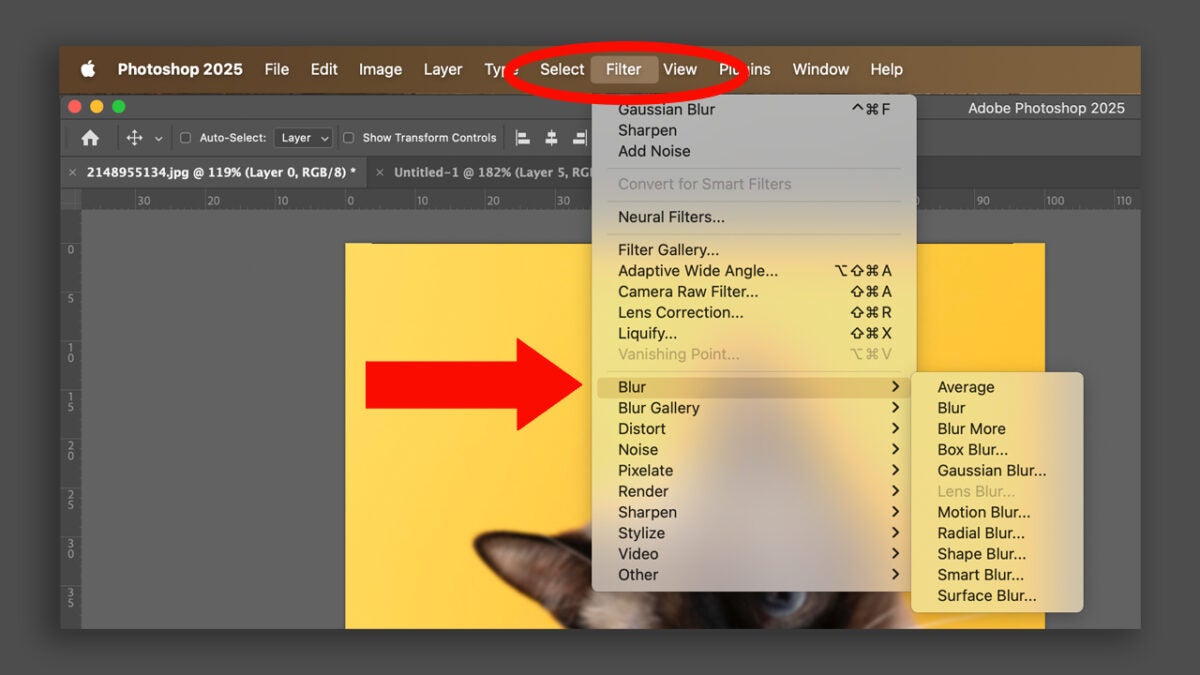
Then, go to Filter, which is located in the top menu and choose the effect you want (Blur, Distort, Pixelate, etc.).
Automatically, the filter will be applied as a Smart Filter. You will see it right below the layer in the Layers panel.
To modify it, you can double-click on the filter. You can also hide it as if it were another layer.
Adjustment layers: This is how they work
The Adjustment Layers or Adjustment Layers are another tool that, like Smart Filters, will help us to edit without altering the original image. With them, we can change things like brightness, contrast, hue, saturation, levels, curves, and much more. It will be very useful for experimenting with different light and color effects without affecting the base photo.
To use them, you just need to follow these steps:
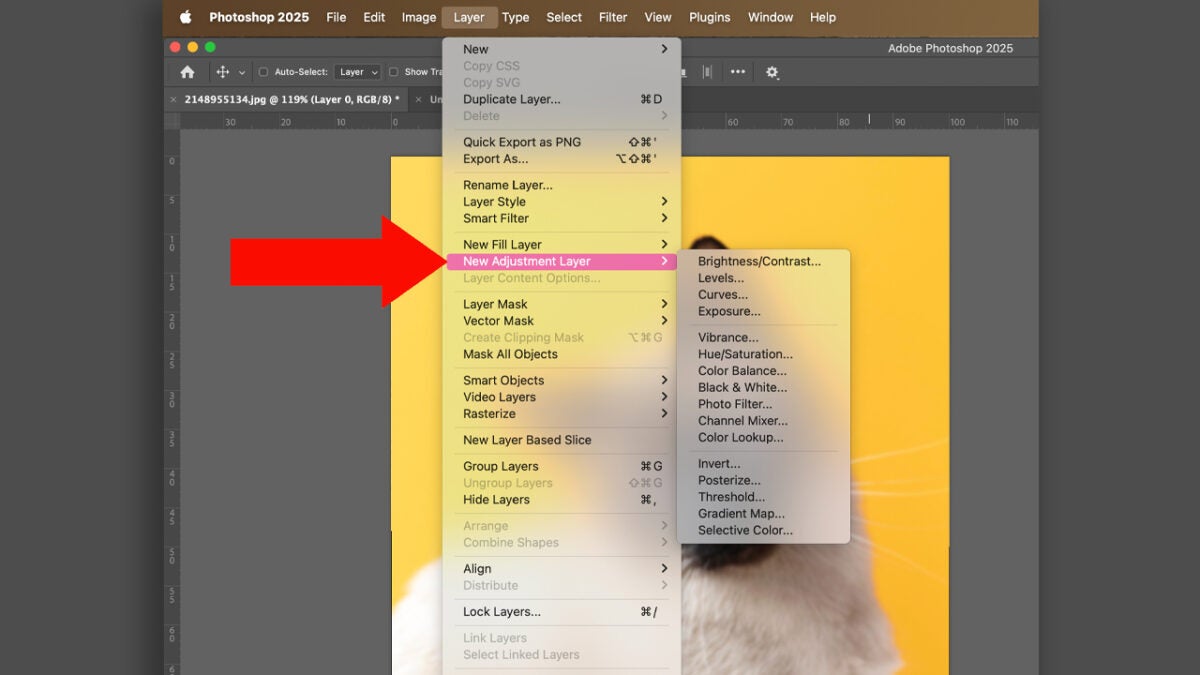
Click on the icon of New Adjustment Layer at the bottom of the layers panel (it is a circle half white, half black). If you can’t find it, you can also go to Layer > New Adjustment Layer.
Choose the type of adjustment you want: Brightness/Contrast, Hue/Saturation, Levels, Curves, Black & White… The list is long.
Next, a new layer will be created on top of your image with the adjustment you have chosen.
Just like with Smart Filters, you can edit the adjustment by double-clicking on the layer icon. You can also use the layer mask that is automatically created to control where the effect is applied.
If you have never used them, you will see that Adjustment Layers will be very helpful when editing, designing, or drawing in Adobe Photoshop. Some of their advantages are:
They are reversible: you can change your mind at any time.
They give you more control: adjust each filter or setting without touching the original.
They facilitate experimentation: try combinations of filters and settings without fear.
They improve your workflow: you will work faster and more organized.
A practical case: use Smart Filters and Adjustment Layers step by step
Imagine you want to give your photos an older, vintage touch. Here’s how you could do it:
Convert your photo into a Smart Object.
Apply a Gaussian Blur filter as a Smart Filter and lower the opacity to your liking.
Then, add an Adjustment Layer of Hue/Saturation and reduce the saturation levels a bit. Alternatively, you can also use the Black & White option.
Finally, an adjustment layer of curves is applied to give a soft contrast.
At any time, you can adjust any of these steps without destroying your original photo. Additionally, you can group all the effects in a folder to keep everything well organized. Below, we leave you some tips that will also be helpful:
Name your layers: Labeling your layers will make your design, editing, or drawing much more organized and easier for you to work on.
Grouping layers will also help you with this.
You can use the layer mask of Smart Filters to apply the effect only in the areas you want.
Duplicate your layers to make quick variations and see other alternatives without risking losing the original photo.
As you can see, Smart Filters and Adjustment Layers are two essential tools for any self-respecting Photoshop user. They not only allow you to work non-destructively, but they also open up a world of creative possibilities. Experiment with them to achieve more interesting effects, knowing that you won’t lose your photo.
Clair Obscur: Expedition 33 is triumphing in an amazing way. With over a million copies sold, it is proving that turn-based role-playing games are far from failing to spark interest among the public. Now, if you think the game is unique, you are very mistaken. That particular mix of turn-based gameplay and action gameplay is something that JRPGs have been doing for years. And we are going to prove it to you with X games that have done it just as well as Expedition 33 itself. The Legend of Dragoon If there is a classic JRPG […]
Clair Obscur: Expedition 33 is achieving remarkable success. With over a million copies sold, it is proving that turn-based role-playing games are far from losing interest among the public. Now, if you think the game is unique, you are very mistaken. That particular blend of turn-based gameplay and action gameplay is something that JRPGs have been doing for years. And we are going to demonstrate this with X games that have done it just as well as Expedition 33 itself.
Clair Obscur: Expedition 33 is a premium role-playing game that immerses you in a quest to stop the threatening Painter from wreaking havoc with her deadly art. Set in a beautifully designed world, you will explore captivating locations such as the Island of Faces and the Forgotten Battlefield.
If there is a classic JRPG that Clair Obscur: Expedition 33 draws from, it is The Legend of Dragoon. The tone is equally dark and apocalyptic, and moreover, its combat system is just as unique. To deal more damage with each attack, we must perform combos by following specific button patterns on screen at the right moment. This makes it a beloved classic from the original PlayStation, not far from what that French game you mentioned does.
Speaking of hitting at the right moment, that’s exactly what we had to do in Super Mario RPG: Legend of the Seven Stars. All our attacks dealt more damage if we pressed the button at the exact moment we hit the enemy, and the damage we received from our enemies was reduced if we pressed it at the exact moment they hit us. Basically what Expedition 33 does, just with less existential angst and more turtle races.
The Last Remnant is surely the most complex and least played game on this list. It is also likely the best in terms of pure mechanical design. With a morality system that defines all actions, a list of when each of the characters we can manipulate will act based on our actions, and the ability to increase the damage of our attacks by pressing the right button at the right moment, we haven’t even touched on how all this affects skills and equipment. But you should play The Last Remnant.
Probably the most famous JRPG for the peculiarity of its combat system, also the most imitated. Each battle in Earthbound has its own song, and if we want to maximize the damage we deal, we must press the attack button to the rhythm of the song. If we don’t, we won’t perform combos, and the battle will be much longer and more brutal. This adds to the originality of an exceptional game that is a cult title for very good reasons.
One of the most special JRPGs on the Xbox 360 is also one that shares a lot with Clair OBscur: Expedition 33. Both have a dark and melancholic tone and both feature a dynamic turn-based combat system. In the case of Lost Odyssey, we had to overlap rings to maximize the damage of our attacks, forcing us to stay alert to make our attacks as powerful as possible. This shows that there is much to draw from in this regard.
If we haven’t been blunt when talking about The Last Remnant, it’s because Resonance of Fate exists. A turn-based JRPG where the position of each character in combat, how we move, and the actions we take during movement will radically change every turn of combat. Not to mention the absurd level of equipment customization or the specialization of the skills. Because Expedition 33 not only hasn’t invented anything, but it also isn’t even remotely the most complex game of its kind.
Clair Obscur: Expedition 33 is a premium role-playing game that immerses you in a quest to stop the threatening Painter from wreaking havoc with her deadly art. Set in a beautifully designed world, you will explore captivating locations such as the Island of Faces and the Forgotten Battlefield.
Hotpatch updates for Windows Server 2025 are marking a milestone in how systems are kept updated and secure, eliminating the need for reboots after certain updates. This approach not only minimizes downtime but also allows users to continue working while their systems receive the necessary updates. These patches, which have been available for free in preview for several months, will soon have an associated cost. Hotpatching: the future of uninterrupted server updates is already here Microsoft announced that starting July 1, 2025, […]
Hotpatch updates for Windows Server 2025 are marking a milestone in how systems are kept updated and secure, eliminating the need for reboots after certain updates.
This approach not only minimizes downtime but also allows users to continue working while their systems receive the necessary updates.
These patches, which have been available for free in preview for several months, will soon have an associated cost.
Hotpatching: the future of uninterrupted server updates is here
Microsoft announced that starting July 1, 2025, the hotpatching service will become a subscription service, priced at $1.50 USD per CPU core per month. This measure is designed to monetize a feature that has captured the interest of many system administrators.
Users who have been using the hotpatching preview are warned that they must unsubscribe before June 30, 2025, if they do not want their subscription to be automatically activated in July. The company emphasizes the need to take this action to avoid unexpected charges, sending a clear message: “If you enjoy the trial period, you must act to avoid incurring future costs.”
It is important to highlight that regular updates for Windows Server 2025 will remain free, regardless of the cost associated with using hotpatching. This provides users with the option to continue receiving updates without the need to subscribe to the paid service.
The arrival of hotpatching is seen as a significant evolution in server management, which can allow companies to maintain operational continuity without the inconveniences that have traditionally accompanied software updates.
Microsoft has adopted an approach that may remind some of a “dealer” style, encouraging users to get used to the new functionality while it is free.
Marvel Studios has been in a somewhat delicate situation for years. Despite still making blockbusters every now and then, like last year’s Deadpool & Wolverine, lately their failures are outnumbering their successes. The latest one was notable: Captain America 4: Brave New World only made 414.2 million dollars, and although it had a budget of 180, it seems that the studio did not recover its investment after advertising and marketing. However, the MCU continues to expand more and more, and Kevin Feige is hopeful that the upcoming movies will balance […]
Marvel Studios has been in a somewhat delicate situation for years. Despite still making box office hits every now and then, like last year’s Deadpool & Wolverine, lately their failures seem to outnumber their successes. The latest one was quite notable: Captain America 4: Brave New World only made 414.2 million dollars, and although it had a budget of 180, it seems that the studio did not recover its investment after advertising and marketing costs.
However, the MCU continues to expand more and more, and Kevin Feige is hopeful that the upcoming movies will balance the scales. This year they will release Fantastic Four and next year Avengers: Doomsday, so everything seems to indicate that their fateful luck will change. However, before that, we will see a more controversial release arriving on May 2: Thunderbolts*.
When this movie was announced, no one seemed very inclined to go see it. The truth is that this pseudo-Suicide Squad didn’t have many followers due to its cast. But as they have shown more trailers and posters, the audience has become more excited. And let’s be honest, the asterisk is an unbeatable cliffhanger. But who are these heroes? If you want to be somewhat up to date on the original lineup, we recommend 5 comics that you can’t miss before watching the movie.
Thunderbolts (1997) #1–12 – The Origin of Deception
The original Thunderbolts series, created by Kurt Busiek and Mark Bagley, started with a brilliant premise: with the Avengers and the Fantastic Four missing after the events of Onslaught, a new team of heroes emerges to fill the void. But by the end of the first issue, readers discover that these new heroes are, in fact, the Masters of Evil in disguise, led by Baron Zemo. Things were getting interesting.
Although Zemo is not confirmed in the movie (how interesting he was…), the concept of villains forced to act as heroes clearly resonates. Many of the characters in the film —such as Ghost, Taskmaster, or U.S. Agent— have murky pasts and could be drawn into undercover missions that challenge their morality. Additionally, Valentina’s presence as a recruiter recalls the manipulative Zemo from the comics, suggesting that there is more than one agenda at play.
Thunderbolts (2006) #110–121 – The Era of Norman Osborn
With a script by Warren Ellis (one of the best comic book writers in history) and art by Mike Deodato Jr., this stage is set after the original Civil War, where the U.S. government creates a squad of controlled villains to hunt down unregistered superheroes. The team, with unstable figures like Bullseye, Venom, and Moonstone, is led this time by Norman Osborn (the future Iron Patriot), whose megalomania and psychological manipulation set the tone for this saga.
Despite the fact that its formation is not similar at all, this version is probably the closest to what we will see in the MCU. The concept of “official missions” with government pawns, led by an ambiguous figure like Valentina, mimics the structure of this comic. Furthermore, the more serious, violent, and paranoid tone fits with the storyline that Marvel has been exploringlately.
Thunderbolts (2012) #1–32 – Antiheroes in Action
In this incarnation of the Thunderbolts, General Thunderbolt Ross (Red Hulk), whom we just saw in Captain America 4, recruits a team of assassins and anti-heroes: Punisher, Deadpool, Elektra, and Venom among others. With a less heroic vision than usual, the group carries out lethal missions that the Avengers could not tackle. Daniel Way and Steve Dillon give this stage a more adult tone, with explicit violence and extreme ethical dilemmas. Still, it does not reach the level of the 2006 version.
This comic seems essential for understanding the team’s philosophy in its most pragmatic and brutal version. Ross’s leadership could be reflected in Bucky Barnes’s role in the movie, who seems to take on a general’s position with reservations.
Thunderbolts (2023) #1 – The Return of Bucky Barnes
Undoubtedly, this is the comic that has served as inspiration for the movie we will see soon. Both Bucky and Yelena are central characters in both versions, and their dark and tactical approach seems a logical continuation of what we saw in both The Falcon and the Winter Soldier and Black Widow.
Written by Collin Kelly and Jackson Lanzing, in this version of the Thunderbolts we see how Bucky Barnes leads a new team that is tasked with dismantling corrupt power networks in the Marvel universe. It is a more cerebral and strategic comic than the others, though no less intense for it.
Avengers/Thunderbolts (2004) #1–6 – Clash of Ideals
This miniseries written by Kurt Busiek and Fabian Nicieza pits the Thunderbolts against the very Avengers… something we might possibly see in theaters (if Doctor Doom allows it). The conflict is similar to that of Captain America and Iron Man in Civil War. While the Avengers doubt the intentions of the group, the Thunderbolts fight to prove that not every villain is doomed to perdition.
Clearly, Marvel Studios will take the characters to their own territory (and will leave us with a notable death or two). However, all these comics can serve to learn more about Marvel’s Suicide Squad. A supergroup with very little super and a lot of hero.