Top 6 female YouTube gamers, new and old

Add some girl power to your YouTube subscriptions.

YouTube is a huge platform that’s growing exponentially by the day, and the largest video genre is gaming. While those who are familiar with the YouTube gaming scene are sure to recognize huge names like Pewdiepie, Markiplier, DanTDM and Jacksepticeye, most times female gamers are left off the ranking lists. We’ll shed a little light on the ladies with our list of a few female YouTube gamers that we enjoy.

YouTube Download Free
8

Top 6 female YouTube gamers

1. iHasCupquake

Subscriber count as of today: 6,558,878

iHasCupquake (Tiffany Herrera) is best known for her earlier Minecraft gameplays but also uploads videos for DIYs and cosplays. She started her YouTube channel in 2010 when she was encouraged to upload by her husband, also a YouTuber, who goes by redb15. Her first videos were of League of Legends and World of Warcraft gameplays, and discussions called “Gamer Talks.”  Outside of gaming, Cupquake also has YouTube channels for her cats and pet product reviews (now inactive), DIYs and Vlogs, and toy reviews.

2. LDShadowLady

Subscriber count as of today: 4,451,248

LDShadowLady (Elizabeth Dwyer) is a YouTuber from the UK who uploads mainly Minecraft and The Sims gameplays. Her Minecraft videos consist of playing a ton of different mods which she uploads in seasons. Her Sims videos are in the form of stories or challenges, like the recently popular 100 Baby Challenge.

3. OneShotGurl

Subscriber count as of today: 518,311

OneShotGurl is known for her Fortnite livestreams and gameplay videos that she makes from them. She streams on Twitch as well and previously held a record for most squad kills made in one round with other streamers FaZe Tfue and FaZe Cloak. Before Fortnite, she played a lot of PlayerUnknown’s Battlegrounds and other AAA titles.

Twitch DOWNLOAD FREE
9

4. Jazzyguns

Subscriber count as of today: 139,924

Jazzyguns is a relatively new YouTube gamer, having posted her first video a year ago. Most of her videos are Let’s Plays and streams of popular titles like Detroit: Become Human, Outlast, and Alien: Isolation. Horror seems to be the genre that she enjoys uploading the most, and her reactions are what really make her videos hilarious to watch. Her gaming content varies as she plays AAA titles and indie games as well. Along with newer games that have just been released, she also includes some that are a few years older like Batman: Arkham Knight.

5. Pokimane

Subscriber count as of today: 3,169,138

Pokimane (Imane Anys) is quite popular in the gaming community, as she uploads on YouTube and streams on Twitch as well. She’s known for her Fortnite and League of Legends streams, but also uploads DIYs, mobile simulator gameplay, and cosplay videos. She’s one of the top Twitch streamers with the most followers, having started in 2012, two years before starting her YouTube channel. Outside of gaming, she also has an ASMR channel.

6. KittyKatGaming/Mortem3r

Subscriber count as of today: KittyKatGaming – 357,733
Mortem3r – 309,951

KittyKatGaming is run by a gamer who goes by Mortem3r, who has a second channel also called Mortem3r. On KittyKatGaming, you can find many different gaming genres, ranging from indie to multiplayer games like Mario Party and The Jackbox Party Pack. A large part of the KKG channel is about interacting with fans, so usually when Mortem3r plays things like Jackbox, she’ll open the game up so subscribers can play as well.

Recently, due to YouTube’s infamous algorithm, KKG hasn’t been receiving as many views and Mortem3r made a video saying that she believes her channel has been shadow banned.

Shadow banning is when a content creator thinks that their channel is being hidden from potential viewers by not showing up when searched, current subscribers have been suddenly unsubscribed, or their videos are not showing up in a subscriber’s feed. Due to this, Mortem3r has decided to move completely over to her Mortem3r channel and continue making all of her KKG content there. The Mortem3r channel currently consists of vlogs, general chatting, and beauty videos.

There you have it! There are thousands of ladies out there who love gaming and contribute to making our favorite games great. More and more advancements in games and gaming hardware are being made every day, and we can’t wait to see more women represented in a male-dominated industry. As displayed in our list, they sure have the talent.


6 best tips to stay safe while shopping online

Don’t let your data leak. Use these tips for a safer shopping experience.

online shopping

We buy just about everything online these days. If you’re not careful, your financial data could end up in the wrong hands. If you’re worried about the safety of your private information, we have a few tips that will help put you at ease. It may be as simple as making the right browser choice.

How to stay safe while shopping online

1. Be careful with Autofill

Honestly, autofill is probably one of the best things to ever happen to people who shop online often. Having to add your information to a website repeatedly in order to check out on different websites is pretty annoying, and auto-populating really helps out. Even so, autofill requires some of your data to be saved and can leave you open to dangerous activity.

Choosing the right browser is one way to protect yourself. For example, Firefox ensures your safety by never saving your CVV number, allowing you to set a password before your information can be autofilled, or you can forego having your information saved altogether. Learn more about the autofill feature here.

2. Check for the padlock

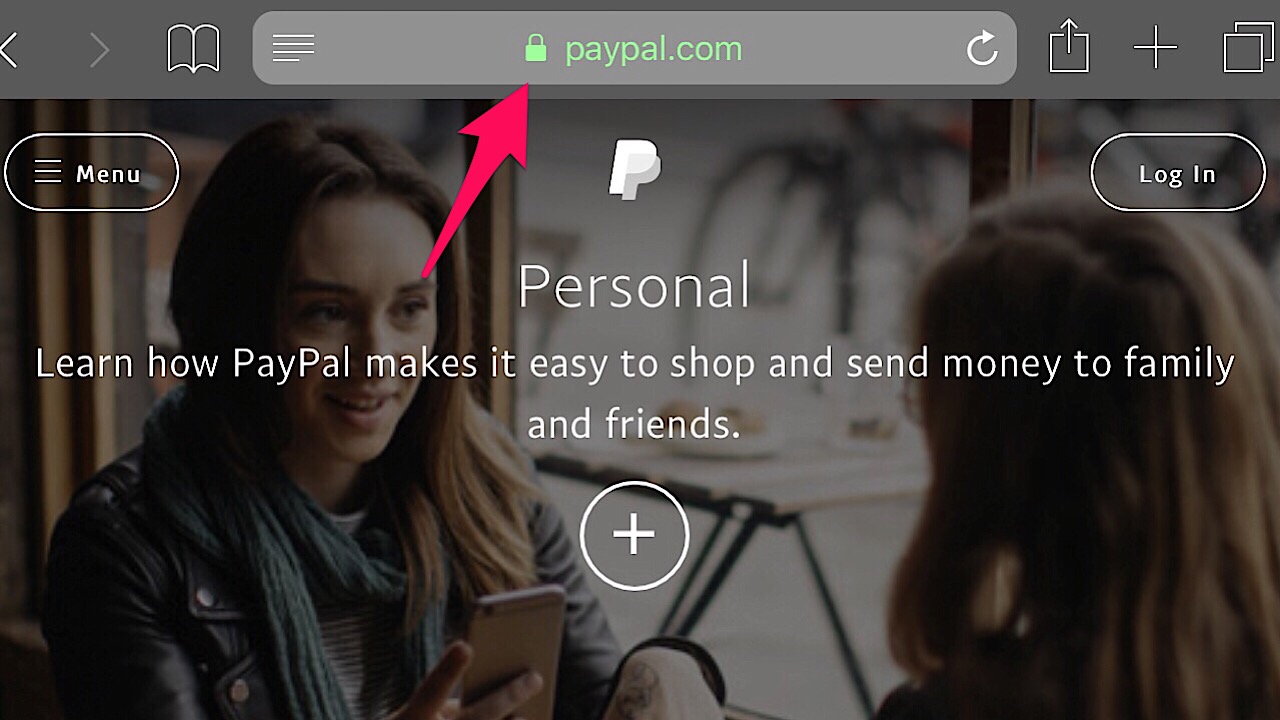
Before sending any private information over the internet, especially banking or credit card information, make sure that there’s a green padlock in the address bar.

Paypal screenshot

If there’s a green padlock then you’re all good to go because it means that the website is encrypted, but if it’s grey or red, the site isn’t secure.

3. Stealth Browse

Shopping in private is the best way to go. Firefox can help here, too. With their Private Browsing Mode, your entire browsing history will be erased when you close the window. This includes your passwords, searches, and cookies. Private Browsing Mode also blocks any site’s trackers keep tabs on you after you’ve left the site. Click here for more info on the Private Browsing Mode and to download Firefox.

Mozilla Firefox DOWNLOAD FREE
8

4. Save money with Price Wise

Instead of going back and forth from website to website to compare prices, Firefox’s Price Wise does all of the work. Price Wise collects and tracks the prices from the top five U.S. retailers: Amazon, eBay, Home Depot, Walmart, and Best Buy. Just add the item that you want from each site to the extension’s wish list and you’ll be able to see if the price increases or decreases. Learn more about Price Wise and other cool extension experiments in the Firefox’s Test Pilot Program here.

5. Screen for hackers

Even if you’ve been exposed to a data breach, all hope isn’t lost. One way to check to see if this has happened with Firefox Monitor. Over on the website, you can enter your email address and it will let you know who, when, and where your information got spilled. If your information is in the open, the page provides some really helpful steps so it doesn’t happen again.

6. Keep track of all your tabs

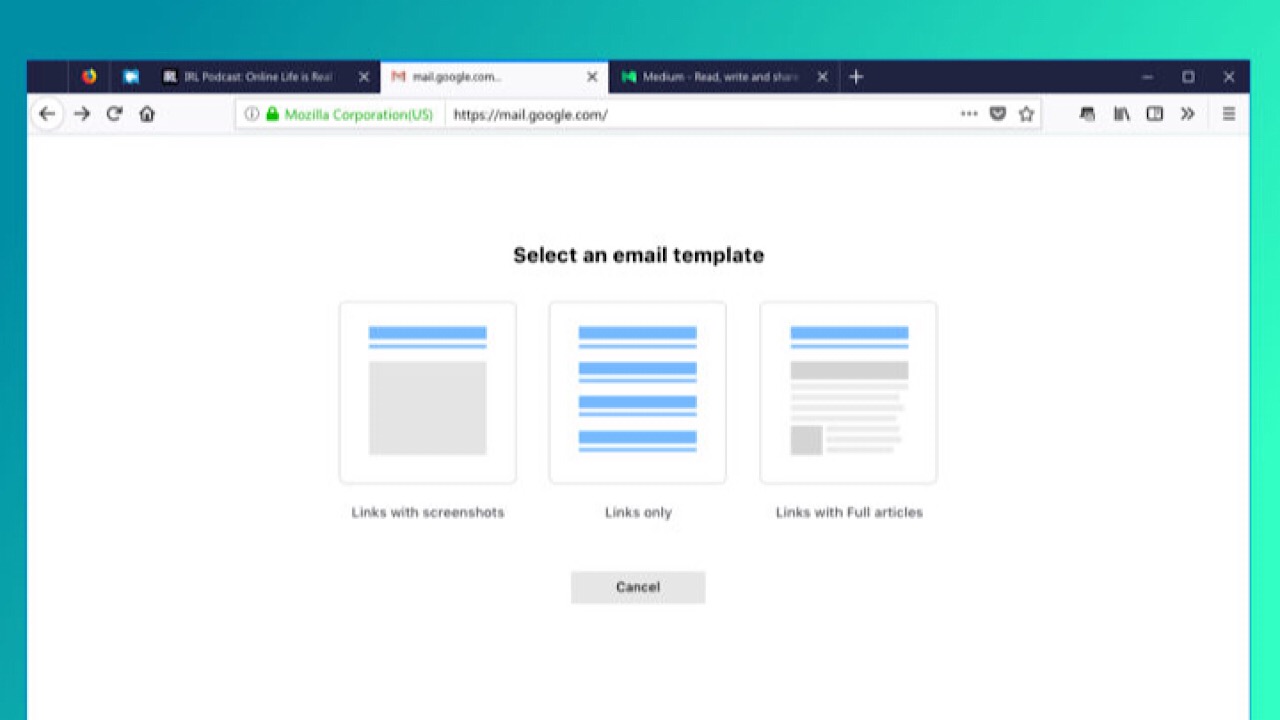
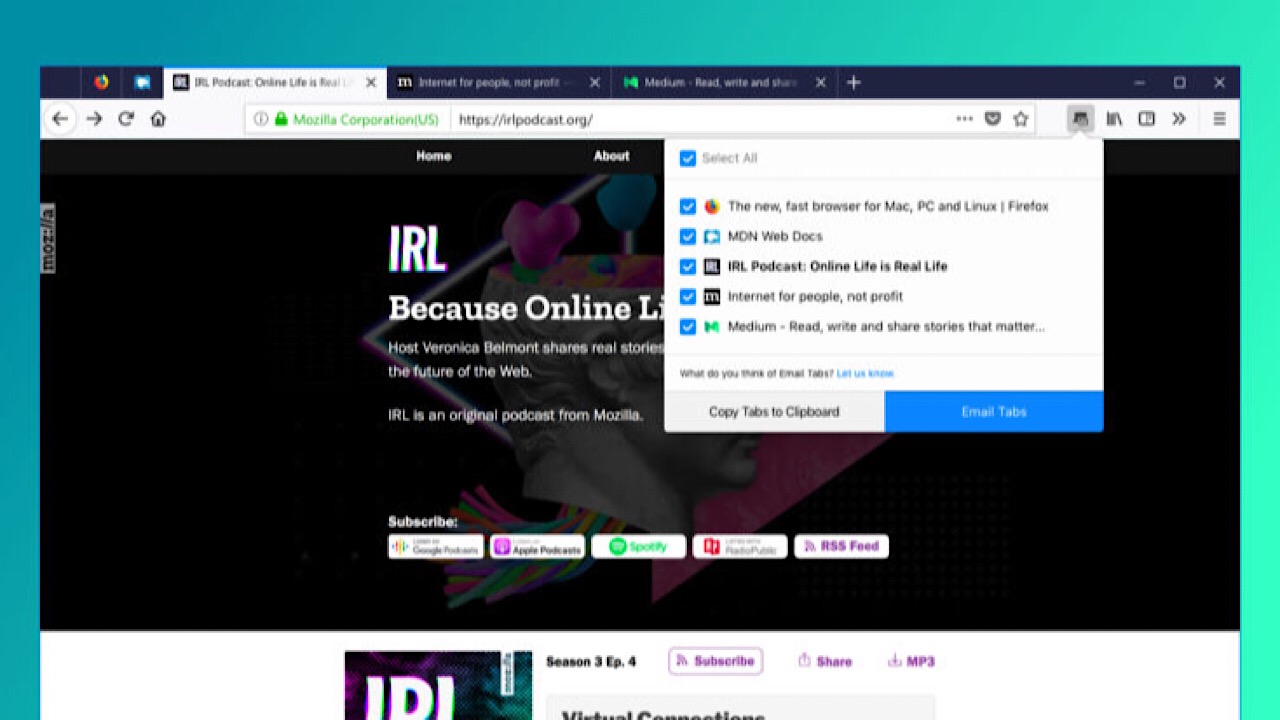
While shopping, you’ve probably added a ton of different products to your wish lists and it’s easy to get a little overwhelmed. Firefox’s Email Tabs takes the stress out of shopping by giving you the ability to add all of the links to your tabs to one email. After you’ve downloaded the extension, just select which of your open tabs you’d like to send, and bam – done!

If you don’t want to send the links, you can send a screenshot of the web page instead.

With these simple precautions, you’ll keep the bad guys at bay and make sure your future transactions go as smoothly as possible. Happy shopping!

Erase an image’s background instantly with this awesome free tool

One of the most tedious Photoshop tasks is now fast and free through this site.

Having to purchase Photoshop or download a paid app to do anything other than crop or add a filter to your photos is now a thing of the past. Instead of trying to figure out layers and painstakingly trace strands of hair, we’ve found something that will do it all for you.

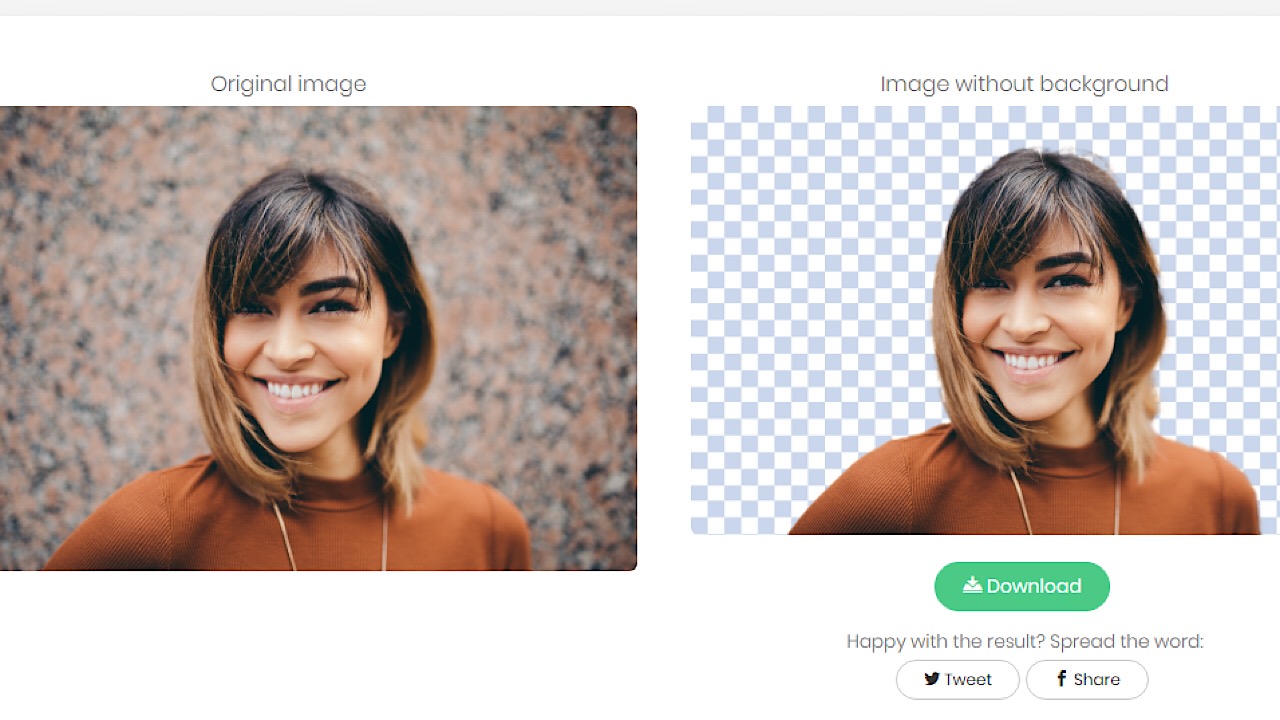
Remove.bg is a really convenient and easy tool that allows you to remove the background from images in less than a few seconds.

Remove.bg example pic

How does it work? The tool uses some sweet AI tech that was trained on people so it can differentiate between a subject and the background so at the moment it can only be used with photos of humans, but the people over at Remove.bg say that they’re working on being able to support other kinds of images.

Remove.bg group example pic

Another great thing – it doesn’t save any of your data, but if they ever want to, they’ll ask you first. We know what you’re thinking, and no, your images won’t be stored and used to create an android with your face. Don’t worry.

There you have it. Your picture of yourself standing in your bathroom is now free to become you standing on a beach in Ibiza on Spring Break! The possibilities are endless. Try it right now!

Top 4 fun trivia apps

Test your wits with these great free trivia games!

trivia apps

Ever throw a party for different groups of friends? Worried your cousins won’t like your roommates and your improv team and the dudes from your fantasy football league? A great way to break the ice and get everyone comfortable is to play a party game. Skip the board games and get everyone’s brain humming with a battle of trivia!

Top 4 fun trivia apps

1. Trivia Crack
Trivia crack logo

One of the most popular trivia apps to date, Trivia Crack is really fun and easy to use. Connect on Facebook or let the app choose a random player to play against. Then, spin the wheel to choose one of six categories: Science, Sports, History, Entertainment, Art, and Geography. If you answer correctly, you can keep answering until you lose, and then it’s your opponent’s turn. You can play more than one game at the same time, but your game expires after one day of inactivity.

There’s also the Triviathon option. Answer as many questions as you can non-stop. When you get a question wrong, you have to start over. The length of your winning streak determines how many in-game coins you’ll get which you can use to customize your profile picture. You can play for hours without realizing it because this app is so addicting. Available for iPhone and Android.

Trivia Crack DOWNLOAD FREE ►
7

2. Jeopardy World Tour
Jeopardy world tour logo

You can now play the game from the famous television show.  Choose topics worth different amounts of money and if you win, you get the game cash and choose the next clue category.

In the World Tour version, you can go to locations in the app like Los Angeles and Australia to compete against other players. For each location that you win, you’ll get in-game cash that allows you to advance to other levels. You can also connect on Facebook to play against friends. Once you get to level two, you won’t have to deal with any ads during the game. Available for iPhone and Android.

Jeopardy! World Tour Download Free ►
8

3. HQ Trivia
hq trivia logo

HQ  is the leader in the new wave of trivia games. Every night HQ broadcasts a live trivia game. A fun (and sometimes cringy) host asks a total of 12 multiple choice trivia questions ranging from easy to really, really hard. If you get all 12 questions correctly you win real money! It’s not very much since you split the jackpot with all the other players all over the world that win, but there are a few people on the leaderboard who have won hundreds of dollars.

HQ Trivia DOWNLOAD FREE ►
6

4. QuizUp
QuizUp logo

What makes Quiz Up cool is that it offers a ton of topics – the most we’ve ever seen in a trivia app. Start with choosing the three that interest you the most, like Harry Potter, sports teams, or U.S. Presidents and you can add more topics over time. Play on your own or against a friend or random player a choose the right answer from multiple choice questions.

Like most trivia games, the questions are timed, and if both players and answer correctly, the player who answers the most quickly gets a few more points. If you lose you can move on to another topic or request a rematch. Another feature is the opportunity to use in-game coins to enter tournaments, and if you win, you’ll get featured at the top of the app. Available for iPhone and Android.

Time to get those brain gears turning!

How to download documents from Google Drive for offline use

No Wi-Fi? No problem. Here’s how to download your Google Drive files.

google drive

Google Drive is heaven for the person who wants to make and organize documents. The ability to create a spreadsheet and allow other people to view and edit it by sending them a unique link helped boost productivity in the workplace and for personal projects. Making a shopping list or writing a letter as a Google Drive document is easy, but what if you want to download the document for offline use? Keep reading for a quick how-to so you can have a copy on your computer and mobile device.

Google Drive Download Google Drive
7

On your computer

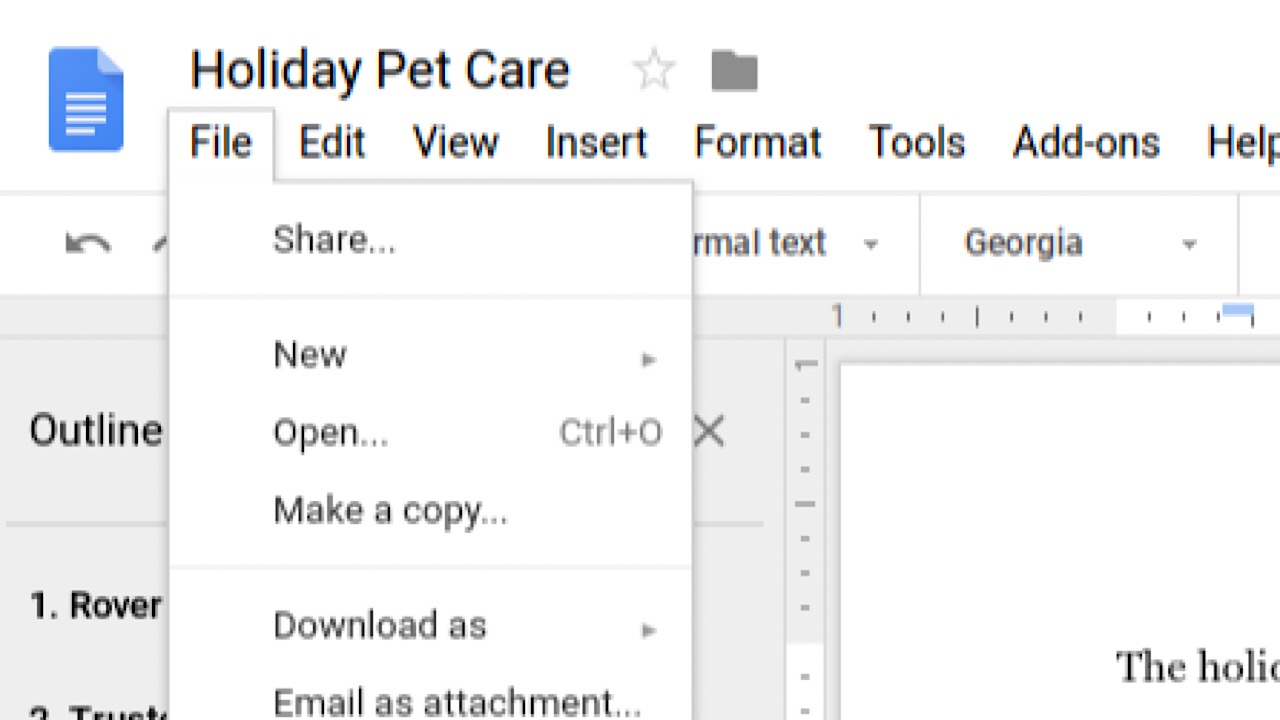
Once in your Google Drive, open the document that you’d like to download.

In the top left corner of your screen, click the “File” tab in the task bar. Drive screenshot

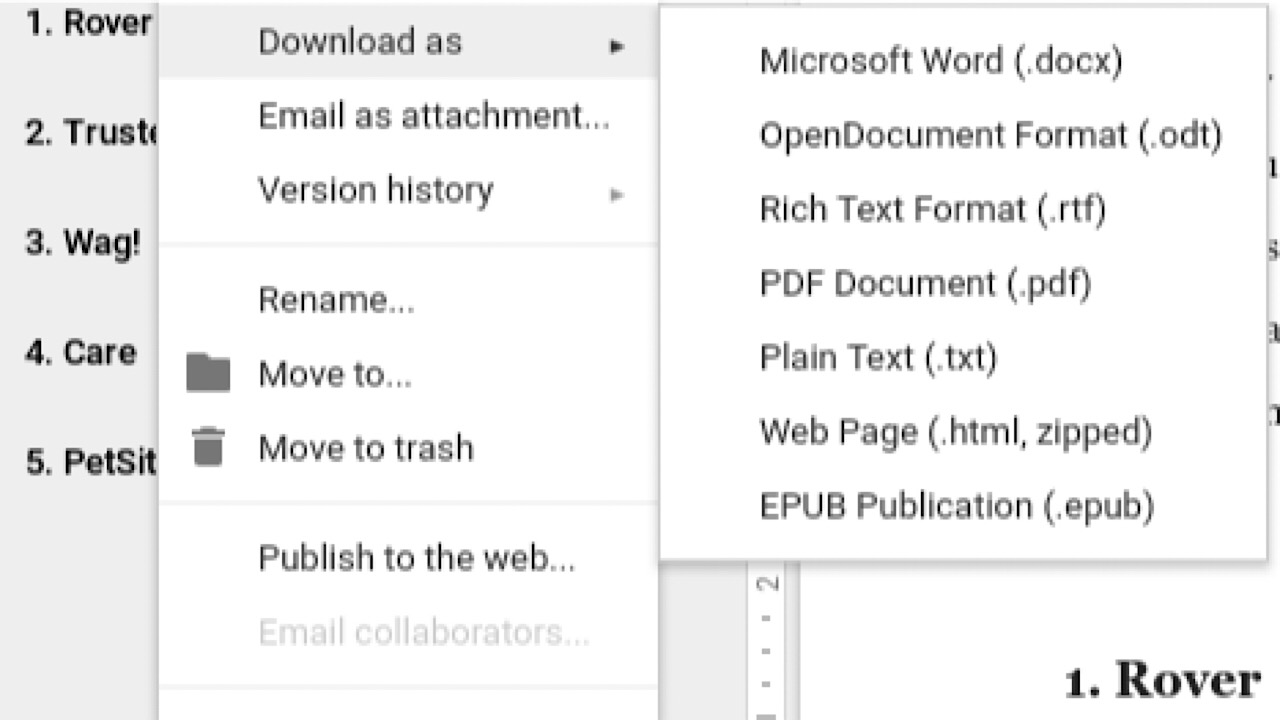
In the drop-down menu, hover over “Download as.” Choose which format that you’d like your document to be in, like a PDF or Microsoft Word document.

Google Drive screenshot

Once selected, you’re all done!

On your mobile device

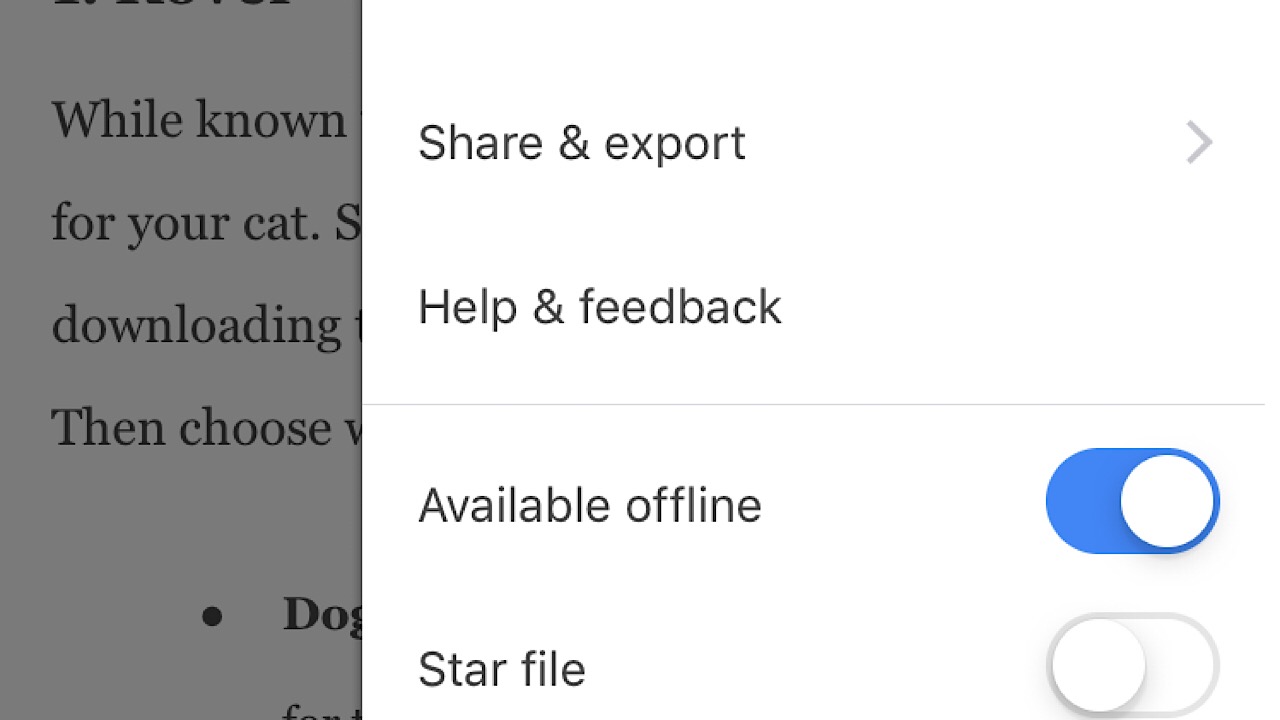
In your Google Drive app, open the document that you’d like to download. Tap the three horizontal dots in the top right corner.

Drive mobile screenshot

In the drop-down menu, scroll down to “Available offline” and toggle it on.

Drive mobile offline screenshot

You can view it in the app now even if you’re out of Wi-Fi range or if you’ve run out of data. In the drop-down menu, you can also save as a Word document and email to anyone who needs to see it without allowing them editing privileges.

In just a few simple moves, you’re all set to view files on the go.

How to join Test Pilot and try new Firefox extensions before everyone else

See the future of the web with cutting-edge features available only on Firefox.

With any product or service that we use, we hope the company takes our voice into account. Take Twitter, for example. Recently, the characters per tweet increased from 140 to 280, but there still isn’t an option to edit a tweet in case of typos, which users have been asking for since Twitter was created. Wouldn’t it be useful to have the ability to choose what we want most in our services?

Mozilla Firefox DOWNLOAD FREE
8

Enter Firefox’s Test Pilot. Essentially, Firefox creates product concepts called “Experiments” in the form of browser add-ons and features. Users get to test-drive them for a short period of time. Concepts are created by Firefox team members, but anyone can submit ideas that could be a good addition to Firefox. Once beta testing is complete, some Experiments graduate to become official features.
The Test Pilot Wiki shows every single step taken by the Firefox team, and is completely transparent about how they come up with ideas for features with the Test Initiator Journey. As users, an in-depth A to Z timeline really makes us feel involved with the process and that our contributions, like feature submissions or just giving general feedback, are appreciated.

Once you’ve joined Test Pilot, you’ll have access to cutting-edge new features that will make browsing better. Do you remember life before tabs? It was brutal. Now, every browser has them. As Firefox continues innovating, Test Pilot gives you access to new features that are likely to become the essentials of the future.

If you’d like to see what Experiments are happening now and take part in building a great browser, head over to the Test Pilot page.

5 new browser features available only on Firefox

Try them now on Firefox before every browser scoops them up.

Want a glimpse of the future? Firefox offers a program called Test Pilot that lets users test features and add-ons called “experiments” for a short period of time to see if they’re worthy of becoming an official part of the browser. With this program, you can try out new features from the Firefox team, or even submissions from other users that help the Firefox browser become even bigger and better than it already is. Check out the experiments below that you can test out right now!

5 cutting-edge features from Firefox

1. Price Wise

Who doesn’t love a bargain? Especially during the holiday season, it’s a hassle trying to keep track of who has the best prices and when they change. Fortunately, Price Wise does all of the work for you.

Price Wise tracks prices from the top five U.S. retailers: Amazon, Best Buy, The Home Depot, eBay, and Walmart. To start tracking, add the Price Wise extension to your browser. Every time you’re online shopping and you see something that you want to track the price for, click the Price Wise icon to add it to your watchlist and Price Wise will notify you every time the price drops or increases. Add the same item from multiple retailers and compare. A green arrow next to the item means the price dropped, and red means an increase. It’ll be such a relief not to have to keep tabs open to check on items repeatedly throughout the day. Check out more about Price Wise in Test Pilot here.

2. Email Tabs

This feature is one of our favorites. If you’re a big planner, the person heading up a group project, or the family member who always ends up making the reunion itinerary, the Email Tabs feature will make your job a breeze.

In the family reunion scenario, imagine you have a ton of tabs open because you’re trying to decide which hotel to stay at. Instead of copying and pasting all of those links into an email, just click the Email Tabs icon. It lists all of your open tabs, and once you pick the ones you want, it creates an email with all of the links for you.

email tabs screenshot

If you expect Grandma might only opening the email instead of the link, you can include a screenshot of the entire web page. Don’t worry Grandma. We’ve got your back. Check out more information on Email Tabs here.

Mozilla Firefox DOWNLOAD FREE
8

3. Side View

We bet you’ve never multi-tasked like this before.

Side View is a feature where you can see two browser tabs at the same time, within the same window. This feature is amazing for literally everyone you can think of: college students writing end-of-year papers, your dad comparing his fantasy football stats, or writing your grocery list inspired by online recipes.

You don’t have to resize one tab to see two simultaneously, and it makes everything so much easier. More about Side View here.

4. Color

Everything is made better when you can customize, and the Color feature lets you do a lot of that in a bunch of different ways.

Make all that text that you have to analyze for that big work project a little more pleasant to look at by making your Firefox browser neon orange. Sprinkle your theme texture with purple flowers, or channel your inner Harry Potter nerd and throw in a few lightning bolts. Icons, toolbars, tabs, search bars, and more can all be Bubblegum Pink, and nobody can take that away from you.

If you’re not sure what you want, you can always choose from the preset themes until you’re ready to utilize all the functions of Color. Save themes that you like for later, and share them by sending the link to friends. Learn more about Color here.

5. Screenshots

What’s unique about Screenshots is that it isn’t part of the Test Pilot program anymore. It was so popular that it became a built-in part of the browser, and we can see why.

There are a lot of reasons why we take screenshots: to post a picture to social media, to add a picture into a document for your boss, or to highlight the most important part of an article instead of sending the link for the entire thing.

Screenshots skips the steps of having to save to your desktop, then drag and drop or upload somewhere else by giving you the ability to copy the screenshot directly into a document. This feature also supports Private Browsing mode, so if you want to keep your guilty pleasure meme collection out of the cloud, all of your downloads are deleted when you exit that mode.

And as the Test Pilot program rolls out, Firefox gets better by the day. With a continual flow of great new features that you can’t find anywhere else, Firefox becomes a better browser by the day.

Firefox Monitor is the internet bodyguard that alerts you to data breaches

Discover how Firefox can alert you when your data has been compromised.

In recent years, privacy on the internet has been a hot topic. With data breaches happening nearly every week, your personal data is at risk in more ways than ever before.

Mozilla Firefox DOWNLOAD FREE
8

Pretty much everything can be done on the internet now: check your account balance with your bank’s app, have Siri tell you what the weather will be like during your vacation in Greece next week, or buy a custom-made cowboy hat in China and have it shipped to your grandma in Florida. Most apps now don’t even require you to enter your password – just scan your thumbprint and unlock.

But there’s a simple rule on the internet: if it can be hacked then someone has probably tried. Taking quick action after a security breach is vital. Thankfully, Firefox Monitor is here to watch your back.

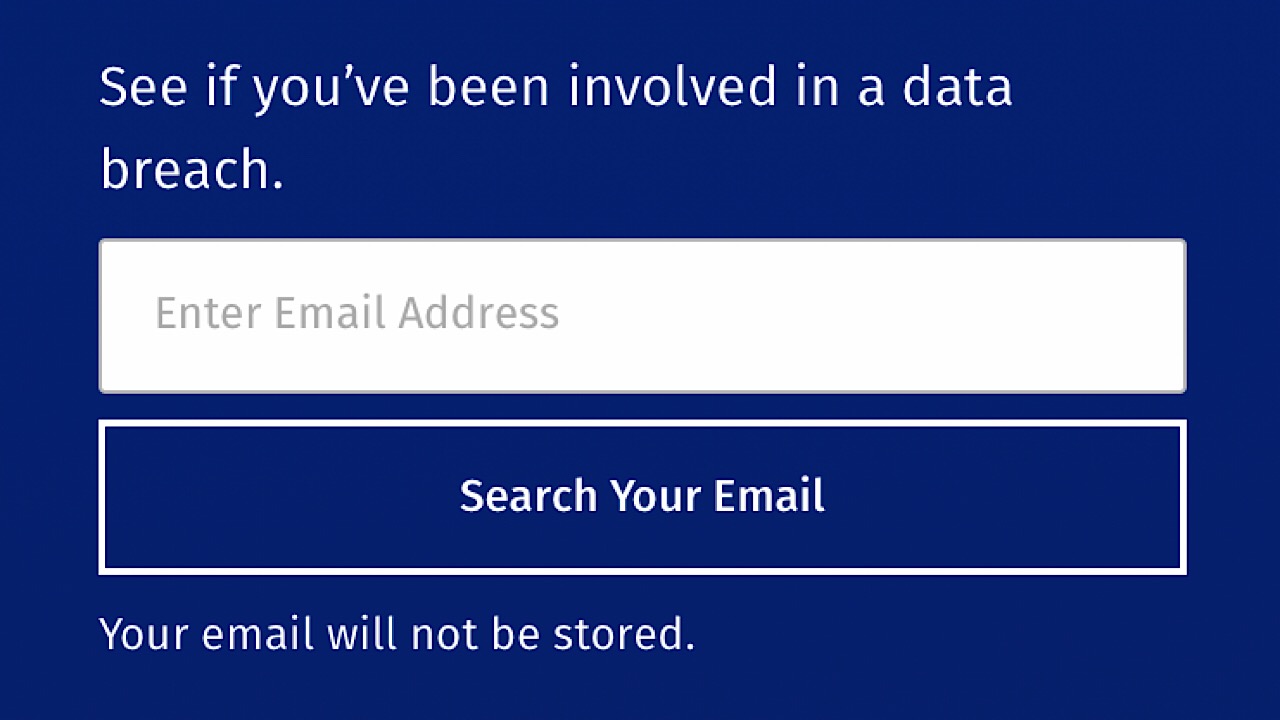
Firefox Monitor is a free service that gives you alerts whenever your email is associated with a business or service that has experienced a data breach. To find out if your information was at risk in the past, visit Firefox Monitor’s website and enter your email. Your email will not be saved, and the Firefox’s servers won’t retain any other bits of your information either.

Firefox Monitor screenshot

If your email was associated with a breach, Monitor will let you know what was leaked, where it was leaked from, and when.

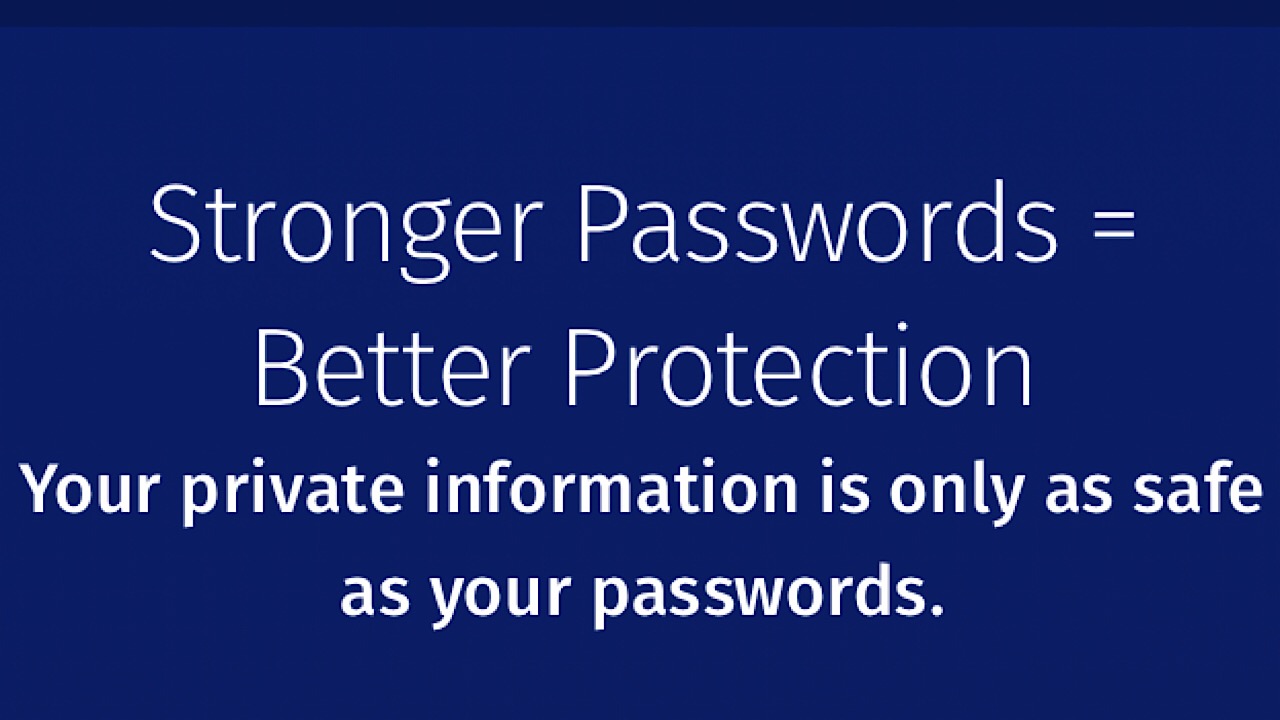
Firefox Monitor passwords

On the website, you’ll find tips on what to do next, like making sure that your passwords are unique and not easy to guess, and that you have a different password for every website. Change your old passwords, and passwords with services that you’ve recently signed up for if it is one that has been recycled.

When you add Monitor to your browser, it will let you know every time your email address or password has been part of a breach so you can take action immediately. Your safety is most important, and Firefox Monitor is a must have to make sure that your personal information is secure.

Top 4 free apps to help you in the kitchen

Guests on the way? Use these apps to whip up your culinary masterpieces!

cooking

If you’re hosting a holiday dinner or just having a party and serving food, the kitchen can get crazy. From the prep to cooking, here are the top four apps that will help you stay organized and sane while you create delicious recipes.

4 best apps for the kitchen

1. Kitchen Stories

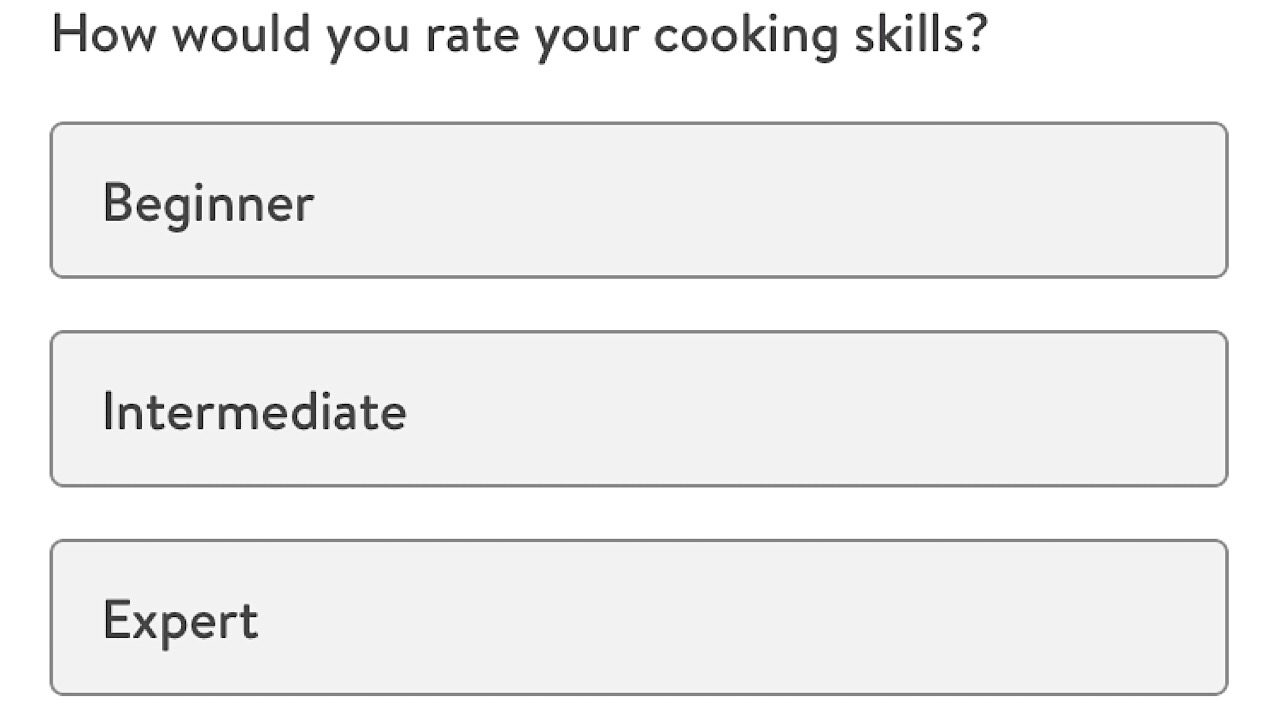
Did you know that there are over 400 different kinds of Italian cheeses? We didn’t, either. Kitchen Stories has it all, and puts a comforting and quirky spin on recipes by giving a little background in the form of relatable stories before you start. This app knows that we aren’t all world-renowned chefs, and begins by asking at what level you think your skills are.

kitchen stories skills

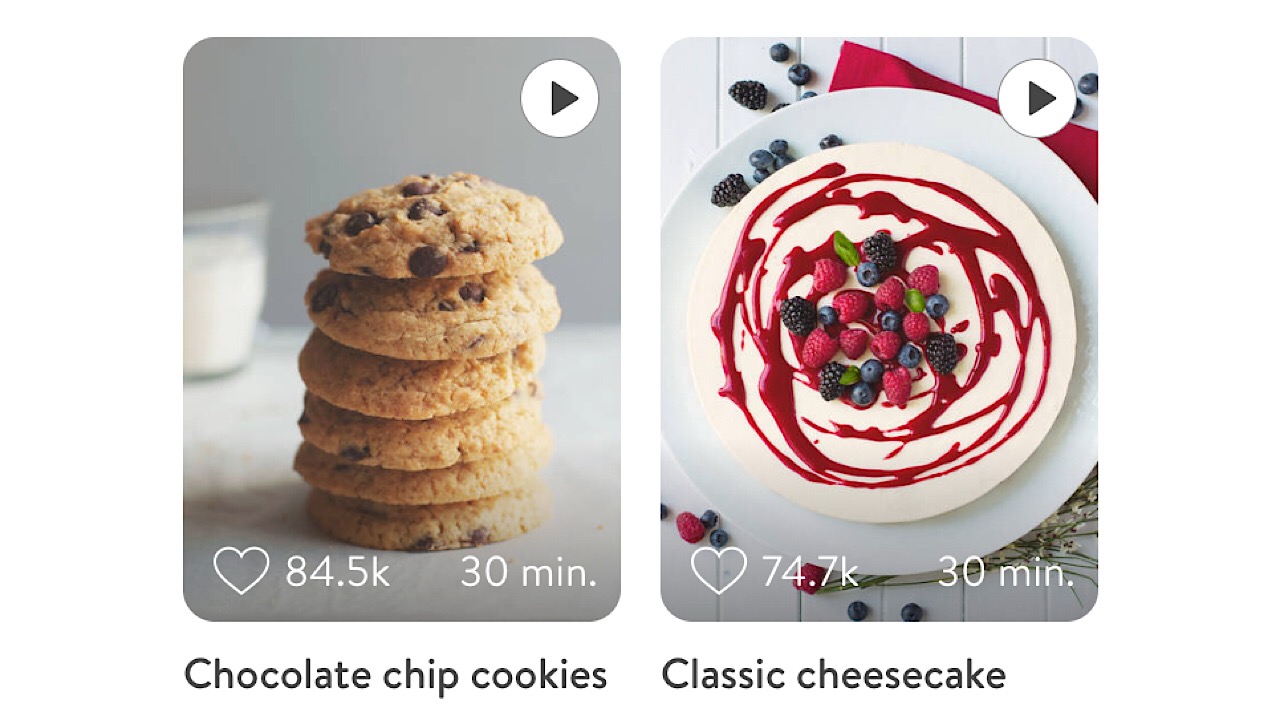
From there, you can view a wide variety of different dishes categorized by cuisine, season, holiday, and more. Follow recipes step-by-step with videos to accompany them.

kitchen stories recipes

Also included are tasting notes if you decide to step outside of your comfort zone to make something new, and you’ve never tried an ingredient before. Kitchen Stories is a must for your arsenal of holiday apps. Available for iOS and Android.

Kitchen Stories Recipes DOWNLOAD FREE
9

2. Substitutions

substitutions logo

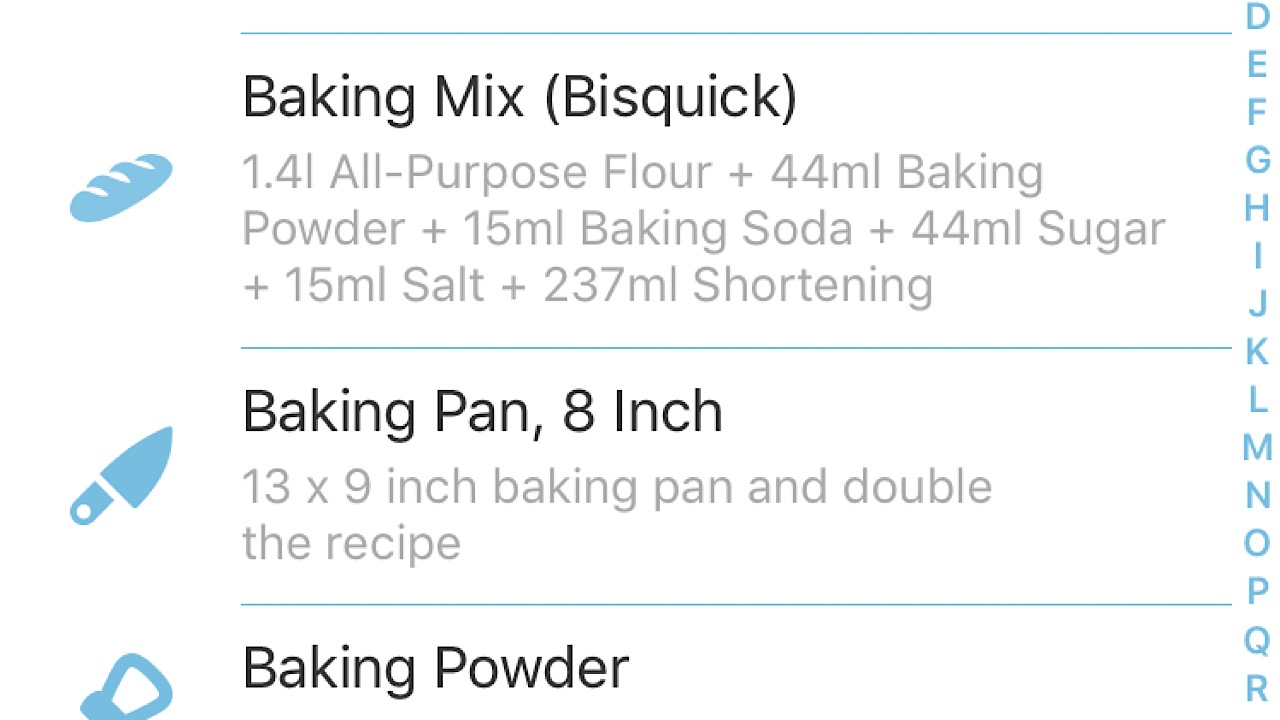
Let’s say you’ve just returned home from the store and only have a little time to cook until people start arriving, and you realize that you forgot an ingredient. Or the cousin with a different girlfriend every month texts you out of the blue to say that she is allergic to a certain spice that plays a large part in most of your recipes. Substitutions helps you by listing meats, seafood, spices and herbs, and other cooking ingredients and giving you something else that you can use instead.

substitutions screenshot

Substitute is a potential life saver for any cook. Available for iOS and Android.

Substitutions DOWNLOAD FREE
7

3. Food Monster

Food Monster logo

Not everyone eats meat and dairy, and Food Monster is the perfect app if you have vegan guests. The pictures alone are enough to pull anyone in.

food monster screenshot

There are a ton of different categories to choose from. Seasonal fall recipes include Roasted Sweet Potato, Black Bean and Kale salad, and for winter holidays you have a hearty Lentil Loaf with Celery Root Mash. You can make meal plans, see what dishes are trending, and make your own collections for recipes that are five ingredients or less, or creative salads. Your vegan guests will be shocked by your delicious food. Available for iOS and Android.

Food Monster - Vegan Recipes Download Free
7

4. Timer +

timer +

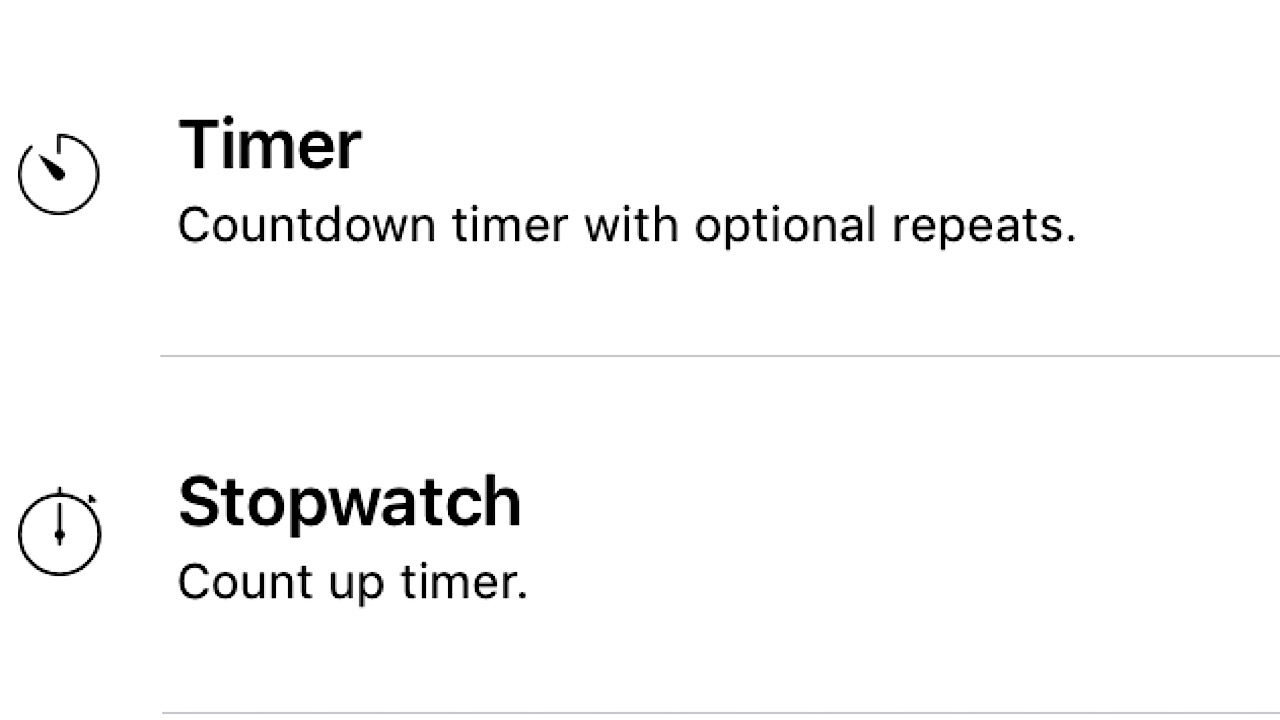
Timer + is the most simple app on our list, but the most crucial. There’s nothing worse than getting overwhelmed with preparation and losing track of time. The smell of burning is a death sentence to any holiday meal.

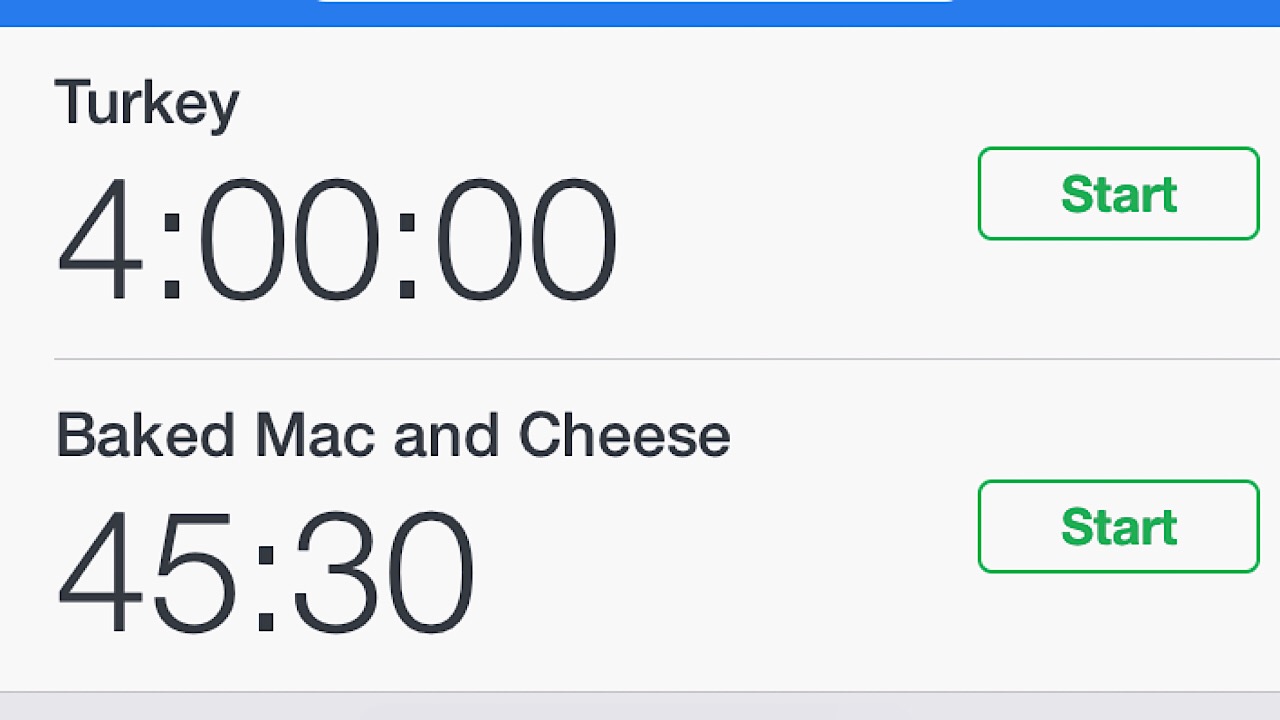
Timer + stopwatch

Simply add a new timer, name it for a meal that’s cooking, and start. The best thing about this app is that you can set multiple timers at once, so if you’ve got to do housework as well, you won’t forget about the wet laundry. Hiding in another room to wait until your shirt dries while the guests arrive is a thing of nightmares. Available on iOS and Android.

Timer + DOWNLOAD FREE
9

Having all these apps at your disposal will make your party prep a breeze. Happy hosting!


Top 3 apps to find the best gas prices

Save on your next road trip with these great apps.

gas prices

The moment you get your license, you realize gas is expensive. If you have to drive, you’re probably willing to go out of your way to find gas stations that don’t charge as much per gallon. Instead of driving in circles trying to compare which station has the best rates, let these apps put them all in one place for you.

Top 3 apps to find the cheapest gas

1. Gas Guru

Gas Guru logo

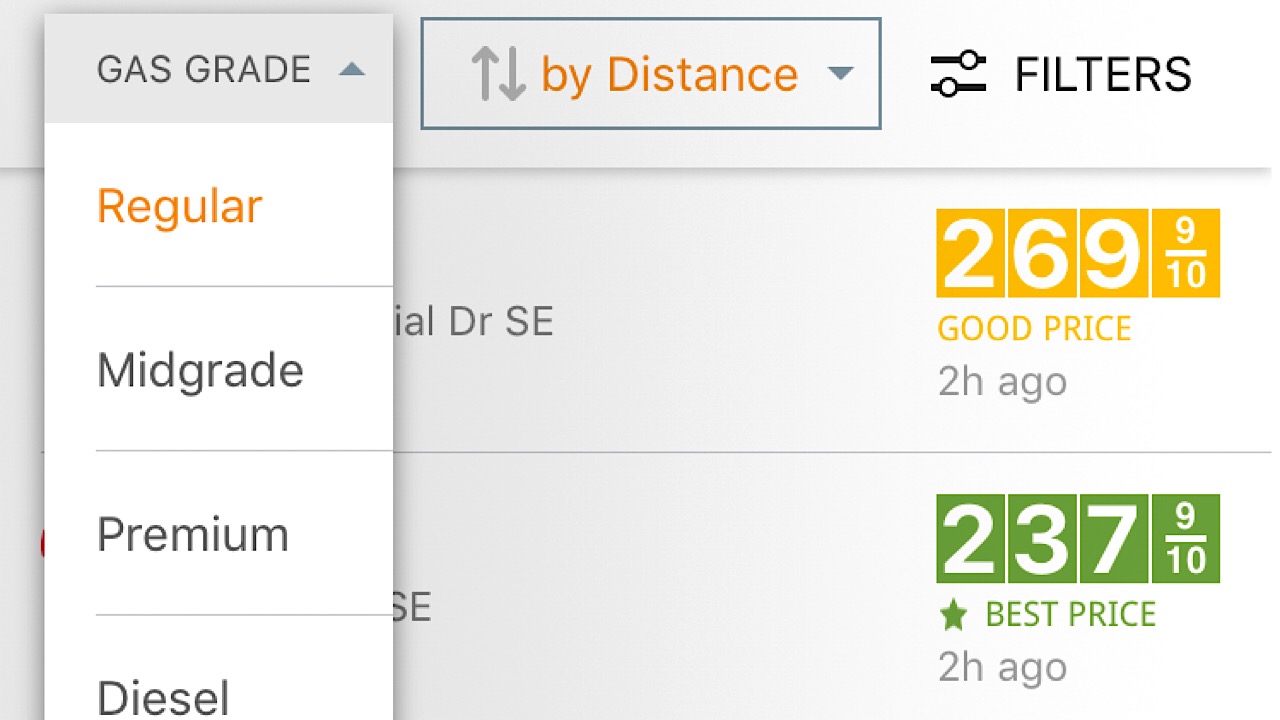
Gas Guru has everything that you want in a gas app. You can start by altering the settings and customizing them to what kind of gas that your car takes. On the main page, just tap on the “Gas Grade” drop-down menu and select your gas type.

Gas Guru gas types

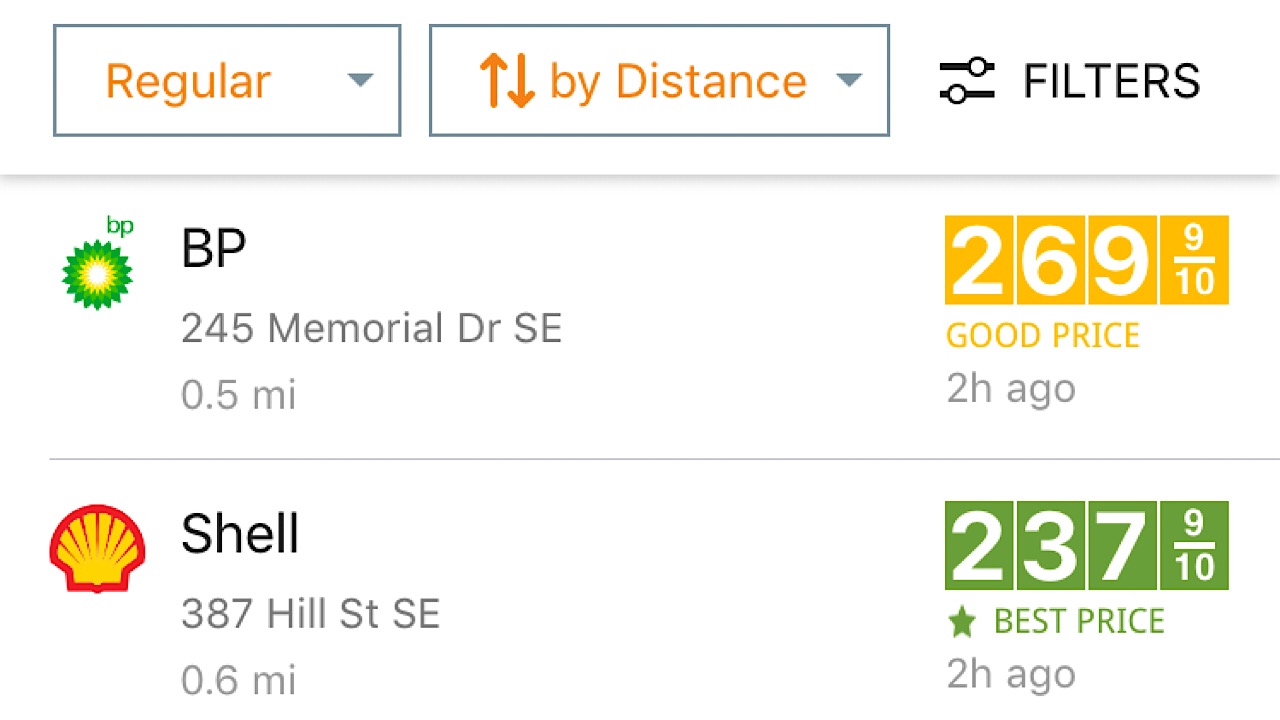
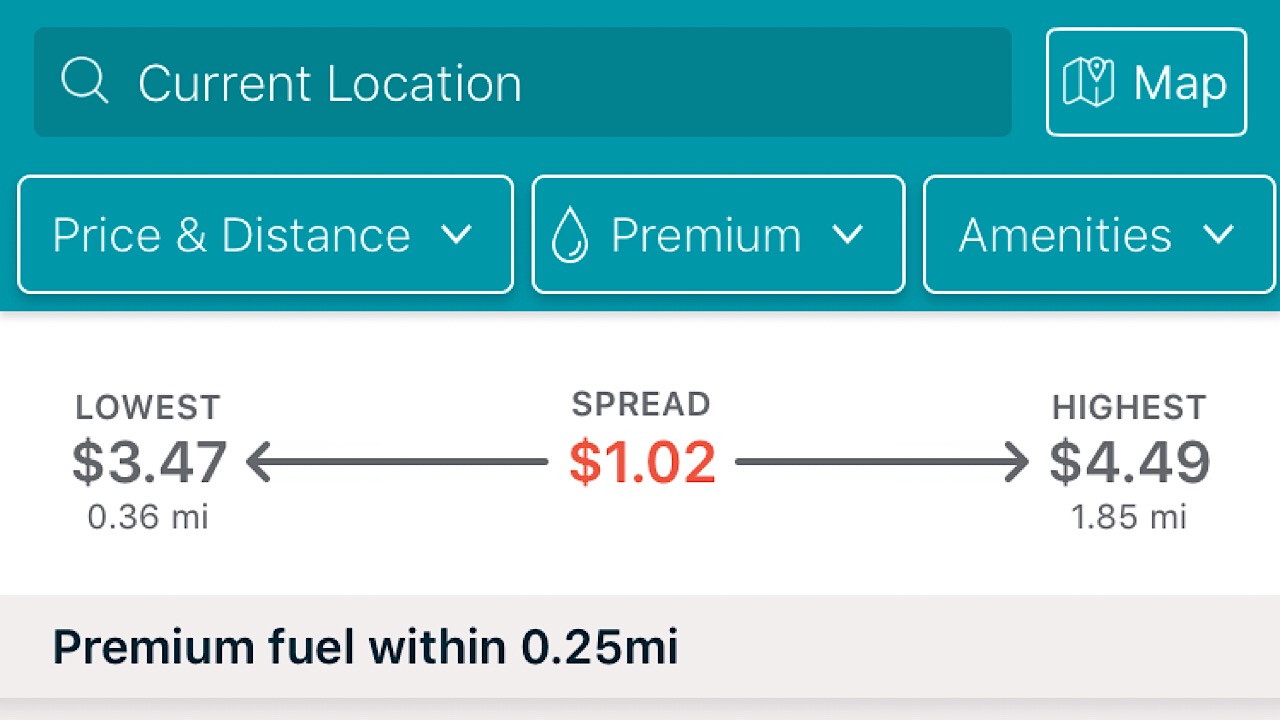
List stations by distance so you know how far you’ll have to drive to get to the BP or Shell that you’re looking for.

Gas Guru distances

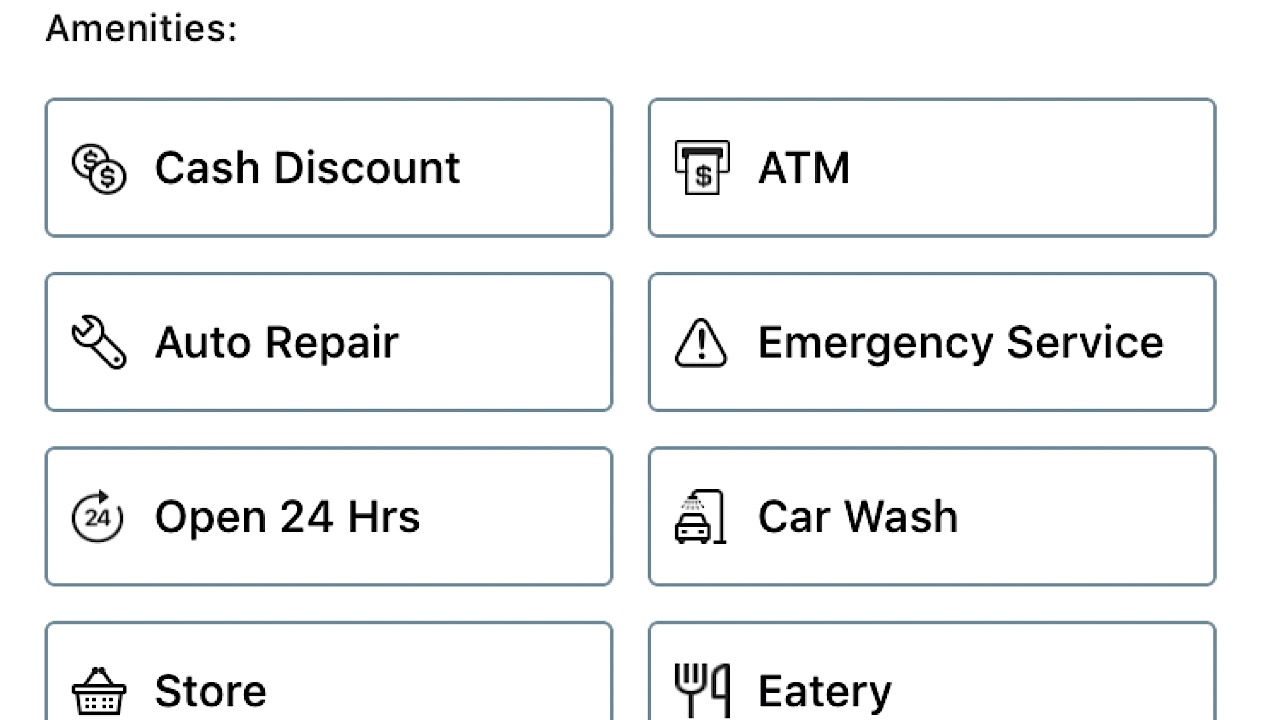
Something that’s pretty cool about Gas Guru is that you can also filter results by the amenities that are offered. If you’re taking a road trip, tap on “Open 24 hours.” If you’ve popped a tire, select “Auto Repair.”

Gas Guru amenities

There are a ton of things you can do with this app outside of just searching for the best gas prices, so it’s definitely worth the download. Available on iOS and Android.

7

2. GasBuddy

GasBuddy is the original gas app. Chances are if you’ve ever searched for one, GasBuddy is the first that will show up.

Like Gas Guru, you can sort your options by just price, just distance, or both, the type of gas, and you can also search by amenities. For each result, you can see the ranking by stars of others that have used this station.

GasBuddy screenshot

If you get there and the price is completely wrong, you can alert the app and they will make changes so as not to convenience you or other people in the future. GasBuddy gives you the option to pay for your gas through the app with their Wallet function, which will save you five cents per transaction. Five cents doesn’t seem like much, but it adds up over time. Earn points for entries in contests to win free gas.

GasBuddy contests

GasBuddy has a bit of everything and the incentives earned it a download from us. Available for iOS and Android.

8

3. MapQuest

MapQuest logo

Remember MapQuest? Back before there were apps for everything, we’d use MapQuest for directions, printing them out and trying to read them while steering. It was insane.

6

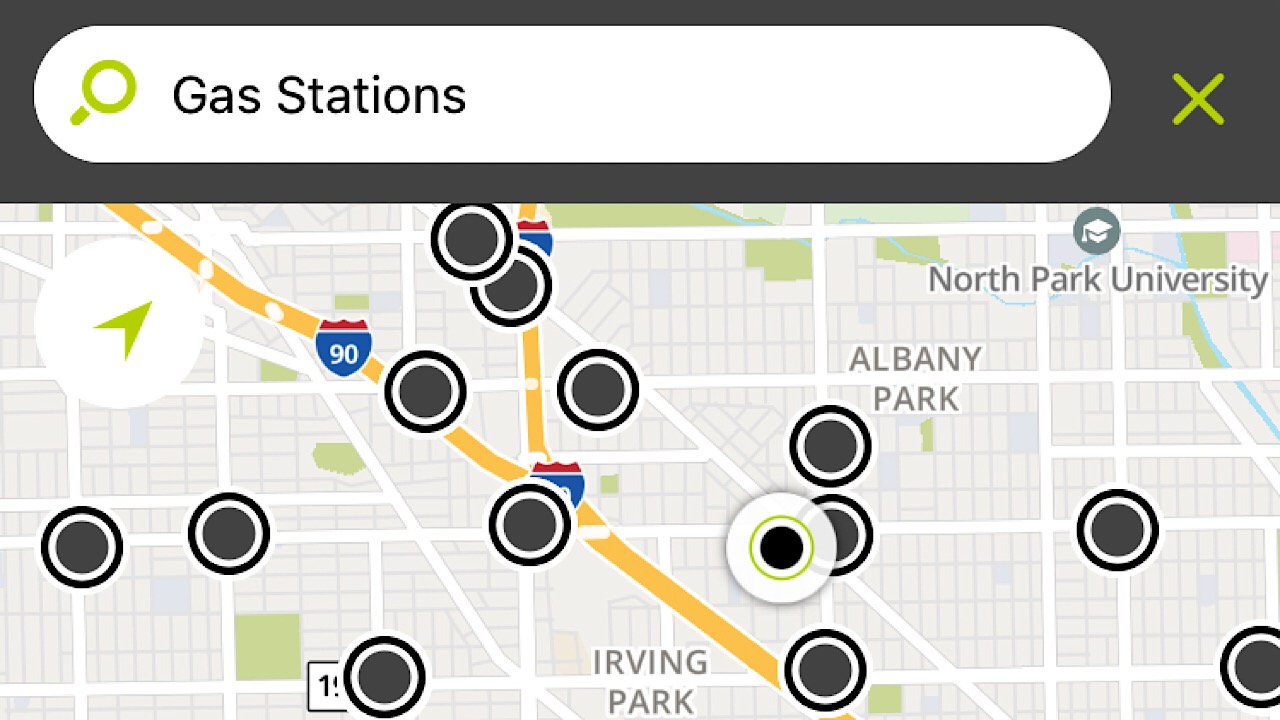
Although this app doesn’t have as many functions as the other two on our list, it still gets the job done. Search gas stations and see an eagle’s eye view of all the stations in your area.

mapquest screenshot

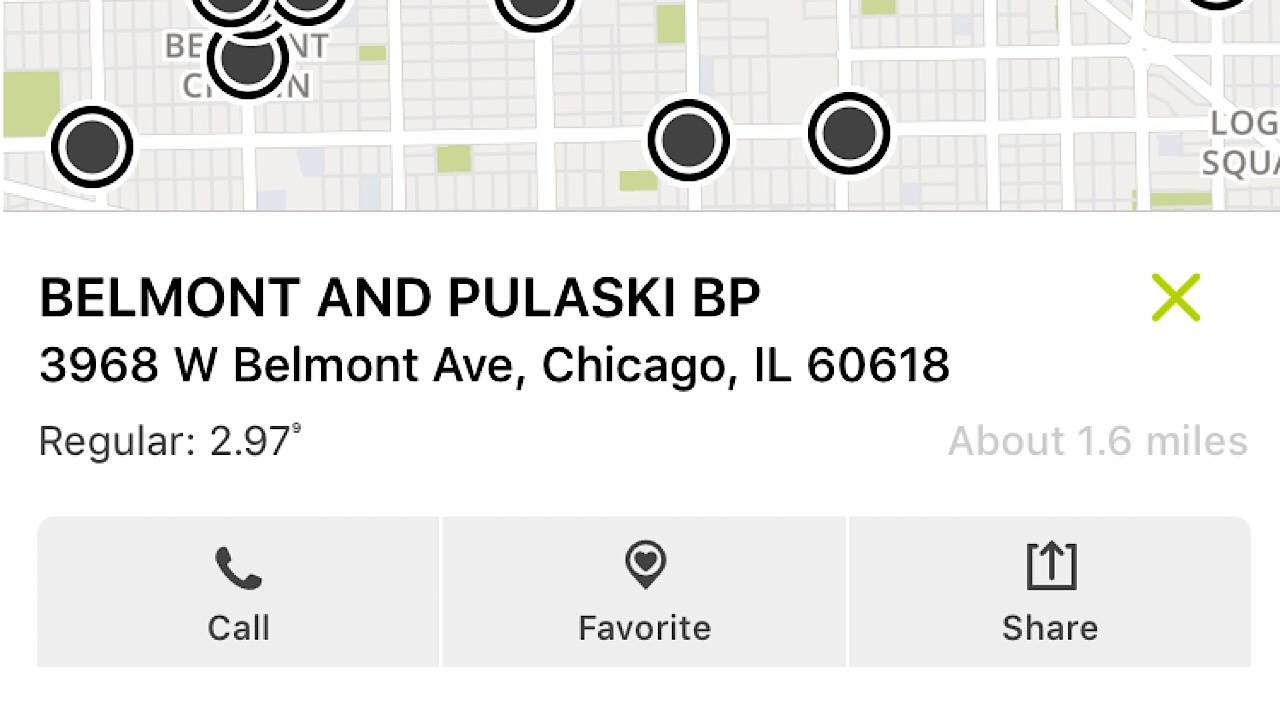
Tap on the one you want and it will give you the address, distance from you, the current price of regular gas, and the ability to save it to your favorites for later.

MapQuest screenshot

As great as our early MapQuest memories are, we’ll take the convenience of app technology over wasting so much paper and ink any day. Available on iOS and Android.

Shelling out hundreds of dollars for gas is already stressful enough, so hopefully, this list will help cut down on some of your day-to-day workload.