Games to travel all around the world while staying home

These video games all offer you a window to the world through beautifully recreated locations from the real world.

Best games set in real places

This week we’re trying to go through all the best video games to play while you’re stuck indoors. We’ve already looked at the biggest PC games that will take the longest for you to complete and we’ll also be looking at Minecraft alternatives and the best multiplayer games that you can play with your friends who don’t even like playing video games. Yep, video games can even help you with your social life while you’re stuck in the house.

Today though, we’re concentrating on all the best video games set in real cities and countries. Today’s games will help you travel the world from your living room, exploring beautiful virtual recreations of real-world cities. With graphics being so impressive these days, prepare to be blown away by the impressive recreations of some of the best cities you’ll find in the games below. Enjoy!

Best video games set in real places

You don’t have to leave your house to see the world. You now have the opportunity to see beautifully recreated real-world locations within some of the best video games out there. Check out any of the games below to take yourself on a virtual holiday. We didn’t want to be too US-centric in this virtual tour of the world though, so for cities like Los Angeles, Boston, Seattle, and Miami you’ll have to look elsewhere.

See Manhattan, New York in Tom Clancy’s The Division

The DIvision

Tom Clancy’s The Division is an exhilarating First Person Shooter (FPS) that is worth playing anyway. The action is fast-paced and sees you battling against the spread of a deadly virus with, you guessed it, lots of guns. The game is so good that it quickly became developer Ubisoft’s best-selling game when it first came out back in 2013.

We’re talking about it today though, because of the painstaking detail that Ubisoft went into recreating midtown Manhattan for the setting of the game. The game is pretty much a like-for-like recreation of the famous high-rise populated island in New York City. When you look up in Tom Clancy’s The Division, you’ll see the same you would see if you were actually in New York and looked up. Even better, the game still looks fantastic now, seven years after it was first released.

Tom Clancy's The Division Download now
8

See Hong Kong in Sleeping Dogs

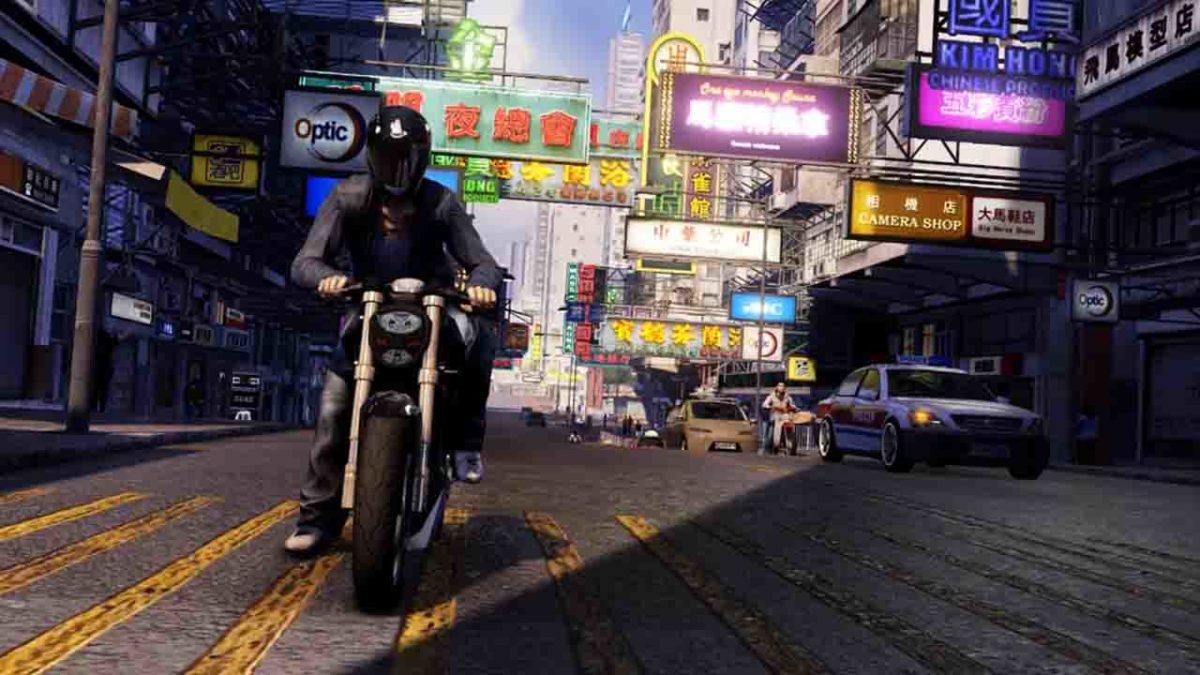
Sleeping Dogs from Square Enix is a bit of a dark horse when it comes to open-world RPG style games. The game doesn’t get nearly as many plaudits as it should because it is lots of fun to play and hardly anybody plays it. Think fast-paced triad flavored GTA and you’re halfway there. It’s not just a copy of Grand Theft Auto, however, as it offers a beefed-up fighting system and a fantastic story to get through. This game rocks.

What’s great about Sleeping Dogs though, is that the action takes in an impressively recreated Hong Kong. It’s all here, from tightly packed residential areas, bright neon-lit nightlife hotspots, bustling street food markets, and the traditional and ultra-modern port. Sure you’ll have to go there as an undercover cop trying to break into the local Triad gangs but if you’ve ever wanted to go and see Hong Kong, you could see this as your chance.

Sleeping Dogs Download now
8

See Paris in Assassin’s Creed: Unity

The Paris that has been so beautifully remade in Assassin’s Creed: Unity is the Paris of the French Revolution when the game is set. You’re going time traveling on this holiday as you set off for the world’s romantic capital during the bloodiest era in its history. As well as the Eiffel Tower and Notre Dame Cathedral, you’ll also be seeing high levels of extreme civil unrest, regular lynchings and public acts of violence, and plenty of guillotines doing what they were invented for.

Again another Ubisoft recreation, this version of Paris gained so many plaudits due to the extreme levels of detail the team behind the game went to capture the magic of Paris. The Notre Dame Cathedral in particular marks a real achievement for the game with one developer dedicating over 80% of the work she did on the game to the single building. Furthermore, even though the Cathedral’s famous Spires weren’t actually a part of the Cathedral back then, Ubisoft added them anyway to stay true the essence of the building everybody knows and loves today.

Assassin's Creed: Unity Download now
9

See San Francisco in Watchdogs 2

Sleeping Dogs San Francisco

Watch Dogs 2 is an amazing sequel to the first Watch Dogs game because it both completely reinvents the hacker based open-world adventure game while staying true to and improving upon the dynamics of the original. The game still feels fresh today and is definitely worth playing even before we consider the virtual travel option that it offers anybody who’s ever wanted to visit San Francisco.

Let’s be honest, San Francisco is an enticing prospect to any traveler with a plethora of famous landmarks and geological features. Watchdogs 2 has them all, from the famous Bay to the Golden Gate Bridge. What’s even better than going there in person, is the fact that on this virtual holiday you’ll have the skills of an expert hacker and be able to break your way into all the coolest places that you’d never get near in real life.

Watch Dogs 2 Download now
8

See Nepal in Far Cry 4

OK, this one requires a slight stretch of the imagination because Far Cry 4 isn’t actually set in Nepal, but a fictional country called Kryat. That being said, Kryat is most definitely a Nepali Himalaya inspired kingdom that bears more than striking resemblance to the tiny country that overlooks India. Everything you’d find in Nepal is here including misty snow-capped mountains and all manner of wildlife such as tigers and elephants. There’s also plenty of thin winding mountain paths to explore and all the Buddhist iconography you could ever hope to see.

Far Cry 4, just like all the other Far Cry games, is an absolute treat to play too. If you’re a First-Person Shooter (FPS) this is a game, you’ll absolutely love.


The best travel apps for finding activities and things to do when planning a trip

The best travel planning apps for finding things to do when you’re researching and planning your next trip.

A suitcase a traveller's suitcase

Traveling is one of the most rewarding activities we can undertake. It enriches the soul, soothes the heart, and fills the mind with a world of exciting possibilities. The richness of the world and all it has to offer, however, opens up its own unique set of problems that any intrepid traveler needs to deal with. There are a lot of places to go and even more things to do when you get there, and there is no possible way you can know about all of them. Don’t worry though, the best travel planning apps can help you. We’re going to show you how to find things to do when you’re planning a vacation.

When you’re planning a trip, you need to research the towns and cities you’re visiting, the different parts of all the countries you’ll be traveling through. You can do this at home before you leave, or you can do it once you’ve hit the dusty road that leads to your destiny. Either way, there are some great digital tools that can help you discover the things you’ll want to do on your next adventure. These are the top travel apps for iPhone and Android to help you discover things to do on your next big trip.

The best travel planning apps

Useful travel apps #1 Culture Trip

Vulture Trip guides

Culture Trip is a relatively new travel app and website. Its simple mission is to be the go-to travel app for all intrepid adventurers. No matter where you go, Culture Trip wants to be able to show you something special that you’ll need to do. The app is split into locations and sections with comprehensive guides offered hundreds of towns and cities around the world, and a seemingly endless list of specialized local activities to do, foods, to taste, drinks to sample and people to meet in all of them. No matter where you’re going if you turn to Culture Trip, there is a good chance you’ll find something interesting to do that you didn’t know about before.


Useful travel apps #2 Wikipedia

Wikipedia app travel screenshots

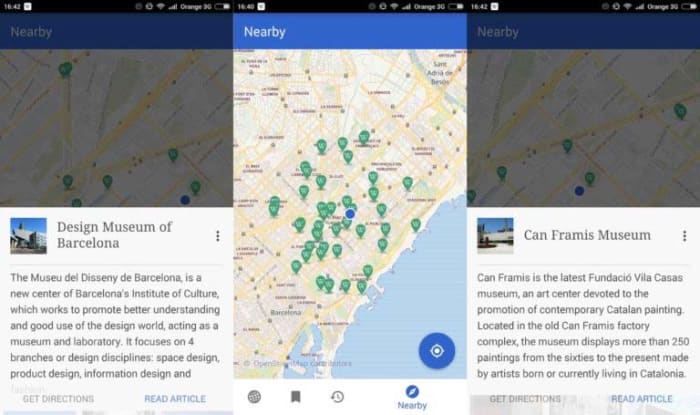
The Wikipedia app might not strike you as a travel app, but it is one of the must have travel apps. The world’s encyclopedia offers you a fantastic way to learn about the culture, history, and buzzing contemporary scenes of all the places you’re planning to visit. When you’re up to speed with these you’ll easily be able to fill an itinerary of any length of time. On top of this the Wikipedia app also offers some pretty cool location services. If you activate them, you’ll be able to view a map that contains all the nearby places of interest that have been added to Wikipedia. This is an absolute gold mine and can help you out, if you find yourself visiting somewhere you haven’t already researched properly.


Useful travel apps #3 Visit a City

Visit a City travel guide app planning

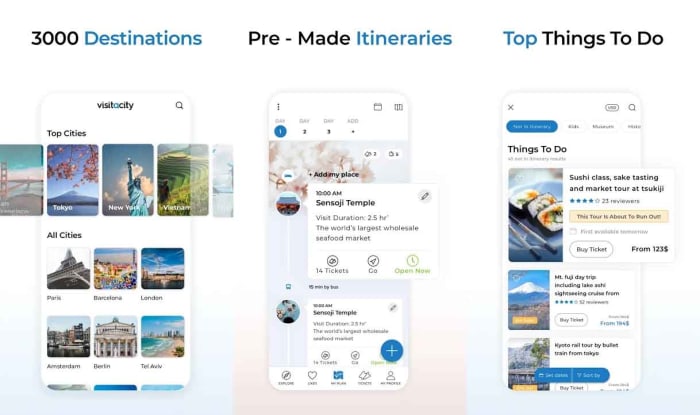
The excellent Visit a City travel app offers free access to over 3,000 travel guides for over 3,500 different locations. All you have to do is enter your destination and then the length of your stay and the app will serve you up a number of travel guides tailored to your stay in the place you’re visiting. Visit a City also offers a comprehensive ticket purchasing portal for local attractions and makes it easy for you to choose all of your top locations from the many thousands recommended on the app. The app also works offline, which will come in handy if you’re worried about hefty data roaming charges.


Useful travel apps #4 Trip Advisor

Trip Advisor app for travel planning

Trip Advisor is like the big daddy of all travel apps. For anybody who is looking for something to do on their next adventure, Trip Advisor’s strength comes from its community. A lot of Trip Advisor is geared around marketing operations for restaurants, hotels, and activities but you’ll find that what you’re really looking for is what other travelers have said about all these different types of places. You can simply type in a city on Trip Advisor and then see all the highest rated activities, voted for by other visitors. The Trip Advisor forums are also full of gold. As well as learning about strange and interesting things to do, you’ll also learn about the best, safest, and most reasonably priced way to do them.

Trip Advisor for Android Download now
7
Trip Advisor for iPhone Download now
7

Useful travel apps #5 Lonely Planet

lonely planet travel apps planning

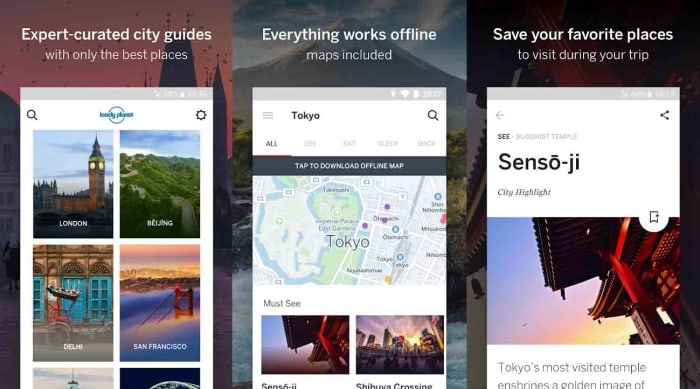
Lonely Planet is another well established name in the world of travel discovery. We’ll have all seen one on somebody’s bookshelf at one time or another and if you’ve ever traveled yourself there is a good chance, you’ll have had one stuffed in your suitcase or backpack. The Lonely Planet apps for traveling try to take that guidebook experience and cram it into your mobile phone. It is a little similar to Visit a City with expertly curated location guides, interactive maps, and various other top recommendations. This app is more for cities though, so if you’re venturing out into the country you might want to check in on Culture Trip, Wikipedia, or the Trip Advisor forums for some extra suggestions.

Guides by Lonely Planet for Android Download now
8
Guides by Lonely Planet for iPhone Download now
8

Useful travel apps #6 Your favorite Podcast app

podcasts are great for planning a trip

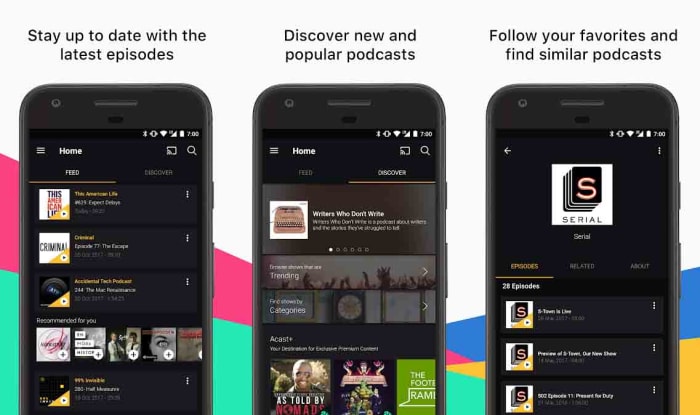
I’m opening a bit of a can of works here that may lead to an article in its own right. Travel podcasts are an excellent source of inspiration. On a recent trip to Colombia we ended up heading to the city of Pereira so that we could stay on a coffee plantation for a few days. It was a magical trip, and it all came from a recommendation we took from the Amateur Traveler podcast. Other great travel podcasts include Conde Nast, The Rough Guide to Everywhere, and the Indie Travel podcast. The trick though is to simply search for podcasts on the places you’re visiting to see if anybody has done a specific edition on somewhere that is on your itinerary. Another little tip, if you want to go the extra mile is to search for history podcasts on the countries you’re going to visit. Revolutions is an excellent podcast and will give you a lot of detail on the brutal things that went on in countries like Great Britain, France, the US, and Mexico.

Castro: Podcast Player Download now
9
Acast - Podcast Player Download now
8

New Google Maps feature could keep you safe when riding in cabs

Google is testing a feature for Maps that will alert you if you stray too far from your intended route.

G Maps

Google is always looking to add new features to its key products like Gmail and Google Maps and we’ve seen a lot of new features land on its flagship navigation app recently. As well as the likes of the speed camera notification system, recently added, Google is now testing a new feature that isn’t for drivers, but rather passengers in cabs.

Google Maps Download Google Maps
7

Google is testing a feature for Maps that will alert you if you stray too far from your intended route

When you’re riding in a cab you shouldn’t forget that you’re in somebody else’s car. This means that you should respect the driver and the car, but you should also be aware that, when it comes down to it, somebody else is in control. Yes, you’ve told the driver where to go but, should they wish, they have the power to take the vehicle away from the intended route.

The more serious issue here relates to being taken somewhere you don’t want to go. The less serious issue (but much more common) is your driver taking you on an extended route in order to bump up your cab fare. It looks like Google is moving to help people avoid both of these situations.

This new Google Maps feature means you may never be overcharged for a cab ride again.

According to a report by XDA Developers, Google is testing a new feature that will alert users should they stray too far from their intended route. The feature, called off-route alerts, will send an alert to the user’s phone every time they go more than 500 meters from where the route they’re supposed to be following. This means that whenever they’re riding in a cab, they won’t have to constantly check the route they’re traveling as they’ll know their phone will tell them if all of a sudden if they’re no longer following it. Anybody who has ever visited a new city will know that you want to be looking out of the window when in a cab, rather than at your phone.

Of course, this feature will also be useful for regular drivers who don’t want to stare at their phones all the time when they’re driving. Enabling this feature will allow drivers to check their route before setting off and then drive without checking Maps knowing that if they do take a wrong turn, Google Maps will beep them to let them know.

Unfortunately, for anybody hoping to see this feature land on their version of Google Maps, there is still no official word from Google about when this feature will receive a general roll-out. So far, the feature has only been spotted in India, which means it is likely still at the testing stage. As soon as we know more about this feature or when we can expect to see it, we’ll let you know.

How to scan for hidden cameras at your Airbnb

Worried about spying eyes while staying at your Airbnb? These tips can help you out!

Hidden camera

Airbnb has changed the way we travel, offering the comforts of home and the ability to experience life as the locals do.

In recent months, an increasing number of reports have made headlines involving guests finding hidden cameras in their Airbnb accommodations. And no, that information was not disclosed to guests up front.

Most recently, a New Zealand family made headlines for spotting a hidden camera after noticing the device on the Wi-Fi network.

Creepy, right?

While it’s unlikely that most Airbnb hosts spy on their guests, reports like these do make the case for erring on the side of caution.

7

What does Airbnb allow — camera-wise?

Airbnb

Airbnb’s policy states that if you are a host and you have any type of security camera, active or not, it needs to be indicated in the House Rules section of your profile.

They also require that any recording taking place during a guest’s stay must be disclosed. Should the guest report an active recording, they can cancel the reservation and receive a full refund.

What’s more, Airbnb added an extra layer of disclosure before booking.

As of early last year, guests receive a pop-up before confirming the booking, informing them of any cameras on the premises and where they are located.

Guests must actively opt-in indicating that they understand that they will be filmed during their stay.

Hidden camera

The rule applies to any camera ranging from nanny cams to Wi-Fi cameras like Nest or Dropcam.

9

Violators may be subject to penalties, though the website doesn’t exactly lay out what those penalties are.

Airbnb’s trust and safety rep told The Atlantic that the company does try to filter out hosts who might engage in suspicious behavior. Airbnb runs their information through felony and sex-offender records before they can start hosting guests.

How can you scan for cameras?

There are a few things you can do to check for hidden cameras in your Airbnb rental.

Make a habit of following these few steps before checking for bedbugs to ensure that you’re not being watched during your next vacation:

Look for objects that seem out of place

Bear on shelf

Let’s start out with a low-tech tip taken from old school sleuthing. Scan your Airbnb for anything that seems “off” or out of place. This could be as obvious as a can of soda placed in the middle of the room or something more subtle.

Assuming your hosts are at least somewhat savvy, here are some common places you might find a hidden camera:

  • Smoke detectors
  • Stuffed animals
  • Shelves
  • Power strips
  • Night lights
  • Books or DVDs
  • Computers and their accessories
  • Holes in the wall

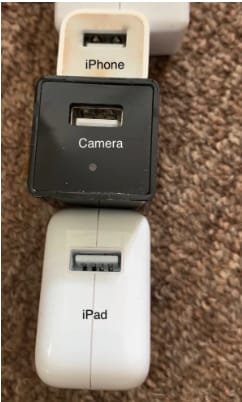
Do a sweep of these “everyday items” to see if anything seems sort of bulky or odd-looking. In this example below, you’ll notice that this USB plug seems a little bit larger than the norm — and what do you know — there’s a hidden camera attached.

Hidden camera in USB Consider the “best” angles for covering the room

Generally speaking, corners are the best place to place a camera, as you’ll get the widest view of the space.

The Barker family, from the aforementioned article, found their Airbnb’s camera in prime position, that wide angled corner.

barker family airbnb camera

You’ll also want to use common sense when scoping out the scene.

If you’re worried that someone is spying on you in the kitchen, chances are they’ll be viewing from above rather than in the baseboard.

If they’re trying to catch you in the living room, you might want to spend time looking at anything stored near the television or pointing at the couch.

Shine a light to pick up the reflection of any hidden lenses

Lenses, being made out of glass, reflect light. Try doing a sweep of the room by shining a flashlight to scan for reflections.

Turn off the lights

Turn off the lights to check for hidden night vision cameras. Most hidden cameras have red or green LED lights that blink or shine in low light conditions, in an effort to supply lighting for better images.

Spot hidden smart devices by scanning for Wi- Fi connections

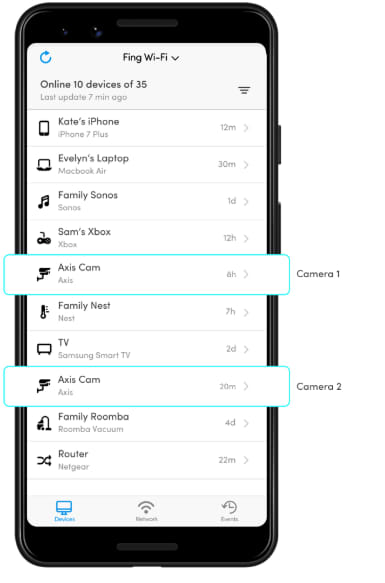
If you connect to the house Wi-Fi — chances are, the host has provided you with a network name and password. Once you’re in, open the network to see what other devices are connected.

Unfortunately, the camera will not be discoverable if it is not connected to the same network you’ve logged into.

Use a Wi-Fi checking app

Unfortunately, scanning with your eyes and flashlights alone won’t catch every hidden camera.

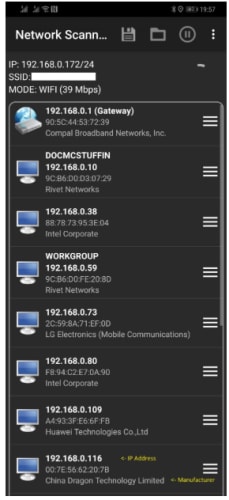
Luckily, there are plenty of apps designed for this express purpose. One example is Network Scanner, which displays IP and MAC addresses, as well as the names of the hosts on the local network.

network scanner find unknown devices

Or, another called Angry IP scanner, which also scans the network for devices, security threats, and more.

Angry IP Scanner Download Free ►
7

Just about every hidden camera the average person can buy relies on wireless technology to stream the footage to a remote location.

Smartphone users can download an app called Fing (available on iOS and Android) which is designed to help users “control their digital environment.”

While the app is primarily designed to help you troubleshoot network issues and keep your own devices secure, it can also clue you into peeping hosts.

Fing App

What should you do if you find a hidden camera in your Airbnb?

Any undisclosed cameras must be reported to both Airbnb and the host. Make sure you don’t move the devices and take pictures documenting the findings.

In the U.S., it’s fully within your rights to get the police involved, as undisclosed cameras are a criminal offense.

Still, hidden camera laws vary by country. If you’re traveling abroad, read up on local laws to find out if any recourse is available.

Wherever you are, hidden cameras violate the terms of the Airbnb host agreement, so make sure you report all you find.

Google Translatotron can mimic your voice

Google’s Translatotron improves speech-to-speech translation and can even mimic the speaker’s voice.

Google Translate logo

Google Translate is an incredible tool.

It hasn’t had the panache of some of the translating devices, we’ve seen in pop culture sci-fi outings like “Star Trek” and “Hitchhiker’s Guide to the Galaxy.” But it’s been getting the job done for years. From travelers in foreign lands to high school kids doing their Spanish homework, Google Translate has made it easier to converse across multiple languages.
Incredibly, Google’s showpiece translation tool is about to get even better with Google Translatotron. Soon, it could be entering realms of existence that have so far only belonged in our wildest imagination.

Google Translate Download now ►
8

Google Translatotron improves speech-to-speech, mimics user’s voice

Google translate

Speech-to-speech translation is still not a huge thing in today’s world. Google has been trying to push it recently, via its Home Hub assistant, but it hasn’t really caught on with the general public. Most of us are still typing in what we need translating or using Google’s excellent image recognition software to take pictures of text that we want to translate.

The main reason for this is that technology hasn’t quite been good enough, up to now. The way speech-to-speech translation works currently is by:

  • Listening to the spoken words
  • Transcribing it into text
  • Translating the text into the target language
  • Finally, converting it back into speech.

All these steps take time and the end result is a more regular text-based conversion.

Google’s new Translatotron is going to change this and will implement true speech-to-speech translation. Translatotron will allow Google to cut out the need to convert sounds into text, which will save time and remove steps were a translation could go wrong.

The other cool feature that Translatotron gives Google is the ability to make the translated speech mimic the voice of the original user. You can find some audio samples of this action here.

How Google Translatotron works
Image via: Google

According to Google, the new feature uses a variety of methods to translate directly from voice and then mimic said voice in its recreations. It’s pretty confusing, but you can find the complete explanation here.
Wrapping up

It isn’t clear when Translatotron will start to be incorporated into Google Translate. The blog post ends by calling it a “start point” for future research on end-to-end speech-to-speech translation systems.

Google sees this as the beginning of something rather than the culmination. It is clear from the audio samples that it is far from a polished feature. Perhaps this is why Google has called it Translatotron, which wouldn’t be out of place in a clunky 1950s era sci-fi outing. It is futuristic, but far from slick.

Find great airport food with these apps

Download these apps and get a great meal before your next flight.

airport food

You don’t need to be rushing through the largest, most confusing airport in the world to appreciate the simplistic joy of finding a perfect bite to eat before hopping on a flight or welcoming a friend home.

If you’re a foodie, frequent traveler, or average human, we recommend these apps. They can help you find a good airport restaurant, get your meal quickly, and maybe even something more! You probably know about Yelp and TripAdvisor, but the apps we’ve assembled take things a step further.

Find great airport food with these apps

Grab

Grab

Yep, that’s the name!

Grab focuses on exactly what their name implies: helping users order food ahead of time, so they can stop by and pick up their purchase before heading into the terminal.

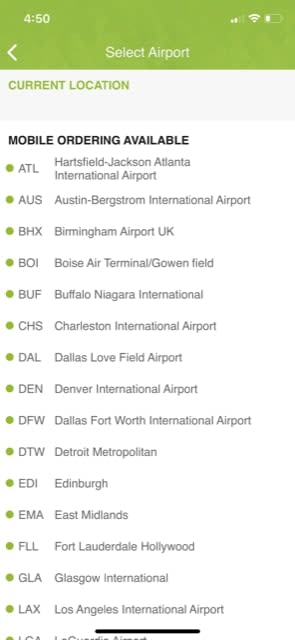
If you don’t want it to check your location, you can still just choose the proper location. Upon opening the app, find your airport:

Grab1

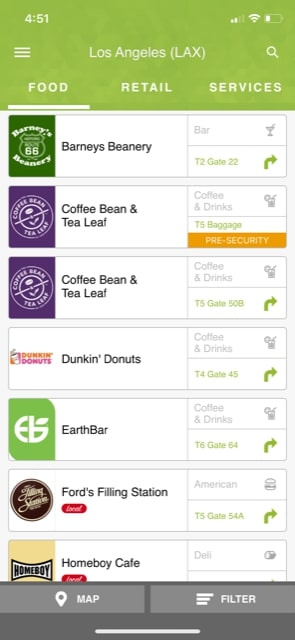
Once there, Grab provides a large list of possible restaurants, along with their location. You also have the option to peruse through retail outlets and service stations. That way, when you’re visiting Arizona, you can make sure to get that turquoise bracelet you’ve always wanted!

Grab2

Among its other strengths, Grab has two more benefits we’d like to note: first, receipts are stored for later so you can track your finances. Second, and more importantly, you have the ability to store your favorite foods for easy ordering the next flight around!

Grab - Airport Mobile Ordering Download Free ►
8

Trippie

Trippiest

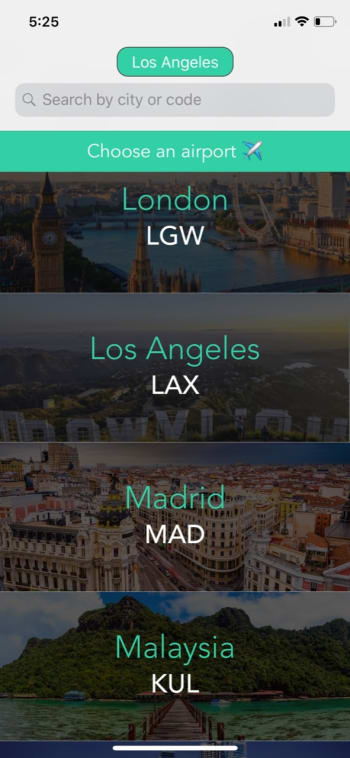
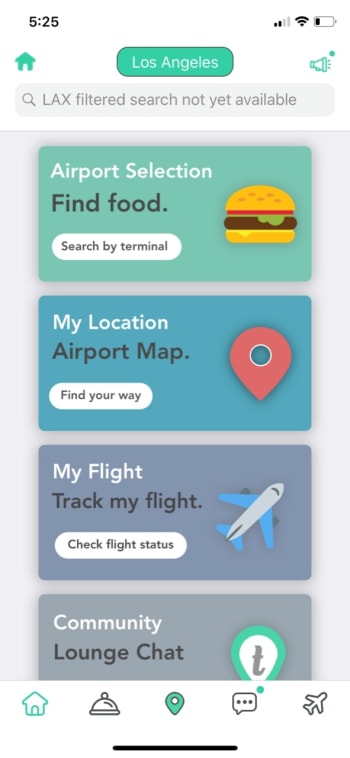
A voyage with Trippie begins like any other: hop into the app and select your departure location.

Hey

From here, things become a bit different. Rather than suggesting food right off the bat, Trippie provides a huge litany of resources:

YES

While the app mainly provides information on restaurants nearby, there are many other things this app can do! If you need to know your way around the airport, it can direct you. If you’re looking for a chat buddy, you can join the community, pick a chat handle, and talk anonymously with other people!

The list goes on. If you’re looking for more than food, this airport EXPERIENCE app may be your cup of tea!

But now, let’s return to food…

Hey


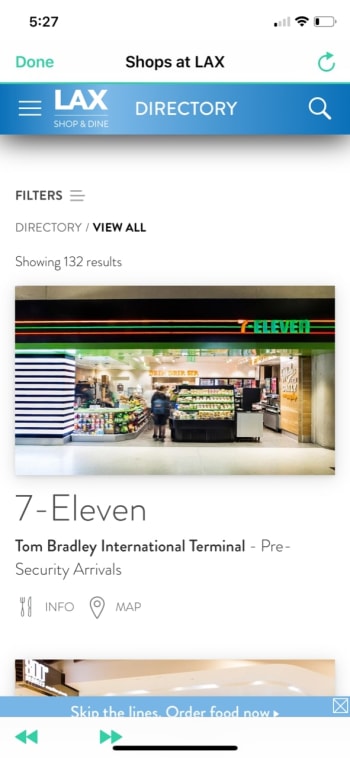
The food section opens a menu. We’d like to note that every store gets a relatively large picture, limiting your list to about two restaurants per page. You may want to put the Filters option to good use.

Other than that, the app has a lot to offer!

Trippie: The Airport App download free ►
7

Grubhub

Grub

Finally, to top off our list, we have a classic food app.

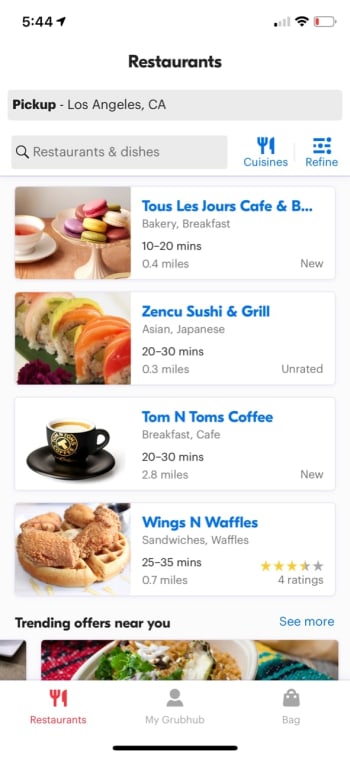
Grubhub wasn’t intended to find food in airports, but it’s great at discovering restaurants anywhere:

GrubHubFinal

Still, despite the ability to find a meal nearby, it may be difficult to have food delivered to you, which is one of Grubhub’s main strengths. You might need to set a meeting point with the delivery driver outside the airport terminal, or even the building itself. The app wasn’t specifically optimized for an airport environment.

Still: benefits of using Grubhub? Before and after reaching your destination, you’ll be able to use a world-class food delivery system! Nothing wrong with that.

7

Download these apps and see how they can make your next trip a little less stressful. And remember, calories consumed on vacation don’t count!

Top 3 packing apps for your vacation

Don’t realize you forgot something at home on your next vacation; download these apps and make travel easier!

Packing

Does it feel like every trip you go on, something gets left behind?

It’s the toothbrush, the flip flops, the hydro flask, the Nintendo Switch, the sunglasses, the towels,  the earbuds, the towels, the cell phone charger, and the chapstick!

Always with the chapstick.

If you’re tired of forgetting everything other than that huge stack of books you promised yourself to read during vacation, we’ve got some apps to make your life a little easier.

Top 3 luggage packing apps

PackPoint

Packpoint

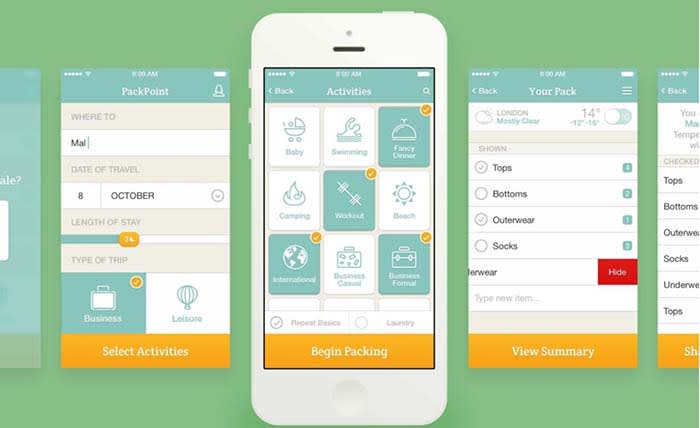
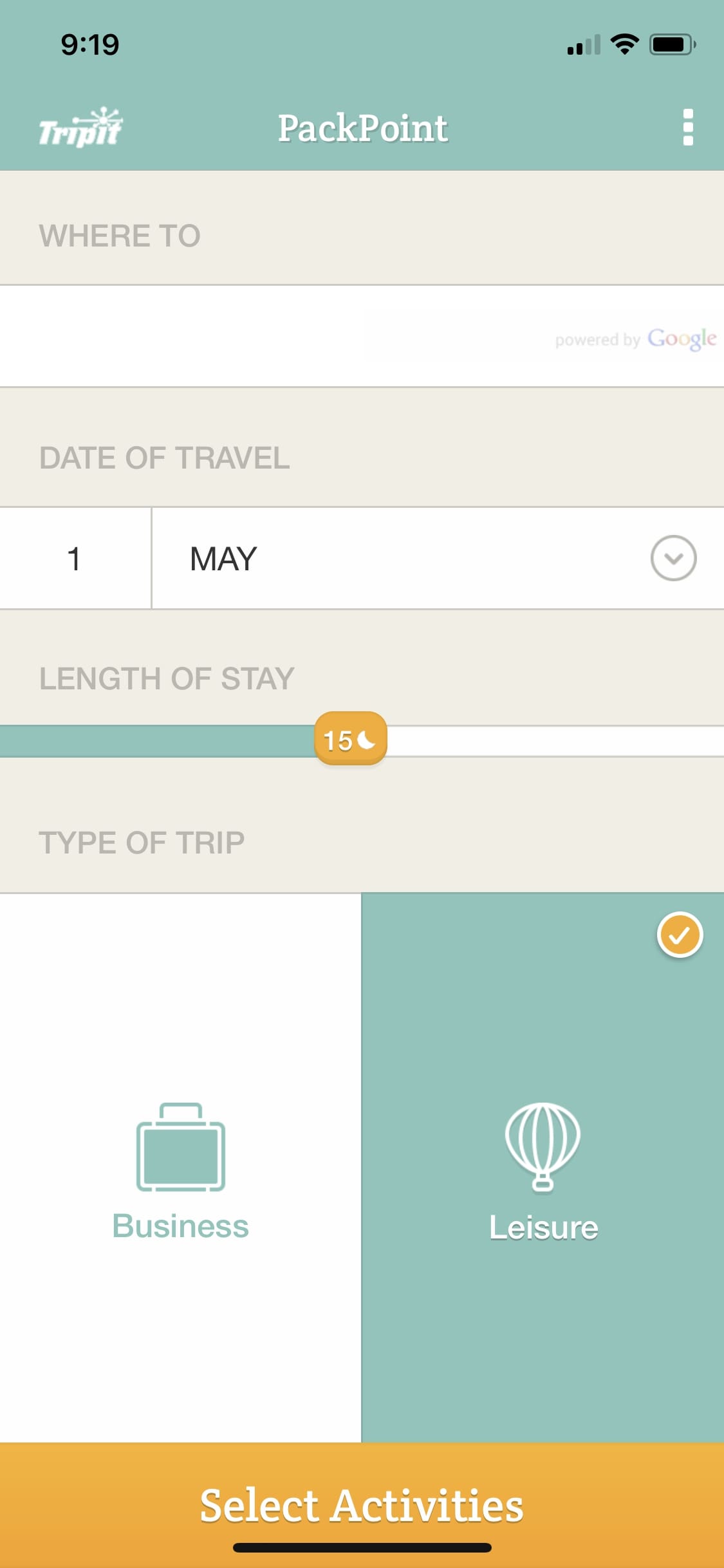
Download and open Packpoint. You’re greeted by a screen that asks your gender, where you’re going, when you’ll be there, and why you’re visiting. These are simple bits of information that will help PackPoint suggest what items you should bring. Don’t worry about editing the packing list just yet, there’ll be time for that soon enough!

Packpoint where to

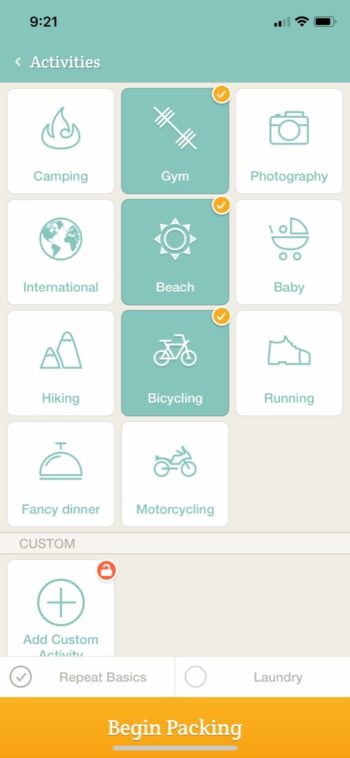
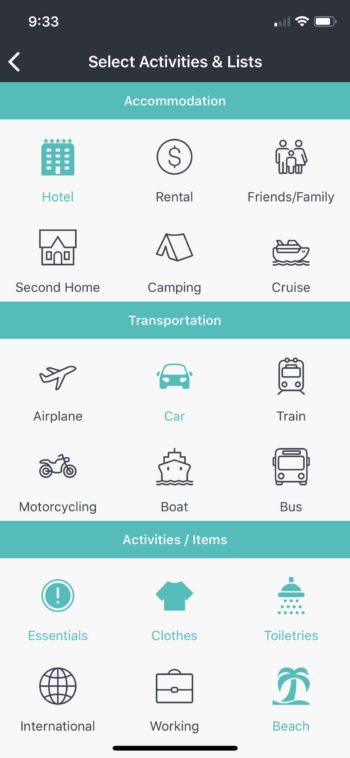
After this, input what activities you’re planning on doing. This can be very important. While most trips require essentials, we often forget to bring activity-specific gear, such as boots for a hike.

PackPoint Activities

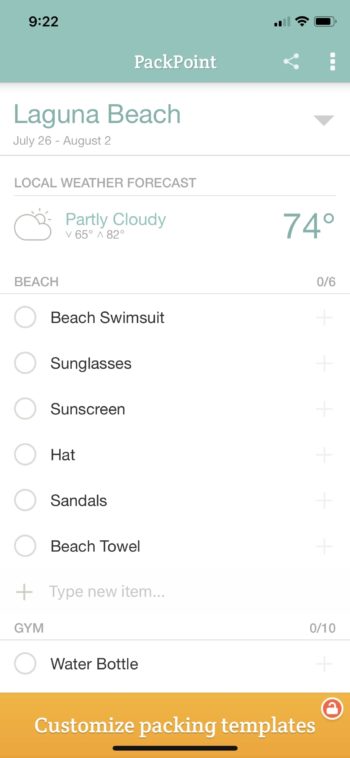
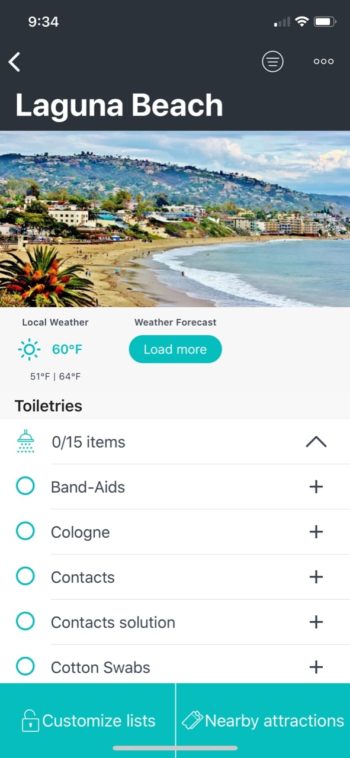
And that’s it; you’re finished! The system creates a full list of items to pack. You can add to the list by clicking “Type new item” in any section, and remove details by swiping right and hitting the red button.

PackPoint Laguna Beach

DISTINGUISHING FEATURES:

PackPoint has a great user interface: no busy screens, a well-designed layout, quick setup, and intuitive buttons. With the difficulty of planning a full vacation, keeping the packing process as simple as possible may be just what’s needed.

PREMIUM:

Unfortunately, this app withholds one of the most important functions for their premium subscribers: customizable packing lists. While you can edit each list within a vacation plan, you aren’t able to create full lists for use in the future. To do that you must pay… three dollars!

It’s really not that bad. Three dollars shouldn’t break the bank, and you can support the devs. Of course, if you’re looking to get the whole bag of chips absolutely free, you may want to try something else.

PackPoint Download now ►
7

Packr

Packr

Packr looks and feels a lot like PackPoint. In fact, it’s so much like PackPoint that the differences come down to visual style and a few key functions.

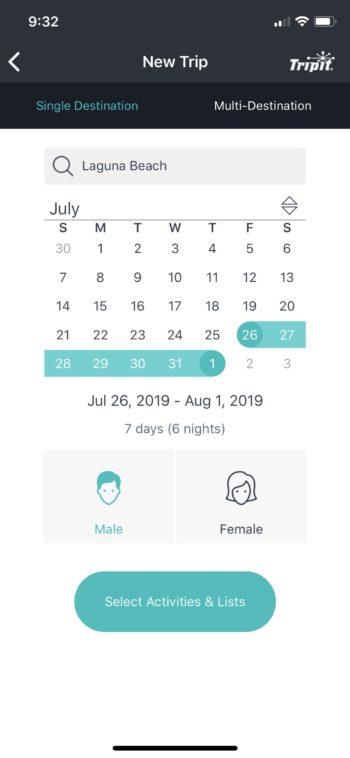
But first, let’s step into the app. Here you can choose your location, gender, and visit dates. Nothing too crazy or different there:

New trip list

Here, we have the familiar activity screen. Look at those adorable icons. What will you be doing on this vacation?

Accomodations list

Finally, Packr organizes everything into a nice little list for you. As before, add, remove, and check items at your leisure.

PAckr Laguna Beach

DEFINING FEATURES:

So, what makes the app different?

First, the style looks different. It’s a little more artistic and visually interesting, which should work great for anyone that’s not into a simplistic, minimalist style.

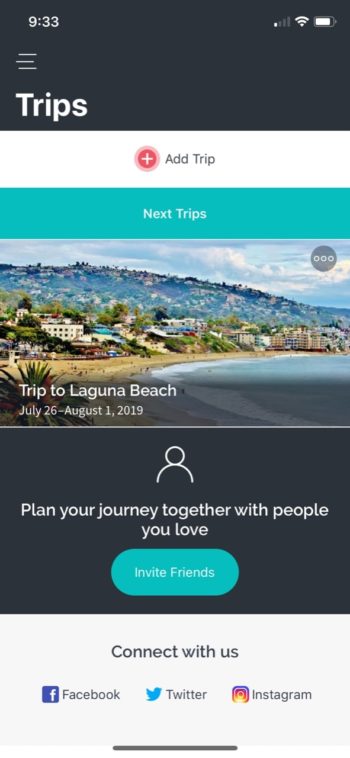
Packr also comes with a main window, another useful detail. After making your first vacation list, you’ll be taken to a screen with all your saved vacations. In PackPoint, on the other hand, you always visit the trip creation environment first and must find your way to saved vacations later. If you’re closing and opening the app while packing your bags, this may make a huge difference.

Packr Trips

PREMIUM:

Packr’s premium account adds many new features. For example: customizable packing lists (sounds familiar), eight-day weather forecasts, and multiple-destination trips!

We have to give the creators kudos here. For four dollars (currently $1.99, there’s a special offer), they give you excellent upgrades! In particular, the multi-destination feature has great promise, seeing as many trips begin and end in different places, with numerous stops in between.

Packing List

Packing List

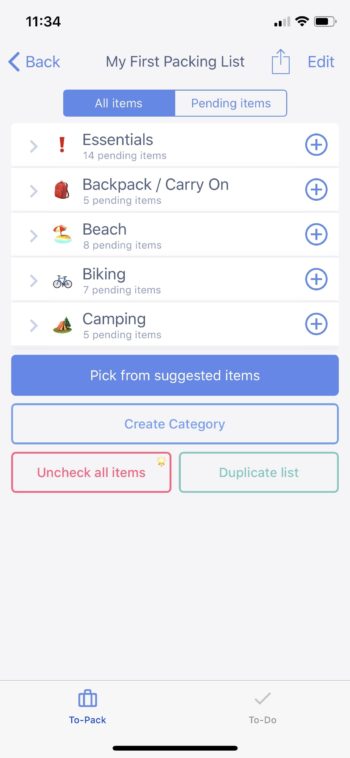
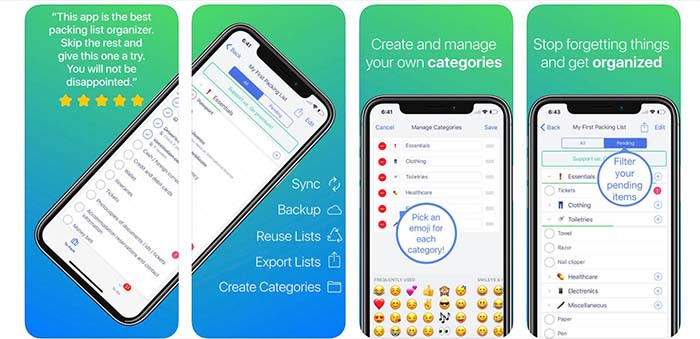
Packing List separates itself right off the bat with a ground-up approach to packing. There’s no asking for a destination or activities, just a large list of suggested items for you to choose from!

Packing List Tasks

Go through the lists, check out the many activities, and decide what fits your itinerary. In the end, there shouldn’t be any need for editing the list: you’ve already got a form-fitted plan laid out:

First Packing List

DISTINGUISHING FEATURES:

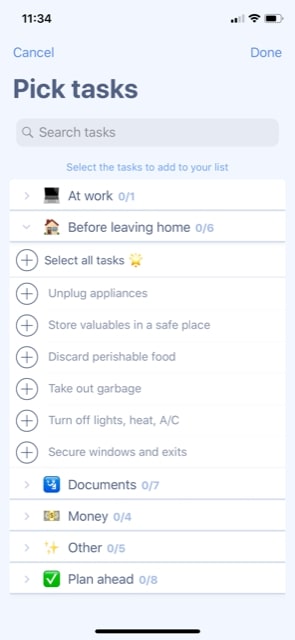
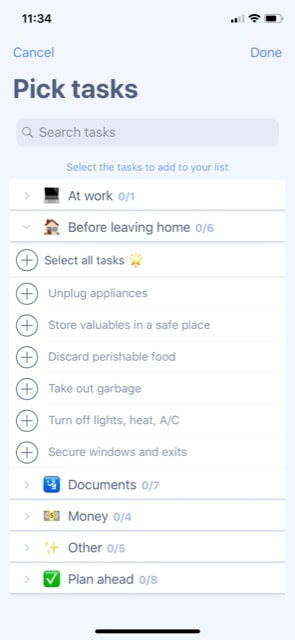
Aside from being the only app that gives you the ability to start from scratch, Packing List adds another great feature: a To-Do List. Once you’re finished selecting your supplies, begin choosing important tasks to complete before heading abroad!

Never again forget to lock the doors before heading out, eat that pizza before it goes bad, or grab cash for the farmer’s market:

PKacing List tasks

PREMIUM:

With a radically different app comes radically different premium features.

Set specific quantities for packing items, check/uncheck all items in a list at once, sync with iCloud, and set reminders for time-sensitive supplies! All of this is only $3.

Packing List Download now ►
7

Happy Travels

Ironically, a relaxing vacation can be hard to pull off. In between laying down plans, and figuring out how to connect point A and point B, packing should be the least of your concerns. We hope these apps make the trip that much easier.

And don’t forget the chapstick!

How to stay safe on ride-sharing apps

Find out how to arrive safely to your destination with these helpful tips.

Using UberWhen it comes to ride-sharing service, safety is no laughing matter.

Recently, a college student was murdered when she got into a vehicle she thought was her Uber. Ride-sharing apps do offer protection for both driver and passenger, but there are still some things you can do to make sure you arrive safe and sound.

If you don’t feel safe, cancel the ride

Sometimes when accepting a ride, or picking up a passenger the situation doesn’t feel right. It could be that the vehicle reeks of alcohol, or that the passenger does not look like their picture. If this happens, you can cancel the ride, and then report the problematic individual in the app.

Sometimes you will be charged a cancellation fee, but you can contest it when filing a report.

Share the ride with someone

For both drivers and passengers, you have the ability to share your location on the app with a friend or relative. This is meant to offer peace of mind so that somebody knows where you are, and can alert the authorities if need be.

Waze is a popular GPS service that updates constantly to show traffic, accidents, potholes, and even nearby police activity. One of the app’s features is the ability to share a ride with somebody so they can see where you are in relation to your destination.

Check the license plate before getting inside

Apps like Uber and Lyft show you the model and color of the vehicle on its way to get you. The apps also tell you the license plate number of the vehicle picking you up, so you know for certain that you are getting in the right vehicle.

For drivers and passengers, the app has your back

Ride-sharing apps take information from both the rider and passenger for each ride. If something were to happen on the ride, the apps know the parties involved, their information, and where they are on the map.

For drivers, every ride is insured and a fee will be charged to the passenger if they make a mess in your vehicle.

Drivers and passengers also have a 24/7 incident report system as well as a button for emergency assistance in the app.

Report problematic riders, drivers

Drunk drivingRide-sharing apps screen both drivers and their vehicles before hiring anybody. Unfortunately, some problematic individual can slip through the cracks.


If you are having an issue with a passenger or a driver, you can report the person. The app will take your report into consideration, and remove problematic people from the service. Click below to read about how Uber especially has been cracking down on drivers.

Reporting problems helps to make the app safer for users on both ends of the spectrum.

Don’t ride/let people ride shotgun

At the end of the day, you are sharing a ride with a stranger. There is nothing wrong with having a conversation between rider and passenger. However, the two do not need to sit right next to each other.

Having the passenger sit in the back seat means that they can leave the vehicle quicker. It also means that they are further away from the steering wheel and gear-shift, ensuring that the driver is the only one in control. 

By following these tips, we hope all your rides go smoothly. And remember, if you ever feel unsafe, trust your gut and find another way to your destination.

Best upcoming gaming conventions in 2019

Hit the road and celebrate the best in gaming with these incredible conventions.

Gaming conventions are a great way to discover new games, meet up with gamers, and dress up as your favorite characters.

But they’re not all the same. Some conventions are all about the industry, while others celebrate fandom. Whether you’re considering your first gaming convention or you’ve competed in tournaments all over the world — 2019 has a lot to offer.

Sure, we’re already three months in, but convention season is just kicking into high gear. Fortnite fanatic? Smash Bros. addict? Just there for the LAN parties? Check out the list to see what’s on the books for the rest of the year.

Best gaming conventions of 2019

PAX East

PAX Boston

March 28-31, 2019, Boston, MA

PAX is a festival for gamers across all genres to come together. PAX South just wrapped up last month, but if you missed it, the East coast installation promises a solid lineup, though it’s not yet available. Catch the indie showcase to discover new games from small developers, chill out in the handheld lounge and regroup on a bean bag. Or, bring your PC and join the LAN Party. And, if unstructured activity is more your speed—you can check out consoles or VR headsets at the con — or take a break from screens with a tabletop games.

What we like about PAX is, this convention seems more about playing games and discovering new releases than serving as a promotion space for the titans of the gaming industry.

E3 2019

E3 Los Angeles 2019

June 11-13, Los Angeles, CA

E3 is one of the world’s biggest events for computer and video game enthusiasts. The three-day event hosts all of the biggest companies, influencers, gamers, and often serves as a platform for some of the biggest announcements in the tech and gaming space. The conference is still a few months off, so most of the information circulating the web is just hearsay. But rumor has it that Microsoft will unveil the next generation of Xboxes, while Sony is skipping the con.

Dreamhack


View this post on Instagram


Sometimes we just reminisce about #DHMasters ?

A post shared by DreamHack (@dreamhack) on Feb 24, 2019 at 11:18am PST

June 15-17, 2019 Elmia, Jönköping, Sweden

Dreamhack’s festivals are a global affair, with cons cropping up all over the world from Rio to Mumbai. However, the biggest events this year take place in Sweden — once in June and once in December.

The three-day events host the world’s biggest LAN party, live music, esports tournaments, and more. Unlike events like E3, Dreamhack is more about the attendees than industry insiders.

Last winter’s event hosted official tournaments for Super Smash Bros., Brawlhalla and Dragon Ball Fighter Z. It’s also a great place to discover new indie games, meet pro gamers, and dance to some DJ sets.

Paris Games Week

Paris Games week

October 30-November 3, 2019, Paris, France

Paris Games Week is a huge gaming convention spanning five days. This fall, you can expect a preview of 2020’s biggest releases, eSports competitions and of course, plenty of cosplay.

PGW is a celebration of all things pop culture — games old and new, and there are several family-friendly activities — including an area dedicated to kids 3-12 – you can even learn to code with your child.

Additional features include the IndieCade area, which is a celebration of European indie designers, and a section devoted to art and literature. In all, it’s a pretty rad mashup of gaming, the arts, and more.

Tokyo Game Show

Tokyo Games

Late September 2019

The Tokyo Game Show is an industry event not unlike E3, but they open their doors to the general public for the last two days of the convention.

This event is Japan’s biggest video game conference, held in late September every year. Because the con is a bit far off, the schedule is all TBA. Still, you can expect to see 300+ exhibitors from over 40 countries showing off everything from the latest game releases to AI innovations and more.

BlizzCon

Blizzcon Anaheim

October 25-28, 2019 Anaheim, CA

Forget Disneyland. Come October, Blizzcon’s semi-annual event is Anaheim’s biggest attraction. The event features several gaming tournaments – watch the pros duke it out in your favorite Blizz games: Starcraft, World of Warcraft, Heroes of the Storm, or Hearthstone. If you’re not really the competitive type, the event offers cosplay contests, exhibitions, and plenty of activities.

Research before you get your tickets

Before you buy tickets to the next big con—near or far—you may want to do some research. Check StubHub to see what’s available, then dig deeper into the details.

Has the convention been around for years or is it a new, untested event? What types of vendors will be there, and are there tournaments or casual gaming activities you can participate in?

Finding out what to expect will allow you to make sure you have the most fun possible — whether you venture into a new country or stay close to home.

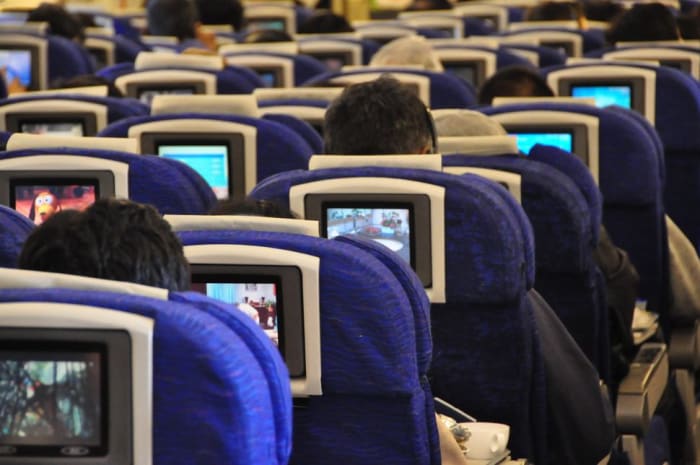
In-flight displays could be watching you

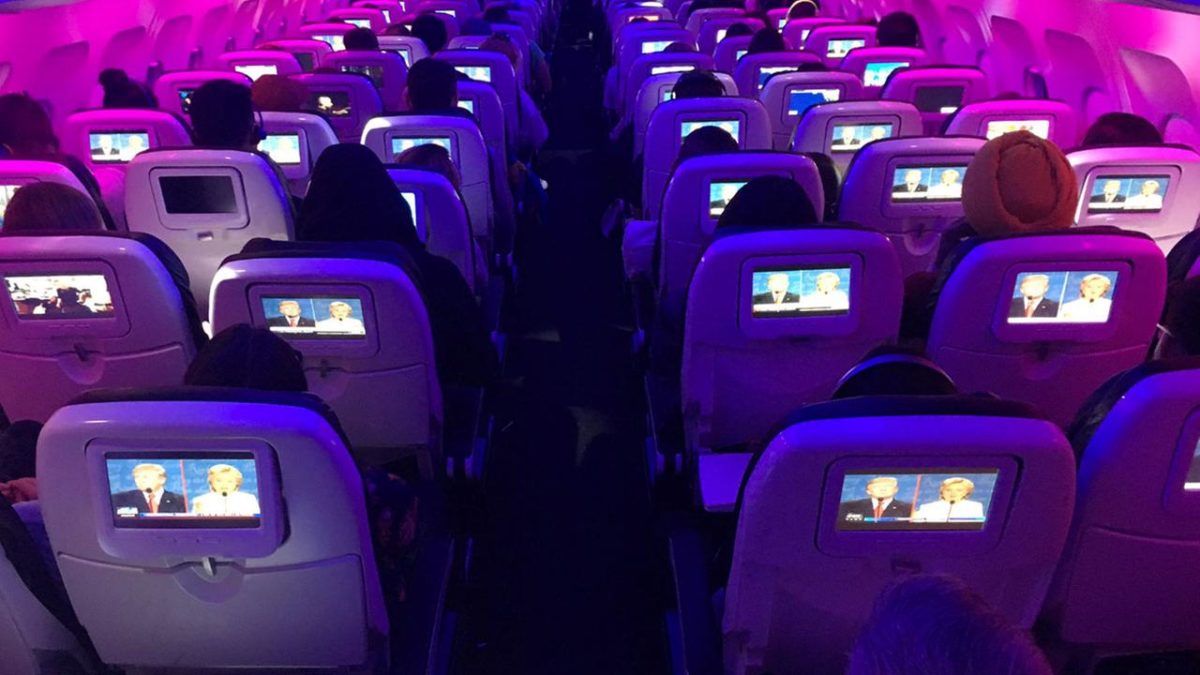
Look closer on your next flight. Airlines have admitted there are cameras pointed at you.

displays

Can’t we catch a break? It’s bad enough Android apps are stealing our data, and hundreds of millions of our emails have been exposed. Now we’ve got to worry about our in-flight movies spying on us too?

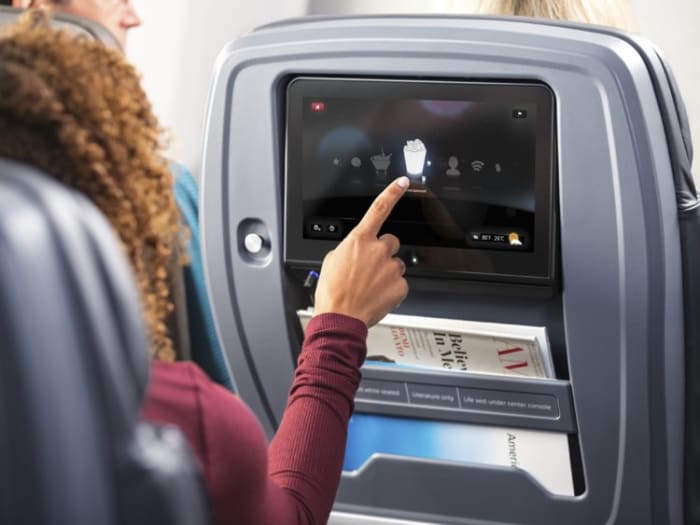
Apparently, we do, as three major airlines have already confirmed our fears: United, American, and Singapore Airlines not only admit to having cameras placed beneath viewing monitors, but they have no plans of removing them. “These cameras on our newer IFE systems were provided by the original equipment manufacturers,” Singapore Airlines said in a tweet. The justification for what otherwise seems an egregious breach of trust is that while the cameras are there, they are not actively watching passengers. “We have no plans to enable or develop any features using the cameras,” they immediately explained.

Good to know they’re not already watching us, at least, but honestly it’s small comfort. Will passengers even be aware should they be turned on? If you think this sounds like a scandal waiting to happen, you’re not alone.

Which begs the question …

Why are there in-flight cameras to begin with?

So if these cameras are not on, what’s the point? “This is a standard feature that manufacturers of the system have included for possible future purposes such as video conferencing,” a United spokesperson explained.

Panasonic Avionics (the maker of the IFE system) acknowledged the outrage by arguing their actions were in compliance with General Data Protection Regulation (GDPR), the data protection law for the European Union. “Our cameras have never been activated on United aircraft,” a spokesman of United Airlines assured, “and we have no plans to use them in the future.”

Some may be assuaged by this claim, but let’s address the elephant in the room: Just because an airline isn’t spying on its passengers with in-flight cameras doesn’t mean a third-party hacker can’t easily access them. After all, if a hacker can slip into someone’s home via IoT devices, who’s to say it’s not possible on a major airline?

Inflight displays
Turns out that movie you’re watching is also watching you.

“As far as IFE is connected to the Internet, there is a possibility of remote hack and espionage if such devices can be activated in software,” said Kaspersky’s Vitaly Kamluk.

The Airline Passenger Experience Association (APEX) asserts these fears are misplaced, however, with their CEO Joe Leader claiming that “the greatest risk to airline passenger privacy breaches come from their own smartphones, tablets, cameras, computers, and smart devices used in private settings.”

Kamluk disagrees, arguing that “the true risk comes from potential unauthorized access to these devices from powerful malicious attackers.” Until a scandal breaks out we’re likely not going to know who’s right here. On the other hand, could this technology one day be praised for its benefits?

Can these be helpful?

Maybe we’re asking the wrong questions. Like all manners of new technology, the benefits may outweigh the risks. After all, there are still millions of people on Facebook despite the numerous privacy risks. Likewise, can we benefit from in-flight cameras?

Leader argues that there are several advantages to these cameras: “Since the advent of the smartphone a decade ago, airlines realized that they need to be thinking ahead to serve the future travel experience,” he said in a statement. “The systems selected years ago are now on aircraft today and in many cases will be on aircraft for the next decade. With explicit customer permission, airlines will be able to provide better service and safety to their passengers using new technology.”

Inflight display
Could in-flight cameras make air travel safer or more convenient?

It’s not unthinkable that these cameras could prove useful, sending alerts if passengers are suddenly sick, or monitoring for incidents like assault, theft, or human trafficking. “Airline passengers are typically tracked outside the aircraft dozens of times on a typical journey through stores, security, roadways, and airports by cameras without any permission,” says Leader, the point being that if there’s no outcry about it outside the plane, why should there be one on the plane? “In contrast, airlines only want to use cameras in the future with permission when technology has advanced to offer personalized service improvements that passengers desire.”

Do you think these cameras will help improve flight safety and convenience? Or is this a breach of privacy and trust that needs to be answered ASAP? Let us know in the comments below, and stay tuned for more.