Top 6 tricks for Facebook comments

Do you regularly use Facebook and its comment feature? Comments on the social network are becoming more and more important to users, so much so that Facebook is constantly making updates to enhance this feature. Despite all these changes, many Facebookers don’t know the latest advances. If you’re one of them, today we’re bringing you the top six tricks for Facebook comments.

Add visual effects

Facebook has implemented a series of completely free and automatic visual effects. For example, if you add a “Congratulations” to the comments, the social network will add balloons and lots of confetti. Users won’t see it unless they hover their mouse over it, so it’s like a secret… but not that hidden. Also, there are other words such as “xoxo,” “hugs and kisses” or “congratulations.” Try them out, they’re great.

Remove visual effects

We’ve told you how to enable visual effects using words, but maybe you don’t want to have these specific animations. You can disable them. To do this, just click on the three dots that appear to the right of each comment. In addition to the classic commands of “edit,” “delete,” etc., you’ll also see one that says “Remove text effects.” Click there and say goodbye to the problem.

Edit comments

We’ve mentioned this above, but it’s key to highlight: you can edit your comments, too. Click on the three dots and click “Edit.” This way, you’ll be able to change any error you may have made. Of course, we’ll warn you that once you edit a comment, you’ll have to wait a little while to go back and edit it again if you want to.

Change the text font

Facebook doesn’t let you change the default font, but you can paste a text from another source to the social network. For example, Lingojam is one of the most popular web pages for recreating this effect. You just have to write the text you want and in the box to the right, the font will appear as requested. Copy and paste it into the Facebook comment box.

Change the privacy settings

Every post you write on Facebook has several privacy options. By default, it usually comes with comments enabled for friends only, but you can make it so your comments also appear for “friends of friends” or the general “public.” Our advice is that you set the privacy settings to friends only, though it’s up to you.

Add GIFs

It may be a little hidden, but there are several icons on the comments bar. The first is for emoticons, the second is for uploading an image… and the third is for GIFs! This effect brightens up any comment, so go nuts! Facebook’s database is bigger every day, so you’ll definitely find the GIF you want.
 

9 out-of-this-world features on your favorite apps that NOBODY knows about

Our favorite apps are updated almost every week. The bad news is that these updates usually go unnoticed. Did you know that Facebook helps you look for public Wi-Fi? Or that Gmail can write your emails for you? So you don’t miss out on the best new features on your favorite apps, we’ve compiled the best updates in recent months. 

1. Gmail writes your emails for you

Gmail offers an option called “Canned Responses.” This feature saves messages or phrases that you use most often and suggests them when you draft an email, saving you time.

Want to enable this option? You have to go to the settings section in Gmail called Labs. Gmail Labs is a testing center with “far-fetched” experiments (according to Google) of all kinds. You can access Gmail Labs here.

The feature you’re looking for is called “Canned Responses” and all you have to do is click on “Enable” and then “Save Changes” at the bottom of the page. 

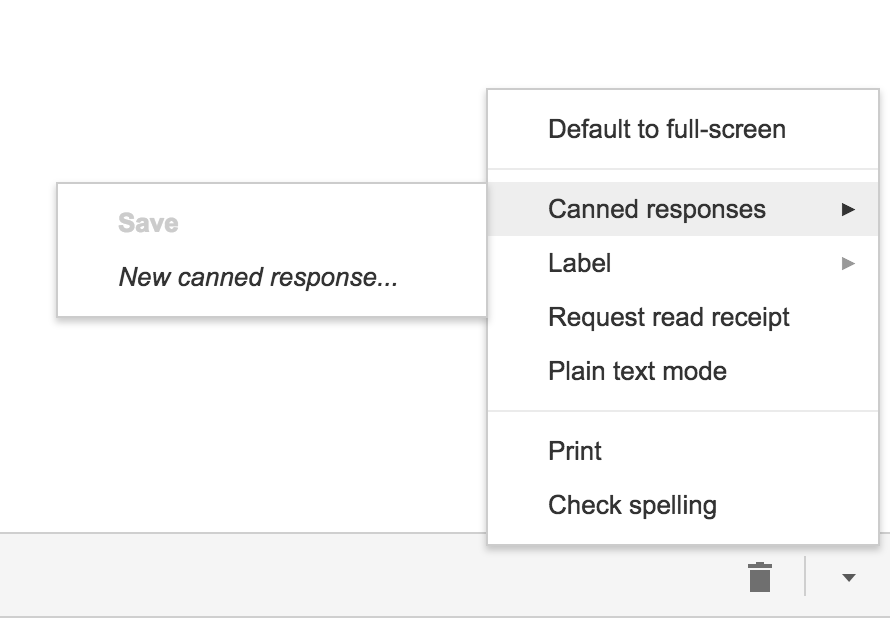
Next time you compose an email you’d like to save as a canned response, click the little triangle on the lower right-hand side of the screen. That opens a menu with an option for “Canned responses.” Just move over and click “Save” if you’d like to save that email so you can fire it off again someday.

You may have noticed a basic AI version of this at the bottom of messages you read on the Gmail app on your phone. They look like this:

2. Gmail’s most invisible feature

It’s unlikely that you’ve noticed this Gmail update because it’s designed to go unseen.

Haven’t you noticed lately that you’ve received fewer spam emails with suspicious links? Gmail has enhanced its ability to detect and delete this type of email even before it reaches your inbox. It’s not yet 100 percent foolproof, but it’ll keep you safer than before.

3. Make wish lists on Google Maps

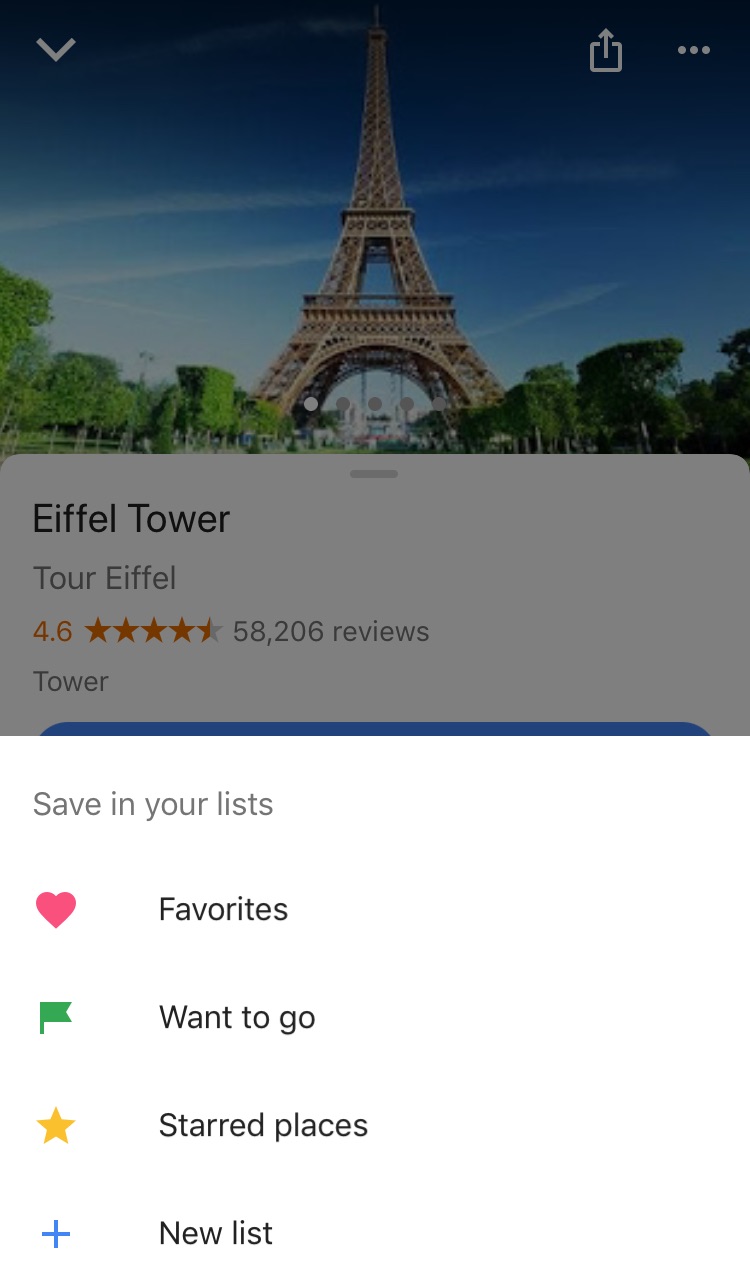
Google Maps lets you make lists of places you’d like to visit. Imagine that you’re planning a vacation to Paris. You can make a list of those museums, restaurants, and attractions that you’d like to visit. And you can share the list with those you’re traveling with. Or with anybody, for that matter!

Google Maps users are making the most of this feature to share recommended places or themed attractions. To use this feature, it’s as easy as pinpointing a place in the app, clicking “Save” and choosing the list with the green label that says “Want to go.”

4. Share anything with WhatsApp

WhatsApp lets you share any file type (mp3, videos…) between contacts provided that these files do not exceed 100MB in size. Instead of sending 100 photos one-by-one, why don’t you send them as a .zip file, for example?

5. WhatsApp gets their act together…kind of

It’s taken a while, but WhatsApp now has filters, like Instagram and the rest! At the time of writing this article, there are just five filters and they’re only available on iOS; no news on when they’ll arrive on Android.

6. Facebook helps you find Wi-Fi

Facebook has a relatively new feature called “Find Wi-Fi.” It’s a little bit hidden. First you have to click on the three horizontal lines on the lower menu bar. Click on “See More.” There you’ll find it and you can enable “Find Wi-Fi.”

After enabling it, Facebook will show you a map with the closest Wi-Fi hotspots as well as details about these hotspots, like which businesses they belong to.

7. Download movies and TV series from Netflix

Taking a plane somewhere? Bring your tablet packed with your favorite Netflix movies and shows! Not all Netflix offerings are available: pay attention to the download icon that appears on the TV series or movie listing. Amazon Prime also offers this feature.

8. Spotify Codes

Spotify has a feature called Spotify Codes. Have you noticed that below songs, playlists, and albums, there is a barcode in the shape of a sound wave? If you don’t see it, click on the three dots to access Spotify’s advanced options.

You can exchange these sound codes with your friends and they only have to open the Camera feature within Spotify for apps to scan them.

Also, Spotify Codes are an excellent way for artists to become known, as they can insert their codes on social media so the rest of the world can quickly access their songs.

9. Muting on Twitter

Got some people on Twitter who won’t stop spoiling your favorite TV series or spewing goofy conspiracy theories? Don’t want to block them because sometimes you talk to them and some of their Tweets are interesting?

Twitter now lets you mute whoever you want. Muting means that their messages will not appear on your feed, all without their knowledge. You’ll receive notifications if they mention you in a Tweet or if you receive direct messages from them. And you can check their Tweets when you feel like it.

Muting is as easy as clicking on the “down arrow” on one of their Tweets. You’ll see this option, among others.

Have you found any hidden features you’d like to share? Let us know in the comments!


The Amazon Cloud Has Not Been Hacked but Two Companies Have Been Affected

EDIT: Amazon Web Services have contacted us to confirm that their service was not affected at all. The companies that were affected suffered due to a poor password protection policy on their AWS cloud infrastructures.

According to the security group RedLock, a group of hackers managed to breach Amazon Web Services, on the Amazon Cloud. Specifically, hackers broke into the infrastructure belonging to two companies on the Amazon Cloud: Aviva and Gemalto.

The hackers’ aim was to use the two companies’ resources to mine Bitcoin cryptocurrency. RedLock is surprised that the hackers didn’t want to steal any important company info. They only used their servers to generate cryptocurrency to get rich at their expense.

“The instance had effectively been turned into a parasitic bot that was performing nefarious activity over the internet,” explains the RedLock report.

This is shocking because usually hackers go to great pains to break into company databases to steal social security numbers, credit card numbers, passwords, emails…

Amazon, Aviva and Gemalto have all been informed about what happened. At the time of writing this article, none of the three companies have made statements. It would be interesting for Amazon to reassure both its clients in the business world as well as personal users. Otherwise, one can’t help but wonder if another hack could happen again on other Amazon services including its virtual store.

We’re facing yet another case that shows how hackers are becoming increasingly interested in infecting their victims so they use their resources (computers, infrastructures) to mine for cryptocurrency. Virtual money is generated by solving complicated mathematical problems that require a great deal of resources. Hackers, instead of paying to buy or build the computers and servers capable of solving these problems, infect their victims so that their computers do the hard work for them. Obviously, only the hackers benefit from this.

Just yesterday I reported that a large number of popular webpages had been infected with a code that installs malware on their users’ computers. This malware turns the infected PC into a cryptocurrency “miner.” You can read all about it, and find out the first steps to take to prevent an infection infection like this, by clicking on this link.

Sources: Business Insider, Bitcoinist, Mobile Marketing Magazine, Genbeta

9 Must-Have Affordable Phone Accessories

We’ve all been there. You’ve just bought a phone and spent a lot of money, but when you open the box your brand new device came in, it’s the same-old dilemma: except for a charger and headphones (in the best case scenario), nothing else is included. This means you’ll have to invest extra money in cases, additional chargers and other gadgets to round off your experience.

Do you have to spend a fortune on official accessories? Nope. Luckily, today there are many affordable options that offer the quality of official brands (Apple, Samsung, etc.) at a lower price.

One of the online stores that offers high-quality cell phone accessories at a lower price is Amazon, with its own brand Amazon Basics, which includes an entire line of gadgets and goods at affordable prices, as well as Amazon Prime (free shipping and products delivered to your home within 1-2 days, click here to find out more).  

We’ll go over some of the most useful and inexpensive gadgets on Amazon Basics.

Spare cables

A must-have: although all smartphones come with a charging cable, it’s always a good idea to have an extra one to leave at work or take on a trip, not to mention how easy they can break or get lost.

Below, we’ll share the most common cables, with USB connection, so you can connect your cell phone to your laptop or a wall charger.

71r8hWqChRL._SL1500_-150x150USB cable 2.0 type A to micro B (most Android phones and tablets: Samsung, Huawei, Xiaomi, Nokia, LG, Google…) – $5,59 (2 units)

Buy it here


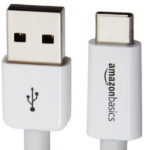
13-09-2017-11-42-38-150x150USB cable type C (MacBook, Chromebook Pixel, Galaxy Note 7, 8… and in general, a connector for newer devices) – $9,29

Careful, don’t confuse this cable with the micro B!

Buy it here


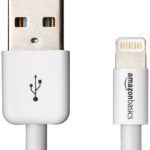
61-SCX0EupL._SL1232_-150x150Apple certified lightning cable (current Apple devices: iPhone, iPad, iPod) –  7,49€

Buy it here

Chargers and plugs

Everybody knows that although cell phones can charge on a PC problem-free, they charge even faster when hooked up to a power outlet. Also, it’s useful to have a charger if you’re traveling by car.

61rqywI9SwL._SL1320_-150x150Power charger with 2 USB ports

– $10,99 (or 15,49€ with 4 ports)

Buy it here


71HDVVMUnBL._SL1500_-150x150Car charger with 2 USB ports – $7,64

Buy it here

Covers and cases

Phones don’t usually come with a cover or case, which are must-have accessories to protect them from cracks. Luckily, you don’t have to spend money on official accessories to protect your cell phone, or sacrifice its sleek good looks. Your cell phone brand has got nothing on these models from Amazon Basics.

91I3IRCfH2L._SL1500_-150x150iPhone 7 / iPhone 7 Plus Cases (thin and inflexible polyurethane covers; available in 4 colors: black, new, navy blue and gray) – 10,09€

Buy it here


81qVzS3u29L._SL1500_-150x150iPhone 7 / iPhone 7 Plus transparent cases (ideal if you want the Apple logo to be visible) – 6,99€ ( iPhone 7 price) / 9,99€ (iPhone 7 Plus price)

Buy it here


81jdcE0yDbL._SL1500_-150x150Universal waterproof smartphone pouch (compatible with any cell phone up to 6 inches; most Android, iPhone, Windows models…) – 8,99€

Buy it here


81PRlaemzyL._SL1441_-150x150Armband for iPhone 6, 6s and Samsung Galaxy S67,99€

Buy it here