Snapchat users on iPhone might have noticed a fresh tag in their notifications – the ‘Time Sensitive’ label. But what’s the deal with it, and why is it making waves among Snapchatters? Let’s break down the specifics of this feature.
Snapchat doesn’t just throw notifications at you; it lets you call the shots. Whether it’s updates from friends, new connections, or reminders, you have the power to customize what pops up on your lock screen or in the notification center.
So, what’s the big deal with time sensitivity on Snapchat? According to the app, ‘Time Sensitive’ means it’s a top-tier notification. Even if your phone is in Do Not Disturb mode, these alerts breakthrough, insisting that you pay attention right away. In a nutshell, Snapchat’s Time Sensitive notifications flag certain messages or Snaps as high-priority, ensuring you don’t miss out on important stuff. This feature landed on Snapchat with an update in May 2023.
These are alerts that demand instant action. While not every app is on board with this real-time urgency, Snapchat has embraced it – not without some users raising eyebrows, especially when routine Snaps get the urgent treatment. Luckily, there is a way to get rid of this feature and it is not very hard.
How to turn off Time Sensitive Snapchat notifications on iPhone
For those who like staying on top of important updates, Snapchat‘s Time Sensitive feature is handy. But not everyone wants their phone buzzing urgently all the time. If the constant urgency is a bit much, no worries – here’s a quick guide on how to dial it down.
Head to Settings: On your iPhone, go to Settings.
Find Snapchat Settings: Scroll down and locate the Snapchat section.
Toggle Off Time Sensitivity: In Snapchat settings, look for Time-Sensitive Notifications and flip the switch to turn it off.
Follow these steps, and you’ll regain control over your Snapchat notifications. It’s all about finding the sweet spot between staying informed and enjoying some uninterrupted peace.
Snapchat cares about its users – that’s clear from the constant evolution of features and the flexibility to opt out. They understand that not every user wants their phone buzzing urgently all the time. By giving you the option to turn off features like Time-Sensitive Notifications, Snapchat empowers users to shape their experience. It’s a nod to individual preferences, allowing users to strike the right balance between staying informed and enjoying uninterrupted moments of peace. The commitment to user choice is a testament to Snapchat’s dedication to enhancing the user experience. After all, technology should work for you, not the other way around.
Technology surrounds us in today’s world. This offers many online benefits for children and adults, but it can also become a problem. Besides offering lightning access to education, entertainment, and social networking, it can also lead to unwanted content.
And because we’re so immersed in technology nowadays, it’s difficult for many to manage their screen time. This article will explore such sides of our interconnected world and how you can monitor online activity, including screen time, to help you navigate the digital landscape safely.
Why Online Monitoring Is Important
Even though there are different points of view regarding the ethics of monitoring someone else, any parent knows that their children should be safe. That’s because the Internet is full of questionable content, but that’s not all. Healthy content can be so engaging anyone can lose track of time.
Here are some crucial considerations on why you should do it:
Harmful Content
Harmful Content
There’s a lot of inappropriate content for children and people of various belief systems. This includes violence, explicit content, cyberbullying, and questionable social practices.
Screen Time
Excessive screen time is problematic for anyone. It can lead to health issues such as eye strain and bad posture, among others. It can also reduce sleeping time and physical activity.
Habit Building
Everyone needs a bit of discipline, and building habits on how to safely browse the Internet and consume content will put children and adults in a better position to manage their activities.
Norton is at the forefront when it comes to online security. The company requires no presentation, and its current accolades include Best of the Year 2021 by Pcmag.com and Best Protection & Best Performance by AV-Test for the same year.
Still, some people might not know or understand what its Norton 360 premium offering can do for them, more specifically, in its Deluxe tier.
Opting for Norton 360 premium will improve your online security. It’ll do so in a myriad of ways, including stopping account takeovers and blocking hackers. But let’s go into detail about parental controls and online monitoring, which is the topic of this article.
Because Norton takes the safety of your children seriously, they’ve developed a comprehensive package of features. Let’s take a look.
Time Supervision
This tool lets you understand how your children spend using their online devices, including PC and Android. It lets you allot a number of hours, and users can request time extensions. There are even graphs to visualize this information in different periods.
Video Supervision
No, this isn’t a Big-Brother-like scheme. This feature lets you check a list of videos your kids watch on their devices. It shows thumbnails, video descriptions, and titles and enables you to watch a small fragment of the video.
Mobile App Supervision
You can also check which devices were downloaded and installed on Android devices. You can also check which ones were uninstalled and browse them by usage. This way, you can also gauge what interests your child the most.
Web Supervision
With this feature, you can check what websites were visited by category, such as general, entertainment, shopping, etc. You can also block unwanted websites and check if there was an attempted access to such sites.
Search Supervision
If you toggle this feature, you can check what your children are looking for in different search engines such as Google, Ask, Bing, Yahoo, and YouTube. There’s also a way to activate safe browsing filters for all these engines with a single click.
Location Supervision
There’s a tool that maps the location of Android and iOS devices to check where your children have been. There’s a 30-day history; you can filter the activity by time and date.
School Time
This is a boon for homeschoolers but suitable for all. Because remote learning requires the Internet, setting online limits is challenging. This feature lets you manage school time by blocking activities during certain hours and checking whether educational websites were visited.
As you can see, this solution has everything you need to keep your children safe, and it allows both monitoring and prevention. However, it’s just a tiny part of what Norton 360 Premium can do for you. Be sure to check the full features to understand how it can help against malware and boost your privacy, among many other things.
Safety Starts at Home
Even though Norton 360 Premium offers a comprehensive package that can help you keep your children safe, teaching your children about online safety and maintaining healthy communication is essential.
The first thing is you should be a role model regarding technology use. Show your child how to use devices responsibly, and don’t just talk the talk; walk the walk as well. Use your devices, keeping healthy screen time limits into account. Avoid using your phone constantly, especially during family time.
People change, and that’s even more pronounced with children. Be sure that you regularly check their needs and make the necessary adjustments. Negotiate so the outcome is positive for both parties.
In the end, monitoring screen time and activity is vital to being a parent today. But it requires a marriage of technology and communication abilities. Norton 360 Premium Deluxe will give you an impressive array of tools to help your children stay safe, but no lesson will be learned without guidance and support.
Remember that the key is balance. This means allowing them to enjoy technology while protecting their well-being, not outright banning everything. Only then you’ll allow your kids to develop skills and awareness to thrive in today’s world.
If history repeats itself, we could see a launch in May 2024 just like we saw with the Pixel 7a when it launched in May 2023. It will be the Pixel 8a…
It’s been just a week since Google unveiled its new Pixel 8 family to the world. This generation, for now, consists of the Pixel 8 and the Pixel 8 Pro. Of course, we all know that a Pixel 8a will arrive later on.
In collaboration with OnLeaks, the tech news website SmartPrix recently shared several renders of the possible design of Google’s future mid-range smartphone, which the company always releases for those seeking something more affordable.
At first glance, the device appears to be a cross between the standard Pixel 8 and the Pixel 7a, as it features characteristics of both. The Pixel 8a will have the same rounded corners as the other models in the lineup.
However, it will be slightly larger than the main model, with dimensions of 152.1 x 72.6 x 8.9 mm.
And despite its increased size, the screen won’t be bigger. In fact, it will be the opposite. The report reveals thicker bezels around the corners, reducing the screen size to 6.1 inches, compared to the Pixel 8’s 6.2 inches.
A very consistent design: yet another Pixel
Other notable design features include the rear camera module, which will maintain the visor-like appearance for which the series is known. On the front, you will see a small pinhole cutout for the selfie camera.
The power and volume buttons are on the left side, with the SIM tray on the opposite side. At the bottom edge, you’ll find a USB-C charging port between the speakers. The top edge apparently houses “an ultra-wideband antenna,” according to SmartPrix. The device will be available in sky blue and what appears to be peach pink.
The most interesting part is that these images align with another leak from late September. Apparently, industry insider Abhishek Yadav got hold of a prototype and posted pictures of it on Twitter. So, the rounder design might be more plausible than we initially thought.
And in terms of power? Less powerful, obviously
Obviously, being a mid-range device, the Pixel 8a won’t be more powerful than its siblings. The SmartPrix report mentions a benchmark test discovered back in August for the smartphone, referred to by its codename: Google Akita.
The results suggest that the model will feature an “underclocked variant of the Tensor G3 chipset, along with the Mali-G715 GPU.” The amount of memory remains the same, as it “appears with 8 GB of RAM.” Of course, Android 14 will be the operating system.
And a good photography section, as is typical of Google
Returning to the rear camera, we know that the Pixel 8a will have two lenses judging by the images, but we don’t know how many megapixels each one will have. If history repeats itself, the phone’s camera could have more megapixels than the standard model.
This is similar to how the lenses on the Pixel 7a are technically better than those on the Pixel 7. However, keep in mind that more megapixels don’t always mean better photos. Other factors such as the processor come into play. Taking photos on the Pixel 8a might be a less impressive experience, although not necessarily bad.
As always, take this information with a grain of salt. Things can always change at any moment. The leaks didn’t provide a release date.
But again, if history repeats itself, we could see a launch in May 2024, just like we did with the Pixel 7a when it was released in May 2023. Google’s budget-friendly model always comes out midway through the generation.
Pokemon Go Harvest went live yesterday, on October 12, and now players have lots of questions in their minds, trying to figure out how to get the best of the tournament. The Shiny Pumpkaboo is one of the special rewards you will get throughout the tournament, and today, we will show you everything you need to know about it!
The Shiny Pumpkaboo is the first step in obtaining a Shiny Gourgeist. You’ll need 200 candies to accomplish this transformation.
The Harvest Festival event might help you increase your chances of receiving Shiny Pumpkaboo – Mossy Lure Modules. These modules will be crucial to your success. They remain active for two hours after being triggered, drawing a swarm of Grass-type Pokemon, including the uncommon Pumpkaboo.
Mossy Lure Modules, which are famed for attracting particular types of Pokemon, function perfectly in this event. Place them at PokeStops to create a haven for the adorable ghostly pumpkins. This greatly boosts your odds of encountering a Shiny Pumpkaboo.
However, there is more to the story. Every Pumpkaboo you capture throughout the event earns you a delicious reward: more Pumpkaboo Candy. These sweets are essential for leveling up your Pumpkaboo and, more importantly, developing it into a sought-after Shiny Gourgeist. This event’s unique feature, paired with the increased Shiny encounter frequencies, makes employing Mossy Lure Modules and collecting Pumpkaboo Candy the winning approach.
The Harvest Festival will last six days, starting on Thursday, October 12 at 10 a.m. local time and finishing on Tuesday, October 17, at 8 p.m. local time. During this event, you will notice a change in the game’s universe, providing all players with a fresh and immersive experience.
A wonderful gift awaits players that purchased the Ticket of Treats Paid Timed Research. This occurrence marks the beginning of the most current segment of this Timed Research. Completing these tasks will reward you with Pumpkaboo encounters and a Mossy Lure Module, both of which will significantly increase your in-game resources.
Finally, the Harvest Festival event in Pokemon GO is your golden ticket to collecting the elusive Shiny Pumpkaboo and growing your Pokemon collection. Don’t pass up the chance to add a Shiny Gourgeist to your team. To win this event, use Mossy Lure Modules and the coveted Pumpkaboo Candy.
We live in exciting times for educators and students alike. The advent of AI being implemented in different fields has resulted in almost daily innovations.
Filmora is one such example. Recently launching version 12.5, this update further enhances the video editing software’s AI capabilities with features like audio visualization, and unique text animations. These new tools in addition to Filmora’s already formidable suite of effects and features positions Filmora as a leader in AI video editing.
Still, some are wary of AI tools and are concerned with the many ethical questions arising from this new technology. Let’s dive into some of these considerations and look at how Filmora addresses them.
AI and Ethics
If you’re an educator, you might be worried about the implications of using AI tools in the classroom. After all, children tend to follow the adults in their lives. If a teacher is using AI to enhance their presentations to make them more engaging their students might think that anything goes when it comes to using AI.
However, a proper discussion should include the pros and cons of AI usage, both inside and outside the classroom. As with any tool, positive results are possible when used responsibly. With AI itcan decrease workload, and speed up productivity of tedious work allowingmore time for other activities.
It can also be a creativity enhancer. Especially when editing videos. Many students might have no idea what’s possible with video due to a lack of technical skills.
However, AI can help students deliver stunning results and polished content, which can allow them to better demonstrate advanced ideas and concepts.
Many who are against AI have a very black and white view of it : AI is often seen as a one-stop shop for everything either enabling incredible creativity and bringing any user’s imagination to life or as a dangerous technology full of intellectual property abuses and in serious need of guardrails . Those who hold a critical view of AI tend to ignore AI’s role as an equalizer. For instance, mature students who are going back to school.
For them, creating PowerPoint presentations can be a difficult and cumbersome task. However, with tools like Filmora, they can create visually impressive presentations and simply concentrate on the content.
What Filmora Can Do
Even though its AI capabilities are impressive, reducing Filmora to an AI-assisted solution would be unfair. It’s, in fact, a powerful suite of tools that allows creators to perform complex edits quickly.
An example of this is adding text. With Filmora, you can straightforwardly add text while customizing font, color, effects, and animations. It’s on par with any other professional video editing solution, but it’s done with just a couple of clicks.
This is just the beginning, efficiency is baked into Filmora at every step of the editing process. For instance, the Quick Split Mode lets you easily cut the clips on your timeline. You can also create adjustment layers to apply the same effect to multiple clips. And let’s not forget that you can match the footage with music thanks to the Auto Beat Sync feature.
Another impressive feature is the Avatar Presentation. Instead of using your real-life image for presentations, you can use an animated avatar that mimics your facial expressions and moves in real time. It’s fun and innovative, which will keep your audience engaged.
Regarding AI-enhanced tools, one of the highlights is AI Copywriting. Working together with ChatGPT, it helps you to generate video scripts by simply writing a video description. It can also create catchy titles,, descriptions, and more.
There are also asset packs ideally suited for both educators and content creators. The Class Pass aims to improve the creativity in class with 27 assets to choose from. The Trend Pass is suited for content creators with 35 assets to unleash their creativity.
The central concept with Filmora is easing the learning curve for video editors and content creators by offering intuitive, one-click tools.. If AI makes the job easier, then AI is incorporated. If a tool is better off in the hands of the user without any AI input, then it’s streamlined so anyone can use it to get pro-level results.
As you can see, it’s a powerful suite that works just as well in education and for content creators. If you find yourself in the last group, there is some exciting news.
Filmora Young Creator Program
Filmora understands that talent needs to be fostered, which is why the team behind it developed the Young Creator program. To participate, you just have to show the world who you are and what inspires you as a Gen Z.
To do so, you can take advantage of Filmora’s many features and create a video.. It’s a great way to get acquainted with the program and use it to monetize your work.
It works like this: Filmora will share weekly themes and ideas that you can use to produce videos. Users visit the contest page and download the specific effect packs. After creating the video,share it on social media with the hashtag #shareTheSpotlight and the tag @Filmora_editor for a chance to earn $250.
In a Nutshell
Filmora is a next-gen solution for your media creation and editing needs. It’s a comprehensive suite of tools that uses the latest technologies and trends to empower you to create stunning content.
In today’s fast-paced world, staying ahead with the latest software is essential, and this is where Filmora truly shines. By using up-to-date software, you not only ensure that your content remains current but also guarantee that you’re harnessing the most advanced technology available. This not only keeps you in line with the latest trends but also enhances your overall experience.
Last but not least, it uses AI in a responsible way that works by enhancing your work, not replacing it.
Twitter, with its bustling and vibrant community, is a platform where voices from all corners of the world converge to engage in conversations, share thoughts, and connect. However, not every tweet or reply is a welcome addition to the discourse. In such instances, Twitter offers a solution through its “Hidden Replies” feature, allowing users to maintain a more controlled and civil conversation. If you’re wondering how to check hidden replies on Twitter, or X, as Elon Musk likes to call it these days, this guide is here to show you how!
What are hidden replies on Twitter (X)?
Hidden replies are comments that Twitter users intentionally conceal when displaying replies to a particular tweet. Twitter introduced this feature as a means to empower users, enabling them to filter out undesirable or disruptive content from their conversations. It’s a digital moderator that helps keep discussions productive and respectful.
It’s important to note that when Twitter users hide a reply, it doesn’t vanish into thin air. Instead, it becomes discreet, tucked away from the primary conversation thread. However, the good news is that hidden replies are not off-limits; you can still access and view them when you visit the tweet in question. In this guide, we’ll walk you through the steps of how to unveil these concealed responses, ensuring that you’re always in control of your Twitter experience.
If you’re seeking respite from unwanted comments on your tweets, Twitter’s “Hide Reply” feature is your ally. Here’s how to use it:
Begin by opening Twitter and logging in if necessary. Find the tweet that has the reply you wish to hide.
Find the specific reply you want to conceal and tap on the three-dot menu icon situated to the right of that reply.
A pop-up menu will appear. Within this menu, select the “Hide reply” option.
How to check hidden replies on Twitter (X)
Hidden replies, as mentioned earlier, are not obliterated; they’re simply tucked away from plain view. Here’s how to uncover them:
Whether you’re on the Twitter website or the mobile app, log in to your account.
Find the tweet that has hidden replies, either within your own conversation or while viewing someone else’s tweets.
Tap or click on the dotted square icon located at the bottom right of the original tweet, just above the replies section.
You’ll be redirected to a new page where you can explore all the hidden replies associated with the tweet.
In conclusion, Twitter’s “Hidden Replies” feature provides a handy tool to maintain a more enjoyable and respectful experience on the platform. By knowing how to hide and reveal replies, you can curate your Twitter conversations to your liking, fostering a healthier and more engaging online environment. So, the next time you encounter an unwanted reply, remember, you have the power to make it disappear or reappear with just a few simple taps. Happy tweeting!
We confirm that the fourth season has 8 episodes, as usual, so prepare about eight hours of your life. We don’t know if the best of your life.
At a time when series do not last more than two seasons and cancellations stalk any product, it is nice to see how some of them last until the end. At least until the end that their creators had thought.
This fourth season of Laurie Nunn’s genuine young adult series is sadly the final installment. Mind you, we say sad when it’s actually a celebration. For the good work done, for the laughs we’ve had, and for the final adventure that premieres today on Netflix. Save the tissues.
Sex Education Season 4 Synopsis
The final season follows Otis and Eric as they face the challenges of attending a new school (Cavendish Sixth Form College), while Maeve is in the United States at the prestigious Wallace University.
Otis is nervous about setting up his new clinic, Eric hopes to fit in socially, and Maeve takes lessons from cult author Thomas Molloy (Dan Levy, star of Schitt’s Creek).
To know Sex Education is to love Sex Education. We are sincerely going to miss this weird, wonderful and heartwarming comedy.
If you need a quick refresher on season three, Netflix recently released a handy three-minute recap. When is Sex Education season four premiering on Netflix? Here’s everything you need to know.
When Sex Education Season 4 premieres
If you’re still reading, it’s because you’re not sure when the 4th season is coming to Netflix. Well, today, September 21, the last full season has been released on the American service.
This means you can binge watch the series today, Netflix style. We confirm that Season 4 has 8 episodes, as usual, so prepare about eight hours of your life. The best? Possibly.
If you’ve found yourself scratching your head while tackling the Taylor Swift 1989 Vault Puzzle, don’t worry because today, we’re here to provide you with all the Taylor Swift 1989 Vault Puzzle answers you need.
This unique puzzle game, created in collaboration between the renowned singer Taylor Swift and Google, has stirred up excitement among fans, offering a glimpse into the bonus songs of “1989 (Taylor’s Version).” To unlock these hidden tracks, fans worldwide must collectively solve a staggering 33 million puzzles, each taking on 89 of them. If you’re feeling stuck and in need of some guidance to crack this enigmatic puzzle, you’ve come to the right place. We’ve got you covered with the Taylor Swift 1989 Vault Puzzle answers.
Taylor Swift 1989 Vault Puzzle answers
Now, without further ado, let’s delve into the answers you’ve been eagerly waiting for. But before we get into the specifics, let’s get a better understanding of how to navigate and conquer the Taylor Swift 1989 Vault Puzzle.
A Game of Cat and Mouse – love
AKA Christmas in September – chai sugar cookies
All You Had To Do Was Stay – but not like this, the palm of your hand, you were all I wanted, they paid the price
And Somehow That Was Everything – but she found herself
Announce – Los Angeles
Bad Blood – now we got problems, she wasn’t doing anything
Birth Date – December thirteenth
Birth Day – Wednesday
Blue Sweatshirt – seagulls
Caption – got a haircut
Coffee – long list of ex-lovers
Deepest Fear – sea urchins
Excitedly Mingling – secret sessions
First Stop – Tokyo
Halloween Costume – pegacorn
How You Get the Girl – of kisses on cheeks
I Know Places – and we run, and everyone was watching, loose lips sink ships
I Love You – swifties
I Was Born In – nineteen eighty-nine
I Wish You Would – elevator buttons, everything and nothing
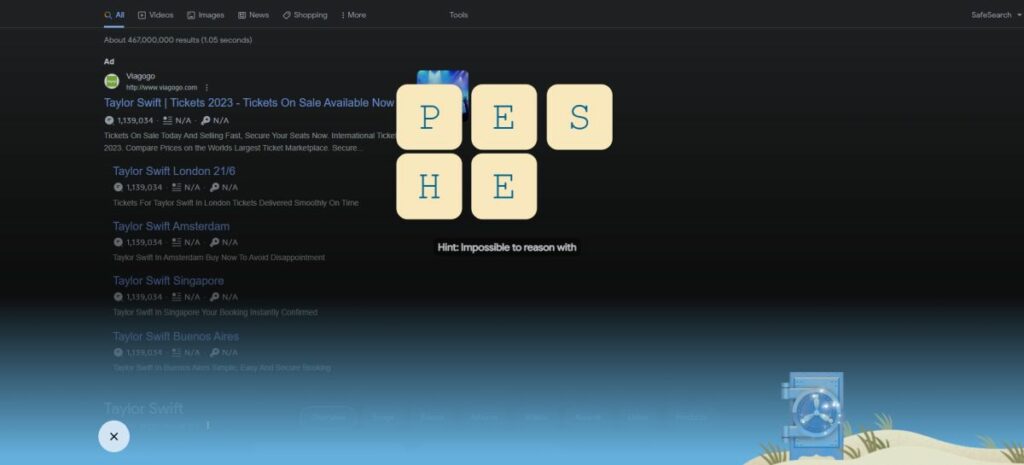
Impossible to Reason With – Sheep
Karnma Music Video – MCMLXXXIX
Last Stop – Melbourne
Likes, Job, Whereabouts Were Studied Intently – taylurking
Look At It! – yes whale
Loudest and Brightest City – New York City
Lucky – thirteen
Makes You Clean – rainstorms
New Romantics – come along with me
Number of Instant Films – sixty five
Out of the Woods Intro – she lost him
Release – October twenty-seventh
Smashing – golf club
Sun Sign – Sagittarius
They Never Go Out of Style – sunglasses
This Love – in silent screams, to what you need, timing is a funny thing
This Love (Taylor’s Version) – the summer I turned pretty
Track 6 – floor eighteen
Welcome to New York – it’s a new soundtrack, it’s been waiting for you, but they never blind me
Wildest Dreams – burning it down, he does it so well
Wildest Dreams (Taylor’s Version) – glitch
Wonderland – we both went mad
World Tour Live – Sydney
You Are In Love – you’re my best friend
Santa Clause emoji – swiftmas
Blank Space – and I’ll write your name, pen click, darling I’m a nightmare. magic madness heaven sin, incredible things, she’s like oh my god, so it’s gonna be forever, so hey let’s be friends, crossword puzzle, nice to meet you
Clean – I could finally breathe, think I am finally clean, what you are is brave.
Out of the Woods – two paper airplanes flying, it all seems so simple, like we stood a chance, you were looking at me.
Shake it Off – can’t stop won’t stop moving, I’m just gonna shake, she danced to forget him
Style – never go out of style, red lip classic, with some other girl
How to submit Taylor Swift 1989 Vault Puzzle answers
Here is how to submit Taylor Swift 1989 Vault Puzzle answers:
Open your web browser.
Go to Google.
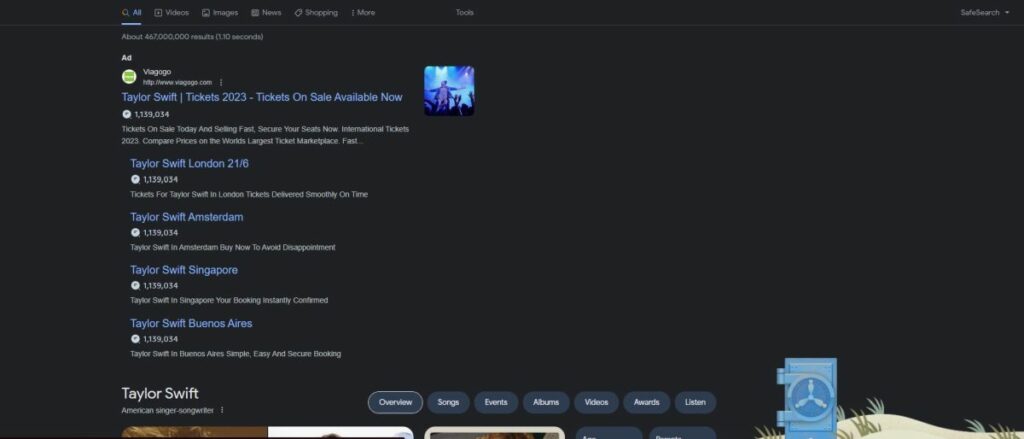
Type Taylor Swift.
Click on the Blue Vault.
Starting solving the puzzle!
So, there you have it! With these answers and steps, you’re ready to tackle the Taylor Swift 1989 Vault Puzzle and find those hidden songs in “1989 (Taylor’s Version).” Join millions of fans worldwide on this exciting journey and share the joy of solving puzzles with your fellow Swifties. Good luck, and may your puzzle-solving skills lead you to the music you’ve been waiting for!
Niantic has introduced a new challenge that’s making waves in the Pokémon universe: evolving Pawmi into Pawmo and finally into the coveted Pawmot. In this guide, we’ll break down the steps and requirements to help you achieve this unique evolution and add Pawmot to your collection. Whether you’re a seasoned trainer or just starting your adventure, we’ve got you covered.
What is Pawmi?
On September 10, Pokémon GO introduced Pawmi, a unique creature from the Scarlet and Violet regions. Unlike most Pokémon that evolve with candies, Pawmi has its own way of evolving. Don’t worry; we’ll guide you through it.
Before we jump into the evolution process, it’s a good idea to prepare. Try to catch a strong Pawmi with good stats. Having a powerful Pawmi will make the evolution process smoother and give you a final Pokémon that’s great for your Pokédex and battles.
Now that you know what’s ahead, let’s get started on evolving Pawmi into Pawmo and eventually Pawmot in Pokémon GO.
How to Get Pawmo and Pawmot in Pokémon GO
Evolving Pawmi into Pawmo and Pawmot involves a few steps, but don’t worry; we’ll take it step by step:
Catch a Pawmi: You can find Pawmi in the wild or by completing certain research tasks. Keep an eye out for this cute Pokémon during your adventures.
Evolve Pawmi into Pawmo: To evolve Pawmi into Pawmo, you’ll need 25 Pokémon GO Candy. You can get these candies by catching more Pawmi or trading in extra Pawmi with Professor Willow.
Evolve Pawmo into Pawmot: This is where it gets interesting. To evolve Pawmo into Pawmot, you need 100 Pokémon GO Candy. But that’s not all; Pawmo needs to be your buddy Pokémon and walk with you for 25 kilometers. It’s a bit of a journey, but worth it in the end.
Once you’ve completed these steps, you’ll witness the incredible transformation of your Pawmi into the mighty Pawmot.
How to Get Shiny Pawmi in Pokémon GO
Shiny Pokémon are a big deal in the Pokémon world, and many trainers are eager to find them. Unfortunately, as of now, Shiny Pawmi hasn’t been added to Pokémon GO. Even during the exciting Ultra Unlock: Paldea event, Shiny Pawmi didn’t make an appearance.
Niantic usually introduces Shiny Pokémon separately from the regular ones. So, it might take some time before you can find a Shiny Pawmi. Keep an eye out for future events and updates from Niantic. There’s still a chance that Shiny Pawmi might pop up in the game.
In summary, evolving Pawmi into Pawmo and Pawmot in Pokémon GO may seem a little tricky, but with some preparation and determination, you’ll get there. Soon, you’ll have a powerful Pawmot to join you on your Pokémon adventures. So, gear up, catch those Pawmi, and get ready for an exciting evolution quest!
At Softonic we give you a series of cybersecurity tips with which to face the dreaded return to school without any extra headaches.
Like every year around this time, parents and children throughout Spain shed tears at the arrival of the dreaded return to school. While the youngest ones suffer the end of vacations and the return to studying, parents feel it mostly in their wallets due to the purchase of school supplies (and all of this without adding uniforms and other expenses, of course).
But it’s important to remember that in a fully interconnected world like the one we live in, minors are exposed to all kinds of risks if proper precautions aren’t taken. That’s why we want to give you several cybersecurity tips, aimed at both parents and children, to ensure a smooth return to school without complications.
Be very careful with the passwords you use
It’s a classic piece of advice that’s given from time to time, but many still make the same mistakes. When creating passwords on websites, make sure they are at least 10 characters long and include a combination of lowercase and uppercase letters, numbers, and other symbols.
Additionally, use a different one for each website (Microsoft Edge and Google Chrome can save them for you, no worries), and never use real data, such as your date of birth.
Now, if you want to not worry about this whole process, you can use LastPass, a program that will allow you to generate secure passwords with the characteristics you want, in addition to saving them with complete security.
Make sure no one accesses your computer
You may have had to use programs like AnyDeskat some point in your life, which allow you to connect to another PC (or have someone connect to yours) to perform technical support and various repairs without having to be physically present in front of the computer.
Well, if you haven’t used it in a while, uninstall it just in case. And if you start using it again, only share the security key with trusted individuals. While it’s a very secure program, you never know who might peek into your files, your email, or even other more sensitive data (including that of your own children).
Create a second profile on your computer just for social networks
At this point, virtually all teenagers have accounts on TikTok, Instagram, Twitter, and other social networks. Beyond the time restrictions that many parents impose on their children’s usage, it’s important to ensure that they can only access these platforms with your permission.
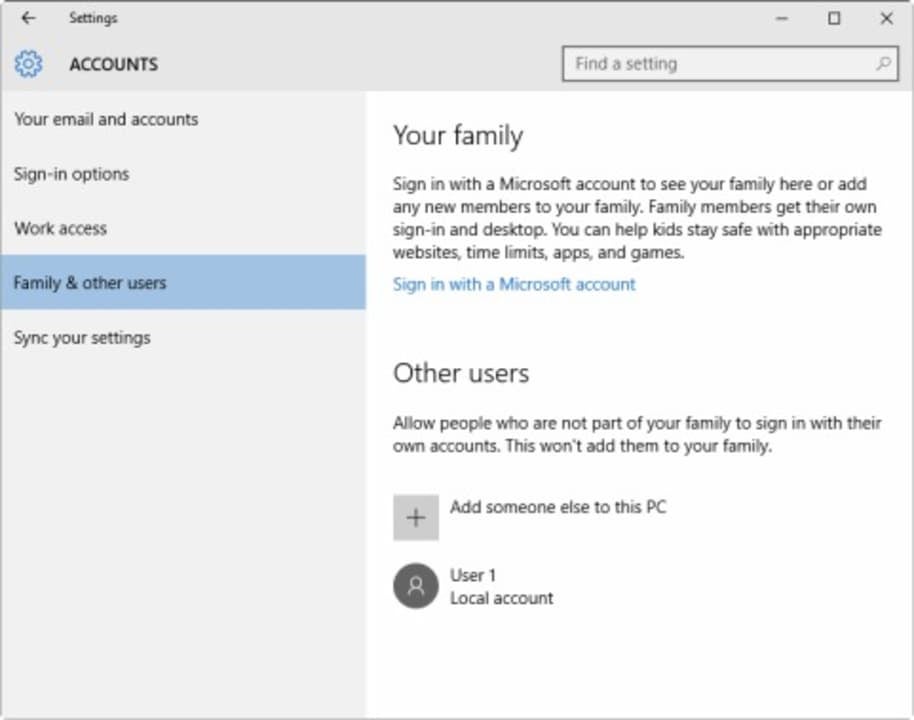
One simple way to do this is by creating a second profile on your PC exclusively for accessing social networks and securing it with a password only you know. This way, if they have restricted access to social media, they can only access them through this second computer profile, and only when you allow it.
To create a second profile, go to Start > Settings > Accounts > Family & other users. Then, under Other users, select Add someone else to this PC, enter the person’s Microsoft account information, and follow the prompts.
Avoid (and detect) fake scam websites
No matter how little time you spend on the internet, you’ll know that there are people in this world who only want to take advantage of others by deceiving them and stealing their personal data (or even their money). Most fake websites will come to you in seemingly legitimate emails, or you might even see them as Google search engine marketing (SEM) results.
Before clicking on a link, hover your mouse over it and check the destination address. Whether it’s a somewhat “strange” address or you suspect its authenticity, search the domain on Google (without actually visiting it) and investigate its reputation on websites like SafeWeb.
In any case, if you want to make your internet browsing as secure as possible, we recommend using a VPN like NordVPN. It allows you to surf the web without risks and offers a range of wonderful advantages, such as accessing content that may be blocked in your country.
PayPal and Google Wallet are your best friends for online payments
Paying through PayPal, Google Wallet, or other services eliminates the need to enter your bank details each time. Additionally, both PayPal and Wallet have sophisticated anti-fraud controls and can help you recover your money in case of a scam.
On the other hand, regardless of how you pay, we recommend using a prepaid card or a debit card linked to a spending account for online purchases. It’s not wise to use your primary card for online shopping.
Some of the links added in the article are part of affiliate campaigns and may represent benefits for Softonic.