
How to do the open office plan right

Does your company have the dreaded “open office” floorplan? Here’s how to cope.

Open Office

Today’s office is more for show than anything. Bright colors and the trappings of a fun, creative culture are powerful recruiting tools.

For startups, well-designed open spaces signal to visitors that things are happening. Which can lend them some credibility when they need to impress angel investors, VCs, and the board.

At a glance, it’s easy to see the appeal. A lack of walls visually represents a silo-free workplace. A place where ideas flow freely and workers can talk to each other on an equal playing field.

Optics aside, study after study has shown that the open plan is not so good for those who need to work inside it. According to a 2013 study from the University of Sydney, a lack of sound privacy was by far the biggest offender associated with participants’ working environments.

And it makes perfect sense. There’s very little privacy, causing performance anxiety for those who need to make a call.

These spaces might even make us feel less positive about collaborating. That total lack of alone time can lead people to retreat inward.

People have tried all sorts of things like working at home after hours to arriving super early to beat the rush. Some organizations have coped by implementing strange rule sets aimed at clarifying the new norms.

Why are we committed to an open office plan if it doesn’t work?

The office (one with private rooms) was established in the 1960s. When open plans came on the scene in the 1990s, there was a sense of excitement that came with tearing down the walls.

But, as the inventor detailed in a 2016 Planet Money episode, that initial excitement quickly turned into a nightmare for workers.

Yet, here we are in 2019 and open offices keep hanging around. In part, because it’s cheaper than renovating.

The floor plan allows offices to fit more people into less space, thus saving money. They also make it easier for companies with high turnover rates — think startups who hire en masse — and sometimes downsize at that same scale.

The point is, we’re kind of stuck with the bad choices we made in the 90s. And workers are left to deal with the fallout.

Here are some thoughts on how to do the open office right, because we all know, it’s probably here to stay for the long haul.

Respect peoples’ need to get things done

If you don’t love the wide open space, make sure you’re a good example yourself. Don’t add to the noisemaking culture if it drives you up a wall.

Send messages to coworkers via email or chat to see if they are available to talk about something. Or, consider whether the issue demands an in-person conversation at all.

While we’re not advocating that you avoid the IRL conversations, it’s smart to consider when it’s appropriate and when it risks knocking yourself or a colleague out of a productive session.

Are you the chatty one in the mix? Chances are unless you’re an extreme introvert or hate your coworkers, you’re guilty of joking around on the job or chatting up other bored colleagues. We are human, after all.

Still, if you work in one of these spaces, it’s partly your responsibility to learn to read the “I’m busy” cues your coworkers are putting out and making sure that your desk neighbors are able to get their work done.

Minimize distractions

work distractions

Everyone presumably needs to work at work.

While entering your average open plan might have you believe that we’re all here to socialize, deadlines need to be met and solutions implemented.

As mentioned above, noise pollution is the biggest threat to productivity in the modern office. Employers should do their part to reduce noise levels. Sometimes it’s not so simple — certain rooms lend themselves to echoes, of course.

But, things like area rugs, large plants, adding noise canceling panels to certain walls — these things might be within a company’s budget.

Employees should invest in a great pair of noise-canceling headphones. The benefits are two-fold — there’s nothing like a big pair of headphones to say, “leave me alone.” And second, well, the noise-canceling aspect.

But, beyond that — focus on controlling other elements that can throw your focus out of whack. For example, keep your desk clean and make sure you have a comfortable space to work. Have sweaters at the ready if it gets cold and space for your favorite beverages.

Things like checking email at designated times or silencing notifications are also good ways to keep on task. As is listening to white noise or music that helps you concentrate.

Colleagues can talk all day and it’s often out of your control. But taking some measures to ensure you carve out your own space — comfort, noise-canceling, and some smart routines — can help you deal.

Dedicated quiet and loud spaces

This one is more on management, but the office needs to change to accommodate different tasks and different working styles.

One solution is designing a workspace that emphasizes compromise. There are indeed some benefits of tearing the walls down. It’s great for the brainstorming phase — just not the actual implementation of the ideas you generate.

But these collaborative conversations should be limited to specific spaces — conference rooms, a cafeteria, a walk around the business park.

There’s a reason those portable phone booths have blown up over the past couple of years — these pods present an affordable solution for companies recognizing this growing need to provide a refuge from noise.

We all need to look toward flexible work cultures

Maybe the modern workspace should take a cue from the modern co-working space. What we mean is, organizations may be wise to incorporate a flexible schedule or a partial remote policy.

Instead of forcing employees to suffer at their desk for a set number of hours each day, allow them to choose the space and time that works for them.

Sure, flexibility depends a lot on the types of jobs people do, but employers need to closely consider why some employees need to be at their desks. Knowledge workers, in particular, spend a lot of time working on the internet — many of them can do their job from anywhere,  but require focus to actually tap into their knowledge.

Complaining about the floor plan, unfortunately, won’t get anyone far. Unless the company is discussing a major remodel — most of us are stuck with these plans for the foreseeable future.

That said, we are starting to see more organizations adopting solutions that lessen the pain. From quiet phone booths to a variety of flexible rooms, this approach may well be the best compromise.


How to uncover your hidden talents

Feel like you’re supposed to do something else? Here’s how to find your hidden talent.

Work daydream

We all talk about the dream: doing what we’re passionate about. It’s a noble aspiration, but realistically, we’re not all able to pull this off.

Some of us start careers we thought we wanted, only to find the shine wearing off sooner than expected. In other cases, we try to make moves from a job that’s just a paycheck to something that offers more than food on the table.

It’s frustrating to watch other people dive into careers they care about, while you’re feeling side-lined, waiting for your hidden talents to reveal themselves.

Is there a way to distill this down to a science? Or are we doomed to hoping we luck out and stumble upon our greatest gifts when we least expected?

Here are some tips for finding out what you’re good at, as well as how you might apply them in the real world.

How to find your hidden talents

What makes you lose track of time?

Imagine you have a full day with nothing on the books — what activity would you do to pass the time? Is it going for a long run? Starting a new art project or playing an instrument? Writing short stories?

Identify a few of these activities and write down what you like about them.

If you’re a writer in your downtime, take note of what you like about it. Is it inventing new worlds or analyzing current events and sharing your opinion?

If it’s the latter, those qualities could lend themselves to being a blogger or an analyst. The former, you might find yourself helping brands tell their story.

An artist looking for a more reliable career path could be well-suited to UX design or something with a strategic component — as it takes a lot of big-picture planning to execute a series of paintings.

The point is, the things you like about your existing hobbies could be transferrable — it just might not be obvious from the outset.

Do some personality testing

Personality testing does have some limitations, but they might get you to think outside of the box when it comes to finding your strengths.

We recommend taking a few and being as honest as possible — not answering with aspirational responses.

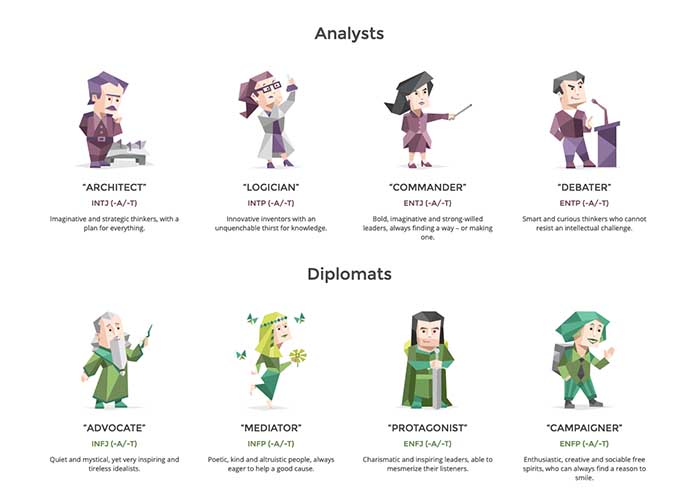
The 16 Personalities Test is one of the more popular choices around, and the free test goes into great detail when it comes to the best career paths and why your personality might be attracted to those choices.

There are longer personality inventory tests, as well. There’s the Revised NEO Personality Inventory, a test aimed at measuring the Big-5 personality traits (openness, conscientiousness, extraversion, agreeableness, and neuroticism).

OCEAN personality

Or, the HEXACO Personality Structure Inventory, which measures those same traits — both are around 200 questions long and take about an hour to complete.

Ultimately, test results should be taken with a grain of salt. They’re not perfect — but they can give you a sense of the qualities you might want to seek out in a career.

Ask around

Obvious, right? It might be a little uncomfortable, but one of the most effective ways to identify your strengths is to get some external feedback.

The key is to ask a handful of people — friends, family, colleagues — those who know you well and likely to be honest.

Frame it like this, “I’m doing some self-work and could use some feedback.” “Or, I’m considering a career change and am crowdsourcing suggestions.”

Then ask some questions:

  • What do you think I’m good at?
  • What stands out about me?
  • What was your first impression?
  • What was I good at when I was younger?

What kind of compliments do you receive?

Compliments

Building on the last suggestion, take stock of the compliments and criticisms you receive from others.

What praises or frustrations are documented inside the inbox? Understandably, it’s no fun to go searching for feedback, but looking back at everything from your LinkedIn endorsements to emails that highlight a forgotten detail can be eye-opening — and serve as a starting point for future careers.

Also, make sure you take stock of those compliments you tend to brush off. These are the qualities that could help you find a hidden gem in an unlikely place.

Take a class, do some research — really, just broaden those horizons

Upskilling is one of the best ways to carve a better career path and broaden your horizons.

If you have an existing skill set, consider looking into ways to specialize more and become an expert — or cultivate a rare, valuable skill.

We’ll add one big caveat here — if you’re looking to secure better paying, fulfilling work, your best bet is to level up skills that relate to one another. For example, if you work in marketing, you might want to take data science courses or polish your social media skills.

Another thing to consider when looking for classes or certifications is, will these skills be needed in the future?

Look at the stats before investing in a new skill. A good starting point is the U.S. Bureau of Labor Statistics; you can search their database by occupation and learn more about which roles are in demand. Payscale or LinkedIn’s Salary Tool offer a more user-friendly approach to sizing up the job market. These sites provide you with information about careers, their pay, and job outlook.

Finally, talk to people already working in the industries you’re looking at. From influencers on LinkedIn and Twitter, to forums like Reddit and Quora, there are countless opportunities to chat with people of all experience levels. Ask questions to find out more about paying your dues, leveling up, and what the daily grind entails.

Be honest with yourself

Again, the passion thing comes into play. When you’re looking into potential paths, you definitely want to find something that pays the bills.

Really look at whether there are opportunities available before you head down a new path. Following your passion is one of those fantasies, like the American Dream. Some people really luck out.

Instead, your best bet is to find where your skills are needed and valued, then seek to find where those skills intersect with your passion.

As much as money can’t buy everything that contributes to happiness, removing financial worry from your daily life is a big part of finding fulfillment.

The best online productivity tools for writers in 2019

Whether you write for fun or for a living, these great apps will supercharge your workflow.

writer

We can’t speak for everyone, but life as a writer can feel like a constant race to get things done. We’re either going full speed ahead, banging out a few pieces of content last minute or trying to combat our worst time-wasting habits.

One second, you’re trying to come up with your latest greatest blog post and the next, you’re looking at socks on Amazon and skimming articles.

And look, there are so many productivity tools out there, but for writers, many of them present more distractions than they aim to destroy.

What makes a great app depends on several factors: your process, the type of writing you do, where your productivity challenges lie. Are you a blogger, a novelist? Are you writing a company handbook or trying your hand at a passion-fueled screenplay?

Here, we’ll look at some of the best apps for writers – be it a distraction-free digital space or a better way to work out your big ideas.

Best productivity apps for writers

Things

Things iOS and desktop

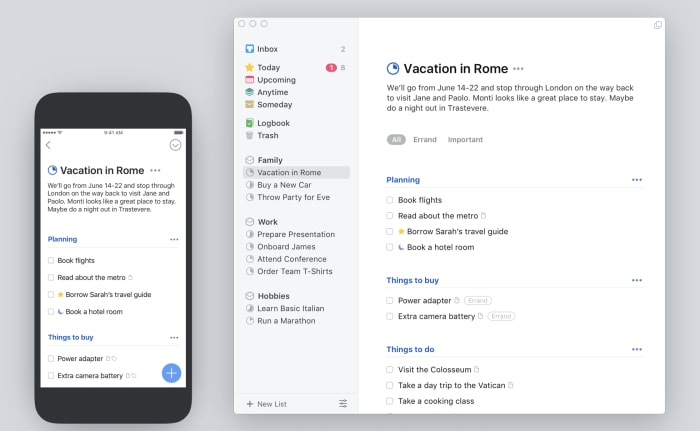
The Things app is probably the best to do list app, at least in our opinion. It’s a paid app, and it’s a little spendy for a lot of folks — but if you need a task manager that can do it all, this is a good choice.

The reason Things is a good thing for writers is — it’s not complicated.

In fact, it kind of feels like a mashup of Google’s tools and the apps that come standard with your Mac — you know, Notes or iCal. The benefit is, Things brings the basics together in a central hub — so you can track your deadlines, write down new ideas, and turn your notes into checklists.

What’s more, Things comes with a searchable archive, as well as the ability to set long term and short-term goals — that’s more important than one might imagine.

Things Download Free
8

Scrivener

Scrivener writing app

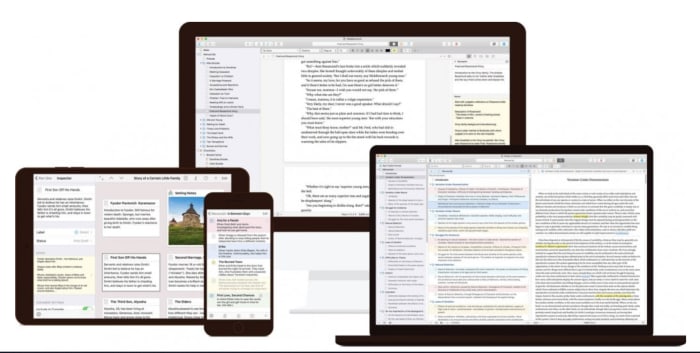
Scrivener is a favorite among the screenwriter set, as well as those taking a crack at a novel.

The productivity benefits you’ll find here are primarily formatting oriented. You can use the platform to create comprehensive outlines, break your writing into scenes or chapters, and move full sections around without the risk of messing up your masterpiece-in-progress.

This isn’t necessarily the best tool for bloggers or those writing shorter pieces of content. But, if you’re writing academic content, this app is a real lifesaver.

They’ll help you stick to Chicago or AP guidelines, no problem. And Scrivener takes care of your formatting woes. When you start a project, you’ll select a template that matches the pilot episode, nonfiction book, or whatever creative project you’ve got up your sleeve.

Scrivener Download Free
7

Ulysses

Ulysses mac iOS

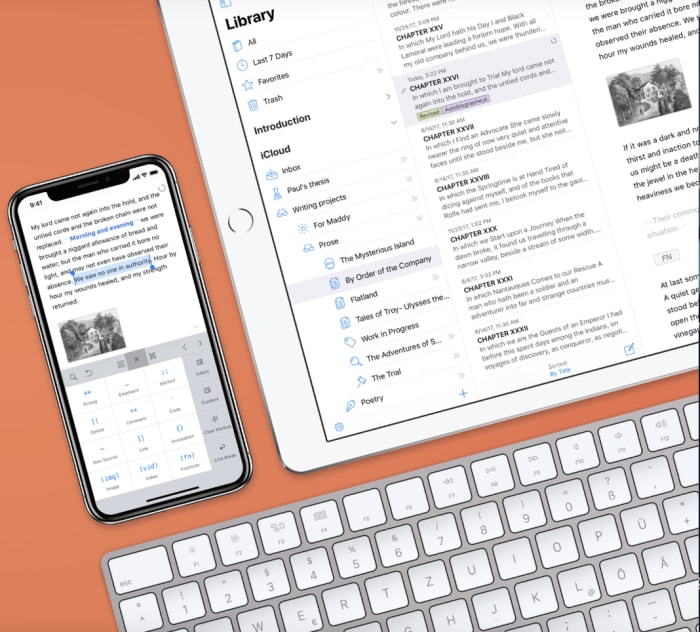
Ulysses is a writing environment app with a cloud-based component. Basically, it’s a clean digital space that seeks to eliminate distractions while you strive to meet that word count minimum.

And while there are a lot of “writing environment” apps, this one brings more to the table than some of the others we’ve encountered.

Honestly, it looks like a better version of Apple’s Notes. And it also syncs your content across all devices — so you can work on your laptop, make some edits on your phone, and review your work from the iPad.

Ulysses Download Free
8

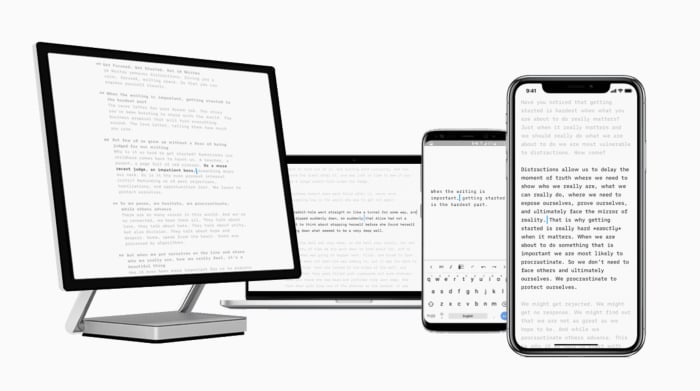
iA Writer

iA writing app

iA Writer is a distraction-free writing app for iOS, Android, Mac, and Windows. The app offers several features that help users get more done. iA writer supports full markdown language and makes it easy for bloggers that need to translate their final draft into Medium or WordPress. What’s more, the app allows you to embed images and tables into the document — which any web writer knows can be a real time-waster.

iA Writer is a minimal tool — offering few distractions and a few handy tools. Syntax highlight highlights specific parts of speech, while focus mode highlights one paragraph or sentence at a time.

iA Writer Download Free
10

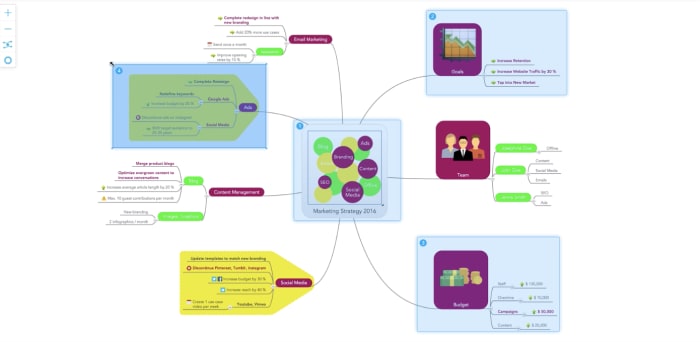
MindMeister

MindMeister sample map

MindMeister is an online tool that allows you to capture and work out ideas as a visual map. While it might not sound like a writing tool at first glance, this tool is a great way for users to work out just how they want to tell a story.

This tool works on Mac OS, Windows, and Linux — or you can just keep things in the web app, download-free. MindMeister is sold with a collaboration bent, but we envision this as being just as useful for solo brainstormers as the whole team.

There are several features built in, but we liked that this tool comes with an online storage system for all inspirational materials — like Evernote, but connected to the mapping feature.

Unpaywall

Unpaywall extension

Ever spend way too much time cruising the internet for reputable sources — only to find reports that cost like $200 just to review? Yeah… us, too.

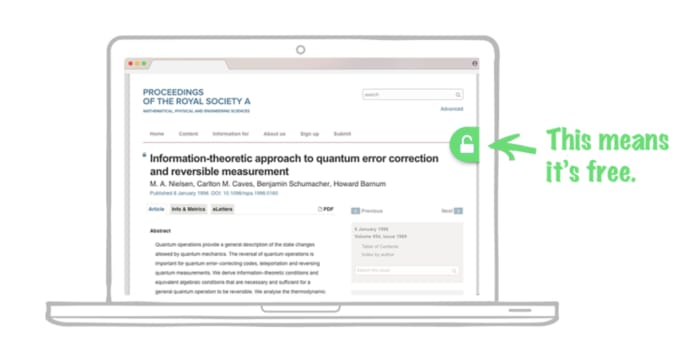
Unpaywall comes in to provide a workaround. It’s a digital library of 50,000+ journals and open-access repositories. Their goal is to bring scholarly articles to everyone — whether they’re writing an article or have a school project due.

Okay, Unpaywall isn’t really an app — rather it’s a free Chrome extension. How it works is, you’ll conduct your research as usual. And when you come upon a paywalled research paper, the extension looks for a free version posted on another site. If something is available, Unpaywall displays a green icon on the right side of your screen — click it to read the article, free.

Now, it doesn’t work on everything, but it will make your life easier, especially if you need to find some stats that make your article all the more credible.

Wrapping up

The best writing tools aren’t necessarily a choice between whether you prefer Scrivener over Google Docs or Microsoft Word.

Rather, the goal is to develop a productivity stack that works for you.

We’ll say this from experience — little tasks like formatting and finding good sources can eat up a lot of time, on par with surfing the internet when we should be working.

2019 Ultimate Guide to Resume Apps 

It’s safe to say that the internet has changed almost everything about jobs. Interviewing for jobs, identifying opportunities, and doing your job.

The whole cycle has been disrupted.

This is all well-documented — we live in a world where preparing for an interview means knowing how to impress an algorithm.

What hasn’t gotten a lot of attention is how to upgrade the stodgy old resume.

Sure, social media and digital portfolios have taken over many traditional CV duties, you still need to have a solid resume on hand.

Just because you’ve been hoping it might fade away along with fax machines and stamps (just us?), you still need to put some effort into creating a memorable, professional one-pager.

To help you out, we’ve pulled together a list of apps that make the formatting, editing, and polishing process relatively painless.

Best resume apps for 2019

Cake Resume

Cake Resume example

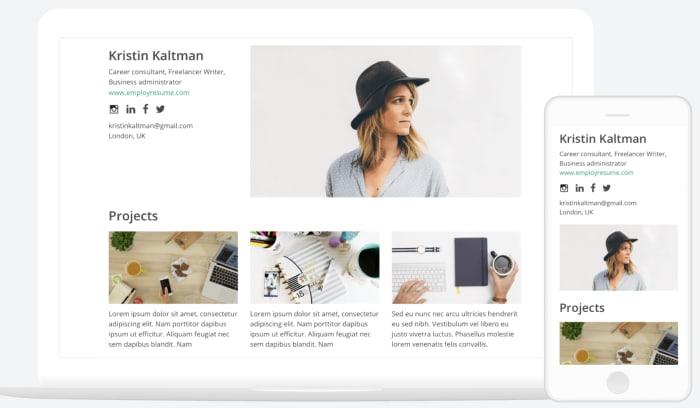
Cake Resume is a drag-and-drop-style resume editor that allows you to customize your design without being held back by the confines of a pre-designed template.

The result is a slick-looking resume that looks more like a well-designed website. How it works is, you’ll fill in each field: name and intro, experience, education, etc., plus photos, links to projects, or anything else that makes sense to include.

From there you can customize the layout — move things around, add, delete, resize — however you please.

If you’re not sure where to start, Cake Resume offers tons of examples of resume creations organized by industry. Because real people create them, some examples look better than others. Still, you’re bound to get some ideas for how you can present yourself.

Though the process is pretty easy, some users might feel a little overwhelmed, if they don’t have any design experience.

The process is similar to a landing page builder — so marketers and designers should be able to get the hang of Cake Resume right out of the gate. For everyone else, the site does come with tutorials that can help you out.

Canva

canva resume templates

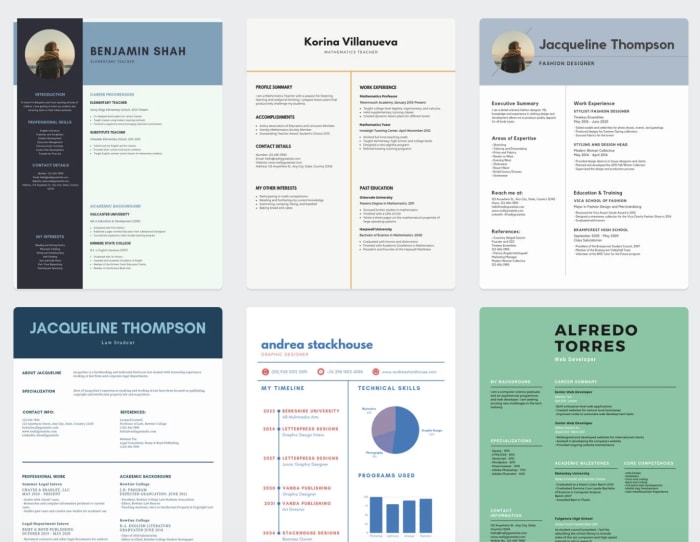
Canva isn’t just for creating logos and custom graphics; you can also use the web app to make your resume pop. Resume designs span a range of styles — some colorful and artsy, others minimal, and many, somewhat traditional. Sort through the template selection by choosing a categoryand finding the one you like best.

Choose from literally thousands of templates — adjust fonts, colors, and make it your own by adding photos, icons, and illustrations from Canva’s library.

Change the font and color, update the details, resize the various elements, and move things around.

Playing around with the tool — those who stand to get the most out of it will change nothing but the details. For a more personalized approach, you will need a bit of design savvy, as it’s easy to mess up the individual elements.

Canva is free if you stick to the tool’s free design elements, plus a dollar per graphic if you add in premium graphics.

10

Visme

Visme does offer fewer templates and graphics than Canva, which means that you can’t customize your CV to the same extent. But, it also makes things easier on people without a design background.

Right away, we were impressed with Visme’s aesthetic. They’ve got a more defined look than Canva—which sources designs from professionals around the world.

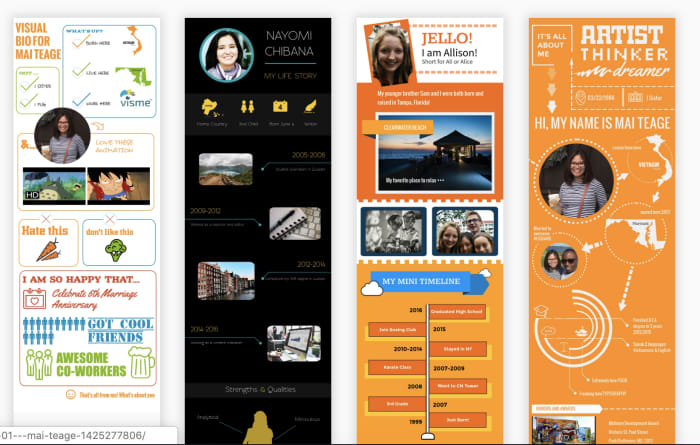
Where Visme brings something fresh to the table is the infographic resume templates. These might not be right for every industry, but they do stand to help you stand out in a sea of white paper.

We should mention, that the resume section isn’t clear upfront. The site is used for creating graphics spanning slide shows and social media designs to infographics.

CV Engineer

CV Engineer mobile app for resumes

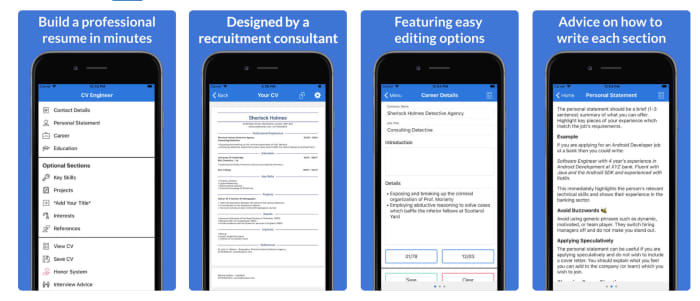
CV Engineer allows you to put together a resume from your phone. While you won’t get the same visual components as Visme or Canva, the app makes it easy to organize your details in a clear, concise way that employers are sure to appreciate.

You’ll get started by filling out each section (skills, references, education, interests, and experience) and CV Engineer chimes in with little tidbits of advice, as you move through the process.

Once you’ve filled everything out, CV Engineer pulls everything together, and from there, you can save your final copy to your Google Drive.

The app is free, but you can tip the developer later on — you know, if the resume lands you a job.

CV Engineer - Free Resume Builder CV Template Download Free
8

Vizualize.me

Visualize me visual resume

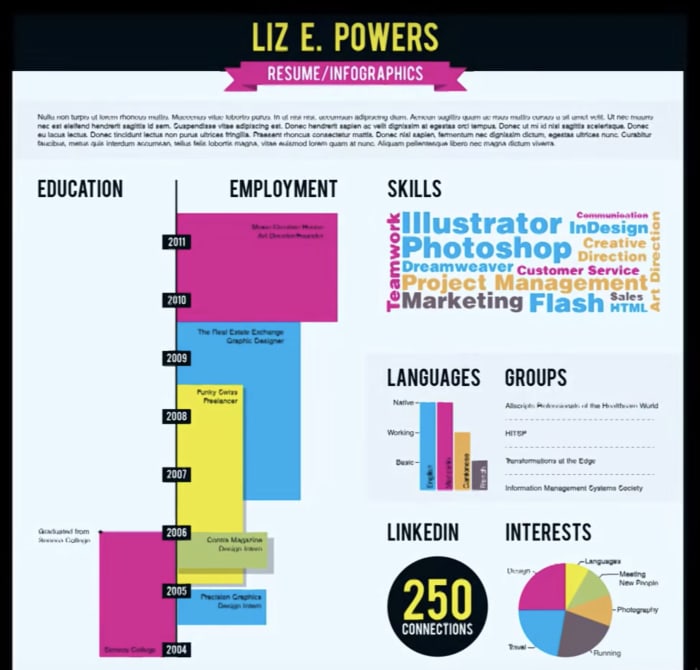
Vizualize.me is an infographics maker with a mission to give the traditional resume a much-needed makeover. The app instead takes your LinkedIn details and compiles your professional achievements into a simple, yet visually engaging graphic.

While the tool is in beta, it already has some pretty rad features. Compile your experience in the form of a colorful timeline, add skills by way of bubble charts, and compile your “stats” as a pictogram — in case you’re wondering “stats” might be how many LinkedIn connections you have or deals you’ve wo n— you know, those little brags.

CVOne

CV One Video Resume

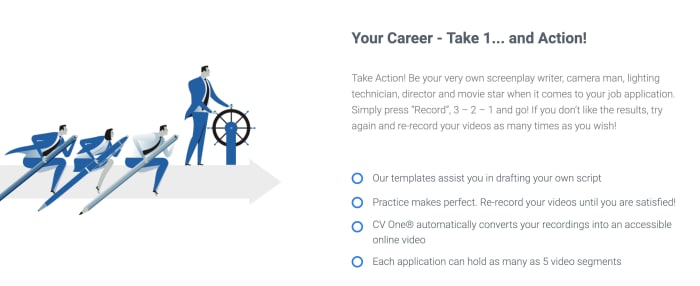
CVOne is a video resume builder that comes with a scrolling teleprompter you can use, so you don’t forget your lines.

While the tool is free, you are forced to share your CV by way of branded URL, which might be a deal breaker for someone trying to put their most professional foot forward. Still, what we liked about this option is, it’s an easy solution for creating a video in a pinch.

We’ve come across job postings that ask for a video — and admittedly, the prospect is a little daunting for those who don’t make a lot of videos in their personal or professional lives.

Microsoft Word

Word for Resume Templates

Okay, you’re probably thinking — wait, my resume is already in a Word doc, this isn’t new information.

Fair assumption, but hear us out.

Word isn’t the most exciting option on the block, but they do offer several good looking templates, and chances are, you already know your way around the platform. Resume options are free (if you have an account) and designed by Moo — you know, the business card folks.

There are also some super simple options for those who prefer to stick to the old school approach —important details, easy to read.

Microsoft Word Download Free
8

How humans and AI are currently working together

Will AI take your job, make your life better, or both?

humans and robots

Artificial intelligence has become good at so many things we once believed were the domain of humans and humans alone. From providing top-notch customer service to diagnosing cancer, bots are beating us in all kinds of industries from logistics to medicine.

We talk about collaboration a lot, but generally, it’s between humans working together toward a common goal. With robots, we’re dealing with a new class of coworkers, those with contrasting strengths and perhaps, less capacity for humor.

Companies like Tesla, Apple, and Facebook lead the charge on technological advances, but artificial intelligence has made its way into businesses of all sizes. Only about 41% of adults support advancing AI, and those folks tend to be wealthy, tech-savvy males.

Those who stand to see an influx of these new coworkers likely won’t fit the description of your average AI enthusiast.

Here are some examples of how humans and bots are already working together:

Chatbots — retailers across the board

Chatbots are the most obvious example of automation in the workplace — or at least the most visible sign of change.

Chatbots offer 24-hour support and the ability to take on tedious customer service tasks and free up support staff. According to a report from Juniper research, chatbots will bring roughly $11 billion in cost savings by 2023 across healthcare, retail, and financial services sectors.

Today’s customers care most about receiving top-notch service at their convenience, so the industry-wide investment in chat makes total sense. Gartner predicts that AI will take over more customer service tasks, which allow companies to better manage the customer experience.

Dealing with more automation is changing the role of the customer service rep, to be sure. On the human side, this role is more strategy-based — focused on improving the customer experience at every touch point.

Tech-enhanced brick and mortar staff

Marty

Marty is a tall gray robot that can navigate grocery store aisles on its own, using a collection of cameras and sensors to find and report safety issues like spills. Giant Food Stores have plans to add Marty robots to all of the chain’s 172 locations. Marty’s main purpose is to spot hazards, but other robots offer shoppers and stores a variety of benefits.

There’s the LoweBot, an autonomous service robot there to help customers find items and answer basic questions. The bot has been around for a couple of years now, and helps users figure out what type of tool they need and can process requests in multiple languages. Additionally, the LoweBot can help workers keep track of inventory.

Walmart’s autonomous scanners reduce issues caused by frequent stock shortages. The big box chain says that unavailable items are a major pain point for customers, and it can be a time-consuming task for employees to scan for items that customers can’t find.

Robot janitors

Walmart is about to unleash an army of robotic janitors in their stores. The company put out a call for bids and recently announced a partnership with a company called Brain Corp. Walmart will employ 360 cleaning machines, equipped with a platform called BrainOS.

The goal is to keep the stores sparkling clean with no human oversight required. The existing scrubbers require a human operator to guide them down the store’s aisles each time the store needs to be cleaned. The initial onboarding phase requires someone to ride each robot around the entire store, so it memorizes the layout. After that first ride, the robot is ready to work without a human on its back.

Walmart says that the aim of this new initiative is to allow employees to focus on helping customers, rather than performing tedious cleaning tasks.

Because the stores are currently in the midst of training the robot janitors, we don’t know how this will impact employees. As it stands, Walmart employs more workers than any other U.S. company, so it could have a negative impact on the economy.

Robots in the medical sector

medical robot

Given the startling statistics regarding patient infections in hospitals, medical staff need all the help they can get when it comes to keeping things germ-free. A study by the CDC found that using germ-killing robots can reduce the rate of hospital infections by 30 percent.

Vanderbilt University Medical Center has started using robots to do follow up job after humans perform normal sterilizations. The robots use ultraviolet radiation to kill germs, which allows hospitals to catch germs that human cleaners leave behind.

There’s also robotic surgery. The concept isn’t exactly new, but technology has improved dramatically in recent years.

The Senhance System is a surgical robot that was just cleared by the FDA for use in minimally invasive procedures. How it works is, surgeons use software to control surgical instruments, performing surgery remotely using three separate robotic arms. Senhance-based surgery stands to improve patient outcomes

Wrapping up

Resistant as we may be to tech entering the workplace, we won’t be able to avoid it for long. It’ll be interesting to see how human job descriptions and duties shift in roles like customer service and medicine.

Customer service is becoming a more skilled job than it has been in the past. The role is now more strategic than being on hand to answer calls and assist customers. Medicine stands to change in the way that doctors might increasingly work with software, rather than directly performing surgery.

It seems robots are fitting in okay, though they’re still relatively new at this whole workplace thing. In the end, we will have to rethink the human scope of work — and find roles that align with every skill set.

How to create a solid freelance portfolio

If you want to be a freelancer, you need to show your skills. Here’s how to make your portfolio pop!

portfolio

If you’re currently working as a freelancer or thinking of diving into self-employment, you already know that your portfolio is one of the biggest assets for growing your business.

The goal is, your portfolio will help you market yourself, find new clients, and differentiate yourself from the competition.

Word of mouth is great, but if you’re a writer, designer, or web developer, showing always beats telling, hands down.

But, if you’ve ever looked at other peoples’ professional portfolios, it can be a real zap for your confidence.  Or maybe you’re just not sure where to start.

In this post, we’ll go over some of the ways that you can create a digital portfolio built to impress.

What a good portfolio website should accomplish:

  • Increases visibility
  • Provides a way for contacts to get in touch
  • Creates new opportunities
  • Proves professionalism
  • Stands out
  • Demonstrates where you can add value

If you went to school for art, design, or web development, you’re already familiar with the idea of a portfolio. But a school portfolio tends to include a little bit of everything you’ve learned during your academic career. A freelance portfolio should focus exclusively on the work you want to be known for.

Which areas are you an expert in? Do you write about food and beverage? If that’s your space, then your portfolio should not be loaded with content about your thoughts on the latest iPhone or training dogs.

Instead, it should have a clear focus on recipes, nutrition, ingredients, and so forth. There may be a broader theme — think wellness and health, along with some restaurant reviews, but everything should tie together.

What if I don’t have much to show?

worker

There are two main ways to build up your body of work when you’re just starting out. The first is by showing off your personal projects.

Personal projects are a great way to drum up attention — especially if you’re already creating a lot of material on your own time. A consistent personal project—like a web comic, a blog, or a series of photos — can help you showcase your talents.

This won’t work if the personal project doesn’t match up with how you plan on earning money. However, posting illustrations to Instagram can help you show off your design skills to a captive audience.

Personal works depend a lot on consistency. If your goal is to build a following on Instagram that you can then leverage into paying clients, you need to consistently push out content.

The second way you can build a portfolio is to do some work for free. We don’t recommend advertising your services for free. This can lead to low-paying gigs — a cycle that unfortunately, can be hard to break.

You can do pro bono work for a friend or family member with a small business or a company that you admire that falls within your niche. Provided you do good work, potential clients won’t know that you worked for free in the past — consider it a marketing expense.

Additionally, if you do good work for a pro bono client, they may be more inclined to refer you to others in their network.

Other things you can do to bulk up your portfolio:

Shorter samples

thinking

Call these snippets, excerpts, shorts. Whatever you decide, consider making a selection of shorter samples that give prospects a taste of what they can expect from working with you.

Write the introduction to an article, compile a selection of mock-ups for an app, or design templates, and write a short description that offers some context.

The point is to show prospects that you have the skills to help them achieve their goals.

Fake projects

Fake projects are another way to show that you have what it takes to help brands level up.

This is especially effective for designers, as it’s easy to present visuals as if they were part of a real portfolio.

You might create a social media campaign for a fictitious brand — with stock photos, logos, and custom typography.

While you can’t use logos from real brands on your site, this is a great way to present your creativity in a way that looks and feels professional.

Create a downloadable resource

Creating a free download isn’t the right move for everyone, but if you can create a resource that people would genuinely like, this is a great way to collect leads.

lead magnet for your site

Here, you might create an eBook that shows users how to get started as a blogger or a set of custom templates readers can use for email newsletters or a set of icons. In any case, the resource should be helpful, and prove your expertise.

Where should my portfolio “live?”

When it comes time to pull the trigger and get your stuff up there, you’ll want to collect all of your assets.

Make a checklist that includes all of the items that you’ll be using on the site.

It doesn’t have to be fancy, in fact, you’ll be just fine with one of the many website builders on the market.

Popular (and easy) options include:

Wix, Weebly, and Squarespace are all incredibly easy to set up, even if you don’t have much experience setting up websites.

That said, Squarespace is definitely the best-designed option in the lineup. WordPress is slightly more complex, but it offers more custom features and tons of themes.

Squarespace example templates

We should mention, too, that visual assets come into play, as well. Obviously, this isn’t a problem for designers, but writers may have some trouble picking images that don’t feel cliche.

Search for “freelance writer websites” and you’ll see a lot of typewriters and close-ups of vintage letterpresses. If you’re looking for free stock photo sites, Jeff Bullas has put together a good, long list. We’ve got our own list.

Alternatively, Clippings, a portfolio site for journalists and online writers presents a way for writers to quickly put together a decent-looking portfolio without all the stress of setting up the visual elements that go with a traditional website. Contently is another good option.

Beyond the work — key elements every portfolio site needs

A portfolio is more than a collection of work.

Rather, it’s a curated collection of samples and information that makes clear how you can help a client reach their specific goals. Take Samar Owais’ home page, for example. There’s not much writing, but it’s instantly attractive and gets right down to business.

copywriting portfolio example

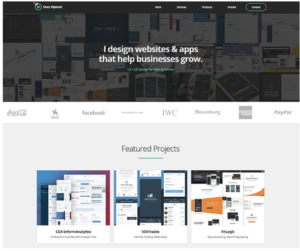
Or look at Matt Olpinski’s site. He’s clearly laid out what he can do for prospective clients looking for a UX/UI designer:

freelance portfolio page

Your “about” page is more about your education, your background, and who you are. The rest of the site should focus on how you can help clients accomplish their goals.

If you’re a copywriter, it makes sense to highlight specific metrics — you’ll triple conversions and increase email open rates, for example.

Beyond playing into the emotional side of the business, you need to spell out exactly what services you provide.

If you’re a writer, mention your areas of expertise: do you cover fashion, food, Apple products? Spell it out.

Beyond niche, what types of services do you provide? Do you write social media captions, blog posts, eBooks, or web copy? All of the above? Make it clear what you provide and what you don’t. This way, you won’t be fielding a bunch of inquiries asking for video scripts if that’s outside of your wheelhouse.

Other important things to include:

  • Call to action: How do you make prospective clients’ lives easier?
  • Lead capture form
  • Contact information
  • Social media links
  • A way to display your projects and any required descriptions

Don’t forget about portfolio rights

Before you begin a relationship with your new clients, you’ll want to set up a contract. Ideally, you’ll want a contract that explicitly states that you can use their non-confidential work in your portfolio.

In some cases, the client might retain rights to your content/design, but it’s smart to build this into the process, as this will provide a steady stream of updated material to use to grow your business.

Know your worth: 5 best salary comparison tools

Are you being paid what you’re worth? Here’s how to find out.

salary comparison

Are you making less than your coworkers? Undercharging clients? Bummed out by wage gap statistics.

Well, you’re definitely not alone.

But making changes requires some research into market rates, experience, and preparing for negotiation.

It literally pays to arm yourself with information, otherwise, you could be leaving some serious cash on the table.

Setting on a number and making the case for it, however, is no easy feat. With that in mind, we’ve put together our shortlist of the best salary comparison tools that provide more insight into how much you should be getting paid for your hard work. Let’s take a look.

5 best salary comparison tools online

Payscale

Payscale

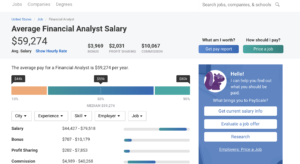
Payscale is a salary calculator that offers a free salary report in exchange for some information from you. The tool will ask you some questions about your background — location, skills, education, title, function, and information about extras like benefits, bonuses, and stock options.

The nice thing about Payscale is, it gives you a snapshot of how you stack up against your peers. There’s a gender breakdown, cost of living calculator, location comparison, and more. What we liked about this tool is — it’s free, yet still provides a lot of useful information about the factors that affect your pay.

LinkedIn Salary

Linked in salary tool

LinkedIn’s salary tool is relatively new, but it provides a long list of salary insights free of charge. Like Payscale, LinkedIn’s tool shows the base salary alongside stock options and bonuses.

The tool can be adjusted to reflect your experience, education, type of company you’re working for, industry, location, and more. According to LinkedIn, their tool is a bit different than the competition, because it provides more context into the why behind salary differences for similar roles.

What’s more, LinkedIn’s aim is to help professionals maximize earning potential by highlighting some of the steps they can take to increase their perceived worth. So, the tool might show that the biggest salary increases come by earning an MBA or taking a similar role in a different industry.

Salary.com

salary.com research tool

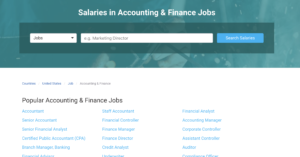
Salary.com is one of the most popular salary sites. The tool lists every position within a field and includes information beyond the cold hard numbers. You can review salaries by industry, career level, and region. The site is one of the older options and doesn’t have the polish you’ll find with some of the other tools.

Still, age is an advantage when it comes to data. The tool is ideal for learning more about similar positions in your area — i.e. how you compare with your peers, but a personalized report will cost you $29.95+. While you’ll get some useful info in that paid report, it’s probably not worth the cash — as LinkedIn and Payscale offer similar insights free of charge.

Glassdoor

glassdoor

Glassdoor is one of the best-known options on the web. The site hosts a comprehensive collection of company reviews and employee feedback, which prove invaluable for job hunters looking for red flags before the interview process is underway.

The platform also provides a solid look at salaries, though it’s a bit different than some of the competitors. Where Payscale and LinkedIn look at salary comparisons by region, field, and other factors, Glassdoor provides specific data for specific companies. What’s more, employees can share information about benefits, interview questions, and what the company culture is like.

SalaryList

SalaryList home

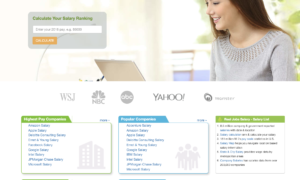
SalaryList gets its data from official company reporting or through the United States Department of Labor, so there’s no question of accuracy here. The site breaks salary info down into a variety of lists: which companies pay most, which roles come with the highest salary, and so on. You can enter your salary to see how it ranks nationally and enter a few more details for a free report.

Wrapping up

It’s a daunting task to determine what your time is worth. And that’s before negotiations and interview awkwardness come into play. Still, doing your research can serve you well. Instead of starting negotiations with an uninformed “I should be paid this much” approach, you’ll have data on your side.

And, when a company comes at you with a low offer, it’s smart to point back at one of the reports generated from any of the apps above. Once you know your worth, that’s where the work begins: perfecting that negotiation game.

8 ways to boost mindfulness at work

8 simple steps to stay mentally healthy at work.

Like other buzzwords and a lot of the concepts tangentially related to the wellness movement, it’s fair if you’ve considered writing off mindfulness as a passing trend.

Mindfulness is about paying attention to the things in your daily life.

The idea is, focusing on how you feel in certain situations will give you more control over how you respond.

As such, mindfulness is well worth exploring. And, it can get you through the frustrations, stress, and other hallmarks of your working life.

In today’s office, you’re dealing with office politics, a soundtrack of chatty coworkers, and passive-aggressive messages firing from all directions.

Here are a few mindfulness tips you can take with you, even if you have a wide open desk in the middle of an open plan.

How to boost mindfulness at work

meditation

1. Prioritize tasks in advance

Mindfulness in the office starts with thinking with intention about how your day will play out. When you start the day with no clear plan, you risk wasting time hanging out in your inbox or playing it by ear.

Instead, set an alarm 15 minutes before you leave and use that time to write down a list of priorities for the next day.

This pre-planned to-do list gives you something to get started on first thing in the AM. And, it also allows you to start being mindful of where your time goes. As time passes, you’ll learn how much you can take on each day and can plan with greater accuracy.

We also recommend writing down a big picture to-do list at the end of the week. Every Friday, list goals to address for the following week.

2. Practice your breath work

relaxing work

It’s not just for the yoga mat. Deep breathing can change the way your brain works. Controlled breathing may improve immune health and boost energy metabolism, which might play a role in fighting fatigue and avoiding the office cold.

Research published in the Journal of Neurophysiology found that deep breathing can help you access new parts of your brain.

Deep breathing can help you control your emotions, meaning you’ll be able to keep your cool in the face of those little frustrations. Think passive aggressive CCs or interrupting colleagues.

Get started by following these steps:

  1. Sit in a relaxed position — in a comfortable chair or on the floor.
  2. Try to relax your body and notice any areas of tension. Notice where you shift your weight and notice any sensations, stress, or other feelings.
  3. Tune into your breath. Notice the natural flow when you breathe in and breathe out. No need to change anything, keep it natural.
  4. Pay attention to where you feel your breath inside the body — it might be in the stomach, chest, throat, or right there in your nose. Notice whether you can sense any evidence of the last breath. Paying attention to those slight sensations is an exercise in mindfulness; you’re learning about your body a
  5. If your mind wanders (perfectly normal), try to redirect it back to the breath.
  6. Sit for about five minutes and observe your breath. Return to your breath and repeat.
  7. Relax — take a moment to acknowledge your effort (whatever that means for you) and return to work refreshed.

3.  Focus on one task at a time

We’ve said it before — and science backs it up — pretty much everyone sucks at multitasking. It’s not a strength. In a study from Ohio State University, students who multitasked felt like they were more productive, though their output suggested the opposite.

Task switching can cost you up to 40% of your productive time.

The APA says the brain wasn’t designed to perform multiple tasks at a time, and rapid switching between tasks can result in a mindfulness disaster.

Instead, take some time to slow down and take things one step at a time. Your brain might freak out at first, tempted to click over to your inbox after just a few minutes of single-tasking.

4. Address emails and small tasks ASAP

email

Now, we’re not suggesting hanging around your inbox all day. That’s a major productivity killer to be sure.

But, emails are like tasks, and when you do check them, make sure you respond right away — as they come in.

This way, those little stressors like remembering on the drive home that you forgot to email a colleague about something important won’t come up as frequently.

Same goes for tasks that take less than five minutes. Often we put off things that take minimal effort — be it a boring errand or a simple organization process. The longer it waits, the more it’ll feel like pulling teeth when you finally get down to business.

5. Write some stuff down

Mindfulness experts and enthusiasts alike will be quick to tell you to write down what you’re grateful for.

The traditional gratitude journal usually entails writing down three things that make you happy. This is all well and good, but if the gratitude journal isn’t quite your bag, frame it a little differently.

When you’re getting ready to head out, shut the computer, or whatever signifies the end of the day, write down at least one positive thing that happened during the workday. This could be something simple like: “finished follow-up calls” or “wrote the first draft.”

Or, use this space to document your goals. Even better if you can break goals up into a series of actionable steps.

Another idea is writing a “done list.” While not a straightforward representation of gratitude, a done list is a way to keep track of your accomplishments. It’s something you can look back at when you need a boost—like a “hey, I really am getting things done” reminder.

6. Start the day with meditation

meditation

Kicking off the day with 10-15 minutes of mindfulness meditation can set the tone for a day of calm. Before you head out, sit down in a quiet room, close your eyes, and breathe deeply.

Acknowledge your thoughts as they come, but refrain from judging. It’s about awareness. While meditation might not be for everyone, it’s worth giving a try. Experts and a whole range of successful people swear that the practice has made them more productive — improving clarity and calm.

7. Set mindfulness reminders

As the day wears on, your brain will start to hit a wall. Whether you’ve chowed down on a big old lunch or just feel fatigued, mindfulness can help you sharpen up the old brain.

Set timers on your phone, every hour or so. Each time the timer rings, take a mini break to do a short mindfulness exercise. Be it a five-minute meditation or a walk around the block; these little breaks will keep you from working like a zombie.

8. Make time for the outdoors

The glow of your laptop is no match for the good old sun. Make sure you pencil in some time to go outside a few times a day.

Movement can help you boost memory retention and focus. Leave your phone behind (or on airplane mode) and pay attention to the sights and sounds in your environment.

The point is, this little act of mindfulness allows you to reconnect with how you’re feeling in the moment.

Coping in a toxic work environment

Hate your job but can’t quit just yet? Here’s how to survive.

A toxic workplace is defined as any work environment that makes you feel uncomfortable, undervalued, or underappreciated. Toxic can run the gamut from bullying and bad management to sabotage and hostility.

Often, people accept their fate, feeling trapped or lucky to have a job at all.

Your work environment plays a critical role in your long term happiness and health. According to research published in the PLOS ONE journal, happiness is directly linked to:

  • Having a strong emotional support system
  • Feeling in control at work
  • Low levels of job strain

Workers in demanding roles with little control over their situation have higher rates of depression and heart disease.

And, when you factor in nasty coworkers and low social support, a negative work environment could be slowly poisoning both body and mind.

Here are some ways to identify whether you’re stuck in a negative environment, as well as some ways to make the time waiting out new job opportunities more bearable.

Signs that your workplace is toxic:

toxic workplace

Poor communication

Poor communication can take a few different forms. This could mean that your boss fails to provide feedback or gives you the brush off. In other cases, you might be on the receiving end of negative feedback with no constructive information.

Other signs include colleagues deliberately not inviting you to important meetings or failing to CC you on important communications until the last minute.

Drama

Cliques, gossip, rumors, favoritism, and fighting. This is the stuff you should run away from fast. The watercolor shouldn’t feel like the high school cafeteria. When colleagues are gossiping, whispering into each others’ ears, it creates a sense of paranoia, anxiety, and stress.

Your boss is toxic

Sometimes, the toxic work environment can be chalked up to the trickle-down effect. How the boss treats employees has a major impact on the employee experience.

When employees see their boss acting like a bully, some may be inspired to follow suit and undermine their reports or colleagues. Turnover tends to increase, and motivation declines.

In some cases, people work in fear of being embarrassed, fired, or betrayed.  Additionally, bad managers contribute to a culture of toxic competitiveness and dysfunctional office politics.

No respect

work stress

Disrespect comes in several different forms. Examples include making overt comments, interrupting someone before they are done speaking, or making jokes at someone’s expense.

People need to feel as though their opinions matter–and that they are being taken seriously on the job. Your boss should not ignore your comments or make negative comments, and neither should your peers.

Find your support system

Having a strong support system is essential regardless of how things are going at work, but especially so when you’re feeling like your colleagues are talking behind your back, your boss won’t listen to you, and you’re just plain miserable.

Building a support system outside of the office is recommended, but finding internal allies is even better. You need to be able to vent to someone who “gets it,” or at the very least, feel that you have someone you can trust in an uncertain environment.

Still, airing your grievances to anyone at work can cross over into the danger zone, so tread carefully and try to focus on building positive relationships at work. A friendly face can make the difference between total misery and a more bearable way to bide your time.

Those expletive-filled tirades about your boss? Save those for when you get home–just don’t do it all of the time. Friends and family will quickly grow tired of listening to the work rants.

Sometimes it is personal–try not to engage

bad workplace

We can always say, “Oh, don’t take it personally.” As much as that’s a noble goal, it’s just not realistic.

Gossip is often extremely personal. Or, your direct manager might really be treating you unfairly. Maybe there’s a colleague that just won’t stop throwing you under the bus.

Whatever it is, it probably is personal. Your best bet in these outwardly toxic situations is to avoid the gossip as much as possible and keep that head down. Your goal is to get the work done, collect a paycheck, and get out of there.

That said, sometimes conflict is inevitable. If confrontation finds you, be assertive and so that bullies don’t pick up on the message that you are a prime target.

Stick up for yourself

Look, nothing is going to change if you passively accept abuse in the workplace. For one, it might result in more bad behavior from the workplace bully. And secondly, failing to stick up for yourself can cause you to feel worse about the situation for letting yourself accept poor treatment.

Stand up for yourself when someone talks over you or fails to provide essential information. Just make sure you do this calmly, privately, and professionally. Yelling or getting upset in full view of your office mates won’t end the way you had in mind.

Unfortunately, you’re somewhat stuck in a relationship with these folks. So, be sure to make clear how you feel when someone says or does something that frustrates you. Initially, speaking up might be difficult–especially if you get red or shaky in the face of confrontation. Still, it’s better to stand your ground–over time, it will get easier. Plus standing up for yourself will help you hang onto your self-esteem during this trying time.

Make sure you take care of yourself

staying calm

The impact of a toxic environment is significant. Some people find themselves getting sick more often, dealing with chronic pain or insomnia. Over time, these things can impact our health, our relationships, our well-being.

Make sure you focus on getting enough sleep, exercising, and eating well. Try spending time outside and connecting with the people that make you feel good.

The thing is, focusing on your happiness will keep you grounded as you seek out new opportunities. When you’re desperate and stressed, the interviewer might pick up on those cues. Or, you might end up in another toxic workplace after making a rash decision to jump ship.

Work-life balance matters more when you’re miserable at work

Set clear boundaries. That means no more checking emails at all hours, working late, or coming in early.  Work-life boundaries can reduce the negative impact of an unhealthy work environment. Things like spending time with friends and family outside of work, exercising, and taking lunch breaks away from the office can help you better manage the stressful situation.

Use this as a teachable moment

Look, we all end up in a job we hate at some point or another. But as you start looking for jobs, make sure you do not find yourself in a similar situation.

Do your homework by reading reviews on Glassdoor and Payscale to see what employees thought about the company. Additionally, pulling a company’s public record can reveal whether they get involved in a lot of lawsuits, engage in unlawful practices, or treat their customers poorly—red flags, to be sure.

Ask cultural questions in the interview. Examples include:

  • What does success look like in this position/organization?
  • Are their growth opportunities available?
  • Do people do things together?
  • What do you like most about working here?

Additionally, try to look around the office as much as possible — is it clean and tidy? Do people seem happy? Is the bathroom in good shape? Did the interviewers seem prepared?

The point is, when you start booking interviews, exhaust all options during the research phase. After what you’ve been through, you deserve a job that values you.

Quitting time: signs that it’s time to look for a new job

These days, nearly every job is temporary. Here’s how to know when to move on.

We all have bad days at work, but when it feels like you haven’t had a good day in recent memory, it might be time to pack your things and move along.

Quitting your job can be scary, and it’s not the kind of decision you can make lightly. Whether you’re daydreaming about a more challenging role or you’re dealing with some nasty coworkers, it’s important to know when it’s time to pull the plug.

Here are some signs that it’s time to get out.

How to know when you should quit your job

quitting job

1. Your skills are being underused

One of the most disheartening realizations you can have on the job is that management doesn’t recognize what you have to offer.

This might hit after being passed up for a promotion or later on as you ask for challenging projects repeatedly to no avail.

It’s not uncommon that starting a new job means easing into more and more responsibilities. But, if you’ve been waiting too long for your boss to call you up to the big leagues, it’s time to start looking at other options.

Our brains like tackling problems on a daily basis, and when you’re stuck in a role that feels like it’s centered on moving data around or writing emails — it can feel like your brain is just rotting away.

2. There are no learning opportunities

If there is little in the way of learning opportunities, it’s a sure sign that it’s time to look for a new job. Sure, you can’t expect to learn something new every day you’re at work.

But if you’ve leveled up as much as possible in this role, sticking around can cause your career to stall out. If you’re not learning anything new and you’re sitting around watching others get promotions — get out fast.

When you start looking for work, make sure you look for companies that support professional development. Look at company websites, read employee reviews, and ask the right questions.

Example questions might include:

  • Do you have mentorship opportunities?
  • What does success look like in this role?
  • How do you support continuous learning?
  • Do you typically promote from within?

3. Company culture isn’t a fit

bad office

Whether the office culture is just plain toxic or it’s not a match, when your daily grind isn’t quite right, it can feel as though you’re trying to be something you’re not.

It could be the people you work with, the set-up in the office, the approach to meetings. Maybe you hate the in-office foosball or catered lunches that prevent you from going outside midday.

Additionally, if you don’t share the company’s values or the direction they’re moving in just plain sucks, it likely feels disingenuous to work toward a goal that doesn’t mean anything to you.

4. Your job is affecting your personal life or health

Feeling overworked and miserable can impact the rest of your life in harmful ways. You might have a shorter fuse with your spouse or children. Or, you’ve started ignoring your friends. Maybe anxiety and stress are keeping you from enjoying yourself outside of work.

Stress symptoms affect more than relationships, they affect your body, too.

Left unchecked, you could start seeing your blood pressure climb, or develop heart disease, obesity, or diabetes. According to the American Psychological Association, stress impacts just about every major system in the body — so your unhappiness at work could turn into chronic pain, upset stomachs, and a whole lot of colds.

5. You dread going to work or can’t be bothered to care

If it feels like pulling teeth to perform basic tasks, it’s time to move on.

That said, you could simply be experiencing burnout. We experience burnout even at jobs we love — so if possible, take a vacation or a couple of days off to evaluate your feelings about the situation.

If that sense of dread is omnipresent and you find yourself watching the clock day in, day out, it’s time to get out of there. 40+ hours a week is a lot of time to dedicate to something that makes you miserable.

Additionally, if others can sense your unhappiness, it can impact your relationship with your boss and your colleagues. It might even be interpreted as a performance issue.

6. You don’t feel valued

There are several ways that a workplace might make you feel undervalued. One example is if colleagues routinely leave you out of the loop when discussing project details or scheduling meetings. In other cases, your ideas are not acknowledged or other people take credit for your accomplishments.

These slights add up over time — and you may become resentful, unmotivated, or just plain angry.

The other way this might play out is if you’re underpaid. If your responsibilities demand a bigger paycheck, it’s time to reevaluate your market value. Do some salary research to learn the average rate for your role — and maybe start applying for jobs.

Final thoughts

Hanging around a bad job can hurt your career, your relationships, and your self-worth. If you’re not growing or you’re just not happy—it’s time to leave.

Don’t burn bridges and keep things professional during the job hunt and transition period. Instead, explain that you’re leaving to pursue the next phase in your career.