5 best apps to help you manage stress

Take control of your stress and anxiety with these apps.

Meditation

According to a recent poll from Gallup, 55% of Americans are stressed out at some point during the day.

When we are stressed, it affects those around us as well. We don’t sleep as well, we can fall into depression, and we can become irritable.

To help manage stress, there are apps that can help you make it through the day and keep your composure. Do yourself a favor and download some of these apps to help ease your tension. 

5 apps to help you manage stress

1. Breathe2Relax

Breathe2Relax

Breathe in. Breathe out.

It should be a simple concept, but when we fry ourselves, we don’t take the time to pause and calm down.

The app does so much more than give you breathing exercises. It also can pair with your Apple Watch to monitor your heart rate. It will also monitor your stress patterns for you and show you your progress.

Breathe2Relax Download now ►
7

2. At Ease

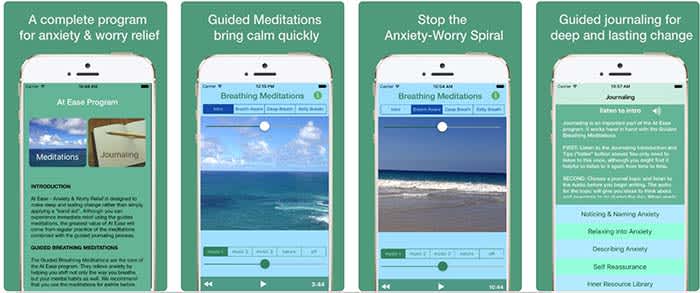
At EaseAt Ease comes with a lot of the tools you find in other stress-management apps. There are breathing exercises and meditations you can do to help manage your stress. However, where the app shines is in its guided journaling feature. 

Guided journaling helps the user become self-aware of the things causing them to feel stressed and anxious. You ask yourself some of the tough questions to help pinpoint the root causes of your stress. From there, you work on how to treat yourself.

This app costs $3, but for those who think this can help them, it’s well worth it.

9

3. Headspace

Headspace

There is such a learning curve with meditation. It is so much more than sitting “criss-cross applesauce” while chanting “Om” over and over again.

Headspace has a 10-day course that teaches you how to properly mediate. That may sound excessive, but you only have to devote a few minutes a day to learning.

Headspace uses real-life science coupled with ancient meditation practices to help you reduce your stress and anxiety.

Headspace Download free ►
10

4. Happify

HappifyHappify uses activities and mobile games to help you manage your stress. Yes, we’re serious.

The app might sound a bit odd, but the experts and scientists at Happify have put research and studies into how the games operate. More than 80% of the people who used the app said that their stress levels went down because of the app.

The games help teach you positive skills like how to give, how to show empathy, and how to savor the moment. The app also helps you track your progress so you can see for yourself how far you’ve come on your journey.

8

5. Pacifica

Pacifica

We saved the best for last.

Pacifica is an all-in-one app to help manage stress, anxiety, and depression. The app features several different types of exercises to help you manage your breathing, relax your muscles, and even help give you a more positive outlook on life. 

The app also manages your lifestyle patterns such as how often you workout, how often you sleep, and your caffeine intake. Even better, the app can help you find a therapist in your area and help you find support systems such as groups and even podcasts.

10

Wrapping up

These apps can help, but the things causing you stress and anxiety might have a deeper meaning. If you have chronic anxiety, it may be in your best interest to see a therapist or psychiatrist. Anti-depressants and anxiety medication might be your answer.

Talk to your family and loved ones about your stress, and get the help you need.

How to fix a slow computer

Is your slow computer driving you crazy? Try out these tricks to make it run faster!

Slow computer

When you’re just trying to get some work done, or blow a few hours surfing the web, a slow-moving computer can throw a wrench in your plan.

Before throwing your computer out of the window in a fit of rage, try out these tips. There are plenty of quick, free, and easy methods to make your computer run faster. 

How to fix a slow computer

Restart your computer/check start-up programs

Although this advice is annoying, there’s a lot of truth to it. It could be that your computer has been on for too long, and it needs to restart. Shut down your computer and start it back up. About 99% of the time, this will solve your problem.

If your computer is still running slow, it’s time to look at what programs automatically start when you log into your computer. It’s pretty common for antivirus programs and messaging apps like Skype to open automatically. Essentially, while you’re trying to open up something like your web browser or a program for work, your computer is too busy trying to open five other programs.

Here’s how to check your start-up programs on Windows 10:

  1. Go to your Start menu and type “run.”
  2. Choose the “Run” app.
  3. In the window that pops up, type “msconfig” and hit “open.”
  4. In the next window that pops up, you’ll be able to see what programs start automatically, and disable them.

Here’s how to do it on Mac:

Mac Login Items

  1. Open System Preferences
  2. Click to “Users & Groups”
  3. Choose your nickname on the left
  4. Choose the “Login” tab
  5. Click the startup programs you want to remove
  6. Press the “–” sign

This is also a good opportunity to reinstall Windows. All versions of Windows get regular updates unless they’ve been discontinued, so updating or reinstalling periodically will keep your computer running smoothly.

Regularly scan for viruses

Maybe you downloaded something you shouldn’t have downloaded. Maybe you went to a shady website. Maybe you clicked on something with malicious intent. Whatever happened, there’s a good chance that you have a virus. 

Luckily, most of the time, getting rid of a virus is both quick and free. Download an anti-virus program like Malwarebytes and scan your computer.

Malwarebytes Download now ►
8

Malwarebytes will scan your computer entirely and will quarantine off everything that might be harmful.

To be completely honest, you should run a weekly virus scan anyway. A lot of the time, there are viruses that are running in the background of your computer. They are stealing personal information like passwords and are sending them to hackers. Weekly virus scans can solve this problem easily.

Check to see how many programs are running

Multiple programs

Your computer is capable of running all sorts of programs, but it can be difficult to run multiple programs at once, especially if you have an older model. 

If you have a Mac, go to Force Quit (under the Apple menu in the upper left corner) and you’ll see every program you have open. If you run Windows 10, hit Ctrl+Alt+Delete and open the Task Manager to see everything that’s open.

If your computer is running Steam, Photoshop, Google Chrome, Microsoft Word, InDesign, Microsoft Excel, and VLC all at once, you should probably close some of those.

Check your computer’s memory/storage

computer memory

Check your computer’s storage. If you are full or nearly full, it can cause your computer to run a little slow. If you can’t or don’t want to delete anything, find a cloud service to store your files. You can also use Google Drive! If you REALLY want to, you can buy an external hard drive, but why do that when there are free options!

7

There’s a bit of a misconception with this tip.

If you have a bunch of small photos from your trip to Cancun or Word documents from your English 105 class, those probably aren’t going to slow down your computer.

Your computer probably has a minimum of 100 gigabytes of storage, so deleting a file that’s 20 kilobytes is not going to make a difference at all. 

However, if you have a lot of huge game files, HD video files, and a ton of useless programs, you might want to consider dropping some of those. Don’t worry about temp files; worry about large files and your drive space.

Run disk defragment and disk repair

Disk defragment and disk repair can keep your computer running properly and make it run quicker. 

To run disk defragment on Windows 10, follow these steps:

  1. Go to “This PC.”
  2. From there, right-click your hard drive and click “Properties.”
  3. Go to “Tools.”
  4. Click “Optimize,” and then click “Optimize” again.

Mac doesn’t have a built-in tool for defragment, but a third-party app like this one can help you!

7

Disk clean-up is really easy to do on Windows 10:

  1. Type “Disk Cleanup” in your search bar, and click the app with the corresponding name.
  2. Click the option to clean up system files.
  3. Once the scan is done, delete the files the app suggests you delete.

Once again, Mac doesn’t have a built-in tool, but we have another third-party app that can help you out:

Disk Cleanup Pro for Mac Download now ►
9

Bite the bullet and buy a new computer

New computer

Although expensive, computers are very disposable.

You can buy a pricey, fancy-schmancy computer and it could be considered low-tech garbage in just a few years. If you’ve been using the same computer for a few years, it might be time to put some money aside to get a new one. 

Yeah, yeah, yeah. That’s easier said than done. If you need some help managing your money to buy a computer, that’s a whole different story. 

Wrapping up

Hopefully, by the end of this article, your computer is running faster. If you tried something else and it worked, let us know in the comments below!

3 hidden features on WhatsApp

Check out these tips to become a pro at using WhatsApp!

WhatsApp

WhatsApp has so many features that sometimes, useful ones go unnoticed. Today, we’re looking at three great options that you might not have known about.

WhatsApp Messenger Download Now ►
8

3 hidden features on WhatsApp

1. Send higher quality photos

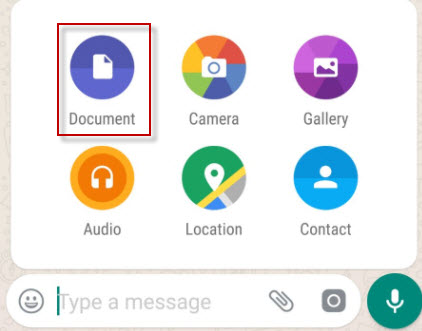
Normally we send photos through the “Gallery” option, but that compresses them so that they occupy less space. If you want to send photos in maximum quality,  send them through Document.

Documents

2. Pin chats

Chats in WhatsApp are sorted by last received message, but there is a way to set a chat so that it always appears among the first ones.

To pin a chat, go to the main WhatsApp window and keep your finger pressed on it. Then tap on the thumbtack to pin it. Want to unpin one? Repeat the process. You can pin up to three chats at a time.

Pin chats

3. Mark messages as favorites

Quite often, friends send us funny messages or useful information that we’d like to look up whenenever we want to see it. You can save them in a separate notebook or, better yet, favorite them. 

To do this, touch the message you want to highlight then touch the star icon.

Favorite messages are saved in the corresponding chat under the general information of the group. Search for “Featured Messages” and you’ll find them there.

whatsapp cowWrapping up

We hope that at least one of these tips changed how you will use WhatsApp. With the ever-increasing popularity of WhatsApp, we hope that there will be more cool hidden features to talk about in the feature.

How to find the temperature of your computer’s CPU

Find out the temperature of your computer’s CPU.

overheating computer

Knowing the temperature of your CPU is critical. An overheating computer can cause problems as serious as blockages, spontaneous reboots, and even disable hardware pieces.

If your computer seems to be acting weird or running slightly hotter than usual, don’t leave it to chance! Check as soon as possible that the temperature of your CPU is within normal ranges. If it’s not, it’s time to take action to ensure everything is functioning properly.

How to find the temperature of your computer

The first method we recommend to find the CPU temperature is by using the free Core Temp program.

Core Temp Download now ►
7

IMPORTANT: Be sure to uncheck any box that invites you to install any other program during the installation of Core Temp.

Core Temp

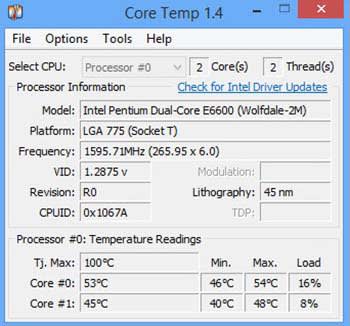
With Core Temp installed, open the application. From the main window, you can see the temperature of your computer’s CPU.

Find out with HWiNFO32

If you’d like another option, we have another really useful free program. HWiNFO32 is a powerful and light application that will let you know the temperature of each component with just one click.

HWiNFO32 Download now ►
8

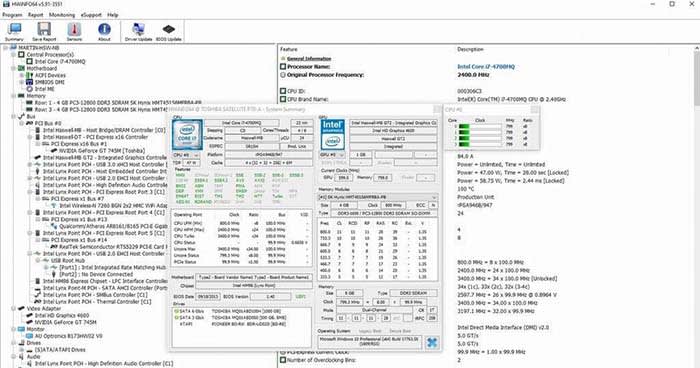
With HWiNFO32 installed on your computer, open it up. Compared with Core Temp, HWiNFO32 offers much more info. It not only offers info on the CPU temperature but also on the graphics card, hard drive, RAM, and even the fans.

HWiNFLO

What temperatures are normal?

Now that we know the temperature of the processor of our PC, it’s time to know if it is in the danger zone.

  • Below 60º: Everything is in order; your equipment works correctly.
  • Between 60º and 70º: The temperature is still between the acceptable ranges, but keep an eye on it.
  • Between 70º and 80º: Your computer is overheating. Check to see if your fans are working.
  • More than 80º: Your equipment is in a dangerous temperature range.

What do I do if the temperature is too high?

If the temperature of your processor exceeds the normal range, it is best that you take action as soon as possible.

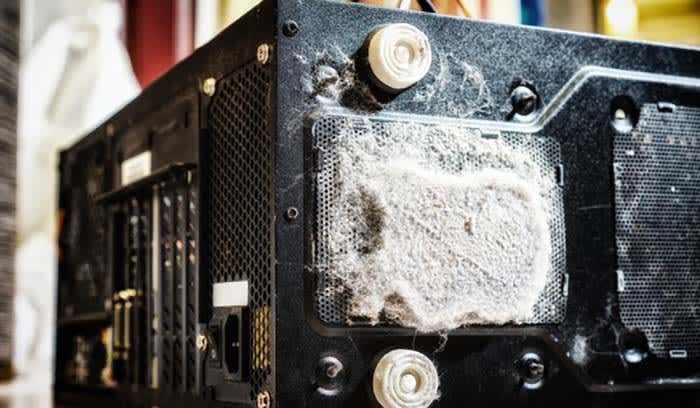
One of the most common recommendations to lower the temperature of a computer is to clean its components and fans. The accumulated dust and dirt tend to increase the temperature.

CPU fan

If you are a laptop user, in addition to cleaning the fans of your computer, you should buy a base so that it cools more efficiently.

If your computer only seems to overheat when you use a certain program, stop using that program. Your processor is not powerful enough to support the application, and it is advisable to stop using it and not risk ending up with unused equipment.

How to clear your cache on Android (4 simple steps with pictures)

Are some of your apps running slow, or are they behaving weirdly? Clearing the cache can help!

Android

Though it may sound a bit drastic, clearing your phone’s cache might be a good idea for a few reasons. The cache is where your phone stores data associated with the applications that you have installed, such as images, so you don’t need to wait as long for the app to load when you open it.

That said, if an app starts behaving strangely, clearing the cache might be one way to get things back to normal. You may also want to clear your cache to free up some more memory on your phone. Whatever the reason may be, here’s how to clear your Android phone’s cache in a few quick and easy steps.

How to clear your cache on Android

First off, there are apps that you can download to clear your cache for you. You can download one of the best ones for the job below. However, you can also do it manually yourself, so we also have the following step-by-step instructions.

Clean Master Download now ►
8

1. Open the Settings menu

android cache clear settings

From your phone’s home screen, head over to the Settings menu. This usually appears as a small gear icon in the top right corner of your phone’s dashboard, and can also be accessed via an icon in the app menu.

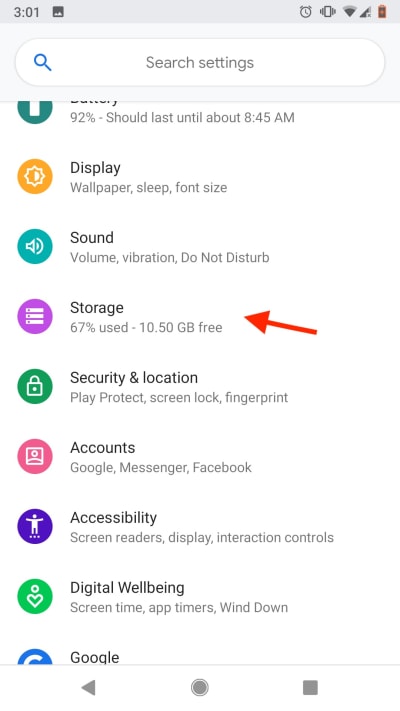
2. Open the Storage menu

android cache storage menu

Once in the Settings menu, you’ll see a variety of options.

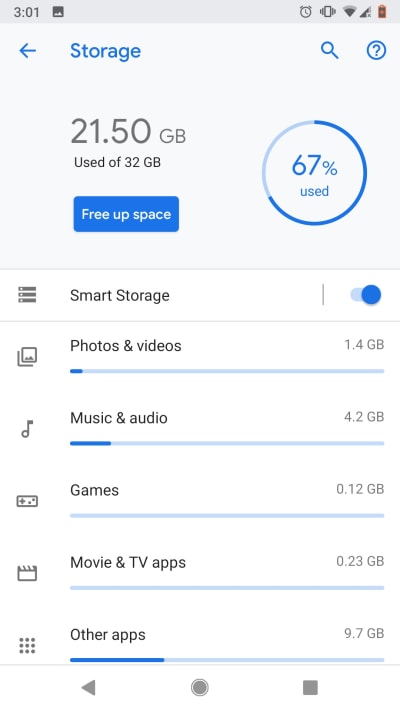
Scroll until you see the Storage menu, then tap it to access it. Here, you’ll see a detailed breakdown of exactly how your phone’s data is allocated. You’ll also see your installed apps broken down into different categories based on their function, such as “Games,” “Movie and TV,” or “Other apps.”

From this top menu, you’ll also see a shortcut labeled “Free up space.” If you want to quickly free up some of your phone’s memory, tapping this key will automatically purge any cache data that your phone considers to be unnecessary.

This can be a great option if you’ve noticed that your phone’s acting a little sluggish or if you just need to make a bit more space. If you’re having problems with a specific app or you want to have some more control over what data gets cleared, head to Step 3.

3. Choose your category

android cache storage breakdown

As stated above, all your apps are subdivided into certain categories. In general, most apps can be found in the “Other apps” tab. Click through the different categories until you find the app that you want to clear, then select it.

4. Choose how much data you want to clear

android app cache

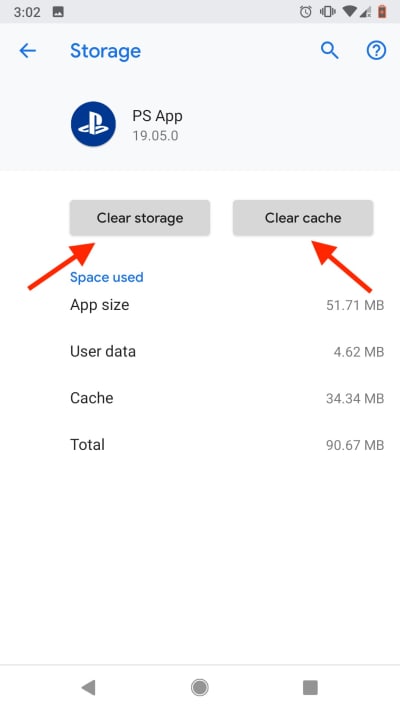
Once you’ve selected the specific app, a new menu will open displaying cache data pertaining to the app you’ve selected. At the top of the menu, you’ll see two buttons: “Clear Storage” and “Clear Cache.”

Tapping “Clear Cache” will get rid of any cache data associated with the app. This includes images and other saved content, meaning that the next time you use the app, it will need to connect to the internet to re-download any content it needs to function.

Usually, clearing the cache and re-downloading data like this will solve any problems if you notice an app behaving strangely.

“Clear Storage” will get rid of any and all data associated with the app, including data such as saved passwords or, in the case of mobile games, save data. If you have dozens of things unlocked in a game like Knife Hit, this probably isn’t the best option.

Wrapping up

Whatever the reason may be, clearing your cache is easier than it sounds. Whether you’re trying to clear space or fix a problem app, following these quick steps should clear things up in no time.

How to create your own Secret Hitler game for free

Learn how to play this hit board game for free!

Secret Hitler

Secret Hitler is the best hidden role game, and nobody can convince us otherwise. Bang, Ultimate Werewolf, Avalon, and Mafia are great options, but the political machinations and end-game trust freakout make SH our top title in a highly competitive board game genre. We’ve played this game time and time again, and it never gets old!

Know what’s even better? It’s FREE.

Official game sets can be purchased, but Secret Hitler also has a Print-and-Play option on their website. In this article, we’re going to show you where to find it, how to make your set, and a few options for improving your self-made boards! By the time you’re done, you’ll have a quality game board for one of the best hidden role games ever made.

Please enjoy our friendly guide on…

How to create your own Secret Hitler game set

Step 1: Printing

Secret HitlerHead over the Secret Hitler website if you haven’t already. Here, you can find more information about the game, including the print links for the Game Set and Rule Book.

Once you’ve downloaded the PDF’s, just print ’em. That’s all there is to it!

Step 2: Cut it Out!

ScissorsGet ye some scissors and cut them out! Be careful to follow the lines, make sure everything’s nice and neat.

Now comes a decision: how nice of a game set do you want? If you’re playing this once with family members at Christmas, you can simply play as is. If you want your game to look pretty, head to the next step on card stock. If you want your game to last, go on to Step 3, lamination. If you just want somewhere to store it, voyage to the final instructions on making a box!

Step 3: Card stock

Card Stock

Why use card stock on a Secret Hitler set? First, it’s a great way to make everything sturdier. Two, it’s a decently effective way to tie the game board pieces together, since they print in two parts. Finally, for the paranoid players, card stock ensures light won’t shine through your cards and allow others to see them.

They’re cheaters, the lot of ’em!

Head to your nearest Staples, Walmart, or scrapbooking store. Pick up your favorite color of card stock (we suggest 10 9 x 12-inch pieces at least) and a good number of glue sticks. Or, if you’re a madman, grab a glue bottle.

At this point, glue your Secret Hitler pieces to the card stock. If you’re using 9×10 papers they can be divided thusly:

  • Voting cards, discard piles, and role cards: divide the paper into 8ths.
  • Liberal and Fascist policy cards: divide the paper into 16ths.
  • Game boards: divide the paper once, lay it down long-ways to form a backboard. Place the game pieces on top, closer to one end of the backboard so the breaks in card stock and board pieces aren’t on top of each other.

Step 3: Laminate

Lamination

To make your cards water resistant, tear resistant, and glue-getting-old resistant, you should laminate them. A well-laminated deck looks professional and stays around much longer!

Personal suggestion from us to you: if you don’t own a laminator yourself, ask friends and family first, then buy your own lamination pouches if they have one. It’ll make life easier.

Once you have the materials, using the laminator shouldn’t be too difficult: the real trick is fitting as many game cards inside one lamination pouch at a time. It all depends on how much material you want on the sides, and how uniform they’ll look afterward.

As usual, the game boards will be an issue, since they’re so long. We put two lamination pouches over them, on opposite sides, with overlap in the middle. Before you run this beast through the laminator, make sure to wait a while for it the machine to get hot. It may struggle to heat up the center.

When that’s all finished, pull a Step 2 and cut the lamination off!

“Final” step: The extras

Extras

To play Secret Hitler, there are just a few more housecleaning items:

  1. Get envelopes to hold the secret role cards. You’ll hand these out at the start of the game to let everyone know their identity for the round. Manila envelopes, plain white, whatever works for you.
  2. Staple the rule book if you haven’t already.
  3. Get a container. There are a lot of moving pieces. We recommend grabbing a canvas bag at the very least, somewhere to store the game. If you’re going all-out, you can even make your own box…

Bonus round: Making a box!

Box

We made this box ourselves, which turned out looking pretty great!

You may be wondering: why put in the effort? Aside from looking fly, Secret Hitler game sets are so long and thin that no box on earth seems to fit them perfectly. However, with a little wood, spray paint, and a few key items, you can have a comfy box too!

You can do it. Seriously. We aren’t carpentry professionals by any stretch.

Let’s run through the steps quickly!

  1. Measure your game boards to determine size. Plan to have a little extra space at the edges: our box ended up measuring in at around 15 x 6 x 3 inches.
  2. Buy your materials: mosey on over to Lowe’s or Home Depot and pick up a large board of thin wood, preferably under 1/2 an inch of thickness.
  3. Using your measurements, draw out all pieces on the board. When it comes to piece organization, we made two panels for the top and bottom, then made top and bottom slices for the “wall” to create a lip for the cap. This makes attaching hinges and a latch much easier.
  4. Cut it. We recommend a radial saw for straight cuts like this. Be warned: the saw takes about 1/8 of an inch from the material. Keep that in mind when drawing out the cuts! And, of course, be careful: stay safe, ask a professional for help if you’re not experienced with power tools.
  5. Sand it. Just use a light sanding, you don’t want to accidentally form pieces and make them harder to fit together when you:
  6. Attach your pieces. If your board was too thin for nails or screws, no problem: grab wood glue. Trust us, it’s strong enough by far! Don’t worry if there’s an overhang, that will be dealt with after you:
  7. Sand that thing to perfection! Even out edges, make it as smooth as you like. Be careful if you bevel, you don’t want to remove too much of the glue.
  8. Pick up hinges, a latch, maybe even a handle! We found great things at Hobby Lobby, although you may find great options in the craft section of superstores like Walmart. Check it out!
  9. First finish: We didn’t have time to do lacquer, but we certainly wanted to; make your wood look even nicer if you have the chance! Instead of that, we used a clear spray enamel to protect the box.
  10. Make the logo. We printed a Secret Hitler logo to the size we wanted on the box, then made a masking tape paint mask by cutting out the letters with an X-Acto knife, using the printout as a guide. From there, we put the paint mask on the top and used black spray paint (three coats).
  11. Final finish: we recommend one more coat of clear enamel to protect the logo. After that, you’re finished!

Enjoy the box! At the very least, we hope it carries your game set well. At best, we hope you’re proud of your work and can show it off at game nights.

A few more things (IMPORTANT!)

Jack Noir

Secret Hitler has a specific creative commons license: you can print off as many copies as you like, but you may not sell them for profit. You can remake the game as you wish (we made a Homestuck version for fun, you can see Jack Noir above), but any new version must be released under the same license, and still cannot be used for profit.

Thanks for reading, we hope you enjoy creating your Secret Hitler game set! After just a few hours of work, you and your friends can enjoy many more hours of fun, learning tells and forming trust issues.


How to download and install Grammarly to improve your writing

Never make a typo in a work email ever again with Grammarly!

Grammarly

If you haven’t tried Grammarly yet, we highly recommend it to everyone who uses a laptop or PC!

You’ve probably seen the advertisements while browsing YouTube: Grammarly wants everyone to know they’ve become the go-tool editing software for millions of user devices. And guess what? They earned it with a combination of powerful, non-invasive editing tools.

On the off chance the insane number of Grammarly commercials annoyed you into deciding never to download the app, please give it a chance! Even the best writers make mistakes. This program will catch them, giving you a sense of security when sending out written documents for absolutely no charge!

Grammarly for Chrome Download free ►
10

Let’s dive into…

How to download and use Grammarly

Gramm

Downloading Grammarly takes very little effort.

First, head over to the Grammarly website. When you arrive, the green button at the bottom right should be specifically optimized for your current browser. Click it and you’ll add it as a web extension!

Using It

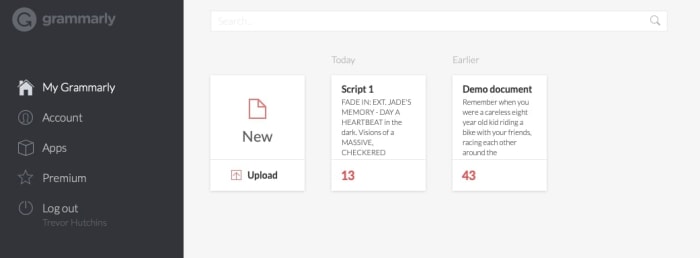
Docs For heavy-duty projects, you’ll want to visit the full Grammarly website or downloaded app. There, you can upload documents in the window seen above and have the program check throughout your entire project for grammar, spelling, and punctuation!


If you made sure to add Grammarly as a browser extension, you don’t even need to load your writing into the program, an editing widget will appear in most programs! Specifically, Gmail will have a highly useful option that provides suggestions when you begin a message:

Email

Mobile

KeyboardOn mobile devices, you’re going to want to look for “Grammarly Keyboard” instead. We recommend either the Apple or Google Play stores.

Grammarly Keyboard Download now ►
10

It’s hard to work with documents on a mobile device, so this program works much like the browser extension. Once you download the app, you’ll go through a few setup steps, after which Grammarly will appear in your messaging environment, Slack chat, and more!

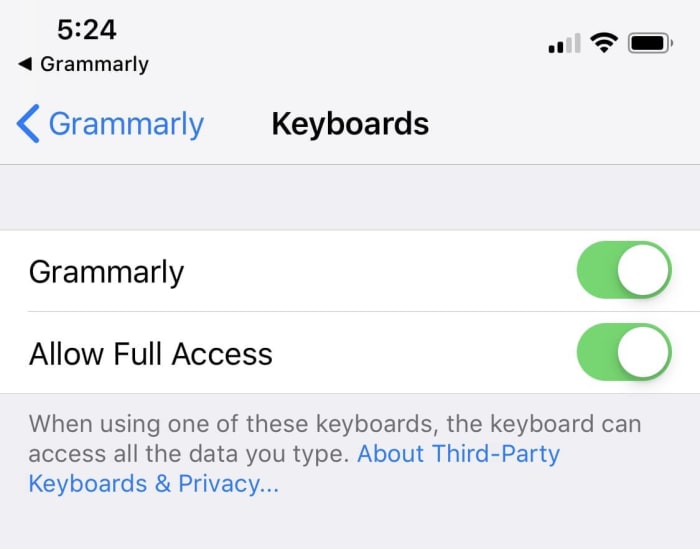
After downloading the app, you’ll have to sign in. Then, to activate Grammarly, go into your settings, find the app, and choose the “keyboard” menu within. There, activate Grammarly across the whole device:

Turned OnFrom there, you’ll need to return to the Grammarly app and switch your normal phone’s keyboard over:
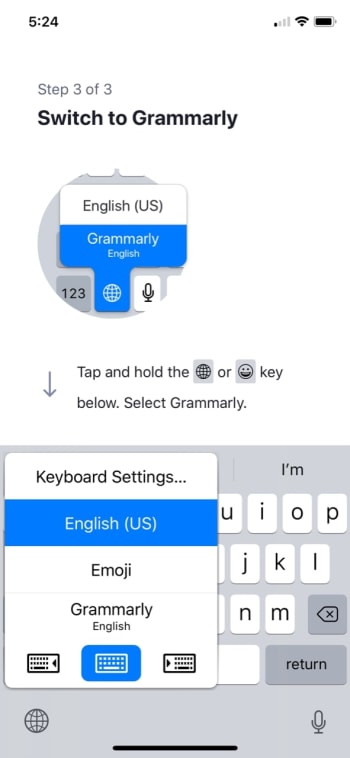


GrammStart

After that, your keyboard will be completely changed. From here on out, it will look something like the picture below. It will also give you all the suggestions and help expected of the Grammarly program!

Keyboard

What is Grammarly Premium?

Grammarly Premium offers a greater range of editing tools and will check for things such as plagiarism, insensitive language, and an inappropriate tone. While these may be great tools, we’ve found the vanilla version to be adequate at the very least.

If you’re trying hard to make sure your writing is professional in every regard, this option may be perfect for you. Just be aware of the cost:

PremiumCost

Final notes

Grammarly isn’t without fault: the English language is radically diverse, and no tool will ever be fully in touch with the enormous range of personal choices that writers can employ. In this very article, the program told us the words “downloaded app” should be “downloaded AN app.” Why? Because it hadn’t logged the possibility that “downloaded” would be used as an adjective! Weird, right?

Still, despite a couple of snags here and there, we’ve found Grammarly to be an excellent companion app and we hope you will too!

Learn to play the piano online for free

Want to become an expert pianist? These resources can help!

PLaying piano

If you’re like most people who own a piano, all it really does is serve as a place to put your family photos. It’s a nice piece of furniture, but it would be nice to use it for its intended purpose.

If you have always wanted to learn how to play the piano, the internet has plenty of tools to learn how to play. We compiled some of the best we could find and put them in the list below. If you always wanted to learn how to play the guitar, don’t worry, we’ve got that covered also.

Learn to play the piano online

Check out some YouTube tutorials

Pretty much your best friend for learning how to play the piano online is through YouTube videos. 

You’ll find videos that teach beginner’s tips, and even how to play specific songs.

We especially enjoyed this video that taught us how to play “Imagine” by John Lennon. We never would have guessed that such a profound and popular song would be so easy to play.

If you’re just starting to learn how to play, we thought these were some of the best videos for beginners:

There are a lot of songs that you can play key by key, but in order to truly become a master, you’ll need to learn how to play chords. This video does a good job of teaching you some of the most common chords you will use. Once you’re done, the follow-up video will teach you accompaniment

If you want to learn how to do a fast piano run, this video is a good teacher. Piano runs look complicated, but they also look impressive and really cool. They’re definitely a must-know trick for up-and-coming pianists.

If you truly want to be a pianist, then you need to know what can prevent you from becoming one. The following video was created by a pro. How good is he? He created the last two videos we showed you. In the video, he goes over the most common pitfalls for becoming a pianist, including not maintaining a schedule and setting unrealistic expectations for yourself.

8

Practice on your computer or smartphone

It can be hard to find time to practice. Luckily, there are electronic solutions for you to practice the piano on both your computer or smartphone.

For Windows users, Electric Piano is one of the best apps for playing the piano. Basically, you can turn your keyboard keys into piano keys. You can even add different playing modes to make the piano sound like a different instrument like a harp or cello. Basically, it’s like having an actual electric keyboard but on your computer.

Electric Piano Download Free ►
7

If you want to practice the piano on your smartphone, My Piano for Android is a solid pick. You don’t get all of the same bells and whistles you get from Electric Piano, but that’s to be expected. (Come on, you’re playing the piano on a smartphone.) You are essentially getting a basic piano playing experience, but it’s still nice to have the option to practice.

7

Learn with Flowkey

Flowkey

Quite possibly the best online teacher for learning piano is Flowkey. Flowkey has songs that you can play along with, and a microphone tool that listens in to make sure you are keeping up. To make things even better, Flowkey is completely free!

There are courses that you can take that range from beginner to pro. So even after you become a master pianist, Flowkey still has tools to help you hone your craft.

One of our favorite tools is the one that repeats a section. If you’re learning a new song, sometimes a single part of that song will give you a lot of trouble. Flowkey has a tool that will repeat that part of the song over and over again until you have it down pat.

Along with its stellar website, there is also an app for Android and iOS. The app is also free to use.

9

Wrapping up

The main thing you are going to need in order to become an expert pianist is discipline. You need to set realistic expectations for yourself and make sure you are devoting as much time as you can to practice.

As long as you do that, you are well on your way.

How to make VLC your default video player on Windows 10 and Mac

Tired of your videos opening in your device’s shoddy video player? Here’s how to switch to VLC!

VLCThere’s not much more annoying than watching your computer try to open a video with its shoddy default video player. As your PC sputters to try to make it happen, you can’t help but wish that your computer would just play videos through VLC by default.

Luckily, there is a way to make that happen, and, better yet, we can tell you how!

How to make VLC your default video player

If you have Windows 10

  1. Open your settings
  2. Click on Apps
  3. Click “Default Apps” in the left rail
  4. Scroll down to your default video player
  5. Click on it, and switch it to VLC
  6. That’s it! You’re all done!

If you have a Mac

  1. Right click on a video file with Finder
  2. Choose “Get Info”
  3. Go to where it says “Open With”
  4. Change the current program with VLC
  5. Click the button below that says “Change All”
  6. A new window will pop up. Click Continue
  7. All video files with that extension will now open in VLC by default
  8. If you want to do this to multiple types of files, you will need to do it to each type of file

Wrapping up

Once you are done, you will be able to use VLC to open almost all of your videos by default. VLC can open pretty much any type of video file, and it is your best option for viewing obscure formats.

VLC for mobile Download now ►
8

How to fix dead pixels

You can fix a dead pixel safely and for free! Find out how!

Dead pixel

Nothing takes you out of the moment like a dead pixel. You’ll be trying to focus on a game or a movie, but all your eyes can focus on is that dead pixel.

Wouldn’t it be nice to rejuvenate that pixel? Well, it turns out there are ways to do so. Better yet, you can do it for free and it’s pretty simple. 

How to fix dead pixels

Detect dead pixels

You probably clicked this article because you found a dead pixel that you need to get fixed, but you might have more than you thought. For this reason, you should use a program like IsMyLCDOK to check for more.

The app has you run a color test, stress test and gradient test. After completing each test, you should be able to see every dead pixel on your computer. This is NOT a dead pixel detector app, but an app that tests the functionality of your screen. It just finds those dead pixels as a result.

isMyLcdOK Download now ►
9

Try rubbing it with a cloth

Wipe your screen

Getting rid of a dead pixel might be easier than you realize. You don’t always have to get into the hardware to fix it, you might be able to just use a cloth to rub it back to life. However, make sure that you do it in just the right way, or you can do more harm than good. 

  1. Make sure the device is turned off.
  2. Get a damp cloth. It can’t be soaked, or you can potentially damage the screen, and it can’t be dry or you can scratch the screen.
  3. Press down gently where the dead pixel lies.
  4. Do NOT press anywhere else! If you do, you could make more dead pixels.
  5. While applying pressure, turn on the device.
  6. Repeat the process until the dead pixel is gone.

JScreenFix

JScreenFixIf your screen issues require more than just using a cloth, there is another option. JScreenFix has a static box that you hover over the dead pixel. Leave the box in the area for about 10 minutes, and it should fix the dead pixel.

As annoying as a dead pixel can be, a box about the size of the GameBoy cartridge on your screen can be even worse. However, if you put the box in the problem area while you grab lunch, it should be fixed by the time you get back.

Most importantly, JScreenFix is completely free. You might have to close the occasional ad, but not having to pay for or download the service makes it all worth it.

Wrapping up

If you have an expensive computer, TV, or smartphone with a dead pixel, it’s worth looking into the warranty. It could very well be covered, and you can get a new device for free altogether.

However, if you don’t have it covered under warranty, one of these options should help you out!