WhatsApp infects millions of Android phones with malware

About 25 million Android users have been hit with a Malware attack that sends them malicious ads.

WhatsApp

About 25 million Android phones were infected with malware hidden inside WhatsApp, according to an article from Forbes. Essentially, the virus replaced certain apps (including WhatsApp) with fake versions that bombard the user with ads. 

Because it is copying and replacing apps with a malicious version, the Malware virus has been named Agent Smith based on the character from “The Matrix.”

How did this happen and what is it doing?

A third-party app store called 9apps.com is responsible for the spread. If you downloaded your apps from the Play Store, you should be safe. You can still download WhatsApp from the website, but we’d recommend downloading it from us just to be safe.

WhatsApp Messenger Download Now ►
8

As of now, the only thing that the malware appears to be doing is bombarding the user with malicious ads. However, Agent Smith has lots of harmful potential. Since it can hide in plain sight, the virus can present a privacy risk without the user knowing what’s happening. 

Most of the infected Android phones are in India (about 15 million). However, there are still about 300,000 infected phones in the U.S. and about 137,000 in the U.K.

What should I do?

If you downloaded anything from 9apps.com, you should uninstall all of those apps immediately just to be safe. Although WhatsApp was the main app infected with Agent Smith, there were others.

You should also regularly scan your phone for viruses. Free apps like Malwarebytes can do that for you lickety-split.

Malwarebytes Download now ►
8

Should I uninstall WhatsApp forever?

Although WhatsApp has had virus attacks in the past including a spyware attack a few months back, this one doesn’t seem to be their fault. Only downloads from 9apps.com appear to be harmful.

If you enjoy using WhatsApp or if you need it on a daily basis, you can still keep doing so. Just make sure you download it from a safe source.

How to scan your TV for viruses

Your Smart TV is just as susceptible to Malware as your computer and smartphone!

Smart TV

Did you know that your Smart TV can get malware just as easily as your computer or smartphone?

Let’s put this into perspective.

You finally bought the TV of your dreams: a 65-inch curved Smart TV with 4K capabilities. Mother of God, misplaced Starbucks cups and water bottles on “Game of Thrones” never looked so good.

Unfortunately, after a few weeks of using your dream TV, you soon realize that it has been infected with malware.

What can malware do to a TV?

For starters, if your Smart TV has malware, your TV will start running slower and slower. If your Smart TV is infected with malware, you are also at risk of having your data stolen, and being subjected to bogus ads, according to an article from WeLiveSecurity.

To think, all you ever wanted was to watch “Stranger Things” in beautiful HD.

How to scan your TV for viruses

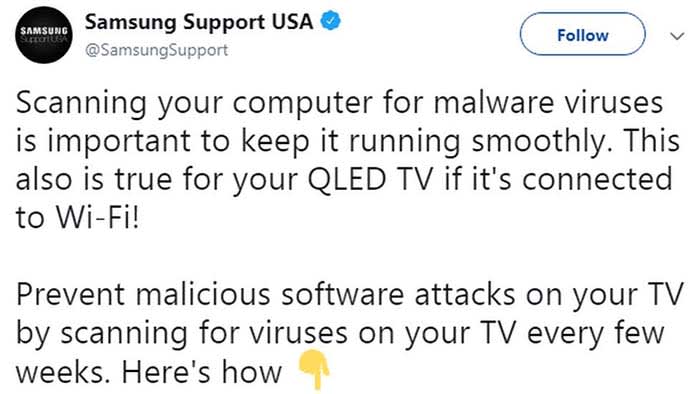
Recently, Samsung tweeted about the need to scan your TV for viruses every few weeks.

Samsung

The tweet has been recently deleted, but we can tell you how to scan your Samsung TV for viruses:

  1. Turn on your TV
  2. Open your Settings
  3. Go to General, and then to System Manager
  4. Scroll down and choose Smart Security
  5. From Smart Security, click Scan

You can check out the video below for reference:

Some Smart TVs have different scanning procedures, but pretty much all of them can be scanned by accessing Security from your Settings. 

Wrapping up

The fact that Samsung tweeted about the need to scan TVs for viruses, and then deleted the tweet after receiving flack is cause for concern. Whether or not Samsung has detected a vulnerability in their TVs has yet to be discovered, but we’ll keep our ears open.

Until then, make sure that you are running regular virus scans on your TV. If you spend hundreds or even thousands of dollars on a TV, you should also spend time to make sure it is working properly.

Your Mac needs malware protection and Intego delivers the goods

The award-winning Mac Antivirus Intego Internet Security X9 now with 30% off.
In January, Mac users were targeted by VeryMal, a piece of malware that tried to trick them into installing a fake upgrade to Adobe Flash Player. If duped into clicking, they would have been gifted with OSX/Shlayer, adware first discovered by security firm Intego, that can monitor your online activity and serve you excessive advertisements. While the attack was halted in just two days, it brought to light an important piece of information that users of Apple computers often overlook: Macs certainly have extremely robust inbuilt protection from malware, but they are not invincible and can always benefit from additional security measures.

Fortunately, the same company that identified Shlayer is also exceptionally good at blocking it, along with other Mac attacks. Intego’s Mac Internet Security X9 software is an affordable best-in-class solution for keeping Macs locked down safely. Here’s why.

Double Shielded Protection

When you download Intego Mac Internet Security X9, you actually get two hard-working utilities.
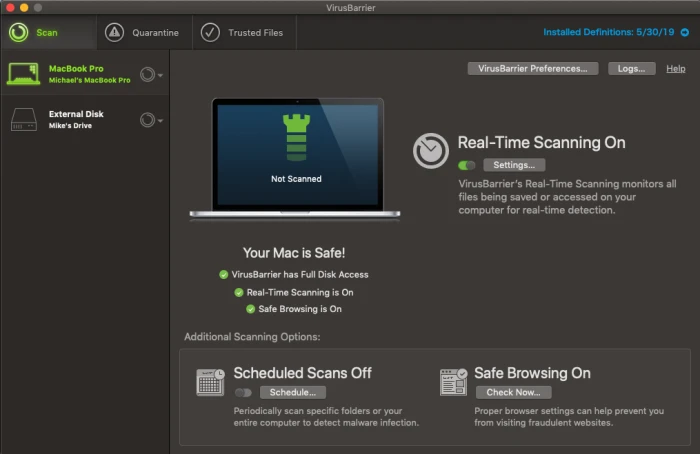
Intego VirusBarrier

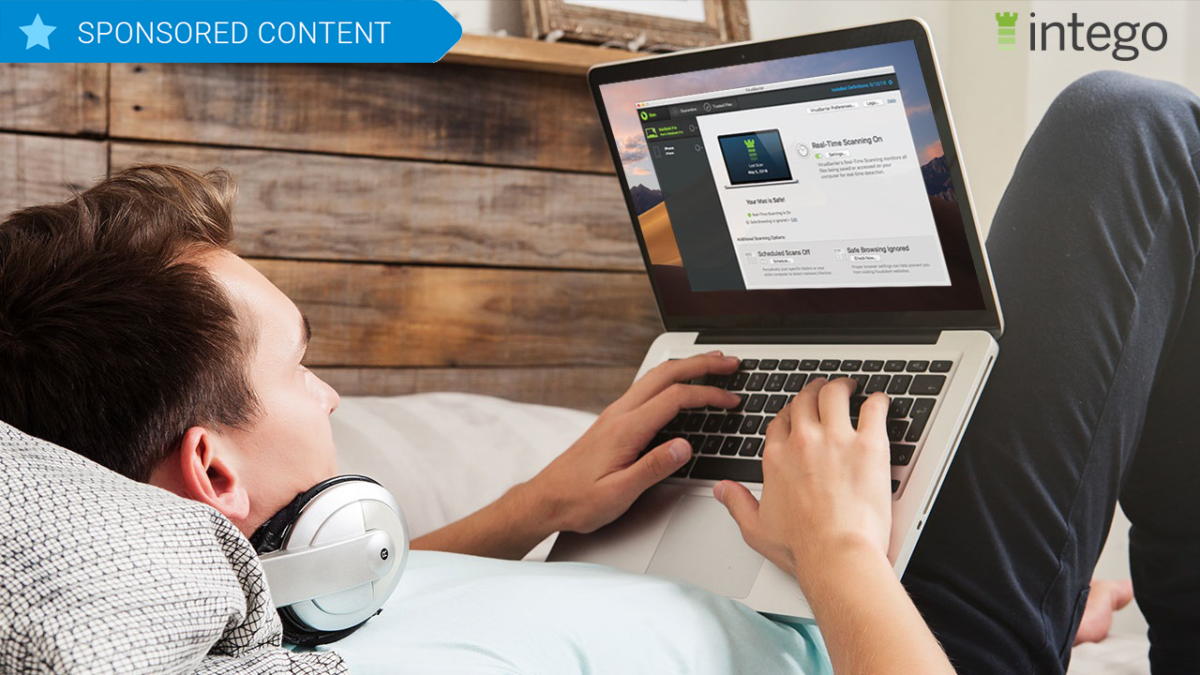
The first is VirusBarier X9, which scans your Mac for every known malware threat and keeps on doing that quickly and efficiently in the background. The interface is pleasant and simple to understand, with a simple toggle switch to control whether or not you want to activate real-time scanning, in which the software constantly monitors files that are accessed on your drive whether by yourself or by other system actions. Pop-up windows alert you to suspicious activity and you instantly have the choice of placing a file in quarantine or allowing it to function normally. You can also set up scheduled scans of either specific folders or your entire computer and can have the software do a quick check of your browsers to ensure they have the proper settings for safe browsing.

The second component to Intego Mac Internet Security is Net Barrier X9.
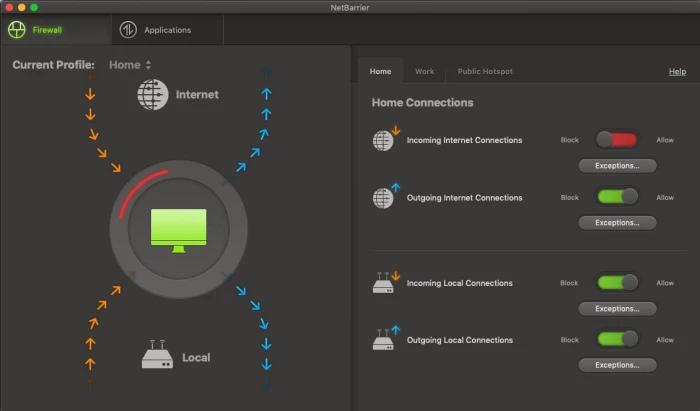
Intego NetBarrier

You might already know that Macs have a built-in Firewall that protect you from nefarious inbound connections. But that native functionality doesn’t extend to watching for outbound connections, which is important because some malware could land on your machine and start telegraphing information out to places you don’t want it to go. Net Barrier X9 monitors both inbound and outbound connections to ensure that nothing happens without your permission.

Like Virus Barrier, the Net Barrier interface is extremely straightforward to use. Four simple toggle switches control whether or not you want to allow incoming or outgoing internet connections as well as incoming or outgoing local connections.

The software alerts you any time a program attempts to make contact with the internet and you get to decide whether to allow it or not. Additionally, you are able to establish different profiles for home, work and public hotspot access, and the software will switch to those profiles automatically.

The applications tab allows you to see which apps are accessing the internet at any one time, and which you’ve granted permission to, something you can do permanently or on a case-by-case basis as notifications arrive.
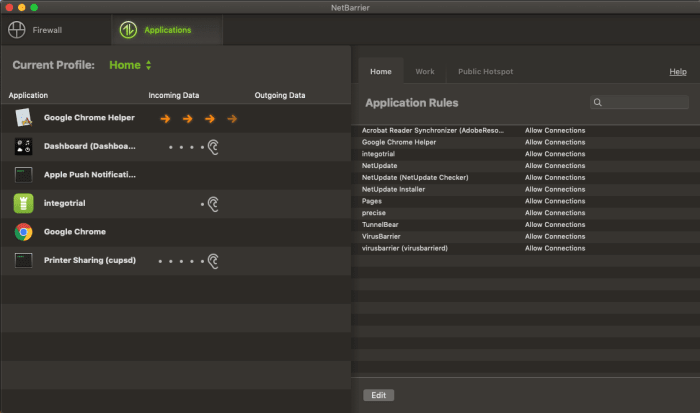
Intego NetBarrier Applications

Additionally, when you first use the software, helpful overlays appear on top of the windows to help you understand how to use the program at a glance, which is just another small feature that makes Intego Mac Internet Security X9, such a pleasure to use.
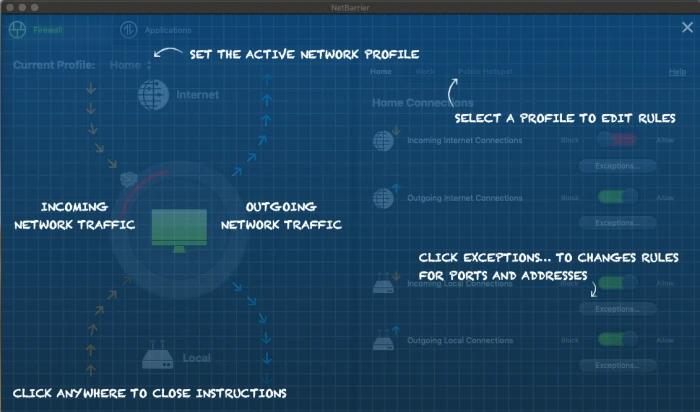
Intego NetBarrier Instructions

Rarely does so much online protection arrive in such a user-friendly package.

The software is available for purchase for the very attractive price of $34.99 for one year or $64.99 for two.


Microsoft: Millions of Windows devices are at risk

Devices using an older version of Windows are at risk of getting a rapidly spreading virus.

Windows virus

If you are using an older version of Windows, Microsoft has urged that you install an update to protect against a potential virus.

The company detected a vulnerability in Remote Desktop Services, and recommends that you download a patch from their update catalog. 

By exploiting this issue, a virus could potentially spread to the millions of devices using an older version of Windows. The virus could be contracted simply by accessing an internet connection.

The vulnerability exists in the following versions of Windows:

  • Windows XP
  • Windows 2003
  • Windows 7
  • Windows Server 2008

Some of the vulnerable versions are highly out of date and no longer supported, such as Windows 2003. Howeverthe company wants to preemptively solve the problem as it could widely spread. Luckily, Windows 8 and Windows 10 are not affected.

The latest and greatest version of Microsoft's operating system.

Simon Pope, director of incident response at Microsoft’s Security Response Center, compared the potential risk to the WannaCry malware attack of 2017. He also said that if the issue were left unpatched, the event of a rapidly spreading virus would be “highly likely.”

The WannaCry malware incident involved ransomware being spread through devices running Windows. It encrypted data and demanded ransom in the form of Bitcoin.

“Any future malware that exploits this vulnerability could propagate from vulnerable computer to vulnerable computer in a similar way as the WannaCry malware spread across the globe in 2017,” Pope said. 

Not out of the woods

Although there weren’t any hackers exploiting the vulnerability at the time Microsoft released the patches, Microsoft consequently gave them the tools to create a virus.

Someone with malicious intent could reverse engineer the patch to create the malware, according to Microsoft.

Basically, download the patch and save your hide.

How to tell if your WhatsApp has spyware

How can I tell whether or not I was affected by the WhatsApp security breach?

WhatsApp

After WhatsApp’s recent security breach which led to personal data being compromised, users have been trying to figure out whether or not they were affected.

The first thing you can do is to update the app. However, the problem is that there is no concrete way of knowing whether you were affected by the breach.

The good news is that there ways you might be able to tell if your device was compromised.

WhatsApp Messenger Download Now ►
8

Look for signs of odd behavior

See if other programs are running slower than usual: Are YouTube videos not loading as quickly as they typically do? Is Instagram taking forever to refresh the page? Is that new app you’re downloading taking a small lifetime? These signs can mean that your phone is doing background tasks that are slowing down your phone.

Check your battery usage: If your battery power is depleting faster than normal, it might mean your device is sending and receiving lots of data.

Check to see if your phone is running hot: If your phone is hot to the touch, it might mean that it is sending and receiving data due to the spyware.

Just nip it in the bud with an antivirus app

If your phone has spyware or another virus, you typically can solve it with your standard antivirus app like Avira or Malwarebytes.

Avira Free Antivirus Download Avira ►
8

Malwarebytes Download now ►
8

If you think you have spyware or a virus, antivirus apps can scan your phone and remove anything problematic. It’s a smart idea to check for a problem rather than waiting around to see if you have one.

What are the chances that I was affected?

The main target of the spyware attack was a human rights lawyer in London. The alleged spyware is called Pegasus and it was made by the Isreali cyber-intelligence organization called NSO Group.

We’re going to go out on a limb and say that you are probably not affiliated with either the Israeli intelligence organization or the human rights lawyer in London who is suing them.

That said, it is in your interest to use these best practices to regularly check for signs of spyware on your device. Although you probably weren’t compromised in this spyware attack, it doesn’t mean you won’t get caught up in a different one.