App of the Week: Plunder Pirates

Softonic’s App of the Week highlights some of the coolest, most unique, and biggest app releases for Android, iOS, Windows, and Mac. If you’ve always wanted to become a looting, drunken, high-sea sailing pirate, check out this week’s Plunder Pirates for iOS.

From the Rovio Stars studio that brought you Juice Cubes and Tiny Thief comes Plunder Pirates, a Clash of Clans style game that sets you in the high seas, managing a pirate crew while defending your land, looting other islands for gold, and getting drunk off Gorg, the pirates’ drink of choice. With a helpful tutorial to get started in the game, you’ll quickly learn to build defenses, distilleries, and mine gold. You’ll have to maintain a crew with a variety of skills and wait as the game develops (or pay to speed things along). Check out the video below to see how you can take the high seas in Plunder Pirates.

Default player


brightcove.createExperiences();

If you’re ready to plunder your way to the top in a Clash of Clan style game with a bit more of a buccaneering flair, then try Plunder Pirates.

Download Plunder Pirates for iOS.
Make sure to check out some of our past App of the Week features:

App of the Week: Duet

App of the Week: Angry Birds Epic

App of the Week: GT Racing 2

Snapchat will get ads soon

Ads are coming to Snapchat ‘soon’, according to its co-founder Evan Spiegel. They will be included in the Stories feature.

Snapchat users don’t have to be scared that ads are going to get in the way of their messages. There’s no indication you’ll get ads stuck in front of messages you’re trying to read. The ads will be ‘opt in’: you won’t be required to view them. Appearing in the Stories feed, you can look at the ads, or just scroll past them, as with ads in Facebook’s News Feed.

Snapchat is very popular among younger people, and this fact has not gone unnoticed by big companies like Google and Facebook, which have both tried to acquire the company. There have been rumors of huge offers of up to three billion dollars, all of which have been refused by Spiegel. There’s yet another rumor that Yahoo! wants to buy a 10% stake of the company for two billion dollars, which would value the whole company at an incredible 20 billion dollars.

There is no official time scale for when ads will appear in your Snapchat Stories feed.

Download Snapchat for Android and iOS

Source: The Verge

Related Stories

Obscure messenger lets you delete your pics and texts from your friends’ phones

Bolt is Instagram’s new Snapchat competitor

Facebook removes Slingshot’s share-to-unlock requirement

Follow Jonathan on Twitter: @jonathanriggall

Get Dragon Age: Origins free until October 14th

EA’s OriginOn the House‘ promotion is continuing, and until October 14th you can get Dragon Age: Origins for free, for Windows. It’s a role playing game from Bioware, also famous for its Mass Effect trilogy and Star Wars role playing games.

Released in 2009, Dragon Age: Origins got excellent reviews, and despite its age, it’s still an excellent fantasy role playing game. It’s also full of gore and sex, so not exactly family entertainment. To get the game, you need EA’s Origin app, and to sign up for an account, both of which are free.

This free version is the Standard Edition, which doesn’t include the downloadable content released later. This can be purchased though, and you’re still getting a huge game for free. Previous On the House games have included the space horror Dead Space, Battlefield 3 and last month’s Bejeweled 3.

Download Origin for PC
Read our review of Dragon Age: Origins

Related Stories

Get Bejeweled 3 free until October 28th

The Crew online racing game gets delayed until Dec 2

Watch the launch trailer for Middle-Earth: Shadow of Mordor

Follow Jonathan on Twitter: @jonathanriggall

There’s a hidden Notification Center in Windows 10 Technical Preview

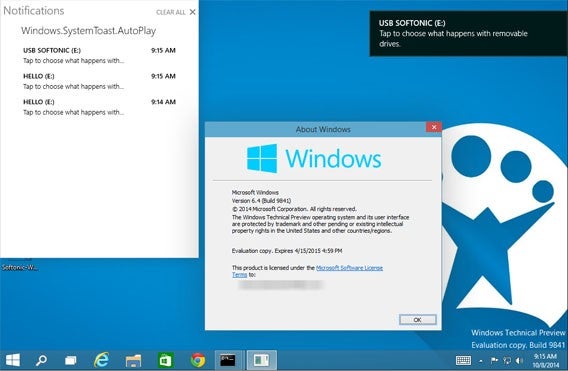
On feature we expected to see in the Windows 10 Technical Preview wasn’t mentioned by Microsoft at its launch event. We saw a Notification Center in leaks, but it disappeared in the final release. However, the feature is actually still there. It’s deactivated in the preview but can be switched on with a hack.

We saw the notification center in a leaked video of the preview in September. A Twitter user, @adeyblue, has created an unofficial patch that you can apply to the Windows 10 Technical Preview to activate the feature. Download and open the Zip file, then double click the .exe to activate. You can see the feature in the screenshot below.

It’s likely that the Notification Center is deactivated due to being to early in its development cycle. It’s similar to what we know from Windows Phone 8.1, but its functions are very limited. In older versions of Windows, notifications appeared as pop-ups that then disappeared. This new notification center serves as a hub for all your recent and relevant messages, like you have in iOS, OS X and Android. However, these notifications don’t currently do anything – you can’t click them to perform any actions like answering a Skype call.

Source: NeoWin

Related Stories

Microsoft collects your data in Windows 10 preview, but it’s not a ‘keylogger’

You can update to the Windows 10 Technical Preview from Windows 7

The Softonic Minute: Google Maps, Shellshock, Assassin’s Creed and Windows 10

Follow Jonathan on Twitter: @jonathanriggall

HTC to bring Zoe photo and video editing app to iOS later this year

HTC is trying to reinvent itself and one of the ways it’s doing this is by turning its phones recording features into a social network called Zoe. Android users already have access to the Zoe app but HTC announced it will bring the app to the iPhone later this year.

But what exactly is Zoe? It’s basically a photo and video sharing app, sort of like Instagram. You can create highlight reels and montages with photos and video. Your friends can then remix what you uploaded. HTC hopes you’ll create the “ultimate highlight reel” with your friends.

HTC will have a tough time convincing people to use Zoe in conjunction with apps like Instagram and Facebook. The one advantage of Zoe is that videos created with the app feature music and look more professionally done. If HTC can make Zoe easy to use while producing professional results, it may stand a chance.

Android users can try out the Zoe now but iPhone users will have to wait until later this year.

UPDATE: This story has been updated to reflect that Zoe for Android is now out of beta.

Source: HTC

Related Stories

Apple hosting event on Oct 16, possibly launching OS X Yosemite

iOS lock screen exploit tricks Siri into revealing your email, SMS and Twitter

Which is safest: Android, iOS or Windows Phone?

Follow me on Twitter: @lewisleong

Rumor: Google Play experimenting with app trials

Google is reportedly testing a new feature in Google Play that will let you try an app before you buy it. This feature isn’t exactly revolutionary. While Apple doesn’t provide trials for its App Store, Amazon does with its Test Drive feature.

However, Google’s trialsfor its Play Store may be better than Amazon Test Drive. First off, Google may create smaller versions of apps for users to try with limited functionality. There’s also rumors that users will be able to choose specific features of an app to test out.

By creating smaller apps for customers to test, Google makes downloading and trying out apps super quick. This is good for users who want to try apps using their cellular networks with data caps.

Android may be the most popular mobile operating system in the world, but its app store still lags behind Apple’s in generating revenue. Google may be hoping that customers will buy more apps if they can try it before they buy.

Source: The Information

Via: Engadget

Related Stories

Obscure messenger lets you delete pics and texts from your friends’ phones

Which is safest: Android, iOS or Windows Phone?

Watch a video of the upcoming Android ‘L’ update with TouchWiz

About Ebola, a free app to keep you informed about the disease

Follow me on Twitter: @lewisleong

Apple hosting event on Oct 16, possibly launching OS X Yosemite

Apple just sent out invitations for a press event on October 16th at the company’s campus in Cupertino, California. The invite is as mysterious as ever, only saying “It’s been way too long.”

Yesterday, Apple released a second Golden Master of its upcoming OS X Yosemite operating system to developers. A Golden Master is basically nearly finalized version of a piece of software, hinting that Apple may release Yosemite at this event.

Apple promised to launch OS X Yosemite this fall, and it looks like their promise is on track. OS X Yosemite is an important piece of Apple’s software ecosystem as it offers tight integration with iOS 8. Users can look forward to Apple’s Continuity and Handoff features, which lets you transition seamlessly between working on your iOS devices and the Mac.

You’ll be able to answer phone calls on your Mac and pick up what you were doing from different Mac and iOS devices. For example, if you’re typing an email on your Mac but have to catch a train, your work will be synced automatically to your iPhone. An icon with show up on the lock screen, letting you slide up to continue your email.

To prepare, you should make a backup of your Mac’s files just in case anything goes wrong. You can use Apple’s own Time Machine utility or one of these alternatives.

Tune in on October 16th at 10AM Pacific to see what Apple has to announce.

Related Stories

Apple prepares OS X Yosemite for launch

Adobe releases new mobile apps and tightens Creative Cloud integration

Should I be afraid of the Shellshock bug?

Twitter for Mac finally receives updated photo features

Follow me on Twitter: @lewisleong

Obscure messenger lets you delete your pics and texts from your friends’ phones

It seems that just about every messaging app is trying to emulate Snapchat’s famous disappearing messages. New app, Obscure, is also doing this but its approach is a bit more unique.

Instead of having messages and photos disappear after a set amount of time after being opened, Obscure gives you control over everything you send. Regret sending that silly picture of yourself or an angry text? You can delete it directly off your friend’s phone. Your friends also can’t screenshot any messages or photos in the app, but that doesn’t prevent people from taking pictures of their phone.

Obscure offers an advantage over Snapchat, which doesn’t let you take back what you sent. You just have to wait for your friend to view it and trigger the self-destructing timer.

Obscure offers more than just deleting messages. The app has a ton of filters and stickers to dress up your photos with. There are also 9 interactive filters that you can interact with. For example, you can obscure a photo behind a zipper and your friends can drag the zipper down to reveal it. They’re a bit gimmicky but teens may eat it up.

You can also blur out sensitive parts of a photo, whether it needs it or not.

Obscure cat

Image credit: Obscure (Facebook)

Check out Obscure for Android if you feel sender’s remorse often.

Source: Obscure

Related Stories

Hong Kong protesters flock to Firechat off-the-grid messaging app

Path Talk can be your human-powered assistant

Google updates Chrome and Gmail for iOS to support iPhone 6 and 6 Plus

iOS lock screen exploit tricks Siri into revealing your email, SMS and Twitter

Follow me on Twitter: @lewisleong

This War of Mine beta overview

There is no glory, with survival being the only achievement in the dilapidated world you are trapped in. This War of Mine is a strategy game that isn’t about being the hero, it’s about being a survivor in a world ruined by conflict. You start with three different characters as you try to protect a bombed out house, surviving as long as possible.

Developed by 11bit Studios, known best for the Anomaly series, This War of Mine presents a different perspective of war and how it affects those not in combat, but living where the fighting takes place. Check out my experience in the beta and get a preview of the title.

Default player


brightcove.createExperiences();

Related Articles

Logitech’s Arx Control app extends the PC gaming experience to Android devices

Assassin’s Creed: Identity coming to iOS and Android next year

Battlefield Hardline multiplayer will launch with nine maps and seven game modes

Follow me on Twitter: @dofuss

Chrome and Gmail for iOS updated with iPhone 6 and 6 Plus support

Google updated its Chrome and Gmail apps for iOS to support the increased resolution of the iPhone 6 and 6 Plus. The updates are minor for all other iPhone and iPad users.

Chrome for iOS also gets Google Drive support in addition to its increased resolution. You can down download and open files in Google Drive using Google Chrome. Although Apple won’t allow you to set Chrome as your default browser in iOS, you can live entirely in Google’s ecosystem if you want. The company’s apps are tightly integrated now, allowing you to open a Gmail link in Chrome and opening YouTube links with the YouTube app.

Gmail for iOS is only updated with support for the iPhone 6 and 6 Plus screens. It’s disappointing that Google still hasn’t added an option for a unified inbox for multiple accounts. The app is still slow and pales in comparison to Gmail for Android.

Download Chrome for iOS

Download Gmail for iOS

Source: Chrome Releases | Gmail (iTunes)

Related Stories

iOS lock screen exploit tricks Siri into revealing your email, SMS and Twitter

Which is safest: Android, iOS or Windows Phone?

Adobe releases new mobile apps and tightens Creative Cloud integration

About Ebola, a free app to keep you informed about the disease

Follow me on Twitter: @lewisleong